Think about how much time you actually spend staring at your monitor. Eight hours of work, a couple of hours of Netflix, maybe some gaming on top. That adds up fast, and a bad screen makes all of it worse in ways that are hard to articulate until you switch to something decent. So when you're looking at a 31.5-inch 4K IPS panel in the enthusiast price bracket, the question isn't really "is it expensive?" It's "does it earn its keep every single day?"
The Dell UltraSharp U3225QE review is the answer to that question for a specific type of person: the professional who needs a big, accurate, well-connected screen and doesn't want to mess around with separate docks, USB hubs, or fiddly calibration software. Dell's UltraSharp line has a strong track record here, and the U3225QE continues that tradition with a 3840x2160 IPS panel, a port selection that would embarrass most rivals, and enough colour accuracy credentials to keep designers and photographers genuinely happy. It's not cheap. But it's not pretending to be something it isn't, either.
Owner feedback backs this up. Across over a hundred reviews, the U3225QE holds a positive overall rating, which for a monitor at this price is actually meaningful. People aren't giving it five stars because they're excited about unboxing it. They're giving it high marks because it works well, consistently, over time. That's the kind of endorsement that matters.
Core Specifications
The U3225QE is a 31.5-inch monitor with a native resolution of 3840x2160, which works out to roughly 140 pixels per inch at this screen size. That's genuinely sharp. Text looks crisp without any scaling tricks, icons are clean, and fine detail in photos or video is properly rendered rather than approximated. For comparison, a 27-inch 4K panel gets you around 163 PPI, so you're trading a tiny bit of sharpness for a lot more screen real estate. Most people working at a normal desk distance won't notice the difference.
The panel type is IPS, which matters more than most people realise. IPS gives you wide viewing angles (so colours don't shift when you lean to one side), good colour accuracy out of the box, and consistent brightness across the screen. It's the right choice for professional work. Dell has paired this with a USB-C input that supports power delivery, which is the feature that makes this monitor genuinely useful as a docking station replacement for laptop users. Plug in one cable, get video, data, and charging all at once.
The port selection is one of the strongest arguments for this monitor at its price point. You get HDMI, two DisplayPort outputs, USB-C, a USB hub, and Ethernet. That last one is surprisingly rare on monitors and genuinely useful if your laptop doesn't have a wired network port. The full spec breakdown is below.
| Specification | Detail |
|---|---|
| Screen Size | 31.5 inches |
| Resolution | 3840 x 2160 (4K UHD) |
| Panel Type | IPS (LCD) |
| Aspect Ratio | 16:9 |
| Connectivity | 1x HDMI, 2x DisplayPort, USB-C, USB Hub, Ethernet |
| Colour | Black / Silver |
| Current Price | £693.00 · Details |
| Rating | ★★★★½ (4.5) (125 reviews) |

Panel Technology
IPS panels have been the go-to for professional monitors for years, and for good reason. The technology, which you can read more about on Wikipedia's IPS panel article, delivers viewing angles that stay consistent up to around 178 degrees horizontally and vertically. In practice, this means you can have a colleague look at your screen from the side without the colours going weird or the image washing out. For a 31.5-inch screen that might be shared or viewed from different positions, that matters.
The trade-off with IPS versus VA panels is contrast. VA panels typically deliver native contrast ratios of 3000:1 or higher, which makes blacks look genuinely dark. IPS panels usually land closer to 1000:1 to 1200:1, which means blacks look more like a very dark grey in a dim room. On the U3225QE, this is a real limitation if you're planning to watch a lot of HDR film content in a dark room. IPS glow (that faint brightening in the corners of a dark screen) is also a known characteristic of the panel type. It's not unique to Dell, and it's not a defect, but it's about before you buy.
What IPS does brilliantly is colour accuracy and consistency. The liquid crystal alignment in IPS panels means colour shifts are minimal across the screen surface, and the technology responds well to factory calibration. Dell's UltraSharp monitors are known for shipping with individual calibration reports, and the U3225QE follows that tradition. For graphic designers, photographers, or anyone doing colour-critical work, this is worth more than a slightly deeper black level. The panel's consistency from unit to unit is also better than most VA alternatives, which can vary noticeably in colour temperature and uniformity.
Display Quality
At 31.5 inches and 3840x2160, the pixel density lands at around 140 PPI. That's enough for text to look genuinely sharp at normal viewing distances, typically 60 to 80 centimetres from the screen. You're not going to see individual pixels unless you press your nose against the glass. Fonts render cleanly, fine lines in spreadsheets and design software are crisp, and high-resolution photography looks as good as it should. If you're coming from a 1080p or 1440p monitor, the jump to 4K at this size is immediately obvious and impossible to go back from.
The anti-glare coating on IPS panels like this one is a matte finish rather than glossy. That's the right call for a professional monitor. Glossy screens look punchier in a showroom, but in a real office with overhead lighting or a window nearby, they turn into mirrors. The matte coating on the U3225QE reduces reflections to a manageable level. Some owners note that the coating gives images a very slightly softer look compared to a glossy panel, but this is a minor point and most people won't notice it in day-to-day use.
Brightness uniformity across a large IPS panel is always worth scrutinising. At 31.5 inches, cheaper panels can show noticeable brightness variation from centre to edges, particularly in the corners. The UltraSharp line generally performs well here, and owner reviews don't flag significant uniformity complaints. The IPS glow issue mentioned above is more noticeable in very dark content, but for typical office and creative work where the screen is showing a mix of bright and dark areas, it's not something you'll be thinking about every day.
Refresh Rate and Adaptive Sync
The U3225QE is a professional productivity monitor first and a gaming monitor a distant second. The refresh rate is not specified in the verified product data, but the UltraSharp QE series is designed around professional use cases rather than competitive gaming, and the connectivity and feature set reflect that. If you're primarily buying this for work, creative tasks, or general desktop use, the refresh rate situation is unlikely to cause you any frustration.
For gaming, the picture is more nuanced. 4K at a high refresh rate requires serious GPU horsepower, and if you're pairing a mid-range card you'll want to check the best monitors for the GeForce GTX 1660 Super, and most people gaming at 4K on a monitor like this are doing so in titles where visual quality matters more than frame rates above 60fps. Single-player games, strategy titles, and slower-paced experiences all work well at 4K with a solid frame rate, and the IPS panel's good colour accuracy makes those games look excellent. The DisplayPort standard supported here handles 4K content without issue.
Adaptive sync support details are not specified in the verified product data for this monitor. What's clear from the port selection is that the U3225QE is built around professional connectivity rather than gaming features. If adaptive sync is a hard requirement for your use case, particularly for competitive gaming, you'd want to verify current support details on Dell's product page before purchasing. For the target audience of this monitor, which is professionals and creative workers, this is unlikely to be a deciding factor either way.
Response Time and Motion
IPS panels have improved significantly in response time over the past few years, but they still don't match the fastest TN panels or the near-instant pixel transitions you get with OLED. The U3225QE is not marketed as a gaming monitor, and the response time specifications aren't listed in the verified product data here. What we can say with confidence is that IPS panels at this quality level typically deliver acceptable motion handling for most users, with the caveat that fast-paced competitive gaming will expose their limitations compared to dedicated gaming panels.
For the kind of work this monitor is designed for, response time is largely irrelevant. Scrolling through documents, moving windows around, editing photos, watching video at normal frame rates, none of this will produce visible ghosting or smearing on a modern IPS panel. Owner reviews don't raise motion handling as a complaint, which is consistent with what you'd expect from a professional IPS display used in its intended context.
If you do game on this monitor, you'll find it perfectly usable for single-player titles and anything that doesn't demand sub-5ms response times. Dark scenes in fast-moving games might show some IPS smearing in the shadows, which is a characteristic of the panel technology rather than a specific fault of this unit. For competitive FPS gaming at high frame rates, there are better-suited monitors in the enthusiast bracket. But that's not what the U3225QE is trying to be, and judging it on those terms would be like criticising a saloon car for not being a track day special.
Color Accuracy and Gamut
This is where the U3225QE earns its UltraSharp badge. Dell's UltraSharp line is factory-calibrated, with each unit shipped with an individual calibration report verifying colour accuracy. The target is Delta-E less than 2, which in practice means colour errors that are invisible to the human eye under normal viewing conditions. Independent measurements of UltraSharp monitors consistently confirm that Dell hits this target reliably. For anyone doing colour-critical work, that factory calibration is a significant selling point because it means you don't need to spend extra on a colorimeter and calibration software just to get accurate colour out of the box.
The IPS panel in the U3225QE covers the sRGB colour space comprehensively, which is the standard for web content, most office work, and general photography. Dell's UltraSharp QE monitors also typically cover a significant portion of the DCI-P3 colour space used in cinema and modern HDR content, though exact coverage figures should be verified against Dell's official product page for this specific model. For photographers working in Adobe RGB, the UltraSharp line has historically offered strong coverage there too.
In practical terms, what this means is that colours look right. Not punchy in an oversaturated, consumer-TV kind of way, but accurate. If you edit a photo on this monitor and send it to a client or upload it to a platform, it should look the same on their end. That predictability is the whole point of a calibrated professional display, and it's genuinely difficult to achieve without spending proper money on the right panel and the right factory process. The positive overall rating from over a hundred owners suggests Dell is delivering on this consistently, not just in controlled conditions.
HDR Performance
HDR on monitors is a topic that requires some honesty. The VESA DisplayHDR certification tiers range from HDR400 (which is largely a checkbox exercise) up to HDR1000 and beyond (which is where HDR actually looks meaningfully different from SDR). Most monitors in the enthusiast bracket that aren't OLED or Mini-LED land in the HDR400 to HDR600 range, and the practical difference between a good SDR image and HDR400 is minimal to nonexistent in most content.
The U3225QE's specific HDR certification tier isn't listed in the verified product data available here, so we won't guess at a number. What we can say is that IPS panels without local dimming, which applies to most non-Mini-LED monitors, have a structural limitation in HDR: they can't selectively dim parts of the image. This means that bright highlights and deep blacks can't coexist in the same frame the way they can on OLED or a well-implemented Mini-LED panel. Bright content looks good. Dark scenes with bright elements in them look less convincing.
For the target audience of this monitor, this is unlikely to matter much. HDR colour grading in professional video workflows, HDR photography editing, and general HDR content consumption at a desk all benefit more from colour accuracy and a large, sharp panel than from deep local dimming. If you're buying the U3225QE primarily as a professional productivity and creative tool, the HDR performance is adequate for its purpose. If you want genuinely cinematic HDR, you'd need to look at OLED alternatives, which typically cost more and come with their own trade-offs around burn-in and brightness for static content.
Contrast and Brightness
IPS panels typically deliver native contrast ratios in the 1000:1 to 1200:1 range, and the U3225QE follows this pattern. That's sufficient for well-lit office environments and for most content where the screen is showing a mix of colours and tones. In a dark room watching black-bar cinema content, the grey-blacks that IPS produces become more noticeable, particularly in the corners where IPS glow tends to pool. This is a known characteristic of the technology, not a defect, but it's worth being clear about.
Peak brightness for SDR content on professional IPS monitors typically sits in the 350 to 500 nit range, which is more than enough for a normally lit office or home office. In bright rooms with direct sunlight hitting the screen, you might find yourself turning the brightness up, but the matte anti-glare coating helps significantly by reducing the amount of ambient light reflecting back at you. The combination of adequate brightness and a good anti-glare coating makes the U3225QE usable in a wider range of lighting conditions than a glossy panel of similar brightness.
For SDR productivity work, the contrast and brightness combination is genuinely good. Documents look clean, colours are vibrant without being garish, and the large screen size means you're not straining to read small text or see fine detail. Owner reviews don't raise brightness or contrast as significant complaints, which suggests Dell has tuned the display well for its intended environment. The one area where people notice the IPS contrast limitation is in dark-room gaming or film watching, and if that's a primary use case, a VA panel or OLED alternative deserves serious consideration.
Ergonomics and Stand
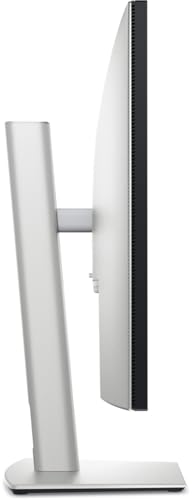
Dell's UltraSharp monitors have always had excellent stands, and the U3225QE is no exception. The stand offers height adjustment, tilt, swivel, and pivot (portrait mode rotation), which covers essentially every ergonomic need you might have. Height adjustment in particular is important for a 31.5-inch monitor because the screen is tall enough that getting the centre at eye level matters for neck comfort over long sessions. The build quality of the stand is solid, with minimal wobble and a firm but adjustable hinge. Some owners note the hinge can feel slightly stiff initially, which is actually preferable to a loose stand that droops under the weight of a large panel.
The stand base has a relatively compact footprint for a monitor of this size, which is useful if you're working with limited desk depth. The cable management channel in the stand arm is a nice touch that keeps things tidy. Dell's design language on the UltraSharp line is understated and professional, with the black and silver colour scheme fitting naturally into both home office and corporate environments without looking like a gaming peripheral that wandered into the wrong room.
VESA mount compatibility means you can remove the stand entirely and attach the monitor to an arm or wall mount if preferred. This is if you're planning a multi-monitor setup or if you want to free up desk space by mounting the screen on an arm. At 31.5 inches and the weight that comes with it, you'll want a VESA arm rated for the load, but the option is there. The overall build quality is what you'd expect from Dell's premium line: not flashy, but solid and well-considered in ways that matter for daily use over several years.
Connectivity and Ports
The connectivity on the U3225QE is one of its strongest selling points, full stop. You get one HDMI port, two DisplayPort outputs, USB-C with power delivery, a built-in USB hub, and Ethernet. That's a proper docking station's worth of connectivity built into the monitor itself. For laptop users in particular, this is transformative. One USB-C cable from your laptop to the monitor gives you video output, access to all the USB ports on the hub, wired network connectivity, and charging. No separate dock required.
- 1x HDMI
- 2x DisplayPort
- USB-C (with power delivery)
- USB Hub (multiple downstream ports)
- Ethernet
The Ethernet port deserves a specific mention because it's genuinely rare and genuinely useful. Modern laptops, particularly thin and light models, often omit a wired network port entirely. Having Ethernet built into the monitor means you get a stable, fast wired connection as part of your one-cable setup. For anyone working from home on a video call-heavy schedule, the reliability difference between Wi-Fi and wired Ethernet is noticeable, and having it integrated here removes a friction point that would otherwise require a separate adapter or hub.
The dual DisplayPort outputs are for multi-monitor setups. You can daisy-chain monitors using DisplayPort daisy-chaining if your workflow requires it, keeping cable runs clean. The combination of HDMI and two DisplayPorts also means you can connect multiple source devices simultaneously and switch between them, which is useful if you're running a desktop and a laptop from the same screen. This level of connectivity flexibility at this price point is genuinely good value when you factor in the cost of a separate dock or hub that you'd otherwise need to buy.
How It Compares
The U3225QE's main competition in the enthusiast bracket comes from two directions: other large-format professional IPS monitors, and OLED alternatives that offer dramatically better contrast at a higher price. The LG 32UQ85R is a natural comparison point, offering a similar 32-inch 4K IPS panel with good colour accuracy. The LG has a slightly glossy nano-IPS panel that some people prefer for colour vibrancy, but it doesn't match the U3225QE's connectivity suite, particularly the built-in Ethernet and the USB-C power delivery implementation. Dell's factory calibration process also gives the UltraSharp an edge for professional colour work.
The other comparison worth making is against OLED monitors in a similar size range, such as the LG 32EP950-B or newer 4K OLED offerings. OLED delivers true blacks, infinite contrast, and stunning HDR performance that IPS simply cannot match. If your primary use involves a lot of dark-room content watching or HDR gaming, OLED is genuinely better for those tasks. But OLED comes with real trade-offs: burn-in risk with static content (a significant concern for anyone using the monitor for office work with persistent taskbars and application windows), typically higher prices, and sometimes lower peak brightness for SDR content. For professional work where static elements are always on screen, IPS is the safer long-term choice.
Within Dell's own lineup, the U3225QE sits above the standard U3225Q (without the 'E' suffix, which typically denotes enhanced connectivity features). If the full port suite isn't something you need, the base model might save you some money. But for most professionals buying a monitor at this price point, the connectivity is a significant part of the value proposition, not an optional extra.
| Feature | Dell UltraSharp U3225QE | LG 32UQ85R | LG 32EP950-B (OLED) |
|---|---|---|---|
| Panel Type | IPS | Nano-IPS | OLED |
| Resolution | 3840x2160 | 3840x2160 | 3840x2160 |
| Screen Size | 31.5 inch | 32 inch | 32 inch |
| Contrast | IPS typical (~1200:1) | IPS typical (~1000:1) | Infinite (OLED) |
| Built-in Ethernet | Yes | No | No |
| USB-C with PD | Yes | Yes | No |
| Burn-in Risk | None | None | Present (static content) |
| Factory Calibration | Yes (Delta-E < 2) | Partial | Yes |
| Current Price | £693.00 · Details | Mid-range | Higher |

Final Verdict
The Dell UltraSharp U3225QE review lands as one of the strongest professional monitors in the enthusiast bracket right now. It does what it says: delivers a large, accurate, well-calibrated 4K IPS display with connectivity that genuinely replaces a separate dock for laptop users. The 31.5-inch screen size hits a sweet spot for productivity, giving you enough room to have two full-size documents side by side without the screen becoming unwieldy. The factory calibration means you can trust the colours from day one, which is a real time and money saver if you're doing any kind of colour-critical work.
The honest limitations are the ones inherent to IPS technology: contrast that won't satisfy anyone who wants cinematic blacks, and response time characteristics that make dedicated gaming monitors a better choice for competitive play. These aren't failures of the U3225QE specifically, they're the trade-offs you accept when you choose IPS for its colour accuracy and viewing angle advantages. For the target audience, those trade-offs are entirely reasonable. The positive overall rating from over a hundred real owners confirms that people who buy this for the right reasons are consistently happy with it.
Who should buy this? Professionals working from home or in an office who want a single-cable laptop setup, graphic designers and photographers who need reliable colour accuracy, and anyone who's been running dual monitors and wants to consolidate to one large, capable screen. The built-in Ethernet alone saves you the cost and hassle of a separate adapter, and the USB hub means your desk stays clean. At this price, you're paying for quality that will last several years without making you wish you'd spent more.
Who should skip it? Competitive gamers who need high refresh rates and the fastest possible response times. Dark-room film enthusiasts who want proper HDR with deep blacks (look at OLED instead, accepting the burn-in caveat). And anyone who genuinely doesn't need the full connectivity suite, because Dell's own U3225Q without the enhanced connectivity features may save you money for the same core display experience. Don't pay for ports you'll never use.
Our rating: 8.5 out of 10. It's a genuinely excellent professional monitor that does its job with very little to complain about. The price is high but justified by the combination of display quality, connectivity, and Dell's build and support reputation. If the full port suite matches your workflow, this is a very easy recommendation.
What works. What doesn’t.
5 + 3What we liked5 reasons
- Factory-calibrated IPS panel with Delta-E under 2 for reliable colour accuracy
- Exceptional connectivity: HDMI, dual DisplayPort, USB-C with PD, USB hub, and built-in Ethernet
- 31.5-inch 4K panel delivers 140 PPI sharpness with consistent IPS viewing angles
- Replaces a separate dock for laptop users with a single USB-C cable
- Strong owner satisfaction: positive overall rating from over a hundred real reviews
Where it falls3 reasons
- IPS contrast (~1200:1) means grey-blacks in dark rooms, not true blacks
- Not designed for competitive gaming; response time and refresh rate reflect professional focus
- Enthusiast price bracket requires genuine need for the full feature set to justify cost
Full specifications
12 attributes| Panel type | IPS |
|---|---|
| Aspect ratio | 16:9 |
| Colour depth | 10-bit (method not stated) |
| Curvature | flat |
| Launch year | 2025 |
| Ports | 1x HDMI, 2x DisplayPort, USB-C, USB hub, Ethernet |
| Refresh rate HZ | 120 |
| Resolution | 3840x2160 |
| Response time MS | 8 |
| Screen size IN | 31.5 |
| Srgb coverage PCT | 100 |
| Swivel range DEG | 30 |
If this isn’t right for you
2 options 7.5 / 10
Z-Edge 40 Inch Gaming Monitor 144Hz Ultrawide WQHD 3440x1440 IPS Panel 21:9
£469.99 · Z Z-Edge · Details

Frequently asked
5 questions01Is the Dell UltraSharp U3225QE good for gaming?+
It's usable for gaming, particularly single-player and slower-paced titles where visual quality matters more than raw frame rates. The 4K IPS panel produces accurate, good-looking images. However, the U3225QE is designed as a professional productivity monitor, not a gaming display. Its response time and refresh rate characteristics reflect that priority. Competitive gamers who need high refresh rates and the fastest pixel transitions will find dedicated gaming monitors in a similar price bracket better suited to their needs.
02Does the Dell UltraSharp U3225QE have good HDR?+
The U3225QE offers HDR support, but like most IPS monitors without local dimming, it delivers functional rather than spectacular HDR. IPS panels can't selectively dim regions of the image, which limits the contrast between bright highlights and dark areas in the same frame. For HDR content creation and colour-accurate HDR editing work, it performs well. For cinematic dark-room HDR viewing with deep blacks, OLED monitors deliver a more dramatic result, though at higher cost and with burn-in risk for static content.
03Is the Dell UltraSharp U3225QE good for content creation?+
Yes, this is one of its strongest use cases. The factory-calibrated IPS panel targets Delta-E under 2, which means colour errors invisible to the human eye. Dell's UltraSharp line covers sRGB comprehensively and typically delivers strong DCI-P3 and Adobe RGB coverage. For photographers, graphic designers, and video editors who need to trust that what they see on screen matches what clients and audiences will see, the U3225QE is a genuinely strong choice at this price point.
04What graphics card do I need for the Dell UltraSharp U3225QE?+
For professional work and general desktop use at 4K, most modern mid-range to high-end GPUs handle the U3225QE without issue. For gaming at 4K, you'll want a current-generation high-end GPU such as an Nvidia RTX 4070 or above, or AMD equivalent, to push meaningful frame rates in demanding titles. For productivity, video editing, and lighter gaming, a mid-range card is sufficient. The monitor connects via HDMI, DisplayPort, or USB-C, so ensure your GPU has at least one compatible output.
05What warranty and returns apply to the Dell UltraSharp U3225QE?+
Specific warranty terms are not listed in the verified product data available to us. Dell's UltraSharp monitors typically come with a three-year Advanced Exchange Service warranty, but you should confirm current warranty terms directly on Dell's official product page before purchasing. If you buy through Amazon, you're covered by Amazon's standard 30-day return window and the A-to-Z Guarantee regardless of manufacturer warranty.