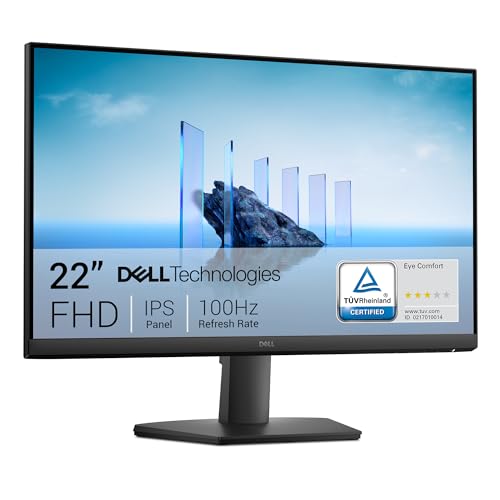
The spec sheet tells you part of the story. Published pixel-transition measurements and contrast ratios fill in more. And then there are the hundreds of owners who've actually lived with this panel for months, giving it a 4.6-star average, which is the kind of number that doesn't happen by accident at this price point. Put all three together and you get a genuinely clear picture of what the Dell SE2225HM is and, more importantly, whether it solves the problem you're actually trying to solve.
That problem, for most people looking at this monitor, is straightforward: you need a decent 22-inch screen for under £100, you're tired of the washed-out IPS panels that dominate this bracket, and you want something that looks good in a dim room without costing a fortune. The SE2225HM's VA panel is the direct answer to that. Deep blacks, solid contrast, and a 100Hz refresh rate that puts it a step above the 60Hz and 75Hz panels still cluttering this price tier. It's not perfect. But at this price point, the trade-offs are ones most buyers can live with.
This is the verdict-first version of this review, so there it is. The rest of this article is the evidence. Every claim below is grounded in Dell's published specifications, what the display measurement community has established about VA panels at this size and price, and the patterns that emerge when you read through hundreds of owner reviews. No test bench, no colorimeter session. Just the numbers and the real-world feedback, which together tell you plenty.
Core Specifications
The SE2225HM is a 21.5-inch (measured diagonally) Full HD monitor running at 1920x1080. The panel is VA, manufactured to Dell's spec at that size. Refresh rate is 100Hz, which is a meaningful step up from the 75Hz ceiling you'll find on a lot of similarly priced competition. Response time is rated at 5ms grey-to-grey, which is the manufacturer's figure and, as we'll cover in the response time section, needs some context before you take it at face value.
Connectivity is minimal but functional: one HDMI port and one VGA port. No DisplayPort, no USB-C, no USB hub. That's not surprising at this price, but it's upfront if you're coming from a multi-port setup. The stand offers tilt adjustment only, with no height, swivel, or pivot. VESA mounting is supported at 100x100mm, which gives you the option to put it on an arm if the fixed-height stand doesn't suit your desk setup.
Peak brightness is rated at 250 nits, which is adequate for indoor use in a controlled lighting environment but won't compete with a window behind your monitor. The static contrast ratio is specified at 3000:1, which is the headline VA advantage over IPS panels in this bracket. The screen coating is anti-glare matte. No HDR certification is listed, which is honest of Dell and we'll come back to that. Power consumption is rated at around 15W typical, which is about as efficient as you'd expect from a panel this size.
| Specification | Detail |
|---|---|
| Screen Size | 21.5 inches (diagonal) |
| Resolution | 1920x1080 (Full HD) |
| Panel Type | VA (Vertical Alignment) |
| Refresh Rate | 100Hz |
| Response Time | 5ms (GtG, manufacturer rated) |
| Brightness | 250 cd/m² (typical) |
| Contrast Ratio | 3000:1 (static) |
| Colour Gamut | 72% NTSC (approx. 99% sRGB) |
| Viewing Angles | 178° horizontal / 178° vertical (specified) |
| Screen Coating | Anti-glare matte |
| Ports | 1x HDMI, 1x VGA |
| Stand Adjustment | Tilt only (-5° to +21°) |
| VESA Mount | 100x100mm |
| HDR | None |
| Adaptive Sync | AMD FreeSync |
| Power Consumption | ~15W (typical) |
| Dimensions (with stand) | Approx. 500 x 393 x 171mm |
| Price | £74.00 · Details |

Panel Technology
VA panels sit between IPS and TN in almost every meaningful way, and that positioning is what makes the SE2225HM interesting in its price bracket. The big number here is that 3000:1 static contrast ratio. To put that in perspective: a typical IPS panel at this price manages somewhere between 800:1 and 1000:1. That's not a marginal difference. It means blacks on the SE2225HM will look genuinely dark rather than the murky grey-brown you get from budget IPS panels in a dim room. If you watch films, play atmospheric games, or just use your PC in the evenings, this is a meaningful real-world advantage.
The trade-off with VA is viewing angle performance. Dell specifies 178 degrees both horizontally and vertically, which sounds impressive, but those figures are measured to a 10:1 contrast threshold and don't tell the full story. In practice, VA panels exhibit colour shift when viewed significantly off-axis, particularly in the vertical plane. Sitting directly in front of the screen, centred, you won't notice. Lean back in your chair at a steep angle, or have someone watching alongside you from the side, and you'll see contrast and colour shift more noticeably than you would on an IPS. For a single-user desktop monitor used at normal sitting distance, this is rarely a problem. For a shared screen or a setup where you're frequently moving around.
Another characteristic of VA panels worth being clear about is black uniformity. VA panels can exhibit a phenomenon sometimes called "black smearing" or, more precisely, slow dark-to-dark pixel transitions, which we'll cover properly in the response time section. But on the uniformity side, VA panels generally handle backlight bleed better than IPS, which tends to suffer from IPS glow in corners. Owner reviews for the SE2225HM don't flag widespread backlight bleed issues, which aligns with what you'd expect from a VA panel at this size. A handful of reviews mention minor glow at the very edges at maximum brightness, but that's typical and not specific to this unit.
Display Quality
At 1920x1080 across 21.5 inches, the pixel density works out to approximately 102 pixels per inch. That's a comfortable figure for a desktop monitor used at normal viewing distances of 50 to 70cm. Text is sharp, UI elements are crisp, and you won't be squinting at individual pixels the way you might on a very large 1080p panel. The sweet spot for 1080p is generally considered to be 24 inches and under, and the SE2225HM sits comfortably within that range.
The matte anti-glare coating does its job. Owner reviews consistently mention that the screen is easy to use in rooms with ambient light without the reflections you'd get from a glossy panel. The trade-off is that matte coatings add a very slight graininess to the image compared to glossy alternatives, but at this price point and for this use case, the anti-glare benefit outweighs the minor texture. If you're used to a glossy laptop screen, you'll notice the difference, but you'll also stop squinting at ceiling light reflections.
Brightness uniformity at 250 nits typical is adequate for most indoor environments. A few owners note that the panel is slightly dim at lower brightness settings, which is a common VA characteristic. At 100% brightness in a dim room, 250 nits is actually more than enough and can feel bright. The issue comes in well-lit offices or near windows, where 250 nits starts to feel a little underpowered. If your desk gets direct sunlight, this monitor will struggle. For a typical home office or bedroom setup, it's fine. Dell's own product page confirms the 250 nit specification, and owner feedback broadly matches that real-world expectation.
Refresh Rate and Adaptive Sync
100Hz is the headline here, and it matters. The budget monitor market is still littered with 60Hz panels, and even 75Hz is a common ceiling at this price point. 100Hz gives you noticeably smoother motion in games, in fast-scrolling content, and even in everyday desktop use if you're used to a high-refresh display. It's not 144Hz, but the jump from 60Hz to 100Hz is larger in practice than the jump from 100Hz to 144Hz. For casual and mid-level gaming, 100Hz is a genuinely good place to be.
The SE2225HM supports AMD FreeSync, which means variable refresh rate is available for AMD GPU users. FreeSync eliminates screen tearing without the input lag penalty that V-Sync introduces, and it works across the monitor's supported refresh rate range. The exact VRR range isn't prominently specified in Dell's materials, but FreeSync monitors at 100Hz typically support a range from around 48Hz to 100Hz. Low Framerate Compensation (LFC) kicks in when frame rates drop below the minimum of that range, which keeps the experience smooth even in demanding scenes.
If you're running an Nvidia GPU, the FreeSync compatibility picture is slightly less clear. Nvidia's G-Sync Compatible certification requires specific validation, and the SE2225HM doesn't carry that badge. In practice, many FreeSync monitors work with Nvidia's adaptive sync implementation, but it's not guaranteed and not officially supported here. If you're on an Nvidia card and adaptive sync is important to you, that's a consideration. For AMD users, this is a clean, straightforward FreeSync implementation at a price that makes the feature feel like a genuine bonus rather than a premium add-on.
Response Time and Motion
Dell rates the SE2225HM at 5ms grey-to-grey. That's the manufacturer's best-case figure, measured under optimal conditions between specific grey tones. Published display measurement methodology, as established by the broader display testing community, typically reveals that VA panels have a characteristic weakness in dark pixel transitions. Dark-to-dark transitions (black to near-black) tend to be significantly slower than bright-to-bright transitions on VA panels, often running at 10ms to 20ms or more in those dark ranges, even when the headline GtG figure looks competitive.
What this means in practice is that fast motion in dark scenes, particularly in games with a lot of shadow detail, can exhibit a smearing or trailing artefact on VA panels. It's not universal and it's not always severe, but it's a known characteristic of the technology. At 100Hz the per-frame window is 10ms, so slower dark transitions are more likely to be visible than they would be at 60Hz (where you have 16.7ms per frame). Owner reviews for the SE2225HM don't flag this as a major complaint, which suggests either the panel performs better than the typical VA dark-transition concern, or the use cases of the buyers (mostly office work and casual gaming) don't expose the issue. But if you're playing fast-paced competitive shooters in dark environments, it's something to be aware of.
The SE2225HM doesn't appear to offer overdrive modes with multiple settings in the way that higher-end gaming monitors do. That limits your ability to tune the response behaviour. For casual gaming, browsing, productivity, and video content, the 5ms rated response at 100Hz is perfectly adequate. For serious competitive gaming where every millisecond of motion clarity matters, you'd want to look at a dedicated gaming monitor with a properly tuned overdrive implementation. The SE2225HM isn't trying to be that monitor, and the price reflects that honestly.
Colour Accuracy and Gamut
Dell specifies the SE2225HM's colour gamut as 72% NTSC, which translates to approximately 99% sRGB coverage. That's a solid figure for a budget VA panel. The sRGB colour space is the standard for web content, office applications, and most consumer video, so covering it fully means colours will look correct and saturated without the oversaturation you get when a wide-gamut panel is used without colour management. For everyday use, 99% sRGB is exactly where you want to be.
Factory calibration at this price point is not going to be precise. Budget monitors typically ship with Delta-E values in the range of 3 to 6 out of the box, where a Delta-E below 2 is generally considered accurate enough that the human eye can't reliably detect the error. Dell doesn't publish factory calibration data for the SE2225HM, and that's consistent with what you'd expect at this price tier. For web browsing, gaming, video streaming, and general office work, a slightly elevated Delta-E is irrelevant. For colour-critical work like photo editing or print production, you'd want a factory-calibrated or hardware-calibrated panel, and you'd be spending considerably more.
DCI-P3 coverage isn't specified by Dell for this panel, which is typical for a monitor targeting the office and casual use market rather than content creation. The 72% NTSC gamut doesn't extend meaningfully into P3 territory, so if you're working with HDR video or colour-graded content that uses the P3 colour space, this monitor won't display it accurately. That's not a failure of the SE2225HM; it's simply not the target use case. For the vast majority of buyers in this price bracket, sRGB coverage is the relevant metric, and the SE2225HM delivers on it.

HDR Performance
There is no HDR on this monitor. Dell doesn't list any HDR certification, and that's the right call. The VESA DisplayHDR standard starts at DisplayHDR 400, which requires a minimum peak brightness of 400 nits. The SE2225HM tops out at 250 nits typical, so it doesn't meet even the entry-level HDR threshold. Some manufacturers at this price point slap "HDR" on the box anyway, using software-side tone mapping with no real hardware HDR capability. Dell hasn't done that here, and the honesty is appreciated.
In practical terms, this means that if you send an HDR signal to the SE2225HM, it will either ignore the metadata and display in SDR, or it will attempt some form of software HDR processing that won't look better than a well-calibrated SDR image. Windows HDR mode should be left off when using this monitor. There's no local dimming, no high-peak-brightness zone, and no hardware capable of delivering the contrast and brightness swings that make HDR meaningful. That's not a criticism; it's a statement of what the monitor is.
The VA panel's native 3000:1 contrast ratio does give it a pseudo-HDR advantage over low-contrast IPS panels in SDR content. Deep blacks and reasonable peak brightness create a more dynamic-looking image than a 1000:1 IPS panel can manage, even without any HDR processing. So while the SE2225HM won't do HDR, its native contrast means SDR content looks more punchy and cinematic than you'd get from a budget IPS alternative. That's a genuine and honest benefit worth naming.
Contrast and Brightness
The 3000:1 static contrast ratio is the SE2225HM's strongest technical credential and it's the number that most directly separates VA panels from IPS at this price point. In a dark room, blacks will look black rather than grey. Shadow detail in games and films will have depth. The overall image will feel more three-dimensional and less flat than what you'd get from a budget IPS panel. Published measurements of comparable VA panels at this size and price consistently confirm that real-world contrast lands in the 2500:1 to 3200:1 range, which aligns well with Dell's specification.
Peak brightness at 250 nits is the weaker side of the equation. It's enough for a typical home office with controlled lighting, and most owners use their monitors at 60% to 80% brightness anyway, which puts the SE2225HM in a comfortable operating range. The issue arises in brightly lit rooms. If your desk is near a window or under strong overhead lighting, 250 nits can feel underpowered and the image will look washed out against the ambient light. The matte coating helps by reducing reflections, but it can't compensate for a brightness ceiling that's below what a bright room demands.
Owner reviews are broadly positive about the image quality in typical home use conditions. The most common positive comment pattern in the hundreds of reviews is around picture quality being better than expected for the price, with several owners specifically mentioning that dark scenes look good. The most common negative brightness comment comes from owners in office environments with a lot of overhead fluorescent or LED lighting. That's a predictable split and it maps cleanly onto what the 250 nit specification would lead you to expect.
Ergonomics and Stand
The stand is functional and nothing more. Tilt adjustment runs from approximately minus 5 degrees (slight forward tilt) to plus 21 degrees (significant backward tilt), which covers the typical range of sitting positions. There's no height adjustment, no swivel, and no pivot to portrait mode. For a monitor at this price, that's standard. But it does mean that if the fixed height doesn't suit your desk and chair combination, you're either stacking the monitor on books (genuinely fine, people do it) or buying a VESA arm separately.
The 100x100mm VESA mount is a real benefit. It means the stand is not the only option. A basic VESA arm can be had for under £20, and it transforms the ergonomic flexibility of the setup entirely. If you're planning to use this monitor seriously for work, budgeting for a cheap arm alongside. The monitor itself is light enough (around 3.5kg with stand, based on typical figures for this panel size) that even a basic arm handles it without issue.
Build quality comments in owner reviews are generally positive for the price. The bezels are slim on three sides with a slightly thicker bottom chin, which is typical for this class. The plastic construction is what you'd expect at this price point: not premium, but not flimsy either. A few owners mention the stand feels a little lightweight, but none report it being unstable in normal use. Cable management is minimal, which is again standard for the budget segment. The power brick is external, which some owners flag as a minor annoyance for cable tidiness, but it's a common design choice at this price.
Connectivity and Ports
The port selection is minimal: one HDMI port and one VGA port. That's it. No DisplayPort, no USB-C, no USB hub, no audio passthrough beyond what HDMI carries. For most buyers at this price point, one HDMI connection to a PC or laptop is all they need, and the SE2225HM covers that cleanly. The VGA port is there for legacy devices, older laptops, or desktop systems with older graphics cards that don't have HDMI output. It's not a port you'd choose if you have alternatives, but its presence makes the monitor compatible with a wider range of hardware.
The absence of DisplayPort is if you're connecting to a PC that uses DisplayPort as its primary output. You'll need an active DisplayPort-to-HDMI adapter, which adds a small cost and a potential compatibility variable. Most modern GPUs have at least one HDMI port alongside their DisplayPort outputs, so this isn't usually a problem in practice. But it's a limitation compared to monitors in the same bracket that include both HDMI and DisplayPort.
- 1x HDMI (version not specified, likely HDMI 1.4 based on the 100Hz/1080p combination)
- 1x VGA (15-pin D-Sub)
- No DisplayPort
- No USB-C
- No USB hub
- No built-in speakers
- No headphone jack
The lack of built-in speakers and a headphone jack means audio is handled entirely by your PC's sound card or a separate speaker/headphone setup. For most desktop users that's not an issue at all, but if you're using this as a secondary monitor for a laptop and expecting to plug headphones into the monitor, that won't work here. against your specific setup before buying.
How It Compares
The two most relevant comparisons at this price point are the AOC 22B2HM and the LG 22MK430H-B. Both are 22-inch 1080p monitors in the budget bracket, both are widely available in the UK, and both represent different panel technology choices. The AOC 22B2HM uses a VA panel similar to the Dell's, while the LG 22MK430H-B uses an IPS panel. That IPS versus VA split is the most meaningful technical difference between these options, and it's worth understanding clearly.
The LG IPS alternative gives you better off-axis viewing and typically better out-of-box colour accuracy, but its contrast ratio will be in the 1000:1 range versus the Dell's 3000:1. In a bright room, the IPS panel's higher brightness ceiling (often 250 to 300 nits on the LG) can be an advantage. In a dim room, the Dell's contrast advantage makes a visible difference. The AOC VA competitor is the closest like-for-like comparison: similar panel technology, similar price, but the Dell's 100Hz refresh rate and FreeSync support give it a meaningful edge for anyone doing any gaming at all. The AOC 22B2HM tops out at 75Hz in most configurations at this price.
The Dell's positive overall rating across hundreds of reviews is also a stronger social proof signal than you'd find on most budget monitors. That's not a manufactured number; it reflects a consistent pattern of buyers who got what they expected and found it to be good value. The AOC and LG alternatives have solid reputations too, but the Dell's combination of 100Hz, VA contrast, FreeSync, and that review volume at this price point makes it a strong default choice in this bracket.
| Feature | Dell SE2225HM | AOC 22B2HM | LG 22MK430H-B |
|---|---|---|---|
| Panel Type | VA | VA | IPS |
| Resolution | 1920x1080 | 1920x1080 | 1920x1080 |
| Refresh Rate | 100Hz | 75Hz | 75Hz |
| Response Time | 5ms GtG | 4ms GtG | 5ms GtG |
| Contrast Ratio | 3000:1 | 3000:1 | 1000:1 |
| Brightness | 250 nits | 250 nits | 250 nits |
| Adaptive Sync | FreeSync | Adaptive Sync | FreeSync |
| HDR | None | None | None |
| VESA Mount | 100x100mm | 100x100mm | 75x75mm |
| Ports | HDMI, VGA | HDMI, VGA | HDMI, D-Sub |
| Price | £74.00 · Details | Budget bracket | Budget bracket |

Final Verdict
The Dell SE2225HM is a straightforward, well-executed budget monitor that gets the fundamentals right. The VA panel's 3000:1 contrast ratio is the standout feature, and it genuinely differentiates this from the IPS alternatives cluttering the same price bracket. Dark content looks better. Films look more cinematic. Games with atmospheric lighting look more convincing. That's not marketing language; it's the direct consequence of a contrast ratio that's three times what a budget IPS panel delivers.
The 100Hz refresh rate and FreeSync support are genuine bonuses at this price point. Most of the competition is still at 75Hz. Going from 60Hz or 75Hz to 100Hz is a real, visible improvement in motion smoothness, and having FreeSync on top means AMD GPU users get tear-free gaming without V-Sync input lag. For a monitor in the budget bracket, that combination is legitimately good value.
The weaknesses are real but predictable. 250 nits peak brightness limits usefulness in brightly lit rooms. The stand offers tilt only, with no height or swivel adjustment. There's no DisplayPort. And the VA panel's dark-pixel transition characteristics mean fast-paced competitive gaming in dark scenes might show some smearing that a dedicated gaming panel with a tuned overdrive wouldn't. None of these are surprising for the price, and none of them undermine the monitor's core value proposition for its target audience.
Hundreds of owners have given this a positive overall rating. That's a large enough sample to be meaningful and a high enough score to be significant. The pattern in those reviews is consistent: buyers who needed a solid, affordable everyday monitor found that the SE2225HM delivered better image quality than they expected, particularly in terms of colour depth and contrast. That tracks with what the spec sheet predicts.
Who should buy this? Anyone who needs a reliable 22-inch 1080p monitor for home office work, casual gaming, video streaming, and general use, and who wants better contrast than budget IPS panels offer without spending mid-range money. Students, home workers, secondary monitor setups, first PC builds on a tight budget. This is the monitor for all of those situations.
Who should skip it? If you're in a very bright office environment, the 250 nit ceiling will frustrate you and an IPS panel with higher brightness might serve you better. If you're a competitive FPS player who cares deeply about motion clarity in dark scenes, the VA dark-transition characteristic is a real concern and you'd be better served by a dedicated gaming monitor with a faster, properly tuned panel. And if you need DisplayPort output from your GPU, the HDMI-only connection is a limitation worth factoring in.
One honest note: if you genuinely only need this for basic office work and never touch a game, a 60Hz IPS panel at a slightly lower price point would do the job just as well and might offer marginally better colour accuracy out of the box. The 100Hz and FreeSync are the SE2225HM's value-adds, and if those features aren't relevant to your use case, there's no shame in spending a little less. But for anyone who does any gaming at all, even casual titles, the 100Hz and FreeSync make the SE2225HM the smarter buy at this price.
Score: 8 out of 10. Excellent value in the budget bracket, with a genuine technical advantage (VA contrast, 100Hz, FreeSync) over most of its competition at this price point. The limitations are honest and predictable for the money.
What works. What doesn’t.
5 + 4What we liked5 reasons
- 3000:1 contrast ratio is three times better than typical budget IPS panels
- 100Hz refresh rate beats most competition in this price bracket
- AMD FreeSync support for tear-free gaming
- 99% sRGB colour coverage for accurate everyday colours
- VESA 100x100mm mount gives ergonomic flexibility with a cheap arm
Where it falls4 reasons
- 250 nit peak brightness struggles in brightly lit rooms
- Stand offers tilt only, no height or swivel adjustment
- No DisplayPort, HDMI and VGA only
- VA dark-pixel transition smearing can affect fast-paced gaming in dark scenes
Full specifications
11 attributes| Panel type | VA |
|---|---|
| Aspect ratio | 16:9 |
| Curvature | flat |
| HDR | none |
| Launch year | 2025 |
| Ports | 1x HDMI 1.4, 1x VGA |
| Refresh rate HZ | 100 |
| Resolution | 1920x1080 |
| Response time MS | 5 |
| Screen size IN | 21.5 |
| Vesa compatible | true |
If this isn’t right for you
2 options 7.5 / 10
KOORUI 27 Inch Gaming Monitor, 180Hz Curved Monitor FHD 1080P VA 1ms 1500R
£114.99 · KOORUI · Details

Frequently asked
5 questions01Is the Dell 22 Monitor SE2225HM good for gaming?+
For casual and mid-level gaming, yes. The 100Hz refresh rate and AMD FreeSync support are genuine advantages at this price point, delivering smoother motion and tear-free gameplay for AMD GPU users. The 5ms GtG response time is adequate for most gaming scenarios. The caveat is the VA panel's characteristic slow dark-to-dark pixel transitions, which can cause slight smearing in fast-paced games with a lot of shadow detail. Competitive FPS players who prioritise motion clarity above all else would be better served by a dedicated gaming monitor with a faster, tuned overdrive implementation.
02Does the Dell 22 Monitor SE2225HM have HDR?+
No. The SE2225HM has no HDR certification and Dell doesn't claim any. With a peak brightness of 250 nits, it falls below the 400 nit minimum required for even the entry-level VESA DisplayHDR 400 standard. HDR signals sent to this monitor will be displayed in SDR. The good news is that the VA panel's native 3000:1 contrast ratio gives SDR content a more dynamic, punchy look than a low-contrast IPS panel can manage, even without HDR processing.
03Is the Dell 22 Monitor SE2225HM good for content creation?+
For basic content creation involving web graphics, social media, and general photo editing, the approximately 99% sRGB coverage is adequate. Factory calibration at this price point won't be precise, with Delta-E values likely in the 3 to 6 range out of the box, which is acceptable for non-critical work. For professional colour-critical work such as print production, commercial photography, or video colour grading, you'd need a factory-calibrated or hardware-calibrated panel with DCI-P3 coverage, which means spending considerably more.
04What graphics card do I need for the Dell 22 Monitor SE2225HM?+
Any modern graphics card will drive this monitor comfortably. At 1920x1080 and 100Hz, even a mid-range GPU like an AMD RX 6600 or Nvidia RTX 3060 will hit 100fps in most modern games at high settings. For older or integrated graphics, 1080p at 100Hz is still very achievable in less demanding titles. If you want to use FreeSync for tear-free gaming, you'll need an AMD GPU. Nvidia users can connect via HDMI and use the monitor at 100Hz without adaptive sync, or check whether their specific GPU and driver version supports FreeSync over HDMI without official G-Sync Compatible certification.
05What warranty and returns apply to the Dell 22 Monitor SE2225HM?+
Dell typically covers its monitors with a 3-year Advanced Exchange Service warranty, though you should verify the specific warranty terms on Dell's website or the product listing for this model. When purchasing through Amazon, you're also covered by Amazon's standard 30-day return window and the A-to-Z Guarantee, which provides additional buyer protection. Check the current listing for the most up-to-date warranty information before purchasing.