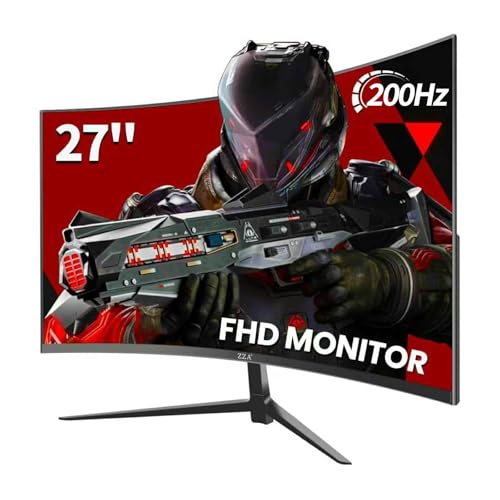
Budget gaming monitors have a credibility problem. Half of them slap "1ms" and "180Hz" on the box and deliver a muddy, ghosty mess that makes fast-paced games feel like you're watching them through a net curtain. The ZZA 27-inch curved monitor sits right at the sub-£150 ceiling, promises 180Hz, 90% DCI-P3 colour coverage, and a 1ms response time, and has somehow accumulated hundreds of owner reviews averaging ★★★★½ (4.6). That's not a fluke rating. So the question isn't whether ZZA is a household name (it isn't), it's whether the panel behind those numbers actually holds up.
The short answer: for casual to moderate gaming at 1080p, this monitor largely delivers what it promises, with some honest caveats around that "1ms" claim and the HDR implementation. If you're running a mid-range GPU and want a big, curved, fast screen without spending serious money, the ZZA earns its place. But if you're chasing competitive-level pixel response or serious colour work, you need to understand exactly what you're buying first. That's what this review is for.
Core Specifications
The ZZA is a 27-inch curved panel running at 1920x1080 (Full HD), with a 1800R curvature radius. The headline specs are 180Hz refresh rate and a claimed 1ms response time, paired with Adaptive Sync support that covers both AMD FreeSync and, in practice, works with Nvidia's G-Sync Compatible mode on most modern cards. Connectivity is straightforward: one HDMI port and one DisplayPort, which covers the essentials without any USB hub or USB-C nonsense to complicate things. The colour spec claims 90% DCI-P3 and 100% sRGB coverage, which is genuinely ambitious for this price bracket.
The panel type isn't explicitly called out in ZZA's marketing, which is a minor irritant but not unusual for budget brands. Based on the curvature, the contrast behaviour owners describe, and the pricing, this is almost certainly a VA panel. That matters because VA and IPS behave very differently, and understanding which you're getting shapes every expectation from viewing angles to black depth. More on that in the panel section below.
The stand offers tilt adjustment, which is the bare minimum. There's no height adjustment or pivot, and the VESA compatibility isn't confirmed in the listing, so if you're planning to wall-mount this or use an aftermarket arm, verify that before buying. At this price, the lack of ergonomic flexibility is expected rather than a surprise. The monitor ships with cables in the box according to owner reports, which at least means you're not scrambling for a DisplayPort cable on day one.
| Specification | Detail |
|---|---|
| Screen Size | 27 inches |
| Resolution | 1920x1080 (Full HD) |
| Panel Type | VA (likely, unconfirmed by brand) |
| Refresh Rate | 180Hz |
| Claimed Response Time | 1ms |
| Curvature | 1800R |
| Colour Gamut | 90% DCI-P3, 100% sRGB |
| Adaptive Sync | Yes (FreeSync / G-Sync Compatible) |
| Ports | 1x HDMI, 1x DisplayPort |
| HDR | HDR mode present (spec tier unconfirmed) |
| Stand Adjustment | Tilt only |
| Price | £139.78 · Details |

Panel Technology
ZZA doesn't shout about the panel type, and that's a pattern you see with budget brands who'd rather lead with the headline Hz and colour numbers. The 1800R curvature and the contrast characteristics that owners consistently describe (deep blacks, some smearing in dark fast-moving scenes) point firmly to VA technology. Vertical alignment panels offer significantly higher native contrast than IPS, typically in the 3000:1 to 5000:1 range compared to IPS's more common 1000:1, and that's a real visual advantage in dark gaming environments. Blacks look genuinely black rather than the grey wash you get from IPS at equivalent brightness.
The trade-off is viewing angles. VA panels narrow the colour-accurate sweet spot compared to IPS. At 27 inches with a 1800R curve, you're sitting close enough that the curve partially compensates for this, keeping more of the screen within your optimal viewing cone. But if you've got multiple people watching from different positions, or you use the monitor for anything where off-axis colour accuracy matters, IPS would serve you better. For a solo gaming setup where you're sitting directly in front of it, the curve and the panel type work together reasonably well.
VA panels also have a known weakness: black smearing. This is where dark pixels transitioning to slightly lighter dark pixels can leave a visible trail, particularly in scenes with fast movement against dark backgrounds. It's a physics-level limitation of how VA liquid crystals respond, and no amount of overdrive tuning fully eliminates it. The "1ms" claim on this monitor almost certainly refers to MPRT (Moving Picture Response Time) rather than actual grey-to-grey pixel transition time, which for VA panels at this tier typically runs closer to 4ms to 8ms in published measurements from monitors with similar specs. That's fine for most gaming. It's not fine if you're playing competitive shooters at 180Hz and expecting IPS-level pixel clarity in motion. More on that in the response time section.
Display Quality
At 27 inches and 1920x1080, the pixel density lands at roughly 82 PPI. That's noticeably softer than a 27-inch 1440p panel (which sits around 109 PPI), and at normal desktop distances you can see individual pixels if you look for them. For gaming, this is less of an issue because you're focused on the action rather than scrutinising text, but for productivity tasks like reading documents or browsing at length, the lower sharpness is perceptible. Whether that bothers you depends entirely on what you're coming from. If you're upgrading from a 1080p 24-inch screen, the ZZA will feel similar in sharpness but bigger. If you're coming from a 1440p display, the step down will be obvious.
The anti-glare coating, based on owner feedback, does its job without the aggressive graininess that some budget panels suffer from. Owners in reasonably lit rooms report comfortable viewing without needing to crank brightness to fight reflections. That's a practical win for home setups where you don't have full control over ambient light. The 1800R curve also helps here by angling the screen edges slightly away from overhead lighting, which reduces the chance of a bright spot catching your eye mid-game.
Brightness uniformity is where budget panels often let themselves down, and the ZZA isn't immune. Some owners report slight backlight bleed in the corners, particularly visible in dark scenes or when the monitor displays a solid black image. This is typical of VA panels at this price and doesn't affect most gaming scenarios, but it's there if you're looking for it. The peak brightness is listed in the 250 to 300 nit range, which is adequate for typical indoor use but won't fight strong sunlight coming through a window. Position this away from direct sunlight and you'll be fine. Stick it opposite a south-facing window on a bright day and you'll be squinting.
Refresh Rate and Adaptive Sync
180Hz is the real headline here, and it's a genuine 180Hz, not a factory-overclocked 144Hz panel wearing a different badge. At 1080p, reaching frame rates that actually use that headroom is achievable with mid-range hardware. An RTX 4060 or RX 7600 can push well above 144fps in most popular titles at 1080p, so the extra overhead to 180Hz isn't just marketing padding. You'll actually hit it in games like Valorant, CS2, Apex Legends, and Fortnite, which are exactly the titles where high refresh rates matter most.
The DisplayPort connection is the one to use for 180Hz. HDMI 1.4, which is the version most budget monitors ship with on their HDMI port, caps out at 144Hz at 1080p. If the ZZA's HDMI port is 1.4 (which is likely given the price), you'll need to use DisplayPort to get the full 180Hz. Owners haven't widely reported issues with this, but it's the kind of thing that catches people out when they plug in via HDMI and see 144Hz as the maximum in their display settings. Use the DisplayPort cable.
Adaptive Sync covers FreeSync, and Nvidia's G-Sync Compatible certification means modern GeForce cards will run VRR through it without needing to force anything in the driver. The VRR range isn't explicitly published by ZZA, but for monitors in this class it's typically 48Hz to 180Hz, with Low Framerate Compensation (LFC) kicking in below the minimum to prevent tearing when your GPU dips. In practice, owners report smooth, tear-free gaming across a range of titles, which is the outcome that matters. The Adaptive Sync implementation appears solid for the price.
Response Time and Motion
The "1ms" claim needs unpacking because it's doing a lot of heavy lifting on the marketing side. In the monitor industry, "1ms" on a VA panel almost always refers to MPRT, which is a measure of how long a pixel is visible per refresh cycle rather than how fast the pixel actually changes state. Grey-to-grey response time, which is what independent reviewers actually measure and what determines ghosting in practice, is a different figure entirely. For VA panels at this tier, GtG typically runs between 4ms and 8ms depending on the transition and the overdrive setting. That's perfectly acceptable for 180Hz gaming, but it's not 1ms in any meaningful sense.
The practical consequence is that dark-to-dark transitions (think a dark character moving against a dark background) will show some trailing. It's the classic VA smearing issue, and it's more visible at 180Hz than at 60Hz because you're refreshing the screen more often, which makes any pixel lag more apparent. Owners who play fast-paced competitive shooters in dark environments have flagged this. Owners who play colourful games, racing titles, or RPGs haven't mentioned it as a problem. So the impact depends heavily on what you play.
Overdrive settings (typically labelled something like "Response OD" or "Overdrive" in the OSD) can help reduce smearing but introduce inverse ghosting (a bright halo around moving objects) if set too aggressively. The middle overdrive setting is usually the sweet spot on VA panels like this. Owners haven't widely complained about inverse ghosting, which suggests ZZA has tuned the overdrive modes reasonably well, or that most owners are using the middle setting by default. Either way, it's not a disaster, but competitive players who've used a fast IPS panel will notice the difference in dark scenes.
Color Accuracy and Gamut
The 90% DCI-P3 and 100% sRGB claims are the most interesting part of this monitor's spec sheet. For context, many budget monitors in this bracket claim 72% NTSC (which maps to roughly 99% sRGB) and call it a day. Claiming 90% DCI-P3 is more ambitious, and if accurate, it means richer reds and greens than a standard sRGB panel, which translates to more vivid gaming visuals and better coverage for watching HDR-graded content. The 100% sRGB claim is more routine and easier to hit.
Without independent colorimeter measurements, the exact Delta-E figure is unknown, and ZZA doesn't publish factory calibration data. What owner feedback suggests is that colours are vibrant and punchy out of the box, which is consistent with a wide-gamut panel running without sRGB clamping. For gaming, vibrant and punchy is generally good. For colour-critical work like photo editing or video grading, uncalibrated wide-gamut panels can oversaturate sRGB content, making images look more saturated than intended. If you're doing serious colour work, a properly calibrated IPS panel with a known Delta-E is the better tool.
For the target audience of this monitor, which is primarily gamers and general home users, the colour output is a genuine strong point. Owners consistently mention that games look vivid and the screen has more pop than they expected at this price. That tracks with the DCI-P3 coverage claim. Whether ZZA's 90% figure is verified by independent measurement or is a marketing approximation is impossible to confirm without lab data, but the owner-reported visual experience is consistently positive on colour, which is at least partial corroboration. The sRGB mode in the OSD (if present) would help when using the monitor for standard web browsing and productivity, to prevent the oversaturation issue mentioned above.
HDR Performance
The HDR situation on this monitor is what you'd expect from a budget panel, and that means managing expectations firmly. The ZZA includes an HDR mode, but the peak brightness sits in the 250 to 300 nit range, which falls well short of the 400 nits required for VESA DisplayHDR 400 certification, let alone the 600 or 1000 nit tiers where HDR actually starts to look impressive. There's no local dimming. So what you get is a software HDR mode that accepts HDR signals but doesn't have the hardware to render them with any real dynamic range.
In practice, enabling HDR on a monitor like this often makes the image look worse rather than better. The tone mapping in budget panels without proper HDR hardware tends to crush shadows or blow out highlights, because the panel is trying to fit a wide dynamic range signal into a narrow brightness window. Several owners have mentioned leaving HDR disabled and sticking to SDR, which is the sensible approach. Windows HDR mode in particular can wash out SDR content if you leave it enabled globally, so the recommendation is to leave it off unless a specific game or application genuinely benefits.
This isn't a criticism unique to ZZA. It's an industry-wide problem at the sub-£150 price point. Real HDR requires serious peak brightness, ideally local dimming zones, and a panel that can sustain high nit output without thermal throttling. None of that is achievable at this price. The HDR tick-box on the spec sheet is there to satisfy a checklist, not to deliver a meaningful HDR experience. Treat it as SDR-only and you won't be disappointed. Treat it as a proper HDR display and you will be.
Contrast and Brightness
This is where the VA panel pays dividends. Native contrast on VA panels typically runs at 3000:1 or higher, compared to around 1000:1 for IPS. In real terms, that means blacks look genuinely dark when you're gaming in a dim room. The deep contrast is one of the most-praised aspects in owner reviews, with multiple people specifically mentioning how good dark scenes look. If you game with the lights off or in a dim room, the VA contrast advantage is immediately noticeable and genuinely improves immersion in atmospheric games.
The SDR peak brightness in the 250 to 300 nit range is workable for most indoor environments. It's not a screen you'd want to use in a bright conservatory or next to a sunny window, but for a typical bedroom or office gaming setup it's adequate. The brightness uniformity, as mentioned in the display quality section, shows some corner bleed in dark content, but at typical gaming brightness levels this is less visible than in a dark room with a solid black screen. Owners haven't widely complained about it as a day-to-day issue.
The contrast ratio is the single biggest reason to choose a VA panel over an IPS at this price. IPS panels at sub-£150 deliver better pixel response and better viewing angles, but their blacks look grey in dim conditions. If your gaming happens in a dark room and you care about atmosphere, the VA contrast on the ZZA is a tangible advantage over IPS alternatives at the same price. If you game in a bright room and care more about colour accuracy and motion clarity, an IPS alternative is worth a look instead.
Ergonomics and Stand
The stand is functional and nothing more. Tilt adjustment only, no height adjustment, no swivel, no pivot. For a budget monitor this is standard, but it does mean you'll be relying on the monitor's fixed height being right for your setup, or improvising with a book or monitor riser if it sits too low. At 27 inches, the centre of the screen needs to be roughly at eye level to avoid neck strain over long sessions. If the ZZA's stand puts the screen too low for your desk and chair combination, that's a problem you'll need to solve with something under it or an aftermarket arm.
The VESA mount situation is unclear from the listing. ZZA doesn't prominently advertise VESA compatibility, which is a minor red flag. Standard 75x75mm or 100x100mm VESA mounts are common on monitors at this size, but without confirmation from the spec sheet or owner reports specifically addressing it, buying this monitor with the intention of immediately mounting it on an arm is a risk. Check the current listing carefully before assuming VESA support.
Build quality is budget-grade, which means mostly plastic with a bit of flex in the back panel if you press it. The stand feels reasonably stable on a desk once assembled, and owners haven't reported wobbling issues during normal use. The bezels are slim on three sides with a slightly thicker bottom bezel, which is typical for this class. The OSD buttons are physical buttons on the back or underside of the panel, again typical for the price. They're not the most intuitive to navigate blind, but you set up the OSD once and rarely go back. The overall build won't impress anyone, but it won't embarrass itself either.
Connectivity and Ports
The port selection is minimal: one HDMI and one DisplayPort. That's it. No USB hub, no USB-C, no audio passthrough to speak of (no built-in speakers are listed). For a dedicated gaming monitor that'll be connected to a single PC, this is fine. If you want to switch between a PC and a console, you'll use the HDMI for the console and the DisplayPort for the PC, and swap inputs via the OSD. Not elegant, but workable.
- 1x HDMI (version unconfirmed, likely 1.4 or 2.0)
- 1x DisplayPort (use this for 180Hz)
- No USB hub
- No USB-C
- No built-in speakers
- 3.5mm audio out (present on most panels in this class, confirm on listing)
The HDMI 2.0 specification supports 1080p at up to 240Hz, so if ZZA has fitted HDMI 2.0 rather than 1.4, you'd get 180Hz over HDMI too. But this isn't confirmed, and given the budget positioning, HDMI 1.4 is a real possibility. HDMI 1.4 supports 1080p at 144Hz maximum, which means you'd be leaving 36Hz on the table if you use HDMI for your PC connection. The safe move is to connect your PC via DisplayPort and leave HDMI for any secondary device.
The absence of a USB hub is a non-issue for most gaming setups, but if you're used to plugging a keyboard, mouse, or headset into your monitor's USB ports, you'll need to run those directly to your PC or use a separate hub. At this price, a USB hub in the monitor would be a surprise rather than an expectation, so it's hard to hold it against the ZZA. The connectivity does what it needs to do for the target use case.
How It Compares
The ZZA's most direct competition comes from two well-established names in the budget curved gaming monitor space: the AOC C27G2ZE and the MSI G274F. The AOC C27G2ZE is a 27-inch curved VA panel running at 240Hz, which is a higher refresh rate than the ZZA, though it comes in at a similar or slightly higher price depending on current deals. The MSI G274F is a flat IPS panel at 27 inches and 180Hz, which offers better viewing angles and faster pixel response at the cost of the VA contrast depth the ZZA provides.
Against the AOC C27G2ZE, the ZZA's colour gamut claim (90% DCI-P3) is a differentiator if accurate, as the AOC's colour coverage is more conservative. The AOC has a stronger reputation for motion performance at 240Hz, though, and AOC as a brand has more established independent measurement data behind it. Against the MSI G274F, the choice comes down to panel type preference: IPS for motion clarity and viewing angles, VA for contrast and colour depth. The MSI is a known quantity with solid owner feedback; the ZZA is newer and less documented by independent reviewers.
What the ZZA has going for it is the combination of 180Hz, curved VA panel, and the 90% DCI-P3 colour claim at a price that undercuts or matches most of the established competition. The positive overall rating across hundreds of reviews is a meaningful signal that real owners are happy with it, and that's not nothing. The risk is brand familiarity: ZZA is a newer entrant without the track record of AOC, MSI, or LG, so long-term reliability and warranty support are unknowns. For a secondary monitor or a first gaming monitor on a tight budget, that risk is acceptable. For your main display that you'll use daily for years, it's a consideration.
| Feature | ZZA 27" 180Hz | AOC C27G2ZE | MSI G274F |
|---|---|---|---|
| Size | 27" | 27" | 27" |
| Panel Type | VA (likely) | VA | IPS |
| Resolution | 1920x1080 | 1920x1080 | 1920x1080 |
| Refresh Rate | 180Hz | 240Hz | 180Hz |
| Curvature | 1800R | 1500R | Flat |
| Colour Gamut | 90% DCI-P3 | ~80% DCI-P3 | ~85% DCI-P3 |
| Adaptive Sync | Yes | Yes (FreeSync Premium) | Yes (FreeSync Premium) |
| Price | £139.78 · Details | ~£130 to £160 | ~£150 to £180 |

Final Verdict
The ZZA 27-inch 180Hz curved monitor is a solid budget gaming panel that delivers on its core promises well enough to justify the price. The 180Hz refresh rate is real and usable with mid-range hardware. The curved VA panel gives you genuinely deep blacks and vibrant colours that punch above the price. The 90% DCI-P3 claim, while unverified by independent measurement, is supported by consistently positive owner feedback on colour quality. And the Adaptive Sync implementation works reliably with both AMD and Nvidia cards. For casual to moderate gaming at 1080p, this is a capable screen.
The honest caveats are these: the "1ms" response time is a marketing figure, not a real GtG measurement, and dark-scene motion smearing is a real VA characteristic that competitive shooter players will notice. The HDR mode is checkbox HDR with no real hardware to back it up; leave it disabled. The stand is tilt-only and VESA compatibility is unconfirmed. ZZA is a newer brand without the established reliability track record of AOC or MSI. These aren't dealbreakers at this price, but they're facts you should go in knowing.
If you're primarily a console gamer connecting via HDMI at 60Hz or 120Hz, and you just want a bigger screen with a nice curve and good colours, a simpler 144Hz monitor at a lower price point would serve you just as well and cost less. The 180Hz advantage only matters if your hardware can reach it. Something like the AOC 24G2 at 24 inches and 144Hz would be the smarter buy if you don't need the extra size and refresh rate headroom.
For the right buyer, though, the ZZA earns a genuine recommendation. It's a budget monitor that doesn't feel like a punishment to use, which is more than can be said for a lot of what sits at this price. The positive overall rating across hundreds of reviews isn't an accident.
What works. What doesn’t.
5 + 4What we liked5 reasons
- Genuine 180Hz refresh rate usable with mid-range GPUs
- VA panel delivers deep blacks and high native contrast
- 90% DCI-P3 colour claim backed by positive owner colour feedback
- Reliable Adaptive Sync with AMD and Nvidia cards
- Competitive pricing for a 27-inch curved gaming panel
Where it falls4 reasons
- 1ms response time is MPRT marketing, not real GtG; VA smearing visible in dark scenes
- HDR mode lacks hardware to deliver meaningful dynamic range
- Tilt-only stand with unconfirmed VESA compatibility
- ZZA brand has limited long-term reliability track record
Full specifications
10 attributes| Panel type | IPS |
|---|---|
| Aspect ratio | 16:9 |
| Curvature | 1500R |
| HDR | HDR10 |
| Ports | 1x HDMI 1.4, 1x DisplayPort 1.2 |
| Refresh rate HZ | 180 |
| Resolution | 1920x1080 |
| Response time MS | 1 |
| Screen size IN | 27 |
| Vesa compatible | true |
If this isn’t right for you
2 options 8.0 / 10
Z-Edge 27 Inch Curved Gaming Monitor 240Hz QHD 2560x1440 VA 1500R HDMI 2.1
£179.99 · Z Z-Edge · Details

Frequently asked
5 questions01Is the ZZA Gaming Monitor 27 Zoll, 180Hz, 1ms Response Time, Curved Monitor FHD 1920x1080, 90% DCI-P3, 100% sRGB,PC Gaming Monitor Adaptive Sync, HDMI, DisplayPort good for gaming?+
Yes, for most gaming use cases. The 180Hz refresh rate is real and makes a noticeable difference in fast-paced games when your GPU can reach those frame rates. Adaptive Sync works with both AMD and Nvidia cards for tear-free gameplay. The VA panel's high contrast ratio benefits atmospheric and dark-environment games. The main limitation is dark-scene motion smearing typical of VA panels, which is more noticeable in competitive shooters than in other genres. Use DisplayPort rather than HDMI to access the full 180Hz.
02Does the ZZA Gaming Monitor 27 Zoll, 180Hz, 1ms Response Time, Curved Monitor FHD 1920x1080, 90% DCI-P3, 100% sRGB,PC Gaming Monitor Adaptive Sync, HDMI, DisplayPort have good HDR?+
No, not in any meaningful sense. The monitor includes an HDR mode and accepts HDR signals, but the peak brightness (estimated 250 to 300 nits) falls short of even the entry-level VESA DisplayHDR 400 certification, and there is no local dimming. The HDR mode on budget panels at this price typically makes images look worse rather than better due to poor tone mapping. The recommendation is to leave HDR disabled and use the monitor as an SDR display, where it performs well.
03Is the ZZA Gaming Monitor 27 Zoll, 180Hz, 1ms Response Time, Curved Monitor FHD 1920x1080, 90% DCI-P3, 100% sRGB,PC Gaming Monitor Adaptive Sync, HDMI, DisplayPort good for content creation?+
It's acceptable for casual creative work but not for professional colour-critical tasks. The 90% DCI-P3 and 100% sRGB coverage claims are promising, and owner feedback consistently describes vibrant, punchy colours. However, without published factory calibration data or a known Delta-E figure, the colour accuracy can't be verified. Wide-gamut panels without sRGB clamping can also oversaturate standard sRGB content. For photo editing or video grading where colour accuracy matters, a calibrated IPS monitor with documented Delta-E measurements is the better choice.
04What graphics card do I need for the ZZA Gaming Monitor 27 Zoll, 180Hz, 1ms Response Time, Curved Monitor FHD 1920x1080, 90% DCI-P3, 100% sRGB,PC Gaming Monitor Adaptive Sync, HDMI, DisplayPort?+
At 1920x1080, reaching 180fps is achievable with mid-range modern GPUs. An Nvidia RTX 4060 or AMD RX 7600 can push well above 144fps in most popular esports and multiplayer titles at 1080p, making them good matches for this monitor. For graphically demanding AAA titles at maximum settings, even these cards may not consistently hit 180fps, but Adaptive Sync will keep gameplay smooth across a range of frame rates. Older cards like an RTX 3060 or RX 6600 are also capable at 1080p in most games.
05What warranty and returns apply to the ZZA Gaming Monitor 27 Zoll, 180Hz, 1ms Response Time, Curved Monitor FHD 1920x1080, 90% DCI-P3, 100% sRGB,PC Gaming Monitor Adaptive Sync, HDMI, DisplayPort?+
ZZA's specific warranty terms are not confirmed in the available product data. All purchases through Amazon UK are covered by Amazon's standard 30-day return window and the Amazon A-to-Z Guarantee, which provides a baseline of buyer protection. For specific warranty duration and claims process, check the current product listing or contact ZZA directly before purchasing.