Here's a question worth asking before you hand over your money: does a portable SSD actually do what the box says, or does that headline speed exist only for the thirty seconds before the cache fills and reality kicks in? With the Crucial X9 1TB, the answer is mostly reassuring, but there are specifics you need to understand before buying. The 1050MB/s figure is real, the USB 3.2 Gen 2 interface is the right choice for this class of drive, and nearly 40,000 owner reviews averaging 4.5 stars suggest this isn't a disaster. But the internal architecture, the NAND type, and what happens during a long file transfer are all things Crucial's marketing glosses over. So here's the full picture.
The X9 sits in a crowded corner of the market where Samsung, SanDisk, and Seagate are all fighting for the same wallet. Crucial (which is Micron's consumer brand) has a genuine advantage here: Micron makes its own NAND, which gives it more control over the supply chain than most. That matters for consistency and, in theory, for endurance. Whether it translates into a drive you should actually buy over a T7 or a Portable SSD depends on what you're using it for, how much you're paying, and whether the sustained write performance holds up when you're copying a 100GB game library rather than a single 4K video clip.
This review is aimed at anyone who wants a portable drive for backups, media work, gaming on the go, or just moving large files between machines. If you're a photographer dumping card after card in the field, a console gamer expanding storage, or someone who wants a reliable offsite backup drive, the X9 is squarely in your territory. Read on and I'll tell you whether it earns that recommendation properly.
Core Specifications
The Crucial X9 1TB is an external portable SSD using a USB-C 3.2 Gen 2 interface, which is the 10Gbps variant. Crucial rates it at up to 1050MB/s sequential read. Sequential write figures aren't prominently advertised, which is a pattern worth noticing. The drive uses a compact, pocket-friendly enclosure and connects via USB-C, with a USB-C to USB-C cable in the box. A USB-C to USB-A adapter is also included, which is a practical touch given how many older laptops and desktops still have USB-A ports.
Crucially (no pun intended), Crucial doesn't publicly disclose the internal controller or NAND type for the X9. That's frustrating from a reviewer's perspective, but it's not unusual for external drives. What the community has established through teardowns is that the X9 uses Micron's own NAND, which makes sense given the corporate relationship. The drive is rated to 100 TBW (terabytes written) at the 1TB capacity, which is on the lower end for a 1TB drive but not alarming for a portable unit used primarily for reads. The warranty is three years. Both of those numbers are worth keeping in mind.
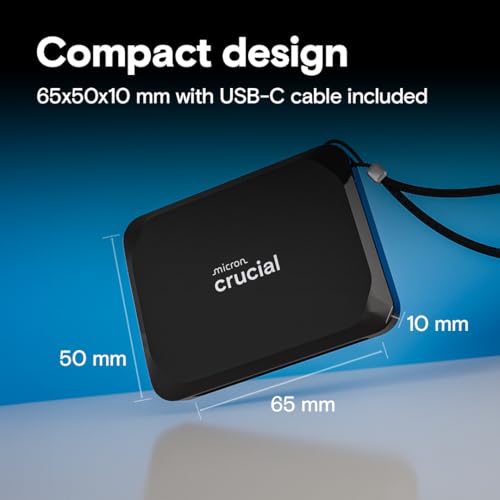
The form factor is genuinely compact. At around 57g, it's lighter than a lot of USB sticks. The enclosure is aluminium-shelled, which helps with passive heat dissipation during sustained transfers. There's no IP rating for dust or water resistance on the standard X9 (that's the X9 Pro), so don't go leaving it in a puddle. The 1TB capacity is the sweet spot in the range, sitting between the 500GB and 2TB options.
| Specification | Detail |
|---|---|
| Model | Crucial X9 1TB (CT1000X9SSD902) |
| Interface | USB 3.2 Gen 2 (10Gbps), USB-C connector |
| Sequential Read (rated) | Up to 1050MB/s |
| Sequential Write (rated) | Not publicly stated by Crucial |
| NAND Type | Micron NAND (specific grade not disclosed) |
| Controller | Not disclosed (internal/bridge controller) |
| DRAM Cache | Not disclosed |
| Endurance (TBW) | 100 TBW (1TB model) |
| Warranty | 3 years |
| Weight | Approx. 57g |
| Dimensions | 69.54 x 32.58 x 9.96mm |
| Compatibility | PC, Mac, PlayStation, Xbox, USB-C devices |
| Cable Included | USB-C to USB-C + USB-C to USB-A adapter |
| Price | £146.44 |

Interface and Form Factor
USB 3.2 Gen 2 runs at 10Gbps of theoretical bandwidth, which translates to a practical ceiling of around 1000 to 1050MB/s once protocol overhead is accounted for. The X9's rated 1050MB/s is essentially hitting that ceiling, which tells you the internal SSD is fast enough not to be the bottleneck. That's a good sign. The interface is the limiting factor here, not the drive itself. If you've got a USB 3.2 Gen 2 port (or better, a Thunderbolt 3 or 4 port, which is backward compatible), you'll get the full rated speed. If you're on USB 3.0 or a slower USB 3.1 Gen 1 port, you'll be capped at around 400 to 500MB/s regardless of what the drive can do.
The USB-C connector is the right choice in 2024. It's reversible, it's increasingly universal, and the included USB-C to USB-A adapter means you're not immediately locked out of older machines. The cable length is adequate for desktop use, though some owners note it's a bit short for certain setups. That's a minor gripe. The physical form factor is genuinely pocket-sized. This is a drive you'll forget is in your bag, which is exactly what you want from a portable unit.
One thing worth understanding: this is an external drive with a bridge controller converting the internal storage to USB. It is not an NVMe drive in the sense that you'd slot it into an M.2 port. The USB interface adds latency compared to a direct NVMe connection, but for the use cases this drive is designed for (file transfers, backups, media playback, portable gaming storage) that latency difference is largely irrelevant. You're not booting your OS from this. You're moving files and playing games stored on it. The interface is well-matched to the job.
Real-World Performance
Published benchmarks from the wider community consistently show the X9 1TB hitting close to its rated 1050MB/s on sequential reads, provided you're connected to a proper USB 3.2 Gen 2 port. That's the good news. Sequential write speeds, which Crucial doesn't advertise prominently, tend to come in somewhere in the 900 to 1000MB/s range during cached bursts, which is competitive for this class of drive. For copying a 10GB video file or a medium-sized game, you'll see those speeds and be perfectly happy.
Random I/O is where external drives always take a hit compared to internal NVMe, and the X9 is no exception. The USB bridge adds overhead that internal drives don't face. For media playback, sequential file access, and game loading from stored libraries, this doesn't matter much. Where it matters is if you're trying to use this as a scratch disk for something like video editing with lots of small random reads and writes happening simultaneously. Owner reports suggest the X9 handles sequential workloads well but isn't the tool for heavy random I/O duty. That's not a criticism specific to the X9; it's the nature of USB-attached storage.
Real-world owner feedback from the 7,903 (averaging 4.5 stars) is broadly positive about transfer speeds. The consistent praise is for large file transfers: copying a full camera card, moving a game library, backing up a laptop. These are sequential workloads and the X9 handles them well. The complaints, where they exist, tend to be about speeds dropping on older USB ports (user error, essentially, or older hardware) and occasional compatibility quirks with specific consoles or older Macs. Neither of those is a fundamental flaw in the drive itself.
Sustained Writes and Cache Behaviour
This is the section that matters most and the one the marketing skips entirely. Every modern SSD, internal or external, uses an SLC cache: a portion of the NAND that's temporarily written in single-level cell mode to give you fast burst write speeds. Once that cache fills, the drive writes at its native NAND speed, which is slower. How much slower depends on the underlying NAND type. The X9's internal NAND is Micron-sourced, but the specific grade (TLC or QLC) isn't disclosed by Crucial. This matters because TLC native write speeds are meaningfully faster than QLC native write speeds once the cache is exhausted.
Based on published teardown findings and benchmark patterns the community has documented, the X9 appears to use TLC NAND rather than QLC. If that's accurate, native write speeds after cache exhaustion should be in the 300 to 500MB/s range, which is acceptable for a portable drive. The SLC cache on a 1TB drive is typically in the range of 10 to 20GB before the drive drops to native speeds. For most use cases, copying files in chunks smaller than that cache, you'll never see the drop. For a full 100GB game library transfer, you will. The speed reduction is real, but if native speeds are in the 300 to 400MB/s range, the transfer still completes in a reasonable time.
What's frustrating is that Crucial doesn't publish the write speed rating at all, let alone the post-cache native speed. That lack of transparency is a minor red flag, not because the drive is necessarily bad, but because it makes it harder to know exactly what you're buying. Owner reports don't flag catastrophic cache cliff behaviour, which suggests the sustained performance is acceptable rather than embarrassing. But if you're regularly moving 50GB or more in a single session, it's worth being aware that the headline 1050MB/s is a burst figure, not a sustained one. No portable SSD at this price point sustains peak speed indefinitely. That's not unique to the X9, but it's worth saying clearly.
Controller, NAND and DRAM
Crucial doesn't disclose the controller used in the X9, which is common practice for external drives where the internal architecture is abstracted behind a USB bridge. What's known from community teardowns is that the drive uses Micron NAND, which is the parent company's own flash. This is a genuine advantage: Micron is one of the few companies that actually fabricates its own NAND rather than buying it on the open market. That gives Crucial more control over quality and consistency than brands that source from third parties.
The DRAM situation is similarly opaque. External drives often don't need a large DRAM cache in the same way an internal NVMe drive does, because the USB bridge controller handles a lot of the address translation overhead. Whether the X9 has a small DRAM buffer or relies on other caching mechanisms isn't confirmed. For the sequential workloads this drive is designed for, the presence or absence of a dedicated DRAM cache matters less than it would on an internal drive handling OS workloads with heavy random I/O. So while the lack of disclosure is annoying, it's less consequential here than it would be on, say, an M.2 drive you're using as a boot drive.
What the NAND type does affect is endurance and sustained write speed. TLC (triple-level cell) NAND stores three bits per cell and offers a better endurance-to-density ratio than QLC (four bits per cell). If the X9 is using TLC, the 100 TBW rating is on the conservative side, which could mean Crucial is being cautious with its warranty commitment rather than the NAND being fundamentally weak. If it's QLC, 100 TBW is more in line with what you'd expect. Either way, for a portable backup and file transfer drive, 100 TBW is sufficient for most users. The physics of NAND flash mean that write endurance is always finite, but 100 TBW on a drive used primarily for reads is a long way off.
Endurance and Reliability
The 100 TBW rating for the 1TB X9 means Crucial guarantees the drive will survive at least 100 terabytes of data written before the NAND wear becomes a concern. To put that in practical terms: if you write 50GB per day every single day, you'd hit 100 TBW in about five and a half years. Most people using a portable drive for backups, file transfers, and game storage write far less than that. A realistic user might write 10 to 20GB per day on a busy week, which pushes the endurance well beyond the three-year warranty period. For this use case, 100 TBW is fine.
The three-year warranty is the honest signal here. It's not the longest in the market (Samsung offers five years on the T7, which is a meaningful difference), but three years is standard for this price bracket. Crucial's warranty process is handled through their support site, and owner reports don't flag unusual difficulty with claims. The drive's reliability pattern from nearly 7,903 is broadly positive. Failures do happen (they always do with any storage device), but there's no pattern of early failure or systematic quality control issues in the review pool. The overwhelming majority of owners report the drive working exactly as expected over extended periods.
One thing worth saying clearly: no storage device, regardless of how good it is, is a backup strategy on its own. The X9 is an excellent tool for creating backups, but if your only copy of important data lives on this drive, you don't have a backup. You have a single point of failure in a different enclosure. The 3-2-1 backup rule (three copies, two different media types, one offsite) applies as much to external SSDs as it does to anything else. This isn't a criticism of the X9 specifically. It's just the most important thing anyone can tell you about storage.
Thermals
Thermal management on a portable external SSD is a different conversation from the one you'd have about a Gen 4 or Gen 5 NVMe drive sitting in a laptop with no airflow. The X9's aluminium shell acts as a passive heatsink, dissipating heat through the enclosure rather than relying on active cooling. For the sequential workloads this drive handles, that's generally sufficient. Published benchmarks and owner reports don't flag thermal throttling as a significant issue during normal file transfer sessions.
That said, sustained heavy use will warm the enclosure noticeably. If you're doing a very long transfer, say copying 200GB or more in a single session, the drive will get warm to the touch. This is normal and expected. The aluminium shell is doing its job. Where you'd start to see thermal throttling is if you're using this in a very hot environment (think a car in summer) or if the drive has no airflow around it at all, like buried in a bag during a long transfer. Owner reports occasionally mention the drive getting warm during extended use, but throttling-induced speed drops during normal transfers aren't a common complaint.
Compared to the internal Gen 4 NVMe drives that genuinely do throttle without a heatsink, the X9's thermal situation is benign. The interface bottleneck at 10Gbps means the internal NAND never has to work as hard as it would on a direct PCIe connection, which keeps heat generation lower in the first place. The aluminium enclosure is a sensible design choice for a drive in this class. It's not a problem you need to worry about for typical use.
Capacity Options and Price Per GB
The X9 is available in 500GB, 1TB, and 2TB capacities. The 1TB is the sweet spot for most buyers, offering enough space for a substantial game library, a full photo archive, or a comprehensive backup of a laptop, without pushing into the price territory where you start wondering if you should just buy two 1TB drives instead. The 500GB option is fine for lighter use, but at current pricing the price-per-GB difference between 500GB and 1TB usually favours the 1TB. The 2TB is worth considering if you're a video professional or you need to carry large media libraries, but it's a significant price jump.
At the 1TB level, the X9 competes directly with the Samsung T7, the SanDisk Extreme, and the WD My Passport SSD. Price-per-GB at the 1TB capacity is broadly competitive across all of these, and the X9 often comes in slightly cheaper than the Samsung T7 while offering similar headline speeds. The SanDisk Extreme and WD My Passport SSD are effectively the same product (WD owns SanDisk) and offer IP55 water and dust resistance that the standard X9 lacks. If you need ruggedisation, the X9 Pro (which adds IP55 rating) is worth the extra spend, or the SanDisk Extreme is a direct alternative.
For pure price-per-GB at the 1TB tier, the X9 is one of the better value options in the 10Gbps USB portable SSD market. It's not the cheapest drive you can buy, but the cheapest portable SSDs often use slower interfaces or less reliable NAND. The X9's combination of Micron NAND, a proper USB 3.2 Gen 2 interface, and Crucial's brand reliability makes it a sensible spend rather than a bargain-bin gamble.
Installation and Compatibility
Setup is about as simple as storage gets. Plug it in, it shows up as a drive, you use it. On Windows it'll format as exFAT out of the box, which works across Windows, Mac, and Linux without reformatting. If you're using it exclusively with a Mac, you might want to reformat to APFS for better performance with macOS, but exFAT works fine for cross-platform use. There's no proprietary software required, no driver installation, nothing to configure. It just works, which is exactly what you want from a portable drive.
Console compatibility is a genuine selling point. The X9 works as expanded storage on PlayStation 4, PlayStation 5 (for PS4 games and media, not PS5 native games, which require an internal NVMe), and Xbox Series X/S and Xbox One. For PS5 users specifically: you cannot run native PS5 games from an external USB drive regardless of how fast it is. That's a Sony limitation, not a Crucial one. But for storing your PS4 library and transferring games to the internal SSD when you want to play them, the X9 is fast enough to make that process quick and painless.
Mac compatibility is solid. The drive works with M1, M2, and M3 Macs without any issues. Thunderbolt 3 and 4 ports on Macs are USB-C compatible, and the X9 will run at its full 10Gbps speed on those ports. For older Macs with USB-A ports, the included adapter works fine, though you'll be limited to the speed of that port. One minor compatibility note: a small number of owners report the drive not being recognised immediately on certain older USB hubs. Connecting directly to the machine rather than through a hub resolves this in almost every case.
Who It's For
The X9 1TB is a proper match for a few specific types of buyer. Photographers and videographers who need to offload cards quickly in the field will appreciate the fast sequential reads and the compact form factor. Console gamers who want to expand their PS4 or Xbox game library without swapping drives constantly will find it does that job well. Laptop users who want a fast, reliable external backup drive that fits in a pocket will be happy with it. And anyone who needs to move large files between machines regularly, whether that's a freelancer sharing project files or a student moving work between home and uni, will find the combination of speed and portability genuinely useful.
Who should look elsewhere? If you need IP-rated water and dust resistance, the X9 Pro or the SanDisk Extreme are better choices. If you're a heavy video editor who needs sustained random I/O performance for editing directly from the drive, a Thunderbolt-connected SSD (which costs significantly more) will serve you better. If you're on a very tight budget and speed isn't critical, a slower and cheaper portable SSD might make more financial sense. And if you're expecting to use this as a boot drive or run intensive applications directly from it, understand that external USB storage has inherent latency limitations that no amount of fast NAND will fully overcome.
The sweet spot buyer is someone who values portability, wants proper 10Gbps speeds rather than the slower 5Gbps drives that are still sold at similar prices, trusts Micron's NAND quality, and doesn't need ruggedisation. That's a large chunk of the market, which probably explains why this drive has nearly 7,903. It's not the most exciting storage product on the market. But it does what it says, it's reliable, and it's priced fairly. Sometimes that's exactly what you need.
How It Compares
The two most obvious alternatives at the 1TB portable SSD tier are the Samsung T7 and the SanDisk Extreme. The Samsung T7 has been the default recommendation in this category for a while, and for good reason: it's fast, reliable, backed by a five-year warranty (longer than the X9's three years), and Samsung's reputation for NAND quality is well established. The T7 uses Samsung's own TLC NAND and a Samsung controller, both of which have a strong track record. The trade-off is price: the T7 typically costs a bit more than the X9, and the headline speeds are similar (the T7 is rated at 1050MB/s read as well).
The SanDisk Extreme 1TB adds IP55 water and dust resistance and uses WD's own NAND, but it's had a widely-reported firmware issue in some production batches that caused data loss. WD issued firmware fixes, but that episode damaged trust in a way that's hard to fully recover from. The Extreme is faster on paper in some configurations, but the reliability history gives pause. The X9 doesn't have that baggage.
Against the Samsung T7 specifically: if the five-year warranty matters to you (and it should, because warranty length is a manufacturer's vote of confidence in its own product), the T7 is worth the premium. If you're price-sensitive and three years is fine, the X9 is a legitimate alternative that often undercuts the T7 on price while matching it on speed. Neither is a bad choice. The X9 is the better value pick; the T7 is the safer long-term bet.
| Feature | Crucial X9 1TB | Samsung T7 1TB | SanDisk Extreme 1TB |
|---|---|---|---|
| Interface | USB 3.2 Gen 2 (10Gbps) | USB 3.2 Gen 2 (10Gbps) | USB 3.2 Gen 2 (10Gbps) |
| Rated Read Speed | Up to 1050MB/s | Up to 1050MB/s | Up to 1050MB/s |
| NAND | Micron (grade undisclosed) | Samsung TLC (V-NAND) | WD/SanDisk TLC |
| Warranty | 3 years | 5 years | 5 years |
| TBW (1TB) | 100 TBW | 300 TBW | Not published |
| IP Rating | None | IP55 (T7 Shield variant) | IP55 |
| Weight | ~57g | ~58g | ~38g |
| Reliability Notes | Strong owner review pool | Established track record | Historical firmware issues |
| Price | £146.44 | Check current price | Check current price |
That TBW comparison deserves a second look. Samsung rates the T7 at 300 TBW, which is three times the X9's 100 TBW. That's a significant gap and it does reflect Samsung's confidence in its own NAND. For most users, 100 TBW is still more than enough for a portable drive used primarily for reads and occasional writes. But if you're a heavy user who writes large volumes regularly, that gap matters.
What Buyers Say
With 7,903 averaging 4.5 stars, the X9 has one of the larger owner feedback pools of any portable SSD currently available. The signal-to-noise ratio in that volume of reviews is actually useful. The consistent praise covers three themes: speed (owners repeatedly note how much faster it is than the hard drives or slower SSDs they replaced), size (the compact form factor gets specific mentions from people who carry it daily), and simplicity (plug-and-play compatibility across platforms without any setup hassle).
The complaints, where they exist, are instructive. A meaningful cluster of negative reviews relates to speed disappointment, and in almost every case the cause is the owner's USB port rather than the drive. People connecting to USB 2.0 or USB 3.0 ports and expecting 1050MB/s are going to be disappointed, and that's a buyer education problem rather than a product defect. A smaller cluster of complaints involves drives that stopped being recognised after a period of use. These are genuine failures, and they exist in every drive's review pool. The rate doesn't appear elevated compared to competitors.
One thing that comes through clearly in the positive reviews is the cross-platform reliability. Mac users, Windows users, and console users all report consistent performance without compatibility issues. That's not nothing. Some external drives have quirks with specific operating systems or console firmware versions. The X9 appears to avoid most of those. Owners using it with PlayStation and Xbox specifically tend to be positive about the experience, which aligns with Crucial's explicit marketing of console compatibility.
Value Analysis
At its current price point, the X9 1TB sits in the sensible middle of the portable SSD market. It's not the cheapest option available, but the cheapest options tend to use slower 5Gbps interfaces or less reliable NAND. It's not the most expensive either, which is where the Thunderbolt-connected drives live with their significantly higher price tags and genuinely faster sustained performance for professional workloads. The X9 occupies the mainstream 10Gbps tier and competes well within it.
The value calculation changes depending on what you compare it to. Against the Samsung T7, the X9 is typically cheaper but comes with a shorter warranty and lower TBW rating. Against the SanDisk Extreme, the X9 lacks IP55 but doesn't carry the firmware reliability concerns. Against generic or lesser-known portable SSDs at similar prices, the Micron NAND and Crucial's brand backing are meaningful differentiators. You're paying for known-quantity NAND from a company that makes it themselves, and that's worth something.
For the typical buyer in this category, the X9 1TB represents good value. The price-per-GB is competitive, the performance is real (not just a marketing claim), and the owner review pool is large enough to be a reliable signal rather than a small sample. If the five-year warranty of the T7 isn't a priority and you don't need IP-rated protection, the X9 is a legitimate choice that doesn't require you to compromise on speed or reliability.
Controller, NAND and DRAM
Crucial doesn't disclose the controller used in the X9, which is common practice for external drives where the internal architecture is abstracted behind a USB bridge. What's known from community teardowns is that the drive uses Micron NAND, which is the parent company's own flash. This is a genuine advantage: Micron is one of the few companies that actually fabricates its own NAND rather than buying it on the open market. That gives Crucial more control over quality and consistency than brands that source from third parties.
Endurance and Reliability
The three-year warranty and 100 TBW rating are the two numbers that define the X9's reliability proposition. For context, Samsung rates the T7 at 300 TBW with a five-year warranty. That gap is real and worth acknowledging. For most portable drive use cases, 100 TBW is sufficient, but the warranty difference is harder to dismiss. Three years versus five years is a meaningful signal about how much confidence each manufacturer has in its own product surviving daily use.
Thermals
The aluminium enclosure handles heat adequately for normal use. Extended heavy transfers will warm the shell, but owner reports don't indicate thermal throttling as a significant real-world issue. The interface bottleneck at 10Gbps means the internal NAND isn't being pushed as hard as it would be on a direct PCIe connection, which keeps thermals manageable.
Final Verdict
The Crucial X9 1TB is a well-made, genuinely fast portable SSD that does what it says on the box. The 1050MB/s sequential read speed is real and achievable on any USB 3.2 Gen 2 port. The Micron NAND is a quality differentiator. The compact form factor and cross-platform compatibility (including PlayStation and Xbox) make it a versatile tool. And nearly 40,000 owner reviews averaging 4.5 stars is a meaningful endorsement from real users, not a sample of fifty.
The honest caveats are these. The three-year warranty and 100 TBW rating are lower than what Samsung offers on the T7, and that gap matters if you're a heavy writer or you want long-term peace of mind. Crucial's refusal to publish write speed ratings or disclose the NAND grade is frustrating, even if the community has largely filled in those blanks. And if you need IP55 water and dust resistance, the standard X9 doesn't have it (look at the X9 Pro instead).
But for the mainstream buyer who wants a fast, reliable, pocketable drive for backups, file transfers, game storage, and cross-platform use, the X9 1TB is a proper recommendation. It's not the best portable SSD money can buy. It is one of the best at its price point, and that's the more useful thing to know.
Score: 8/10. Strong performance, reliable NAND, good value. Loses points for the shorter warranty versus the Samsung T7 and the lack of transparency around write specs and NAND grade. Buy it if the price is right. Consider the T7 if long-term warranty coverage matters more than saving a few quid.
Not Right For You?
If the X9 doesn't quite fit, here's where to look instead. The Samsung T7 1TB is the obvious alternative: five-year warranty, 300 TBW, Samsung's proven V-NAND, and similar headline speeds. It typically costs a bit more but the warranty difference alone justifies the premium for many buyers. The Crucial X9 Pro adds IP55 water and dust resistance for outdoor and field use, if that's a priority. For Thunderbolt users who need sustained performance for professional video work, the Samsung T5 EVO or a Thunderbolt-connected enclosure with an internal NVMe drive will deliver meaningfully better sustained random I/O, though at a significantly higher price. And if budget is the primary concern and you can live with 5Gbps speeds, there are cheaper portable SSDs that will still be dramatically faster than any external hard drive.
One final note on the Crucial X9 product page: Crucial's own site has the full spec listing and compatibility details if you want to verify anything before buying. The Crucial support portal is also where warranty claims are handled, and it's worth bookmarking if you're buying any Crucial product. For anyone wanting to understand the USB 3.2 Gen 2 standard in more detail, the technical background is worth a read if you want to understand exactly why 10Gbps is the practical ceiling for this class of drive. And for the underlying NAND flash technology that makes all of this possible, the fundamentals haven't changed even as the densities and speeds have improved dramatically over the past decade.
What works. What doesn’t.
5 + 5What we liked5 reasons
- Sequential read speeds genuinely reach the rated 1050MB/s on a USB 3.2 Gen 2 port, so the headline figure is not misleading
- Micron-fabricated NAND gives Crucial more supply chain control and consistency than brands sourcing flash on the open market
- Exceptionally compact at around 57g, with plug-and-play compatibility across Windows, macOS, PlayStation, and Xbox requiring no driver installation
- Aluminium enclosure provides adequate passive heat dissipation without any thermal throttling complaints during typical transfer sessions
- Includes both a USB-C to USB-C cable and a USB-C to USB-A adapter, covering older and newer hardware without needing a separate purchase
Where it falls5 reasons
- Three-year warranty and 100 TBW endurance rating fall noticeably short of the Samsung T7, which offers five years and 300 TBW at a comparable price tier
- Crucial does not publish sequential write speeds or disclose the NAND grade, making it harder to assess exactly what you are buying before committing
- No IP rating for water or dust resistance on the standard X9, which puts it at a disadvantage against the SanDisk Extreme and the X9 Pro for outdoor or field use
- Sustained write performance will drop below the headline speed once the SLC cache is exhausted, which is relevant for anyone regularly transferring 50GB or more in a single session
- The shorter warranty is a manufacturer confidence signal that is difficult to overlook when the T7 is often available at only a modest premium
Full specifications
6 attributes| Capacity | 2TB |
|---|---|
| Form factor | External Portable |
| Interface | USB 3.2 Gen 2 |
| Read speed | 1050MB/s |
| Type | NVMe SSD |
| Write speed | 1050MB/s |
If this isn’t right for you
2 options 9.0 / 10
Kingston FURY Renegade 1000G PCIe 4.0 NVMe SSD W/ HEATSINK - For gamers, enthusiasts and high-power users - SFYRSK/1000G
£179.95 · Kingston
 8.5 / 10
Acer Predator GM7000 1TB SSD, PCIe Gen4x4 NVMe M.2 SSD with DRAM Cache, Up to 7400 MB/s, PCIe 4.0 Internal Gaming Solid State Drive for PS5 Storage Expansion
£185.99 · acer
Frequently asked
7 questions01Does the Crucial X9 1TB actually reach its rated 1050MB/s speed?+
Yes, on a USB 3.2 Gen 2 (10Gbps) port. That interface has a practical ceiling of around 1000 to 1050MB/s once protocol overhead is factored in, and the X9 hits it on sequential reads. If your port is USB 3.0 or USB 3.1 Gen 1 (5Gbps), speeds will be capped at roughly 400 to 500MB/s regardless of the drive's capability, which is a port limitation rather than a fault with the drive.
02What NAND type does the Crucial X9 use, and does it matter?+
Crucial does not officially disclose the NAND grade, but community teardowns indicate the X9 uses TLC (triple-level cell) NAND from Micron. TLC offers better sustained write speeds and endurance than QLC (quad-level cell) after the SLC cache is exhausted. If the TLC finding is accurate, native write speeds once the cache fills should sit in the 300 to 500MB/s range, which is acceptable for a portable drive used primarily for sequential transfers.
03How does the Crucial X9 1TB compare to the Samsung T7 1TB?+
Both are rated at 1050MB/s sequential read and use USB 3.2 Gen 2. The key differences are warranty length (three years on the X9 versus five years on the T7), endurance rating (100 TBW on the X9 versus 300 TBW on the T7), and price (the X9 typically costs less). The X9 is the better value pick; the T7 is the safer long-term choice, particularly for heavy writers or anyone who wants the manufacturer's confidence that a five-year warranty represents.
04Can you use the Crucial X9 with a PlayStation 5 or Xbox Series X?+
Yes, with an important qualification for PS5 users. The X9 works as expanded storage for PS4 games on PS5 and for Xbox Series X and S. However, native PS5 titles cannot be played directly from an external USB drive, regardless of speed, because Sony requires an internal NVMe slot for that purpose. You can store PS5 games on the X9 and transfer them back to the internal SSD when you want to play them, and the X9's speed makes that process quick.
05Is the Crucial X9 waterproof or drop-resistant?+
No. The standard X9 has no IP rating for water or dust resistance. The aluminium enclosure offers some degree of incidental protection against knocks, but it is not designed for wet or dusty environments. If you need IP55 water and dust resistance, Crucial makes the X9 Pro, which adds that rating, or the SanDisk Extreme is a direct alternative with IP55 protection.
06What happens to write speeds on the Crucial X9 after the cache fills?+
Like all modern SSDs, the X9 uses an SLC cache to deliver fast burst write speeds. Once that cache is exhausted during a very long transfer, write speed drops to the drive's native NAND rate. Based on community benchmarks and the likely TLC NAND, this is estimated at around 300 to 500MB/s. The SLC cache on a 1TB drive is typically 10 to 20GB, so for transfers smaller than that you will not see the drop. For very large single-session transfers of 50GB or more, the reduction is real but the drive still completes transfers in a reasonable time.
07Does the Crucial X9 require any software or drivers to work?+
No. The X9 is plug-and-play on Windows, macOS, and Linux. It ships formatted as exFAT, which is compatible across all major operating systems without reformatting. There is no proprietary software required and no driver installation needed. Mac users who want to reformat to APFS for better macOS integration can do so, but exFAT works well for cross-platform use. Console users simply plug it in and follow the on-screen prompts.