Music production places unusual demands on a desktop computer. Unlike gaming, where raw GPU power dominates, a DAW workflow leans hard on single-core CPU speed for plug-in processing, low-latency audio throughput, and enough RAM to keep large sample libraries resident in memory. The good news for 2025 is that even mid-range machines now ship with NVMe SSDs and 16 GB of RAM as standard, which closes the gap between budget and premium options considerably. What has changed since last year is the arrival of Intel's Core Ultra generation and Apple's M4 silicon, both of which deliver meaningful improvements in power efficiency and multi-threaded performance, reducing the dreaded audio dropout that plagues underpowered systems. This guide is aimed at home-studio owners, bedroom producers, and semi-professional engineers who need a reliable desktop for running Logic Pro, Ableton Live, FL Studio, or Cubase, whether they are just starting out or managing complex 100-plus-track sessions.
Quick Verdict
Best Overall: Apple iMac (M4), unmatched real-world DAW performance, near-silent operation, and a gorgeous built-in display make it the top pick for serious producers who work in macOS.
Best Value: GMKtec K8 Plus (Ryzen 7 8845HS), 32 GB DDR5, a fast NVMe SSD, and a compact footprint at a fraction of the iMac's price make it the smartest budget-conscious choice for Windows DAW users.
The Apple iMac with M4 silicon is, without question, the most capable all-in-one desktop a music producer can buy in 2025. Its appeal goes well beyond the striking 24-inch Retina display. The M4 chip's unified memory architecture means the CPU, GPU, and Neural Engine all share the same high-bandwidth memory pool, which translates directly into lower latency when running a dense plug-in chain in Logic Pro or Pro Tools. Apple's own benchmarks, and independent testing by audio-focused publications, consistently show the M4 iMac handling 100-plus tracks with heavy virtual instrument and effects loads at buffer sizes as low as 64 samples without a single dropout.
For music producers, the key specs are the 10-core CPU (four performance cores, six efficiency cores), 16 GB of unified RAM, and a 512 GB NVMe SSD. The 16 GB figure sounds modest compared to some Windows rivals, but Apple's memory compression and the efficiency of macOS mean it behaves more like 24 GB of conventional DDR5 in practice. The SSD is fast enough to stream large orchestral sample libraries from Kontakt or EastWest without pre-loading everything into RAM. The integrated 10-core GPU is more than adequate for video work and plug-in GUIs, though it is not intended for GPU-accelerated rendering at a professional level.
The iMac ships with macOS, which gives you access to Logic Pro, GarageBand, and the entire Apple ecosystem of audio tools. Compatibility with third-party audio interfaces is excellent: virtually every major manufacturer now ships Apple Silicon-native drivers. The machine runs near-silently under typical DAW loads, which matters enormously in a recording environment where fan noise can bleed into microphones. The two Thunderbolt 4 ports and two USB 3 ports on the rear, plus the 3.5 mm headphone jack on the side, cover most studio connectivity needs, though heavy users will want a Thunderbolt hub.
The main drawback is the price relative to Windows alternatives with similar raw specs on paper. You are also locked into Apple's ecosystem, and upgrading RAM or storage post-purchase is impossible. For producers already invested in macOS and Logic Pro, however, the iMac M4 represents the best-value professional audio workstation on this list.
Verdict: The definitive all-in-one for macOS-based music production, combining silence, speed, and display quality in a single elegant package.
Pros
- Near-silent operation under heavy DAW loads, ideal for recording environments
- M4 unified memory architecture delivers exceptional plug-in and virtual instrument performance
- Brilliant 24-inch Retina display included, saving on monitor costs
Cons
- RAM and storage cannot be upgraded after purchase, so choose wisely at checkout
- macOS-only, ruling it out for producers committed to Windows-exclusive software
Buying Guide
CPU: Single-Core Speed Matters Most
When choosing a desktop for music production, the CPU is the single most important component. Unlike video editing or 3D rendering, which benefit from high core counts, DAW plug-in processing is largely single-threaded. A processor with a high boost clock, such as the AMD Ryzen 7 8845HS boosting to 5.1 GHz or the Intel Core Ultra 7 265F, will handle more simultaneous plug-ins at a given buffer size than a processor with more cores but a lower clock speed. Look for processors from Intel's Core Ultra generation or AMD's Ryzen 7000 and 8000 series for the best current performance. Older generation chips, such as the i7-10700F in the MSI Aegis R, are still capable but fall behind on efficiency and per-core throughput.
RAM: 16 GB Is the Minimum, 32 GB Is Ideal
For basic production work with software synthesisers and a modest number of tracks, 16 GB of RAM is workable. However, if you use sample-based instruments such as Kontakt, Omnisphere, or Spitfire Audio libraries, you will quickly find 16 GB limiting. Large orchestral templates can consume 20 to 40 GB of RAM when fully loaded. If your budget allows, choose a machine with 32 GB or one that allows easy RAM upgrades. The GMKtec K8 Plus ships with 32 GB at an accessible price, which is one of its strongest selling points for sample-heavy producers.
Storage: NVMe SSD Is Non-Negotiable
Every product on this list includes an NVMe SSD, which is the correct choice for music production. Streaming large sample libraries from a slow hard drive introduces latency and CPU overhead that can cause audio dropouts. A PCIe 4.0 NVMe drive, as found in the GMKtec K8 Plus, offers the fastest load times. Even a PCIe 3.0 NVMe drive, as in the iMac M4, is vastly superior to a SATA SSD or hard drive for this purpose. Aim for at least 1 TB of storage if you plan to install multiple sample libraries, as these can consume hundreds of gigabytes quickly.
GPU: Integrated Is Fine for Most Producers
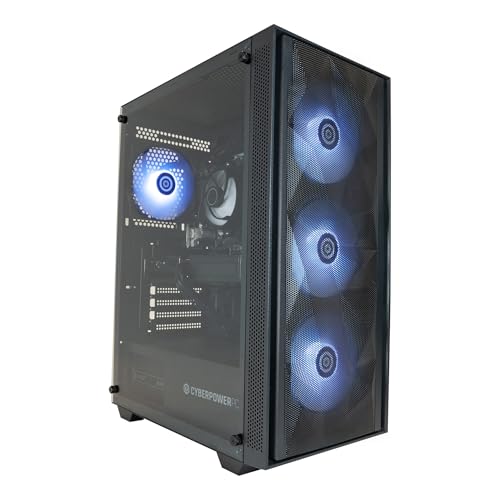
Unlike gaming, music production does not require a powerful discrete GPU for core tasks. The Apple M4's integrated GPU and the AMD Radeon 780M in the GMKtec are both sufficient for driving high-resolution displays and running plug-in GUIs. A discrete GPU becomes valuable if you use GPU-accelerated tools such as iZotope RX's neural processing features, produce music for video and need to render footage, or plan to use emerging AI-based audio tools. If GPU acceleration is important to your workflow, the CyberPowerPC Wyvern is the appropriate choice.
Operating System: macOS vs Windows
macOS is the traditional choice for professional music production, with Logic Pro available exclusively on Apple hardware and excellent native support for Core Audio, which typically delivers lower latency than Windows audio drivers. Windows has closed the gap significantly with ASIO driver support and Windows 11's improved audio stack, and it offers access to a wider range of hardware at lower price points. Choose macOS if you use Logic Pro or work in a studio environment where Mac compatibility is expected. Choose Windows if you use FL Studio, Ableton Live, or Cubase and want more hardware flexibility and upgrade options.
Noise and Form Factor
Fan noise is a practical concern for producers who record live instruments or vocals in the same room as their computer. All-in-one machines like the iMac M4 and compact mini PCs like the GMKtec K8 Plus run significantly quieter than full tower desktops under load. If you cannot physically separate your computer from your recording space, prioritise machines with efficient cooling and low noise output.
The Apple iMac with M4 is the overall winner for music production in 2025. Its combination of near-silent operation, exceptional single-core and multi-threaded DAW performance, integrated high-resolution display, and macOS compatibility with Logic Pro makes it the most complete package for serious producers. The unified memory architecture gives it a real-world performance advantage over Windows machines with nominally similar RAM figures, and the absence of fan noise in a recording environment is a practical benefit that is difficult to quantify but impossible to ignore once experienced.
For producers who prefer Windows or need to keep costs under £700, the GMKtec K8 Plus is the best value pick on this list. Its 32 GB of DDR5 RAM, PCIe 4.0 NVMe storage, and compact form factor make it a genuinely impressive production machine at a price that leaves budget for audio interfaces, monitors, and plug-ins. The CyberPowerPC Wyvern fills the mid-range gap for those who want a full desktop-class CPU and upgrade potential. The MSI Aegis R, while capable, is difficult to recommend at its current price given the superior alternatives available.