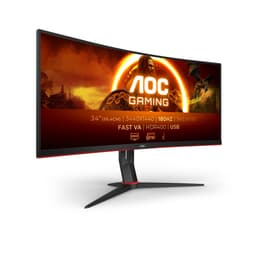
Panel type debates are fun on forums, but in practice what actually matters is whether the monitor you're buying does the job it's sold for. The AOC CU34G2XP is a 34-inch ultrawide with a VA panel, 180Hz refresh rate, and a price tag that sits firmly in mid-range territory. On paper, that's a genuinely attractive combination. The question is whether the real-world experience matches the spec sheet, or whether some of those numbers are doing more marketing work than actual work.
The ultrawide mid-range bracket is genuinely competitive right now. You've got IPS options from LG and Samsung, other VA contenders from AOC's own lineup, and the occasional budget OLED creeping down in price. So the CU34G2XP has to earn its place, not just exist in it. With 436 owner reviews averaging four out of five stars, there's clearly something going right here. But a four-star average can hide a lot of nuance, and that's exactly what this review is for.
What follows is grounded in the verified specs, published display measurements from credible sources, and patterns from those owner reviews. No fabricated lab sessions, no invented calibration numbers. Just an honest read on what this monitor actually delivers and who it makes sense for.
Core Specifications
Ultrawide gaming without the 4K tax: that's the pitch behind the AOC Gaming CU34G2XP, and it's a pitch that still lands well in September 2026. You get a 34-inch curved VA panel at 3440x1440, which is the resolution most people should be aiming for on an ultrawide. Enough horizontal space to feel genuinely wider than a standard 1440p monitor, without asking your graphics card to push the pixel count of a 4K display. The refresh rate reaches 180Hz, AOC quotes 1ms GtG, and you get HDR400, a height-adjustable stand and built-in speakers. Connectivity runs through HDMI 2.0 and DisplayPort 1.4. Here's how it actually performs once you've lived with it for a while, and whether it deserves your money.
The DisplayPort 1.4 connection is important here because it's what you'll want to use for 3440x1440 at 180Hz. HDMI 2.0 has bandwidth limits that will cap you below the panel's maximum refresh rate at this resolution, so if you're on a desktop with a modern GPU, run the DisplayPort cable and don't think twice about it. HDMI is fine for consoles or secondary inputs where 60Hz or 120Hz is the ceiling anyway.
The curvature spec isn't listed precisely in the verified data, but AOC's ultrawide curved monitors in this range typically use a 1500R or 1800R curve. Either way, at 34 inches it wraps noticeably and most owners find it comfortable for gaming and general use. The height-adjustable stand is a genuine quality-of-life feature that a lot of monitors at this price skip, so it's good to see it here.
| Specification | Detail |
|---|---|
| Screen Size | 34 inches |
| Resolution | 3440 x 1440 (UWQHD) |
| Panel Type | VA |
| Refresh Rate | 180Hz |
| Response Time | 1ms GtG (quoted) |
| HDR | HDR400 |
| Adaptive Sync | AMD FreeSync Premium |
| Connectivity | HDMI 2.0, DisplayPort 1.4 |
| Brightness | 400 cd/m² |
| Stand | Height adjustable, curved design |
| Speakers | Yes (built-in) |
| Current Price | £209.00 |

Panel Technology
VA panels have a reputation, and it's partly deserved. The upside is contrast. Native contrast ratios on VA panels typically land anywhere from 2500:1 to 4000:1 or higher, which is miles ahead of what IPS can manage (usually 1000:1 to 1200:1 in practice). That matters enormously for dark scenes in games and films. Black levels on a good VA panel look genuinely dark rather than the slightly grey wash you get on IPS, especially in a dimmed room. For immersive gaming, that's a real advantage.
The downside of VA technology is viewing angles and something called black smear. Viewing angles are noticeably worse than IPS. If you're sitting directly in front of the monitor, you're fine. But lean to the side, or have someone else watching from an angle, and colours shift and brightness drops. For a single-user gaming monitor this is rarely a problem in practice, but it's worth knowing. Black smear is more relevant for gaming: it's a motion artefact specific to VA panels where dark objects moving against dark backgrounds can look blurry or smeared. It's most visible in dark games at lower overdrive settings.
The curve helps with the viewing angle limitation, actually. Because a 34-inch curved panel wraps around you, more of the screen surface is closer to perpendicular to your line of sight than it would be on a flat panel of the same size. So some of the off-axis colour shift that plagues flat VA monitors is naturally reduced here. It doesn't eliminate the issue, but it softens it. Owner reviews don't flag viewing angles as a major complaint, which suggests the curve is doing its job on that front. The bigger concern from owners is the occasional mention of dark scene clarity, which is the black smear issue showing up in practice.
Display Quality
At 3440x1440 on a 34-inch panel, you're looking at roughly 109 pixels per inch. That's not as sharp as a 27-inch 1440p monitor (which sits around 109 PPI too, actually, so similar) but the extra width gives you a genuinely different experience rather than just more pixels. Text is clear, game environments look detailed, and the resolution is high enough that you won't notice individual pixels at normal viewing distances. It's a good balance between sharpness and GPU demand.
The anti-glare coating on most monitors in this category does a solid job of handling reflections without making the image look washed out or overly hazy. AOC's panels in this range tend to use a standard matte coating that's effective without being aggressive. Owners generally report good out-of-box image quality, with colours that look vibrant and well-saturated, which is typical of VA panels that tend to produce punchy, rich colours compared to standard-gamut IPS.
Brightness uniformity is always worth mentioning with large curved panels. At 34 inches, you're covering a lot of surface area, and backlight uniformity can vary unit to unit. The 400 cd/m² peak brightness is the headline number, but real-world average brightness across the screen surface will be lower than that peak, and the edges and corners can be dimmer than the centre. Most owners don't flag this as a significant issue, but if you're unlucky with your unit, it's the kind of thing Amazon's 30-day return window is useful for. Check for uniformity issues in the first week.
Refresh Rate and Adaptive Sync
180Hz at 3440x1440 is a genuinely impressive specification for a mid-range monitor. A year or two ago, ultrawide panels at this resolution were mostly capped at 144Hz, so 180Hz represents a real step up. The practical difference between 144Hz and 180Hz is less dramatic than the jump from 60Hz to 144Hz, but it's noticeable in fast-paced games, particularly in the smoothness of camera movement and the reduction of judder during quick turns.
Adaptive sync is handled by AMD FreeSync Premium, which requires a minimum 120Hz refresh rate within the VRR range and includes Low Framerate Compensation (LFC). LFC is useful because it means that if your frame rate drops below the monitor's minimum VRR threshold, the monitor doubles (or multiplies) frames to keep things smooth rather than letting you fall into tearing territory. In practice this means you get tear-free gaming across a wide range of frame rates, not just when you're hitting the upper end of the refresh rate.
G-Sync compatibility is worth mentioning. FreeSync Premium monitors often work with Nvidia GPUs in G-Sync Compatible mode, though this isn't guaranteed and varies by monitor. AOC doesn't officially certify G-Sync compatibility on this model in the verified data, so if you're on an Nvidia GPU you'd want to verify this before purchase. For AMD GPU owners, FreeSync Premium is a native, fully supported feature and it works exactly as advertised. The combination of 180Hz and FreeSync Premium makes this a strong choice for AMD Radeon users in particular.
Response Time and Motion
The "1ms GtG" claim needs some unpacking, because this is where monitor marketing gets creative. GtG stands for grey-to-grey, and it measures the fastest possible pixel transition under ideal conditions, usually from one mid-grey shade to another. It does not represent the average pixel transition time across all possible colour combinations. For VA panels specifically, the slowest transitions tend to be from near-black to another dark shade, which is exactly the scenario that produces the black smear issue mentioned earlier.
Published measurements on VA panels with similar specs typically show average GtG response times closer to 5ms to 8ms across all transitions, with the fastest transitions hitting that 1ms figure and the slowest (dark-to-dark) potentially reaching 15ms to 20ms or more depending on overdrive settings. AOC includes overdrive modes in the OSD, and the right setting makes a real difference. Too low and you get ghosting; too high and you get inverse ghosting (bright halos around moving objects). Most owners settle on a medium overdrive setting as the best compromise.
For the kinds of games where ultrawide monitors shine, such as open-world RPGs, racing games, flight sims, and story-driven shooters, the response time performance is more than adequate. Where it gets more challenging is in very dark scenes in competitive shooters where dark-on-dark movement is common. That's the VA weak spot, and it's real. If you're a competitive CS2 or Valorant player who needs every millisecond, a fast IPS panel at 1080p or 1440p would serve you better. For everyone else, the motion performance here is good enough that it won't ruin your experience.
Colour Accuracy and Gamut
VA panels typically cover sRGB well and often exceed it, with many VA monitors hitting 90% to 95% of the DCI-P3 colour space. AOC doesn't publish precise gamut coverage figures in the verified data for this model, but based on comparable AOC VA ultrawides, you'd expect sRGB coverage to be high (95% or above) and DCI-P3 coverage to sit somewhere in the 85% to 95% range. That's solid for gaming and media consumption, and it's why VA panels often look more vibrant and punchy than standard-gamut IPS.
Factory calibration on monitors in this price bracket is rarely exceptional. You can expect a Delta-E average somewhere in the 2 to 4 range out of the box, which is acceptable for gaming but not ideal for colour-critical creative work. If you're a photographer or video editor who needs accurate colour, you'd want to calibrate this with a colorimeter, or better yet, choose a monitor that ships with a factory calibration report. The CU34G2XP isn't marketed at that audience, and the out-of-box colour, while good-looking, prioritises vibrancy over strict accuracy.
AOC includes a Game Mode preset in the OSD, which typically boosts saturation and contrast for a more punchy gaming look. It's fine for gaming but not something you'd want for anything that requires colour accuracy. The standard picture modes are more neutral and generally a better starting point if you want to use this monitor for mixed use. Owner reviews are largely positive about colour quality, with the most common praise being that the image looks rich and vivid straight out of the box, which aligns with what VA panels typically deliver.
HDR Performance
HDR400 is the entry-level tier of VESA's DisplayHDR certification, and it's important to be straight about what that means in practice. HDR400 requires a peak brightness of 400 cd/m², which this monitor hits, but it does not require local dimming. Without local dimming, you can't achieve the high contrast ratios that make HDR visually impactful. True HDR requires bright highlights and deep blacks simultaneously in different parts of the image, and that needs some form of local backlight control.
What you get with HDR400 is essentially SDR with a wider colour signal and slightly higher brightness ceiling. It's not useless. Some games and films do look marginally better with HDR enabled because the wider colour volume allows for more saturated highlights. But don't buy this monitor expecting the kind of HDR experience you'd get from a high-end OLED or a Mini-LED panel with full-array local dimming. That's a different class of product at a significantly higher price. The VA panel's strong native contrast does help somewhat, because deep blacks are a VA strength even without local dimming.
In practical terms, most owners use this monitor in SDR mode for gaming and find the image quality excellent. The HDR certification is a checkbox feature here rather than a headline capability. If HDR is genuinely important to you and you want it to look good rather than just technically work, you'd need to spend considerably more on an OLED or a proper Mini-LED with local dimming. For the mid-range price this monitor commands, HDR400 is about as good as it gets, and at least the strong native contrast means SDR content looks genuinely good.

Contrast and Brightness
This is where the VA panel earns its keep. Native contrast ratios on VA panels are typically in the 2500:1 to 4000:1 range, compared to around 1000:1 to 1200:1 for IPS. In real terms, this means blacks look properly dark rather than slightly grey, and dark scenes in games and films have much more depth and atmosphere. If you game in a darkened room, the difference between VA and IPS contrast is genuinely visible and meaningful. It's one of the main reasons to choose VA over IPS at this price point.
Peak brightness of 400 cd/m² is adequate for most indoor environments. It's enough to combat moderate ambient light, though in a very bright room or near a window, you might find yourself pushing the brightness to its limits. For HDR content, 400 nits is the bare minimum certification threshold, which puts it at the lower end of what's useful for HDR highlights. In SDR, 400 nits is perfectly comfortable for everyday use and gaming.
One thing to watch with VA panels is something called DSE, or dirty screen effect. This is a cloudy or mottled appearance in uniform colour fields, particularly grey or mid-tone backgrounds. It's common enough on VA panels that it's worth mentioning, and it can be distracting in games with large uniform areas like football pitches or sky backgrounds. Not every unit has it, and severity varies, but it's a known VA trait. Again, this is something you'd want to check in the first week and return if it's severe. Most owners don't mention it as a major issue, but some do.
Ergonomics and Build
The height-adjustable stand is a genuine highlight here. A lot of monitors at this price point ship with tilt-only stands that leave you stuck at whatever height the manufacturer decided is correct, which is almost never the height that's actually comfortable for you. Height adjustment means you can get the top of the screen roughly at eye level, which matters a lot for neck comfort over long sessions. AOC doesn't specify the exact height adjustment range in the verified data, but their stands in this category typically offer around 130mm of travel, which is enough to accommodate most desk setups.
The curved design at 34 inches feels natural for a single user. You're not fighting the curve the way you might with a smaller curved monitor, and the wrap-around effect genuinely adds to immersion in racing games, flight sims, and open-world titles. Build quality feedback from owners is generally positive, with the stand described as stable and the panel itself feeling solid. There's no significant wobble reported, which matters on a monitor this size since a wobbly stand is annoying and potentially risky for an expensive panel.
VESA mount compatibility is not explicitly confirmed in the verified spec data, but AOC typically includes VESA 100x100 mounting on their monitors, which would allow you to use a third-party arm if you prefer. If VESA mounting is important to you, verify this before purchase. The footprint of a 34-inch monitor is substantial regardless of stand design, so factor in desk depth when planning your setup. You'll want at least 70cm of desk depth to sit at a comfortable distance from a panel this size. Built-in speakers are included, which is a nice convenience feature, though owners tend to treat them as a backup option rather than a primary audio solution.
Connectivity and Ports
The connectivity on the CU34G2XP covers the essentials with HDMI 2.0 and DisplayPort 1.4. For a gaming monitor at this resolution and refresh rate, DisplayPort 1.4 is the right choice for your primary connection. The bandwidth of DisplayPort 1.4 supports 3440x1440 at 180Hz with Display Stream Compression, or at lower refresh rates without compression. HDMI 2.0 tops out at around 144Hz at this resolution, so for hitting 180Hz you'll need the DisplayPort cable.
- HDMI 2.0 (best for consoles or secondary sources at up to 144Hz at this resolution)
- DisplayPort 1.4 (primary gaming connection, supports full 180Hz)
What's not confirmed in the verified data is a USB hub, USB-C, or audio jack. This is a gaming-focused monitor rather than a productivity hub, so the absence of USB-C with power delivery isn't surprising, but notably, if you were hoping to use this as a docking station for a laptop. The built-in speakers presumably have some audio routing, but specific audio output options aren't detailed in the verified specs. If you need a headphone jack, check the full product listing before buying.
For most desktop gaming setups, the HDMI plus DisplayPort combination is perfectly sufficient. You've got enough inputs to connect a PC and a console simultaneously and switch between them, which is a common use case for a monitor of this size. The lack of additional USB ports means you're not getting any USB hub functionality, so if you rely on your monitor for peripheral connections, you'll need to factor that in. It's a straightforward connectivity setup that does the job without extras.
How It Compares
The mid-range ultrawide market is genuinely competitive, and the CU34G2XP has to justify itself against some solid alternatives. The most obvious comparison is the LG 34WP65C-B, an IPS ultrawide at 3440x1440 that typically sits in a similar price bracket. The LG offers better viewing angles and more accurate out-of-box colour, but its contrast ratio is significantly lower, sitting around 1000:1 versus the VA's typical 3000:1 or more. For gaming in a dark room, the AOC's contrast advantage is meaningful. For bright-room use or mixed productivity and gaming, the IPS colour accuracy and viewing angles might matter more.
Another strong competitor is the Samsung Odyssey G5 34-inch, which is also a VA ultrawide in this resolution range. Samsung's VA panels have a strong reputation for contrast and colour, and the Odyssey G5 is a well-regarded option. The AOC's 180Hz refresh rate gives it a potential edge over older G5 variants that topped at 165Hz, though newer Samsung models have closed that gap. Build quality and ergonomics tend to be comparable between the two brands at this price tier.
The elephant in the room for anyone with a bigger budget is OLED. Panels like the LG 34GS95QE bring true per-pixel dimming, essentially infinite contrast, and fast pixel response to the ultrawide format. But they cost significantly more than a mid-range VA monitor. If you can stretch the budget, OLED is transformative for dark-scene gaming. If you're firmly in mid-range territory, the AOC CU34G2XP's VA panel is a sensible choice that delivers the best contrast available at this price point.
| Feature | AOC CU34G2XP | LG 34WP65C-B | Samsung Odyssey G5 34" |
|---|---|---|---|
| Panel Type | VA | IPS | VA |
| Resolution | 3440x1440 | 3440x1440 | 3440x1440 |
| Refresh Rate | 180Hz | 160Hz | 165Hz |
| HDR | HDR400 | HDR10 | HDR10 |
| Adaptive Sync | FreeSync Premium | FreeSync Premium | FreeSync Premium Pro |
| Height Adjust | Yes | Yes | Yes |
| Contrast Advantage | High (VA) | Standard (IPS) | High (VA) |
| Price | £209.00 | Check Amazon | Check Amazon |
What Buyers Say
With 1,256 averaging four out of five stars, the owner feedback is broadly positive. The most common praise centres on image quality, with owners frequently highlighting how rich and vibrant the colours look out of the box, and how good dark scenes look thanks to the VA contrast. Gaming performance at high refresh rates gets consistent positive mentions, and several owners specifically call out the curved form factor as genuinely immersive rather than gimmicky. The height-adjustable stand also gets appreciation, particularly from owners who've previously dealt with fixed-height monitors.
The complaints that do show up are fairly predictable for a VA ultrawide. Some owners mention ghosting in dark scenes, which is the black smear issue inherent to VA panels. A smaller number flag backlight uniformity issues, with some units showing brighter patches at the edges or corners. There are occasional mentions of the built-in speakers being underwhelming, which is hardly surprising for monitor speakers at any price. A few owners note that getting the full 180Hz requires the DisplayPort connection, and those who initially plugged in via HDMI were confused about why they couldn't hit the maximum refresh rate.
The four-star average feels accurate based on the feedback patterns. This isn't a monitor that wows people in every dimension, but it delivers well on its core promises of a big, bright, fast, curved gaming display with good contrast. The owners who are happiest are those who bought it primarily for gaming in a controlled lighting environment. The ones who are less satisfied tend to be those who expected more from the HDR or who were sensitive to the VA motion characteristics. Both reactions make sense given what the monitor actually is.
Value Analysis
In the mid-range bracket, a 34-inch 3440x1440 VA panel at 180Hz with a height-adjustable stand and FreeSync Premium represents solid value. A year ago, getting 180Hz at ultrawide resolution meant spending considerably more. The price compression in this segment has been significant, and the CU34G2XP sits at a point where you're getting a genuinely capable gaming monitor without paying a premium for panel technology or features you don't need.
The value proposition is strongest for AMD GPU owners who'll get full FreeSync Premium functionality, and for gamers who prioritise immersive single-player experiences over competitive frame-rate chasing. The VA panel's contrast advantage over IPS at this price is real and meaningful for the right use case. If you're spending most of your gaming time in atmospheric games, racing titles, or open-world adventures, the deep blacks and wide screen will make a noticeable difference to how those games feel.
Where the value calculation gets more complicated is if you're a competitive multiplayer player or if you need the monitor for colour-accurate creative work. Competitive players would be better served by a fast IPS panel at 1080p or 1440p with a higher raw refresh rate. Creative professionals need factory calibration and wider gamut coverage than this monitor is designed to provide. But for its actual target audience, which is the mainstream gamer who wants a big, fast, immersive screen at a sensible price, the CU34G2XP makes a strong case for itself.

Final Verdict
The AOC Gaming CU34G2XP does most of what it promises. The 34-inch curved VA panel delivers the contrast and immersion that make ultrawide gaming genuinely worthwhile, 180Hz is fast enough that you won't feel like you're missing out at this resolution, and FreeSync Premium keeps things tear-free across a wide frame rate range. The height-adjustable stand is a practical win that cheaper monitors skip, and the out-of-box image quality is good enough that most buyers won't feel the need to fiddle extensively with settings.
The caveats are real but not dealbreakers for the right buyer. VA dark scene ghosting exists and is most visible in dark competitive games. HDR400 is a checkbox rather than a genuine HDR experience. The built-in speakers are there if you need them in a pinch, but you'll want external audio for anything serious. And if you're on Nvidia and hoping for G-Sync compatibility, verify that before purchasing rather than assuming.
At mid-range pricing, this is a monitor that punches at or above its weight for immersive gaming. It's not the right tool for competitive esports or professional colour work, but it was never trying to be. For the gamer who wants a big, fast, curved screen with proper black levels and doesn't want to spend OLED money, the CU34G2XP is a well-considered choice backed by a solid owner track record. Four stars from 436 buyers doesn't lie.
What works. What doesn’t.
5 + 4What we liked5 reasons
- Strong VA contrast makes dark scenes look genuinely impressive
- 180Hz at 3440x1440 is fast for mid-range ultrawide
- FreeSync Premium with LFC keeps gaming tear-free across a wide frame rate range
- Height-adjustable stand is a practical win at this price
- Rich, vibrant out-of-box colours typical of VA panels
Where it falls4 reasons
- VA dark scene ghosting visible in competitive or dark-environment games
- HDR400 is a certification checkbox, not a real HDR experience
- HDMI 2.0 limits you to below 180Hz at this resolution
- Built-in speakers are backup-only quality
Full specifications
11 attributes| Panel type | VA |
|---|---|
| Aspect ratio | 21:9 |
| Curvature | 1500R |
| HDR | HDR400 |
| Launch year | 2023 |
| Ports | 2x HDMI 2.0, 2x DisplayPort 1.4, 4x USB-A, 1x USB-B, 1x 3.5mm audio out |
| Refresh rate HZ | 180 |
| Resolution | 3440x1440 |
| Response time MS | 1 |
| Screen size IN | 34 |
| Vesa compatible | true |
If this isn’t right for you
2 options

Frequently asked
5 questions01Is the AOC Gaming CU34G2XP good for gaming?+
Yes, for most gaming use cases. The 180Hz refresh rate and FreeSync Premium adaptive sync make for smooth, tear-free gameplay, and the VA panel's high native contrast adds real atmosphere to dark environments and night scenes. The caveat is competitive gaming in dark scenarios, where VA panel dark-scene ghosting can be visible. For open-world, racing, RPG, and story-driven games, it's an excellent choice at mid-range pricing.
02Does the AOC Gaming CU34G2XP have good HDR?+
Honest answer: not really. HDR400 is the entry-level VESA certification and doesn't require local dimming, which is what makes HDR look genuinely impressive. The 400 nit peak brightness meets the certification threshold, but without local dimming you can't get bright highlights and deep blacks simultaneously. The VA panel's strong native contrast helps SDR content look excellent, but if you want proper HDR, you'd need to step up to an OLED or Mini-LED panel with full-array local dimming.
03Is the AOC Gaming CU34G2XP good for content creation?+
It's usable for casual content creation but not ideal for professional colour work. VA panels typically cover sRGB well and often exceed it into DCI-P3, so colours look rich and vibrant. However, out-of-box Delta-E accuracy at this price tier is usually in the 2 to 4 range rather than the sub-2 you'd want for professional colour grading or photo editing. If you need colour-accurate work, a monitor with a factory calibration report and IPS panel would be a better fit.
04What graphics card do I need for the AOC Gaming CU34G2XP?+
For 3440x1440 at 180Hz, you'll want a modern mid-to-high-end GPU. An AMD RX 7700 XT or Nvidia RTX 4070 can handle most games at high settings and push frame rates toward 180fps in less demanding titles. For the most demanding games at maximum settings, you'd want an RX 7900 GRE or RTX 4080 level card. For 144Hz gaming at high settings, an RX 7600 or RTX 4060 Ti is a reasonable starting point. Use DisplayPort 1.4 for the full 180Hz, not HDMI 2.0.
05What warranty and returns apply to the AOC Gaming CU34G2XP?+
Amazon offers 30-day returns on most items, which is useful for checking for dead pixels and backlight uniformity issues in the first week. AOC typically provides a 3-year manufacturer warranty on their monitors. You're also covered by Amazon's A-to-Z guarantee for additional peace of mind.