Pull up the spec sheet for the TP-Link Archer TX3000E and cross-reference it against what over a thousand owners have actually said, and a pretty clear picture emerges: this is a PCIe Wi-Fi 6 adapter that does exactly what it promises for the vast majority of buyers, with a small but consistent minority running into driver headaches. That split is worth understanding before you buy, because the TX3000E is genuinely good kit for the right machine, and genuinely frustrating for the wrong one.
The problem this card exists to solve is straightforward. Your desktop PC is stuck in the corner of the room, the ISP router is in the hallway, and running Ethernet through the walls isn't happening this weekend. Or maybe you built a new rig and the motherboard's onboard Wi-Fi is either absent or stuck on Wi-Fi 5, and you're watching your laptop pull faster speeds on the same network. The TX3000E is the answer to both of those problems: a PCIe card that drops Wi-Fi 6 and Bluetooth 5.2 into any desktop with a spare PCIe slot, for a budget price.
What separates it from the pile of cheap Wi-Fi adapters on Amazon is the Intel Wi-Fi 6 chipset underneath. That's not marketing copy; it genuinely matters for driver stability and long-term Windows support. The TP-Link Archer TX3000E WiFi PCIe Review UK question most people are actually asking is: does the Intel chipset make this reliable enough to forget about, or does it still need babysitting? The owner reviews give a pretty honest answer to that.
Core Specifications
The TX3000E is a dual-band Wi-Fi 6 PCIe adapter. On the 5 GHz band it tops out at a theoretical 2402 Mbps; on 2.4 GHz you get a theoretical 574 Mbps. Combined that gives you the AX3000 label on the box, which is the sum of both bands under ideal conditions. Nobody's desktop will hit 2402 Mbps in practice, but the 5 GHz band being capable of that ceiling means real-world throughput in a good environment is genuinely fast.
The chipset is Intel's Wi-Fi 6 solution, which matters more than the TP-Link branding on the outside. Intel's wireless drivers are maintained through Windows Update, which means you're not dependent on TP-Link pushing a firmware update to stay secure. The card supports WPA3, the current security standard that replaced the ageing WPA2 with stronger personal password protection. It also supports the full backwards-compatible stack: 802.11ac, a, b, g, and n. So if your router is still on Wi-Fi 5, the card works fine; it just won't unlock the Wi-Fi 6 benefits until your router catches up.
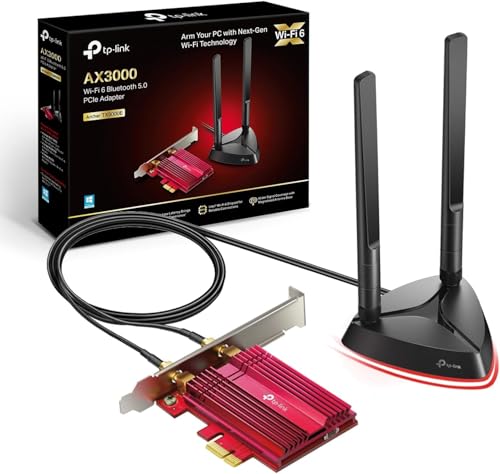
Bluetooth 5.2 is built in, which is a genuine bonus at this price. TP-Link claims 2x faster speed and 4x broader coverage compared to Bluetooth 4.2. For most people that means a wireless headset, mouse, and keyboard that connect more reliably and stay connected further from the machine. The card uses multi-directional antennas on a magnetised base, so you can position them for the best signal rather than being stuck with whatever angle the PCIe slot dictates. The heatsink and gold-plated contacts are a nice touch for a budget card, designed to keep temperatures stable under sustained load.
| Specification | Detail |
|---|---|
| Wi-Fi Standard | Wi-Fi 6 (802.11ax) |
| Bands | Dual-band (2.4 GHz + 5 GHz) |
| Max Speed (5 GHz) | 2402 Mbps (theoretical) |
| Max Speed (2.4 GHz) | 574 Mbps (theoretical) |
| Chipset | Intel Wi-Fi 6 |
| Bluetooth | 5.2 |
| Security | WPA3, WPA2, WPA |
| Backwards Compatibility | 802.11ac/a/b/g/n |
| Interface | PCIe |
| Antenna | Multi-directional, magnetised base |
| OS Support | Windows 11 / 10 (64-bit) only |
| Latency Improvement | Up to 75% lower vs Wi-Fi 5 (spec claim) |
| Price | £39.99 · Details |

Real-World Coverage and Signal Reception
Coverage figures on the box are always best-case. Line of sight, no walls, no interference. Your actual situation involves plasterboard, brick, a microwave, and probably a neighbour's network on the same channel. What the TX3000E's multi-directional antennas with the magnetised base actually give you is some control over that. You can angle the antennas toward the router, which matters when the card is tucked behind a desk or inside a tower case with the antenna mount poking out the back.
Owner reports across the thousand-plus reviews consistently mention strong signal where previous USB Wi-Fi adapters or older PCIe cards were struggling. The Intel chipset's sensitivity is a real factor here; it tends to hold a connection at longer range and through more obstacles than cheaper MediaTek or Realtek-based cards in the same price bracket. People in larger houses with the PC one or two rooms away from the router report solid, stable connections. The magnetised antenna base is a small but practical feature: you can stick the antennas on top of the case or on a metal surface nearby for better line of sight, rather than having them pointing straight up behind the machine.
That said, the TX3000E is still a client adapter, not a router. It receives the signal your router is putting out. If your router is weak or poorly positioned, no adapter will fully compensate. The card does its job well, but the ceiling of your coverage is still set by the router end. What the TX3000E does is make sure your desktop is no longer the weakest link in the chain, which for most people is exactly the problem they're trying to fix.
Sustained Speed Under Load
The 2402 Mbps on 5 GHz is a theoretical peak that requires ideal channel conditions, a Wi-Fi 6 router, and a client device that can use 160 MHz channel width. In a real home, with real interference and a router that's also serving phones and tablets and smart TVs, you won't see that number. What you will see, based on what owners consistently report, is a meaningful step up from Wi-Fi 5 adapters, particularly for sustained throughput rather than burst speed.
Wi-Fi 6 brings OFDMA (Orthogonal Frequency Division Multiple Access) to the table, which is the technology that lets the router divide each channel into smaller resource units and serve multiple devices simultaneously rather than taking turns. For a desktop that's doing something heavy, like a game download running alongside a video call, OFDMA means the router can handle both without the download completely starving the call. The TX3000E supports this when paired with a Wi-Fi 6 router.
TP-Link's spec claims 75% lower latency compared to Wi-Fi 5. That's a headline figure, but the underlying reason is real: Wi-Fi 6's BSS Colouring and improved scheduling reduce the time devices spend waiting for the channel to be clear. For gaming specifically, where latency spikes are more noticeable than raw throughput, this matters. Owners who bought this card specifically to improve their gaming connection report that it delivers on that front. The speed is solid; the consistency is what people notice most.
Mesh and Backhaul: Not Applicable, But Here's What Matters
The TX3000E is a client adapter, not a router or mesh node, so there's no backhaul to discuss in the traditional sense. But the concept is still relevant to why you'd buy this card. If you're running a mesh networking system at home, the TX3000E is how your desktop connects to it. A mesh system with a dedicated backhaul band will serve the TX3000E better than a cheap dual-band mesh that's sharing its backhaul with client traffic, because the desktop's connection is only as good as the node it's talking to.
The practical implication: if you've got a decent Wi-Fi 6 router or mesh system and your desktop has been the bottleneck, the TX3000E fixes that. It brings the desktop up to the same Wi-Fi 6 standard as your phone and laptop, so you're no longer watching a Wi-Fi 5 or Wi-Fi 4 adapter drag down your speeds. The card connects to whatever Wi-Fi network you have; it doesn't change how the router manages its own backhaul or device prioritisation.
One thing worth noting for mesh users specifically: the TX3000E will connect to whichever mesh node has the strongest signal, just like any other client device. If you've got a mesh node closer to the desktop, the card will use it. If you're relying on the main router unit from the other end of the house, you'll get the signal quality that distance and your walls allow. The card's Intel chipset handles roaming between mesh nodes reasonably well according to owner reports, without the sticky client problem that plagues some cheaper adapters.
Device Capacity and the Busy Home Network
As a client adapter, the TX3000E represents one device on your network, not a hub for many. But its Wi-Fi 6 support means it plays nicely in a network that's already busy. MU-MIMO (Multi-User Multiple Input Multiple Output) support means the router can communicate with the TX3000E at the same time as other devices, rather than queuing them up. In a house with 20 or 30 connected devices, this reduces the waiting time that causes latency spikes.
The 75% latency reduction TP-Link quotes is specifically relevant in a congested network. Wi-Fi 5 devices have to wait for the channel to be free before transmitting. Wi-Fi 6 devices with OFDMA can share the channel more efficiently. So in a busy home where the network is already under load from phones, tablets, smart home devices, and streaming boxes, the TX3000E should behave better than a Wi-Fi 5 card would in the same conditions. That's the actual benefit of Wi-Fi 6 in a crowded network, not the raw speed number.
For IoT and smart home load, the TX3000E is irrelevant. Your smart bulbs and thermostats connect directly to the router; this card only affects the desktop it's installed in. But it does mean the desktop isn't competing as aggressively for airtime with everything else on the network. Wi-Fi 6's improved scheduling means the router can handle the desktop's heavier demands alongside the lighter IoT traffic without the desktop dominating the channel and causing problems for other devices.
Wi-Fi Standard and Future-Proofing: The TX3000E WiFi PCIe Review UK Honest Take
Wi-Fi 6 is the right standard for most people buying a PCIe adapter in 2025 and 2026. Wi-Fi 6E adds the 6 GHz band, which is less congested and supports wider channels, but it requires a Wi-Fi 6E router to unlock any of that, and those routers cost significantly more. Wi-Fi 7 is the newest standard, with even higher theoretical speeds and improved multi-link operation, but again: you need a Wi-Fi 7 router, and the price premium is substantial. If you've already got a Wi-Fi 6 router, the TX3000E is the correct match. If you're still on Wi-Fi 5, the TX3000E will work, but you won't see the Wi-Fi 6 improvements until you upgrade the router too.
The Windows-only limitation (Windows 10 and 11, 64-bit) is the most important caveat in the spec sheet. Linux users are out. Mac users are out. If you're running a Windows 10 32-bit install on an older machine, you're out too. This is a card for modern Windows desktops, full stop. That's not unusual for PCIe Wi-Fi adapters, but it's worth being explicit about because some buyers have been caught out by it.
Future-proofing is reasonable but not exceptional. Wi-Fi 6 will be the mainstream standard for several more years; most routers being sold today are Wi-Fi 6. The Intel chipset means driver support through Windows Update rather than depending on TP-Link's update cadence. WPA3 support means you're on the current security standard. You won't need to replace this card because it's outdated for a good while yet. The only scenario where it becomes limiting is if you upgrade to a Wi-Fi 6E or Wi-Fi 7 router and want to take advantage of those extra bands on your desktop, at which point you'd need a newer card. But that's a problem for future you.

Features and QoS
The TX3000E is a client adapter, so there's no QoS, parental controls, or guest network management on the card itself. Those features live in the router. What the card does bring is WPA3 security support, which is the current standard for personal Wi-Fi security. WPA3 uses Simultaneous Authentication of Equals (SAE) instead of the older Pre-Shared Key method, which makes it significantly harder for an attacker to crack your Wi-Fi password through offline dictionary attacks. If your router supports WPA3 and you've been connecting with an older adapter that only does WPA2, upgrading to the TX3000E means your desktop connection is now using the stronger authentication, and pairing it with a good VPN adds a further privacy layer on top of your home network and keeps you protected on public Wi-Fi when you are away from it.
Bluetooth 5.2 is a genuine feature addition. Most PCIe Wi-Fi cards include Bluetooth, but Bluetooth 5.2 is a step up from the 4.2 or 4.0 you'd find on older cards or budget alternatives. The practical difference is range and reliability for wireless peripherals. A wireless headset that was marginal at the edge of Bluetooth 4.2's range should be solid on 5.2. The 4x broader coverage claim is a spec figure, but the underlying improvement in Bluetooth 5's range and connection stability compared to 4.x is well documented by the Bluetooth SIG.
The heatsink and gold-plated contacts are worth a mention. Budget PCIe cards often skip thermal management entirely, which can cause the card to throttle under sustained load. The TX3000E's heatsink keeps temperatures in check during extended use, which is relevant if your PC is doing something intensive for hours at a time. Gold plating on the PCIe contacts improves corrosion resistance and connection reliability over time. These aren't headline features, but they're the kind of build quality detail that separates a card you'll be replacing in two years from one that keeps working.
Firmware, App and Security Updates
Here's where the Intel chipset earns its keep most clearly. Because the TX3000E uses Intel's Wi-Fi 6 chipset, the core drivers are maintained by Intel and distributed through Windows Update. You don't need to manually check TP-Link's website for driver updates, and you're not dependent on TP-Link continuing to support this specific product to get security patches. Intel's wireless driver support track record is solid; they maintain current drivers for their chipsets for considerably longer than most third-party card manufacturers.
TP-Link does provide their own driver package and setup utility, and owner reports are mixed on whether to use it. The Intel driver via Windows Update tends to be more stable for most users. Some owners report that installing TP-Link's bundled software caused conflicts, while others had no issues. The general advice from the owner community is to let Windows Update handle the Intel driver and skip the TP-Link utility unless you specifically need something it provides. That's not a knock on TP-Link; it's just the reality that Intel's own driver is the more reliable path for this chipset.
The reboot question, which is the real reliability test for any networking kit, gets a largely positive answer from owners. The majority of the thousand-plus reviews report stable, set-and-forget operation. The minority who report problems almost universally trace them to driver installation issues, particularly on systems where a previous Wi-Fi adapter left conflicting drivers behind. A clean driver install resolves most reported problems. That's a meaningful distinction: the card itself isn't flaky; the setup process can be, if you don't clean out old drivers first.
Setup and Management
Physical installation is standard PCIe fare: power down, slot the card in, connect the antenna cable to the bracket, screw the bracket in, boot up. The magnetised antenna base means you can position the antennas on top of the case or on any nearby metal surface rather than having them stick straight out the back, which is a small quality-of-life improvement over cards with fixed antenna mounts. The whole physical process takes about five minutes for anyone who's opened a PC before.
Driver installation is where it gets slightly more involved. Windows 10 and 11 will often detect the Intel chipset and install the driver automatically through Windows Update, which is the smoothest path. If that doesn't happen, or if you're doing a fresh install, TP-Link provides drivers on their website and on the included disc (if your machine still has an optical drive, which most don't). The critical step, which several owners mention in their reviews, is making sure any old Wi-Fi adapter drivers are fully removed before installing the new ones. Conflicting drivers are the most common cause of the problems reported in the negative reviews.
There's no ongoing app management required. This isn't a router with a dashboard to check; it's an adapter. Once it's connected to your Wi-Fi network, it just works like any other network connection. Windows' built-in network management handles everything. If you want to do anything more advanced, like set a preferred band or manage Bluetooth devices, Windows' own settings are sufficient. The simplicity is a feature for most buyers; you install it, connect to Wi-Fi, and forget about it.
Ports and Connectivity
The TX3000E connects to the motherboard via a PCIe slot. It's worth confirming your motherboard has a free PCIe slot before buying; on a budget board with a graphics card already installed, the available slots can be limited. The card is physically small, so it'll fit in a PCIe x1 slot, but check your specific board's slot availability and spacing. The antenna cable connects to a bracket that mounts in a rear expansion slot, with the magnetised antenna base attaching externally.
The Bluetooth 5.2 functionality connects via USB internally. Most motherboards have internal USB headers for exactly this purpose, but it's another connection to account for. If your internal USB headers are already fully occupied, you'll have Wi-Fi but no Bluetooth. Again, check your motherboard's available headers before assuming both features will work out of the box. It's a common oversight that shows up in a handful of the owner reviews.
There are no external ports on the card itself. It's a wireless adapter, so the connectivity is all radio-based. The PCIe interface handles the data transfer between the card and the rest of the system, and the theoretical bandwidth of even a PCIe x1 slot is far higher than the card's wireless throughput, so the interface is never the bottleneck. The gold-plated PCIe contacts are the only physical connection that matters for long-term reliability, and TP-Link's decision to include them on a budget card is a sensible one.
How It Compares to the Competition
The main alternatives at this price point are the Intel AX200 and AX210 in bare M.2 or PCIe form, and Fenvi's PCIe adapters which use the same Intel chipsets. The TX3000E sits in a crowded market, but the Intel chipset underneath it puts it in a different category from the MediaTek and Realtek-based cards that dominate the very cheapest end of the market.
The Fenvi FV-AX3000 uses a very similar Intel Wi-Fi 6 chipset and competes directly on price. The main differences are build quality details: the TX3000E's heatsink and gold plating give it a slight edge for long-term reliability, and TP-Link's brand support is more accessible for UK buyers who want a warranty claim process that doesn't involve dealing with a less well-known brand. The Intel AX210-based cards add Wi-Fi 6E (6 GHz band support) but cost more and require a Wi-Fi 6E router to unlock any benefit. For anyone on a Wi-Fi 6 router, the extra spend on an AX210 card is wasted.
The Asus PCE-AX3000 is another direct competitor, also using an Intel Wi-Fi 6 chipset with a similar antenna arrangement. It tends to cost a bit more than the TX3000E for comparable specs. Asus's driver support is good, but the Intel chipset on both cards means Windows Update handles the core driver regardless of brand. The TX3000E's price advantage is the deciding factor for most buyers choosing between them.
| Feature | TP-Link Archer TX3000E | Fenvi FV-AX3000 | Asus PCE-AX3000 |
|---|---|---|---|
| Wi-Fi Standard | Wi-Fi 6 (AX3000) | Wi-Fi 6 (AX3000) | Wi-Fi 6 (AX3000) |
| Chipset | Intel Wi-Fi 6 | Intel Wi-Fi 6 | Intel Wi-Fi 6 |
| Bluetooth | 5.2 | 5.2 | 5.0 |
| WPA3 Support | Yes | Yes | Yes |
| Heatsink | Yes | No | Yes |
| Magnetised Antenna Base | Yes | No | No |
| OS Support | Windows 10/11 (64-bit) | Windows 10/11 (64-bit) | Windows 10/11 (64-bit) |
| Price | £39.99 · Details | Similar price range | Slightly higher |

Final Verdict: TP-Link Archer TX3000E WiFi PCIe Review UK
The TX3000E is one of the most sensible budget networking purchases you can make for a Windows desktop. The Intel Wi-Fi 6 chipset is the key reason: it means driver stability through Windows Update, genuine Wi-Fi 6 performance including OFDMA and MU-MIMO, and long-term support that isn't dependent on TP-Link remembering this product exists. At this price, you'd expect to be compromising somewhere significant. The compromises here are minor: Windows-only support, and a setup process that requires a bit of care around old drivers. Those aren't deal-breakers for the target audience.
The positive overall rating across over a thousand reviews is high for a networking component, and it holds up under scrutiny. The negative reviews cluster around driver installation problems, almost all of which are solvable. The positive reviews consistently mention improved speeds, stable connections, and the Bluetooth 5.2 working well for wireless peripherals. That's a product doing its job for the people it's designed for.
Who should buy this? Anyone with a Windows 10 or 11 desktop that's currently on Wi-Fi 5 or has no Wi-Fi at all, and who has a Wi-Fi 6 router. Also anyone whose onboard Wi-Fi is unreliable or whose current PCIe card is ageing. The magnetised antenna base and the heatsink are small details that add up to a card that's been thought about, not just spec'd to a price point. And the Bluetooth 5.2 means you're not buying a separate Bluetooth adapter on top.
Who should skip it? Linux users, obviously. Anyone on a Mac. Anyone running Windows 10 32-bit. And anyone who wants Wi-Fi 6E or Wi-Fi 7, because this card doesn't do either. If you've already got a Wi-Fi 6E or Wi-Fi 7 router and you want your desktop to use those extra bands, you'll need a more expensive card. But if your router is Wi-Fi 6 and your desktop is the bottleneck, the TX3000E is the right fix at the right price.
Editorial score: 8.5 out of 10. Solid Intel chipset, proper Wi-Fi 6 with OFDMA and MU-MIMO, Bluetooth 5.2, heatsink, magnetised antennas, WPA3. All for a budget price. The Windows-only limitation and the driver setup fussiness keep it off a perfect score, but for the buyer it's aimed at, it's hard to argue with.
What works. What doesn’t.
5 + 4What we liked5 reasons
- Intel Wi-Fi 6 chipset means driver updates via Windows Update, not TP-Link's schedule
- Genuine Wi-Fi 6 with OFDMA and MU-MIMO for better performance on busy networks
- Bluetooth 5.2 included, with improved range over older BT 4.x
- Heatsink and gold-plated contacts add durability at a budget price
- Magnetised antenna base allows flexible positioning for better signal
Where it falls4 reasons
- Windows 10/11 64-bit only; no Linux or macOS support
- Driver setup requires care around old adapter drivers to avoid conflicts
- No Wi-Fi 6E or Wi-Fi 7 support for future router upgrades
- Bluetooth requires internal USB header connection, which may not be available on all boards
Full specifications
10 attributes| Antennas | 2 |
|---|---|
| Device type | pcie-card |
| Ethernet ports | 0 |
| Frequency bands | dual-band |
| HAS bluetooth | 5.0 |
| Launch year | 2019 |
| MAX speed | 3000 |
| Mesh capable | false |
| TOP speed mbps | 3000 |
| Wifi standard | Wi-Fi 6 |
If this isn’t right for you
2 options

Frequently asked
5 questions01Will the TP-Link Archer TX3000E cover my whole house?+
The TX3000E is a client adapter installed in your desktop PC, not a router. It improves how well your desktop connects to your existing Wi-Fi network. Coverage depends on your router and the distance and obstacles between the router and your PC. The Intel chipset and multi-directional antennas with the magnetised base help maximise signal reception, and owners consistently report stronger, more stable connections compared to older adapters. But if your router's coverage is limited, the TX3000E won't extend it; it just makes sure your desktop is no longer the weak link.
02Do I need a Wi-Fi 6 router to get the most from the TX3000E?+
Yes, to unlock the Wi-Fi 6 benefits like OFDMA, MU-MIMO improvements, and lower latency, you need a Wi-Fi 6 router. The TX3000E is fully backwards compatible with Wi-Fi 5 (802.11ac) and older standards, so it will work with any router. But if you're still on Wi-Fi 5, you won't see the Wi-Fi 6 performance improvements until you upgrade the router too. Wi-Fi 6E and Wi-Fi 7 routers are not required and the TX3000E won't use their extra bands.
03Is the TX3000E easy to set up?+
Physical installation is straightforward: slot the card into a PCIe slot, connect the antenna cable, boot up. Driver installation is usually handled automatically by Windows Update, which detects the Intel chipset. The main setup risk is conflicting drivers from a previous Wi-Fi adapter. Owners who had problems almost universally traced them to old drivers not being fully removed first. Clean out old wireless drivers before installing, and the process is smooth. The card itself is not the source of instability in the negative reviews; the setup process is.
04Does the TX3000E work with Linux or macOS?+
No. TP-Link explicitly states Windows 10 and Windows 11 (64-bit) only. There are no official Linux or macOS drivers. Some Linux users have reported partial success with community drivers for the Intel chipset, but this is unsupported and results vary by distribution and kernel version. If you need Wi-Fi on Linux, this is not the card to buy.
05What warranty and returns apply to the TP-Link Archer TX3000E?+
Amazon offers 30-day returns on most items. TP-Link typically provides a 2-year warranty on networking hardware sold in the UK. You're also covered by Amazon's A-to-Z guarantee for purchases made through Amazon. TP-Link's UK support is accessible and well-regarded for a networking brand at this price point.