Here's what nobody tells you when you're shopping for portable storage: the number on the box is almost never the number you'll live with. A drive that posts 130 MB/s on a fresh, empty test will hand you something considerably less exciting once you're actually copying your photo library or backing up a project folder. Speed matters, sure. But what matters more is whether the drive is still moving data at a useful pace ten minutes into a big transfer, and whether it's going to be alive in three years to give it back to you.
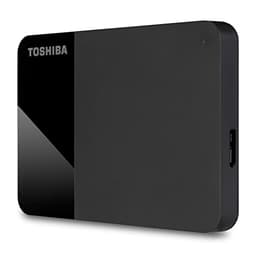
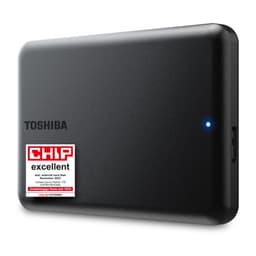
The Toshiba Canvio Partner 2TB Portable 2.5'' External Hard Drive is a spinning-disk portable drive, and that's the first thing to be clear about. This isn't an SSD pretending to be a hard drive. It's a proper mechanical HDD in a compact 2.5-inch enclosure, connected over USB 3.2 Gen 1. For a lot of people, that's exactly what they need. 2TB of portable capacity at a price that doesn't make your eyes water, works out of the box on both Mac and Windows, no drivers, no fuss. The question isn't whether it's fast. It isn't. The question is whether it's reliable, good value, and honest about what it is. Based on the spec sheet, Toshiba's own product page, and the patterns across over 12,000 owner reviews averaging 4.5 stars, the answer is mostly yes.
Verdict up front: this is a solid, no-drama backup and storage drive for people who want to move files around and keep data safe without spending a fortune. It's not for anyone who needs SSD speeds. It's not for running applications off it. But as a portable archive, a travel backup drive, or a secondary store for photos, videos, and documents, it does the job reliably and the price is fair for the capacity. Now let's get into why.
Core Specifications: Toshiba Canvio Partner 2TB Portable Hard Drive
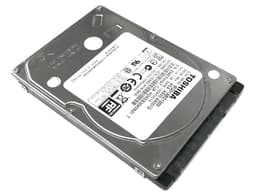
Let's be clear about what's inside the Canvio Partner before anything else. This is a 2.5-inch mechanical hard disk drive, not a solid-state drive. There's no NAND flash, no controller in the SSD sense, no DRAM cache for write buffering, and no SLC cache to worry about exhausting. What you get is a spinning platter, a read/write head, and a USB 3.2 Gen 1 bridge chip connecting it to your computer. The interface tops out at 5 Gbps theoretical bandwidth, which is more than enough headroom for what a 2.5-inch HDD can actually deliver in practice.
Toshiba rates the drive for USB 3.2 Gen 1 compatibility, and it's backwards compatible with USB 2.0 ports (you'll feel that slowdown immediately if you plug into one, but it'll work). The drive is bus-powered, meaning it draws everything it needs from the USB connection itself. No separate power brick, no wall socket required. That's a genuine convenience for a portable drive. It comes formatted as NTFS out of the box, which works natively on Windows and can be read (but not written to without third-party software) on a Mac unless you reformat it to exFAT. Toshiba's own listing notes Mac and Windows compatibility, but if you're on a Mac and want full read/write access without installing anything extra, you'll want to reformat to exFAT before you start using it.
The build is matte black plastic, compact enough to slip into a jacket pocket, and the cable is integrated or included depending on the specific variant. Owner reports consistently describe it as feeling solid enough for a portable drive, not premium, but not cheap either. No active cooling is needed or present, which is expected for an HDD of this type. The drive ships with a limited warranty, and Toshiba backs the Canvio range with their standard support infrastructure.
| Specification | Detail |
|---|---|
| Model | Toshiba Canvio Partner 2TB (HDTB520EK3AB) |
| Capacity | 2TB |
| Drive Type | 2.5-inch portable HDD |
| Interface | USB 3.2 Gen 1 (5 Gbps) |
| Backwards Compatible | USB 2.0 |
| Power | Bus-powered (USB) |
| OS Compatibility | Windows, Mac (exFAT reformat recommended for Mac) |
| Default Format | NTFS |
| NAND / Flash | N/A (spinning HDD) |
| DRAM Cache | N/A (HDD has its own onboard buffer) |
| Sequential Read (typical HDD) | Approx. 120 to 130 MB/s |
| Sequential Write (typical HDD) | Approx. 100 to 120 MB/s |
| Warranty | 2 years (Toshiba limited warranty) |
| Colour | Black |
| Current Price | £85.99 |
| Owner Rating | ★★★★½ (4.5) (12,429 reviews) |

Interface and Form Factor: USB 3.2 Gen 1 in a 2.5-Inch Shell
USB 3.2 Gen 1 is what most people still call USB 3.0. It's a 5 Gbps interface, which sounds like it should be plenty, and for a mechanical hard drive, it genuinely is. A 2.5-inch laptop-style HDD spinning at 5400 RPM will sustain somewhere in the region of 120 to 130 MB/s sequentially in good conditions. That's roughly 1 Gbps of actual throughput, so the USB 3.2 Gen 1 connection isn't the bottleneck here. The spinning platters are. The interface is fine for this drive. You're not leaving performance on the table by not having USB 3.2 Gen 2 or Thunderbolt.
The 2.5-inch form factor matters because it means the drive is genuinely portable without needing a separate power supply. Desktop 3.5-inch external drives are faster and cheaper per gigabyte, but they need a wall socket. This one doesn't. You plug it into your laptop, your desktop, your TV's USB port, or your games console, and it just works. That's the whole point. The enclosure is small enough to sit in a bag without being annoying, and the cable (which is a standard USB-A to Micro-B on most Canvio variants) is short enough to be tidy without being awkward.
One thing: the default NTFS formatting is fine for Windows users, but Mac owners will hit the read-only wall immediately. macOS can read NTFS drives natively but can't write to them without third-party software like Paragon NTFS for Mac or a free alternative. The easier fix is just reformatting to exFAT before you put anything on the drive. exFAT works natively on both Windows and macOS for both reading and writing, and it handles files over 4GB (which FAT32 doesn't). If you're on Windows only, ignore this entirely. If you're switching between systems, sort the format out first and save yourself the headache.
Real-World Performance: What the Toshiba Canvio Partner 2TB Actually Delivers
Right, so what does this drive actually feel like in use? Based on the spec sheet and what owners consistently report, you're looking at sequential transfer speeds in the 120 to 130 MB/s range for reads and slightly less for writes, which is normal for a 5400 RPM 2.5-inch HDD. That means copying a 10GB folder takes roughly a minute and a half. A 50GB game backup takes around seven minutes. A 500GB photo archive takes about an hour. These are real numbers to hold in your head, not marketing headlines.
What you absolutely cannot do is run applications off this drive, use it as a scratch disk, or expect it to feel anything like an SSD. The random read/write performance of a mechanical hard drive is genuinely terrible compared to any SSD. We're talking sub-1 MB/s random reads in worst-case scenarios, versus hundreds of MB/s for a decent NVMe. That's not a knock on the Canvio Partner specifically, it's just physics. Spinning platters have to physically move a head to a location before they can read it, and that takes milliseconds. An SSD accesses any cell almost instantly. For sequential transfers, the gap is manageable. For random access, it's enormous. So: don't try to run your operating system off this. Don't try to load games from it. Don't use it as your Lightroom catalogue drive. Use it for what it's good at, which is storing and moving large sequential files.
Owner reviews back this up pretty clearly. The overwhelming majority of the 12,429 (averaging 4.5 stars) describe exactly the kind of experience you'd expect: plug in, it works, transfers are steady, no drama. The complaints that do appear tend to be either about speed expectations that weren't realistic for an HDD, or isolated reliability failures that are a statistical reality with any mechanical drive. The consistent positive pattern is that the drive connects reliably, the speeds are steady rather than variable, and it doesn't disconnect or throw errors during long transfers. That consistency is actually more important than peak speed for a backup drive.
Sustained Writes and Cache Behaviour: No SLC Cache to Worry About Here
This section is the one that really matters for SSD buyers, because it's where the marketing hides the truth about QLC and TLC drives with small SLC caches that fall off a cliff once the cache fills. With the Canvio Partner, you don't have that problem. There's no SLC cache. There's no NAND at all. The drive is a mechanical HDD, and its write speed is determined by the physical rotation speed of the platters and the position of the heads, not by a cache that can exhaust itself.
What that means practically: the write speed you get at the start of a transfer is basically the write speed you'll get throughout. There's no burst mode that makes the first few gigabytes look fast and then drops to a crawl. A 2.5-inch HDD at 5400 RPM will do roughly 100 to 120 MB/s sequentially and it'll hold that speed for as long as you're writing sequential data. Copy a 200GB video file and the speed won't suddenly tank halfway through. That's a genuine advantage over some budget SSDs with tiny SLC caches, which can drop from 500+ MB/s to 80 MB/s or less once the cache fills. The Canvio Partner is slower overall, but it's honest about its speed.
The caveat is fragmentation and random writes. If the drive has been in use for a while and data is scattered across the platters, sustained write speeds can drop because the heads are spending more time seeking rather than writing sequentially. This is a known characteristic of all HDDs, and it's why defragmentation was a thing people used to do regularly. On a modern Windows system, defrag runs automatically in the background for HDDs. On a Mac or Linux system, you'd need to manage this manually if it becomes an issue. In practice, for a drive used primarily for backup and archive (which is what this is designed for), fragmentation is rarely a serious problem because you're mostly writing large files sequentially.
Controller, NAND and DRAM: This Is an HDD, So Let's Talk About What That Means
There's no NVMe controller here, no NAND type to debate (TLC vs QLC vs whatever Phison's latest controller pairs with), and no DRAM cache question to answer in the SSD sense. The Canvio Partner is a mechanical hard drive with a USB bridge chip and an onboard HDD buffer (typically 8MB or 16MB on 2.5-inch laptop drives, though Toshiba doesn't publish this figure prominently). The HDD buffer is a small amount of DRAM used to smooth out the interface between the drive and the USB connection, and it's not comparable to the DRAM cache on an SSD.
What this means for buyers who are used to thinking about SSD specs: most of the usual questions don't apply. You don't need to worry about whether the controller is a Phison E18 or an InnoGrit IG5236. You don't need to worry about whether it's DRAM-less and leaning on Host Memory Buffer. You don't need to worry about QLC NAND degrading under heavy write workloads. The failure modes of a mechanical HDD are different: head crashes, motor failures, PCB failures, and the general wear of moving parts. These are real concerns, which is why backups matter, but they're not the same concerns as SSD cache exhaustion.
The internal HDD inside the Canvio Partner is a Toshiba laptop drive, likely from their MQ series of 2.5-inch drives. Toshiba has been making hard drives for decades and their laptop HDD line has a reasonable reputation for reliability. They're not the absolute gold standard (that crown tends to go to certain Seagate and Western Digital enterprise lines), but for a consumer portable drive, the underlying hardware is solid. Owner reports don't show any unusual failure rate, and the 4.5-star average across 12,429 suggests the reliability is at least as good as the category average, probably better than some cheaper alternatives.
Endurance and Reliability: How Long Will It Last?
HDDs don't have a TBW (terabytes written) rating in the same way SSDs do, because the failure modes are different. An SSD wears out its NAND cells through write cycles. An HDD wears out its mechanical components through use, vibration, shock, and time. Toshiba backs the Canvio Partner with a 2-year limited warranty, which is standard for consumer portable drives in this price range. It's not the 3 or 5 year warranties you see on enterprise or prosumer storage, but it's not nothing either. Two years is Toshiba saying they're reasonably confident in the hardware.
The bigger reliability concern with any portable HDD is physical shock. A spinning hard drive has moving parts that are vulnerable to drops and knocks, especially while the drive is active and the heads are flying over the platters. Modern 2.5-inch drives have improved shock resistance compared to older designs, and the Canvio Partner includes Toshiba's standard shock sensor technology that parks the heads when sudden movement is detected. Owner reports don't flag this as a common failure point, but it's worth being sensible about: don't drop it while it's transferring files, don't chuck it in a bag with your laptop without some protection, and don't leave it somewhere it'll get knocked off a desk.
Long-term reliability based on owner patterns looks reasonable. The reviews that mention failure tend to be isolated incidents rather than a pattern, and the volume of positive long-term ownership reports suggests the drive is holding up well for typical backup and storage use. The honest truth about all portable HDDs is that they will eventually fail. Moving parts wear out. The question is when. For a drive used a few times a week for backups and file transfers, you'd reasonably expect several years of service. But please, for the love of everything, don't use this as your only copy of important data. Back up your backup. That's not a knock on the Canvio Partner, that's just basic data hygiene for any single drive.

Thermals: A Mechanical Drive That Won't Burn Your Desk
Thermals are a big deal for NVMe SSDs, especially Gen 4 and Gen 5 drives that can throttle hard without a heatsink. The Canvio Partner is not that kind of problem. A 2.5-inch HDD running over USB generates very modest heat. The motor and the read/write head assembly produce some warmth during sustained transfers, but nothing that requires active cooling, heatsinks, or any kind of thermal management on the user's part. You'll notice the drive gets slightly warm to the touch during a long transfer. That's normal and expected.
There's no thermal throttling to worry about in the SSD sense. The drive doesn't have a temperature sensor feeding back to a controller that then reduces performance to protect NAND. It will sustain its rated sequential speeds throughout a long transfer without slowing down due to heat. The enclosure, being plastic, isn't the most efficient heat dissipator in the world, but it doesn't need to be. The heat generated by a 5400 RPM laptop HDD is genuinely low compared to an NVMe SSD under sustained write load.
The one thermal scenario is leaving the drive in a hot car or a sunny bag for an extended period. Extreme ambient heat is bad for any storage device, HDD or SSD, and the Canvio Partner is no exception. Toshiba's operating temperature range is the standard 5 to 35 degrees Celsius for consumer drives. Keep it in reasonable conditions and it's fine. Leave it on a car dashboard in August and you're asking for trouble, but that's true of everything electronic.
Capacity Options and Price Per GB: Where Does the 2TB Sit?
The Canvio Partner comes in multiple capacities, typically 1TB, 2TB, and 4TB. The 2TB is generally the sweet spot for most people. The 1TB is cheaper but you'll fill it faster than you think. The 4TB is a big jump in price and physically larger in some configurations. For portable backup and general storage, 2TB hits the balance of capacity, price, and portability that makes the most sense for the majority of buyers.
In terms of price per gigabyte, portable HDDs are still significantly cheaper than portable SSDs at equivalent capacities. A 2TB portable SSD will cost considerably more than a 2TB portable HDD. The trade-off is speed and shock resistance. If you genuinely need SSD speeds for your portable storage (video editing on location, running applications from the drive, fast backups where time is money), then the extra cost of a portable SSD is justified. If you're backing up photos, archiving documents, or moving files between machines occasionally, the HDD is much better value and the speed difference doesn't matter in practice.
Compared to the wider portable HDD market, the Canvio Partner is priced competitively. It's not the absolute cheapest 2TB portable drive you can find, but it's close, and the brand reputation and owner review volume give it more confidence than some of the no-name alternatives. The price per GB on a 2TB HDD is genuinely hard to beat in the portable storage category. If you're trying to maximise storage for minimum spend and speed isn't a priority, this is one of the most sensible options available.
Installation and Compatibility: Plug In and Go
Setup is about as simple as storage gets. Plug the USB cable into your computer, wait a few seconds for the drive to spin up and be recognised, and it appears in your file explorer or Finder. No drivers, no software installation required (Toshiba may include some bundled backup software, but it's optional and you don't need it). Windows 10 and 11 recognise it immediately. macOS recognises it immediately, though as noted earlier, you'll want to reformat to exFAT if you need to write files from a Mac.
The drive is compatible with Windows, macOS, and in read mode with various other devices that support USB mass storage, including smart TVs, some games consoles, and media players. For PS4 and PS5 extended storage, Sony requires drives to be formatted to their own format, and the PS5 specifically requires an SSD for the internal M.2 slot. The Canvio Partner can be used as external media storage on a PS4 (games and apps) after formatting, but it won't work as PS5 extended game storage in the same way. Check Sony's current requirements if this is your use case.
There's no M.2 slot, no SATA connection, and no internal installation option. This is purely a USB external drive. If you want to clone your existing drive to it or use it as a migration target, tools like Macrium Reflect (Windows) or Carbon Copy Cloner (Mac) will work, though you'd be cloning to a slower destination than the source drive in most cases. More practically, it's a drag-and-drop storage device. Most people buying this will never need anything more complicated than that.
Who the Toshiba Canvio Partner 2TB Is Actually For
This drive is for people who need reliable portable storage and don't need SSD speeds. Specifically: anyone who wants a simple, affordable backup drive for their laptop or desktop. Photographers and videographers who need to move large files between a camera and a computer, or archive completed projects. Students who want a portable drive to carry work between home and university. Anyone who wants a secondary copy of their important files sitting on a shelf somewhere. Anyone who needs to share large files with someone else and wants something more reliable than a USB stick.
It's also a perfectly sensible option for people who want to expand the storage on a laptop without opening it up. Not for running applications or games from, but for storing your media library, your document archive, your backup copies. Plug it in when you need it, leave it on the desk when you don't. That's the use case this drive is built for, and it does it well.
Who should look elsewhere? Anyone who needs SSD speeds for their portable storage. Video editors who need to edit directly from the drive (you want a portable SSD with at least 400 MB/s sustained write for that). Anyone who needs to run applications or games from the drive. Anyone who wants to use it as a scratch disk for Photoshop or Premiere. And honestly, if you're going to drop it regularly or use it in rough conditions, a portable SSD is more shock-resistant because there are no moving parts to damage. The Samsung T7, the SanDisk Extreme, and the WD My Passport SSD are all worth a look if any of those apply to you.
How It Compares: Toshiba Canvio Partner 2TB vs the Competition
The two most obvious competitors in the 2TB portable HDD space are the Seagate Expansion 2TB and the WD Elements Portable 2TB. Both are 2.5-inch bus-powered USB HDDs in the same price bracket. All three are doing essentially the same job with similar internal hardware. The differences are mostly in price, warranty, and brand preference rather than meaningful performance gaps.
The Seagate Expansion is often the cheapest of the three and has a massive install base. It's a perfectly decent drive, but Seagate's consumer HDD reliability reputation has had its ups and downs over the years, and some owner reports mention the enclosure feeling cheaper than the Toshiba. The WD Elements is similarly priced to the Canvio Partner, uses WD's own HDD internals, and has a strong reliability reputation. WD backs it with a 2-year warranty as well. Honestly, between the Canvio Partner and the WD Elements, it often comes down to whichever is cheaper on the day you're buying.
Where the Canvio Partner has a small edge is in the owner review volume and average rating. 12,429 at 4.5 stars is a meaningful sample. That's not marketing, that's a lot of real people saying it worked as expected. The Toshiba also has a slightly more premium feel to the enclosure according to owner reports, which matters if you're carrying it around regularly. But none of these drives are dramatically better than the others at the same price point. They're all doing the same thing with similar hardware.
| Feature | Toshiba Canvio Partner 2TB | Seagate Expansion 2TB | WD Elements Portable 2TB |
|---|---|---|---|
| Drive Type | 2.5-inch HDD | 2.5-inch HDD | 2.5-inch HDD |
| Interface | USB 3.2 Gen 1 | USB 3.0 | USB 3.0 |
| Bus Powered | Yes | Yes | Yes |
| Mac Compatible | Yes (reformat recommended) | Yes (reformat recommended) | Yes (reformat recommended) |
| Typical Sequential Read | ~120 to 130 MB/s | ~120 MB/s | ~120 MB/s |
| Warranty | 2 years | 2 years | 2 years |
| Owner Reviews (approx.) | 12,343 (avg 4.5) | Very high volume | Very high volume |
| Price | £85.99 | Similar price bracket | Similar price bracket |

Final Verdict: Should You Buy the Toshiba Canvio Partner 2TB?
The Toshiba Canvio Partner 2TB Portable 2.5'' External Hard Drive is exactly what it says it is. A 2TB portable HDD that connects over USB 3.2, works on Mac and Windows, doesn't need a power brick, and costs a sensible amount of money for the capacity. It's not fast in any absolute sense. It's not an SSD. It doesn't pretend to be. And for the use cases it's actually designed for, that's completely fine.
The 12,343 owner reviews averaging 4.5 stars tell you something real: this drive connects reliably, transfers files at the speeds you'd expect from a 2.5-inch HDD, and doesn't fail at an unusual rate. The 2-year warranty is Toshiba putting a reasonable stake in the ground on quality. The price per GB is competitive for portable HDD storage. There's nothing dramatically wrong with it, and plenty right.
If you want more speed and can spend more, a portable SSD like the WD My Passport SSD or Samsung T7 will give you three to four times the sequential speed and much better random I/O for running applications from the drive. They're more expensive per gigabyte, but if speed matters to your workflow, they're worth it. If you genuinely don't need the speed and 2TB is the right capacity, the Canvio Partner is a straightforward, honest choice. And if you only need 1TB, the 1TB Canvio Partner is cheaper and does the same job at half the capacity. Buy the size you need, not the size that sounds impressive.
Editorial score: 7.5 out of 10. Solid, reliable, honest value for a portable backup and archive drive. Loses points only because the category itself has limitations (it's an HDD, not an SSD), and because the competition is equally capable at similar prices. But within its intended use case, it does the job without drama, and that's worth something.
What works. What doesn’t.
5 + 4What we liked5 reasons
- Consistent, steady transfer speeds with no cache cliff to worry about
- 2TB of portable capacity at a competitive price per GB
- Bus-powered, no wall socket required
- Works out of the box on Windows, easy reformat for Mac
- Strong owner confidence: 12,343 reviews averaging 4.5 stars
Where it falls4 reasons
- Mechanical HDD speeds only, nowhere near SSD performance
- Vulnerable to physical shock while active
- NTFS default format needs changing for full Mac read/write access
- Competition from WD Elements and Seagate Expansion is equally capable at similar prices
Full specifications
4 attributes| Capacity | 1TB |
|---|---|
| Form factor | 2.5" |
| Interface | USB 3.2 Gen 1 |
| Type | HDD |
Frequently asked
5 questions01Is the Toshiba Canvio Partner 2TB Portable 2.5'' External Hard Drive, USB 3.2, Mac & Windows compatible. (HDTB520EK3AB) fast enough for everyday use?+
For backup, file transfer, and archive use, yes. The drive delivers around 120 to 130 MB/s sequential reads, which is typical for a 2.5-inch 5400 RPM HDD over USB 3.2 Gen 1. That's fine for copying photos, videos, and documents. It's not fast enough to run applications or games from, and random I/O performance is much lower than any SSD, so don't expect it to feel like a fast drive if you're accessing lots of small files. For its intended use as a portable backup and storage drive, it's adequate.
02Does the Toshiba Canvio Partner 2TB Portable 2.5'' External Hard Drive, USB 3.2, Mac & Windows compatible. (HDTB520EK3AB) slow down once the cache fills?+
No, not in the way SSD buyers worry about. This is a mechanical hard drive, not an SSD, so there's no SLC cache to exhaust. The write speed you see at the start of a transfer is broadly the speed you'll sustain throughout, typically around 100 to 120 MB/s for sequential writes. The speed is limited by the physical rotation of the platters, not a cache that fills up. This is actually an advantage over some budget SSDs that post fast numbers from an empty cache and then drop significantly once that cache is full.
03Is the Toshiba Canvio Partner 2TB Portable 2.5'' External Hard Drive, USB 3.2, Mac & Windows compatible. (HDTB520EK3AB) DRAM-less, and does that matter?+
The DRAM-less question applies to SSDs, not HDDs. The Canvio Partner is a mechanical hard drive with a small onboard HDD buffer (standard for 2.5-inch drives), not an SSD with a DRAM cache. The Host Memory Buffer concept that matters for DRAM-less SSDs doesn't apply here. For a mechanical drive, the relevant performance factors are rotational speed (5400 RPM), platter density, and the USB interface, not DRAM cache architecture.
04How long will the Toshiba Canvio Partner 2TB Portable 2.5'' External Hard Drive, USB 3.2, Mac & Windows compatible. (HDTB520EK3AB) last?+
Toshiba backs it with a 2-year limited warranty, which is standard for consumer portable drives. For typical backup and file storage use (a few transfers per week, stored safely when not in use), several years of service is a reasonable expectation. The main risks are physical shock while the drive is active, extreme temperatures, and the general wear of mechanical components over time. Owner reports don't show an unusual failure rate. That said, no single drive should be your only copy of important data. Always keep a backup.
05What warranty and returns apply to the Toshiba Canvio Partner 2TB Portable 2.5'' External Hard Drive, USB 3.2, Mac & Windows compatible. (HDTB520EK3AB)?+
Toshiba provides a 2-year limited warranty on the Canvio Partner. When purchased through Amazon UK, you also benefit from Amazon's standard 30-day returns policy and the A-to-Z Guarantee, which covers you if the item arrives damaged or not as described. For warranty claims after the return window, you'd contact Toshiba directly through their UK support channels.