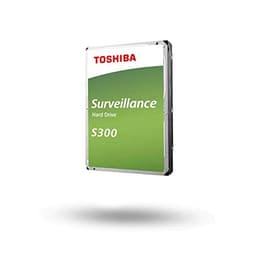

Surveillance drives occupy a strange corner of the storage market. The headline numbers look modest compared to what a flashy NVMe will post, but that's rather the point. The Toshiba 1TB S300 Surveillance HDD Bulk isn't trying to win a benchmark race. It's designed to spin continuously, write camera footage reliably, and not fall over after six months of being ignored in a cupboard. The question worth asking isn't whether it's fast. It's whether it's the right tool for the job, and whether the alternatives do it better for less.
The short answer is that the S300 does what it says. Rated for 24/7 operation, equipped with Toshiba's RV sensor technology for multi-camera environments, and carrying a 4.5-star average across 1,884 owner reviews, this is a drive that's earned its reputation the boring way. Through not breaking. That said, 'boring and reliable' isn't the same as 'automatically the best choice', and there are a couple of competitors worth stacking it against before you hand over your money.
Core Specifications: Toshiba 1TB S300 Surveillance HDD Bulk
The S300 is a traditional spinning hard drive, not an SSD. That's important context if you've been browsing NVMe listings and landed here by accident. It connects via SATA, sits in a standard 3.5-inch bay, and spins magnetic platters to read and write data. Toshiba rates it at up to 160 MB/s sequential read and up to 150 MB/s sequential write. Those are respectable numbers for a surveillance-class mechanical drive, though they're nowhere near what even a budget SATA SSD will do, let alone NVMe.
What matters more than those peak figures is the drive's design intent. The S300 is built for always-on, continuous recording workloads. It's not optimised for random I/O or fast boot times. It's optimised for sustained sequential writes, which is exactly what a DVR or NVR system demands when it's logging footage from multiple cameras around the clock. Toshiba's RV (Rotational Vibration) sensor technology is specifically there to maintain stable performance when multiple drives are installed in the same enclosure, because vibration from neighbouring drives can cause read/write errors in standard desktop HDDs.
The drive ships as a bulk unit, which means no retail packaging, no mounting screws, and no SATA cable in the box. That's standard practice for bulk/OEM storage and it keeps costs down. Owner reports confirm the drives arrive well-padded despite the minimal packaging, and the lack of accessories is a non-issue if you're fitting it into an existing DVR or NAS enclosure that already has what you need.
| Specification | Detail |
|---|---|
| Brand | Toshiba |
| Model | S300 Surveillance HDD |
| Capacity | 1TB |
| Form Factor | 3.5-inch |
| Interface | SATA |
| Drive Type | HDD (mechanical) |
| Sequential Read | Up to 160 MB/s |
| Sequential Write | Up to 150 MB/s |
| Operation | 24/7 continuous |
| RV Sensor | Yes |
| Target Use | Surveillance, DVR, NVR |
| Packaging | Bulk (OEM) |
| Rating | ★★★★½ (4.5) (1,873 reviews) |
Interface and Form Factor
The S300 uses a standard SATA interface and comes in the 3.5-inch form factor that's been the default for desktop hard drives for decades. If you're fitting this into a dedicated DVR unit, a standalone NVR, or a desktop NAS enclosure, it'll slot straight in without any adapters or faff. Most surveillance systems are built around 3.5-inch SATA bays precisely because drives like this exist. Compatibility is essentially a non-issue.
What it won't do is fit into a laptop (most modern laptops have no 3.5-inch bay and no SATA port anyway), and it's not going anywhere near a PS5 or any other console storage slot. This is desktop and enclosure territory, full stop. If you need portable surveillance storage or something for a compact NVR with only 2.5-inch bays, you're looking at the wrong drive. your enclosure's bay size before ordering, because a surprising number of compact NVR units only accept 2.5-inch drives.
The SATA interface itself is not a bottleneck here. SATA III tops out at 600 MB/s, and the S300's rated speeds of 160 MB/s read and 150 MB/s write sit well within that ceiling. You're not going to be constrained by the interface. The mechanical nature of the drive is what sets the performance ceiling, not the connection. And for surveillance workloads, that's completely fine. Continuous HD camera feeds don't demand anywhere near 150 MB/s of sustained write throughput even when you're running a dozen cameras simultaneously. The bottleneck in most home and small-business surveillance setups is the network or the camera encoding, not the drive.
Real-World Performance
For its intended purpose, the S300's real-world performance is exactly what you'd want. Surveillance recording is an almost entirely sequential write workload. Cameras encode footage and stream it to the drive in long, continuous blocks. That's the one thing mechanical HDDs are still genuinely good at, and the S300's 150 MB/s sustained write capability is more than adequate for even demanding multi-camera setups running 4K or high-bitrate 1080p streams. Owner reports consistently back this up, with users running four, eight, and even sixteen-channel NVR systems reporting stable, uninterrupted recording without dropped frames or write errors.
Where the S300 is not going to impress you is anything involving random I/O. Booting an operating system, launching applications, loading games. Mechanical drives have seek times measured in milliseconds, and a typical HDD will manage somewhere in the region of 100 to 150 random read IOPS under real workloads. A budget SATA SSD will do tens of thousands. That gap is enormous, and it's why HDDs feel so sluggish as system drives. But here's the thing: nobody is buying an S300 as a boot drive. It's a surveillance drive. Judging it on random I/O is like criticising a lorry for being slow around a roundabout.
The advanced formatting technology Toshiba mentions is worth a brief note. Modern drives use Advanced Format with 4K physical sectors, and some older DVR firmware has historically had compatibility issues with this. Toshiba's implementation is designed to work cleanly with a wide range of DVR and NVR systems, and owner reports suggest compatibility problems are rare. A handful of users mention needing a firmware update on their DVR unit, but that's a DVR issue rather than a drive issue. If you're running a modern NVR system, you almost certainly won't see any problems.
Sustained Writes and Cache Behaviour
This section is where SSD reviews get painful, because SLC cache exhaustion is the dirty secret most drive marketing glosses over. With an HDD like the S300, the dynamic is different but worth understanding properly. Mechanical drives don't have an SLC cache in the SSD sense. They may have a small DRAM buffer (typically 32MB to 64MB on a 1TB drive in this class) that acts as a write cache to smooth out small bursts of data, but there's no large SLC cache that fills up and then causes a dramatic speed cliff. What you get instead is a consistent, predictable write speed that reflects the actual mechanical capability of the drive.
That consistency is genuinely valuable for surveillance. An SSD with a 10GB SLC cache might write at 500 MB/s until the cache fills, then drop to 80 MB/s or lower on QLC NAND. For a surveillance system writing continuously for hours or days, that post-cache speed is what actually matters, and on a QLC SSD it can be worse than a decent HDD. The S300 doesn't have that cliff. It writes at roughly 150 MB/s and keeps doing so, hour after hour, day after day. That predictability is a feature, not a limitation, when your use case is 24/7 continuous recording.
Owner reports from users running the S300 in multi-camera NVR setups consistently note the absence of recording interruptions or sudden slowdowns over extended periods. That tracks with the drive's design. Toshiba built the S300 for exactly this sustained-write scenario, and the RV sensor technology adds another layer of protection by compensating for the vibration that can cause mechanical drives to slow down or produce errors when multiple units are running in the same enclosure. If you've ever had a standard desktop drive fail in a multi-bay NAS because of vibration-induced read errors, you'll appreciate why that sensor matters.
Controller, NAND and Drive Technology
The S300 is a mechanical hard drive, so the SSD concepts of NAND type (TLC vs QLC), NVMe controllers, and DRAM cache in the SSD sense don't apply here. Instead, what matters is the drive's internal engineering: the number of platters, the read/write head design, the firmware tuning, and the RV sensor implementation. Toshiba doesn't publicly disclose the full internal spec of the S300's platter count or exact DRAM buffer size, which is typical for drives in this segment.
What Toshiba does tell us is that the S300 uses RV sensor technology. This is a real differentiator from standard desktop drives. Rotational vibration is a genuine problem in multi-drive enclosures. When several drives spin simultaneously, the vibration each generates can interfere with the others' head positioning, causing read/write errors and performance degradation. The RV sensor detects this vibration and adjusts the drive's servo system to compensate. Western Digital's Purple and Seagate's SkyHawk lines use similar technology. It's not marketing fluff. It's the reason you shouldn't just bung a standard desktop WD Blue or Seagate Barracuda into a multi-camera NVR and expect trouble-free operation.
The firmware tuning on the S300 also matters. Standard desktop drives are optimised for a mixed workload of reads and writes, with error recovery routines that can take several seconds to complete. In a RAID or NVR context, that long error recovery time can cause the controller to drop the drive from the array. Surveillance-class drives like the S300 tune their error recovery behaviour for continuous-write environments, trading some of the aggressive error correction of a desktop drive for faster recovery that keeps the recording stream intact. It's a deliberate engineering choice, and it's the right one for this use case.
Endurance and Reliability
Toshiba's S300 is rated for 24/7 continuous operation, and that's the headline endurance claim. For a 1TB drive in a home or small-business surveillance context, that's the spec that matters most. A standard desktop HDD is typically rated for something like 2,400 power-on hours per year. The S300, like other surveillance-class drives, is built to handle the full 8,760 hours a year that a continuously running system demands. That's a meaningful engineering difference, not just a badge Toshiba slapped on the box.
The 4.5-star average across 1,884 owner reviews is a strong reliability signal. At that volume of reviews, statistical noise gets smoothed out and you're seeing a genuine picture of how the drive behaves in the real world. The negative reviews, where they exist, tend to cluster around a small number of DOA units (which happens with any drive at scale) and a handful of failures after extended use. That's not unusual or alarming. What's notable is the absence of a pattern of early failures or widespread reliability complaints, which would show up clearly in a review set this large if it existed.
Toshiba as a brand has a long history in storage, and the S300 line sits within their broader portfolio of surveillance and NAS-oriented drives. The bulk packaging means you're not getting a retail warranty card in the box, so it's worth confirming the warranty terms with your seller before purchase. Amazon's standard 30-day return window and A-to-Z guarantee apply regardless, which gives you a reasonable safety net if the drive arrives faulty. For longer-term peace of mind, checking Toshiba's official support pages for the S300's warranty terms is worth doing before you commit.

Thermals
Mechanical hard drives run warm under sustained load, and the S300 is no exception. A 3.5-inch HDD spinning continuously in a surveillance enclosure will typically reach temperatures in the 35 to 45 degree Celsius range under normal ambient conditions. That's within safe operating parameters for a drive like this, and Toshiba's design accounts for continuous operation at those temperatures. You don't need a heatsink in the SSD sense, because the drive's metal casing dissipates heat passively.
What does matter is airflow in your enclosure. A DVR or NVR crammed into a tight space with no ventilation can push drive temperatures higher than ideal, and sustained high temperatures accelerate mechanical wear. If you're mounting the S300 in a custom enclosure or a repurposed desktop case, make sure there's at least some passive airflow across the drive. Most dedicated surveillance enclosures are designed with this in mind and will have ventilation slots or a small fan. Owner reports don't flag thermal issues as a common complaint, which suggests the drive handles its operating environment well in typical surveillance setups.
One thing for anyone considering this drive in a multi-bay NAS enclosure: the RV sensor helps with vibration-induced performance issues, but thermal management in a tightly packed multi-drive enclosure is still your responsibility as the installer. Four drives running 24/7 in a small NAS box generate meaningful heat. If your NAS has a fan, keep it clean. If it doesn't, think carefully about ambient temperature. The S300 is built to run continuously, but 'built to run continuously' assumes reasonable operating conditions, not a sealed box in a boiler room.
Capacity Options and Price Per GB
The S300 range covers multiple capacities, from 1TB up to higher capacities suitable for larger surveillance installations. The 1TB model reviewed here is the entry point and makes sense for home setups running two to four cameras at 1080p. How much storage you actually need depends heavily on your camera count, resolution, frame rate, and how many days of footage you want to retain. A rough rule of thumb: a single 1080p camera at standard surveillance bitrates uses around 10 to 15GB per day. So 1TB gives you somewhere between 60 and 100 days of single-camera footage, or proportionally less if you're running multiple cameras.
For most home users with four cameras, a 1TB drive will retain a week or two of footage before the DVR starts overwriting the oldest recordings. That's often enough, but if you need longer retention or you're running more cameras at higher resolution, stepping up to a 2TB or 4TB S300 is the sensible move rather than stacking multiple 1TB drives. The price-per-GB on larger capacity drives in this class tends to be more favourable, and fewer drives means less vibration and simpler management.
At its current price point, the 1TB S300 sits in reasonable territory for a surveillance-rated drive. Standard desktop HDDs of the same capacity will be cheaper, but they lack the 24/7 rating and RV sensor. The price premium over a basic desktop drive is modest and justified by the engineering differences. Compared to purpose-built surveillance SSDs, the S300 is considerably cheaper per gigabyte, which matters when you're buying storage purely for sequential write workloads and don't need SSD-level random I/O performance.
Installation and Compatibility
Fitting the S300 into a DVR or NVR is about as straightforward as storage installation gets. It's a 3.5-inch SATA drive. You slide it into the bay, connect the SATA data cable and the power cable, and you're done. Most dedicated surveillance enclosures have tool-free drive bays or simple screw mounts. The bulk packaging means no mounting screws are included, but the standard screws that came with your enclosure will work fine, and M3 screws are available anywhere.
Compatibility with DVR and NVR systems is broad. Toshiba's advanced formatting implementation is designed to work with a wide range of surveillance hardware, and owner reports confirm compatibility with popular brands including Hikvision, Dahua, and similar systems. A small number of users mention that older DVR firmware needed updating to recognise the drive correctly, but this is increasingly rare as manufacturers push firmware updates that support modern drive formats. If you're running a DVR that hasn't had a firmware update in several years, it's the manufacturer's compatibility list before ordering.
The drive is not suitable for laptop installation (wrong form factor and no SATA port on most modern laptops), and it won't work in an M.2 slot. It's also not a good fit for a primary system drive in a desktop PC, not because it can't physically connect, but because the performance characteristics are wrong for that use case. As a secondary data drive in a desktop, it would work, but you'd be paying a surveillance premium for a use case that a standard desktop HDD serves just as well for less money. Use the right tool for the right job.
Who It's For
The S300 is for anyone running a home or small-business surveillance system who wants a drive that's actually designed for the job. If you've got a DVR or NVR and you're currently running a standard desktop hard drive in it, or you're about to buy one, the S300 is a better choice. The 24/7 rating and RV sensor technology aren't marketing noise. They reflect genuine engineering differences that matter when a drive is running continuously for years rather than the intermittent workload a desktop drive is designed for.
It's also a sensible choice for anyone building a small NAS for media storage or backup, where the workload is predominantly large sequential writes and the drive will run continuously. The S300 isn't a NAS-optimised drive in the same way that Seagate's IronWolf or WD's Red lines are, but for light NAS use it performs well and costs less. Owner reports from NAS users are generally positive, with the caveat that for demanding multi-user NAS environments with heavy random I/O, a proper NAS drive is the better fit.
Who should look elsewhere? Anyone who needs this as a primary system drive, a gaming drive, or anything where random I/O performance matters. Also anyone who needs 2.5-inch form factor for a compact enclosure. And if your surveillance setup is modest enough that a single camera feeds into a cloud service or a USB-connected external drive, the S300 is overkill. It's a purpose-built tool, and its value is clearest when the purpose matches.
How the Toshiba 1TB S300 Surveillance HDD Bulk Compares
The two most obvious competitors to the S300 at 1TB are the Seagate SkyHawk 1TB and the Western Digital Purple 1TB. Both are purpose-built surveillance drives with similar feature sets: 24/7 operation ratings, vibration compensation technology, and compatibility with major DVR and NVR platforms. The market for surveillance HDDs is not huge, so these three dominate the conversation.
The Seagate SkyHawk brings ImagePerfect firmware, which Seagate claims optimises the drive specifically for surveillance workloads by reducing the likelihood of dropped frames during recording. It also supports a higher camera count than the S300 on paper, though for home and small-business use that distinction rarely matters in practice. The WD Purple uses WD's AllFrame technology for similar aims. Both competitors are well-regarded and have their own strong owner review bases. The S300 is not definitively better or worse than either. It's a genuine three-way tie at this capacity and price tier, with the choice often coming down to brand preference, current pricing, and which drive your NVR manufacturer recommends.
What the S300 doesn't have to compete with is any SSD alternative at this price for this use case. Surveillance SSDs exist but cost significantly more per gigabyte, and the sequential write workload of surveillance recording is one of the few remaining areas where a mechanical drive's cost advantage over flash storage is clear enough to make the HDD the rational choice. If you're recording from a handful of cameras and storing weeks of footage, spending SSD money on that storage makes no sense.
| Feature | Toshiba 1TB S300 Surveillance HDD Bulk | Seagate SkyHawk 1TB | WD Purple 1TB |
|---|---|---|---|
| Form Factor | 3.5-inch SATA | 3.5-inch SATA | 3.5-inch SATA |
| Sequential Read | Up to 160 MB/s | Up to 180 MB/s | Up to 180 MB/s |
| Sequential Write | Up to 150 MB/s | Not separately rated | Not separately rated |
| 24/7 Operation | Yes | Yes | Yes |
| Vibration Compensation | RV Sensor | Yes (multi-drive) | AllFrame (vibration management) |
| Surveillance Optimised | Yes | Yes (ImagePerfect) | Yes (AllFrame) |
| Packaging | Bulk / OEM | Retail and OEM | Retail and OEM |
Final Verdict
The Toshiba 1TB S300 Surveillance HDD Bulk does exactly what it's supposed to do, and it does it reliably. That sounds like faint praise, but in the surveillance storage market, consistent and boring is the highest compliment you can pay. The 24/7 operation rating, RV sensor technology, and surveillance-tuned firmware make it a genuinely better fit for a DVR or NVR than a standard desktop drive, and the owner review base of nearly 1,873 at 4.5 stars confirms that real-world reliability matches the spec sheet's promises.
The performance numbers, 160 MB/s read and 150 MB/s write, are adequate for the workload. Sequential writes for camera footage don't need to be fast, they need to be consistent and sustained, and the S300 delivers both. The RV sensor is a real differentiator for multi-camera setups where vibration from neighbouring drives would cause problems with a standard desktop HDD. And the advanced formatting compatibility means it'll work cleanly with modern DVR and NVR systems without the firmware headaches that occasionally plague older drives.
The honest caveat is that the Seagate SkyHawk and WD Purple are equally capable competitors at this capacity. If the S300 is priced competitively against those two at the time you're reading this, it's an easy recommendation. If one of the others is meaningfully cheaper, buy that one instead. The differences between these three drives in a home surveillance context are smaller than the marketing would have you believe. What matters is that you buy a drive that's actually rated for surveillance use rather than a standard desktop drive, and all three tick that box.
If your surveillance setup is genuinely minimal, say one or two cameras feeding into a basic DVR, a standard desktop HDD will probably serve you fine and cost less. The S300's engineering advantages are most valuable in multi-camera, multi-drive environments running continuously. For a single-camera home setup that only records when motion is detected, the premium over a basic desktop drive is harder to justify. Know what you actually need before you buy.
What works. What doesn’t.
5 + 3What we liked5 reasons
- Rated for 24/7 continuous operation, unlike standard desktop HDDs
- RV sensor technology handles multi-drive vibration properly
- Consistent 150 MB/s sustained write speed without cache cliff behaviour
- Strong 4.5-star average across nearly 1,900 real owner reviews
- Broad compatibility with DVR and NVR systems via advanced formatting
Where it falls3 reasons
- No meaningful advantage over Seagate SkyHawk or WD Purple at this capacity
- Bulk packaging means no accessories, mounting screws, or warranty card in box
- Overkill and overpriced for single-camera or motion-only recording setups
Full specifications
9 attributes| Capacity GB | 1000 |
|---|---|
| Dram cache | false |
| Form factor | 3.5" |
| Interface | SATA III |
| Read speed MBS | 160 |
| TBW | 180 |
| Type | HDD |
| Warranty years | 3 |
| Write speed MBS | 150 |
If this isn’t right for you
1 optionsFrequently asked
5 questions01Is the Toshiba 1TB S300 Surveillance HDD Bulk fast enough for everyday use?+
For its intended purpose, yes. The S300 is rated at up to 160 MB/s sequential read and 150 MB/s sequential write, which is more than adequate for continuous surveillance recording from multiple cameras. For general desktop use like booting an OS or loading applications, it's not the right tool. Mechanical drives have slow random I/O compared to any SSD, and that's what makes a system feel fast or sluggish. The S300 is optimised for sustained sequential writes, not random access performance.
02Does the Toshiba 1TB S300 Surveillance HDD Bulk slow down once the cache fills?+
Unlike SSDs with SLC caches that can drop sharply to native QLC or TLC speeds after the cache exhausts, the S300 is a mechanical drive with a small DRAM write buffer rather than a large SLC cache. This means it doesn't have the dramatic cache cliff that affects budget SSDs. Its write speed is consistent and predictable at around 150 MB/s, which is exactly what you need for uninterrupted 24/7 surveillance recording. That consistency is one of the genuine advantages of a purpose-built surveillance HDD for this workload.
03Is the Toshiba 1TB S300 Surveillance HDD Bulk DRAM-less, and does that matter?+
The S300 is a mechanical hard drive, so the DRAM-less versus DRAM-cache distinction that applies to SSDs works differently here. HDDs typically include a small DRAM buffer (commonly 32MB to 64MB) to smooth out write bursts, but this is not the same as the large SLC cache found in SSDs. For surveillance workloads, this distinction doesn't matter in the way it would for an SSD used as a system drive. The S300's consistent mechanical write speed is what sustains recording performance, not a cache layer.
04How long will the Toshiba 1TB S300 Surveillance HDD Bulk last?+
The S300 is rated for 24/7 continuous operation, meaning it's engineered for the full 8,760 power-on hours per year that a surveillance system demands. Standard desktop HDDs are typically rated for around 2,400 hours per year. Real-world longevity depends on operating temperatures, vibration environment, and workload, but the owner review base of nearly 1,900 ratings at 4.5 stars shows no widespread pattern of early failures. For warranty terms, check with your seller at point of purchase, as the bulk packaging does not include a warranty card.
05What warranty and returns apply to the Toshiba 1TB S300 Surveillance HDD Bulk?+
The drive ships in bulk OEM packaging without a retail warranty card. Amazon's standard 30-day return window and A-to-Z guarantee apply if purchased through Amazon UK, giving you a baseline safety net for DOA units. For longer-term warranty coverage, check Toshiba's official support pages for the S300 product line and confirm terms with your seller before purchase.