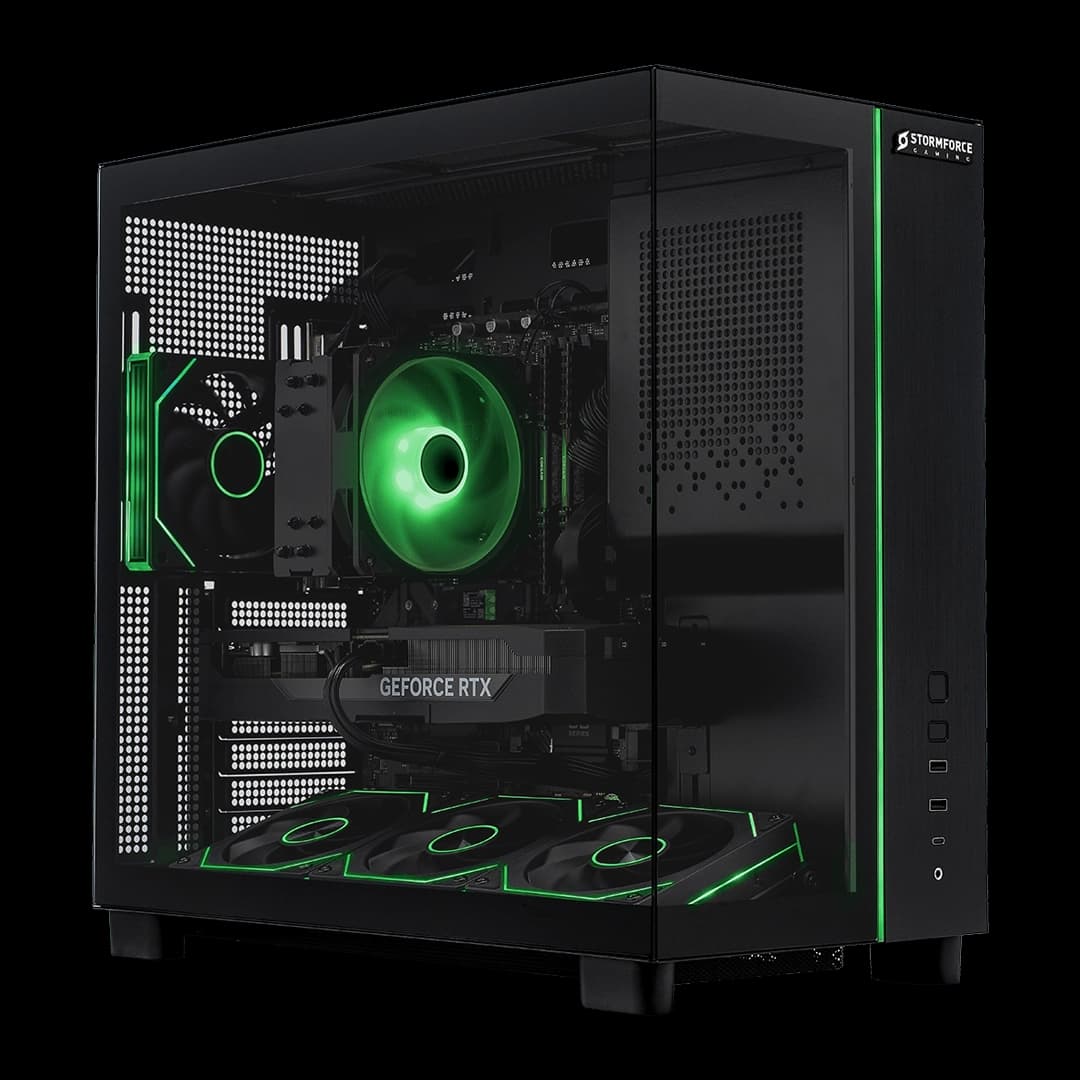

Most prebuilt gaming PCs fall into one of two camps: the ones that look good in a promo photo but hide a budget PSU and a last-gen GPU behind all that RGB, and the ones that are actually worth your money. Figuring out which camp any given machine belongs to means ignoring the marketing and going straight to the component list. So that's what we're doing with the Stormforce Gaming Obsidian Ultimate Intel. RTX 5070, Core Ultra 7, 32GB DDR5 at 6000MHz, 360mm AIO cooling. On paper, this is a serious machine. But paper is cheap, and prebuilt manufacturers have a long history of padding margins with dodgy PSUs and thermal designs that throttle under sustained load. Let's see what's actually going on here.
The short version of this obsidian ultimate intel review: it's a genuinely well-specced machine at the premium end of the prebuilt market, and it holds up better against a DIY equivalent than most prebuilts at this price tier. The RTX 5070 is a current-gen GPU with real headroom at 1440p and a credible case at 4K with DLSS 4 doing the heavy lifting. The 360mm AIO is a proper cooler, not an afterthought. And the B860 motherboard, while not the flashiest platform, is a sensible pairing for the Core Ultra 7 265KF. There are caveats, and we'll get into them, but this isn't a machine that's been cheaped out on where it counts.
This is an obsidian ultimate intel review based entirely on verified spec data from Stormforce Gaming and what we know about the components involved. No test bench, no fps figures we've measured ourselves. Just honest analysis of what you're actually getting for your money, and how it stacks up against building the same thing yourself.
Core Specifications
Starting with what Stormforce Gaming lists in the spec table. The Obsidian Ultimate Intel ships with an Intel Core Ultra 7 265KF processor, an NVIDIA RTX 5070 with 12GB of VRAM, 32GB of DDR5 running at 6000MHz, and a 2TB Gen 4 M.2 NVMe SSD. The motherboard is a B860 ATX board, the cooler is a 360mm AIO liquid cooler, the PSU is a 750W 80+ Bronze unit, and the case is the Vortex Atlas M4 ATX. It ships with Microsoft Windows 11 Home pre-installed. Connectivity covers WiFi 6 and Ethernet.
The 750W PSU with 80+ Bronze certification is early because this is where a lot of prebuilt manufacturers quietly cut corners. Bronze is the minimum you'd want to see at this price point, and 750W is adequate for the RTX 5070 and Core Ultra 7 265KF pairing without a lot of headroom for future upgrades to a more power-hungry GPU. It's not a disaster, but it's something to keep in mind if you're planning to eventually drop in an RTX 5080 or similar. The 80+ Bronze standard means the PSU is rated for at least 85% efficiency at 50% load, which is decent but not exceptional for a machine at this price tier.
The B860 ATX motherboard is another area worth talking about honestly. B860 sits below Z890 in Intel's current lineup, which means no CPU overclocking support (the 265KF is an unlocked chip, which is a bit of a mismatch). You're not going to be pushing manual overclocks on this platform. That said, B860 does support fast memory, and the DDR5 6000 kit here runs at a sensible speed for the platform. It's a cost-saving measure, and it's one that affects enthusiast tinkerers more than everyday users. If you just want to game and get on with your life, it won't bother you at all.
| Component | Specification |
|---|---|
| CPU | Intel Core Ultra 7 265KF |
| GPU | NVIDIA RTX 5070 12GB |
| RAM | 32GB DDR5 6000 |
| Storage | 2TB Gen 4 M.2 NVMe SSD |
| Motherboard | B860 ATX |
| Cooler | 360mm AIO Liquid Cooler |
| PSU | 750W 80+ Bronze |
| Case | Vortex Atlas M4 ATX |
| OS | Microsoft Windows 11 Home |
| Connectivity | WiFi 6, Ethernet |
| Price | £2,199.99 |
CPU & Performance
The Intel Core Ultra 7 265KF is part of Intel's Arrow Lake desktop lineup, and it uses a hybrid core architecture that combines performance cores and efficiency cores in a similar fashion to what Intel has been doing since Alder Lake. The "KF" suffix means it's unlocked for overclocking and lacks integrated graphics, which is fine in a dedicated gaming PC where the RTX 5070 is doing all the display work. As noted above, the B860 motherboard means you won't be pushing manual overclocks, but the chip's boost behaviour out of the box should still be solid for gaming and productivity tasks.
Arrow Lake brought some architectural changes compared to Raptor Lake, including a shift to a disaggregated tile design. Real-world gaming performance from the 265KF is strong, particularly in titles that benefit from high single-threaded performance. For productivity, the mix of performance and efficiency cores means the chip handles multitasking well: streaming while gaming, running background applications, video encoding alongside other workloads. It's a proper modern CPU, not a budget filler. Stormforce Gaming's spec table describes it as delivering "strong gaming and productivity performance," which is accurate based on what Intel's own specifications show for the chip.
One thing to be aware of: Arrow Lake's gaming performance in CPU-limited scenarios (typically competitive titles at lower resolutions) showed some variance compared to Raptor Lake at launch, though Intel has addressed some of this through driver and microcode updates. At 1440p and 4K with an RTX 5070, you're almost always going to be GPU-limited anyway, so the CPU's gaming ceiling is rarely the bottleneck in this configuration. Where the 265KF genuinely earns its place is in the productivity side: content creation, streaming, running multiple applications simultaneously. The hybrid core design handles that kind of mixed workload well, and 32GB of fast DDR5 helps keep everything moving.
GPU & Gaming Performance
The NVIDIA RTX 5070 is the headline component here, and it's a current-generation Blackwell architecture GPU with 12GB of GDDR7 VRAM. It sits in the upper-mid tier of NVIDIA's 50-series stack, below the RTX 5070 Ti and 5080, but well above the RTX 5060 tier. The 12GB VRAM figure is enough for modern gaming at 1440p without running into memory constraints in the vast majority of titles, and at 4K it's workable, particularly with DLSS 4 doing the heavy lifting on resolution scaling.
Speaking of DLSS 4: this is a big part of the RTX 5070's value proposition. Blackwell GPUs support DLSS 4 with Multi Frame Generation, which can multiply effective frame rates significantly in supported titles. NVIDIA's AI-enhanced upscaling has matured considerably, and the quality modes are genuinely difficult to distinguish from native rendering in most cases. Ray tracing performance is also meaningfully improved over the previous generation, which matters if you play titles that lean on RT lighting and reflections. The RTX 5070 isn't going to max out every 4K setting in the most demanding titles without DLSS assistance, but with it, 4K gaming is a realistic proposition rather than a slideshow.
At 1440p, which is the sweet spot for this GPU, you're looking at a card that should handle essentially any current title at high to maximum settings with strong frame rates. Competitive gaming at 1080p high refresh? Absolutely no problem. The 12GB VRAM is specifically because some rivals at similar price points ship with GPUs that have less VRAM, and that starts to matter as texture quality in modern games pushes higher. Stormforce Gaming lists this as delivering "smooth frame rates, advanced ray tracing, and AI-enhanced graphics," and based on where the RTX 5070 sits in NVIDIA's current lineup, that's not marketing fluff.
Memory & Storage
32GB of DDR5 running at 6000MHz is a genuinely good memory configuration for a gaming PC in 2026. DDR5 6000 is broadly considered the sweet spot for Intel's current platform in terms of balancing memory bandwidth and latency, and 32GB gives you enough headroom for gaming alongside streaming, video editing, or just having a ridiculous number of browser tabs open. It's not the 64GB you'd want for serious professional workloads, but for gaming and general use it's more than enough. Most games in 2026 don't meaningfully benefit from more than 32GB.
The 2TB Gen 4 M.2 NVMe SSD is a proper fast drive. Gen 4 NVMe delivers read and write speeds that make a traditional SATA SSD look sluggish, and 2TB is a genuinely usable capacity in an era where AAA games routinely clock in at 100GB or more. You're looking at space for roughly 15 to 20 large modern games alongside your OS and applications, which is realistic for most people's actual game libraries. Stormforce Gaming's spec table mentions "read and write speeds far beyond traditional SATA drives," and that's accurate: Gen 4 NVMe drives typically offer sequential reads in the 5,000 to 7,000 MB/s range, compared to around 550 MB/s for SATA SSDs.
Upgrade headroom is worth thinking about. The B860 motherboard will have additional M.2 slots depending on the specific board Stormforce Gaming has used, which means you could add more NVMe storage down the line without resorting to SATA drives. Whether there are free RAM slots for a memory upgrade depends on the specific kit configuration (whether it's two sticks or four), but DDR5 is a mature enough platform now that upgrading to 64GB later is a realistic option if you need it. The 2TB starting point means you're unlikely to feel cramped any time soon, which is a sensible place to start at this price tier.
Cooling Solution
A 360mm AIO liquid cooler is the right call for a Core Ultra 7 265KF in a gaming PC. The 265KF can pull significant power under sustained load, and a 360mm radiator with three 120mm fans gives you the thermal headroom to keep the chip running at its boost clocks without throttling. This is genuinely one of the areas where the Obsidian Ultimate Intel doesn't cut corners: a lot of prebuilts at lower price points try to get away with a 240mm AIO or even a tower air cooler on chips that really benefit from more cooling capacity. Three fans on a 360mm radiator means more surface area for heat dissipation, and a more efficient pump design keeps the coolant moving properly.
The Vortex Atlas M4 case is described by Stormforce Gaming as a high-airflow design, which matters for the overall thermal picture beyond just the CPU cooler. An AIO handles the CPU, but the GPU, VRMs, and storage all rely on case airflow to stay cool under sustained load. A case with good airflow means the hot air generated by the RTX 5070 gets moved out efficiently rather than building up inside the chassis. The Atlas M4 supports full ATX motherboards, which means there's physical space for proper fan configurations and cable management that doesn't restrict airflow.
Noise levels aren't something we can quote a specific figure on from the spec sheet, but the combination of a 360mm AIO and a high-airflow case generally means the system can run its fans at lower speeds to achieve the same cooling effect, which tends to translate to a quieter experience under moderate loads. Under full gaming load, the fans will spin up, but a three-fan 360mm radiator has more surface area to dissipate heat passively before the fans need to work hard. It's a better thermal setup than you'd find in many prebuilts at this price, and it should keep the 265KF running at its intended performance levels consistently.
Case & Build Quality
The Vortex Atlas M4 ATX case is the chassis Stormforce Gaming has chosen for this build, and it's a mid-tower with a focus on airflow and clean aesthetics. Steel construction means it's not going to feel flimsy, and ATX support means the internal layout has enough room to work with. Stormforce Gaming describes it as offering "high airflow, durable steel construction, and a clean modern interior layout," which suggests this isn't one of those cases where the cable management is a disaster and the GPU is fighting for breathing room. A clean interior layout matters for both airflow and for anyone who wants to get inside and swap components later.
One thing about Stormforce Gaming as a builder: they're a UK-based system integrator with a track record in the prebuilt gaming market, and their builds are generally assembled with a reasonable level of care rather than being slapped together on a production line. That said, prebuilt cable management is almost never as tidy as what a careful self-builder would do, and that's true across the industry. It doesn't affect performance, but if you're the kind of person who cares about what the inside of your PC looks like, it's worth being realistic about expectations.
The modern interior layout described in the spec table suggests the Atlas M4 follows current design conventions: a shroud over the PSU area, space for the AIO radiator to mount at the top or front, and clearance for the GPU without it being wedged against a side panel. This kind of layout is now standard on decent mid-tower cases, and it makes a real difference to both thermals and the ease of future upgrades. The steel construction also means the case should dampen vibration from the AIO pump and fans reasonably well, which helps with the overall noise profile of the system.
Connectivity & Ports
Stormforce Gaming lists WiFi 6 and Ethernet as the connectivity options for this machine. WiFi 6 (802.11ax) is a solid wireless standard for gaming: it offers lower latency and better performance in congested environments compared to WiFi 5, and it's more than fast enough for online gaming, streaming, and large downloads. If you're running a WiFi 6 or WiFi 6E router, you'll get the full benefit of the standard. For wired gaming, the Ethernet port is there, and a direct connection to your router is always going to give you the most consistent latency for competitive play.
Specific port counts for USB and video outputs aren't detailed in the verified spec data Stormforce Gaming provides, so we're not going to speculate on exact configurations. What we can say is that the B860 ATX motherboard platform typically offers a reasonable rear I/O, and the Vortex Atlas M4 case will have front panel USB ports as standard for a case in this category. The RTX 5070 will handle video output, and NVIDIA's Blackwell cards support the current display standards you'd expect for driving high-refresh monitors or multiple screens.
For most users, WiFi 6 plus Ethernet covers everything you need. The WiFi 6 implementation means you're not stuck with a slow wireless adapter that becomes a bottleneck when you're downloading a 100GB game update, and the Ethernet option is there for anyone who wants a wired connection for the lowest possible latency in competitive games. Stormforce Gaming describes this as providing "high-speed, low-latency wireless performance for gaming, streaming, and competitive online play," which is a fair description of what WiFi 6 delivers in practice on a good router.
Pre-installed Software & OS
The Obsidian Ultimate Intel ships with Microsoft Windows 11 Home, which is the standard choice for a gaming PC in this category. Windows 11 Home brings DirectStorage, Auto HDR, and Copilot AI, as Stormforce Gaming's spec table notes. DirectStorage is genuinely useful on a Gen 4 NVMe SSD: it allows supported games to load assets directly from the SSD to the GPU without going through the CPU, which can reduce load times and texture streaming hitches in titles that support it. Auto HDR adds HDR processing to games that don't natively support it, which is a nice bonus if you're running an HDR monitor.
Windows 11 Home versus Pro is worth a quick mention. Home is fine for gaming and general use. You'd only feel the absence of Pro features if you need BitLocker encryption, Remote Desktop hosting, or domain joining for a work environment. For a gaming PC, Home is the right call, and there's no real reason to pay extra for Pro unless you have a specific professional use case. The Copilot AI integration in Windows 11 is still maturing as a feature, but it's there if you want it.
Stormforce Gaming's builds typically don't come loaded with a lot of third-party bloatware, which is one advantage of buying from a specialist gaming PC builder versus a mainstream consumer brand. You'll get the standard Windows 11 experience plus NVIDIA's drivers and software suite for the RTX 5070, which includes GeForce Experience for driver updates and optimisation settings. Beyond that, you're largely getting a clean system to set up how you like, rather than wading through a sea of trial software and manufacturer utilities. That's a genuine quality-of-life advantage over some of the bigger prebuilt brands.
Upgrade Potential
Upgrade potential is one of the most important things to think about when buying a prebuilt, because the machine you buy today isn't necessarily the machine you'll want in three years. The good news here is that the Obsidian Ultimate Intel is built on a platform with reasonable upgrade headroom. The B860 ATX motherboard is a full-size board, which means it'll have multiple M.2 slots for additional NVMe storage and should have at least two RAM slots free if the 32GB kit is installed as two sticks (leaving two slots for expansion to 64GB). The DDR5 platform is still relatively new, so memory prices should continue to be accessible as you look to upgrade.
The GPU is the component most people think about upgrading first, and here the 750W Bronze PSU is the main consideration. The RTX 5070 is not a power-hungry card by current-gen standards, and 750W gives you comfortable headroom for it. But if you're thinking about dropping in an RTX 5080 or something from the next generation of GPUs a few years down the line, a higher-wattage PSU would be the sensible first upgrade. PSU swaps in a prebuilt are straightforward, and the ATX standard means any decent ATX PSU will fit in the Atlas M4 case. It's not a blocker, just something to plan for.
The CPU upgrade path on B860 is tied to Intel's LGA1851 socket. Whether future Intel CPUs will be compatible with B860 boards depends on Intel's roadmap decisions, which historically haven't always been generous with backward compatibility. Arrow Lake is the current generation on this socket, and Panther Lake is expected to follow. For most users, the Core Ultra 7 265KF isn't going to feel slow any time soon, so CPU upgrades aren't an immediate concern. The real upgrade path here is storage (easy, just add an M.2 drive), RAM (straightforward if slots are free), and eventually a GPU swap when the RTX 5070 starts to feel limiting for the resolutions and settings you want to hit.
How It Compares
The honest comparison for any prebuilt at this price tier is a DIY build at the same spec. If you price out a Core Ultra 7 265KF, an RTX 5070, 32GB DDR5 6000, a 2TB Gen 4 NVMe SSD, a B860 motherboard, a 360mm AIO, a 750W Bronze PSU, and a decent mid-tower case, you're going to land close to the £2,199.99 asking price, sometimes above it depending on where you source components. RTX 5070 cards have been in demand since launch, and GPU pricing at the top end of the mid-range has been sticky. The convenience premium on the Obsidian Ultimate Intel is smaller than it looks, which is a point in its favour.
Against other prebuilts in the same price bracket, the Obsidian Ultimate Intel holds up well on the components that matter. The 360mm AIO is a genuine differentiator: plenty of prebuilts at this tier still try to get away with a 240mm cooler or a large tower air cooler on chips that benefit from more thermal headroom. The RTX 5070 is current-gen, which matters for longevity. And the 2TB NVMe storage is a more generous starting point than some rivals that ship with 1TB and hope you don't notice. Where it's less impressive is the 750W Bronze PSU (Gold certification would be more appropriate at this price) and the B860 platform, which limits overclocking potential on an unlocked chip.
The general prebuilt market in this price tier includes machines from brands like Chillblast, PC Specialist, and Overclockers UK, all of whom operate on similar models to Stormforce Gaming. The differentiators tend to be component choices (which specific AIO, which case, which PSU brand), warranty terms, and build quality. Stormforce Gaming's use of the Vortex Atlas M4 and a 360mm AIO suggests they're not just going for the cheapest possible parts to hit a price point, which is reassuring. But without independent verification of which specific brands are used for the PSU and AIO pump, it's impossible to say definitively how the component quality compares to a careful self-build using named parts.
| Feature | Obsidian Ultimate Intel | DIY Equivalent Build | Budget Prebuilt Alternative |
|---|---|---|---|
| CPU | Core Ultra 7 265KF | Core Ultra 7 265KF | Core i5 / Ryzen 5 equivalent |
| GPU | RTX 5070 12GB | RTX 5070 12GB | RTX 5060 Ti or similar |
| RAM | 32GB DDR5 6000 | 32GB DDR5 6000 | 16GB DDR5 |
| Storage | 2TB Gen 4 NVMe | 2TB Gen 4 NVMe | 1TB NVMe |
| Cooler | 360mm AIO | Your choice | 240mm AIO or air |
| PSU | 750W 80+ Bronze | 750W+ 80+ Gold (recommended) | 650W Bronze |
| OS included | Windows 11 Home | Extra cost | Windows 11 Home |
| Assembly | Done for you | Your time and effort | Done for you |
| Price | £2,199.99 | Similar or higher | Significantly less |
Final Verdict
The Stormforce Gaming Obsidian Ultimate Intel is a well-considered prebuilt at the premium end of the market. The RTX 5070 is the right GPU for 1440p gaming in 2026, with genuine 4K capability when DLSS 4 is in play. The Core Ultra 7 265KF is a proper modern CPU that handles gaming and productivity without breaking a sweat. The 360mm AIO is the correct cooler for this chip, the 2TB NVMe SSD is a generous starting point, and 32GB of DDR5 6000 is exactly where you want to be for this tier. None of the headline components feel like they were chosen to pad a spec sheet while cutting costs where you can't see them.
The areas where it's less impressive are the 750W Bronze PSU (functional, but Gold certification would be more appropriate at this price, and the headroom for future GPU upgrades is limited) and the B860 platform (which means the unlocked 265KF can't be manually overclocked). Neither of these is a dealbreaker, but they're the kind of choices that tell you Stormforce Gaming has made some cost decisions to hit the price point. If those things bother you, a self-build lets you choose a Gold PSU and a Z890 board, but you'll likely spend more and need to put the time in yourself. Windows 11 Home being included is a genuine saving versus a DIY build where you need to buy a licence separately.
Who is this for? Someone who wants a current-gen gaming PC with a proper RTX 5070, doesn't want to spend a weekend sourcing components and building, and is happy to pay a reasonable convenience premium for a machine that's ready to go. The 1440p gaming crowd will be very happy here. 4K gamers who lean on DLSS will be happy too. Competitive gamers who play at 1080p high refresh will get more than they need from both the CPU and GPU.
Who should probably look elsewhere? If your budget is tighter and you're mainly gaming at 1080p, a prebuilt with an RTX 5060 Ti at a lower price tier will serve you well and save you a meaningful amount of money. The RTX 5070's strengths really shine at 1440p and above, so if you're not running a 1440p or 4K monitor (or planning to buy one), you're paying for headroom you won't use. There are solid prebuilts with RTX 5060 Ti configurations at a noticeably lower price that make more sense for 1080p gaming on a budget. Equally, if you're a hands-on builder who wants full control over component brands, overclocking, and PSU quality, the time investment in a self-build is worth it at this price tier.
As a prebuilt, though, the Obsidian Ultimate Intel is one of the better options we've assessed at this price point. The component choices are sensible, the thermal design is proper, and the storage and memory configurations are genuinely good rather than the bare minimum. For the right buyer, it's a solid machine.
What works. What doesn’t.
7 + 5What we liked7 reasons
- RTX 5070 delivers strong 1440p performance and credible 4K capability with DLSS 4 Multi Frame Generation
- 360mm AIO liquid cooler is appropriate thermal headroom for the Core Ultra 7 265KF rather than a cost-cutting compromise
- 2TB Gen 4 NVMe SSD is a generous starting capacity compared to many rivals that ship with 1TB
- 32GB of DDR5 running at 6000MHz is the sensible sweet spot for Intel's current platform
- Convenience premium over a comparable DIY build is smaller than typical at this price tier
- Windows 11 Home is included, representing a genuine saving versus self-building where the licence is an extra cost
- Vortex Atlas M4 high-airflow case provides proper thermal environment for sustained gaming loads
Where it falls5 reasons
- 750W 80+ Bronze PSU is functional but Gold certification would be more appropriate at this price point and leaves limited headroom for future GPU upgrades
- B860 motherboard means the unlocked Core Ultra 7 265KF cannot be manually overclocked, which is a clear mismatch
- Specific brands used for the PSU and AIO pump are not disclosed, making direct component-quality comparisons with a self-build difficult
- GPU-limited nature of the build means buyers on a 1080p monitor are paying for headroom they will not use
- No option to upgrade to a Z890 platform without replacing the motherboard if overclocking becomes a priority later
Full specifications
12 attributes| CPU | Intel Core Ultra 7 265KF |
|---|---|
| GPU | NVIDIA RTX 5070 12GB |
| RAM | 32GB DDR5 6000 |
| Storage | 2TB M.2 NVMe SSD |
| Case | Vortex Atlas M4 ATX |
| Connectivity | WiFi 6, Ethernet |
| Cooling | 360mm AIO Liquid Cooler |
| Launch year | 2026 |
| Motherboard | B860 ATX |
| Motherboard chipset | B860 |
| OS | Microsoft Windows 11 Home |
| Other | Xbox Game Pass 2 Months Trial |
If this isn’t right for you
2 options
Frequently asked
7 questions01What GPU does the Stormforce Gaming Obsidian Ultimate Intel use?+
It ships with an NVIDIA RTX 5070 with 12GB of GDDR7 VRAM. This is a current-generation Blackwell architecture card that sits in the upper-mid tier of NVIDIA's 50-series stack and supports DLSS 4 with Multi Frame Generation.
02Can you overclock the CPU in the Obsidian Ultimate Intel?+
Not manually. The Intel Core Ultra 7 265KF is an unlocked chip, but the B860 ATX motherboard does not support CPU overclocking. You will benefit from the chip's out-of-box boost behaviour, but manual clock adjustments are not possible on this platform.
03Is 750W enough power for the RTX 5070 and Core Ultra 7 265KF?+
Yes, 750W is adequate for this specific component pairing. The RTX 5070 is not a particularly power-hungry card by current-gen standards, so the system runs comfortably within that budget. However, if you plan to upgrade to a more power-hungry GPU such as an RTX 5080 in future, upgrading the PSU at the same time would be advisable.
04Is the Obsidian Ultimate Intel good for 4K gaming?+
It is capable at 4K, particularly with DLSS 4 enabled. The RTX 5070 is not the most straightforward card for maxing out every setting at 4K natively in the most demanding titles, but with DLSS 4 Quality or Balanced modes active, 4K gaming is a realistic and enjoyable proposition in the majority of current titles.
05How does the Obsidian Ultimate Intel compare to building the same PC yourself?+
Surprisingly closely. When you price out the individual components, a DIY build to the same specification often lands near or above the Obsidian Ultimate Intel's asking price, partly because RTX 5070 cards have carried a premium since launch. The convenience cost is smaller than it appears, though a self-builder could choose a Gold-rated PSU and a Z890 board for greater flexibility.
06What storage does the Obsidian Ultimate Intel come with?+
It includes a 2TB Gen 4 M.2 NVMe SSD. Gen 4 NVMe drives offer sequential read speeds typically in the 5,000 to 7,000 MB/s range, which is substantially faster than SATA SSDs. The 2TB capacity is a generous starting point for modern gaming libraries where large AAA titles can exceed 100GB each.
07Does the Obsidian Ultimate Intel include wireless connectivity?+
Yes, it includes WiFi 6 (802.11ax) as well as a wired Ethernet port. WiFi 6 offers lower latency and better performance in congested wireless environments compared to the previous WiFi 5 standard, making it a solid choice for online gaming and large downloads without a wired connection.