Whether you want a tidy all-in-one for the kitchen worktop, a capable family machine for homework and streaming, or a full-fat gaming tower that doubles as a home workstation, the desktop market in 2025 has never been more varied. The arrival of Nvidia's RTX 50-series cards has shaken up the mid-range and high-end considerably, pushing older RTX 30-series machines into genuinely competitive value territory. Meanwhile, Apple's M4 iMac has raised the bar for all-in-one performance, and mini PCs have matured to the point where they can handle light gaming and creative tasks without taking up any meaningful desk space. This guide covers carefully chosen desktops spanning a wide price range, each suited to a different type of home user. Prices, availability, and generation shifts since last year make this a very different landscape from 2024, so read on for updated recommendations.
Quick Verdict
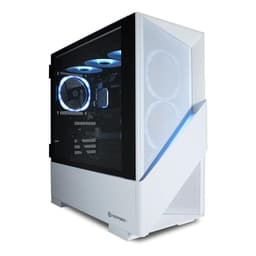
Best Overall: CyberPowerPC Luxe Gaming PC (Intel Core Ultra 7 265KF, RTX 5070 Ti), a genuinely well-rounded home desktop that handles gaming, creative work, and everyday tasks without compromise.
Best Value: ADMI Gaming PC (AMD Ryzen 5 5500, RTX 3050), delivers solid 1080p gaming and reliable everyday performance at a price that won't break the family budget.
The Lenovo IdeaCentre A100 is aimed squarely at households that want a neat, clutter-free desktop for everyday tasks: browsing the web, video calls, streaming box sets, managing household finances, and helping children with homework. Its 24-inch Full HD display is built right in, which means no separate monitor to buy and no cable tangle on the desk. This is the sort of machine that suits a kitchen counter, a spare bedroom, or a shared family space where aesthetics matter as much as raw power.
The Intel N100 processor is a quad-core efficiency chip designed for light workloads rather than heavy lifting. It handles Microsoft 365 applications, Google Chrome with a dozen tabs open, and 1080p video streaming without any trouble at all. Pair that with 16 GB of RAM and you have a genuinely comfortable everyday experience, with enough headroom to keep several applications running side by side. The 512 GB SSD keeps Windows 11 Home feeling snappy and boots the machine in seconds.
Where the IdeaCentre A100 falls short is anywhere demanding. The integrated graphics are not capable of gaming beyond very light titles, and tasks like video editing or photo processing in large RAW files will feel sluggish. It is also not upgradeable in any meaningful way, so what you buy is what you get for the life of the machine. Storage is on the modest side too: 512 GB fills up faster than you might expect once you factor in Windows updates, photos, and downloaded media.
That said, for its intended audience, the IdeaCentre A100 is an excellent fit. The all-in-one form factor keeps the desk tidy, Windows 11 Home is a familiar and capable operating system, and the price point makes it accessible for families on a tighter budget. If you want a simple, space-saving desktop that just works, this is one of the most sensible options in the catalogue. It is not a powerhouse, but it was never meant to be.
Verdict: The best choice for families and casual users who want a tidy, affordable all-in-one that handles everyday computing without fuss.
Pros
- All-in-one design eliminates the need for a separate monitor, saving desk space and reducing cable clutter
- 16 GB RAM provides comfortable multitasking headroom for everyday applications and web browsing
- Competitive entry-level price makes it accessible for budget-conscious households
Cons
- Intel N100 integrated graphics cannot handle modern games or GPU-accelerated creative workloads
- 512 GB storage fills up quickly once Windows updates, photos, and media are factored in
- Limited upgrade potential means the hardware you buy today is the hardware you keep
The ADMI Gaming PC sits at one of the most competitive price points in the desktop market, offering a genuine discrete GPU in the form of the NVIDIA GeForce RTX 3050 alongside a capable six-core AMD Ryzen 5 5500 processor. This combination makes it a strong candidate for households that want a proper gaming desktop without spending close to four figures. It is also a very solid all-rounder for families: the Ryzen 5 5500 handles productivity tasks, video calls, and light content creation comfortably, while the RTX 3050 opens up GPU-accelerated applications and 1080p gaming that simply is not possible on integrated graphics machines.
The RTX 3050 with 6 GB of GDDR6 is the key differentiator here. At 1080p with medium to high settings, it delivers playable frame rates in a wide range of popular titles, including Fortnite, Minecraft with shaders, FIFA, and many older AAA games. It is not a card that will push 4K or ultra settings in demanding modern titles, but for casual and moderate gamers it represents a meaningful step up from anything relying on integrated graphics. The 16 GB of DDR4 RAM at 3200 MHz is a sensible amount for gaming and multitasking, and the 1 TB NVMe SSD provides fast load times and enough space for a decent game library.
The Ryzen 5 5500 is a mature processor at this point, based on the Zen 3 architecture, which means it is not the newest silicon available. However, it remains a genuinely capable chip for home use and gaming, with six cores and twelve threads that handle most everyday tasks without bottlenecking the GPU. Windows 11 is included, so there are no hidden software costs to factor in.
Where the ADMI falls short is at higher resolutions or in very demanding modern titles where the RTX 3050's 6 GB VRAM limit becomes a constraint. It is also worth noting that the RTX 3050 is now a generation behind the latest 50-series cards, though for the price it remains competitive. If your primary use case is 1080p gaming and everyday computing, this machine delivers excellent value and is one of the most sensible entry points into discrete GPU desktop computing in the UK right now.
Verdict: The best value pick for households that want real gaming capability without stretching the budget, covering everyday tasks equally well.
Pros
- RTX 3050 6 GB GDDR6 delivers genuine 1080p gaming performance at a budget-friendly price point
- Ryzen 5 5500 handles productivity, streaming, and multitasking alongside gaming without feeling strained
- 1 TB NVMe SSD provides fast load times and enough space for a solid game and application library
Cons
- RTX 3050's 6 GB VRAM is a bottleneck in newer AAA titles at higher settings or resolutions
- Ryzen 5 5500 is Zen 3 architecture, meaning it is two CPU generations behind the current mainstream
The Apple iMac with M4 chip occupies a unique position in the home desktop market. It is not aimed at gamers, and it does not pretend to be a budget option. Instead, it targets creative professionals, students in design or media disciplines, and households that are already invested in the Apple ecosystem and want a desktop that integrates flawlessly with their iPhone, iPad, and other Apple devices. The M4 chip, with its ten-core CPU and ten-core integrated GPU, represents a significant generational leap over the M3, and the iMac's all-in-one design remains one of the most aesthetically refined in the industry.
Performance on the M4 iMac is genuinely impressive for the tasks it is designed for. Video editing in Final Cut Pro, photo processing in Lightroom, coding, and general creative work all feel fluid and responsive. The unified memory architecture means the 16 GB of RAM is shared efficiently between CPU and GPU, and in practice the machine handles demanding creative workflows with ease. The 512 GB SSD is fast, though it fills up quickly for users working with large media files, making external storage a likely necessity for serious content creators.
The built-in display is one of the iMac's strongest selling points: a 24-inch Retina 4.5K screen with excellent colour accuracy that would cost a significant sum to match with a standalone monitor. The webcam, speakers, and microphone array are all class-leading for an all-in-one, making it an excellent choice for video calls and content consumption. The design is slim, quiet, and available in several colours, making it genuinely pleasant to have on a desk.
The limitations are well known. macOS is not a gaming platform in any meaningful sense, and the M4's integrated GPU, impressive as it is, cannot compete with a dedicated gaming card for frame rates in Windows titles. Storage is soldered and cannot be upgraded after purchase, and 512 GB goes quickly. The price is also considerably higher than Windows alternatives with comparable raw specifications. For the right user, though, the iMac M4 is a beautifully executed, long-lasting home desktop that excels at creative work and everyday productivity.
Verdict: The definitive choice for Apple ecosystem users and creative professionals who want a premium all-in-one that excels at everything except gaming.
Pros
- Apple M4 chip delivers class-leading performance per watt for creative and productivity workloads
- Built-in 24-inch 4.5K Retina display offers colour accuracy and sharpness that rivals standalone monitors costing hundreds of pounds
- Exceptionally quiet operation and slim all-in-one design suit desk-conscious home environments
Cons
- 512 GB base storage fills up rapidly for users working with video, RAW photography, or large project files
- macOS and the integrated GPU make it unsuitable for Windows gaming or GPU-intensive tasks requiring a discrete card
- Premium price is significantly higher than Windows alternatives with comparable processing power
Buying Guide
What to Look for in a Home Desktop in 2025
CPU Generation Matters More Than Ever
The processor generation has a significant impact on how long your desktop will remain relevant. Older Zen 3 chips like the Ryzen 5 5500 are still capable for everyday tasks and 1080p gaming, but they are two generations behind AMD's current mainstream lineup. If you plan to keep your desktop for five or more years, spending a little more to get a current-generation CPU, such as AMD's Ryzen 7 8000-series or Intel's Core Ultra 7, is a worthwhile investment. Newer platforms also support faster RAM standards like DDR5, which will become increasingly relevant as software evolves.
Integrated vs Discrete GPU
For pure everyday computing, web browsing, streaming, and office applications, integrated graphics are perfectly adequate. The Intel N100 and AMD Radeon 780M both handle these tasks without any difficulty. However, if anyone in the household wants to play modern games, even casually, a discrete GPU is essential. The RTX 3050 is the entry point for genuine gaming capability, while the RTX 4060 and RTX 5060 represent the sweet spot for 1080p and 1440p gaming respectively. The RTX 5070 Ti is for enthusiasts who want 4K or maximum settings without compromise.
RAM: How Much Do You Need?
For everyday home use and light gaming, 16 GB is the comfortable minimum in 2025. Heavy multitaskers, content creators, and enthusiast gamers will benefit from 32 GB, which also provides better future-proofing. The type of RAM matters too: DDR5 is faster and more efficient than DDR4, though the real-world difference in everyday tasks is modest. For a machine you intend to keep for several years, 32 GB DDR5 is the aspirational target.
Storage: SSD as Standard
All of the desktops in this selection use SSD storage, which is now the baseline expectation. NVMe SSDs are significantly faster than SATA SSDs for loading applications and games. Capacity-wise, 512 GB is the minimum, but 1 TB is a far more comfortable allocation for a household machine that will accumulate photos, downloads, and game installations over time. If you work with video or large creative files, 2 TB is worth the investment.
All-in-One vs Tower vs Mini PC
All-in-one desktops like the Lenovo IdeaCentre A100 and Apple iMac are ideal for spaces where tidiness matters, but they are generally not upgradeable and cost more for equivalent performance. Tower desktops offer the best performance per pound and can be upgraded with new components over time. Mini PCs occupy a middle ground: they are compact and power-efficient, but GPU upgrade options are non-existent. Choose your form factor based on where the machine will live and how long you want it to last.
Operating System
The vast majority of home desktops run Windows 11, which is the sensible choice for gaming, compatibility, and general use. The Apple iMac runs macOS, which is excellent for creative work and the Apple ecosystem but unsuitable for gaming. If you are buying a Windows machine, ensure Windows 11 Home is included in the price rather than requiring a separate licence purchase.
Budget Guidance
Under £700: budget all-in-ones and mini PCs for everyday computing. £700 to £1,000: entry-level to mid-range gaming desktops with discrete GPUs. £1,000 to £1,500: capable mid-range gaming with current-generation hardware. Above £1,500: high-performance gaming and creative workstations with top-tier GPUs and generous RAM and storage.
The CyberPowerPC Luxe Gaming PC with the Intel Core Ultra 7 265KF and NVIDIA RTX 5070 Ti is the overall winner in this selection. It combines a current-generation CPU platform with one of the most powerful consumer GPUs available, 32 GB of DDR5 RAM, and a 2 TB NVMe SSD, all at a price that, while not cheap, represents genuine value for the hardware on offer. It suits enthusiast gamers, home content creators, and anyone who wants a desktop that will remain powerful for the next five or more years without compromise.
For buyers on a tighter budget, the ADMI Gaming PC with the Ryzen 5 5500 and RTX 3050 remains the best value pick, delivering real gaming capability and comfortable everyday performance at an accessible price. Those who want an all-in-one experience should look at the Apple iMac M4 for creative and productivity work, or the Lenovo IdeaCentre A100 for simple, space-saving everyday computing. Whatever your home setup, there is a desktop in this selection that fits the bill.