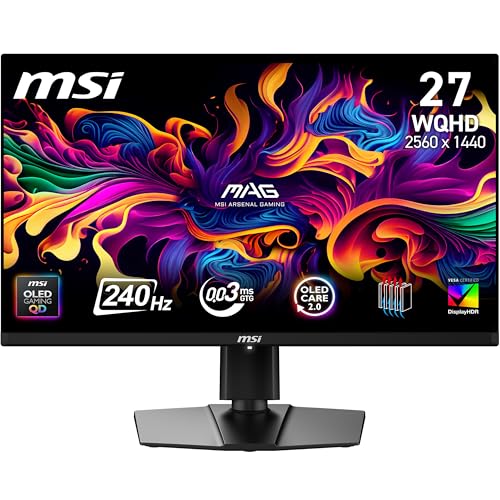
The specification sheet and the actual display are often two very different things, which is why the spec list is only ever half the story. Manufacturers quote 0.03ms response times, 99% DCI-P3 coverage, and infinite contrast ratios, and most of those numbers are technically defensible in some narrow test condition that bears no resemblance to how you'll actually use the monitor. So this review of the MAG 273QP QD-OLED X24 reads its spec sheet with that in mind.
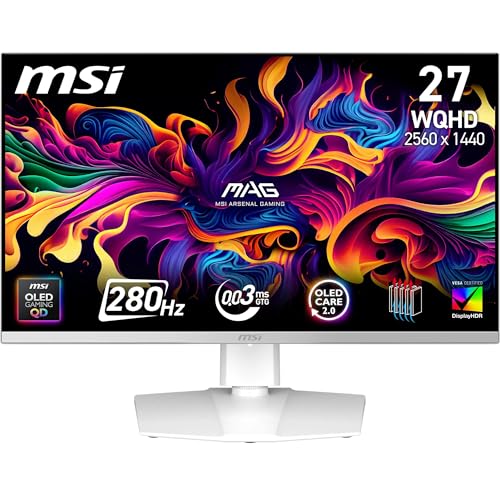
The MAG 273QP sits in an interesting position. It's a 26.5-inch WQHD QD-OLED panel running at 240Hz, which puts it squarely in the upper mid-range bracket. The MSI product page makes bold claims about colour accuracy and motion clarity. The job here is to put those claims in context.
The short version: this is an impressive panel with a few caveats that matter depending on your use case. The longer version follows below.
Core Specifications
The MAG 273QP QD-OLED X24 uses a 26.5-inch OLED panel with Quantum Dot enhancement, running at 2560x1440 resolution. That gives you a pixel density of approximately 111 PPI, which is noticeably sharper than a 27-inch 1080p display but not as dense as a 4K panel at the same size. For gaming, 1440p at this size is a well-balanced choice: demanding enough to look sharp, but not so pixel-heavy that you need a top-tier GPU to hit 240Hz consistently.
The panel is rated at 240Hz with a claimed 0.03ms grey-to-grey response time. The response time section puts that figure in context, but the headline is the self-emissive OLED advantage: pixel transitions happen at the organic compound level, so there's no liquid crystal alignment delay. The 240Hz refresh rate is supported over both DisplayPort 1.4a and HDMI 2.1; an older HDMI 2.0 port couldn't carry 1440p at 240Hz without compression.
Connectivity is built around video inputs. You get one DisplayPort 1.4a and two HDMI 2.1 ports, but no USB ports of any kind. The DisplayPort 1.4a standard supports up to 32.4 Gbps bandwidth. MSI has also included a headphone jack, which sounds basic but helps when you're switching between speakers and headphones during a session.
| Specification | Detail |
|---|---|
| Screen Size | 26.5 inches |
| Resolution | 2560 x 1440 (WQHD) |
| Panel Type | QD-OLED |
| Refresh Rate | 240Hz |
| Response Time (claimed) | 0.03ms GtG |
| Brightness (peak HDR) | 1000 nits (peak) |
| Contrast Ratio | 1,500,000:1 (MSI) |
| SDR Brightness | 250 nits (typical) |
| Colour Gamut | 99% DCI-P3 |
| Delta E | ≤2 |
| HDR Certification | DisplayHDR True Black 400 |
| Adaptive Sync | FreeSync Premium Pro / G-Sync Compatible |
| DisplayPort | 1x DP 1.4a |
| HDMI | 2x HDMI 2.1 |
| USB | None |
| VESA Mount | 100x100mm |
| Stand Height | 0-130mm, tilt, swivel, pivot |
| Warranty | 3 years, including OLED burn-in |
| Current Price | £386.06 · Details |
Panel Technology
QD-OLED is a hybrid technology that combines the self-emissive properties of OLED with a Quantum Dot colour filter layer. Quantum Dot enhancement on an OLED backplane takes a blue OLED emitter and uses QD material to convert some of that light to red and green, producing a much wider colour gamut than standard OLED while retaining the infinite contrast and per-pixel dimming that makes OLED special. Samsung Display pioneered this approach, and it's the same fundamental technology you'll find in high-end TV panels, now scaled down to monitor sizes.
The practical consequence of this architecture is that the MAG 273QP delivers viewing angles that are essentially perfect. This is one area where OLED simply cannot be matched by IPS or VA panels. IPS glow at the corners is a non-issue here because there's no backlight to bleed. VA panels have better native contrast than IPS but still suffer from the characteristic corner glow and slow pixel transitions in dark scenes. Neither of those problems exist on this panel.
Black levels are genuinely black. Not "very dark grey" like a good IPS, not "deep black with some blooming" like a Mini-LED. Actual black, because pixels that aren't receiving a signal simply don't emit light. This transforms dark scene rendering in games and films. Shadow detail in dark games is presented with a clarity that backlit panels can't replicate, because the bright elements don't wash out the dark areas around them. The one trade-off worth mentioning is OLED burn-in risk. MSI includes pixel refresh cycles and a pixel shift feature to mitigate this, and modern QD-OLED panels have improved significantly in this regard, but it remains a consideration if you display static content for extended periods. MSI backs the panel with a three-year warranty that explicitly covers OLED burn-in, which takes much of the sting out of that risk.
Display Quality
At 111 PPI, the MAG 273QP sits in a comfortable sharpness zone for a desktop monitor used at typical viewing distances of 60-80cm. The OLED subpixel layout is triangular (RGB stripe is not used on QD-OLED panels), which can occasionally produce very slight fringing on fine text at small font sizes. It's a known characteristic of the panel architecture, so if you're doing a lot of small-font document work, it's worth being aware of.
MSI describes the screen as anti-reflection but doesn't say how glossy it is. What's true of QD-OLED generally is that the panel has no polariser, so in a bright room ambient light lifts blacks towards grey and reflections show more than on a matte IPS. If your desk faces a window, factor this in.
There's no backlight uniformity issue because there is no backlight. SDR brightness is lower than a high-brightness IPS panel but sufficient for typical indoor use. The real brightness story is in HDR mode, where the panel can hit significantly higher peaks on small highlights, covered in the HDR section.
Refresh Rate and Adaptive Sync
240Hz at 1440p is a useful specification in 2026. The gap between 144Hz and 240Hz is perceptible in fast-paced games, particularly in competitive titles where tracking moving targets benefits from reduced motion blur between frames. The MAG 273QP runs the full 240Hz over both DisplayPort 1.4a and HDMI 2.1, so a PC can use either. Consoles top out lower: MSI quotes up to 120Hz for a PS5 or Xbox Series X over HDMI 2.1, with VRR and ALLM.
Adaptive sync support covers both AMD FreeSync Premium Pro and NVIDIA G-Sync Compatible certification. The VRR range runs from 48Hz to 240Hz, which is a reasonable window. Low Framerate Compensation (LFC) kicks in below 48Hz to prevent tearing when frame rates drop significantly, though if you're regularly dropping below 48fps on a 240Hz monitor, you probably need a GPU upgrade more than a monitor upgrade. In practice, with a mid-to-high-end GPU targeting 1440p, you'll spend most of your time well within the VRR range.
Response Time and Motion
The 0.03ms response time claim needs context. This figure refers to the time it takes for an OLED pixel to transition states at the organic compound level. It is, in isolation, a real measurement. But it's not the same as the end-to-end input lag or the motion clarity you'll actually experience. Total input lag, which includes signal processing, panel response, and display pipeline latency, isn't specified.
Motion clarity at 240Hz is where this panel stands out. Because OLED pixels respond so quickly, there's no trailing or smearing behind fast-moving objects that you see on slower panels. In competitive shooters, that should make tracking enemies across the screen cleaner than on a 144Hz IPS, and it's where the rest of your setup from our best gaming peripherals guide pays off too. The high refresh rate also means each frame is displayed for a shorter duration, which reduces the persistence blur that makes motion look soft even on fast panels. OLED panels don't use backlight strobing, which some competitive players prefer for maximum motion clarity, but at 240Hz the natural persistence blur is already low.
Colour Accuracy and Gamut
MSI claims 99% DCI-P3 coverage and a Delta E of 2 or below. For reference, a Delta E below 2 is considered colour-accurate for professional work, and below 1 is considered imperceptible to the human eye.
Wide gamut cuts both ways for content creation. If you're editing photos or video intended for sRGB delivery (which is most web content), a wide-gamut panel running unclamped will display oversaturated colours that don't reflect what your audience will see. MSI's OSD Pro Mode includes sRGB, Adobe RGB and Display P3 presets, so you can clamp the panel to the colour space you're working in. The trade-off is that those presets lock settings such as colour temperature, low blue light and contrast.
The DCI-P3 colour space is the standard for digital cinema, and 99% coverage means this panel suits video colour grading if you're working in a DCI-P3 pipeline.

HDR Performance
The MAG 273QP carries VESA DisplayHDR True Black 400 certification. This is a different certification tier from the standard DisplayHDR 400 that most budget monitors carry. The "True Black" designation specifically recognises OLED's ability to achieve genuine black levels (0 nits) rather than just meeting a minimum brightness threshold. The 400 figure refers to peak brightness in nits on small highlights. MSI rates the panel at up to 1000 nits peak on very small bright areas.
HDR is where this monitor separates itself from LCD-based alternatives. The combination of infinite contrast and 1000-nit rated peak highlights produces HDR content that looks like HDR content, not just slightly brighter SDR. In HDR10 games, the difference between a torch flame against a dark background and the same scene on a 400-nit IPS panel is stark. The OLED's black floor means the flame appears to float in true darkness rather than sitting on a dark grey background. This is what HDR is supposed to look like, and most LCD monitors, even expensive ones with local dimming, can't replicate it.
DisplayHDR certification requires HDR10 support, and for gaming HDR10 is the format that matters. One note: HDR mode does reduce the effective brightness ceiling in SDR areas of the image, which is a characteristic of tone mapping rather than a panel deficiency.
Contrast and Brightness
Native contrast on an OLED panel is, for practical purposes, infinite. The black level is effectively zero because pixels producing black simply don't emit light. This makes the contrast ratio specification on OLED monitors essentially meaningless as a comparative metric: the number is so large it stops being useful. What matters is the peak brightness ceiling, because that determines how much dynamic range the panel can express between its darkest black and its brightest highlight.
In SDR mode, MSI rates typical brightness at 250 nits, lower than a high-brightness IPS panel, which can reach 400-500 nits in SDR, and this does mean the MAG 273QP is less suitable for very bright rooms. If you work near a south-facing window in summer, you may find yourself fighting reflections and wishing for more brightness headroom. In a controlled or dim environment, that matters far less.
The ABL (Automatic Brightness Limiting) behaviour is worth understanding. Like all OLED panels, the MAG 273QP reduces brightness on large bright areas to manage heat and power consumption. A full-white screen will be noticeably dimmer than a screen with a small bright element on a dark background. This is a fundamental characteristic of OLED technology, not a defect. For gaming and video content it's rarely noticeable, but for productivity work involving large white document backgrounds, the brightness will be lower than the peak figures suggest. It's not a dealbreaker, but it's a real characteristic that LCD panels don't share.
Ergonomics and Stand
On the MAG 273QP, height adjustment range is 0-130mm, tilt runs from -5 to +20 degrees, and there's swivel of 30 degrees in each direction. The panel also pivots 90 degrees either way into portrait mode, which is handy for long documents, code or chat windows alongside a main screen.
The monitor body itself is slim, as you'd expect from an OLED panel without a thick backlight assembly.
VESA compatibility is 100x100mm, the standard pitch for monitors in this size class, so any standard 100x100mm VESA arm will work, and one with integrated cable management is the tidiest option for a clean desk setup.
Connectivity and Ports
The port selection on the MAG 273QP is well-considered for its target audience. The headline connections are one DisplayPort 1.4a and two HDMI 2.1 ports. Two HDMI 2.1 ports pay off: you can connect a gaming PC via DisplayPort and two consoles via HDMI simultaneously, switching between them through the OSD without unplugging anything. Both HDMI ports are HDMI 2.1 (FRL 6G) and carry the full 2560x1440 at 240Hz, and for consoles MSI quotes 120Hz with VRR and ALLM.
- 1x DisplayPort 1.4a
- 2x HDMI 2.1
- 1x 3.5mm headphone output
There are no USB ports at all: no USB hub, no USB-B upstream and no USB-C. That's an omission that matters if you want to connect a laptop with a single cable for both video and data, or plug a keyboard and mouse into the monitor. At this price point, USB-C with Power Delivery is becoming more common, and its absence is a legitimate criticism.
The OSD is navigated with MSI's Navi Key, a small multi-directional joystick on the back of the panel.
For a comprehensive overview of options in this category, see our guide to the best PC accessories and monitors. Against IPS alternatives at a similar price, the OLED advantage in contrast and motion clarity is substantial. A 240Hz IPS panel at this price tier will have better peak SDR brightness and no burn-in concern, but it cannot match the black levels, colour volume, or response time of the QD-OLED. The choice between OLED and IPS at this price point comes down to use case: if you spend significant time in bright rooms or display static content for hours at a time, IPS is the safer choice. For gaming and media consumption in a controlled environment, the QD-OLED is the better display by a meaningful margin.
Value Analysis
In the upper mid-range bracket, the MAG 273QP is good value for what it delivers. QD-OLED panels at 240Hz with this level of rated colour accuracy were significantly more expensive two years ago. The price compression in the OLED monitor market has been rapid, and this monitor sits at a point where the technology is accessible without requiring a flagship budget. A Mini-LED IPS panel with a similar refresh rate and colour coverage still can't match per-pixel contrast or OLED pixel response.
The value calculation depends on your priorities. If you're a competitive gamer who wants fast, clear motion at 1440p, the combination of 240Hz and OLED motion clarity is difficult to match at this price. If you're primarily a productivity user who works with large white document backgrounds in a bright room, the OLED brightness characteristics make a high-brightness IPS a more practical choice.
That edge case is real but specific. The QD-OLED panel quality is not something you can replicate with a cheaper LCD alternative.
Final Verdict
The MSI MAG 273QP QD-OLED X24 is a well-executed QD-OLED gaming monitor that delivers on its core promises. The panel quality is excellent: MSI quotes a Delta E of 2 or below, the 240Hz refresh rate is properly supported across all ports, and the OLED motion clarity is a clear step above what IPS panels offer at this price. The dual HDMI 2.1 configuration is a practical advantage for multi-device setups.
The limitations are real but bounded. The screen needs some thought about room lighting. SDR brightness is lower than high-brightness IPS alternatives. And burn-in, while much improved on modern QD-OLED panels, remains a consideration for static content use. None of these are dealbreakers for the target audience, but they're worth knowing before you buy.
Affiliate disclosure: This article contains affiliate links. If you purchase through our links, we may earn a small commission at no extra cost to you. This does not influence our editorial scores or recommendations.
What works. What doesn’t.
5 + 3What we liked5 reasons
- Infinite contrast from QD-OLED, transforms dark scene gaming
- Delta E ≤2 quoted by MSI
- Dual HDMI 2.1 ports for PC and two consoles simultaneously
- 240Hz OLED motion clarity for competitive gaming
- Real DisplayHDR True Black 400 performance, not checkbox HDR
Where it falls3 reasons
- Reflections and greyer blacks in bright rooms
- No USB ports at all, so no single-cable laptop connectivity
- OLED ABL dims large bright areas, affects productivity use cases
Full specifications
12 attributes| Refresh rate | 240 |
|---|---|
| Screen size | 26.5 |
| Panel type | QD-OLED |
| Adaptive sync | G-SYNC Compatible, FreeSync Premium Pro |
| Aspect ratio | 16:9 |
| Curvature | flat |
| HDR | DisplayHDR True Black 400 |
| Ports | 2x HDMI 2.1, 1x DisplayPort 1.4a, 1x headphone out |
| Refresh rate HZ | 240 |
| Resolution | 2560x1440 |
| Response time | 0.03ms |
| Response time MS | 0.03 |
If this isn’t right for you
2 options
 8.0 / 10
Samsung LS37D702EAUXXU 37" 4K Viewfinity Monitor - 3840 x 2160, Ultra HD, HDMI, Displayport
£429.00 · Samsung · Details
Frequently asked
4 questions01Is the MSI MAG 273QP QD-OLED X24 26.5 Inch WQHD Gaming Monitor - 2560 x 1440 Quantum Dot OLED Panel 240Hz / 0.03ms, 99% DCI-P3, ΔE≤2, DisplayHDR True Black 400, DP 1.4a, HDMI 2.1 good for gaming?+
Yes, it's excellent for gaming. The 240Hz refresh rate combined with the QD-OLED panel's near-instantaneous pixel response delivers motion clarity that IPS panels at this price simply cannot match. The infinite contrast also transforms dark scene gaming, with shadow detail rendered clearly without washing out bright highlights. FreeSync Premium Pro and G-Sync Compatible certification means VRR works reliably with both AMD and NVIDIA GPUs.
02Does the MSI MAG 273QP QD-OLED X24 26.5 Inch WQHD Gaming Monitor - 2560 x 1440 Quantum Dot OLED Panel 240Hz / 0.03ms, 99% DCI-P3, ΔE≤2, DisplayHDR True Black 400, DP 1.4a, HDMI 2.1 have good HDR?+
Yes, it's real HDR rather than checkbox HDR. The DisplayHDR True Black 400 certification reflects the OLED panel's ability to achieve true 0 nit black levels, which is what makes HDR content look like HDR rather than just brighter SDR. MSI rates peak brightness on small highlights at up to 1000 nits, and the combination of that peak brightness with genuine black levels produces a dynamic range that LCD panels with local dimming cannot replicate at this price. HDR10 is supported.
03Is the MSI MAG 273QP QD-OLED X24 26.5 Inch WQHD Gaming Monitor - 2560 x 1440 Quantum Dot OLED Panel 240Hz / 0.03ms, 99% DCI-P3, ΔE≤2, DisplayHDR True Black 400, DP 1.4a, HDMI 2.1 good for content creation?+
Largely, yes. MSI quotes a Delta E of 2 or below and 99% DCI-P3 coverage, which suits DCI-P3 workflows such as video colour grading. For photographers and designers working in sRGB, the OSD's Pro Mode includes sRGB, Adobe RGB and Display P3 presets that clamp the wide gamut, so sRGB content isn't shown oversaturated. Those presets lock colour temperature, low blue light and contrast, so a proper ICC profile is still worth having for colour-critical work.
04What graphics card do I need for the MSI MAG 273QP QD-OLED X24 26.5 Inch WQHD Gaming Monitor - 2560 x 1440 Quantum Dot OLED Panel 240Hz / 0.03ms, 99% DCI-P3, ΔE≤2, DisplayHDR True Black 400, DP 1.4a, HDMI 2.1?+
To make meaningful use of the 240Hz refresh rate at 1440p, you'll want a GPU capable of consistently delivering high frame rates at that resolution. An NVIDIA RTX 4070 or AMD RX 7800 XT class card is a sensible pairing for high frame rates at 1440p, especially in esports titles. The VRR range of 48-240Hz means the adaptive sync will smooth out frame rate variation, so you don't need to hit 240fps constantly to benefit from the high refresh rate. Older GPUs like an RTX 3070 or RX 6700 XT will still work well, just with lower average frame rates.