Picking a motherboard is the decision that quietly determines whether your entire build is sorted or a source of ongoing grief. Get it wrong and you're dealing with stability issues, bottlenecked VRMs, or a board that's obsolete before your CPU is. The MSI B760M GAMING PLUS WIFI sits in the budget bracket, priced under £120, and it's asking you to trust that MSI has packed enough into a mATX form factor to justify choosing it over the pile of similarly priced competition. Based on the spec sheet and 221 owner reviews averaging ★★★★½ (4.6), the honest answer is: mostly yes, with some caveats before you click buy.
The verdict upfront: this is a genuinely capable budget board for a gaming or everyday productivity build around an Intel 12th, 13th, or 14th Gen processor. Wi-Fi 6E, 2.5G LAN, two M.2 Gen4 slots, and DDR5 support at this price point is a strong combination. The VRM situation is where you need to keep expectations realistic, and we'll get into that properly below. But if you're building around a Core i5 or i7 and you don't plan to push it hard beyond its stock power limits, this board does the job without drama.
Core Specifications
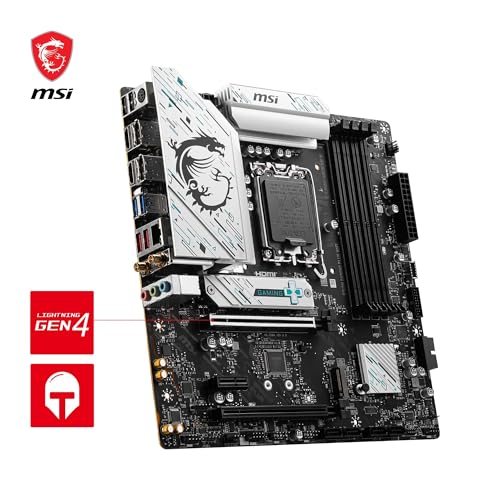
The MSI B760M GAMING PLUS WIFI is a Micro-ATX board built around Intel's B760 chipset, using the LGA 1700 socket. It supports Intel 12th, 13th, and 14th Gen Core processors, which covers a wide range of chips from the budget Celeron end all the way up to Core i9s (though pairing a 253W i9 with a budget B760M board is a choice we'd question, and we'll explain why in the VRM section). Four DDR5 DIMM slots give you dual-channel memory support with a rated boost speed of 6800+ MHz with overclocking, which is respectable for this tier.
Storage is handled by two M.2 Gen4 x4 slots, both running at up to 64Gbps, which means you can run a fast primary NVMe drive and a secondary without bottlenecking either. The primary PCIe slot is a single x16 running at PCIe 4.0, which is fine for any current GPU including the RTX 4090 (PCIe 4.0 x16 doesn't meaningfully bottleneck any GPU available today). Rear I/O includes USB 3.2 Gen 2x2 Type-C at 20Gbps, HDMI 2.1, DisplayPort 1.4, and 7.1 HD audio with S/PDIF output. Wi-Fi 6E and 2.5G LAN are both present, which is a proper win at this price.
The form factor is Micro-ATX, so it'll fit in both mATX and full ATX cases. That's if you're planning a compact build but want the option to upgrade your case later. The board uses a 6-layer PCB with 2 oz. thickened copper, which MSI describes as server-grade, and that's not pure marketing fluff: thicker copper traces genuinely help with signal integrity and thermal performance under sustained loads.
| Specification | Detail |
|---|---|
| Socket | LGA 1700 |
| Chipset | Intel B760 |
| Form Factor | Micro-ATX (mATX) |
| Memory Slots | 4 x DDR5 DIMM |
| Memory Speed (OC) | 6800+ MHz |
| PCIe x16 Slot | 1 x PCIe 4.0 x16 |
| M.2 Slots | 2 x M.2 Gen4 x4 (up to 64Gbps each) |
| LAN | 2.5Gbps |
| Wi-Fi | Wi-Fi 6E |
| Bluetooth | 5.3 |
| Rear USB | USB 3.2 Gen 2x2 Type-C (20Gbps) |
| Video Output | HDMI 2.1, DisplayPort 1.4 |
| Audio | 7.1 HD Audio with Audio Boost, S/PDIF output |
| CPU Generations | Intel 12th, 13th, 14th Gen Core |
| PCB | 6-layer, 2 oz. copper |
Socket and CPU Compatibility
The LGA 1700 socket is Intel's platform for 12th Gen (Alder Lake), 13th Gen (Raptor Lake), and 14th Gen (Raptor Lake Refresh) processors. That covers an enormous range: from the budget Core i3-12100F all the way up to the Core i9-14900K. In practice, the B760 chipset imposes some sensible constraints on what you'd actually pair with this board, but the socket compatibility itself is broad. If you're buying a Core i5-13600K, Core i5-14600K, or Core i7-13700, this board will physically accept those chips without any issue.
One thing to be aware of: if you're buying a 14th Gen processor and the board has older firmware, you may need a BIOS update before the CPU is recognised. MSI has been fairly good about keeping BIOS updates current for LGA 1700 boards, and the B760M GAMING PLUS WIFI should ship with firmware that supports 14th Gen out of the box at this point in the product cycle. But it's always MSI's support page before building if you're buying a very recent CPU. The LGA 1700 platform is also confirmed to be the end of the line for this socket: Intel moved to LGA 1851 with Arrow Lake, so there's no future CPU upgrade path beyond 14th Gen on this board.
That last point matters for long-term planning. If you're buying this board today with a 13th or 14th Gen chip, you're essentially locked into that CPU generation for the life of the board. That's not unusual for budget platforms, but it's worth being clear-eyed about: this isn't a board you'll upgrade through three CPU generations. It's a solid platform for one build, and when you're ready to upgrade significantly, you'll likely be replacing the board too. For most people building a gaming PC they plan to use for four or five years without major upgrades, that's completely fine.
Chipset Features
The Intel B760 chipset sits in the middle of Intel's consumer chipset stack, below the Z790 (which allows CPU overclocking) and above the H610 (which strips out a lot of connectivity). For a gaming build or a productivity workstation, B760 hits the right balance: you get PCIe 4.0 for storage and graphics, reasonable USB bandwidth, and enough chipset lanes to keep things from feeling constrained. The key limitation compared to Z790 is that you cannot overclock the CPU multiplier. You can still run XMP/DOCP memory profiles to push DDR5 speeds, but the CPU itself runs at Intel's rated boost frequencies, not beyond.
In terms of chipset-level connectivity, B760 provides a decent spread of PCIe and USB lanes. The board uses these to serve the two M.2 slots, the rear USB ports, and the onboard audio and networking. One thing the B760 chipset does well is DMI bandwidth: it uses a DMI 4.0 x8 connection between the chipset and CPU, which is double what the older B660 offered. That matters when you've got multiple fast NVMe drives and USB devices running simultaneously, as it reduces the chance of the chipset becoming a bottleneck. For a gaming build with one fast SSD and a GPU, you'll never notice the difference, but it's good to know the headroom is there.
The B760 chipset does not support CPU overclocking, which is because it catches people out. If you're buying a K-series processor like the Core i5-13600K or i7-13700K specifically to overclock, you need a Z790 board, not this one. The B760M GAMING PLUS WIFI will run a K-series chip at its rated boost speeds without complaint, but you're leaving performance on the table if overclocking was the plan. For non-K chips, which are arguably better value anyway on a B760 platform, this is a non-issue.
VRM and Power Delivery
This is where budget boards either earn their keep or expose their compromises, so let's be specific. The verified product data for this board doesn't list explicit phase counts or MOSFET ratings for the B760M GAMING PLUS WIFI specifically. What we know from the B760 chipset tier and MSI's positioning of this board is that it sits in the budget bracket, which typically means a simpler VRM configuration than MSI's higher-end B760 offerings. Compare this to MSI's own B760M PROJECT ZERO, which uses a 12-phase Duet Rail Power System with 75A DrMOS MOSFETs and 7W/mK thermal pads: that's a genuinely premium VRM setup. The GAMING PLUS WIFI is a different proposition at a lower price point.
For practical purposes, what does this mean? If you're running a Core i5-13400F, Core i5-14400F, or even a Core i5-13600K at stock settings, the VRM on this board will handle it without breaking a sweat. These chips have TDPs in the 65W to 125W range under realistic loads, which is well within what a properly designed budget VRM can manage. Where you'd start to worry is if you're planning to run a Core i9-14900K at its maximum power limit of 253W for sustained workloads like video rendering or heavy compilation. That's genuinely not what this board is designed for, and pushing it there would be asking for thermal throttling or long-term VRM degradation.
Owner reviews don't flag VRM problems as a recurring issue, which is reassuring. With 220 at 4.6 stars, if there were systematic overheating or stability problems under normal gaming loads, you'd see a pattern in the lower ratings. The fact that you don't suggests MSI has sized the VRM appropriately for the CPUs this board is realistically paired with. The sensible pairing is a Core i5 or i7 without a K suffix, running at stock, in a well-ventilated case. Do that, and the power delivery won't be a conversation you ever need to have.
Memory Support
Four DDR5 DIMM slots with a rated overclock speed of 6800+ MHz is a solid offering for this price tier. DDR5 is now the standard for new Intel builds, and having four slots rather than two gives you the option to start with 16GB or 32GB and add more later without replacing existing sticks. The dual-channel architecture means you want to populate slots in matched pairs for best performance: slots 2 and 4 first (check your manual for the exact pairing, as it varies by board), then fill slots 1 and 3 when you upgrade.
The 6800+ MHz figure refers to the XMP (Extreme Memory Profile) overclock ceiling, which is the standardised memory overclocking specification from JEDEC. In practice, DDR5 kits rated at 6000MHz or 6400MHz are the sweet spot for Intel 13th and 14th Gen in terms of price-to-performance, and this board will run those profiles without issue. Going above 6400MHz can sometimes require more BIOS fiddling and isn't always stable on budget boards, so don't buy an expensive 7200MHz kit expecting it to just work out of the box. Start with a quality 6000MHz or 6400MHz kit and you'll be fine.
One thing: DDR5 at launch had some teething issues with compatibility and stability, particularly with aggressive XMP profiles. That's largely sorted now, but it reinforces the point about not buying the most extreme memory kit and expecting plug-and-play behaviour. Stick to well-known brands, Corsair, Kingston, G.Skill, and check MSI's QVL (Qualified Vendor List) on their support page if you want certainty. Owner reviews don't flag memory compatibility as a persistent problem on this board, which suggests MSI's DDR5 tuning is in decent shape.
Storage Options
Two M.2 Gen4 x4 slots running at up to 64Gbps each is genuinely good for a budget board. Gen4 NVMe drives like the Samsung 990 Pro or WD Black SN850X can hit sequential read speeds of around 7000MB/s, and both slots on this board can support that. For most gaming builds, one fast Gen4 drive for the OS and games, and a second for bulk storage or a games library, is exactly the configuration you want. Having both slots at Gen4 rather than mixing Gen4 and Gen3 (as some budget boards do) is a proper win.
The PCIe Gen 4 standard delivers twice the bandwidth of Gen 3, which matters for sustained write workloads like video editing or large file transfers. For gaming specifically, the real-world difference between Gen3 and Gen4 NVMe is minimal in most scenarios, but having Gen4 on both slots means you're not compromising if you later add a drive for content creation work. The board also supports SATA storage, though the specific SATA port count isn't detailed in the verified product data, so check the full spec sheet on MSI's site if you're planning to run multiple 2.5-inch or 3.5-inch drives.
Installation should be straightforward. MSI's EZ M.2 Clip system is a tool-free installation mechanism that's been well-received across their board range: no screwdriver needed to secure the M.2 drive, which sounds like a minor thing until you've stripped a tiny M.2 screw in a cramped case. Owner reviews don't flag installation difficulties as an issue, which suggests the tool-free system works as advertised. If you're building for the first time, this is the kind of quality-of-life feature that makes the process noticeably less frustrating.
Expansion Slots and PCIe
The primary GPU slot is a single PCIe 4.0 x16 with Steel Armor reinforcement. Steel Armor is MSI's name for the metal shielding around the slot, which prevents the slot from cracking or flexing under the weight of a heavy GPU. Given that modern graphics cards like the RTX 4080 or RX 7900 XT can weigh over a kilogram and often need a GPU support bracket to prevent sag, having a reinforced slot is sensible rather than a premium feature. PCIe 4.0 x16 provides 32GB/s of bandwidth, which is more than enough for any current GPU: even the fastest cards available today don't saturate PCIe 4.0 x16 in gaming workloads.
Being a budget mATX board, you're not getting a sprawling array of PCIe x1 slots for expansion cards. The focus is clearly on the primary GPU slot and the two M.2 slots for storage. If you need a dedicated capture card, sound card, or other PCIe expansion, check the full spec sheet carefully before buying, as the mATX form factor naturally limits what's physically possible. For a standard gaming build with a GPU and NVMe storage, the slot configuration is exactly what you need and nothing you don't.
The single x16 slot also means there's no multi-GPU support, but that's fine. AMD CrossFire and NVIDIA SLI are effectively dead technologies for consumer gaming, and no modern game or GPU driver meaningfully benefits from multi-GPU setups. A single powerful GPU is always the right call, and the B760M GAMING PLUS WIFI is designed around that reality. The PCIe 4.0 x16 slot will handle any GPU you'd realistically pair with a B760 platform without complaint.

Connectivity and Rear I/O
The rear I/O on this board is genuinely impressive for the price tier. USB 3.2 Gen 2x2 Type-C at 20Gbps is the headline: that's the fastest USB standard currently in common use, and finding it on a budget board is notable. Most budget boards include Gen 2 Type-C at 10Gbps if they include a Type-C at all. Having 20Gbps available means you can connect an external NVMe enclosure, a fast USB hub, or a high-bandwidth peripheral without hitting a speed wall. That's a real-world benefit, not a spec-sheet number that never matters.
Video outputs include HDMI 2.1 and DisplayPort 1.4, both of which are useful if you're running a CPU with integrated graphics (like the non-F variants of Intel's Core lineup) and want to use the iGPU for a secondary display or as a backup output. HDMI 2.1 supports 4K at 120Hz or 8K at 60Hz from the iGPU, which is more than most people will ever need. Audio is handled by 7.1 HD Audio with Audio Boost and S/PDIF output, which covers both analogue and digital audio needs. The S/PDIF output is specifically useful if you're connecting to a DAC or AV receiver via optical.
The specific count of USB 2.0 and USB 3.x Type-A ports on the rear isn't detailed in the verified product data, so check MSI's official spec page for the full port count before buying if that matters to your build. What is confirmed is the USB 3.2 Gen 2x2 Type-C, which is the headline connectivity feature. Internal headers for front-panel USB aren't specified in the verified data either, but B760 boards at this tier typically include USB 3.2 Gen 1 and USB 2.0 internal headers as standard. Again, the MSI product page will have the definitive list.
WiFi and Networking
Wi-Fi 6E with Bluetooth 5.3 is the wireless package here, and it's a good one. Wi-Fi 6E extends the Wi-Fi 6 standard into the 6GHz band, which means access to less congested spectrum in environments where the 2.4GHz and 5GHz bands are crowded. In a flat or house with multiple Wi-Fi devices, the 6GHz band can make a meaningful difference to latency and throughput stability. For gaming specifically, the lower latency and reduced interference of 6GHz Wi-Fi is a genuine advantage over older Wi-Fi standards. You'll need a Wi-Fi 6E router to access the 6GHz band, but the board is ready when you are.
The 2.5Gbps LAN is the wired networking option, and it's the right choice for a gaming board in 2026. Standard Gigabit LAN (1Gbps) has been the baseline for years, but 2.5Gbps is increasingly common on mid-range and premium boards because it future-proofs you for faster broadband speeds and faster local network transfers. If you're on a 1Gbps or faster internet connection, or you transfer large files between PCs on your home network, 2.5Gbps LAN makes a practical difference. Budget boards often cut corners here with 1Gbps LAN, so seeing 2.5Gbps at this price point is.
Bluetooth 5.3 covers wireless peripherals: headsets, controllers, keyboards, mice. Version 5.3 is the current mainstream standard, offering good range and connection stability. If you're using a wireless gaming headset or a Bluetooth controller, you'll have no issues here. The combination of Wi-Fi 6E, 2.5G LAN, and Bluetooth 5.3 means the networking package on this board punches well above its budget price bracket. It's one of the genuinely strong arguments for choosing this board over similarly priced alternatives that ship with older Wi-Fi standards or 1Gbps LAN.
BIOS and Overclocking
MSI's BIOS, called Click BIOS 5, has a mixed reputation in the enthusiast community. The good news: it's improved significantly over the past few years, and the interface is now reasonably navigable for both beginners and experienced builders. The Easy Mode gives you a quick overview of system status, fan speeds, and basic settings, while Advanced Mode exposes the full range of tuning options. Fan curve control is present and functional, which matters if you care about noise levels. Owner reviews don't flag BIOS navigation as a major pain point, which suggests the experience is at least acceptable.
The overclocking picture is straightforward: the B760 chipset doesn't allow CPU multiplier overclocking, so you can't push a Core i5-13600K beyond its rated boost clocks. What you can do is run XMP memory profiles to hit the 6800+ MHz rated speed, adjust fan curves, and tweak some voltage settings for stability. For the vast majority of users building a gaming PC with a non-K processor, this is all the BIOS interaction you'll ever need: enable XMP, set your boot drive, done. If you want a BIOS deep-dive for extreme memory tuning or CPU overclocking, you need a Z790 board.
One area where MSI's BIOS has historically been decent is fan control. The ability to set custom fan curves per header, including a dedicated pump header for liquid cooling, is present here. The dedicated pump-fan header is if you're planning an AIO liquid cooler: having a separate header that can run at full speed for the pump without affecting your case fan curves is a small but practical feature. Owner feedback on BIOS stability is generally positive, with no widespread reports of the random crashes or settings-reset bugs that have plagued some competitors' firmware in the past.
Build Quality and Aesthetics
The 6-layer PCB with 2 oz. thickened copper is a genuine quality marker. Most budget boards use 4-layer PCBs with standard 1 oz. copper. The additional layers improve signal integrity and thermal performance, and thicker copper traces handle current more efficiently with less heat generation. MSI describes this as server-grade PCB construction, and while that's partly marketing language, the underlying specification is real and measurable. It's the kind of detail that doesn't show up in gaming benchmarks but contributes to long-term reliability.
Aesthetically, the board has a clean, dark look without excessive RGB lighting. For builders who want a tidy build without a light show, this is actually a positive. The heatsinks cover the VRM area and chipset, and the M.2 slots have Shield Frozr thermal covers to prevent SSD throttling under sustained load. The overall impression from the product imagery and owner descriptions is of a board that looks purposeful rather than flashy, which suits a compact mATX build where cable management and clean lines matter more than RGB.
Build quality reports from owners are generally positive. At 4.6 stars from 220, there's a clear pattern of satisfaction with the physical construction and installation experience. The EZ M.2 Clip tool-free installation system and the Steel Armor GPU slot reinforcement are both quality-of-life features that reflect thoughtful design rather than cost-cutting. The one area where budget boards sometimes show their price is in the quality of rear I/O shielding and port feel, but owner reviews don't flag this as a specific concern on the B760M GAMING PLUS WIFI.
How It Compares
The two most relevant competitors at this price point are the ASUS PRIME B760M-A WIFI D4 and the Gigabyte B760M DS3H AX. The ASUS PRIME B760M-A WIFI is a comparable mATX board with Wi-Fi, though it uses DDR4 rather than DDR5, which makes it a slightly different proposition: DDR4 kits are cheaper to buy, but DDR5 is the forward-looking platform. If you already own DDR4 memory from a previous build, the ASUS is. If you're buying memory fresh, DDR5 is the smarter long-term choice, which points back to the MSI. ASUS's BIOS (UEFI) is widely regarded as one of the better implementations in the industry, arguably ahead of MSI's Click BIOS 5 in terms of polish and feature depth.
The Gigabyte B760M DS3H AX is a stripped-down option that typically comes in below the MSI in price. It offers Wi-Fi 6 (not 6E), 2.5G LAN, and a more basic feature set overall. The Gigabyte is fine if you're building a very budget-constrained system and don't need Wi-Fi 6E or the USB 3.2 Gen 2x2 Type-C port. But if you're spending close to what the MSI costs, the MSI's connectivity package is clearly superior. The MSI also has the edge on PCB quality with its 6-layer construction versus the more standard approach on the Gigabyte.
The question of MSI versus ASUS is one that comes up constantly. The honest answer is that both are reliable manufacturers with good warranty support, and the choice often comes down to specific features and BIOS preference. ASUS's BIOS is generally considered more polished for advanced tuning. MSI's boards at this tier often have a slight edge on connectivity features. For a straightforward gaming build where you're not planning deep BIOS exploration, the MSI's Wi-Fi 6E and 20Gbps USB-C are more tangible benefits than BIOS interface polish.
| Feature | MSI B760M GAMING PLUS WIFI | ASUS PRIME B760M-A WIFI | Gigabyte B760M DS3H AX |
|---|---|---|---|
| Chipset | Intel B760 | Intel B760 | Intel B760 |
| Memory | DDR5 | DDR4 | DDR5 |
| M.2 Slots | 2 x Gen4 | 2 x Gen4 | 2 x Gen4 |
| Wi-Fi | Wi-Fi 6E | Wi-Fi 6 | Wi-Fi 6 |
| LAN | 2.5Gbps | 2.5Gbps | 2.5Gbps |
| USB Type-C Rear | USB 3.2 Gen 2x2 (20Gbps) | USB 3.2 Gen 2 (10Gbps) | Not specified |
| PCB Layers | 6-layer, 2oz copper | Standard | Standard |
| Form Factor | mATX | mATX | mATX |
| BIOS | Click BIOS 5 | ASUS UEFI (well-regarded) | Gigabyte UEFI |

Final Verdict
The MSI B760M GAMING PLUS WIFI is a well-specified budget board that earns its 4.6-star average honestly. Wi-Fi 6E, 2.5G LAN, two M.2 Gen4 slots, DDR5 support, USB 3.2 Gen 2x2 Type-C, and a 6-layer PCB at this price point is a combination that's genuinely hard to beat. For a gaming build centred on a Core i5-13400F, Core i5-14500, or Core i7-13700, this board gives you everything you need and nothing that's going to cause grief. The 221 owner reviews back that up: this isn't a board that looks good on paper and disappoints in practice.
The caveats are real but specific. Don't pair this with a Core i9 at full power limits and expect the VRM to love you for it. Don't buy K-series CPUs expecting to overclock them, because B760 won't let you. And if BIOS depth matters to you for advanced tuning, ASUS's implementation is arguably more refined. But for the target audience, which is someone building a solid gaming PC or home workstation without spending mid-range board money, those caveats barely apply.
The one honest alternative to consider: if you genuinely don't need Wi-Fi and you're happy with a simpler feature set, there are B760M boards available for less that will run a Core i5 just as reliably. But the moment you factor in the cost of a separate Wi-Fi adapter (which you'd need to add to a non-WiFi board), the price gap closes fast, and the MSI's integrated Wi-Fi 6E becomes a clear win. That's a good deal.
Our rating: 8 out of 10. A genuinely strong budget Intel board that over-delivers on connectivity. The VRM keeps it out of the top tier for power users, but for the builds it's actually designed for, it's close to the best option in its price class.
What works. What doesn’t.
5 + 4What we liked5 reasons
- Wi-Fi 6E and 2.5G LAN at budget pricing
- Two M.2 Gen4 x4 slots with thermal covers
- USB 3.2 Gen 2x2 Type-C (20Gbps) on rear I/O
- 6-layer PCB with 2oz copper for long-term reliability
- 4.6 stars from 221 owners with no systemic stability complaints
Where it falls4 reasons
- VRM not suited to Core i9 at full power limits
- No CPU overclocking via B760 chipset (need Z790 for that)
- BIOS less polished than ASUS UEFI for advanced tuning
- LGA 1700 is end-of-life; no CPU upgrade path beyond 14th Gen
Full specifications
12 attributes| Socket | LGA1700 |
|---|---|
| Chipset | B760 |
| Form factor | Micro-ATX |
| Bios flashback | false |
| M2 slots | 2 |
| MAX RAM | 192GB |
| MAX RAM GB | 192 |
| Network | 2.5GbE + Wi-Fi 6E |
| Pcie 5 slots | 0 |
| Pcie slots | 5x PCIe x16 |
| RAM slots | 4 |
| RAM type | DDR5 |
If this isn’t right for you
2 options 8.5 / 10
MSI PRO B760-P WIFI DDR4 Motherboard, ATX - Supports Intel 14th, 13th & 12th Gen Core Processors, LGA 1700 - DDR4 Memory Boost 5333+MHz/OC, PCIe 4.0 x16 Slots, M.2 Gen4 Slots, 2.5G LAN, Wi-Fi 6E
£129.95 · MSI
 8.5 / 10
MSI B650M GAMING PLUS WIFI Motherboard, mATX - Supports AMD Ryzen 9000/8000 / 7000 Series Processors, AM5 - DDR5 Memory Boost 7800+ MHz/OC, PCIe 4.0 x16, M.2 Gen4, Wi-Fi 6E
£138.40 · MSI
Frequently asked
5 questions01Is the MSI B760M GAMING PLUS WIFI Motherboard overkill for just gaming?+
Not at all. For gaming specifically, the B760M GAMING PLUS WIFI is well-matched. The PCIe 4.0 x16 slot handles any current GPU, the two M.2 Gen4 slots cover fast NVMe storage, and Wi-Fi 6E means you're not compromising on wireless connectivity. The features that go beyond basic gaming needs, like 20Gbps USB-C and 2.5G LAN, are genuinely useful rather than pointless extras. If anything, the B760 chipset's lack of CPU overclocking support keeps this board appropriately focused on stable, reliable gaming performance rather than chasing synthetic benchmark numbers.
02Will my existing CPU cooler work with the MSI B760M GAMING PLUS WIFI Motherboard?+
If your cooler uses an LGA 1700 mounting bracket, it will fit directly. Most coolers released since late 2021 include LGA 1700 support, either with the bracket pre-installed or included in the box. If you have an older cooler designed for LGA 1200 or LGA 1151, you'll need a new mounting kit or a new cooler entirely, as those sockets are not compatible with LGA 1700. Check your cooler manufacturer's compatibility list or contact their support to confirm before buying.
03What happens if the MSI B760M GAMING PLUS WIFI Motherboard doesn't work with my components?+
Amazon's standard 30-day return window applies to this board, and the A-to-Z Guarantee covers you if there's a genuine compatibility or defect issue. Before buying, check MSI's QVL (Qualified Vendor List) on their support page to confirm your memory kit is listed as compatible. For CPU compatibility, any Intel 12th, 13th, or 14th Gen LGA 1700 processor will work. If you're buying a very new 14th Gen chip, ensure the board's firmware is up to date, as older BIOS versions may not recognise the newest CPUs.
04Is there a cheaper motherboard I should consider instead?+
Yes, honestly. If you don't need Wi-Fi at all and you're building with a very budget CPU like a Core i3-12100F or i5-12400F, there are basic B760M boards available for less that will run those chips without issue. The Gigabyte B760M DS3H AX is one option in that direction. However, the moment you factor in the cost of a separate Wi-Fi adapter and consider that the MSI includes Wi-Fi 6E, 2.5G LAN, and 20Gbps USB-C, the price difference shrinks considerably. If Wi-Fi is in your plan at all, the MSI is likely the smarter spend.
05What warranty and returns apply to the MSI B760M GAMING PLUS WIFI Motherboard?+
The verified product data doesn't specify a manufacturer warranty period for this board. MSI typically offers a three-year warranty on their motherboards, but confirm this directly with MSI UK or the retailer at point of purchase. Regardless of manufacturer warranty, Amazon's 30-day return policy and A-to-Z Guarantee provide a solid safety net for the initial purchase period.