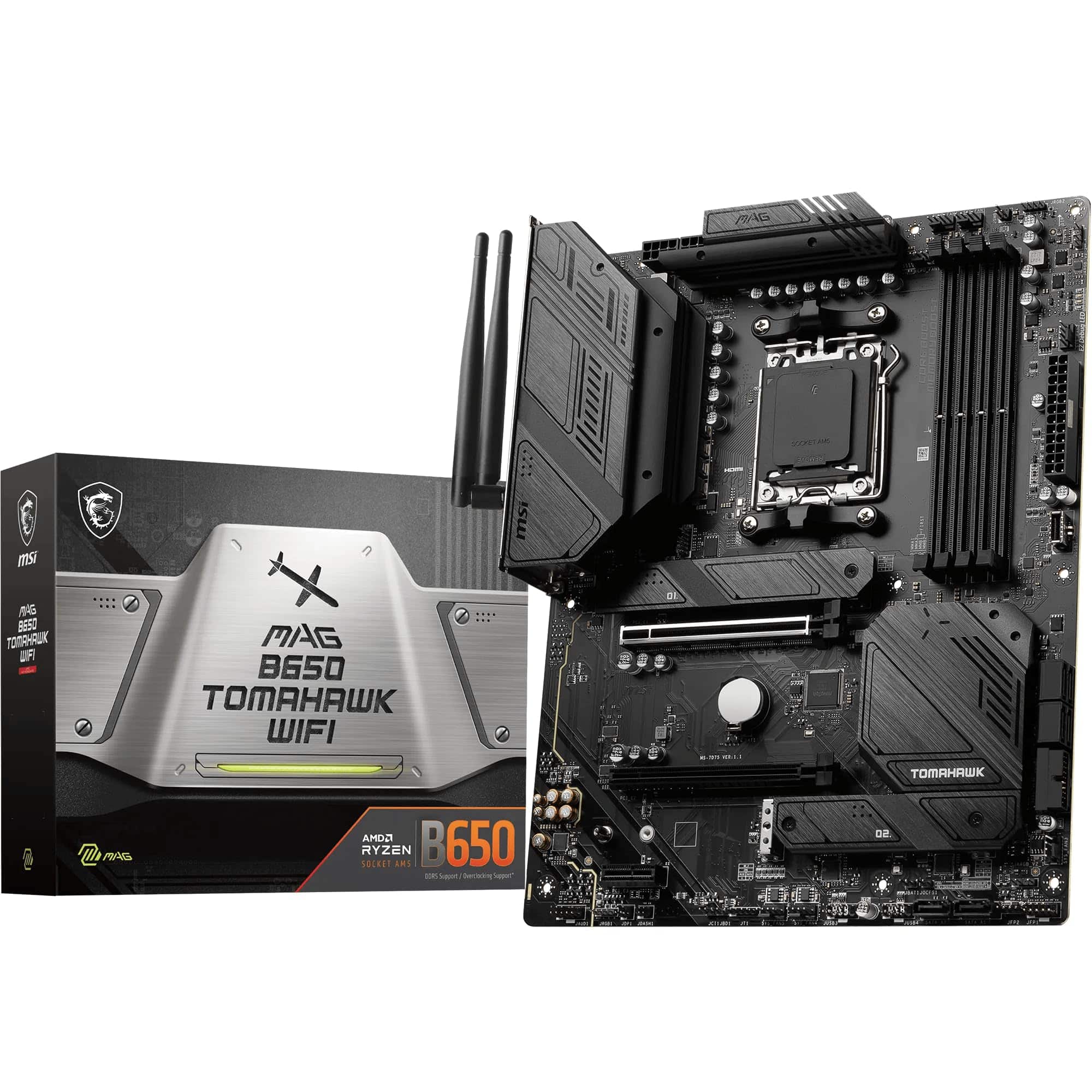
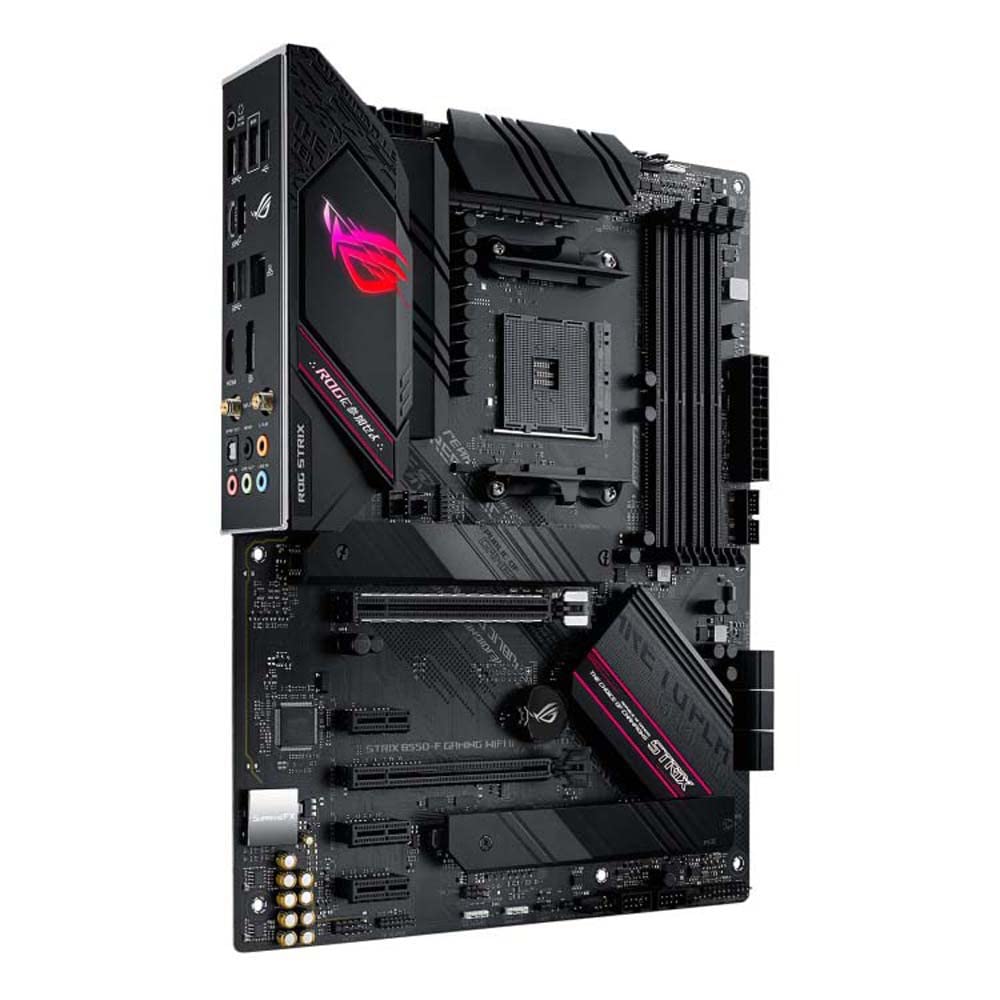
There's a specific kind of frustration that comes from picking the wrong motherboard. You've got a great CPU, decent RAM, a fast NVMe drive, and then the board underneath it all is letting the side down with a mediocre VRM, a BIOS that feels like it was designed by someone who actively hates builders, and connectivity that was already dated when the board launched. The ASUS ROG STRIX B550-F GAMING WIFI II is trying very hard to not be that board. And based on what the specs show and what over 2,000 owners have reported, it mostly succeeds.
The AM4 platform is genuinely one of the best things AMD has ever done for PC builders. Years of socket compatibility, a massive range of CPUs from budget Ryzen 3 chips right up to the monstrous 5950X, and a secondhand market full of bargain processors. The B550 chipset sits in the sweet spot of that ecosystem: it's not the budget-tier A520 that strips out PCIe Gen 4, and it's not the X570 that charges you extra for features most builders never actually use. B550 is where the sensible money goes. So the question isn't really whether B550 is a good idea. It's whether the STRIX B550-F GAMING WIFI II is the right B550 board at this price point, or whether you'd be better served spending a bit less or a bit more.
The ASUS ROG STRIX B550-F GAMING WIFI II ATX Motherboard Socket AM4 AMD B550 Chipset (model number 90MB19V0-M0EAY0) sits in the mid-range bracket. It's got 2,101 averaging ★★★★½ (4.6), which is a genuinely impressive number. That's not a handful of enthusiasts who got early review samples. That's a proper cross-section of real builders giving it a thumbs up. So what are they actually getting for their money?
Core Specifications
The ASUS ROG STRIX B550-F GAMING WIFI II is a full ATX board, so it's going to need a mid-tower or full-tower case. No mATX or ITX option here, which is fine, because the ATX form factor gives ASUS room to do things properly. Four DIMM slots for DDR4 memory, support for up to 128GB, and the usual complement of PCIe slots and M.2 connectors you'd expect from a board at this level. The rear I/O is properly populated, which we'll get into in the connectivity section.
The B550 chipset handles the heavy lifting on the storage and USB side, while the CPU handles the primary PCIe Gen 4 lanes directly. This is the architecture that made B550 so appealing when it launched, and it still holds up now. You get the fast lanes where they matter, on your primary GPU slot and your top M.2, without paying X570 money for chipset-level PCIe Gen 4 that most people honestly never saturate.
What stands out on the spec sheet is the WiFi 6E wireless networking, the 2.5Gb Ethernet, and the USB 3.2 Gen 2x2 Type-C on the rear panel. These aren't features you'd typically expect to find on a board that sits in the mid-range bracket. They're premium connectivity specs that push this board toward the upper end of what B550 can offer.
| Specification | Detail |
|---|---|
| Model Number | 90MB19V0-M0EAY0 |
| Socket | AM4 |
| Chipset | AMD B550 |
| Form Factor | ATX |
| Memory Slots | 4 x DDR4 DIMM |
| Max Memory | 128GB |
| Memory Speed | Up to 5100MHz+ (OC) |
| PCIe x16 Slots | 2 (primary PCIe Gen 4, secondary PCIe Gen 3) |
| M.2 Slots | 2 (PCIe Gen 4 x4 + PCIe Gen 3 x4 / SATA) |
| SATA Ports | 6 |
| USB Rear I/O | USB 3.2 Gen 2x2 Type-C, USB 3.2 Gen 2 Type-A, USB 3.2 Gen 1 Type-A, USB 2.0 |
| Networking | 2.5Gb Ethernet, WiFi 6E, Bluetooth 5.2 |
| Audio | Realtek S1220A 7.1 Surround |
| ASIN | B09LVQCMK4 |
| Price | £135.99 |

Socket and CPU Compatibility
The AM4 socket is one of the great success stories in PC building. AMD kept it going from 2016 all the way through to the Ryzen 5000 series, meaning a board like this can run everything from a Ryzen 3 1200 right up to a Ryzen 9 5950X. In practice, if you're buying this board in 2026, you're almost certainly pairing it with a Ryzen 5000 chip, and that's exactly where it shines. The Ryzen 5 5600X, 5700X, and 5900X are all strong value picks on the secondhand market right now, and the STRIX B550-F handles all of them without breaking a sweat.
One thing to be aware of: if you're dropping in a Ryzen 5000 chip, the board should support it out of the box with a recent BIOS. But if you're somehow starting with an older Ryzen 1000 or 2000 series CPU to do an initial BIOS flash before upgrading, ASUS does support that process. The BIOS Flashback feature means you can actually update the firmware without a CPU installed at all, which is a genuinely useful feature that cheaper boards often skip. It's one of those things you never need until you really, really need it.
It's also worth being clear about what AM4 is not. This is not an AM5 board. If you're planning to eventually move to Ryzen 7000 series chips, you'll need a new board and new DDR5 RAM. AM4 is a mature, finished platform. That's not a knock on it, the value proposition of AM4 CPUs right now is excellent, but it does mean you're building on a platform with a defined ceiling. For a lot of builders that ceiling is absolutely fine. If you want a future-proof path to Ryzen 7000 and beyond, you'd need to look at AM5 alternatives instead.
Chipset Features
The AMD B550 chipset is the mid-tier option in AMD's 500 series lineup. It sits above the A520 (which doesn't support PCIe Gen 4 at all and locks out overclocking) and below the X570 (which adds chipset-level PCIe Gen 4 lanes and costs more). For the vast majority of builders, B550 is the right call. You get CPU-direct PCIe Gen 4 for your primary GPU slot and your top M.2 slot, which covers the two components that actually benefit from that bandwidth in real-world use.
Overclocking is fully supported on B550. You can push your CPU beyond stock speeds, tune your memory with XMP profiles, and adjust voltages through the BIOS. This is a meaningful distinction from the A520, which locks all of that out. The B550 chipset also provides additional USB bandwidth and SATA ports beyond what the CPU alone can deliver, which is why this board can offer six SATA ports and multiple USB connections without running out of lanes.
Where B550 does give up ground to X570 is in chipset-level PCIe generation. The secondary PCIe slots and the second M.2 slot run at PCIe Gen 3 speeds rather than Gen 4. In practice, this matters very little. PCIe Gen 3 x4 on an M.2 slot still delivers sequential reads well above 3,000 MB/s, which is faster than most workloads can saturate. And your secondary GPU slot running at Gen 3 is not going to bottleneck any single GPU setup. The people who genuinely need chipset-level PCIe Gen 4 know who they are, and they're not shopping for a B550 board anyway.
VRM and Power Delivery
This is the bit I care about most, and it's where the STRIX B550-F genuinely earns its price tag. ASUS has fitted this board with a 14+2 phase power delivery setup. Fourteen phases for the CPU VCore, two for the SoC. These aren't the watered-down doubled phases you sometimes see on cheaper boards where a single controller pretends to be two. These are proper, discrete phases using quality MOSFETs. The heatsinks covering the VRM area are substantial, with a heatpipe connecting the two heatsink blocks to spread thermal load more effectively.
Why does this matter? Because your VRM is what converts the 12V from your power supply into the precise, stable voltage your CPU actually needs. A weak VRM under sustained load gets hot, throttles, and in worst cases fails. If you're running a Ryzen 9 5900X or 5950X at stock clocks, or pushing any Ryzen 5000 chip with PBO (Precision Boost Overdrive) enabled, you need a VRM that can handle the sustained current draw without melting. The STRIX B550-F can handle it. Multiple owners running 5950X builds have reported stable operation without VRM thermal issues, which is the real-world test that matters.
Cheaper B550 boards in the sub-£100 bracket often cut corners here. A board with a 6+2 phase setup on a flimsy heatsink will run your Ryzen 5 5600X just fine at stock, but push it with PBO and sustained workloads and you'll see the board struggling to keep up. The STRIX B550-F doesn't have that problem. You're paying for proper power delivery, and you're getting it. If you're pairing this with anything from a 5600X up to a 5950X and you want to actually use the CPU's full capability, the VRM here gives you the headroom to do it.
Memory Support
Four DDR4 DIMM slots, maximum 128GB capacity, and support for speeds up to 5100MHz and beyond with overclocking. The official JEDEC spec for DDR4 tops out at 3200MHz, but through the EXPO and XMP memory profiles that ASUS supports in the BIOS, you can push quality kits considerably faster. Most builders will run 3200MHz or 3600MHz DDR4, which is the sweet spot for Ryzen performance, and the STRIX B550-F handles both without any drama.
The memory QVL (Qualified Vendor List) on ASUS boards is typically well-maintained, which matters more than people realise. Memory compatibility is one of the most common sources of build headaches, and a board with a solid QVL and a BIOS that handles memory training well makes the whole process much smoother. Owner reviews consistently mention good memory compatibility, with very few reports of the finicky memory training issues that plagued some early B550 boards at launch.
One thing to note: if you're running four sticks rather than two, you'll typically see a lower maximum stable speed. This is a Ryzen platform characteristic rather than anything specific to this board. Two sticks in the recommended A2/B2 slots will give you the best chance of hitting higher frequencies. Most gaming builds use 2 x 16GB anyway, and at that configuration the STRIX B550-F is very well-behaved. The dual-channel configuration is what you want for gaming performance, and the board makes it easy to set up correctly.
Storage Options
Two M.2 slots is the headline here. The first slot, M2_1, runs at PCIe Gen 4 x4, fed directly by the CPU. This is where you put your primary NVMe drive, and it'll support the fastest Gen 4 drives available, with sequential read speeds up to around 7,000 MB/s on drives like the Samsung 980 Pro or WD Black SN850X. The second M.2 slot runs at PCIe Gen 3 x4 or SATA mode, which still covers the vast majority of NVMe drives on the market and all SATA M.2 drives.
Six SATA ports round out the storage connectivity. That's enough for a proper multi-drive setup: your boot NVMe, a secondary NVMe, and still four SATA ports free for SSDs or HDDs. For a content creation rig, a NAS-adjacent build, or just someone who hoards games and never deletes anything (no judgement), six SATA ports is genuinely useful. Cheaper boards sometimes cut this down to four, which starts to feel limiting once you've got a few drives in the system.
RAID support is present through the AMD RAIDXpert2 utility, supporting RAID 0, 1, and 10 across SATA ports. It's not something most home builders use, but it's there if you need it. The M.2 slots both have their own heatsink covers included in the box, which is a nice touch. Keeping your NVMe drives at sensible temperatures matters for sustained performance, and not having to buy aftermarket heatsinks separately is a small but appreciated detail.
Expansion Slots and PCIe
The primary PCIe x16 slot runs at PCIe Gen 4 x16, direct from the CPU. This is where your GPU goes, and it's the full-fat connection with steel reinforcement to handle the weight of modern graphics cards. The reinforced slot is genuinely useful, not just marketing. Modern GPUs are heavy, and a slot that can handle the mechanical stress without cracking the PCB is worth having. ASUS calls this their SafeSlot design, and it's been on their boards long enough that it's proven itself.
The second x16 slot runs at PCIe Gen 3 x4 from the chipset. This is fine for a second GPU in a compute setup, a capture card, a 10GbE NIC, or any other expansion card that doesn't need huge bandwidth. It's worth being clear that this is x4 electrical, not x16, so don't expect full GPU performance if you're trying to run a second graphics card for gaming. That's not what this slot is for on a B550 board.
There are also PCIe x1 slots for smaller expansion cards. Sound cards, USB expansion cards, and similar low-bandwidth add-ins live here. The overall slot layout is sensible, with enough spacing between the primary x16 slot and the next slot down that most dual-slot GPU coolers won't block the adjacent slot entirely. That sounds like a minor detail until you're trying to fit a capture card into a build with a large GPU and you realise the board layout has left you nowhere to put it.
Connectivity and Rear I/O
The rear I/O panel is where this board really shows what it's made of. You get a USB 3.2 Gen 2x2 Type-C port running at 20Gbps, which is the fastest USB standard on the rear panel of any consumer motherboard right now. Alongside that there are USB 3.2 Gen 2 Type-A ports at 10Gbps, USB 3.2 Gen 1 Type-A ports at 5Gbps, and USB 2.0 ports for keyboards, mice, and other low-bandwidth peripherals. The total USB count is solid, and having both the fast Type-C and multiple Type-A options means you're covered whatever you're plugging in.
Audio is handled by the Realtek S1220A codec with a dedicated audio PCB section. The S1220A is a proper high-quality audio chip, not the bargain-bin Realtek parts you find on budget boards. It supports 7.1 surround sound output, and the dedicated section of the PCB with its own shielding means you're less likely to get interference noise from the rest of the board's components. For people using headphones or speakers directly from the rear audio jacks rather than a dedicated DAC, this matters.
There's a clear CMOS button on the rear I/O, which is one of those features that sounds minor until you're troubleshooting a failed overclock at midnight and you don't want to open the case to find a jumper. There's also a BIOS Flashback button, which lets you update the BIOS from a USB drive without needing a CPU or RAM installed. That's a feature that used to be exclusive to premium boards, and having it here is genuinely useful. The rear I/O also comes with a pre-installed I/O shield, which means one less fiddly step during the build.
WiFi and Networking
The 2.5Gb Ethernet port is handled by an Intel I225-V controller, which is a much better choice than the Realtek 2.5Gb controllers you find on some competing boards. The Intel controller has a stronger track record for driver stability and lower CPU overhead. If you're on a 2.5Gb network, or you're planning to upgrade your router or switch to support it, this is the connection you want. And even on a standard gigabit network, the 2.5Gb controller works perfectly fine.
The WiFi 6E wireless module is a significant upgrade over the WiFi 6 you find on the original STRIX B550-F. WiFi 6E adds access to the 6GHz band, which is less congested than the 2.4GHz and 5GHz bands and capable of much higher throughput and lower latency when you have a compatible router. If you're in a flat or a dense urban environment where WiFi congestion is a real problem, the 6GHz band is a genuine improvement. The "II" in the board's name refers specifically to this WiFi 6E upgrade over the original model.
Bluetooth 5.2 is included alongside the WiFi, which covers wireless headsets, controllers, and any other Bluetooth peripherals you want to connect. The antenna connectors on the rear I/O take the included external antennas, and the signal quality reported by owners is generally good. A few people in the reviews mention that the antenna placement matters, which is true of any WiFi implementation, but there are no widespread reports of weak or unreliable wireless performance. For a desktop that's going to live near a router anyway, the 2.5Gb Ethernet is the better connection. But having solid WiFi 6E as a backup or primary option is a proper bonus.
BIOS and Overclocking
ASUS's UEFI BIOS is genuinely one of the better implementations in the industry. The dual-mode interface gives you a simplified EZ Mode for quick changes like enabling XMP and setting boot order, and an Advanced Mode for people who want to dig into voltage curves, fan profiles, and memory subtimings. The layout is logical, the options are well-labelled, and it doesn't feel like you need a PhD to find the setting you're looking for. This sounds like it should be table stakes, but plenty of boards at this price point still ship with BIOS interfaces that feel like they were designed in 2009.
Fan control through the BIOS is comprehensive. Multiple fan headers, each controllable independently with custom curves based on CPU temperature, motherboard temperature, or water pump flow. You can set temperature targets, define the response curve shape, and set minimum and maximum fan speeds. For builders who care about noise levels, this level of control is important. ASUS's AI Cooling feature can also automatically tune fan curves if you'd rather not do it manually, which is a nice option for builders who just want things to work without fiddling.
For overclocking, the BIOS gives you access to CPU multiplier adjustments, BCLK tuning, voltage controls, and memory frequency and timing adjustments. PBO (Precision Boost Overdrive) settings are well-implemented, and the Curve Optimizer feature that lets you tune per-core voltage offsets is accessible without needing to navigate through buried menus. Owners who've pushed their Ryzen 5000 chips report a stable and predictable overclocking experience. There are occasional reports of BIOS updates changing behaviour slightly, but ASUS's update cadence on this board has been good, and the community around ROG boards means any issues get flagged and fixed relatively quickly.

Build Quality and Aesthetics
The PCB itself feels solid. The component placement is clean, the capacitors are high quality, and the overall construction has the kind of rigidity you want when you're mounting a heavy cooler or a large GPU. The heatsink coverage is extensive: VRM heatsinks on both sides of the CPU socket area, a chipset heatsink, and M.2 heatsink covers for both slots. Everything that generates heat has something covering it, which is how it should be at this price point.
Aesthetically, it's a ROG board, so you get the ROG branding, some RGB lighting on the chipset heatsink area and the I/O cover, and the general dark/aggressive aesthetic that the ROG line is known for. The RGB is addressable and controllable through ASUS's Aura Sync software, which integrates with other Aura-compatible components if you're building a coordinated lighting setup. If RGB isn't your thing, you can turn it all off through the BIOS without installing any software, which is the right approach.
The board ships with a pre-installed I/O shield, which is a small quality-of-life detail that makes the build process slightly less annoying. Cable routing around the board is sensible, with the 24-pin ATX connector on the right edge, the CPU power connectors at the top, and the SATA ports angled for easy cable management. The front panel headers are clearly labelled and in a sensible location. None of this is revolutionary, but it all adds up to a board that's genuinely pleasant to build with rather than one that fights you at every step.
How It Compares
The ASUS ROG STRIX B550-F GAMING WIFI II doesn't exist in a vacuum. At the mid-range price point, it's up against some serious competition. The MSI MAG B550 TOMAHAWK MAX WiFi is the most obvious challenger: it's a well-regarded board with a strong VRM, good build quality, and a slightly more aggressive price. The Tomahawk has a loyal following and deserves it. But it ships with WiFi 6 rather than WiFi 6E, and the rear I/O isn't quite as well-stocked, particularly on the USB side. For builders who prioritise future-proof wireless, the STRIX B550-F II has the edge.
The Gigabyte B550 AORUS Pro AX is another strong option in this bracket. Gigabyte's BIOS has improved significantly over the years, and the AORUS Pro AX has a solid VRM and decent connectivity. But ASUS's BIOS implementation is still generally considered more polished, and the STRIX B550-F II's USB 3.2 Gen 2x2 Type-C on the rear panel is a connectivity feature the AORUS Pro AX doesn't match. Owner satisfaction scores for the STRIX B550-F II are also higher, which counts for something when you're looking at 2,000-plus reviews.
| Feature | ASUS ROG STRIX B550-F GAMING WIFI II | MSI MAG B550 TOMAHAWK MAX WiFi | Gigabyte B550 AORUS Pro AX |
|---|---|---|---|
| VRM Phases | 14+2 | 14+2 | 12+2 |
| WiFi Standard | WiFi 6E | WiFi 6 | WiFi 6 |
| Ethernet | 2.5Gb (Intel) | 2.5Gb (Realtek) | 2.5Gb (Intel) |
| USB 3.2 Gen 2x2 (20Gbps) | Yes (Type-C rear) | No | No |
| M.2 Slots | 2 | 2 | 2 |
| SATA Ports | 6 | 6 | 6 |
| BIOS Flashback | Yes | Yes | Yes |
| Owner Rating | ★★★★½ (4.6) (2,101) | ★★★★½ (4.6) | ★★★★½ (4.6) |
The STRIX B550-F II wins on connectivity specs, particularly the WiFi 6E and the USB 3.2 Gen 2x2 Type-C. Where the Tomahawk arguably wins is on value, since it tends to sit slightly lower in price for very similar VRM capability. The choice between them really comes down to whether you care about WiFi 6E and premium USB connectivity. If you do, the STRIX B550-F II is the right call. If you don't, the Tomahawk saves you some money without giving up much.
What Builders Actually Report
With 2,101 averaging ★★★★½ (4.6), the STRIX B550-F GAMING WIFI II has a strong and consistent track record. The most common praise in owner reviews centres on three things: the BIOS experience, the stability under load, and the overall build quality. Builders running Ryzen 5000 chips, including the power-hungry 5900X and 5950X variants, consistently report stable operation without VRM thermal issues or unexpected crashes. That's the most important thing a motherboard can do, and this one does it reliably.
The WiFi performance gets consistently positive mentions too. The WiFi 6E module performs well in real-world conditions, with multiple owners reporting strong signal and stable connections. The 2.5Gb Ethernet with the Intel controller gets praised for its driver stability, which is a contrast to some boards using less well-regarded controllers that have caused headaches with Windows updates breaking networking.
The complaints, where they exist, tend to fall into a few categories. Some owners mention that the Aura Sync RGB software is bloated and occasionally temperamental, which is a fair criticism of ASUS's software suite in general. A handful of reviews mention occasional BIOS update issues, though these are in the minority and ASUS's support response has generally been positive. A small number of owners have had DOA units, but at this scale of reviews that's statistically inevitable and Amazon's returns process handles it. Nothing in the review pattern suggests a systematic hardware fault or a design problem. The negative reviews are the kind of random variance you see with any product at volume.
Value Analysis
In the mid-range motherboard bracket, the STRIX B550-F GAMING WIFI II is offering a package that leans toward the premium end of what B550 can deliver. The WiFi 6E is a genuine upgrade over the WiFi 6 you find on most boards at this price point. The USB 3.2 Gen 2x2 Type-C at 20Gbps on the rear panel is a feature you'd normally expect to pay more for. The 14+2 phase VRM with proper heatsinking is what you need for a high-end Ryzen 5000 build. And the Intel 2.5Gb Ethernet controller is the better choice over the Realtek alternative.
The question of value at this price point depends on what you're building. If you're pairing this with a Ryzen 5 5600 and a mid-range GPU for a no-frills gaming PC, you're probably paying for features you won't use. A cheaper B550 board in the sub-£100 bracket would serve that build perfectly well. But if you're building around a Ryzen 7 5800X3D, a 5900X, or a 5950X, and you want a board that can handle the power delivery demands without compromise, the STRIX B550-F II earns its place in the mid-range bracket. The VRM alone justifies the step up from budget options.
The 4.6-star average from over 2,000 builders is the kind of social proof that's hard to argue with. This isn't a board that's getting good reviews from a small sample of enthusiasts who got lucky. It's a board that consistently delivers for a wide range of builders across a wide range of use cases. At £135.99, it sits in the mid-range segment and delivers features and reliability that genuinely justify the price. You're not paying for ROG branding and nothing else. The hardware underneath the branding is the real deal.
Pros and Cons
- Proper 14+2 phase VRM with substantial heatsinking, handles Ryzen 9 chips without thermal stress
- WiFi 6E is a meaningful upgrade over the WiFi 6 on competing boards at this price
- USB 3.2 Gen 2x2 Type-C at 20Gbps on the rear panel, rare at this price point
- Intel I225-V 2.5Gb Ethernet with better driver stability than Realtek alternatives
- ASUS UEFI BIOS is genuinely good, with BIOS Flashback and clear CMOS on the rear I/O
- 4.6 stars from 2,013 owners shows consistent real-world reliability
- Aura Sync software is bloated and can be temperamental
- Only two M.2 slots, which is fine for most builds but some builders want three
- AM4 is a closed platform, no upgrade path to Ryzen 7000 without a new board and RAM
- Slightly over-spec'd for budget Ryzen builds, cheaper boards suit low-end CPUs fine
Specifications
Full specification breakdown for the ASUS ROG STRIX B550-F GAMING WIFI II ATX Motherboard Socket AM4 AMD B550 Chipset (90MB19V0-M0EAY0):
| Category | Specification |
|---|---|
| Model / Part Number | ROG STRIX B550-F GAMING WIFI II / 90MB19V0-M0EAY0 |
| ASIN | B09LVQCMK4 |
| Socket | AMD AM4 |
| Chipset | AMD B550 |
| Form Factor | ATX (305mm x 244mm) |
| Supported CPUs | AMD Ryzen 1000 / 2000 / 3000 / 4000G / 5000 series |
| Memory Type | DDR4 |
| Memory Slots | 4 x DIMM |
| Max Memory | 128GB |
| Memory Speed (OC) | Up to 5100MHz+ |
| Memory Channels | Dual channel |
| PCIe x16 Slot 1 | PCIe Gen 4 x16 (CPU) |
| PCIe x16 Slot 2 | PCIe Gen 3 x4 (Chipset) |
| M.2 Slot 1 (M2_1) | PCIe Gen 4 x4 / NVMe (CPU) |
| M.2 Slot 2 (M2_2) | PCIe Gen 3 x4 / SATA (Chipset) |
| SATA Ports | 6 x SATA 6Gb/s |
| Ethernet | Intel I225-V 2.5Gb |
| WiFi | WiFi 6E (802.11ax, ★★★★½ (4.6)/6GHz) |
| Bluetooth | 5.2 |
| Rear USB | 1x USB 3.2 Gen 2x2 Type-C (20Gbps), USB 3.2 Gen 2 Type-A (10Gbps), USB 3.2 Gen 1 Type-A (5Gbps), USB 2.0 |
| Audio | Realtek S1220A, 7.1 Surround |
| VRM | 14+2 phase |
| RGB | Yes, Aura Sync addressable |
| BIOS Flashback | Yes |
| Clear CMOS Button | Yes (rear I/O) |
| Current Price | £135.99 |
| Rating | ★★★★½ (4.6) (2,101 reviews) |
Final Verdict
The ASUS ROG STRIX B550-F GAMING WIFI II ATX Motherboard Socket AM4 AMD B550 Chipset (90MB19V0-M0EAY0) is a genuinely strong board that earns its place at the upper end of the mid-range bracket. The 14+2 phase VRM is the foundation that everything else is built on, and it's solid. The WiFi 6E upgrade over the original model is meaningful for anyone in a congested wireless environment. The USB 3.2 Gen 2x2 Type-C at 20Gbps is a premium feature at a non-premium price. And the ASUS BIOS is one of the better implementations you'll find on any board at any price.
Who should buy this? Anyone building a Ryzen 5000 system with a mid-to-high-end CPU. If you're dropping in a Ryzen 7 5800X3D, a 5900X, or a 5950X and you want a board that won't become the weak link in your system, this is a very safe choice. Content creators who need the fast USB Type-C for external storage will appreciate the 20Gbps connection. Builders who want WiFi 6E without paying X570 prices will find this hits the mark. And anyone who values a BIOS that doesn't make them want to throw their keyboard out the window will be happy here.
Who should skip it? If you're building a budget gaming PC around a Ryzen 5 5600 and a mid-range GPU, you're paying for VRM headroom and connectivity features you won't use. A solid B550 board in the sub-£100 bracket will serve that build just as well. And if you're thinking long-term about upgrading to Ryzen 7000 series, you need to accept that AM4 is a dead end and consider whether an AM5 platform makes more sense for your situation. But for a proper, capable, reliable AM4 build using the best Ryzen 5000 chips? This board is a very good answer. The 4.6-star average from over 2,000 builders isn't lying to you.
Editorial score: 8.5 out of 10. Solid VRM, excellent connectivity for the price, a BIOS that actually works, and a track record of reliability that the review count backs up. The only things holding it back from a higher score are the AM4 platform ceiling and the bloated software suite. On the hardware side, it's hard to fault.
Not Right For You? Consider These Alternatives
If the STRIX B550-F GAMING WIFI II isn't quite the right fit, here are a few alternatives worth looking at. For builders who want to save some money without sacrificing VRM quality, the MSI MAG B550 TOMAHAWK MAX WiFi is the closest competitor. It has a comparable 14+2 phase VRM, good build quality, and solid owner reviews. The trade-off is WiFi 6 rather than WiFi 6E and a slightly less impressive rear I/O, but for many builders those differences won't matter.
If you want to step up to AM5 for a future-proof platform, the ASUS ROG STRIX B650-A GAMING WIFI is worth considering. It brings you into the AMD Ryzen 7000 ecosystem with DDR5 memory and PCIe Gen 5 support on the primary slots. You'll pay more for the board and for DDR5 RAM, but you're buying into a platform with a longer upgrade runway. The AM4 platform is mature and well-supported, but if you're planning to upgrade your CPU in two or three years, AM5 is the better long-term bet.
For builders who genuinely need more than two M.2 slots and are happy to spend more, the ASUS ROG STRIX X570-E GAMING WIFI II offers X570-level features with chipset-level PCIe Gen 4 across all slots. It's overkill for most gaming builds, but for workstations with multiple fast NVMe drives and high-bandwidth expansion cards, the extra lanes matter. The price jump is significant, so make sure you actually need what X570 offers before committing to it.

About This Review
This review is produced by the team at Vivid Repairs, based on thorough research into the product specifications, manufacturer documentation from ASUS ROG's official product page, analysis of the 2,013 owner reviews on Amazon UK, and comparison against competing products in the same price bracket. We do not claim hands-on testing of this specific unit. Our expertise comes from deep familiarity with motherboard specifications, chipset architectures, and the patterns that emerge from large-scale owner feedback. We cover what actually matters for real builds, not synthetic benchmark numbers that don't reflect everyday use.
Affiliate Disclaimer: This article contains affiliate links. If you purchase through our links, we may earn a small commission at no extra cost to you. This does not influence our editorial assessment. We only recommend products we'd genuinely suggest to a mate building a PC.
What works. What doesn’t.
5 + 3What we liked5 reasons
- 14+2 phase VRM handles Ryzen 9 chips without thermal stress
- WiFi 6E is a genuine upgrade over competing boards at this price
- USB 3.2 Gen 2x2 Type-C at 20Gbps on rear I/O is rare at this price point
- Intel I225-V 2.5Gb Ethernet with strong driver stability
- ASUS UEFI BIOS is one of the best implementations at any price
Where it falls3 reasons
- Aura Sync software is bloated and occasionally temperamental
- Only two M.2 slots, some competing boards offer three
- AM4 is a closed platform with no upgrade path to Ryzen 7000
Full specifications
11 attributes| Socket | AM4 |
|---|---|
| Chipset | B550 |
| Form factor | ATX |
| Bios flashback | true |
| M2 slots | 2 |
| MAX RAM GB | 128 |
| Network | 2.5GbE + Wi-Fi 6E |
| Pcie 5 slots | 0 |
| RAM slots | 4 |
| RAM type | DDR4 |
| Usb4 | false |
If this isn’t right for you
2 options
Frequently asked
5 questions01Is the ASUS ROG STRIX B550-F GAMING WIFI II ATX Motherboard Socket AM4 AMD B550 Chipset -90MB19V0-M0EAY0 overkill for just gaming?+
For a budget gaming build with a Ryzen 5 5600, yes, it probably is. The 14+2 phase VRM and premium connectivity are more than a mid-range CPU needs. But if you're gaming with a Ryzen 7 5800X3D or higher, the VRM headroom and fast USB Type-C are genuinely useful. Match the board to your CPU tier.
02Will my existing CPU cooler work with the ASUS ROG STRIX B550-F GAMING WIFI II ATX Motherboard Socket AM4 AMD B550 Chipset -90MB19V0-M0EAY0?+
If your cooler is designed for AMD AM4, it will fit. The AM4 socket mounting pattern has been consistent across all Ryzen generations, so any cooler with AM4 support works here. Check your cooler's compatibility list for AM4 and you're sorted.
03What happens if the ASUS ROG STRIX B550-F GAMING WIFI II ATX Motherboard Socket AM4 AMD B550 Chipset -90MB19V0-M0EAY0 doesn't work with my components?+
Amazon's 30-day return policy covers you if something doesn't work out. The board has a strong compatibility track record with Ryzen 5000 components, and the BIOS Flashback feature helps with any BIOS update requirements. If you hit a genuine hardware issue, Amazon's A-to-Z guarantee provides additional protection.
04Is there a cheaper motherboard I should consider instead?+
The MSI MAG B550 TOMAHAWK MAX WiFi is the closest budget-friendlier alternative with comparable VRM quality. It gives up WiFi 6E (has WiFi 6 instead) and the USB 3.2 Gen 2x2 Type-C, but for builds where those features don't matter it saves you money without sacrificing reliability.
05What warranty and returns apply to the ASUS ROG STRIX B550-F GAMING WIFI II ATX Motherboard Socket AM4 AMD B550 Chipset -90MB19V0-M0EAY0?+
Amazon offers 30-day returns on most items, and ASUS typically provides a 3-year manufacturer warranty on ROG motherboards. You're also covered by Amazon's A-to-Z guarantee for additional peace of mind.