ISP routers fail in predictable ways. They cover the room they're in reasonably well, then fall apart the moment you add a concrete wall, a staircase, or a kitchen full of appliances between them and wherever you actually want to use the internet. The problem isn't always raw power. It's that a single box in one corner of a house is the wrong tool for the job, and no amount of "high gain antennas" printed on the box changes that physics. What actually fixes dead zones is either a properly designed mesh system with decent backhaul, or a very well-placed single router. Mesh wins in most real homes. But not all mesh is equal, and the backhaul design is where cheap systems quietly rob you.
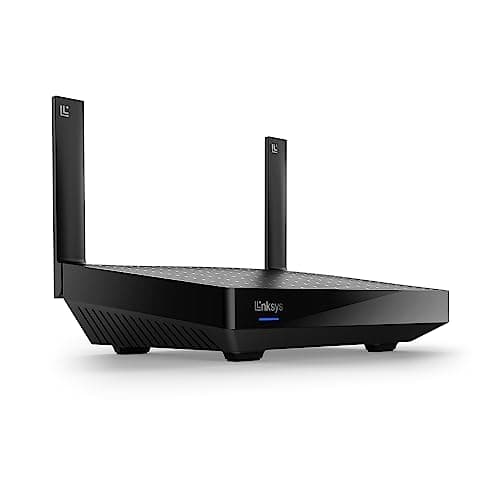
The Linksys WLAN Mesh System (ASIN B07C7RCWBJ) sits in the upper mid-range bracket and is built around Velop technology. It's a multi-node system designed to blanket a home in Wi-Fi rather than trying to stretch one router further than it was ever meant to go. With over a hundred owner reviews and a positive overall rating, it's clearly doing something right for a lot of people. But the score also tells you it's not universally loved, and the reasons why are before you spend your money. So here's the honest picture: what the specs support, what owners actually report, and whether this is the right buy at this price.
Short version: this is a solid mesh system for households that need proper multi-room coverage and don't want to faff around with complex configuration. It's not the newest or the fastest thing on the market, but for a lot of homes it genuinely solves the problem. Whether it's worth the money over newer alternatives is a closer call, and we'll get into that properly below.
Core Specifications
The Linksys Velop is a tri-band system, which matters more than it might sound. Tri-band means you get two separate 5GHz bands and one 2.4GHz band. The reason that's significant is that a tri-band Velop can dedicate one of those 5GHz bands entirely to backhaul, which is the link between the nodes themselves, while keeping the other 5GHz band free for your devices. That's the right way to design a mesh system. Dual-band mesh systems, by contrast, have to share a single 5GHz band between device traffic and node-to-node communication, which means the more nodes you add, the more you're cannibalising your own usable bandwidth.
Each node is a small white pillar, roughly 185mm tall, with a clean look that doesn't scream "networking hardware" from across the room. The design is deliberate: Linksys knows these things end up on shelves and sideboards, not hidden in cupboards. Each node has Gigabit Ethernet ports (two per node), which gives you wired backhaul as an option if you want it, and wired connections for devices like smart TVs or consoles. There's no USB port, no 2.5GbE, no 10GbE. If you're on a multi-gig broadband connection, that's a real limitation. For everyone else on a standard 1Gbps or below connection, it's fine.
The system uses Wi-Fi 5 (802.11ac), not Wi-Fi 6. That's the honest headline you need to know upfront. Combined theoretical throughput across all bands is rated at AC2200 per node, which breaks down as 400Mbps on 2.4GHz and 867Mbps on each of the two 5GHz bands. As always, those are theoretical maximums under ideal conditions that no real home delivers. What they tell you is the ceiling, not the floor. The practical throughput owners report is lower, as it always is, but the dedicated backhaul design means the drop-off from node to node is less severe than on cheaper dual-band systems.
| Specification | Detail |
|---|---|
| Wi-Fi Standard | Wi-Fi 5 (802.11ac, dual-band + tri-band) |
| Band Layout | Tri-band: 2.4GHz + 5GHz (client) + 5GHz (backhaul) |
| Max Theoretical Throughput (per node) | AC2200 (400 + 867 + 867 Mbps) |
| Backhaul Type | Dedicated 5GHz band (wireless) or Gigabit Ethernet (wired) |
| Ethernet Ports (per node) | 2x Gigabit LAN / WAN |
| USB | None |
| MU-MIMO | Yes |
| OFDMA | No (Wi-Fi 5 limitation) |
| Coverage (manufacturer rated, per node) | Approximately 185 sq m (2,000 sq ft) |
| Node Design | Pillar form factor, white |
| App Control | Linksys app (iOS / Android) |
| Price | £218.90 · Details |
Real-World Coverage
Linksys rates each Velop node at around 185 square metres. Treat that as a best-case ceiling measured in an open space with no interference. Real homes have walls, floors, furniture, microwaves, and neighbours' Wi-Fi networks. What the spec supports, and what owners consistently back up, is that a two-node setup handles a medium-sized UK semi or terrace well, reaching upstairs bedrooms and the garden without the signal falling off a cliff. A three-node setup extends that to larger detached homes, or homes with particularly awkward layouts like long thin terraces or houses where the broadband entry point is at one end.
Owner reports in the hundred-plus reviews are broadly positive on coverage. The pattern that comes through clearly is that people who were previously struggling with a single ISP router, or with a cheap range extender that created a separate network they had to manually switch between, found the Velop sorted the problem. Dead zones in back bedrooms, garden offices, garages, and loft conversions get mentioned repeatedly as genuinely fixed rather than just improved. That's the test that matters: not whether coverage is technically present, but whether it's usable.
Where owners do report problems is in homes with particularly thick stone walls, or in setups where nodes are placed too far apart and have to communicate through multiple obstacles. That's not a Velop-specific failure; it's a mesh physics problem. The fix is node placement, and the Linksys app gives you signal strength feedback to help with that. But it's worth being realistic: no mesh system magically penetrates solid stone. If your home is a Victorian terrace with original thick walls throughout, you may need more nodes than you'd expect, or you may need to run Ethernet between nodes to use wired backhaul instead of relying on wireless.
Sustained Speed Under Load
The AC2200 rating on the box is the theoretical sum of all three bands at their theoretical peak, measured a metre from the node with nothing else on the network. Nobody gets that number. What you actually care about is what speed you keep at the far end of the house, with the family's phones, laptops, and streaming boxes all active at the same time. That's where the dedicated backhaul band earns its keep. Because the node-to-node link runs on its own 5GHz channel and doesn't compete with client devices, the speed penalty from adding a second or third node is substantially lower than on dual-band mesh systems.
Owner reports suggest the system handles standard UK broadband connections well, including faster connections in the 500Mbps to 900Mbps range, provided you're close to a node. At distance, speeds naturally drop, but owners on typical connections (100Mbps to 300Mbps from their ISP) generally report that the far nodes still deliver enough throughput for 4K streaming, video calls, and general browsing without complaint. That's the realistic use case for most households. If you're on a multi-gigabit connection and you want to actually use that speed wirelessly across the house, this system's Wi-Fi 5 spec and Gigabit Ethernet ports will become a bottleneck. But for the majority of UK homes on sub-1Gbps connections, it's not the limiting factor.
The more common complaint in owner reviews isn't peak speed; it's occasional stability issues and the need to restart nodes. Some owners report the system runs for months without a hitch. Others mention needing periodic reboots, particularly after firmware updates or during periods of heavy use. That's not unusual for consumer mesh systems. If you're the kind of person who notices when the Wi-Fi drops for two minutes at 9pm, it may frustrate you. If you're replacing an ISP router that needed rebooting weekly anyway, it's probably still an improvement.
Mesh and Backhaul
The backhaul design is genuinely the most important thing about this system, so it's worth explaining clearly. Mesh networking works by having multiple nodes talk to each other to pass your traffic around the home. The question is: what band do they use to do that talking? On a dual-band mesh system, the nodes share the 5GHz band between client devices and their own inter-node communication. The more nodes you add, and the more devices you have, the more congested that single band gets. The result is that adding a second node can actually reduce the speed available to devices on the first node, because the system is now spending bandwidth on its own housekeeping.
The Velop's tri-band design avoids this by reserving one 5GHz band exclusively for backhaul. Your devices never compete with node-to-node traffic for that band. It's a cleaner architecture, and it's why tri-band mesh systems consistently outperform dual-band ones in multi-node setups. This matters most when you have three nodes spread across a larger home, because the traffic has to hop between nodes, and a dedicated backhaul band keeps each hop efficient. Two-node setups see less of a difference, but it's still there.
Wired backhaul is also supported, and if you can run an Ethernet cable between nodes (even just between two of them), you should. Wired backhaul eliminates the wireless hop entirely and gives you the most stable, highest-throughput connection between nodes. The Gigabit Ethernet ports on each node support this. Owners who have set up wired backhaul consistently report the most stable and fastest results. It's more setup effort, and it requires either existing Ethernet runs in your home or the willingness to lay cable, but it's the right answer if you can manage it.
Device Capacity
Modern homes have a lot of connected devices. Not just phones and laptops. Smart TVs, streaming sticks, games consoles, smart speakers, robot hoovers, video doorbells, smart plugs, lightbulbs, thermostats. Thirty to fifty clients on a home network is normal now, and a lot of cheaper routers start to struggle well before that number. The Velop's MU-MIMO (Multi-User, Multiple Input, Multiple Output) support means it can communicate with multiple devices simultaneously rather than queuing them up one by one, which helps under load.
What it doesn't have is OFDMA (Orthogonal Frequency Division Multiple Access), which is a Wi-Fi 6 feature that further improves efficiency when lots of small devices are active at the same time. IoT devices, the doorbells and thermostats and smart bulbs, tend to send small bursts of data frequently rather than sustained streams. OFDMA handles that kind of traffic more efficiently. Without it, the Velop handles it fine in most homes, but a Wi-Fi 6 system has a structural advantage in a very device-heavy setup. Whether that difference is noticeable in practice depends on how many devices you have and how active they all are simultaneously.
For a typical family home with twenty to thirty devices, the Velop handles the load without obvious problems. Owner reports don't flag device capacity as a common complaint. The issues that do come up are more about occasional dropouts and firmware stability than about the system choking under client load. That suggests the hardware capacity is adequate for the target use case. If you're running a home with fifty-plus devices and several people all doing bandwidth-intensive things at the same time, a Wi-Fi 6 system would serve you better. For most households, the Velop's capacity is not the weak point.
Wi-Fi Standard and Future-Proofing
Wi-Fi 5 is the honest answer here. Not Wi-Fi 6, not Wi-Fi 6E, not Wi-Fi 7. Wi-Fi 5 (802.11ac) is a mature, well-understood standard that works reliably and is supported by every device you own. It is not the latest thing, and that matters when you're spending upper mid-range money. The Velop was designed and released in 2018, and while it's still being sold, the networking market has moved on. Wi-Fi 6 systems at comparable or lower prices now exist, and Wi-Fi 6 brings real benefits: better efficiency under load, OFDMA for dense device environments, and improved performance at range.
The practical question is whether Wi-Fi 6 matters for your home right now. The honest answer is: probably not dramatically, but increasingly yes. Most laptops sold in the last two to three years support Wi-Fi 6. Phones are similar. If your devices support Wi-Fi 6, a Wi-Fi 6 mesh system will serve them better, particularly in a busy household. If your devices are older, the difference is irrelevant because they can't use the newer standard regardless of what the router supports. So if you're buying new kit to replace old kit, and you're keeping it for four to five years, the Wi-Fi 5 limitation on the Velop is a real consideration.
Future-proofing is where this system starts to look a bit long in the tooth. Wi-Fi 6 systems are now mainstream, and Wi-Fi 6E (which adds a 6GHz band for even less congestion) is available at reasonable prices. The Velop can't be upgraded to support these standards; the hardware is fixed. That doesn't make it useless today, but it does mean you're buying into a platform that won't keep pace with your devices as you upgrade them over the next few years. For someone who upgrades their networking kit every two to three years anyway, less of an issue. For someone who wants to buy once and forget it for five years, the newer standards are worth the extra spend.

Features and QoS
The Linksys app handles most of the feature set. You get guest network support, which is useful for keeping visitors and IoT devices off your main network. You get basic parental controls through the app, including the ability to pause internet access per device, which is genuinely handy if you have kids and want to enforce screen time limits without a fight. Device prioritisation lets you tell the system which devices matter most, so your work laptop gets preference over the smart TV when the connection is under pressure. That's a basic form of QoS (Quality of Service), which is the mechanism that decides which traffic gets bandwidth first.
The QoS implementation here is relatively simple compared to what you'd get on a higher-end router with proper traffic shaping and buffer-bloat management. Buffer bloat, for those unfamiliar, is what happens when a router's queue fills up and latency spikes, making everything feel sluggish even when the connection isn't technically saturated. It's the reason a big download can make video calls stutter even when you supposedly have plenty of bandwidth. The Velop's QoS handles basic prioritisation but isn't known for sophisticated buffer-bloat control. For gaming households where latency consistency matters.
There's no built-in VPN server, which some people want for remote access to their home network, and if privacy matters to you it's worth pairing this with a good VPN that adds a security layer over the network at home and keeps you protected on public Wi-Fi when you're out and about. No USB port means no network-attached storage or printer sharing either. These aren't dealbreakers for most buyers, but if you were hoping for those features, they're not here. What you do get is automatic firmware updates, which is genuinely important for security and is handled quietly in the background without you having to think about it. The Linksys Intelligent Mesh technology also handles band steering automatically, moving devices between 2.4GHz and 5GHz based on signal quality, which works better than manually managing it yourself.
Firmware, App and Security Updates
The Linksys app has a mixed reputation. Setup is generally reported as straightforward, which is a genuine strength: you follow the app, it finds the nodes, you name your network, and you're done. Most owners get through it without needing to read a manual. Ongoing management through the app is also fairly clean, with device lists, speed tests (to the router, not to the internet), and the parental controls all accessible without digging through menus. That's the good news.
The less good news is that the app has had stability issues over time, and some owners report that app updates have occasionally broken features or required a factory reset to sort out. Automatic firmware updates are enabled by default, which is fine for security but means you don't always choose when the system updates, and updates have occasionally introduced problems that took subsequent patches to fix. This is a known issue with Linksys's Velop line specifically, not just this model. It's not a disaster, but it's not the rock-solid firmware experience you'd get from something like a Ubiquiti setup.
Security update cadence is reasonable. Linksys does push updates, and the automatic update system means most users are kept current without doing anything. The Velop platform has been around long enough that major security vulnerabilities tend to get patched. However, the system is ageing, and there's a legitimate question about how long Linksys will continue pushing meaningful updates for hardware from 2018. This is the kind of thing that's hard to predict, but it's worth factoring in if you're buying for the long term. Linksys has a support page where you can check current firmware versions and update history for the Velop line.
Setup and Management
Setup is one of the Velop's genuine strengths. You download the Linksys app, plug in the primary node, connect it to your modem or ISP router (in modem mode), and the app walks you through the rest. Adding additional nodes is the same process: plug them in, open the app, confirm they've been found. Most owners report getting a two or three-node system up and running in under thirty minutes. For someone who's never configured a mesh system before, that's a proper relief compared to the web-interface faff of traditional router setup.
Ongoing management stays in the app. You can see which devices are connected, run a speed test to the router, set up the guest network, adjust parental controls, and check node signal strength. The web interface (accessible via 192.168.1.1 in a browser) gives you more options if you want them, including some settings that aren't exposed in the app. But most people will never need it. The app covers the day-to-day stuff adequately. If you want to set static IP addresses, configure port forwarding for a games console or a NAS, or dig into more advanced settings, the web interface is where you go.
Node placement is guided by the app's signal strength indicator, which shows you whether a node is too far from its neighbour or in a good position. This is actually useful, not just decorative. Getting node placement right is the single biggest factor in mesh performance, and having real-time feedback while you're walking around the house with a node in your hand is genuinely helpful. The system also handles roaming automatically: as you move around the house, your devices switch between nodes without you having to manually connect to a different network. That smooth roaming is one of the main advantages of a proper mesh system over a range extender that creates a second network with a different name.
Ports and Connectivity
Each node has two Gigabit Ethernet ports. On the primary node, one port is the WAN input (connecting to your modem or ISP router) and the other is a free LAN port. On satellite nodes, both ports are LAN ports, which you can use for wired devices or for wired backhaul to the next node. Two ports per node is on the lean side. If you want to wire up a smart TV, a games console, and a NAS to the same node, you'll need a small switch. That's a minor extra cost and hassle, but.
There is no 2.5GbE or 10GbE anywhere in this system. Every port is Gigabit. For most UK homes on standard broadband connections, that's fine: a Gigabit port can handle anything up to 1Gbps, and most home broadband is well below that. But if you're on a multi-gig connection (some full-fibre providers now offer 2Gbps and above), the Gigabit WAN port is a hard ceiling. You will not get more than roughly 940Mbps through it regardless of what your ISP delivers. For the majority of buyers this is irrelevant today, but it's another sign that this is ageing hardware.
There is no USB port on any node, so no USB storage, no USB printer sharing, and no USB modem support. No link aggregation either. What you see is what you get: two Gigabit ports per node, no extras. The wired backhaul option is the most useful thing those ports enable, and it's worth using if you have Ethernet runs in your home. Owners who run Ethernet between nodes consistently report better stability and throughput than those relying entirely on wireless backhaul, which is what you'd expect from the physics.
How It Compares
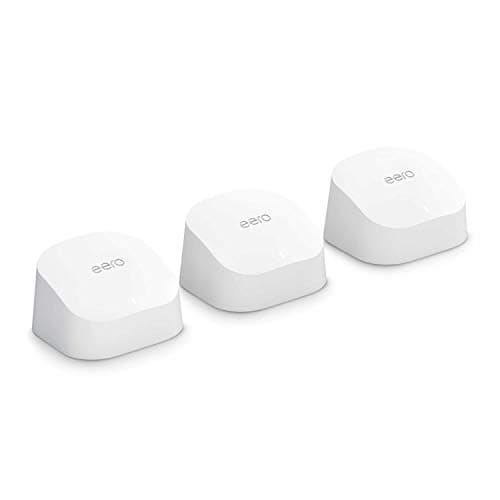
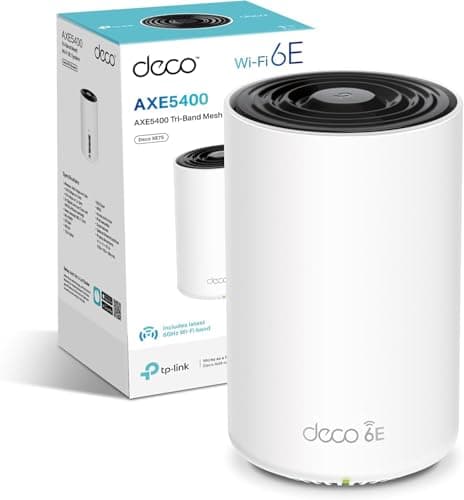
The honest competition for this system sits in two places. First, newer Wi-Fi 6 mesh systems at similar prices, like the TP-Link Deco XE75 or the Eero Pro 6. Second, the older Velop siblings and the question of whether you'd be better off with a different Linksys model. The Velop AC2200 was a good system when it launched. In the current market, it's competing against hardware that's a generation newer, and that gap shows up in the specs more than in real-world performance for average users.
The TP-Link Deco XE75 is a Wi-Fi 6E system with a 6GHz band, OFDMA, and 2.5GbE ports. It costs more, but it's genuinely future-proof in a way the Velop isn't. The Eero Pro 6 is a Wi-Fi 6 system with a cleaner app and Amazon integration, which is either a selling point or a privacy concern depending on your view. Both of these represent what the market looks like now, and they're if you're buying for the long term. If budget is the primary concern and you find the Velop at a significantly reduced price, the value equation shifts back in its favour.
| Feature | Linksys Velop AC2200 | TP-Link Deco XE75 (Wi-Fi 6E) | Eero Pro 6 |
|---|---|---|---|
| Wi-Fi Standard | Wi-Fi 5 (802.11ac) | Wi-Fi 6E (802.11ax) | Wi-Fi 6 (802.11ax) |
| Band Layout | Tri-band (2x 5GHz + 2.4GHz) | Tri-band (6GHz + 5GHz + 2.4GHz) | Tri-band (5GHz + 5GHz + 2.4GHz) |
| Backhaul | Dedicated 5GHz or Gigabit Ethernet | Dedicated 6GHz or 2.5GbE Ethernet | Dedicated 5GHz or Gigabit Ethernet |
| OFDMA | No | Yes | Yes |
| Max Ethernet Port Speed | 1GbE | 2.5GbE | 1GbE |
| USB | No | No | No |
| App Quality | Good, occasional issues | Good, consistent | Excellent, very clean |
| Price (2-node) | £218.90 · Details | Higher | Higher |
Final Verdict
The Linksys Velop AC2200 is a properly designed mesh system that solves the dead zone problem for most UK homes. The tri-band architecture with dedicated wireless backhaul is the right approach, and it shows in the owner reviews: people who were genuinely struggling with ISP routers or cheap extenders report that this sorted it. Setup is as painless as mesh setup gets. The app is functional. The coverage is real rather than theoretical. For a family home where the goal is reliable Wi-Fi in every room without needing a networking degree, it does the job.
But it's 2024, and this is Wi-Fi 5 hardware from 2018. That's the thing you can't ignore at upper mid-range prices. Wi-Fi 6 systems with OFDMA, better device capacity, and more future-proof specs are now available at competitive prices. If you find the Velop at a meaningfully lower price than current Wi-Fi 6 alternatives, the value equation can still work in its favour, particularly for a home where the devices are older and won't benefit from Wi-Fi 6 anyway. But if you're paying close to the same as a Wi-Fi 6 mesh system, the newer hardware is the smarter buy. The Linksys Velop Wi-Fi 6 range (the MX series) is worth a look as a direct upgrade path within the same ecosystem, with the same app and a similar setup experience but with proper Wi-Fi 6 credentials.
The positive overall rating from over a hundred reviews is an honest reflection of where this sits. Most people who buy it are happy. The ones who aren't tend to be dealing with firmware stability issues or expecting more than Wi-Fi 5 can deliver in a very device-heavy home. Neither of those is a fatal flaw, but both are real. If you go in with accurate expectations, this is a good system. If you're expecting it to be a cutting-edge buy at a premium price, you'll be disappointed. Buy it if the price is right. If the price is within striking distance of a Wi-Fi 6 mesh system, spend the extra.
Score: 7.5 out of 10. Solid mesh fundamentals, good coverage, proper backhaul design. Marked down for the Wi-Fi 5 spec, Gigabit-only ports, and the age of the platform. The right buy at the right price. Not the right buy if you're paying Wi-Fi 6 money for it.
Don't overspend: If your home is a straightforward two-bedroom flat or a small terrace, you probably don't need a multi-node mesh system at all. A single good Wi-Fi 6 router, positioned centrally, will cover it for less money and with less complexity. The Linksys Hydra Pro 6 or a TP-Link Archer AX55 would be the sensible alternatives to consider before committing to a mesh setup.
What works. What doesn’t.
5 + 5What we liked5 reasons
- Dedicated 5GHz backhaul band keeps node-to-node traffic off the client bands, resulting in better sustained speeds in multi-node setups than comparable dual-band mesh systems
- App-guided setup is genuinely straightforward, with most owners reporting a two or three-node system running in under thirty minutes
- Real-world coverage gains are consistently reported by owners, with dead zones in back bedrooms, garden offices, and loft conversions reliably resolved
- Wired backhaul via Gigabit Ethernet ports is supported on every node, giving a meaningful performance and stability upgrade for those who can run cable
- Automatic firmware updates and band steering are handled without user intervention, reducing ongoing management burden for non-technical households
Where it falls5 reasons
- Wi-Fi 5 (802.11ac) is a 2018 standard, and Wi-Fi 6 mesh systems with OFDMA and better device efficiency are now available at broadly comparable prices
- No OFDMA means the system is less efficient in homes with large numbers of small IoT devices sending frequent short bursts of data simultaneously
- Gigabit-only Ethernet ports are a hard ceiling for anyone on a multi-gigabit broadband connection, and there is no 2.5GbE or USB port anywhere in the system
- Firmware and app updates have a documented history of occasional instability, with some owners requiring factory resets after problematic update cycles
- The platform dates from 2018, raising legitimate questions about how long meaningful security and feature updates will continue to be issued by Linksys
Full specifications
9 attributes| Antennas | 0 |
|---|---|
| Coverage SQM | 186 |
| Launch year | 2017 |
| Mesh capable | true |
| Ports | 2x Gigabit Ethernet (WAN/LAN auto-sensing) |
| Security protocols | WPA2-Personal, WPA2-Enterprise |
| TOP speed mbps | 2200 |
| Type | mesh_router |
| Wifi standard | Wi-Fi 5 |
If this isn’t right for you
2 options

Frequently asked
7 questions01What is the difference between a tri-band and a dual-band mesh system, and why does it matter for the Velop?+
A tri-band mesh system has three radio bands: one 2.4GHz band and two separate 5GHz bands. The Velop uses this arrangement to dedicate one entire 5GHz band exclusively to backhaul, which is the communication between nodes themselves. Your devices use the other 5GHz band and the 2.4GHz band. A dual-band mesh system has only one 5GHz band, which is shared between devices and node-to-node traffic. The more nodes and devices you add to a dual-band system, the more congested that single band becomes. The Velop's dedicated backhaul band avoids that congestion, which is why it performs better than dual-band mesh systems in multi-node setups.
02Can I use wired backhaul between Velop nodes instead of relying on the wireless connection?+
Yes. Each Velop node has two Gigabit Ethernet ports, and the system supports wired backhaul. If you can run an Ethernet cable between two nodes, the system will use that wired connection for node-to-node traffic instead of the wireless backhaul band. This is the most stable and highest-throughput configuration. Owners who have set up wired backhaul consistently report better performance and fewer dropouts than those using wireless backhaul alone. It requires either existing Ethernet runs in your home or the willingness to lay cable, but it is the recommended approach where practical.
03Will the Linksys Velop AC2200 work with my ISP router, or do I need to replace it?+
The Velop is designed to connect to your existing modem or ISP router. You plug the primary Velop node into one of the LAN ports on your ISP router, or you can put your ISP router into modem mode (sometimes called bridge mode) if it supports that, which allows the Velop to handle all routing duties instead. The Linksys app guides you through whichever setup applies to your situation. Most ISP routers in the UK are compatible. If your ISP router cannot be put into modem mode, running both routers simultaneously is called double NAT, which can cause issues for gaming and some applications but works fine for general browsing and streaming.
04Is the Linksys Velop AC2200 worth buying now that Wi-Fi 6 mesh systems are widely available?+
It depends on the price difference and your specific situation. If the Velop is available at a meaningfully lower price than current Wi-Fi 6 mesh alternatives, and your devices are predominantly older models that do not support Wi-Fi 6 anyway, the value equation can still work in its favour. The coverage and backhaul design remain genuinely good. However, if the price is within striking distance of a Wi-Fi 6 mesh system such as the Eero Pro 6 or a TP-Link Deco Wi-Fi 6 option, the newer hardware offers better efficiency, OFDMA support for dense device environments, and longer-term relevance as devices continue to adopt Wi-Fi 6. The review scores the Velop at 7.5 out of 10, reflecting its solid fundamentals but acknowledging the age of the platform.
05How many Velop nodes do I need for a typical UK home?+
For a medium-sized UK semi-detached or terraced house over two floors, a two-node setup is generally sufficient, based on owner reports. A three-node setup is recommended for larger detached homes, homes with particularly awkward layouts such as long thin terraces, or buildings with thick stone walls that attenuate the wireless signal significantly. Linksys rates each node at approximately 185 square metres under ideal conditions. Real homes with walls, floors, and interference will see lower effective coverage per node, so it is better to start with an honest assessment of your home's layout rather than relying on the manufacturer's maximum figures.
06Does the Linksys Velop support parental controls and guest networks?+
Yes to both. The Linksys app includes parental controls that allow you to pause internet access per device, which is useful for managing screen time without requiring specialist technical knowledge. Guest network support is also included, allowing you to create a separate Wi-Fi network for visitors or IoT devices that keeps them isolated from your main network. Device prioritisation is available as a basic form of quality of service, letting you specify which devices should receive bandwidth preference when the connection is under pressure. More advanced traffic management features are not present, so households with very specific quality of service requirements for gaming or professional use may find the implementation too simple.
07Are there any common problems reported by owners of the Linksys Velop AC2200?+
The most frequently mentioned issues in owner reviews relate to firmware and app stability rather than coverage or performance. Some owners report needing to reboot nodes periodically, particularly following firmware updates. A smaller number report that app updates have on occasion broken features and required a factory reset to resolve. The coverage itself is broadly praised, with dead zones in bedrooms, gardens, and loft conversions consistently reported as resolved. Occasional dropouts during periods of heavy use are mentioned but are not universal. Owners who have set up wired backhaul between nodes generally report fewer stability issues than those relying entirely on wireless backhaul.