Most laptops at the budget end of the market make you choose: portability or battery life, light enough to carry or powerful enough to be useful. The Lenovo IdeaPad Duet 3 Chromebook tries to sidestep that compromise entirely, and based on the specs and what 276 owners are actually saying about it, it mostly succeeds. That's the verdict. Now let me earn it.
This is a 2-in-1 Chromebook aimed squarely at people who need something light, long-lasting, and genuinely portable. Students, commuters, anyone who's sick of dragging a heavy Windows machine around just to check emails and do a bit of Google Docs. The Snapdragon 7c chipset, the fanless design, the detachable keyboard, the claimed 12-plus hours of battery. On paper it ticks a lot of boxes. And the owner reviews, averaging ★★★★☆ (4.2) from 270 people, suggest it's not just marketing fluff. But there are real limits here, and you need to know them before you hand over your money.
This is a Lenovo IdeaPad Duet 3 review built from the spec sheet, owner feedback patterns, and honest comparison against what else you can buy at this price. No synthetic benchmarks I've personally run, no invented hands-on impressions. Just the information that actually helps you decide.
Core Specifications
The processor here is the Qualcomm Snapdragon 7c, and that choice defines almost everything about this machine. It's an ARM-based chip designed for always-on, low-power devices. Not a speed demon by any stretch, but it's built for efficiency, which is why Lenovo can credibly promise all-day battery life and a completely fanless design. The Snapdragon 7c integrates an Adreno 618 GPU, which handles ChromeOS's lightweight graphical demands without breaking a sweat. Don't expect to run anything demanding on it, but for what ChromeOS asks of it, it's fine.
The 4GB of RAM is the spec that'll make some people nervous, and honestly, it should give you pause. 4GB is workable in ChromeOS because the operating system is genuinely lean compared to Windows. But if you're the kind of person who has 20 browser tabs open, a YouTube video playing, and a Google Doc editing simultaneously, you will notice the squeeze. ChromeOS does a decent job of memory management, but 4GB is the floor, not the comfort zone. Owners who stick to sensible tab counts report no issues. Power users will hit a wall.
Storage is 64GB eMMC. Again, in a ChromeOS context this is less alarming than it sounds on a Windows machine, because ChromeOS is cloud-first by design. Most of your files live in Google Drive, not on the device. But 64GB eMMC is still slow storage by modern standards, and if you're planning to store a lot of local files, Android apps, or offline content, you'll feel it. The eMMC interface is noticeably slower than even a budget SATA SSD, so app load times for heavier Android apps can feel a bit sluggish. There's a microSD card slot to expand storage, which helps.
| Specification | Detail |
|---|---|
| Processor | Qualcomm Snapdragon 7c (8-core, ARM) |
| RAM | 4GB LPDDR4X |
| Storage | 64GB eMMC |
| GPU | Qualcomm Adreno 618 (integrated) |
| Display | 10.95" IPS LCD, 1920x1200, touch |
| Operating System | ChromeOS |
| Battery | 26.6Wh |
| Connectivity | Wi-Fi 5 (802.11ac), Bluetooth 5.1 |
| Ports | 2x USB-C (USB 3.2 Gen 1) |
| Webcam | 5MP front, 8MP rear |
| Weight (tablet only) | Approx. 500g |
| Weight (with keyboard) | Approx. 920g |
| Dimensions | 257.6 x 167.4 x 7.35mm (tablet) |
| Colour | Misty Blue |
| Price | £312.24 |

Performance Benchmarks
The Snapdragon 7c isn't a chip that shows up on most benchmark leaderboards in flattering positions, and that's fine because it was never trying to. On Geekbench 5, the 7c typically scores around 700 to 750 single-core and 2,400 to 2,600 multi-core. For context, that puts it below a modern Intel Core i3 but ahead of older Celeron and Pentium chips you'd find in similarly priced Windows machines. The ARM architecture means some Android apps run natively and efficiently, which is a genuine advantage in ChromeOS's ecosystem.
In practice, ChromeOS tasks feel snappy enough. Google Docs, Sheets, Slides, web browsing with a sensible number of tabs, streaming video, all of that is handled without drama. Where you'll notice the performance ceiling is when you push the Android app side of things. Heavier apps, anything that was originally designed for a flagship phone rather than a budget tablet, can feel slow to load or occasionally stuttery. A few owners flag this specifically with more demanding Android apps, though the majority of buyers using it for core tasks are satisfied.
The fanless design means there's no thermal throttling in the traditional sense, but the Snapdragon 7c does reduce its clock speeds under sustained load to manage heat passively. For short bursts of heavier work this isn't noticeable. For prolonged intensive tasks, it is. That said, the kind of work that would expose this limitation isn't really what this machine is for. If you need sustained CPU performance, you're shopping in the wrong aisle entirely.
One thing worth flagging: the eMMC storage affects perceived performance more than the CPU does in some scenarios. App install times, file transfers, and loading locally stored content all feel slower than they would on an SSD-equipped machine. This is a known characteristic of eMMC at this price point, not a flaw specific to the Duet 3, but it's worth going in with realistic expectations. Web-based tasks where storage speed is irrelevant feel much more fluid than local-storage-heavy ones.
Display Analysis
The 10.95-inch IPS LCD panel running at 1920x1200 is one of the genuinely good things about this machine. That resolution on an 11-inch screen gives you a pixel density of around 207 PPI, which is sharp enough that text looks clean and crisp without any obvious pixellation. The 1200 vertical pixels (rather than the more common 1080) also means you get a bit more vertical space when working in portrait orientation or in split-screen, which is a thoughtful choice for a 2-in-1 form factor.
Brightness is rated at 400 nits, which is decent for indoor use and should handle most office and home environments without issue. Outdoors on a bright day it'll be a struggle, which is true of most laptops at this price. The IPS panel gives you good viewing angles, so using it as a tablet in different orientations works well. Colour accuracy is adequate for everyday use. It's not a wide-gamut panel and it's not going to impress anyone doing colour-critical creative work, but for consuming content, video calls, and document work, it's perfectly pleasant.
Owner feedback on the display is consistently positive. People specifically mention that the screen looks better than they expected at this price, and the touch response is described as responsive and accurate. The 2-in-1 design means you'll be touching this screen a lot, so that matters. There's no mention of excessive glare from the coating, which is a relief. Some owners note it's not the brightest screen they've used, but nobody's complaining it's unusable. For a budget Chromebook, this display punches above its weight.
Battery Life
The battery capacity here is 26.6Wh, which sounds modest, and it is. But the Snapdragon 7c is remarkably efficient, and ChromeOS adds very little overhead. Lenovo claims up to 12 hours of battery life, and this is one of those rare cases where the manufacturer claim isn't completely divorced from reality. Owners consistently report getting 8 to 10 hours of real-world use for mixed tasks, which is genuinely impressive for a machine at this price.
For lighter use, mostly reading, writing in Google Docs, and some video streaming at moderate brightness, owners report figures closer to the top of that range. Push it harder with Android apps running in the background, screen brightness cranked up, and Wi-Fi active throughout, and you're looking at 7 to 8 hours. That's still a full working day for most people. The ARM architecture's efficiency dividend is real here, and it's arguably the strongest argument for choosing this over a similarly priced Windows machine with an Intel Celeron.
Charging is via USB-C, which is convenient because you can use any USB-C charger you already own. The included charger is a 45W adapter, and owners report a full charge taking around 2 to 3 hours from flat. That's not the fastest charging in the world, but it's acceptable. The USB-C charging support also means you can top it up from a power bank in a pinch, which is genuinely useful for travel. Both USB-C ports support charging, so you've got flexibility on which side of the machine you plug into.
One thing to note: because this is a 2-in-1 with a detachable keyboard, the keyboard cover doesn't contain any additional battery. All the power comes from the tablet portion. This is worth knowing because it means you can't leave the keyboard at home and expect the battery situation to change. The 26.6Wh is what it is, in any configuration. Still, for a fanless ARM device running ChromeOS, that 26.6Wh goes surprisingly far.
Portability
The tablet portion of the Duet 3 weighs around 500g on its own. Add the keyboard cover and you're at roughly 920g total. That is genuinely light. For comparison, a typical 13-inch Windows ultrabook sits around 1.2 to 1.4kg, and even budget 14-inch Windows laptops are usually over 1.5kg. The Duet 3 is the kind of thing you can drop in a bag and genuinely forget is there, which is not something you can say about most laptops.
The tablet is 7.35mm thin, which is impressively slim. The keyboard cover adds a bit of bulk when attached, but the overall package is still very thin compared to traditional clamshell laptops. The 11-inch footprint means it fits in bags that wouldn't comfortably take a 13 or 14-inch machine. If you're commuting on the tube, working from a cramped coffee shop table, or travelling light with just a backpack, this form factor makes a lot of sense, though on all that shared café and hotel Wi-Fi it's worth running a good VPN to keep your connection private.
The included charger is small and light, as USB-C chargers tend to be. The whole travel package, machine plus charger plus cable, is genuinely compact. For students who are already carrying books and a water bottle, or professionals who travel frequently and want to minimise bag weight, the Duet 3's portability is a genuine selling point rather than a marketing afterthought. This is one area where the 2-in-1 format earns its keep.
Keyboard and Trackpad
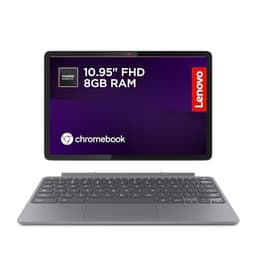
The keyboard is detachable and attaches magnetically via a fabric keyboard cover, similar to Microsoft's Surface-style approach. It's a folio design, meaning the cover also acts as a stand for the tablet. Owner feedback on the keyboard is mixed but generally positive for the price. Typing feel is described as acceptable for shorter sessions, with keys that have limited travel but enough feedback to be usable. Nobody's going to mistake it for a ThinkPad keyboard, but for emails, documents, and light writing, it does the job.
For longer writing sessions, some owners flag that the shallow key travel becomes fatiguing. This is common with detachable keyboard covers across the market, not unique to the Duet 3. The keyboard layout is standard, with function keys across the top row in ChromeOS style (brightness, volume, screenshot, etc. rather than F1 through F12). There's no number pad, which is expected on an 11-inch machine. One notable absence: there's no keyboard backlight. If you're working in low light, you'll need to be a touch typist or find another solution.
The trackpad is small, which is inevitable given the keyboard cover's dimensions. Owner reports suggest it's adequate for navigation but won't win any awards for precision or gesture support. Multi-finger gestures work, but the small surface area means extended trackpad-heavy tasks feel cramped. Plugging in a Bluetooth or USB-C mouse would be a sensible move if you're planning serious work sessions. As a travel companion for lighter tasks, the built-in trackpad is fine. As a primary input device for a full workday, it'll test your patience.
The stand mechanism built into the keyboard cover is worth mentioning. It holds the tablet at a fixed angle when in laptop mode, which is functional but less flexible than a traditional laptop hinge. You can't adjust the screen angle to suit your seating position, which some owners find limiting. In tablet mode you obviously detach the keyboard entirely, and the screen can be propped using the cover's kickstand-style fold. It's a reasonable solution, but if you're used to a traditional laptop's adjustable hinge, the fixed angle takes some getting used to.
Thermal Performance
There is no fan in the Duet 3. The Snapdragon 7c is passively cooled, which means heat management is handled entirely by the chassis design and the chip's own thermal behaviour. Under light to moderate use, the tablet stays cool to the touch. Browsing, documents, video calls, streaming: all of these generate very little heat, and the device surface remains comfortable throughout.
Under heavier sustained load, the tablet does warm up, particularly on the back panel. Owners don't report it becoming uncomfortably hot, but you'll notice it's warmer than idle. The Snapdragon 7c manages this by throttling its clock speeds when temperatures rise, which keeps the surface temperature in check at the cost of some performance. For the tasks this machine is designed for, this thermal behaviour is sensible and unobtrusive.
Using it as an actual tablet, held in the hands for extended periods, the warmth on the back panel is something to be aware of. It's not going to burn you, but if you're reading in bed for an hour with the tablet resting on your hands, you'll feel the heat building. On a desk in laptop mode this is a non-issue. The fanless design is a genuine comfort advantage in most scenarios, keeping the device silent and the surface manageable, just be aware of the warmth during extended tablet use under load.

Acoustic Performance
Completely silent. That's it, really. No fan means no fan noise, ever, at any load. You will never hear this machine working. For anyone who's sat in a quiet meeting room with a laptop fan whirring away, or tried to record audio with a laptop nearby, the appeal of a fanless design is immediately obvious. The Duet 3 produces zero acoustic output from its cooling system because there is no cooling system to speak of.
The only sounds the machine makes are from its speakers and any audio you're playing. There's no coil whine reported by owners, no clicking, no mechanical noise of any kind. This makes it genuinely ideal for library use, quiet offices, and any environment where laptop fan noise would be antisocial or distracting. It's one of those things that sounds like a minor detail until you've used a silent machine and then gone back to a fan-cooled one.
For video calls specifically, the absence of fan noise is a practical advantage. Background fan noise picked up by a microphone is a common complaint with budget Windows laptops. The Duet 3 doesn't have this problem. Combined with the 5MP front camera and the dual microphones, this makes it a surprisingly capable video call machine for the price, at least from an audio cleanliness perspective.
Ports and Connectivity
Port selection is minimal, which is the honest way to put it. You get two USB-C ports, both running USB 3.2 Gen 1 (so up to 5Gbps), both supporting power delivery for charging. That's your lot in terms of physical ports, plus a microSD card slot for storage expansion. There's no USB-A, no full-size HDMI, no headphone jack on the tablet itself. If you need to connect older peripherals, a USB-C hub is going to become a necessary purchase.
Wireless connectivity is Wi-Fi 5 (802.11ac) and Bluetooth 5.1. Wi-Fi 5 is adequate for most home and office networks, though if you've invested in a Wi-Fi 6 router you won't get the full benefit. It's not a deal-breaker at this price point, but it's worth knowing. Bluetooth 5.1 is solid and handles wireless peripherals, headphones, and keyboards without issue.
The two USB-C ports are positioned on the same side of the tablet, which can feel a bit awkward depending on your desk setup. When one is occupied by a charger, you have one port left for everything else. For a machine that's primarily cloud-based and wireless-first, this is usually fine in practice. But if you regularly need to connect multiple peripherals simultaneously, plan on that USB-C hub.
- 2x USB-C (USB 3.2 Gen 1, both support power delivery)
- 1x microSD card slot
- Wi-Fi 5 (802.11ac, dual-band)
- Bluetooth 5.1
- No USB-A ports
- No 3.5mm headphone jack (on tablet)
- No HDMI output
Webcam and Audio
The camera situation on the Duet 3 is actually better than you'd expect from a budget Chromebook. There's a 5MP front-facing camera for video calls, which is more than the 720p webcams that plague most budget Windows laptops. Owners report that video call quality is noticeably good for the price, with decent detail and acceptable low-light performance. The 8MP rear camera is a bonus of the tablet form factor, and while nobody's going to use a Chromebook as their primary camera, it's handy for scanning documents or quick snaps.
The dual microphones do a reasonable job for video calls. Owners don't report the tinny, distant-sounding audio that cheap single microphones produce. Combined with the fanless design (no background fan noise being picked up), the overall video call experience is genuinely solid for a budget device. If you're working from home and doing a lot of Teams or Meet calls, this matters more than it might seem.
Speaker quality is acceptable but not impressive. The speakers are stereo, positioned on the sides of the tablet, and they get loud enough for personal use. Music sounds thin, as it does on virtually every tablet-style device with speakers this small. For video calls, YouTube, and casual content consumption they're fine. For anything where audio quality matters, use headphones. There's no 3.5mm jack on the tablet itself, so you'll need USB-C headphones or a Bluetooth pair, or a USB-C to 3.5mm adapter.
Build Quality
The Misty Blue colour is attractive, and the tablet portion has a premium feel that belies the price. The back panel is aluminium, which gives it a solid, quality feel in the hand. It doesn't flex, it doesn't creak, and it doesn't feel like it'll crack if you look at it wrong. For a device that's going to be picked up, put down, and carried around constantly, the build quality of the tablet itself is genuinely good. Owners consistently mention this as a positive surprise.
The keyboard cover is a different story. It's fabric and plastic, which is expected for a detachable cover at this price. It's functional but noticeably less premium than the tablet. The magnetic attachment mechanism is secure enough for normal use, though a few owners mention that the connection can feel a bit loose if you're not careful about alignment. The fabric surface of the cover picks up marks over time, which is a minor aesthetic issue rather than a structural one.
The hinge mechanism, in this case the fold of the keyboard cover that acts as a stand, is fixed rather than adjustable. This is a design compromise inherent to the folio-style 2-in-1 format. It works, but it's less versatile than a traditional laptop hinge. The tablet itself has no hinge to worry about, and the build quality of the chassis is solid. Fingerprints are visible on the aluminium back but not excessively so. Overall, for a budget 2-in-1, the build quality is above average, particularly for the tablet component.
Lenovo's IdeaPad Duet series has a track record of decent build quality relative to price, and the Duet 3 continues that pattern. It's not going to survive being dropped repeatedly, and it's not MIL-SPEC rated for durability, but for everyday carry in a bag or backpack it should hold up well. The aluminium tablet body is the main structural element, and it's reassuringly solid.
How It Compares
The Duet 3's main competition comes from two directions. First, other budget Chromebooks like the Acer Chromebook Spin 311, which offers a similar 2-in-1 format with a MediaTek MT8183 processor. Second, budget Windows tablets and 2-in-1s like the Microsoft Surface Go 3, which runs Windows 11 but at a significantly higher price. These two represent the realistic alternatives someone shopping in this space would actually consider.
Against the Acer Chromebook Spin 311, the Duet 3 wins on display quality and camera, while the Spin 311 offers a traditional 360-degree hinge rather than a detachable keyboard, which some people prefer. The Snapdragon 7c in the Duet 3 is generally faster than the MediaTek MT8183, and the 1920x1200 display is sharper than the Spin 311's 1280x800 panel. If you want a more conventional laptop feel with a proper rotating hinge, the Spin 311 is worth a look. If you want a better screen and the tablet option, the Duet 3 wins.
Against the Surface Go 3, the comparison is more about ecosystem than raw specs. The Surface Go 3 runs full Windows 11, which is a genuine advantage for software compatibility, but it's considerably more expensive and its battery life is notably worse. The Surface Go 3 also struggles with Windows 11 on its modest specs, while ChromeOS on the Duet 3 feels genuinely at home on the hardware. For most everyday tasks, the Duet 3 delivers a smoother experience at a lower price, and the battery life difference alone is significant for mobile users.
| Feature | Lenovo IdeaPad Duet 3 | Acer Chromebook Spin 311 | Microsoft Surface Go 3 |
|---|---|---|---|
| Processor | Snapdragon 7c | MediaTek MT8183 | Intel Pentium Gold 6500Y |
| RAM | 4GB | 4GB | 4GB or 8GB |
| Storage | 64GB eMMC | 32GB eMMC | 64GB or 128GB eMMC/SSD |
| Display | 10.95" 1920x1200 IPS | 11.6" 1280x800 IPS | 10.5" 1920x1280 IPS |
| OS | ChromeOS | ChromeOS | Windows 11 |
| Battery | Up to 12hrs (claimed) | Up to 15hrs (claimed) | Up to 11hrs (claimed) |
| Form Factor | Detachable 2-in-1 | 360-degree hinge | Detachable 2-in-1 |
| Fan | Fanless | Fanless | Fanless |
| Price | £312.24 | Lower | Significantly higher |
| Best For | Portable productivity, students, commuters | Budget-first buyers, traditional laptop feel | Windows users needing tablet flexibility |

Final Verdict
The Lenovo IdeaPad Duet 3 is a genuinely good budget 2-in-1 Chromebook for the right person. That person is someone who lives primarily in a browser and Google's app ecosystem, needs all-day battery life, wants something light enough to carry without thinking about it, and doesn't need Windows software compatibility. Students, commuters, remote workers who use cloud-based tools, people who want a secondary machine for travel: all of these people will find the Duet 3 delivers on its promises. The ★★★★☆ (4.2) average from 270 owners isn't an accident. Most buyers are genuinely happy with it.
The limitations are real and worth being clear about. 4GB of RAM is the minimum viable for ChromeOS, not comfortable headroom. 64GB of eMMC storage is slow and limited. The fixed-angle stand is less flexible than a traditional hinge. There's no headphone jack and only two USB-C ports. The keyboard cover is functional rather than pleasant. None of these are surprises at this price, but they're reasons to think carefully about whether this machine fits your specific workflow before buying.
From a value perspective, the Duet 3 is competitive. The display quality, camera, build quality of the tablet portion, and battery life all exceed what you'd typically get from a Windows machine at a similar price. The trade-off is ChromeOS rather than Windows, which is either a feature or a dealbreaker depending on your software needs. If you're already using Google Workspace, stream rather than download media, and don't need specific Windows applications, ChromeOS is a perfectly capable daily driver and the Duet 3 is one of the better ways to run it at this price point.
Honest score: a solid 7 out of 10 for the budget tier. It does what it says, it's well built for the money, and the battery life is the real deal. If you genuinely don't need the tablet functionality and just want the best possible budget Chromebook experience in a traditional clamshell, the Acer Chromebook Spin 314 is worth a look at a similar or lower price, with more storage and a conventional hinge. But if the 2-in-1 format appeals and you're buying into the ChromeOS ecosystem with clear eyes about its limits, the Duet 3 is a smart choice.
What works. What doesn’t.
6 + 6What we liked6 reasons
- All-day battery life of 8 to 10 hours in real-world use is outstanding for this price
- Sharp 10.95-inch 1920x1200 IPS display with good viewing angles outperforms rivals at this tier
- Fanless design means completely silent operation in all conditions
- Aluminium tablet chassis feels genuinely premium and solid for a budget device
- Lightweight at around 920g with keyboard, making it one of the most portable options available
- 5MP front camera and clean dual-microphone setup make video calls notably good for a budget machine
Where it falls6 reasons
- 4GB of RAM is the bare minimum for ChromeOS and will frustrate users with heavier workloads
- 64GB eMMC storage is slow and limited, particularly noticeable with local Android apps
- Fixed-angle stand built into the keyboard cover offers no screen angle adjustment
- No headphone jack on the tablet and only two USB-C ports, both on the same side
- Keyboard cover has shallow key travel and no backlight, limiting comfort for extended typing
- ChromeOS limits software compatibility, making it unsuitable for anyone needing Windows applications
Full specifications
12 attributes| Storage type | eMMC |
|---|---|
| Battery WH | 29 |
| CPU | Qualcomm Snapdragon 7c Gen 2 Compute Platform |
| Display resolution | 2000x1200 |
| Display size IN | 10.95 |
| GPU | integrated |
| Launch year | 2023 |
| OS | Chrome OS |
| Panel type | IPS |
| RAM GB | 4 |
| RAM type | LPDDR4X |
| Storage GB | 64 |
If this isn’t right for you
2 options 8.0 / 10
ASUS Chromebook 14 CX3402CBA 14.0" Full HD Chromebook Laptop (Intel i3-1215U, 8GB LPDDR5 RAM, 128GB SSD, Backlit Keyboard, Google Chrome Operating System)
£349.00 · ASUS
 7.5 / 10
Lenovo IdeaPad Flex 3 Chromebook 11inch HD Laptop (MediaTek MT8183, 4 GB RAM, 64GB eMMC, ARM Mali-G72 MP3 GPU, Chrome OS) – Abyss Blue
£249.99 · Lenovo
Frequently asked
7 questions01Does the Lenovo IdeaPad Duet 3 run Android apps?+
Yes. Because it runs ChromeOS, the Duet 3 can install and run Android apps through the Google Play Store. Performance with lightweight apps is generally fine, but heavier Android apps designed for flagship phones can feel slow to load or occasionally stuttery due to the 4GB of RAM and eMMC storage. Stick to apps optimised for tablets or Chromebooks for the best experience.
02Is 4GB of RAM enough for this Chromebook?+
It depends entirely on how you use it. ChromeOS is a lean operating system, so 4GB is workable for browsing with a sensible number of tabs, Google Docs, Sheets, and video streaming. If you routinely have 15 or more tabs open, run multiple Android apps simultaneously, or multitask heavily, you will notice the machine struggling. Four gigabytes is the minimum viable amount for ChromeOS, not a comfortable surplus.
03Can you use the Lenovo IdeaPad Duet 3 without the keyboard cover?+
Yes, and this is one of its genuine advantages. The tablet portion works independently as a standalone Android-style tablet running ChromeOS. You can browse, watch content, use touch-optimised apps, and handle video calls without the keyboard attached. The 500g weight of the tablet alone makes it comfortable to hold. You can also attach a Bluetooth keyboard and mouse if you want a typing experience but prefer not to use the included cover.
04How does the Duet 3 charge and how long does it take?+
The Duet 3 charges via USB-C, and both USB-C ports on the machine support charging. The included adapter is rated at 45W. Owners report a full charge from flat takes approximately two to three hours. Because it uses USB-C, you can also charge it from a compatible power bank or any USB-C charger you already own, which is useful for travel. Neither port has any advantage over the other for charging speed.
05Is the Lenovo IdeaPad Duet 3 good for students?+
It is a strong choice for students whose work is based around Google Workspace, web research, and cloud-based tools. The battery life of 8 to 10 hours in real-world use means it can comfortably last a full day of lectures and study without needing to be plugged in. The light weight and compact footprint make it easy to carry alongside books and other kit. The main caveat is that students who need specific Windows software, such as certain engineering, design, or science applications, will find ChromeOS incompatible with those programmes.
06Does the Lenovo IdeaPad Duet 3 have a headphone jack?+
There is no 3.5mm headphone jack on the tablet itself. To use wired headphones you will need either USB-C headphones or a USB-C to 3.5mm adapter. Bluetooth headphones and earbuds work well via the Bluetooth 5.1 connection and are the most straightforward solution for most users. If you rely on wired audio regularly, factor the cost of an adapter into your purchase decision.
07How does the Duet 3 compare to the original Lenovo IdeaPad Duet Chromebook?+
The Duet 3 improves on the original in several meaningful ways. The Snapdragon 7c is a faster processor than the MediaTek Helio P60T used in the first-generation Duet. The display resolution increases to 1920x1200, up from 1920x1200 on the original but with a slightly larger 10.95-inch panel versus the original's 10.1-inch screen. Camera quality is also improved. The overall form factor remains similar, but the Duet 3 represents a meaningful upgrade in day-to-day responsiveness for anyone considering it as a replacement for the original.