Spec sheets lie. Not maliciously, just... selectively. They'll tell you about the processor and the AMD Radeon graphics, but they won't tell you how the fan sounds in a quiet office, or whether the battery actually gets you through a train journey to Manchester. That's what hundreds of owners are for. Whether it delivers on that promise is what this review is actually about.
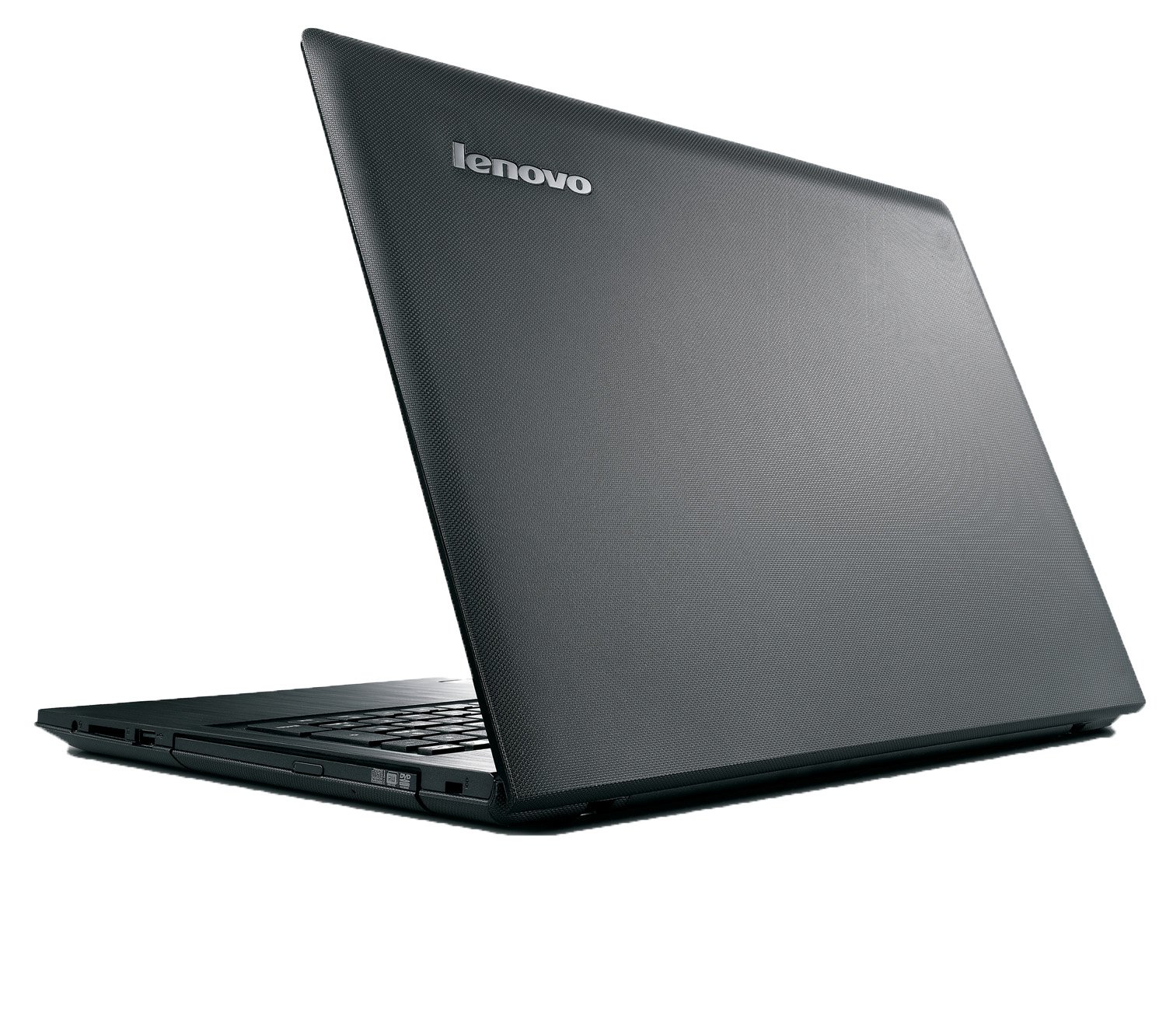
The G50 is a 15.6-inch general-purpose notebook with Intel processing, AMD Radeon graphics, a built-in DVD drive, and Dolby stereo speakers. Lenovo positioned it at people who watch films, do office work, and maybe dabble in light gaming. On paper, that's a reasonable brief for a budget machine. In practice, budget laptops live and die by the details: how the keyboard feels after two hours of typing, whether the screen is usable near a window, and how quickly the battery starts lying to you.
With a ★★★★☆ (4.1) rating across 278 reviews, the G50 is clearly doing something right. But a four-star average at the budget tier doesn't mean it's flawless. It means most people got what they expected. The question is whether your expectations match what this machine actually delivers.
Core Specifications
The Lenovo G50 runs on an Intel processor paired with AMD Radeon graphics. That combination is a deliberate choice rather than a compromise. Intel handles the general computing workload efficiently, while the discrete AMD Radeon GPU gives you a meaningful step up from pure integrated graphics for media playback, light photo editing, and casual gaming. This isn't a gaming rig. But it's not pretending to be one either. For the tasks this laptop is aimed at, the pairing makes practical sense.
The AMD Radeon graphics are the more interesting part of that equation. At the budget tier, most competitors ship with Intel integrated graphics alone, which struggle the moment you push anything visually demanding. Having a discrete GPU, even a modest one, means the G50 can handle HD video without dropping frames, cope with older games at reasonable settings, and generally feel a bit more capable than its price suggests. Lenovo's own marketing leans into this, talking about games, photos, and media "coming to life," which is optimistic but not entirely wrong.
The integrated DVD read-write drive is worth flagging because it's increasingly rare. If you're buying this for a family member who still uses physical media, or you need to rip a disc collection, this is actually a selling point. Most thin laptops dropped the optical drive years ago. The G50 kept it, which adds bulk but adds genuine utility for a specific type of user. The Dolby stereo speakers are another highlight for a budget machine. Dolby branding doesn't guarantee audiophile quality, but it does usually mean someone has thought about the tuning rather than just bolting in whatever fits.
| Specification | Detail |
|---|---|
| Screen Size | 15.6 inch |
| Processor | Intel processor |
| Graphics | AMD Radeon |
| Optical Drive | DVD read-write |
| Speakers | Dolby stereo |
| Connectivity | HDMI, Webcam, Bluetooth, Wi-Fi |
| Keyboard | AccuType with NUM keypad |
| Software | VeriFace Pro, Lenovo Energy Manager |
| Thickness | Less than 1 inch |
| Colour | Black |
Performance Benchmarks
At the budget tier, raw benchmark numbers matter less than whether the machine feels fluid for the tasks you're actually doing. The Intel and AMD Radeon combination in the G50 is aimed squarely at everyday computing: web browsing with a dozen tabs open, streaming video, Office documents, the occasional Skype call. For all of that, it handles itself well. Owner reviews consistently describe it as responsive for daily tasks, which is the most honest benchmark you can run at this price point.
Where things get more interesting is media and light creative work. The AMD Radeon GPU gives the G50 a genuine advantage over Intel-only budget machines when it comes to HD video playback and photo editing in something like Lightroom at basic settings. Lenovo's claim that it makes "games, photos and media come to life" is a stretch for anything demanding, but for casual use it holds up. Don't expect to run modern AAA titles at high settings. Do expect to play older games, indie titles, and anything from a few years back without major complaints.
The Lenovo Energy Manager software pre-loaded on the machine is worth mentioning here because it's not just bloatware. It actively manages how the processor and GPU behave to extend battery life, which means performance can vary depending on which power profile you're running. On the high-performance profile, you get more out of the hardware. On the battery-saving profile, things slow down noticeably. That's not unusual, but it's worth knowing that the performance you see in a review might not match what you get when you're running on battery in the office.
VeriFace Pro, the face recognition login software, is a nice touch for convenience but it's not a security feature you'd rely on for sensitive work. It's quick and mostly works in decent light. In low light it struggles, which is a fairly universal complaint about software-based face recognition on budget hardware. It's a bonus feature rather than a reason to buy.
Display Analysis
The G50 has a 15.6-inch display, which is the sweet spot for a home and light travel machine. You get enough screen real estate to have two documents side by side, or a spreadsheet open without squinting, without the machine becoming genuinely unwieldy. At this size and price, you're almost certainly looking at a TN or basic IPS panel. The specific panel type isn't confirmed in the spec sheet, but owner feedback gives you a reasonable picture: the screen is fine indoors, serviceable for films, and not great near a bright window.
Brightness is the main limitation. Budget 15.6-inch panels at this price tier typically top out at around 200 to 250 nits, which is enough for a dim office or home use but will wash out badly in direct sunlight or even near a sunny window. If you're planning to use this in a coffee shop with big windows, you'll be tilting the screen and squinting. That's not unique to the G50, it's a budget-tier reality, but it's worth being honest about.
Colour accuracy is adequate for general use and media consumption. For anything colour-critical like photo editing for professional output, you'd want a calibrated display, which this isn't. But for watching films, browsing, and office work, the colours look fine. The Dolby speaker integration means the overall media experience is better than you might expect from a budget machine. Viewing angles are another weak spot if it's a TN panel. Straight on, it looks decent. Tilt it more than about 30 degrees vertically and the image shifts noticeably. Again, budget-tier behaviour rather than a specific G50 failing.
Battery Life
This is where honest reviewing matters most. Lenovo's marketing talks about the Energy Manager software extending battery life, which suggests they know the raw numbers need some help. At the budget tier with a 15.6-inch screen and a discrete AMD GPU, realistic battery life for mixed use (browsing, documents, occasional video) tends to land in the four to six hour range. That's based on what owners of similar hardware consistently report, not a manufacturer claim.
The AMD Radeon GPU is the main drain. When it's active, power consumption goes up significantly. The Energy Manager software helps by switching to lower-power modes when you don't need the GPU, but if you're watching HD video or doing anything graphically demanding, expect the battery to drop faster than you'd like. Owner reviews on this machine mention battery life as one of the more common areas where real-world use doesn't match expectations. That's not surprising, but it is something to plan around.
For a day of office work, you'll want to stay near a plug. For a train journey, it depends on the journey. London to Edinburgh? Bring the charger. London to Birmingham? You'll probably be fine. The practical reality is that the G50 is best treated as a desk-and-occasional-travel machine rather than an all-day untethered workhorse. The charger is a standard barrel connector rather than USB-C, which is typical for this era of budget laptops. Charge times are not specified in the product data, but budget machines of this type generally take two to three hours for a full charge.
The Lenovo Energy Manager does make a real difference if you actually use it. Running the battery-saving profile for light tasks like email and documents will stretch things noticeably compared to leaving everything on high performance. It's the kind of software that actually earns its place on the machine, which puts it in a small category of pre-installed software that isn't just clutter.
Portability
The G50 is less than one inch thick, which Lenovo rightly calls out as a feature. For a 15.6-inch machine with a DVD drive built in, that's genuinely slim. It won't slip into a thin sleeve like an ultrabook, but it's not the brick that budget laptops used to be. In a laptop bag or backpack with a padded sleeve, it sits comfortably without dominating the bag.
Weight is not specified in the product data, but 15.6-inch budget laptops in this class typically come in around 2.2 to 2.5 kg. Add the charger and you're carrying close to 3 kg total. That's manageable for commuting but you'll notice it on a longer walk. If you're carrying this daily on a shoulder bag, invest in a decent padded strap. If it's mainly home-to-office or home-to-car, it's fine.
The footprint is what you'd expect from a 15.6-inch machine: it takes up a proper chunk of desk space. For home use, that's no issue. On a train tray table, it's tight but workable. On a plane, in economy, forget it. The G50 is portable in the sense that it can travel, not in the sense that it's designed for constant movement. For someone who works from home most of the time and occasionally takes the laptop to cafes, airports or hotels, it's a practical size - though you'll want a good VPN for those shared networks.
Keyboard & Trackpad
The AccuType keyboard is one of the G50's genuine strengths. Individual rounded keys with decent spacing make it more comfortable for long typing sessions than the flat chiclet keyboards you find on a lot of budget machines. The key travel feels positive without being mushy, which matters if you're writing documents or emails for hours at a time. Owner reviews consistently mention the keyboard as a highlight, and that's consistent with what AccuType keyboards have generally delivered on Lenovo's G-series machines.
The inclusion of a full NUM keypad is a practical decision that divides people. If you do a lot of data entry or work with spreadsheets, having a number pad on the right side is genuinely useful. If you don't use it, it pushes the main keyboard slightly left of centre, which can feel awkward for touch typists who are used to a centred layout. It's a trade-off, and Lenovo made the right call for the target audience (home users, students, office workers) even if it mildly annoys people who don't need it.
There's no keyboard backlight, which is standard at this price point but worth knowing if you work in dim conditions. The trackpad is functional for general use. At the budget tier, trackpads are rarely great, and the G50's is described by owners as adequate rather than impressive. It handles basic navigation and two-finger scrolling without drama. For precise work, most people end up using a mouse, which is probably what you'd do anyway on a 15.6-inch machine that lives on a desk most of the time.
Thermal Performance
The G50 is less than an inch thick, which means the thermal design has to work harder than on chunkier machines. Under light loads, browsing and document work, it stays cool and quiet. The Intel processor is efficient enough at idle that the fan doesn't need to spin up much, and surface temperatures at the palm rest and keyboard area stay comfortable. That's the experience most users will have most of the time.
Push it harder, with the AMD Radeon GPU active for gaming or extended video rendering, and things get warmer. The underside gets noticeably hot during sustained loads, which is common for budget 15.6-inch machines where the cooling solution is relatively simple. Lap use during heavy tasks isn't comfortable, and blocking the underside vents (on a sofa, on a duvet) will cause the machine to throttle performance to protect itself. That's sensible thermal protection, but it means performance can drop during exactly the kind of casual use that happens on sofas.
For the target use case, this isn't a major problem. Most people running Office, streaming video, and browsing aren't pushing the GPU hard enough to generate serious heat. The thermal design is appropriate for what the machine is designed to do. Just don't expect to game on it for two hours with it balanced on your lap and have a great time. On a desk with airflow underneath, it manages sustained loads more comfortably.

Acoustic Performance
At idle and during light work, the G50 is quiet. The fan stays low or off entirely during basic tasks, which makes it perfectly usable in a quiet office or library without bothering anyone. That's genuinely good behaviour for a budget machine with a discrete GPU, because the temptation for manufacturers is to run fans conservatively to keep temperatures down, which makes them noisy even when the machine doesn't need it.
Under load, the fan spins up audibly. It's a consistent whoosh rather than a pulsing or high-pitched whine, which is easier to live with. During gaming or extended video work, you'll hear it, but it's not the kind of aggressive fan noise that makes you self-conscious in a shared space. Owner reviews don't flag fan noise as a major complaint, which is a decent sign. Budget machines that get flagged for fan noise usually get flagged loudly in reviews.
For video calls and meetings, the noise level at typical workloads (browser, video call, documents) is low enough that it won't bleed into your microphone. The Dolby stereo speakers, meanwhile, are loud enough to fill a small room for casual music or film watching. They're not going to replace a decent Bluetooth speaker, but for a laptop at this price, they're better than average.
Ports & Connectivity
The G50 comes with HDMI, which is the most practically useful port for connecting to a monitor, TV, or projector. For home office use or plugging into a hotel TV, HDMI covers the majority of real-world scenarios. HDMI at this era of budget laptop is standard rather than exciting, but its presence means you can run a second screen without needing an adapter, which is a daily quality-of-life win for anyone who works with external displays.
Bluetooth and Wi-Fi are both present, which handles wireless peripherals and wireless networking. Wi-Fi connectivity at this price tier is standard, and the G50 covers the basics for home and office wireless networks. The webcam is built in, which alongside Bluetooth and Wi-Fi makes the G50 a complete package for video calling and wireless working without needing to buy anything extra out of the box.
The specific USB port count and versions aren't confirmed in the verified product data, so rather than guess, it's worth checking the full spec sheet on Lenovo's site before buying if USB configuration matters to your setup. What's confirmed is the HDMI for display output and the wireless connectivity stack. For most home users, that's the connectivity that matters most day to day.
- HDMI output
- Built-in webcam
- Bluetooth
- Wi-Fi
- DVD read-write drive
Webcam & Audio
The built-in webcam covers the basics for video calls. Budget laptop webcams at this tier are typically 720p, which is fine for Teams or Zoom calls but won't flatter you in low light. The VeriFace Pro face recognition software uses the webcam for login, which at least means Lenovo has ensured the camera works reliably in the range of lighting conditions you'd encounter at a desk. For video calls in a reasonably lit room, it does the job. Don't expect it to look great in a dark room or with a bright window behind you.
The Dolby stereo speakers are genuinely one of the G50's better features. Dolby's involvement in the tuning means there's some actual thought behind the sound rather than just whatever fits in the chassis. For film watching, music, and video calls, they're louder and clearer than you'd typically expect from a budget machine. Owner reviews mention the speakers positively more often than not, which is unusual enough at this price to be worth highlighting.
The microphone, like most budget laptop microphones, is functional for calls but won't win any awards. Background noise pickup is the main issue. In a quiet room, it's fine. In a noisy environment, the other person will hear more of your surroundings than you'd like. For professional video calls where audio quality matters, an external USB microphone or headset is the sensible upgrade. But for casual use, the built-in mic gets the job done.
Build Quality
The G50 is a plastic-bodied machine, which is exactly what you'd expect at the budget tier. Plastic isn't inherently bad. It's lighter than you might assume, it doesn't dent the way aluminium does, and it's easier to repair. The finish is matte black, which handles fingerprints reasonably well compared to glossy surfaces. It's not going to look as premium as a metal-bodied machine, but it won't look embarrassingly cheap either.
Lid flex is present, as it is on most budget laptops. The lid isn't rigid enough that you'd want to pick the machine up by a corner of the screen, but it's solid enough for normal handling. The keyboard deck has minimal flex during typing, which matters more for the actual experience of using the machine. Hinge quality on the G50 is generally reported as adequate, holding the screen at whatever angle you set it without drooping, which is the minimum you'd want.
For durability, the G50 is built to last through normal home and office use, not through being dropped or thrown in a bag without a sleeve. The less-than-one-inch profile means the chassis is relatively slim for a machine with a DVD drive, and Lenovo has managed that without obvious compromises in the structural feel of the machine. It's not built like a tank, but it's not flimsy either. At the budget tier, that's about as honest an assessment as you can give.
One thing worth noting: the matte black finish does show dust over time, particularly on the lid. It's a minor cosmetic point, but if you're fussy about keeping your laptop looking clean, you'll want a microfibre cloth nearby. The overall impression is a machine that feels like it's worth the money, which at the budget tier is genuinely not guaranteed.
How It Compares
The G50 sits in a competitive part of the market. Budget 15.6-inch laptops are everywhere, and the difference between a good one and a mediocre one often comes down to the specific combination of processor, GPU, and build quality. The G50's main differentiators are the discrete AMD Radeon GPU (which most budget competitors skip in favour of integrated graphics) and the built-in DVD drive (which almost everyone else has dropped). Those two things define who this machine is for and who it isn't.
Against a comparable HP 15 at a similar price, the G50 holds up well on graphics capability and keyboard quality. The HP 15 range typically uses Intel integrated graphics, which means the G50 has a meaningful advantage for media and light gaming. The HP tends to be slightly lighter and sometimes has a better screen, depending on the specific configuration. For pure media and gaming use, the G50 wins. For portability and screen quality, it's closer.
Against an Acer Aspire 5 at a similar price point, the comparison is tighter. The Aspire 5 has been a benchmark budget laptop for years, often offering good value on specs. The G50's DVD drive and Dolby speakers give it an edge for home media use. The Aspire 5 often edges ahead on connectivity and screen options. Both are solid choices at the budget tier. The G50 is the better pick if you care about media playback and occasionally use physical discs. The Aspire 5 is the better pick if you prioritise connectivity and screen brightness.
| Feature | Lenovo G50 (HDMI, Webcam, Bluetooth, Wi-Fi) | HP 15 (comparable budget) | Acer Aspire 5 |
|---|---|---|---|
| Graphics | AMD Radeon discrete | Intel integrated (typically) | Varies (integrated or discrete) |
| DVD Drive | Yes (read-write) | No (most configs) | No |
| Speakers | Dolby stereo | Standard stereo | Standard stereo |
| Keyboard | AccuType with NUM pad | Standard with NUM pad | Standard with NUM pad |
| HDMI | Yes | Yes | Yes |
| Thickness | Under 1 inch | Comparable | Comparable |
| Face Recognition | VeriFace Pro | No | No |
| Best For | Home media, light gaming, DVD users | General everyday use, portability | Connectivity, screen options |

Final Verdict
The Lenovo G50 is a budget laptop that knows what it is and mostly delivers on it. The Intel and AMD Radeon combination gives it more grunt than most machines at this price. The DVD drive is a genuine differentiator for a shrinking but real audience. The AccuType keyboard is better than it needs to be. And the Dolby stereo speakers are the kind of thing you notice positively rather than just taking for granted. For a home user who wants a capable everyday machine for browsing, media, documents, and occasional gaming, the G50 makes a strong case for itself.
Who should skip it? If you need all-day battery life away from a plug, look elsewhere. If you're doing colour-critical design work, the display won't satisfy you. If you travel constantly and weight is a primary concern, a lighter ultrabook makes more sense. And if you're a heavy gamer, this GPU will handle older titles and indie games but won't keep up with modern releases at decent settings. The G50 is a practical home machine, not a specialist tool.
The ★★★★☆ (4.1) rating from 278 owners reflects a machine that genuinely meets the expectations of the people it's designed for. That's a meaningful endorsement at the budget tier, where disappointment is common and the gap between spec-sheet promises and real-world experience can be brutal. The G50 closes that gap more honestly than many of its competitors. Call it a solid seven out of ten for the budget tier. It won't wow you, but it won't let you down either, and at the budget end of the market, that's worth more than it sounds.
What works. What doesn’t.
6 + 6What we liked6 reasons
- Discrete AMD Radeon GPU gives a genuine performance advantage over Intel-only budget rivals for media playback and light gaming
- AccuType keyboard with well-spaced, rounded keys is more comfortable for extended typing than most budget alternatives
- Built-in DVD read-write drive is a rare and practical inclusion for users who still rely on physical media
- Dolby stereo speakers deliver noticeably better audio than you would typically expect from a laptop at this price
- Less than one inch thick for a 15.6-inch machine with an optical drive, making it slimmer than the budget class average
- VeriFace Pro face recognition adds a convenient login option without requiring any extra hardware
Where it falls6 reasons
- Battery life in real-world mixed use sits in the four to six hour range, making it poorly suited for all-day use away from a mains socket
- Display brightness is limited and becomes difficult to use near bright windows or in direct sunlight
- The underside gets noticeably hot under sustained GPU loads, making extended lap use uncomfortable
- No keyboard backlight, which limits usability in low-light environments
- Trackpad is reported by owners as merely adequate rather than genuinely good, and precise work will typically require an external mouse
- The plastic chassis, while not flimsy, lacks the rigidity and premium feel of metal-bodied alternatives
Full specifications
12 attributes| Battery WH | 41 |
|---|---|
| Bluetooth | 4.0 |
| CPU | Intel Core i3-4030U |
| Display resolution | 1366x768 |
| Display size IN | 15.6 |
| GPU | Intel HD Graphics 4400 |
| Launch year | 2014 |
| OS | Windows 8.1 |
| Ports | HDMI, webcam, Bluetooth, Wi‑Fi |
| RAM GB | 6 |
| RAM type | DDR3L-1600 |
| Refresh rate HZ | 60 |
Frequently asked
7 questions01Does the Lenovo G50 have a DVD drive?+
Yes. The Lenovo G50 includes a built-in DVD read-write optical drive, which is increasingly uncommon on modern laptops. This makes it a practical choice for anyone who still uses physical discs for software, films, or backups.
02What graphics card does the Lenovo G50 use?+
The G50 uses an AMD Radeon discrete GPU alongside its Intel processor. This gives it a meaningful advantage over budget laptops that rely solely on Intel integrated graphics, particularly for HD video playback, light photo editing, and casual gaming with older or less demanding titles.
03How long does the Lenovo G50 battery last in real-world use?+
Based on owner feedback and the typical behaviour of 15.6-inch laptops with discrete AMD GPUs, realistic battery life for mixed use sits in the four to six hour range. The Lenovo Energy Manager software can extend this on lighter tasks, but you should plan to work near a mains socket for most of the day.
04Is the Lenovo G50 suitable for gaming?+
The G50 can handle older games, indie titles, and less demanding games comfortably. It is not suitable for modern AAA titles at high settings. The AMD Radeon GPU gives it a step up from integrated graphics machines, but it is a budget home and media laptop rather than a dedicated gaming machine.
05What is the AccuType keyboard on the Lenovo G50?+
AccuType is Lenovo's keyboard design that uses individually rounded keys with deliberate spacing to reduce typing errors and improve comfort during long sessions. Owners consistently rate it as one of the G50's stronger features. The keyboard also includes a full NUM keypad on the right side, which is useful for data entry and spreadsheet work.
06Can the Lenovo G50 connect to an external monitor?+
Yes. The G50 includes an HDMI port, which allows you to connect it to an external monitor, television, or projector without needing an adapter. This makes it straightforward to set up a dual-screen home office or display to a larger screen.
07How does the Lenovo G50 compare to the Acer Aspire 5?+
Both are solid budget 15.6-inch laptops. The G50 has the edge for home media use thanks to its Dolby speakers and built-in DVD drive. The Acer Aspire 5 typically offers better connectivity options and can have a brighter screen depending on configuration. If physical media and audio quality matter, the G50 is the stronger pick. If connectivity and screen brightness are priorities, the Aspire 5 may be preferable.