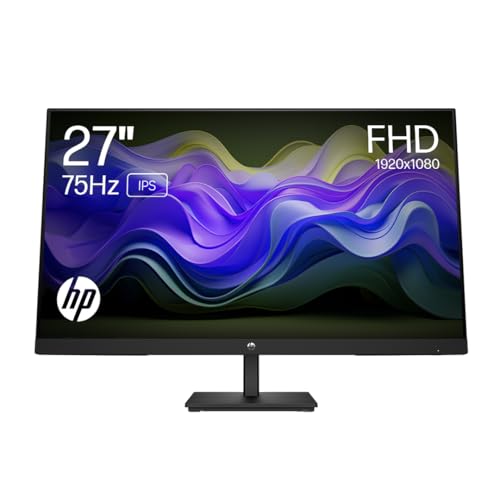
There's a real problem with budget monitors that nobody talks about enough: the headline numbers look fine on paper, then you actually sit in front of one and something feels off. The panel smears. The colours look washed out. The stand wobbles every time you adjust it. Refresh rate figures mean absolutely nothing if the underlying panel can't keep up. So when HP puts a 75Hz IPS panel on the V27ie G5 and prices it in the budget bracket, the question worth asking isn't "does 75Hz sound good?" It's whether the whole package actually holds together for eight hours of spreadsheets, a bit of YouTube, and the occasional casual gaming session.
Short answer: mostly yes, with some caveats you should know about before you buy. The HP V27ie G5 27 inch monitor is a genuinely decent everyday display for home working and light use, and the positive overall rating across dozens of owner reviews backs that up. But it's not a gaming monitor, it's not a creative tool, and if you're expecting anything remotely close to HDR performance, you'll be disappointed. What it is, is a clean, well-made IPS panel that does the basics properly at a budget price. That's worth something. Just not everything.
This HP V27ie G5 27 inch monitor review will work through every spec that matters, compare it against the obvious alternatives in the same bracket, and tell you straight whether it's worth your money or whether you'd be better off spending a bit more elsewhere.
Core Specifications
The V27ie G5 is a 27-inch Full HD IPS monitor running at 1920x1080 resolution with a 75Hz refresh rate. HP rates the panel at 250 nits peak brightness and a 1000:1 contrast ratio, which are both fairly standard figures for budget IPS. Response time is listed at 5ms GtG, which is the actual grey-to-grey figure rather than some marketing-invented 1ms MPRT number. That's a point in HP's favour right there. They're at least being honest about what the panel does.
Connectivity covers the three main bases: one HDMI 1.4 port, one DisplayPort 1.2, and one VGA. The VGA inclusion is either a bonus or a sign of the times depending on your perspective. If you've got an older machine or a secondary PC that only has VGA out, this is genuinely useful. If you're wondering why VGA is still appearing on a monitor in 2026, well, HP clearly knows its audience. There's no USB-C, no USB hub, and no built-in speakers. The stand offers tilt adjustment only, with no height, swivel, or pivot. VESA mounting is 100x100mm, so you can ditch the stand if you need to.
AMD FreeSync support is included, which is the adaptive sync standard you want if you're running an AMD GPU. The FreeSync range on this panel covers 48Hz to 75Hz, which is a reasonable window for casual gaming. No G-Sync compatibility is listed, though some FreeSync monitors work with Nvidia GPUs in G-Sync Compatible mode. HP doesn't officially certify this one for that, so don't count on it. Here's the full spec breakdown:
| Specification | Detail |
|---|---|
| Screen Size | 27 inches |
| Resolution | 1920x1080 (Full HD) |
| Panel Type | IPS LCD |
| Refresh Rate | 75Hz |
| Response Time | 5ms GtG |
| Brightness | 250 nits |
| Contrast Ratio | 1000:1 (native) |
| Adaptive Sync | AMD FreeSync (48 to 75Hz) |
| Ports | 1x HDMI 1.4, 1x DisplayPort 1.2, 1x VGA |
| Stand Adjustment | Tilt only |
| VESA Mount | 100x100mm |
| HDR | None |
| Speakers | None |
| Price | £144.95 · Details |

Panel Technology
IPS stands for In-Plane Switching, and it matters because it's the reason this monitor looks decent from the side of your desk, from an angle, or when a colleague leans over to look at something on your screen. IPS panels maintain colour accuracy across wide viewing angles, typically rated at 178 degrees horizontal and vertical. That's not marketing fluff for once. It's a real, measurable advantage over TN panels, which go greenish and washed out the moment you're not sitting dead centre. For a monitor that's likely to live in a home office or on a shared desk, IPS is the right call.
The trade-off with IPS is contrast. Native contrast on IPS panels typically lands around 1000:1, and that's exactly what HP specifies here. Compare that to a VA panel, which can hit 3000:1 or higher natively, and you'll notice the difference in dark scenes. Blacks on an IPS panel look dark grey rather than true black, especially in a dim room. This is called IPS glow, and it's most obvious in the corners of the screen when you're watching something dark. It's not a flaw unique to the V27ie G5, it's just the physics of how IPS panels work. VA panels fix the contrast problem but introduce smearing in fast motion. OLED fixes both but costs several times more. At this budget price point, IPS is the sensible choice for mixed use.
Owner reviews don't flag any unusual uniformity issues with this panel, which is encouraging. Budget IPS panels can sometimes have backlight bleed that's bad enough to be distracting, but the feedback from the few dozen reviewers doesn't show a pattern of complaints about that. A handful of owners specifically mention the colours looking natural and the image feeling crisp for the price, which lines up with what you'd expect from a decent IPS implementation. HP has been making IPS monitors for long enough that their panel sourcing tends to be reliable at this level. The V27ie G5 uses an anti-glare matte coating on the panel surface, which handles reflections well in bright rooms without adding the hazy quality that some cheaper matte coatings produce.
Display Quality
Full HD at 27 inches gives you a pixel density of roughly 82 pixels per inch. That's noticeably lower than 1440p at the same size, which would give you around 109 PPI. You will see individual pixels if you sit close. Text won't look as crisp as it does on a higher-resolution panel. This is the single biggest compromise you're making with the V27ie G5, and it's worth being direct about it. If you sit about 60 to 80 centimetres from the screen, 1080p at 27 inches is fine for everyday work. If you sit closer, or if you're particularly sensitive to pixel structure, you might find yourself wishing for more resolution. Some owner reviews do mention that the image looks slightly soft compared to their previous monitors, which is almost certainly a resolution perception thing rather than a panel quality issue.
The matte anti-glare coating is a genuine practical advantage for a home office monitor. Glossy panels look more vibrant in controlled lighting, but they turn into mirrors the moment there's a window behind you. The V27ie G5's matte surface handles ambient light properly, which is what you actually want when you're trying to work. The coating isn't overly aggressive either. Some budget monitors apply such a thick anti-glare layer that it creates a sparkle effect on fine text. The feedback from owners suggests HP has struck a reasonable balance here.
Brightness uniformity across the panel is where budget monitors often let themselves down. At 250 nits peak, the V27ie G5 isn't going to be blinding anyone, but the question is whether that 250 nits is consistent across the whole screen or whether the edges are noticeably dimmer. HP doesn't publish uniformity figures for this model, and owner reviews don't raise it as a major concern, which suggests it's at least acceptable. For context, 250 nits is comfortable for indoor use in most lighting conditions. You might struggle in a very bright room with direct sunlight, but for a typical home office setup, it's enough. The panel doesn't support HDR, so there's no peak brightness mode to worry about.
Refresh Rate and Adaptive Sync
75Hz is the sweet spot for budget office monitors right now. It's a meaningful step up from 60Hz. The difference between 60Hz and 75Hz is subtle but real, particularly in how smoothly the cursor moves and how Windows animations feel. You're not going to get the silky experience of a 144Hz or 165Hz gaming monitor, but you're also not stuck with the slightly choppy feel of 60Hz that makes everything look like a slideshow compared to what you've seen on better displays. For productivity work, browsing, and video, 75Hz is perfectly comfortable.
AMD FreeSync support covers a range of 48Hz to 75Hz, which is the variable refresh rate window where the monitor and GPU can sync their frame output to eliminate screen tearing. AMD FreeSync is an open standard, so it works across a wide range of AMD Radeon graphics cards without any additional licensing fees baked into the monitor price. The practical benefit for casual gaming is that you get tear-free output even when your frame rate drops below 75fps, as long as it stays above 48fps. Below 48fps, Low Framerate Compensation (LFC) would typically kick in, but HP doesn't confirm LFC support on this model, so don't assume it's there.
If you're running an Nvidia GPU, the FreeSync support is less useful. Nvidia's G-Sync Compatible certification requires the monitor to pass Nvidia's own validation testing, and the V27ie G5 isn't listed as G-Sync Compatible. You can still use the monitor with an Nvidia card, obviously. You just won't get adaptive sync, which means you'll need to use V-Sync in games to avoid tearing, or accept the occasional tear. For office work and casual use, this doesn't matter at all. For gaming. If you're on an Nvidia GPU and gaming matters to you, look for a G-Sync Compatible certified monitor instead.
Response Time and Motion
The 5ms GtG response time is the figure HP publishes, and it's a real grey-to-grey pixel transition measurement rather than the 1ms MPRT figures that some manufacturers use to make budget panels sound faster than they are. MPRT (Moving Picture Response Time) measures perceived blur with backlight strobing active, not actual pixel transition speed, and it's frequently used to inflate response time claims on panels that wouldn't look impressive otherwise. HP quoting GtG here is the honest approach.
5ms GtG on an IPS panel at 75Hz is fine for casual gaming and completely irrelevant for productivity work. You're not going to see smearing on spreadsheets or ghosting while scrolling through a webpage. In fast-paced competitive games, particularly anything with very fast camera movement or lots of motion in dark areas, you might notice some trailing. Dark scene ghosting is a known characteristic of IPS panels at this response time and price level. It's not severe, but it's there if you're looking for it. Owner reviews don't flag motion quality as a significant complaint, which suggests it's within acceptable limits for the kind of use this monitor is designed for.
There's no overdrive mode mentioned in the spec sheet, which is typical for monitors at this price. Overdrive pushes pixels harder to reduce response time, but it can cause inverse ghosting (bright halos around moving objects) if it's set too aggressively. Not having an overdrive option means you're getting whatever the panel's natural response time is, without the risk of overshoot. For 75Hz gaming and everyday use, that's a reasonable trade. If you want proper overdrive control, you're looking at monitors further up the price ladder. The V27ie G5 is what it is: a solid, honest panel for work and light play, not a motion-performance showcase.
Color Accuracy and Gamut
HP rates the V27ie G5 at 99% sRGB colour gamut coverage, which is a strong figure for a budget IPS panel and means it covers essentially the entire standard colour space used for web content, office work, and consumer video. sRGB is the baseline standard for most digital content, so hitting 99% means colours will look accurate and consistent across the kinds of tasks this monitor is designed for. There's no DCI-P3 coverage figure published, and you shouldn't expect wide-gamut performance at this price. DCI-P3 is the colour space used in cinema and professional creative work, and panels that cover it properly cost considerably more.
Factory calibration at this price point is minimal. HP doesn't publish Delta-E figures for the V27ie G5, which is pretty standard for budget office monitors. Delta-E is the measurement of colour accuracy, where a Delta-E below 2 is considered indistinguishable from perfect to the human eye, and below 3 is considered good for general use. Budget panels often ship with Delta-E values around 3 to 5 out of the box, which means colours are broadly accurate but not precision-calibrated. For spreadsheets, email, and video calls, this doesn't matter. For colour-critical photo editing or graphic design, it would matter, and you'd want a monitor with a published Delta-E below 2 and ideally a factory calibration report.
Owner reviews mention colours looking natural and pleasing, which is consistent with a decent sRGB IPS implementation. Nobody's reporting wildly inaccurate hues or a colour cast that makes everything look wrong. A few reviewers specifically call out the image quality as a positive, which is encouraging given the price. If you want to do any serious colour work, you'd want to calibrate with a hardware colorimeter, but for everyday use, the out-of-box accuracy should be acceptable. The 99% sRGB coverage is the key number here, and it's genuinely good for the budget bracket.

HDR Performance
There is no HDR on the V27ie G5. None. HP doesn't claim HDR support, doesn't list an HDR certification, and doesn't pretend the 250-nit panel can do something it physically can't. That's actually the right call. The alternative would be slapping an "HDR" badge on a 250-nit panel with no local dimming, which is what some manufacturers do to tick a checkbox on a spec sheet. That kind of "HDR" looks worse than SDR because the OS sends HDR-encoded content to a panel that can't render it properly, and the result is washed-out, dim images that make you want to turn HDR off immediately.
Proper HDR requires a minimum of 400 nits peak brightness (the VESA DisplayHDR 400 certification baseline), and ideally local dimming to actually achieve the contrast that makes HDR content look different from SDR. The V27ie G5 has neither. At 250 nits, it's below the HDR 400 threshold, and as a budget IPS panel, there's no local dimming zone control. So HDR content will simply be tone-mapped to SDR output, which is fine. It won't look spectacular, but it won't look broken either.
If HDR matters to you, you need to spend more. DisplayHDR 400 certified monitors start appearing around the upper end of the budget bracket, and anything with genuine local dimming and meaningful peak brightness is going to be in the mid-range or above. For the use case this monitor is designed for, the absence of HDR is completely irrelevant. Office workers and home users watching Netflix in a window don't need HDR. Competitive gamers don't need HDR either. It's really only content creators and home cinema enthusiasts who will miss it, and those people shouldn't be looking at this monitor anyway.
Contrast and Brightness
The 1000:1 native contrast ratio is exactly what you'd expect from an IPS panel, and it's honest. Some manufacturers list "dynamic contrast ratios" of 1,000,000:1 or similar, which is a meaningless figure produced by the backlight dimming to near-zero in very dark scenes. Native contrast is the number that actually tells you how the panel performs in normal use, and 1000:1 means blacks will look dark grey in a dim room. Not deep black. Dark grey. If you're watching films in a darkened room, you'll notice IPS glow in the corners and a general lack of depth in dark scenes. It's manageable, but it's there.
250 nits peak brightness is on the lower end for 2026. Many budget monitors now ship at 300 nits or higher, and mid-range panels often hit 350 to 400 nits in SDR. For a home office with controlled lighting, 250 nits is fine. You'll probably run it at 60 to 70 percent brightness anyway, because maximum brightness is rarely comfortable for extended use. The issue comes if you have a bright room with windows. In direct sunlight or strong ambient light, 250 nits can feel a bit dim, and the anti-glare coating, while helpful, can't fully compensate for insufficient brightness when the room is really bright.
The combination of 1000:1 contrast and 250 nits brightness means the V27ie G5 is best suited to a controlled indoor environment, which is exactly what most home offices are. Draw the blinds, set the brightness to a comfortable level, and the image quality will be perfectly pleasant. Try to use it in a sun-drenched conservatory and you might struggle. That's not a criticism specific to this monitor. It's just the reality of what 250 nits means in practice, and it's worth being clear about so you're not surprised when it arrives.
Ergonomics and Stand
The stand on the V27ie G5 offers tilt adjustment only. That means you can angle the screen forward and backward, but you can't raise or lower it, swivel it left or right, or rotate it to portrait orientation. For a budget monitor, this is normal. It's not great, but it's expected. The tilt range is typically around minus 5 to plus 20 degrees on monitors like this, which covers most seated positions. If you need the screen higher, you'll need a monitor arm or a riser. Owner reviews don't raise the stand as a major complaint, which suggests it's stable enough and the tilt range is adequate for most setups.
VESA 100x100mm mounting is supported, which means you can remove the stand entirely and attach the monitor to a third-party arm or wall mount. This is a significant plus if you care about desk space or ergonomics. A decent monitor arm will give you full height, swivel, tilt, and rotation adjustment, and it'll free up the footprint that the stand occupies. If you're buying this monitor for a home office and you care about proper ergonomics, budget for a monitor arm alongside it. The VESA compatibility means you're not locked into the tilt-only stand forever.
Build quality is generally described positively in owner reviews. The bezel is slim on three sides, which is good for a monitor at this price. The back of the unit has a clean, minimal design that HP has been using across its budget monitor range for a while now. The overall construction feels solid according to owner feedback, with no reports of creaking stands or flimsy materials. The cable management on the stand is basic but functional. One thing: there are no built-in speakers and no headphone jack on the V27ie G5. Audio output is entirely absent. If you need sound, you'll need external speakers or a USB headset connected to your PC rather than the monitor.
Connectivity and Ports
Three video inputs: HDMI 1.4, DisplayPort 1.2, and VGA. That's the full port list. HDMI 1.4 supports up to 1920x1080 at 120Hz or 4K at 30Hz, so for 1080p at 75Hz it's more than adequate. DisplayPort 1.2 handles up to 4K at 60Hz with full colour depth, so again, 1080p at 75Hz is well within its capabilities. You won't be bandwidth-limited on either connection at this resolution and refresh rate. Use DisplayPort if you want FreeSync to work reliably, as FreeSync over HDMI can occasionally be temperamental depending on your GPU and driver version.
The VGA port is there for legacy compatibility, and it's either a lifesaver or irrelevant depending on your setup. If you've got an older desktop PC, a secondary machine, or a work laptop that only has VGA out, this is genuinely useful. VGA can handle 1080p at 60Hz without issue, though you won't get 75Hz over VGA. So if you're connecting via VGA, you're capped at 60Hz.. For most people buying this in 2026, the VGA port will sit unused, but its presence doesn't cost you anything.
There's no USB-C port, no USB hub, no audio output, and no headphone jack. This is a display-only monitor with no peripheral connectivity beyond the video inputs. For a budget office monitor, that's fine. Most people have their keyboard, mouse, and headset plugged into the PC rather than the monitor. But if you were hoping to use this as a USB hub to simplify your desk cable situation, look elsewhere. The port selection is minimal but covers what you actually need for video input, and HP has kept the cost down partly by not including features that most buyers in this bracket won't use.
How It Compares
The budget 27-inch monitor market is genuinely competitive right now, and the V27ie G5 has to justify itself against some decent alternatives. The two most obvious comparisons are the AOC 27B2H and the LG 27MP60G-B, both of which sit in a similar price bracket and target the same home office and light gaming audience. Understanding where the HP lands relative to these two tells you a lot about whether it's the right choice for your specific situation.
The AOC 27B2H is a 27-inch 1080p IPS monitor with 75Hz refresh rate and FreeSync, similar in almost every meaningful spec to the V27ie G5. AOC rates it at 250 nits brightness as well, and the port selection is comparable. The key difference is that the AOC typically comes in slightly cheaper, which makes the HP's value proposition a bit tighter. The HP has a marginally better build reputation in owner reviews and the inclusion of DisplayPort (the AOC 27B2H is HDMI-only), which matters for FreeSync reliability and future flexibility. If you need DisplayPort, the HP wins. If you don't, the AOC is.
The LG 27MP60G-B is a more interesting comparison. LG rates it at 75Hz with a 1ms MPRT response time (remember, that's not the same as 5ms GtG, it's a different measurement), and it includes AMD FreeSync as well. LG's IPS panels have a strong reputation for colour accuracy out of the box, and the 27MP60G-B is often cited as a reliable budget option. It's priced similarly to the V27ie G5 and also lacks height adjustment. The LG's IPS colour performance is generally considered slightly ahead, but the HP's build quality and DisplayPort inclusion keep it competitive. Neither is a clear knockout winner over the other.
| Feature | HP V27ie G5 | AOC 27B2H | LG 27MP60G-B |
|---|---|---|---|
| Panel Type | IPS | IPS | IPS |
| Resolution | 1920x1080 | 1920x1080 | 1920x1080 |
| Refresh Rate | 75Hz | 75Hz | 75Hz |
| Brightness | 250 nits | 250 nits | 250 nits |
| Response Time | 5ms GtG | 4ms GtG | 1ms MPRT / 5ms GtG |
| Adaptive Sync | FreeSync | FreeSync | FreeSync |
| DisplayPort | Yes (DP 1.2) | No | Yes (DP 1.2) |
| VGA | Yes | No | No |
| Height Adjustment | No (tilt only) | No (tilt only) | No (tilt only) |
| VESA Mount | 100x100mm | 100x100mm | 100x100mm |
| Price | £144.95 · Details | Check Amazon | Check Amazon |
One alternative that's separately is the 24-inch bracket. If you're working at a desk where 27 inches at 1080p means sitting close enough to see pixels, a 24-inch 1080p monitor at around 92 PPI will look noticeably sharper. The HP 24mh and similar 24-inch budget IPS options come in cheaper and deliver better pixel density for close-up work. If you have a smaller desk or sit closer than 70cm from the screen, seriously consider whether 27 inches at 1080p is actually what you want.

Final Verdict
The HP V27ie G5 is a solid, honest budget monitor that does exactly what it says on the box. It's a 27-inch 1080p IPS panel with 75Hz refresh rate, decent colour coverage, FreeSync support, and a clean build. For home office work, general productivity, casual browsing, and light gaming, it gets the job done without making you feel like you've bought something compromised. The positive overall rating from dozens of owners reflects a monitor that meets expectations reliably, which is genuinely valuable in a bracket where some panels disappoint on delivery.
The weaknesses are real but predictable. 250 nits is adequate rather than comfortable in bright rooms. 1080p at 27 inches is softer than 1440p. The stand is tilt-only, which is annoying if you care about ergonomics (get a monitor arm and be done with it). There's no HDR, no USB hub, no speakers. None of these are surprises. They're the trade-offs you make to get a decent IPS panel at a budget price, and HP has made them sensibly rather than cutting corners on the things that actually matter.
Who should buy this? Someone setting up a home office on a budget, a student who needs a proper-sized screen for studying and video calls, or anyone replacing an ageing 60Hz monitor and wanting a clean step up without spending serious money. It's also a reasonable second monitor if you're adding screen real estate to an existing setup and don't need the secondary display to be anything special.
Who should skip it? Anyone who games seriously. If you're spending real time in competitive shooters or fast-paced action games, you want 144Hz minimum and ideally a 1ms GtG response time. The V27ie G5 isn't built for that. Similarly, if you do any colour-critical creative work, you need a monitor with published Delta-E figures and ideally wide-gamut DCI-P3 coverage. And if pixel density matters to you, a 27-inch 1440p monitor is a better long-term investment, even if it costs more upfront.
The honest don't-overspend line: if you're mainly using this for office work and genuinely don't care about gaming at all, a 24-inch 1080p IPS monitor in the sub-budget bracket will save you money and look sharper on your desk. The V27ie G5 earns its place if you specifically want 27 inches and the extra screen real estate matters to you. If it doesn't, go smaller and spend less.
Our verdict: 7.5 out of 10. A reliable, well-built budget monitor that does the basics right. Not exciting. Not trying to be. Exactly what a good everyday display should be.
What works. What doesn’t.
5 + 4What we liked5 reasons
- Genuine 99% sRGB IPS panel with wide viewing angles
- Honest 5ms GtG spec rather than inflated marketing figures
- DisplayPort 1.2 included alongside HDMI and VGA
- VESA 100x100mm support for monitor arm compatibility
- Solid build quality backed by strong owner review scores
Where it falls4 reasons
- 250 nits brightness is low for bright room use
- Tilt-only stand with no height or swivel adjustment
- 1080p at 27 inches gives soft pixel density at close range
- No speakers, no USB hub, no audio output of any kind
Full specifications
11 attributes| Panel type | IPS |
|---|---|
| Aspect ratio | 16:9 |
| Curvature | flat |
| HDR | none |
| Launch year | 2023 |
| Ports | 1x HDMI 1.4, 1x DisplayPort 1.2, 1x VGA |
| Refresh rate HZ | 75 |
| Resolution | 1920x1080 |
| Response time MS | 5 |
| Screen size IN | 27 |
| Vesa compatible | true |
If this isn’t right for you
2 options 8.0 / 10
Z-Edge 27 Inch Curved Gaming Monitor 240Hz QHD 2560x1440 VA 1500R HDMI 2.1
£179.99 · Z Z-Edge · Details

Frequently asked
5 questions01Is the HP V27ie G5 good for gaming?+
It's fine for casual and light gaming, but not for competitive play. The 75Hz refresh rate is a step up from 60Hz and FreeSync helps eliminate tearing if you're on an AMD GPU, but the 5ms GtG response time and lack of overdrive control mean fast-paced games with lots of dark scene motion may show some trailing. If you play competitive shooters or fast action games seriously, you'd want a 144Hz monitor with a faster response time. For slower-paced games, RPGs, strategy titles, and casual play, the V27ie G5 is perfectly adequate.
02Does the HP V27ie G5 have HDR?+
No, the HP V27ie G5 does not support HDR. HP does not claim HDR certification for this monitor, and at 250 nits peak brightness it falls below the VESA DisplayHDR 400 minimum threshold. There is also no local dimming. HDR content will be tone-mapped to SDR output, which is fine and avoids the washed-out look you get from fake HDR implementations on underpowered panels. If HDR matters to you, you need to spend more on a monitor with at least DisplayHDR 400 certification.
03Is the HP V27ie G5 good for content creation?+
For basic content creation like social media graphics, casual photo editing, and video work where precision colour isn't critical, the 99% sRGB coverage is acceptable. HP doesn't publish Delta-E figures for this model, and the panel isn't factory calibrated to a professional standard. For serious photo editing, graphic design, or video colour grading, you'd want a monitor with published Delta-E below 2, wide-gamut DCI-P3 coverage, and ideally a factory calibration report. The V27ie G5 isn't that monitor.
04What graphics card do I need for the HP V27ie G5?+
Almost any modern graphics card will handle 1920x1080 at 75Hz without breaking a sweat. Integrated graphics on modern Intel and AMD processors can drive this monitor at full resolution and refresh rate. For FreeSync to work, you need an AMD Radeon GPU (any recent RX series card will do). For Nvidia users, FreeSync won't be active, but the monitor works normally for display output. Even budget GPUs like the RX 6500 XT or GTX 1650 will push well over 75fps in most games at 1080p, keeping you in the FreeSync range.
05What warranty and returns apply to the HP V27ie G5?+
HP typically includes a 1-year limited warranty on their monitor range, but check the specific warranty documentation included with the product for confirmation. When purchasing through Amazon UK, you also benefit from Amazon's standard 30-day return window and the Amazon A-to-Z Guarantee, which covers you if the item arrives damaged or not as described. For warranty claims beyond the return window, contact HP support directly.