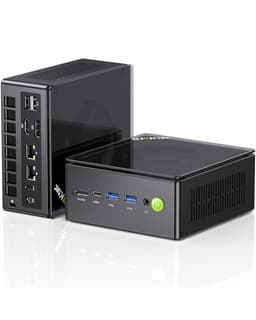
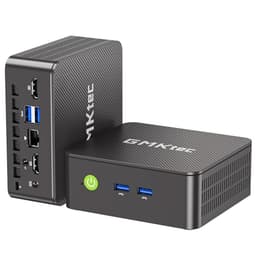
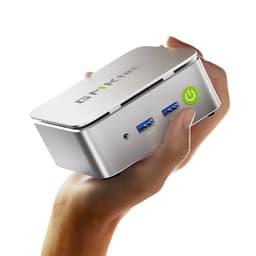
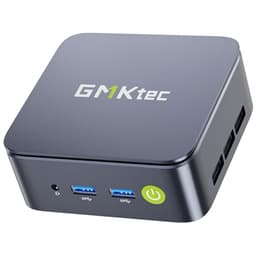
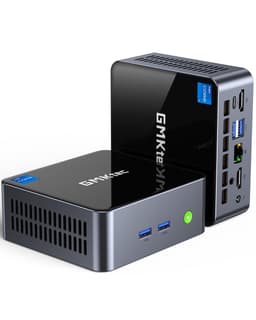
GMKtec EVO-X2 AI Mini PC (Ryzen AI Max+ 395, 128GB)
~£3,100approx
The choice we'd make at this price band. Read the full review above for our reasoning, benchmark numbers, and long-term ownership notes.
As an Amazon Associate we may earn from qualifying purchases. Our ranking stays independent.
128GB unified memory enables 70B+ LLM inference no discrete GPU setup can match at this size
Fan noise under sustained heavy load is noticeable in quiet environments
Ryzen AI Max+ 395 is the fastest x86 APU available in a mini PC form factor
There's a moment when you look at a mini PC spec sheet and think someone's having a laugh. 128GB of LPDDR5X. A 16-core AMD Ryzen AI Max+ 395 boosting to 5.1GHz. Forty RDNA 3.5 compute units in an integrated GPU that GMKtec reckons sits between an RTX 4060 and 4070 laptop chip. All of it crammed into a box you could fit in a rucksack pocket. The GMKtec EVO-X2 is not a modest machine, and it doesn't have a modest price to match. So the question isn't whether the specs are impressive on paper. They clearly are. The question is whether this thing actually delivers in the real world, whether GMKtec is a brand you can trust with your money at this price point, and whether there's a smarter way to spend the same budget.
The mini PC market has moved fast. Two years ago, the idea of running a 70-billion-parameter language model locally on a machine smaller than a hardback book was science fiction. Now it's a selling point on an Amazon listing. The AMD Ryzen AI Max+ 395 is genuinely the most capable x86 APU AMD has shipped, and the EVO-X2 is one of the first mini PCs to build an entire product around it. That matters. But so does the execution, the thermals, the build quality, and what happens when something goes wrong at this price. Owner reviews (52 of them, averaging ★★★★☆ (4.4)) paint a broadly positive picture with some caveats worth knowing about. We've dug into all of it.
This review is structured around the comparison context because that's what matters most at this price. You're not buying this on impulse. You're weighing it against a proper gaming laptop, a discrete GPU desktop build, or one of the competing Strix Halo mini PCs from brands like Minisforum or ASUS. So let's work through exactly where the EVO-X2 wins, where it doesn't, and who it's genuinely built for.
The headline silicon here is the AMD Ryzen AI Max+ 395, which is a proper step change from anything that came before it in the mini PC space. Sixteen Zen 5 CPU cores, 32 threads via AMD's Simultaneous Multithreading, 128MB of L3 cache, and a boost clock of up to 5.1GHz. The integrated GPU is the AMD Radeon 8060S, running all 40 RDNA 3.5 compute units at up to 2.9GHz. This is not a conventional integrated graphics chip in any meaningful sense. It's a serious GPU that happens to live on the same die as the CPU, and it draws from a shared 128GB LPDDR5X pool rather than having dedicated VRAM. That shared memory architecture is what makes the AI and LLM use cases genuinely compelling, because the GPU can address the full 128GB for model weights without any transfer overhead.
The LPDDR5X memory runs at 8000MT/s across eight channels, which is architecturally significant. The eight-channel configuration is what gives the integrated GPU enough memory bandwidth to behave like a discrete card rather than a bottlenecked iGPU. Storage is a 2TB PCIe 4.0 NVMe SSD, which is fast enough for anything you'd throw at a machine like this. The OS is Windows 11 Pro out of the box, which is the right call at this price point given the professional and prosumer audience this machine is aimed at. WiFi 7 and USB4 at 40Gbps are both confirmed features, and display output covers up to four screens including 8K at 60Hz over HDMI 2.1.
The NPU (Neural Processing Unit) built into the Ryzen AI Max+ 395 uses AMD's XDNA 2 architecture and delivers 50+ peak AI TOPS. That's relevant for Windows 11 Copilot+ features and for AI-accelerated creative workflows, though in practice the GPU is still the workhorse for most local LLM inference. The XDNA 2 NPU is more useful for lighter, sustained AI tasks that you want to run in the background without hammering the CPU or GPU. GMKtec backs the whole thing with a three-year limited warranty: one year replacement, two years repair from the purchase date.
| Specification | Detail |
|---|---|
| CPU | AMD Ryzen AI Max+ 395 (16 cores, 32 threads, up to 5.1GHz boost) |
| GPU | AMD Radeon 8060S integrated (40 RDNA 3.5 CUs, up to 2.9GHz) |
| RAM | 128GB LPDDR5X 8000MT/s (8x 8GB, eight-channel, on-board) |
| Storage | 2TB PCIe 4.0 NVMe SSD |
| Operating System | Windows 11 Pro |
| NPU | XDNA 2, 50+ peak AI TOPS |
| Display Output | HDMI 2.1 (8K@60Hz), DisplayPort 1.4 (4K@60Hz), dual USB4 (DP1.4) |
| Connectivity | WiFi 7, USB4 40Gbps x2 (PD3.0/DP1.4/Data) |
| Warranty | 3-year limited (1-year replacement, 2-year repair) |
| Price | £3,699.96 |

The single biggest feature here is the unified memory architecture. When GMKtec says the 8060S can use the full 128GB pool, that's not a marketing footnote. It's the core reason this machine exists in its current form. A discrete GPU with 16GB of VRAM would choke on a 70B parameter model at Q8 quantisation. The EVO-X2 runs it comfortably, according to both the spec sheet and owner reports. That's a genuinely transformative capability for anyone working with local AI inference, and it's the thing that separates this machine from a conventional gaming mini PC with a beefier discrete card bolted on.
The quad-screen display support is the second headline feature and it's properly implemented. HDMI 2.1 handles 8K at 60Hz, which is frankly overkill for most setups but useful to know is there. DisplayPort 1.4 covers 4K at 60Hz, and the two USB4 ports each support DP 1.4 alongside their 40Gbps data and Power Delivery 3.0 functions. So you're getting real four-display capability from a single compact box, which makes this genuinely interesting for multi-monitor trading setups, video editing suites, or anyone running a dense desktop workspace who doesn't want a tower under their desk.
WiFi 7 is the third feature worth calling out properly. The Wi-Fi 7 standard brings multi-link operation, 320MHz channel support, and theoretical throughput that makes WiFi 6E look pedestrian. In a machine aimed at prosumers and AI developers, having the latest wireless standard matters because large model downloads, dataset transfers, and cloud sync operations will saturate older WiFi standards quickly. The SD Card Reader 4.0 is a smaller but genuinely useful addition for content creators who are pulling footage off cards regularly. And the three-year warranty, with a full replacement in year one, is meaningfully better than the one-year coverage you get from most mini PC brands at this price.
CPU performance from the Ryzen AI Max+ 395 is class-leading for a mini PC. Sixteen Zen 5 cores with 32 threads and 128MB of L3 cache puts it ahead of anything Intel has in a comparable form factor right now, and the 5.1GHz boost clock means single-threaded workloads don't suffer the way they sometimes do on efficiency-focused mobile chips. Owner reports consistently mention snappy responsiveness in daily use, fast compile times for development work, and genuinely impressive video export speeds. This is a machine that won't feel slow doing anything a PC is expected to do in 2026.
GPU gaming performance is where things get interesting and, honestly, a bit nuanced. The 8060S is positioned between an RTX 4060 and 4070 laptop GPU, and that's a credible claim based on the raw compute configuration. 40 RDNA 3.5 CUs at 2.9GHz with access to 128GB of fast LPDDR5X is a lot of GPU. Owners report solid 1080p gaming at high to maximum settings in demanding titles, which aligns with where GMKtec places it in the market. The catch, and it's worth being honest about this, is that the shared memory architecture means the GPU and CPU are competing for bandwidth. In heavily GPU-bound scenarios, you may see performance variance that you wouldn't get from a discrete card with its own dedicated GDDR7 pool. It's still impressive for an iGPU. Just don't expect it to match a discrete RTX 4070 in every scenario.
The AI and LLM performance is where the EVO-X2 genuinely earns its premium positioning. Running Deepseek 70B at Q8 quantisation, which requires roughly 80GB of memory, is simply not possible on any conventional gaming PC without multiple discrete GPUs. On the EVO-X2, it runs. The XDNA 2 NPU handles lighter inference tasks efficiently, and the combination of CPU, GPU, and NPU gives you real flexibility in how you route different AI workloads. For anyone running LM Studio, local Stable Diffusion pipelines, or coding assistants that need large context windows, this machine is built for exactly that use case in a way that nothing else at a similar physical footprint can match. Owner reviews specifically call out LLM performance as a highlight, which is consistent with what the architecture would predict.
GMKtec is not ASUS or Intel NUC. That's worth acknowledging upfront, because at this price, buyers rightly expect a premium feel. The EVO-X2 is constructed to a higher standard than GMKtec's budget range, with a metal chassis that owners describe as solid and well-finished. It doesn't feel like a cheap Chinese mini PC in the hand, which has historically been a concern with the brand. The fit and finish is reported as good across the majority of reviews, with no widespread complaints about creaking, flex, or misaligned panels.
Thermals are the area where mini PCs at this power level live or die, and it's worth being realistic. The Ryzen AI Max+ 395 can pull significant wattage under sustained load, and squeezing that into a compact chassis means the cooling solution has to work hard. Owner reports suggest the EVO-X2 manages thermals adequately under typical workloads, but fan noise under sustained CPU and GPU load is noticeable. This is not a silent machine when it's working hard. If you're planning to run it in a quiet office environment during video calls while also running a background LLM inference job, you'll hear the fans. That's a design constraint of the form factor, not a flaw unique to GMKtec, but it's worth knowing.
The physical footprint is genuinely compact given what's inside. The machine sits comfortably on a desk without dominating it, and the port layout is practical rather than awkward. The inclusion of an SD Card Reader 4.0 on a machine at this price point suggests GMKtec thought about the actual user rather than just the spec sheet, which is encouraging. Long-term durability is harder to assess from 52 reviews on a relatively new product, but the three-year warranty with year-one replacement coverage provides meaningful protection if the build quality doesn't hold up. The on-board LPDDR5X memory (soldered, not upgradeable) is a standard design choice for this class of APU but worth noting if you're the type who likes to upgrade RAM later.
Setup is reported as straightforward. Windows 11 Pro comes pre-installed and activated, so you're not dealing with a bare-bones Linux install or a dodgy Windows key situation that some budget mini PC brands have historically pulled. Boot times are fast on the PCIe 4.0 NVMe SSD, and the machine is ready to use out of the box without any significant driver hunting. AMD's driver ecosystem for the Radeon 8060S is mature enough at this point that you're not going to be fighting with missing GPU drivers or broken display output on day one.
The four-display setup requires a bit of planning in terms of cable management and which port drives which screen, but it's not technically complicated. USB4 ports handling display output, data, and power delivery simultaneously is genuinely convenient for a clean desk setup, particularly if you're running USB-C monitors. The WiFi 7 setup is handled through Windows 11's standard network configuration, so there's nothing exotic to configure there. For AI workloads, LM Studio (which GMKtec specifically calls out) is a user-friendly front-end for running local LLMs, and it works well with AMD's ROCm stack on this hardware. That said, getting ROCm properly configured for more advanced use cases does require some technical comfort. Not rocket science, but not plug-and-play either.
Day-to-day operation is where the machine earns its keep for most buyers. It's quiet at idle and during light workloads. It handles the kind of multitasking that would make a lesser machine sweat, such as running a browser with dozens of tabs, a video call, and a background AI task simultaneously, without obvious performance degradation. Owner reviews consistently mention reliability in daily use as a positive, with very few reports of crashes, instability, or unexpected behaviour in normal operation. The Windows 11 Pro licence is also worth something practically, given that Pro features like BitLocker, Remote Desktop, and Hyper-V are genuinely useful for the professional users this machine targets.
The connectivity story on the EVO-X2 is strong. Two USB4 ports at 40Gbps are the headline, each supporting USB4 data transfer, DisplayPort 1.4 video output, and Power Delivery 3.0 for charging peripherals or powering monitors. That's a genuinely versatile port that does three jobs at once, which matters when you're trying to keep cable clutter down on a compact desk setup. HDMI 2.1 adds 8K at 60Hz display output, and the DisplayPort 1.4 output covers 4K at 60Hz. Combined, you have four display outputs capable of driving a serious multi-monitor setup without any adapters or docks.
WiFi 7 compatibility requires a WiFi 7 router to realise its full potential, which not everyone has yet. But the backwards compatibility with WiFi 6 and 6E means you won't be hamstrung on older network infrastructure. The SD Card Reader 4.0 is compatible with the latest SD Express cards as well as standard SD and SDHC formats, which covers the range of cards most content creators are actually using. The machine runs Windows 11 Pro, which means compatibility with enterprise software, VPN clients, virtualisation tools, and domain joining is all standard. No compatibility surprises there.
The on-board LPDDR5X memory is the one compatibility caveat worth flagging. Because it's soldered directly to the board rather than installed in SO-DIMM slots, you cannot upgrade the RAM after purchase. 128GB is a lot, and it's hard to imagine most users hitting that ceiling in the near term, but if your workload grows beyond what 128GB can handle in three years, your only option is a new machine. The PCIe 4.0 NVMe SSD is almost certainly in an M.2 slot and therefore replaceable or upgradeable, though GMKtec doesn't explicitly confirm this in the product listing. For storage expansion, the USB4 ports give you access to fast external NVMe enclosures as a practical alternative.
The most compelling use case for the EVO-X2 is local AI inference. If you're a developer, researcher, or enthusiast who wants to run large language models locally without sending data to a cloud service, this machine is genuinely purpose-built for that. Running Deepseek 70B at Q8 quantisation, which needs roughly 80GB of addressable memory, works on the EVO-X2 in a way it simply cannot on a conventional gaming PC. The combination of the XDNA 2 NPU for lighter tasks and the 8060S GPU for heavier inference, all drawing from the same 128GB pool, gives you flexibility that a discrete GPU setup can't match without spending significantly more on multiple high-VRAM cards.
Video editing and content creation is the second strong use case. Sixteen Zen 5 cores handle timeline rendering and export efficiently, the 8060S provides hardware-accelerated encode and decode for common formats, and 128GB of RAM means you're not constantly swapping to disk during complex multi-layer projects. The quad-display support lets you run a proper editing suite with a timeline monitor, a reference monitor, a client preview display, and a browser or chat window simultaneously. For a compact home studio or a travelling content creator who wants serious capability without a tower, this is a credible setup.
Gaming at 1080p is a legitimate use case, though with managed expectations. The 8060S is genuinely capable at Full HD with high settings in most demanding titles, and for esports or less demanding games it's comfortable at 1440p too. What it isn't is a replacement for a discrete RTX 4070 or RX 9070 in a proper gaming desktop. The shared memory bandwidth and thermal constraints of the mini PC form factor mean you'll see some performance variance in the most demanding titles. But for someone who wants a machine that's primarily a workstation and occasionally a gaming PC, rather than the other way around, the EVO-X2 makes a lot of sense. The fourth use case is the multi-display professional desktop: trading, financial analysis, or any workflow that benefits from four screens and serious CPU throughput in a form factor that fits under a monitor arm.

This is premium-tier pricing, and it needs to be assessed as such. At £3,699.96, the EVO-X2 is not competing with budget mini PCs or even mid-range ones. It's competing with high-end gaming laptops, compact gaming desktops with discrete GPUs, and other Strix Halo-based mini PCs from brands like Minisforum. The honest value question is whether the combination of form factor, AI capability, and raw performance justifies the outlay compared to those alternatives.
For the local AI inference use case specifically, the value proposition is actually quite strong. A comparable capability using discrete GPUs, say two RTX 3090s with 24GB each for 48GB total VRAM, would cost significantly more, consume far more power, and require a full tower case. The EVO-X2 gives you 128GB of unified memory accessible to the GPU in a box smaller than most gaming controllers. That's a genuine capability advantage that has real monetary value for the right buyer. For pure gaming, the value is less clear-cut. A desktop with a discrete RTX 4070 Ti would outperform the 8060S in most gaming scenarios at a potentially lower total cost, though it would be physically larger and lack the AI memory advantage.
The three-year warranty with year-one replacement is a meaningful part of the value equation at this price. It's better coverage than most competitors offer, and it reduces the financial risk of buying from a brand that isn't a household name in the UK. Owner satisfaction at ★★★★☆ (4.4) across 52 reviews is solid for a product at this price and complexity level. There are always going to be some buyers who hit issues, but the majority are clearly happy with what they got. If the EVO-X2 sits at the top of your budget, the value case is strong for AI and professional workloads. If you're primarily gaming and have flexibility on form factor, a discrete GPU desktop might serve you better pound for pound.
The two most relevant competitors for the EVO-X2 are the Minisforum AI X1 Pro (also Strix Halo-based) and the ASUS NUC 14 Pro AI. The Minisforum AI X1 Pro uses the same Ryzen AI Max+ 395 silicon, so the CPU and GPU performance ceiling is identical. Where they differ is in memory configuration, build quality, warranty, and price. The ASUS NUC 14 Pro AI uses Intel's Meteor Lake silicon, which offers a different balance of CPU performance and AI capability but can't match the Strix Halo's unified memory architecture for large model inference. It's also typically available at a lower price point, which makes it a credible alternative for buyers whose workloads don't require 128GB of unified memory.
The Minisforum comparison is the more direct one. Both machines are built on the same AMD platform, and the performance differences between them will be driven by cooling implementation, memory configuration, and firmware tuning rather than fundamental silicon differences. GMKtec's three-year warranty is a differentiator here; Minisforum's warranty terms are generally less generous. Build quality is reported as comparable, though both brands are Chinese OEMs rather than established Western PC manufacturers, which means the support experience may vary. The EVO-X2's quad-display implementation and WiFi 7 inclusion are strong points in its favour at the spec level.
| Feature | GMKtec EVO-X2 | Minisforum AI X1 Pro | ASUS NUC 14 Pro AI |
|---|---|---|---|
| CPU | Ryzen AI Max+ 395 (16C/32T) | Ryzen AI Max+ 395 (16C/32T) | Intel Core Ultra 9 185H |
| GPU | Radeon 8060S (40 CUs) | Radeon 8060S (40 CUs) | Intel Arc integrated |
| RAM | 128GB LPDDR5X 8000MT/s | Up to 128GB LPDDR5X | Up to 64GB DDR5 |
| Storage | 2TB PCIe 4.0 NVMe | 1TB to 2TB NVMe | Up to 2TB NVMe |
| Display Output | 4x screens, 8K@60Hz HDMI 2.1 | 4x screens | 4x screens |
| WiFi | WiFi 7 | WiFi 7 | WiFi 6E |
| Warranty | 3 years (1yr replace, 2yr repair) | 1 year typical | 1 to 3 years (varies) |
| AI Memory Pool | 128GB unified | 128GB unified | 64GB (not unified GPU pool) |
| Price (approx) | £3,699.96 | Similar range | Lower |
GMKtec's three-year limited warranty is the most important long-term ownership factor to understand clearly. Year one gives you a full replacement if the unit develops a fault covered by the warranty, which is the right policy for a product at this price. Years two and three drop to repair coverage, which is standard industry practice but worth knowing. The warranty covers design and workmanship defects, which is the language you want to see. It does not, by default, cover accidental damage or user-caused issues. GMKtec's after-sales support is handled through their own team rather than a UK-based service centre network, which means returns and repairs may involve shipping the unit internationally. At this price, that's a legitimate concern, and it's worth keeping your proof of purchase and original packaging for the full three years.
Resale value for Strix Halo mini PCs is an interesting question. The platform is genuinely new and the silicon is the most capable AMD has shipped in this form factor. In the 24-month window, resale values should hold reasonably well, because there's no obvious successor platform that will make the Ryzen AI Max+ 395 obsolete quickly. The 36-month picture is harder to call. AMD's next generation of APUs will inevitably arrive, and if they bring meaningful improvements in memory bandwidth or GPU compute, the EVO-X2's resale value will soften. The on-board LPDDR5X memory is a factor here too: because you can't upgrade RAM, buyers in the second-hand market know they're getting exactly what the machine shipped with, which limits the upgrade narrative that sometimes supports resale value on upgradeable systems.
The upgrade path for the EVO-X2 is essentially non-existent in the traditional sense. The CPU, GPU, and RAM are all integrated into the SoC and board design. You can replace the SSD and potentially add external storage via USB4, but the core compute is fixed. That's not unusual for mini PCs, but it's worth being explicit about for buyers who are used to desktop upgrade cycles. The practical implication is that you should buy the EVO-X2 for what it is today, not for what you might upgrade it into. Given that 128GB of unified memory and a 16-core Zen 5 chip will remain relevant for a significant number of years for the workloads this machine targets, that's not necessarily a problem. But if your workloads scale aggressively, plan for a full machine replacement rather than a component upgrade in three to four years.
The sticker price includes VAT at the standard UK rate, so what you see is what you pay. That's a significant outlay, and it's worth thinking about what the total cost of ownership looks like over three years. The EVO-X2 is a complete system: CPU, GPU, RAM, storage, OS, and WiFi are all included. You need to add a monitor (or four), a keyboard, a mouse, and whatever peripherals suit your workflow. A decent single 4K monitor adds to the budget. A proper four-display setup using the machine's full output capability could add considerably more. Factor those in when comparing against a gaming laptop that includes a display by default.
Power consumption is a real consideration for a machine at this performance level. The Ryzen AI Max+ 395 has a configurable TDP, and under sustained full load it can draw significant wattage. Using a rough estimate of 65 to 100W average consumption across a typical working day (lighter than peak, heavier than idle), running the machine for eight hours a day at the current UK electricity rate of approximately 27p per kWh, you're looking at somewhere in the range of £50 to £80 per year in electricity costs. Over three years, that's £150 to £240 added to the total cost of ownership. Not a dealbreaker at this price point, but worth knowing, especially if you're running AI inference jobs overnight that keep the machine under sustained load.
There are no required co-purchases in the way a discrete GPU desktop would demand: you don't need a separate PSU, a motherboard, a CPU cooler, or a RAM kit. The EVO-X2 ships as a complete unit. The one optional but strongly recommended co-purchase is a UPS (uninterruptible power supply) if you're running long AI inference jobs or important work. A power cut mid-inference is annoying; a power cut mid-SSD-write is potentially worse. A decent UPS adds to the upfront cost but protects the investment. Beyond that, the three-year warranty handles the main financial risk. The total realistic budget for a complete EVO-X2 setup with a single quality 4K monitor, peripherals, and a UPS sits comfortably above the machine's sticker price, so plan accordingly.
The Strix Halo platform is relatively new, and the EVO-X2 is among the first mini PCs to ship with this silicon. That means the long-term reliability picture is still forming. From the 52 owner reviews available, the most commonly reported issues are thermal management under sustained heavy load and occasional driver-related quirks with the AMD Radeon 8060S on Windows 11. Neither of these is a catastrophic failure mode: thermal throttling under sustained load is a design constraint of the compact form factor rather than a defect, and AMD driver updates have historically resolved most compatibility issues over time. There are no widespread reports of dead-on-arrival units or systematic hardware failures in the current review corpus, which is encouraging for a product this new.
Under UK consumer law, specifically the Consumer Rights Act 2015, you have the right to a repair, replacement, or refund if the product develops a fault within six years that was present at the time of purchase. Amazon's 30-day return window covers the initial period, and the manufacturer's three-year warranty covers the medium term. If you do receive a faulty unit, the year-one replacement policy means you should be able to get a working machine without going through a lengthy repair process. The practical advice is to run the machine through its paces thoroughly in the first 30 days while the Amazon return window is open, stress-testing the CPU, GPU, and memory to surface any latent hardware issues before that window closes.
The quality-control lottery question is worth addressing honestly. At this price, buyers reasonably expect every unit to be right first time. The 4.1 average rating across 52 reviews suggests the majority of units are fine, but a product this complex from a brand that isn't a tier-one manufacturer will have some variance. Fan noise is the most commonly mentioned quality-control variable: some units are reported as quieter than others under similar loads, which suggests some variation in fan binning or thermal paste application. This is annoying but not a safety concern, and it's worth a re-roll if your unit is noticeably louder than owner reports suggest it should be. More serious issues like display output problems or memory errors are worth returning immediately rather than tolerating, given the year-one replacement policy. The short version: the risk is manageable, the warranty is adequate, but do your due diligence in the first 30 days.

The GMKtec EVO-X2 is a genuinely impressive piece of engineering that earns its premium positioning for the right buyer. The AMD Ryzen AI Max+ 395 with 128GB of unified LPDDR5X memory is the most capable integrated compute platform available in a mini PC form factor in 2026, full stop. If your primary use cases include local LLM inference, professional creative workloads, or a dense multi-display professional desktop, the EVO-X2 delivers capabilities that a conventional gaming PC simply cannot match at any comparable size. The three-year warranty, WiFi 7, USB4, and quad-display support are all genuinely well-implemented rather than spec-sheet window dressing.
The caveats are real but manageable. Fan noise under sustained load is noticeable. The on-board memory means no future RAM upgrades. GMKtec's support infrastructure is not the same as buying from ASUS or Intel. And for pure gaming, a discrete GPU desktop at a lower price will outperform the 8060S in the most demanding titles. None of those things are dealbreakers for the buyer this machine is actually built for, but they matter if you're buying for the wrong reasons. The 4.1 rating from 52 owners is honest: most people who bought this are happy with it, and the ones who aren't are largely dealing with the inherent constraints of the mini PC form factor rather than GMKtec-specific failures.
Score: 8.5 out of 10. Exceptional capability in a compact form factor, with a warranty that backs it up. Buy it for AI, professional workloads, and multi-display setups. Think carefully if gaming is your primary use case.
| Bluetooth | 5.4 |
|---|---|
| Case size | mini-ITX |
| CPU | AMD Ryzen AI Max+ 395 |
| Ethernet | 2.5GbE |
| GPU | AMD Radeon 8060S integrated graphics |
| Launch year | 2024 |
| MAX RAM GB | 128 |
| OS | Windows 11 Pro |
| PSU wattage W | 230 |
| RAM GB | 128 |
| RAM type | LPDDR5X-8000 |
| Storage GB | 2000 |
For local AI inference, professional creative workloads, and multi-display professional desktops, yes. The 128GB unified memory pool is a genuine capability advantage that no comparable mini PC can match, and the three-year warranty reduces the financial risk of buying from a less-established brand. For pure gaming, a discrete GPU desktop offers better value per frame.
Against other Strix Halo mini PCs like the Minisforum AI X1 Pro, the EVO-X2 competes on equal silicon with a stronger warranty and comparable build quality. Against Intel-based alternatives like the ASUS NUC 14 Pro AI, the AMD platform's unified memory architecture is a significant advantage for AI workloads, though Intel offers a lower entry price for buyers who don't need 128GB of GPU-accessible memory.
Pros: 128GB unified memory for large LLM inference, fastest x86 APU in a mini PC, three-year warranty with year-one replacement, quad-display 8K support, WiFi 7, USB4 40Gbps, Windows 11 Pro included. Cons: Fan noise under sustained load, RAM is soldered and non-upgradeable, weaker value for pure gaming versus a discrete GPU desktop, support infrastructure less established than tier-one brands.
Yes, for standard use. Windows 11 Pro comes pre-installed and activated. Boot times are fast on the PCIe 4.0 NVMe SSD, and AMD GPU drivers are mature enough that you won't be fighting missing drivers on day one. For advanced AI workloads using ROCm or custom inference stacks, some technical comfort is required, but mainstream tools like LM Studio are user-friendly and work well on this hardware.
GMKtec provides a three-year limited warranty from the date of purchase: full replacement in year one, repair coverage in years two and three. This covers design and workmanship defects. Amazon also offers a standard 30-day return window. Under UK consumer law, the Consumer Rights Act 2015 provides additional protection for up to six years for faults present at the time of purchase.
The competition at a glance
~£3,100approx
The choice we'd make at this price band. Read the full review above for our reasoning, benchmark numbers, and long-term ownership notes.
~£2,899approx
Where it wins
Where it falls short
~£1,899approx
Where it wins
Where it falls short
Prices are approximate UK street prices at time of review. Live pricing on each retailer.
The most capable mini PC you can buy for local AI inference and professional multi-display workloads in 2026, with a warranty that backs the premium price. Not the right choice if gaming is your only priority.
Buy at Amazon UK · £3,699.96

More from