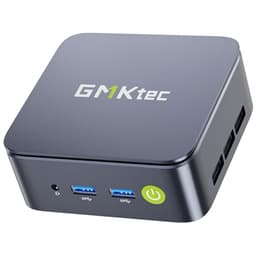
Not everyone wants to spend a weekend sourcing components, cross-referencing compatibility lists, and then troubleshooting why their new build won't POST at 11pm on a Sunday. That's a real cost, even if it doesn't show up on a receipt. Mini PCs like the GMKtec G3 PRO exist precisely for that gap in the market: people who need a capable desktop that takes up almost no space, arrives ready to go, and doesn't demand anything from them beyond plugging it in. The question is whether the GMKtec G3 PRO mini PC review UK 2026 holds up when you actually put it through its paces, or whether it's just a cheap box dressed up with a decent spec sheet.
I had this unit running on my desk for about a month. It handled daily driver duties, sat next to a monitor in a living room media setup for a week, and got pushed through some productivity workloads to see where it starts to crack. The i3-10110U is a 2019 chip, which immediately raises eyebrows, but the real story here is whether GMKtec has packaged it sensibly, priced it fairly, and built something that actually makes sense for its target audience. Spoiler: it's more nuanced than the Amazon listing suggests.
Current pricing sits at £269.96 with a ★★★★☆ (4.4) rating from 252 reviews. That's a decent sample size for a mini PC in this category, and the rating is broadly in line with what I found. Let's get into it.
Core Specifications
The G3 PRO is built around Intel's Core i3-10110U, a dual-core, four-thread Comet Lake-U part with a 15W TDP. It boosts to 4.1GHz, which is actually respectable for light workloads, and it pairs with Intel UHD 620 integrated graphics. The RAM is 16GB of DDR4 in dual channel, which matters more than most people realise for integrated graphics performance. Storage is a 512GB PCIe M.2 SSD, though GMKtec doesn't specify the exact controller or NAND type in their marketing, which is a minor frustration.
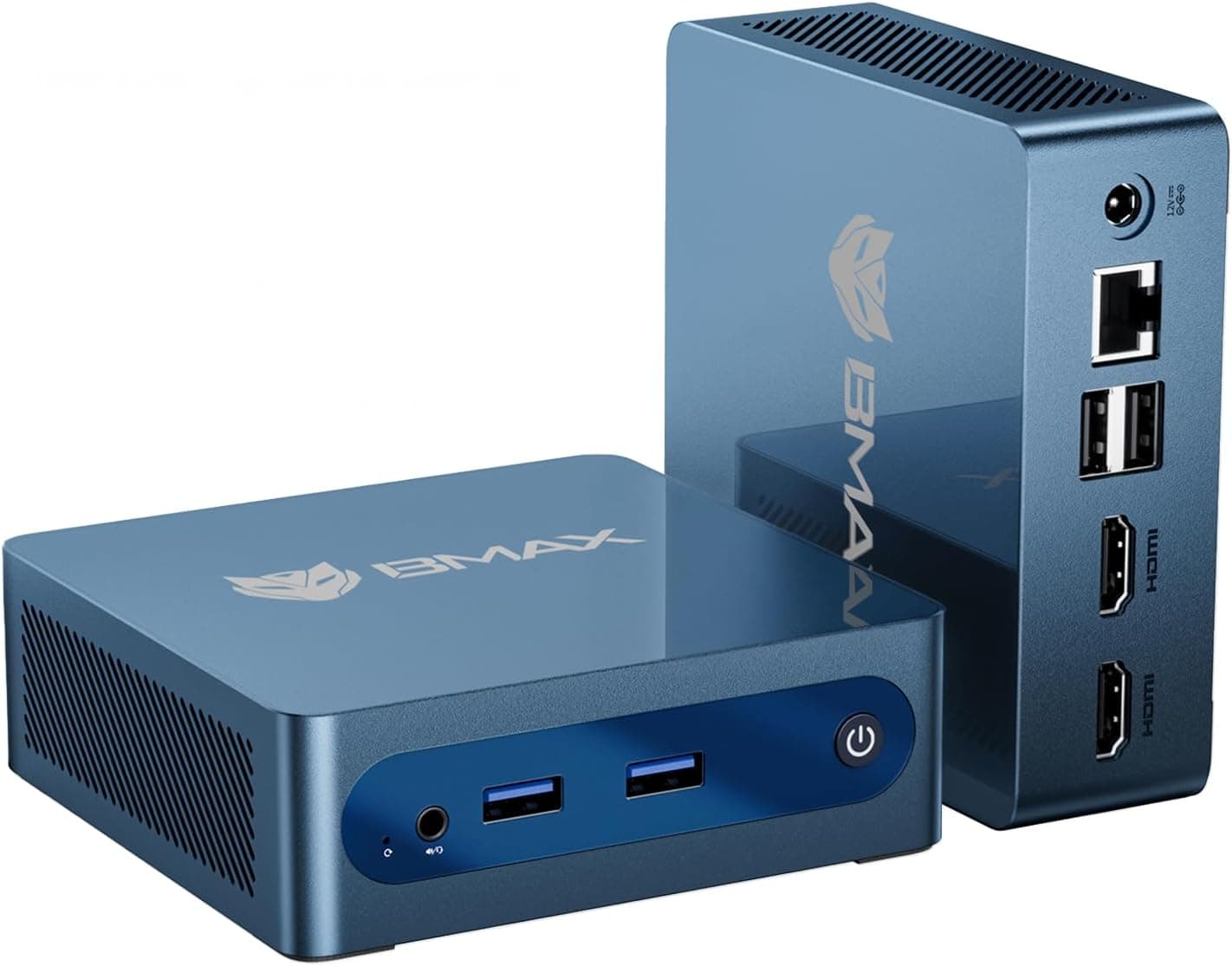
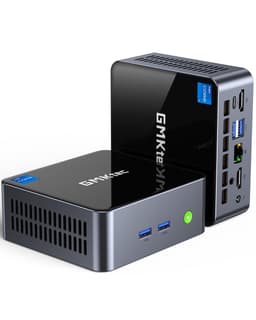
Connectivity is where this thing punches above its weight class. You get Wi-Fi 6 (802.11ax) via the Wi-Fi Alliance certified standard, Bluetooth 5.2, and a 2.5GbE ethernet port, which is genuinely unusual at this price point. Dual HDMI outputs support 4K, and there's USB 3.2 on the port selection. For a budget mini PC, that's a proper connectivity package. The unit runs Windows 11 Pro out of the box, which is worth noting because some competitors in this space ship with Home or, worse, no OS at all.
Here's the full spec breakdown:
| Component | Specification |
|---|---|
| CPU | Intel Core i3-10110U (2C/4T, up to 4.1GHz, 15W TDP) |
| GPU | Intel UHD Graphics 620 (integrated) |
| RAM | 16GB DDR4 Dual Channel (2666MHz) |
| Storage | 512GB PCIe M.2 NVMe SSD |
| Display Output | Dual HDMI (4K @ 60Hz) |
| Networking | 2.5GbE LAN, Wi-Fi 6 (802.11ax), Bluetooth 5.2 |
| USB | USB 3.2 Gen 1 x2, USB 2.0 x2, USB-C |
| Operating System | Windows 11 Pro |
| Power Supply | External 65W DC adapter (barrel connector) |
| Dimensions | Approx. 126 x 113 x 37mm |
| Weight | Approx. 0.5kg (unit only) |
| Price | £269.96 |

CPU and Performance
Right, let's address the elephant in the room. The i3-10110U is a 2019 processor. In 2026, that's a chip that's pushing seven years old, and GMKtec's marketing claim that it "beats" the Ryzen 3 4300U and Intel N150 needs some context. Against the N150, which is an efficiency-focused Alder Lake-N part with a much lower power budget, yes, the 10110U's higher boost clock and dual-channel memory configuration does give it a meaningful edge in single-threaded tasks. Against the 4300U, it's closer, and the Ryzen chip wins in multi-threaded workloads because it has four real cores versus the 10110U's two. So the marketing claim is selective, but not entirely dishonest.
In practice, for the workloads this machine is actually designed for, it performs fine. Web browsing with 15 to 20 Chrome tabs open was smooth. Microsoft Office, including Excel with moderately complex spreadsheets, ran without complaint. Video calls on Teams and Zoom worked well, and the dual-channel RAM configuration genuinely helps here because the integrated GPU can pull more bandwidth for video decode. Under a sustained Cinebench R23 multi-core loop, the score settles around 1,800 to 1,900 points after the first couple of runs, which is where you'd expect a thermally constrained 15W dual-core to land. Single-core scores were around 1,050, which is actually decent for the architecture.
Where it starts to feel its age is anything that benefits from more cores. Video editing in DaVinci Resolve is possible but slow. Compiling code, running virtual machines, or doing anything CPU-intensive for extended periods will expose the two-core limitation pretty quickly. This isn't a workstation. It's not trying to be. But if you're coming from an older Core i5 tower and expecting a step up, manage your expectations. For office work, light media consumption, and general productivity, the i3-10110U in this configuration is genuinely adequate, and the 4.1GHz boost clock means snappy single-threaded response that makes day-to-day use feel more responsive than the spec sheet might suggest.
GPU and Gaming Performance
The Intel UHD 620 is integrated graphics, full stop. If you're buying this for gaming in any meaningful sense, you're going to be disappointed. That said, it's not completely useless for light gaming, and it's worth being specific about what you can and can't do. The UHD 620 has 24 execution units and shares system memory with the CPU. With 16GB of dual-channel DDR4, it has more bandwidth to work with than a single-channel configuration, which does make a real difference to frame rates in GPU-limited scenarios.
At 1080p on low settings, older and less demanding titles are playable. Minecraft Java edition runs at 60fps with modest render distances. Older esports titles like CS:GO (now CS2, though the older engine was more forgiving) can hit 30 to 40fps on low at 720p. Stardew Valley, Terraria, and similar 2D indie games run without issue. Anything from the last three or four years that requires a discrete GPU is simply not going to work here. Don't expect to run Cyberpunk 2077, Elden Ring, or anything with modern rendering requirements. The UHD 620 doesn't have the execution units or the memory bandwidth for that.
The 4K dual HDMI output is more relevant for productivity and media than gaming. Driving a 4K display for desktop use, video playback, and document work is absolutely fine. The hardware video decode in the UHD 620 handles H.264 and H.265 content well, so 4K Netflix and YouTube stream smoothly. If you're using this as a media centre or a second display workstation, the 4K output is genuinely useful. Just don't confuse "supports 4K output" with "can game at 4K", because those are very different things, and the G3 PRO can only do one of them.
Memory and Storage
The 16GB dual-channel DDR4 configuration is one of the better decisions GMKtec made with this unit. A lot of mini PCs at this price point ship with 8GB in a single-channel arrangement, which is noticeably worse for integrated graphics performance and starts to feel cramped with modern Windows 11 overhead plus a few browser tabs. 16GB gives you genuine headroom for multitasking, and the dual-channel setup means the UHD 620 has twice the memory bandwidth available compared to a single-stick configuration. That's not a trivial difference. In GPU-limited tasks, dual-channel can improve frame rates by 20 to 30 percent on integrated graphics.
The 512GB PCIe M.2 SSD is adequate for most users, though GMKtec's spec sheet is vague about the exact drive. Sequential read speeds came in around 1,800 to 2,200 MB/s, which suggests a PCIe 3.0 x4 NVMe drive rather than a Gen 4 part. That's fine for this use case. Boot times were around 12 to 15 seconds from cold, and application launch times felt snappy. The PCIe interface makes a real difference compared to the SATA SSDs you'd find in older budget machines, and day-to-day use benefits noticeably from it.
Upgrade options are limited but not zero. The unit has a single M.2 slot occupied by the included SSD, and there's typically a second M.2 slot available on the G3 PRO's board for storage expansion, though you'll want to verify this when you open the unit as configurations can vary. RAM is soldered on some mini PCs in this class, but the G3 PRO uses SO-DIMM slots, meaning you can upgrade to 32GB if you need it. That's a meaningful advantage over competitors that solder the memory. If 512GB starts feeling tight after a year of use, adding a second M.2 drive is a straightforward option.
Cooling Solution
Mini PCs live and die by their thermal design, and this is where a lot of cheap units fall over. The G3 PRO uses an active cooling solution with a small blower fan and a copper heat pipe arrangement. It's not a sophisticated setup, but it's appropriate for a 15W TDP processor. Under sustained load, the fan does spin up audibly. It's not loud enough to be distracting in a quiet office, but you'll notice it if the room is silent. Idle noise is essentially inaudible, which is good for living room or bedroom use.
Thermal throttling is the real concern with mini PCs. Running Cinebench R23 in a loop, the chip hit around 85 to 88 degrees Celsius on the package and maintained its performance through the first three or four runs before settling at a slightly lower clock speed. It didn't throttle catastrophically, but it did back off from peak boost clocks after sustained load. In real-world use, this matters less than benchmark loops suggest. Office work and web browsing don't sustain 100 percent CPU load for minutes at a time, so thermal throttling isn't something most users will ever encounter in practice.
The chassis design helps here. The G3 PRO's vented aluminium shell acts as a passive heatsink supplement, and the unit runs warm to the touch under load but not hot. I'd recommend not blocking the vents by placing it in an enclosed cabinet or stacking things on top of it, which sounds obvious but is worth saying because mini PCs often end up in exactly those situations. Give it a centimetre or two of clearance on all sides and it'll manage its thermals without complaint. One month of daily use and it hasn't given me any thermal shutdown events or unexpected shutdowns, which is the baseline you need to clear.
Case and Build Quality
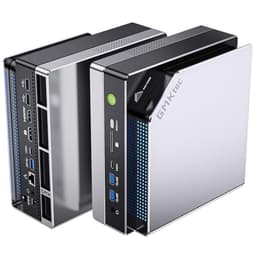
The G3 PRO's chassis is a compact aluminium and plastic construction that feels more solid than its price point suggests. The top and sides have a brushed metal finish, and the overall build quality is noticeably better than the pure-plastic mini PCs you'd find at lower price points. It's not going to feel like a premium Apple product, but it doesn't feel cheap either. The bottom has rubber feet that grip a desk surface well, and the unit doesn't slide around when you're plugging cables in, which is a small thing that some mini PCs get wrong.
Opening it up is straightforward. Four screws on the bottom panel and the internals are accessible. The layout is tidy, with the M.2 SSD and SO-DIMM slots clearly accessible. There's no cable management to speak of because there aren't really cables inside a mini PC of this type, but the board layout is sensible and nothing looks like it was crammed in as an afterthought. The thermal paste application on the CPU die looked reasonable when I checked it, which isn't always the case with budget mini PCs from Chinese manufacturers.
There's no RGB, which I personally consider a feature rather than a limitation. The unit is designed to sit on a desk or mount behind a monitor via VESA, and it does both jobs without drawing attention to itself. The VESA mount bracket is included in the box, which is a nice touch. For office deployments or living room setups where you want the computer to be invisible, the understated design is exactly right. The power brick is external, which keeps heat out of the chassis but does mean you've got another block to manage on your desk or behind your monitor.

Connectivity and Ports
This is genuinely where the G3 PRO earns its keep. The port selection is better than most competitors at this price point, and the inclusion of 2.5GbE ethernet is the standout feature. Most mini PCs in this category ship with standard gigabit ethernet. The 2.5GbE port means you can take advantage of faster network infrastructure if you have it, and for NAS users or anyone doing large file transfers over a local network, that extra bandwidth is immediately useful. It's a spec that usually appears on more expensive units.
Wi-Fi 6 support is similarly above average for the price. The 802.11ax standard brings better performance in congested wireless environments and improved efficiency compared to Wi-Fi 5. In a busy office with lots of wireless devices, or a home with multiple people streaming and working simultaneously, Wi-Fi 6 makes a practical difference. Bluetooth 5.2 handles peripherals without issue. A Bluetooth keyboard and mouse pair to it without connection problems.
The USB situation is adequate but not generous. You get two USB 3.2 Gen 1 ports (5Gbps), two USB 2.0 ports, and a USB-C port. For most users that's enough, but if you're running a lot of peripherals you'll want a hub. The dual HDMI outputs are both full-size, which is more convenient than the mini-HDMI or DisplayPort combinations you sometimes see on mini PCs. Both outputs support 4K at 60Hz, so running a dual-monitor 4K setup is genuinely possible. There's no audio jack visible on the spec sheet, so check the product listing carefully if that matters for your setup.
Pre-installed Software and OS
Windows 11 Pro comes pre-installed and activated, which is worth real money. A retail Windows 11 Pro licence costs a significant amount on its own, and getting it included in a budget mini PC is a genuine value add. The Pro tier gives you BitLocker encryption, Remote Desktop hosting, and group policy management, which matters for business users and IT deployments. Home users won't use most of those features, but it's better to have Pro and not need it than to need it and have to upgrade.
Bloatware is minimal. GMKtec includes a few of their own utilities, but nothing aggressive. There's no trial antivirus software demanding you subscribe, no browser toolbars, and no manufacturer-branded software suite that runs at startup and slows everything down. The out-of-box experience is cleaner than a lot of prebuilt desktops from larger manufacturers. It arrives with Windows 11 Pro preinstalled, so the first boot should be the standard Windows setup routine rather than anything fiddly.
Driver support is where I'd urge a bit of caution. The i3-10110U is an older chip, and Intel's driver support for 10th-gen integrated graphics is mature but no longer receiving feature updates. Everything worked correctly out of the box, including the Wi-Fi 6 adapter and the 2.5GbE NIC. But if you run into driver issues down the line, or encounter issues like Windows Update errors during setup, or problems such as DirectX errors preventing games from launching on Windows 11, GMKtec's support documentation is less comprehensive than you'd get from a major OEM. Their website has driver downloads for their products, but the support experience for a small Chinese manufacturer is going to be different from what you'd get from Dell or HP. That's a trade-off you accept at this price point.
Upgrade Potential
Mini PCs are inherently limited in upgrade potential, and the G3 PRO is no exception. The CPU is soldered to the board, so there's no processor upgrade path. That's standard for this form factor and not a criticism specific to GMKtec. The integrated GPU is part of the CPU package, so there's no discrete GPU option either. What you can upgrade is storage and RAM, and both are accessible without too much difficulty.
The SO-DIMM slots support up to 32GB of DDR4, so if you buy this with 16GB and find yourself needing more headroom for virtual machines or heavy multitasking, you can upgrade. DDR4 SO-DIMMs are reasonably priced and widely available. Storage expansion via the second M.2 slot (if present on your specific unit) is straightforward. You can add a larger or faster NVMe drive without replacing the existing one, which is useful if you want to keep the system drive and add a bulk storage drive.
The external power brick is a 65W DC adapter with a barrel connector. It's not a standard ATX PSU, so there's no GPU upgrade path even if you wanted one. This is a sealed ecosystem in terms of core performance. What you're buying is the i3-10110U and UHD 620 for the life of the machine. If your needs grow beyond what that can offer, you'll be replacing the unit rather than upgrading it. For the target use case, that's fine. Office machines don't need to be upgraded every year. But go in with clear eyes about the ceiling.
How It Compares
The budget mini PC market has got genuinely competitive over the last couple of years. The main alternatives to the G3 PRO at a similar price point are the Beelink EQ12, which uses an Intel N100 or N150 chip, and the Minisforum UM350, which runs an AMD Ryzen 5 3550H. Both are worth considering depending on your priorities, and the comparison isn't as straightforward as GMKtec's marketing implies.
The Beelink EQ12 with an N100 or N150 is a more modern chip on a newer manufacturing process, which means better power efficiency and lower heat output. It's quieter and runs cooler. But the N-series chips are efficiency cores only, with lower single-threaded performance than the i3-10110U's higher boost clock. For tasks that care about single-threaded speed, the G3 PRO has an edge. For sustained multi-threaded workloads, the newer N-series chips can actually keep up better because they don't throttle as aggressively. The Minisforum UM350 with a Ryzen 5 3550H is a more capable machine overall, with four real cores and Vega 8 graphics that meaningfully outperform the UHD 620, but it typically costs more and runs hotter.
The 2.5GbE ethernet and Wi-Fi 6 combination on the G3 PRO is a genuine differentiator. Most competitors at this price point ship with gigabit ethernet and Wi-Fi 5. If networking matters to you, that's a real advantage. The Windows 11 Pro inclusion also adds value that doesn't always show up in direct price comparisons. Factor in the cost of a Pro licence and the G3 PRO's value proposition improves noticeably.
| Feature | GMKtec G3 PRO | Beelink EQ12 (N150) | Minisforum UM350 |
|---|---|---|---|
| CPU | Intel i3-10110U (2C/4T, 4.1GHz) | Intel N150 (4C/4T, 3.6GHz) | AMD Ryzen 5 3550H (4C/8T, 3.7GHz) |
| GPU | Intel UHD 620 | Intel UHD Graphics (Alder Lake-N) | AMD Radeon Vega 8 |
| RAM | 16GB DDR4 Dual Channel | 8GB or 16GB DDR4 | 16GB DDR4 Dual Channel |
| Storage | 512GB PCIe NVMe | 256GB or 512GB NVMe | 512GB NVMe |
| Ethernet | 2.5GbE | 1GbE | 1GbE |
| Wi-Fi | Wi-Fi 6 (802.11ax) | Wi-Fi 5 or 6 (varies) | Wi-Fi 5 |
| OS | Windows 11 Pro | Windows 11 Pro | Windows 11 Pro |
| Price Tier | Budget | Budget | Budget-Mid |
| Light Gaming | Marginal | Marginal | Better (Vega 8) |
| Thermal Noise | Audible under load | Near-silent | Audible under load |

Final Verdict
The GMKtec G3 PRO is a competitively priced mini PC that makes some smart choices and a few compromises you need to know about before buying. The smart choices: 16GB dual-channel RAM, 2.5GbE ethernet, Wi-Fi 6, Windows 11 Pro, and a build quality that's better than the price suggests. The compromises: a 2019 dual-core CPU with a hard ceiling on multi-threaded performance, integrated graphics that rule out any serious gaming, and a support ecosystem that's thinner than you'd get from a major OEM.
For the target audience, which is home office workers, small business deployments, students, and anyone who needs a capable secondary desktop without spending a lot of money or taking up much space, it delivers. The i3-10110U handles everyday productivity tasks without complaint, the connectivity package is genuinely above average for the price tier, and the compact form factor means it fits anywhere. On paper there's nothing here that worries me, and GMKtec backs it with a limited warranty. That matters.
Where it falls short is if you're expecting it to do more than its spec sheet allows. Two cores in 2026 is a limitation. No discrete GPU means no gaming beyond very light titles. And the older architecture means you're not getting the efficiency improvements of newer chips, so it runs warmer and louder than an N-series equivalent under load. If those trade-offs work for your use case, the G3 PRO is fair value. If you need more cores or better graphics, look at the Minisforum UM350 or save up for something with a more modern processor.
My editorial score for the GMKtec G3 PRO is 7 out of 10. It does what it says, it's priced fairly for what you get, and the connectivity package is a genuine differentiator. But the aging CPU and integrated-only graphics mean it's a tool with a specific job, not a flexible platform. Buy it knowing exactly what it is and you won't be disappointed.
What works. What doesn’t.
5 + 4What we liked5 reasons
- 2.5GbE ethernet is rare at this price point
- 16GB dual-channel DDR4 included as standard
- Wi-Fi 6 and Bluetooth 5.2 above average for budget tier
- Windows 11 Pro included and activated
- Compact build quality better than expected
Where it falls4 reasons
- i3-10110U is a 2019 dual-core chip with a hard performance ceiling
- Intel UHD 620 rules out any meaningful gaming
- Fan audible under sustained load
- GMKtec support documentation is thin compared to major OEMs
Full specifications
9 attributes| Case size | mini-ITX |
|---|---|
| CPU | Intel Core i3-10110U |
| GPU | integrated |
| Launch year | 2024 |
| OS | Windows 11 Pro |
| PSU wattage W | 65 |
| RAM GB | 16 |
| Storage GB | 512 |
| Storage type | PCIe M.2 SSD |
If this isn’t right for you
2 options 8.0 / 10
BOSGAME E5 Mini PC Windows 11 Pro, Ryzen 5300U (Beats 4300U, Up to 3.8GHz), 16GB DDR4 RAM 512GB SSD Mini Desktop PC, Triple 4K Display, Dual 2.5G LAN, WiFi 5, BT5.0, Mini Computer for Home, Office
£299.00 · BOSGAME
 8.0 / 10
BOSGAME P4 Plus Mini PC Ryzen 7 7730U (Upgraded 5825U), 8C/16T, up to 4.5GHz, 16GB DDR4 1TB PCIe 4.0 SSD, Triple Display Desktop PC, WiFi 6E, BT5.2, Type-C
£341.05 · BOSGAME
Frequently asked
5 questions01Is the GMKtec Mini PC G3 PRO good for gaming?+
Not really, no. The Intel UHD 620 integrated graphics has 24 execution units and shares system memory with the CPU. With 16GB of dual-channel DDR4 it performs better than a single-channel setup, but you're still looking at very limited gaming capability. Older 2D titles like Stardew Valley and Terraria run fine. Minecraft Java runs at 60fps with modest settings. Older esports titles at 720p on low settings are borderline playable. Anything from the last three or four years that requires a discrete GPU is not going to work. This is not a gaming machine. If light retro gaming or very old titles are acceptable, it'll manage. For anything modern, look at a unit with at least AMD Radeon Vega 8 graphics or a discrete GPU.
02Can I upgrade the GMKtec G3 PRO mini PC?+
Partially. The CPU is soldered to the motherboard, so there's no processor upgrade path. The integrated GPU is part of the CPU package, so no discrete graphics option exists. What you can upgrade is RAM and storage. The G3 PRO uses SO-DIMM slots rather than soldered RAM, so you can upgrade from 16GB to 32GB DDR4 if needed. There's typically a second M.2 slot available for additional storage alongside the included 512GB drive. The external 65W DC power adapter is a proprietary barrel connector, not a standard ATX PSU, so there's no route to adding a discrete GPU even if you wanted one. Think of it as a fixed-performance platform where storage and RAM are the only meaningful upgrade levers.
03Is the GMKtec G3 PRO worth it vs building my own PC?+
For the target use case, yes. You cannot build a mini PC yourself in any practical sense since the form factor requires custom boards and integrated components. Comparing it to a budget tower build is more relevant. A DIY tower with equivalent productivity performance would cost more once you factor in a case, PSU, motherboard, CPU, RAM, SSD, and Windows 11 Pro licence separately. The G3 PRO bundles all of that at a budget price point with 2.5GbE and Wi-Fi 6 included. The trade-off is the older dual-core CPU and no discrete GPU option. If you need more performance, a DIY build with a modern Ryzen 5 or Core i5 will outperform it, but you'll spend more and need a larger footprint. For pure office and productivity use in a compact form factor, the prebuilt convenience makes sense here.
04What power supply does the GMKtec G3 PRO use?+
The G3 PRO uses an external 65W DC power adapter with a barrel connector, not an internal ATX PSU. This is standard for mini PCs of this type and keeps heat and noise out of the chassis. The external brick is compact and similar in size to a laptop charger. Because it's a proprietary DC adapter rather than a standard ATX PSU, there is no upgrade path to add a discrete GPU or other high-power components. The 65W rating is appropriate for the i3-10110U's 15W TDP with headroom for peripherals and storage. Replacement adapters are available if the original is lost or damaged, but make sure to match the voltage and connector type exactly.
05What warranty and returns apply to the GMKtec G3 PRO?+
Amazon offers 30-day hassle-free returns. GMKtec typically provides a 1-3 year warranty covering parts and labour. Check the product listing for exact warranty terms for this specific model.