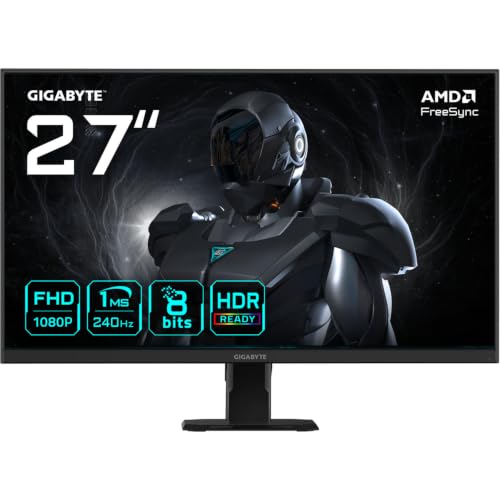
Budget 240Hz monitors are a bit of a minefield, honestly. You'll find panels with backlight bleed in the corners, pixel response that looks nothing like the "1ms" sticker on the box, and HDR badges that are basically decorative. So when a monitor like the Gigabyte GS27F2 lands in the budget bracket at under £150, the question isn't "is it perfect?" It's "is it good enough for what it actually needs to do?" And for a competitive gaming monitor aimed at 1080p players who want a smooth, fast experience without remortgaging, that's a fair question worth answering properly.
The short answer is: yes, mostly. The GS27F2 is a solid pick for anyone upgrading from a 60Hz or 144Hz panel who plays fast-paced games, wants 240Hz on a tight budget, and isn't going to lose sleep over the HDR badge being more aspirational than functional. It's not without compromises, and we'll get into those. But the core proposition, a 240Hz IPS panel with FreeSync and DisplayPort 1.4 for under £150, is genuinely hard to argue with at this price point. Sixty owners have rated it positively, which for a budget monitor is a decent signal that it's not quietly terrible.
So here's the full picture, spec by spec, with a look at what real owners are saying and how it stacks up against the obvious alternatives.
Core Specifications
The GS27F2 is a 27-inch Full HD monitor running at 1920x1080. That resolution at that screen size gives you a pixel density of around 81 PPI, which is noticeably lower than a 1440p panel at the same size (around 109 PPI). If you're coming from a smaller 24-inch 1080p screen, the jump to 27 inches at the same resolution will look a bit softer. That's just physics, not a fault with this particular monitor. The trade-off is that your GPU has a much easier time hitting 240Hz at 1080p than it would at 1440p, which is the whole point of this kind of display for competitive gaming.
The panel is IPS, which is the right call for a gaming monitor in this category. You get decent viewing angles, better colour than TN, and good enough response for fast gaming. The rated response time is 1ms, which Gigabyte lists as MPRT (Moving Picture Response Time) rather than GtG (Grey-to-Grey). We'll dig into what that actually means in the response time section, because it matters. Peak brightness is rated at 300 cd/m², which is adequate for indoor use but not a standout figure. The monitor carries an HDR Ready badge, which we'll also address honestly in its own section.
Connectivity is straightforward: one HDMI 2.0 port and one DisplayPort 1.4. HDMI 2.0 can handle 1080p at 240Hz, so console users on a PS5 or Xbox Series X are covered, though those consoles top out at 120Hz anyway. DisplayPort 1.4 is the right connector for a PC at 240Hz and gives you the headroom for proper high-refresh gaming without bandwidth bottlenecks. There's no USB hub, no USB-C, and no built-in speakers. At this price point, that's expected rather than disappointing.
| Specification | Detail |
|---|---|
| Screen Size | 27 inches |
| Resolution | 1920 x 1080 (FHD) |
| Panel Type | IPS |
| Refresh Rate | 240Hz |
| Response Time | 1ms (MPRT) |
| Peak Brightness | 300 cd/m² |
| Adaptive Sync | AMD FreeSync |
| HDR | HDR Ready |
| HDMI | 1x HDMI 2.0 |
| DisplayPort | 1x DisplayPort 1.4 |
| VESA Mount | 100x100mm |
| Current Price | £119.00 · Details |
Panel Technology
The GS27F2 uses an IPS panel, and that's genuinely good news for a monitor in this bracket. The alternative at this price is often a TN panel, which gives you faster pixel transitions on paper but at the cost of genuinely terrible viewing angles and washed-out colours. TN panels look fine if you're sitting dead-centre, but shift slightly in your chair and you'll notice the colour shift immediately. IPS doesn't have that problem. You get consistent colour across a wide viewing angle, which matters even if you're the only one looking at the screen, because your eyes naturally move around the display.
IPS does have its own characteristic quirk though: IPS glow. This is the slightly milky, bright haze you see in the corners of the screen when displaying dark content in a dim room. It's a property of how IPS panels work rather than a manufacturing defect, and it's present to some degree on virtually every IPS monitor. Owner feedback on the GS27F2 is broadly positive, with most reporting the glow is manageable and not intrusive during actual gaming. A small number of owners mention some backlight bleed, which is typical panel lottery territory. Some units are better than others, and at this price point you're not getting binned panels with guaranteed uniformity.
Native contrast on IPS panels typically sits around 1000:1, and the GS27F2 is in that range. That's fine for gaming and everyday use, but it's noticeably lower than VA panels, which can hit 3000:1 or higher. If you're playing a lot of dark atmospheric games, films with lots of night scenes, or you game in a darkened room, the IPS contrast limitations will be more apparent. Blacks look dark grey rather than truly black when the panel is backlit. For competitive gaming in a normally lit room, it's a non-issue. For cinematic single-player games in the dark, it's a genuine trade-off you should know about before buying.
Display Quality
At 27 inches and 1080p, the pixel density lands at roughly 81 PPI. To put that in context, a 24-inch 1080p monitor sits at around 92 PPI, and a 27-inch 1440p display hits around 109 PPI. So yes, if you sit close to the screen (say, 50 to 60cm), you may notice individual pixels on fine text or detailed textures. For gaming, where you're typically sat a bit further back and motion is constant, it's much less of an issue. But for productivity work, web browsing, or anything with lots of small text, the softness is real. Owners who use this primarily for gaming are happy. Those who also use it for work mention the pixel density as a mild frustration.
The anti-glare coating is a matte finish, which is the sensible choice for a gaming monitor. Glossy screens look vivid in controlled lighting but become mirrors the moment there's a window behind you. The matte coating on the GS27F2 handles ambient light well, and owners in normally lit rooms report no significant glare issues. The coating does add a very slight grain to the image, which is standard for matte IPS panels and something you stop noticing after about ten minutes.
Brightness uniformity across the panel is something the spec sheet doesn't tell you much about, and it varies between units. The 300 cd/m² peak brightness is adequate for indoor use, and in practice most owners run IPS monitors at 60 to 80 percent brightness anyway, which brings the actual operating level well below peak. At typical indoor brightness settings, the panel looks even and consistent according to owner feedback. The 300 cd/m² figure also means this isn't a monitor you'd want to use in direct sunlight or a very bright conservatory, but for a standard desk setup it's perfectly fine.
Refresh Rate and Adaptive Sync
240Hz is the headline, and it's the main reason you'd pick this monitor over the sea of 144Hz options in the same price bracket. The difference between 60Hz and 144Hz is genuinely transformative. The difference between 144Hz and 240Hz is more subtle, but it's real, particularly in competitive shooters where tracking moving targets feels smoother and input lag is reduced. If you're playing Counter-Strike 2, Valorant, Apex Legends, or any other fast-paced multiplayer game, 240Hz gives you a meaningful edge over players on 144Hz panels, assuming your GPU can actually push the frame rates to match.
The GS27F2 supports AMD FreeSync, which is the adaptive sync technology that eliminates screen tearing by syncing the monitor's refresh rate to your GPU's output. FreeSync is free to implement (unlike Nvidia's G-Sync, which requires a hardware module), which is partly why this monitor can hit its price point. The FreeSync range on the GS27F2 covers 48Hz to 240Hz, which is a solid range. The Low Framerate Compensation (LFC) feature kicks in when your frame rate drops below the minimum sync threshold, effectively doubling or tripling the frame to maintain tear-free output. So even if your GPU dips below 48fps in a demanding scene, you shouldn't see tearing.
It's also that FreeSync monitors are often compatible with Nvidia's G-Sync Compatible mode. Nvidia certifies some FreeSync monitors officially, but even uncertified ones frequently work with VRR enabled in the Nvidia control panel. The GS27F2 isn't listed as G-Sync Compatible certified at the time of writing, but Nvidia GPU owners have reported it working with variable refresh rate enabled. Your mileage may vary, and Nvidia can't guarantee the experience, but it's worth trying if you're on a green GPU. AMD users are fully sorted with native FreeSync support.
Response Time and Motion
Right, this is where we need to be straight with you about that "1ms" claim. Gigabyte rates the GS27F2 at 1ms, but this is the MPRT figure, not GtG. These are two different measurements and they're not interchangeable, even though manufacturers love to use whichever number sounds better. MPRT (Moving Picture Response Time) measures how long a pixel appears to be "on" during a motion sequence, and it's typically achieved by using backlight strobing (also called black frame insertion). GtG (Grey-to-Grey) measures the actual time it takes for a pixel to transition between two grey values, which is a more direct measure of how fast the panel responds.
IPS panels at this price point typically measure around 4ms to 6ms GtG in practice, which is perfectly fine for 240Hz gaming. The concern with overshoot (also called inverse ghosting or pixel overshoot) is more relevant here. Some monitors push their overdrive settings too aggressively to hit impressive-looking response numbers, and the result is bright halos or coronas trailing behind fast-moving objects. Owner feedback on the GS27F2 suggests the overdrive implementation is sensible rather than aggressive, with no significant complaints about coronas or halos in normal gaming. That's a good sign. A monitor with a measured 5ms GtG and no overshoot is more pleasant to use than one claiming 1ms with visible halos everywhere.
In practice, at 240Hz the frame interval is just 4.17ms, so the panel needs to transition reasonably quickly to avoid smearing. The IPS panel in the GS27F2 appears to handle this well based on what owners report. Fast-paced shooters feel responsive, and there's no widespread complaint about motion blur or smearing that would suggest the panel is struggling to keep up. If you want to use the MPRT mode (backlight strobing), it does reduce motion blur further, but it also reduces brightness and can introduce some flicker sensitivity issues for people prone to that. Most owners stick with the standard mode and are happy with the result.
Color Accuracy and Gamut
The GS27F2 is an IPS panel, so you'd expect reasonable colour coverage out of the box. Gigabyte doesn't publish specific sRGB or DCI-P3 coverage figures for this model in the way that premium monitors do, which is typical for budget gaming displays. IPS panels at this tier generally cover around 95 to 99 percent of the sRGB colour space, which is more than adequate for gaming and general use. DCI-P3 coverage is typically lower, around 70 to 80 percent for standard IPS panels without wide-gamut backlighting, so this isn't a monitor you'd choose for professional photo or video work.
Factory calibration on budget monitors is rarely impressive. You shouldn't expect a Delta-E below 2 out of the box (Delta-E is the measure of colour accuracy, where lower is better and below 2 is considered good for most uses). Most budget IPS monitors ship with a Delta-E somewhere between 3 and 6, which means colours are close but not precise. For gaming, this is irrelevant. For content creation where accurate colour reproduction matters, it's a limitation. Owner feedback doesn't flag any dramatic colour issues, with most describing the image as vivid and pleasing rather than clinically accurate. A few mention that the default colour temperature runs slightly warm, which is common and easily adjusted in the OSD.
The on-screen display (OSD) gives you the usual controls: brightness, contrast, colour temperature presets, and a few picture mode options including a gaming mode. There's no factory calibration report included, which again is standard at this price. If you want to get the best out of the panel, spending ten minutes in the OSD to dial in brightness and colour temperature to your preference is worthwhile. You don't need a colorimeter for that. Just set brightness to a comfortable level for your room, pick the colour temperature that looks neutral to you, and you're done. The panel will look good. It won't look like a professional reference display, but that's not what it's for.

HDR Performance
The "HDR Ready" badge on the GS27F2 needs some honest context. HDR on a monitor is only meaningful if the hardware can actually deliver the contrast and brightness that HDR content requires. The VESA DisplayHDR certification tiers start at DisplayHDR 400, which requires a peak brightness of 400 cd/m² and some basic HDR metadata support. The GS27F2 is rated at 300 cd/m² peak brightness and carries an "HDR Ready" label rather than a specific DisplayHDR tier certification. That tells you quite a lot.
In practice, "HDR Ready" on a monitor at this price point means it can accept an HDR signal and process the HDR metadata, but the panel doesn't have the brightness headroom or local dimming capability to actually render HDR content in a meaningful way. True HDR requires peak highlights well above 600 cd/m² and ideally some form of local dimming to control the backlight zone by zone. The GS27F2 has neither. What you get is tone-mapped HDR, where the monitor takes the HDR signal and maps it to the panel's SDR capabilities. The result often looks similar to or slightly worse than a well-calibrated SDR image.
This isn't unique to the GS27F2, and it's not really Gigabyte's fault. It's a budget monitor. Proper HDR at this screen size requires technology that costs significantly more. The honest advice is to leave HDR mode off in Windows and your games, run the monitor in SDR, and enjoy a clean, well-calibrated image. Enabling HDR in Windows on a monitor like this often makes the image look washed out rather than better. Plenty of owners have figured this out and are happy running it in SDR. The HDR badge is essentially marketing for this tier of monitor. Useful to know, not a dealbreaker.
Contrast and Brightness
The 300 cd/m² peak brightness is the rated figure, and in practice IPS panels often measure slightly above or below their rated brightness depending on the specific unit. For a room with standard indoor lighting, 300 cd/m² is comfortable. You'd typically run the monitor at 60 to 70 percent brightness in a normal office or bedroom setup, which brings the actual output to around 180 to 210 cd/m². That's plenty for most environments. Where it falls short is in very bright rooms with a lot of natural light, where a higher brightness rating (400 cd/m² or above) would give you more headroom to push the backlight and maintain image visibility.
Native contrast on IPS panels is typically around 1000:1, and the GS27F2 sits in that range. This is one of the fundamental limitations of IPS technology compared to VA. A VA panel at the same price can deliver 3000:1 or even higher native contrast, which makes blacks look genuinely dark rather than dark grey. The trade-off is that VA panels have slower pixel response times, which makes them less suitable for 240Hz competitive gaming. So for this use case, IPS is the right choice, and the contrast limitation is an acceptable trade-off. Just don't expect cinema-quality blacks.
Brightness uniformity across the panel is generally reported as good by owners, with no widespread complaints about obvious hot spots or dark patches. Some variation across the panel is normal and expected at this price point, but it doesn't appear to be a significant issue based on the feedback pattern. The matte anti-glare coating helps in real-world conditions by diffusing reflections rather than concentrating them, which makes the perceived contrast in a normally lit room feel better than the native contrast ratio might suggest on paper.
Ergonomics and Stand
The stand on the GS27F2 is functional rather than impressive. You get tilt adjustment, which lets you angle the screen forward and back to find a comfortable viewing angle. What you don't get is height adjustment, swivel, or pivot. For a budget monitor, tilt-only stands are common, but it's because monitor ergonomics genuinely affect comfort over a long session. If the screen is too low or too high for your desk and chair setup, you'll be craning your neck, and that gets old fast. The fix is a VESA monitor arm, which brings us to the good news.
The GS27F2 does support VESA 100x100mm mounting, which means you can remove the stand and attach a third-party monitor arm. A decent monitor arm costs around £20 to £40 and gives you full height, tilt, swivel, and even pivot adjustment. If you're serious about your desk setup and ergonomics, budget for an arm alongside this monitor. The stand itself is stable enough that it won't wobble annoyingly during gaming, and the footprint is reasonable for a 27-inch display. Owners don't flag any issues with stability or wobble, which is reassuring.
The overall build quality is what you'd expect from a budget Gigabyte monitor. The bezel is slim on three sides, which looks clean and modern. The rear has a simple design without RGB lighting, which some people will appreciate and others will find boring. The OSD buttons are physical buttons on the rear of the monitor, which is less convenient than a joystick control but functional once you know where they are. Cable management is basic, with no dedicated routing channel. The monitor feels solid enough for everyday use, and owners don't report any build quality failures or material concerns. It's not premium, but it's not cheap-feeling either.
Connectivity and Ports
The port selection on the GS27F2 is minimal but covers the essentials for a gaming monitor at this price. You get one HDMI 2.0 port and one DisplayPort 1.4 port. That's it. No USB hub, no USB-C, no audio passthrough, no headphone jack. For a dedicated gaming monitor where you're plugging in a PC or a single console, this is fine. If you want to switch between a PC and a console regularly, you've got one port for each, which is actually quite convenient.
- 1x HDMI 2.0 - Supports 1080p at 240Hz, suitable for consoles and PCs
- 1x DisplayPort 1.4 - Full bandwidth for 1080p at 240Hz from a PC, recommended for PC gaming
- No USB hub - No USB-A ports for peripherals
- No USB-C - Not relevant at this price point, but
- No built-in speakers - You'll need external speakers or headphones
- 3.5mm headphone jack - Audio out is present for headphone connection
The DisplayPort 1.4 connection is the one you want for PC gaming at 240Hz. DisplayPort 1.4 has a maximum bandwidth of 32.4 Gbps, which is more than enough for 1080p at 240Hz without any compression. HDMI 2.0 can also handle 1080p at 240Hz, so if your graphics card only has HDMI outputs (some budget cards do), you're still covered. The absence of HDMI 2.1 isn't a problem at 1080p, since HDMI 2.0 handles the resolution and refresh rate combination without issue. HDMI 2.1 would only matter if you were running higher resolutions or refresh rates.
The lack of a USB hub is a minor inconvenience if you're used to plugging your keyboard, mouse, or headset into your monitor. At this price point it's expected, and most people have enough USB ports on their PC to manage without a monitor hub. The 3.5mm headphone jack is a nice inclusion since there are no built-in speakers, giving you a direct audio output from the monitor if you want to use it. Overall the connectivity is lean but practical for the target use case.
How It Compares
The two most obvious competitors in this space are the AOC 27G2ZN and the LG 27GN650-B. The AOC 27G2ZN is another budget 27-inch 240Hz IPS monitor that's been around a bit longer and has a larger pool of owner reviews to draw from. The LG 27GN650-B is a 144Hz IPS panel from LG, which sits in the same price bracket but sacrifices the 240Hz refresh rate for LG's slightly better colour tuning reputation. Both are depending on what matters most to you.
The AOC 27G2ZN is probably the GS27F2's most direct rival. Both are 27-inch 240Hz IPS panels in the budget bracket, both have FreeSync, and both have similar connectivity. The AOC has a longer track record and more owner reviews, which gives you a better picture of long-term reliability. The GS27F2 is the newer product, which means it benefits from Gigabyte's more recent panel sourcing and may have minor improvements in overdrive tuning. Honestly, at this price tier the differences between these two are marginal. Whichever is cheaper on the day you buy is probably the right call.
The LG 27GN650-B is a different proposition. It's 144Hz rather than 240Hz, but LG's IPS panels have a strong reputation for colour accuracy and factory calibration. If you're a casual gamer who also does creative work or just wants a really nice-looking display for everyday use, the LG might serve you better. But if 240Hz for competitive gaming is the priority, the GS27F2 wins on the headline spec. You're not going to go back to 144Hz once you've used 240Hz in a fast shooter.
| Feature | Gigabyte GS27F2 | AOC 27G2ZN | LG 27GN650-B |
|---|---|---|---|
| Screen Size | 27 inch | 27 inch | 27 inch |
| Resolution | 1920x1080 | 1920x1080 | 1920x1080 |
| Panel Type | IPS | IPS | IPS |
| Refresh Rate | 240Hz | 240Hz | 144Hz |
| Adaptive Sync | FreeSync | FreeSync | FreeSync / G-Sync Compatible |
| Peak Brightness | 300 cd/m² | 300 cd/m² | 300 cd/m² |
| HDR | HDR Ready | HDR Ready | HDR10 |
| VESA Mount | 100x100mm | 100x100mm | 100x100mm |
| Price | £119.00 · Details | Budget bracket | Budget bracket |
Final Verdict
The Gigabyte GS27F2 is a good budget 240Hz gaming monitor. Not a great one, not a perfect one, but a genuinely solid pick for what it is and what it costs. The IPS panel delivers decent colours and wide viewing angles, the 240Hz refresh rate is the real deal for competitive gaming, FreeSync works properly, and the owner feedback at ★★★★½ (4.5) from dozens of reviews suggests this isn't a monitor that's quietly falling apart six months in. The HDR badge is essentially meaningless in practice, the stand is tilt-only, and the 1080p resolution at 27 inches is softer than you'd get on a 1440p panel. But none of those things are surprising or unique to this monitor at this price.
Who should buy this? If you're a competitive gamer on an AMD GPU (or willing to try FreeSync on Nvidia), upgrading from a 60Hz or 144Hz panel, and you want the smoothest possible experience in fast-paced multiplayer games without spending a lot of money, this is a strong choice. It's also a reasonable option as a second monitor for a dual-screen setup where you want high refresh rate gaming on the primary screen. The VESA mount support means you can pair it with a cheap monitor arm and get a properly ergonomic setup without spending extra on a premium stand.
Who should skip it? If you sit close to a 27-inch screen and pixel density matters to you, consider a 24-inch 1080p 240Hz monitor instead, where the PPI is higher and the image looks sharper. If you play a lot of dark atmospheric games and care about deep blacks, a VA panel at 144Hz will serve you better than this IPS at 240Hz. And if your GPU can comfortably push 1440p at high frame rates, spending a bit more on a 1440p 165Hz or 240Hz IPS panel is a smarter long-term investment. A 27-inch 1440p 165Hz IPS monitor in the mid-range bracket will give you noticeably better image quality and is worth the extra spend if your PC can handle it.
At this price point in the budget bracket, the GS27F2 earns a solid 7.5 out of 10. It does exactly what it promises for competitive gaming, doesn't embarrass itself on image quality, and the 240Hz IPS combination at this price is genuinely hard to beat. Just go in with realistic expectations about the HDR, the stand, and the pixel density, and you'll be happy with it.
What works. What doesn’t.
5 + 4What we liked5 reasons
- Genuine 240Hz IPS panel at a budget price point
- FreeSync with 48 to 240Hz range and LFC support
- Good owner satisfaction with a positive overall rating from dozens of reviews
- VESA 100x100mm mount for monitor arm compatibility
- DisplayPort 1.4 and HDMI 2.0 cover PC and console use
Where it falls4 reasons
- 1080p at 27 inches gives a soft 81 PPI - noticeable up close
- HDR Ready badge is effectively meaningless at 300 cd/m²
- Tilt-only stand with no height or swivel adjustment
- No USB hub or built-in speakers
Full specifications
11 attributes| Panel type | IPS |
|---|---|
| Aspect ratio | 16:9 |
| Curvature | flat |
| HDR | none |
| Launch year | 2026 |
| Ports | 2x HDMI 2.0, 1x DisplayPort 1.4 |
| Refresh rate HZ | 240 |
| Resolution | 1920x1080 |
| Response time MS | 1 |
| Screen size IN | 27 |
| Vesa compatible | true |
If this isn’t right for you
2 options

Frequently asked
5 questions01Is the Gigabyte GS27F2 27" FHD Gaming Monitor - 1920 x 1080, 240Hz, 1ms, 300 cd/m², FreeSync, HDR Ready, HDMI 2.0, Displayport 1.4 good for gaming?+
Yes, it's a strong choice for competitive gaming. The 240Hz refresh rate delivers noticeably smoother motion than 144Hz panels in fast-paced multiplayer games, and the FreeSync adaptive sync (48 to 240Hz range) eliminates screen tearing. The IPS panel has good viewing angles and decent colour for a budget display. The 1ms MPRT response time is a marketing figure - real GtG is closer to 4 to 6ms, which is fine for 240Hz gaming. Owner feedback is positive for gaming performance with no widespread reports of problematic ghosting or overshoot.
02Does the Gigabyte GS27F2 27" FHD Gaming Monitor - 1920 x 1080, 240Hz, 1ms, 300 cd/m², FreeSync, HDR Ready, HDMI 2.0, Displayport 1.4 have good HDR?+
No, not in any meaningful sense. The HDR Ready label means it can accept an HDR signal, but with a 300 cd/m² peak brightness and no local dimming, it cannot render HDR content properly. True HDR requires at least 400 cd/m² (DisplayHDR 400 certified) and ideally 600 cd/m² or higher. The recommendation is to keep HDR disabled in Windows and your games, run the monitor in SDR, and enjoy a clean image. Enabling HDR on this type of monitor typically makes the picture look washed out rather than better.
03Is the Gigabyte GS27F2 27" FHD Gaming Monitor - 1920 x 1080, 240Hz, 1ms, 300 cd/m², FreeSync, HDR Ready, HDMI 2.0, Displayport 1.4 good for content creation?+
Not ideally. The GS27F2 is designed for gaming rather than content creation. Gigabyte doesn't publish specific sRGB coverage figures, but standard IPS panels at this tier typically cover around 95 to 99 percent sRGB with limited DCI-P3 coverage. Factory calibration is unlikely to deliver Delta-E below 3, and there's no calibration report included. For casual photo editing or general creative work it's usable, but if accurate colour reproduction is important for your workflow, a monitor with published colour specs and a factory calibration certificate would be a better choice.
04What graphics card do I need for the Gigabyte GS27F2 27" FHD Gaming Monitor - 1920 x 1080, 240Hz, 1ms, 300 cd/m², FreeSync, HDR Ready, HDMI 2.0, Displayport 1.4?+
To get the most from 240Hz at 1080p, you need a GPU capable of pushing consistently high frame rates in your games. For competitive titles like CS2, Valorant, or Apex Legends, a mid-range card like an AMD RX 6600 or Nvidia RTX 3060 can comfortably sustain 240fps at 1080p on medium to high settings. For more demanding titles, you may not always hit 240fps, but FreeSync will keep the experience tear-free at whatever frame rate you achieve. The monitor connects via DisplayPort 1.4 (recommended) or HDMI 2.0, both of which support 1080p at 240Hz.
05What warranty and returns apply to the Gigabyte GS27F2 27" FHD Gaming Monitor - 1920 x 1080, 240Hz, 1ms, 300 cd/m², FreeSync, HDR Ready, HDMI 2.0, Displayport 1.4?+
Specific warranty terms for this model are not confirmed in the verified product listing data. When purchasing through Amazon UK, you're covered by Amazon's standard 30-day return policy and the Amazon A-to-Z Guarantee. For manufacturer warranty details, check the Gigabyte support pages directly or contact the seller at the point of purchase. Gigabyte typically offers a three-year warranty on monitors in some regions, but confirm this with the retailer before buying.