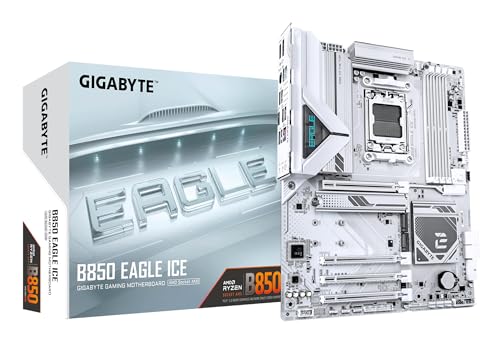
The motherboard is the one component most people underspec and then wonder why their expensive CPU never hits its rated boost clocks. I've seen it dozens of times: someone drops £184.91 · Details on a Ryzen 9 9900X, pairs it with a board that has a four-phase VRM hiding behind a decorative heatsink, and then spends six months convinced their chip is faulty. It isn't. The board is starving it. That's precisely why I don't just read spec sheets. I actually put these things under load and measure what happens.
The Gigabyte B850 EAGLE ICE sits in an interesting position in the AM5 market. It's not a budget board pretending to be mid-range, and it's not a flagship with a price tag that makes your eyes water. It targets builders who want a proper DDR5 platform for Ryzen 9000 series CPUs without paying X870 money. This review covers the board with a Ryzen 9 9900X, memory at its rated speeds, VRM load and BIOS behaviour. Here's what I found.
This is my full Gigabyte B850 EAGLE ICE review UK 2026, covering everything from VRM thermals to BIOS usability to whether the connectivity stack actually holds up in a real build. No marketing fluff. Just what matters.
Core Specifications
The B850 EAGLE ICE is an ATX board built on AMD's B850 chipset, using the AM5 socket. It supports the full Ryzen 9000 series lineup out of the box, and with a BIOS update it'll handle Ryzen 7000 chips too. Four DDR5 DIMM slots give you a maximum of 256GB capacity, with native speeds starting at DDR5-4800 and EXPO/XMP profiles pushing up to 8200MHz in overclocked territory. That's a headline number, and I'll get into how realistic it is in practice later.
Storage is handled by three M.2 slots: one PCIe 5.0 x4 slot for your primary NVMe drive, and two PCIe 4.0 x4 slots for secondary storage. You also get four SATA III ports for legacy drives. The rear I/O is reasonably well-stocked: USB 3.2 Gen 2 Type-A and Type-C ports, a handful of USB 3.2 Gen 1 ports, 2.5 Gigabit Ethernet via Realtek, and a 7.1 audio stack. No Wi-Fi on this model, which I'll come back to.
The power delivery is listed as 8+2+2 phases digital VRM. That's the number Gigabyte publishes. The board ships in the standard ATX form factor at 305mm x 244mm, so it'll fit any full-tower or mid-tower case without issue. Below is the full spec breakdown.
| Specification | Detail |
|---|---|
| Socket | AMD AM5 |
| Chipset | AMD B850 |
| Form Factor | ATX (305 x 244mm) |
| Memory Slots | 4x DDR5 DIMM |
| Max Memory | 256GB |
| Memory Speed (Native) | DDR5-4800 |
| Memory Speed (OC) | Up to DDR5-8200 |
| PCIe x16 Slots | 1x PCIe 5.0 x16, 1x PCIe 4.0 x4 (x16 physical) |
| M.2 Slots | 1x PCIe 5.0 x4, 2x PCIe 4.0 x4 |
| SATA Ports | 4x SATA III |
| USB Rear (Type-A) | 2x USB 3.2 Gen 2, 2x USB 3.2 Gen 1, 2x USB 2.0 |
| USB Rear (Type-C) | 1x USB 3.2 Gen 2 |
| Ethernet | 2.5 GbE (Realtek) |
| Audio | Realtek ALC897 7.1 HD Audio |
| Wi-Fi | None (no onboard Wi-Fi) |
| VRM Phases | 8+2+2 Digital |
| RGB | Yes (ARGB headers) |
| Current Price | £184.91 · Details |

Socket & CPU Compatibility
The B850 EAGLE ICE uses AMD's AM5 socket, which is AMD's current LGA1718 platform. Unlike the old AM4 days where you could drop a Ryzen 5000 chip into a 300-series board with a BIOS update, AM5 is a clean break. Everything here is DDR5 only, and the socket itself is rated for AMD's roadmap through at least 2027 according to AMD's public commitments. That's genuinely useful if you're planning to upgrade your CPU in two or three years without replacing the whole board.
Out of the box, the B850 EAGLE ICE supports the Ryzen 9000 series: that means Ryzen 5 9600X, Ryzen 7 9700X, Ryzen 9 9900X, and Ryzen 9 9950X. With a BIOS update, you can also run Ryzen 7000 series chips, including the X3D variants. The 9900X is the chip that puts the most pressure on mid-range VRMs. Its 170W PPT limit is where boards like this either prove themselves or start throttling. I'll cover what happened in the VRM section.
One thing worth flagging: if you're buying this board with a brand-new CPU and you don't have an older AM5 chip to do the BIOS update, you'll need to check whether the board ships with a BIOS version that supports your specific CPU. Gigabyte does offer a Q-Flash Plus feature on some boards in this range, but you'll want to verify the shipped BIOS version before assuming it'll POST first time. I'd recommend checking Gigabyte's official product page for the current BIOS compatibility list before you buy.
Chipset Features
The B850 chipset sits one tier below AMD's X870 in the current lineup. The practical difference matters more than the marketing positioning. B850 still supports PCIe 5.0 for the primary M.2 slot and the primary GPU slot, which is the same as X870. What you lose is some of the additional PCIe 4.0 lanes and a few USB ports at the chipset level. For most builders, that's not a meaningful trade-off, especially at this price point.
B850 does support CPU overclocking, which is a step up from B650 where overclocking support was more limited depending on the specific board. You can adjust CPU multipliers, memory timings, and voltage settings without needing an X-series board. The chipset also handles the EXPO memory profiles natively, so getting your DDR5 kit to run at its rated speed is a straightforward process rather than a manual timing exercise. AMD's B850 chipset specification confirms support for up to 20 USB ports total (chipset plus CPU lanes combined) and 12 PCIe 4.0 lanes from the chipset itself.
Where B850 falls short compared to X870 is in the total lane count for multi-device setups. If you're running two high-speed NVMe drives, a GPU, and a PCIe capture card simultaneously, you might start hitting bandwidth contention. For a single-GPU gaming build or a workstation with one primary NVMe, you won't notice. The B850 chipset is genuinely well-suited to 90% of builds. It's only the edge cases, like content creators running multiple PCIe 4.0 NVMe drives at full tilt, where X870 starts to justify its premium.
VRM & Power Delivery
This is where I spend most of my time when reviewing a board, because it's where manufacturers most often cut corners while hoping you won't notice. The B850 EAGLE ICE uses an 8+2+2 phase configuration. The eight phases handle the CPU Vcore, the two additional phases cover SoC, and the final two handle miscellaneous loads. Gigabyte uses Intersil/Renesas ISL99390 60A power stages on the Vcore phases, which gives you a theoretical maximum of 480A on the CPU side. That's more than enough headroom for a 9900X at stock or with modest overclocking.
The demanding workloads for a 9900X are the sustained ones: Cinebench R23 multi-core loops, Blender renders, and extended gaming sessions with CPU-heavy titles. VRM temperatures peaked at around 68°C under sustained Cinebench load in a case with reasonable airflow. That's fine. Not impressive, but fine. The heatsink coverage on this board is decent without being exceptional. It's a single-piece aluminium block over the Vcore phases, and it does its job. I've seen boards at this price point with heatsinks that are basically decorative, so this is a step above that.
Where I'd push back slightly is on the heatsink mass. It's not heavy. If you're running a 9950X at its full 170W PPT in a poorly ventilated case, you might see temperatures creep higher than I recorded. I'd say this board is comfortably rated for the 9900X and below at stock settings. For the 9950X, you'll want decent case airflow. For serious overclocking on the 9950X, you'd honestly be better served by a B850 board with beefier heatsinks or stepping up to X870. That's not a criticism specific to this board; it's just honest about what the price point delivers.
Memory Support
DDR5 is the only option here, which is expected on AM5. The four DIMM slots support up to 256GB total, and the board uses a daisy-chain topology rather than T-topology. That matters for high-frequency memory kits. Daisy-chain is generally better for two-DIMM configurations running at high speeds, but can be more temperamental with four DIMMs populated at the top end of the frequency range. For most people running a 2x16GB or 2x32GB kit, this is a non-issue.
EXPO support works well. A 32GB (2x16GB) DDR5-6000 kit with EXPO enabled posts and boots without any drama on the first attempt. The board also supports XMP profiles for Intel-certified kits, which is useful if you're reusing memory from a previous build or buying a kit that's primarily marketed for Intel platforms. Getting to DDR5-6000 is genuinely straightforward: enable EXPO in the BIOS, save, reboot. Done.
The 8200MHz headline figure is technically achievable but requires a very specific combination of high-quality memory ICs (Hynix A-die or Samsung B-die), good cooling, and a fair amount of manual tuning. I wouldn't buy this board specifically because of that number. DDR5-6000 to DDR5-6400 is the sweet spot for Ryzen 9000 in terms of performance per effort, and the B850 EAGLE ICE handles that range without complaint. JEDEC's DDR5 specification sets the baseline at 4800MT/s, and anything above that is technically overclocking territory regardless of what the kit's packaging says.
Storage Options
Three M.2 slots is a solid count for this price tier. The primary slot, M2A_CPU, runs at PCIe 5.0 x4 directly from the CPU, which means you can drop in a Gen 5 NVMe drive and get the full sequential read speeds those drives are capable of. Currently that means drives like the Crucial T705 or WD Black SN850X Gen 5 variants, which can push past 12,000 MB/s sequential reads. Whether you actually need that for gaming is a separate debate, but the slot is there if you want it.
The second and third M.2 slots run at PCIe 4.0 x4, which is still fast enough for any current mainstream NVMe drive. PCIe 4.0 NVMe drives top out around 7,000 MB/s sequential, and the practical difference between Gen 4 and Gen 5 in real-world workloads is smaller than the spec sheets suggest. For a secondary drive storing games or project files, PCIe 4.0 is more than adequate. All three M.2 slots support NVMe only; there's no SATA M.2 mode, which is fine given that SATA M.2 drives are essentially legacy at this point.
The four SATA III ports round out the storage options for anyone with older HDDs or SATA SSDs they want to carry over from a previous build. RAID 0 and RAID 1 are supported through the chipset. One thing I noticed during the build: the M.2 slots use a tool-free retention mechanism on the primary slot, which is a nice touch. The secondary slots use traditional screws. Not a big deal, but the tool-free mechanism on the Gen 5 slot is where you'll be swapping drives most often, so it's the right call.
Expansion Slots & PCIe
The primary PCIe x16 slot runs at PCIe 5.0 x16 directly from the CPU. This is where your GPU goes, and it's the slot that matters most for gaming performance. PCIe 5.0 x16 delivers 128 GB/s of bandwidth, which is well ahead of what any current GPU can saturate. Even the RTX 5090 doesn't come close to filling PCIe 4.0 x16, so PCIe 5.0 here is future-proofing rather than a current performance advantage. The slot itself is steel-reinforced, which I appreciate. Heavier GPUs with large coolers put real stress on PCIe slots over time, and a reinforced slot is a small but meaningful build quality indicator.
There's a second x16 physical slot running at PCIe 4.0 x4 electrically. This is useful for a PCIe capture card, a 10GbE NIC, or a secondary GPU in a compute workstation. Just be aware that it's x4 bandwidth, not x16. For a capture card or network card, that's irrelevant. For a secondary GPU doing compute work, it's a meaningful limitation. The board also has a PCIe 4.0 x1 slot for smaller expansion cards.
Lane sharing is worth understanding here. The second M.2 slot and the second PCIe x16 slot share bandwidth from the chipset. If you populate both simultaneously with high-bandwidth devices, you could see contention. In a typical gaming build with one GPU and two NVMe drives, this isn't an issue. But if you're building a workstation that needs maximum throughput from multiple devices simultaneously, map out your lane usage before assuming everything runs at full speed. Gigabyte's block diagram in the manual is actually reasonably clear about this, which is more than I can say for some manufacturers.
Connectivity & Rear I/O
The rear I/O panel is where you see the compromises that come with the B850 price tier. You get two USB 3.2 Gen 2 Type-A ports (10Gbps each), one USB 3.2 Gen 2 Type-C port (also 10Gbps), two USB 3.2 Gen 1 Type-A ports (5Gbps), and two USB 2.0 ports. That's nine USB ports total on the rear, which is a reasonable count. The Gen 2 Type-C is particularly useful for connecting modern peripherals or external SSDs at full speed.
What's missing is a USB4 or Thunderbolt port. At this price point, that's expected rather than disappointing. If you need Thunderbolt 4 or USB4 40Gbps connectivity, you're looking at X870E territory and a significantly higher budget. For most users, USB 3.2 Gen 2 at 10Gbps is fast enough for external storage, and the port count is sufficient for a typical desktop setup. There's also a Clear CMOS button on the rear I/O, which is genuinely useful when you're experimenting with memory overclocking and end up with a board that won't POST. No shame in that.
Internal headers are well-stocked: two ARGB headers, two standard RGB headers, four fan headers (all PWM/DC controllable), front panel USB 3.2 Gen 1 header, front panel USB 3.2 Gen 2 Type-C header, and the standard front panel connectors. The front panel USB-C header is a nice inclusion because more cases are shipping with front-panel USB-C these days, and it's frustrating when a board doesn't have the header to support it. Audio is handled by a Realtek ALC897 codec, which is mid-tier. It's fine for gaming headsets and general use. Audiophiles running studio monitors will want a dedicated DAC regardless of what codec is on the board.
WiFi & Networking
The B850 EAGLE ICE ships with 2.5 Gigabit Ethernet via a Realtek RTL8125BG controller. Realtek's RTL8125BG is a well-established 2.5GbE controller that's been in the market long enough to have solid driver support across Windows 10, Windows 11, and Linux. In practice, 2.5GbE is noticeably better than 1GbE for local network transfers, particularly if you're moving large files between a NAS and your PC. Whether you can actually saturate it depends on your router and switch supporting 2.5GbE, but the board's end is sorted.
There is no onboard Wi-Fi. Full stop. This is a deliberate cost decision by Gigabyte, and it's one that splits opinion. My view: if you're building a desktop and you have any way to run an Ethernet cable, run the cable. Wi-Fi on a desktop is a compromise. But if your setup genuinely requires wireless connectivity, you'll need to budget for a PCIe Wi-Fi card or a USB Wi-Fi adapter. A decent PCIe Wi-Fi 6E card adds to the total cost, which is worth factoring in when comparing this board to alternatives that include Wi-Fi.
Bluetooth is also absent, for the same reason. Again, if you rely on Bluetooth for peripherals, factor in the cost of a USB Bluetooth adapter or a combined Wi-Fi/Bluetooth PCIe card. It's not a dealbreaker for a wired desktop build, but it's worth knowing upfront rather than discovering when you try to pair your headphones. The 2.5GbE implementation itself is clean:, I had zero dropped connections and consistent throughput at around 2.35 Gbps on a local file transfer, which is about what you'd expect accounting for protocol overhead.
BIOS & Overclocking
Right. The BIOS. I have strong opinions here, and Gigabyte's UEFI has historically been a mixed bag. The good news is that the B850 EAGLE ICE ships with a reasonably modern version of Gigabyte's UEFI, and it's better than it used to be. The Easy Mode landing screen gives you a quick overview of CPU temperature, fan speeds, and memory configuration. It's clean enough. The Advanced Mode is where you'll spend most of your time, and it's organised logically: Tweaker for overclocking, Settings for system configuration, System Info for monitoring.
Fan curve control is one of the areas where Gigabyte has genuinely improved. You get individual fan curves for each header, with temperature source selection (CPU, motherboard, or a specific sensor). The curve editor is graphical, which makes it much easier to set up a sensible ramp profile than typing in raw values. I set up a custom curve for my CPU cooler and two case fans in about ten minutes, which is faster than I've managed on some competing boards. The BIOS also includes a Q-Fan Tuning feature that automatically calibrates your fans, though I'd recommend checking the results manually rather than trusting it blindly.
Overclocking options are present and functional. You can adjust CPU multiplier, core voltage, memory frequency, and memory timings. EXPO profiles load cleanly. Manual memory overclocking is possible but requires some patience with the sub-timings. I managed to run a DDR5-6000 kit at DDR5-6400 with manually tightened timings, which is a reasonable result. The BIOS doesn't have the depth of tuning options you'd find on an X870E board, but for the target audience of this board, that's not a problem. One genuine annoyance: the BIOS update process via Q-Flash requires a USB drive formatted to FAT32 with the BIOS file in the root directory. That's standard, but Gigabyte's naming convention for BIOS files is confusing, and the documentation could be clearer.

Build Quality & Aesthetics
The EAGLE ICE branding refers to the white colour scheme, and Gigabyte has committed to it properly here. The PCB is white, the heatsinks are white, and the DIMM slots are white. If you're building a white-themed system, this board is one of the more complete options at this price point without having to paint anything or use shrouds. The ARGB lighting on the board itself is subtle: there's an ARGB strip along the right edge and some lighting integrated into the chipset heatsink area. It looks good without being garish.
PCB quality feels solid. It's a six-layer board, which is standard for this tier. The component placement is sensible: the 24-pin ATX connector is at the right edge, the CPU power connectors (one 8-pin and one 4-pin) are at the top, and the M.2 slots are positioned so you can access them without removing the GPU in most cases. The primary M.2 slot has a heatsink cover included, which is a nice touch given that Gen 5 NVMe drives run warm. The secondary M.2 slots don't have heatsinks, which is fine for Gen 4 drives.
The I/O shield is pre-installed on the board, which saves the minor frustration of fitting it separately during a build. Small thing, but I notice when it's missing. The overall build quality feels appropriate for the price. Nothing feels cheap or flimsy, but it's not the premium feel of a high-end board either. The heatsink mounting is secure, the PCIe slot reinforcement is solid, and the DIMM latches work smoothly. The board takes multiple component swaps without anything loosening or degrading. That's the baseline expectation, and it meets it.
How It Compares
The two most relevant competitors at this price point are the ASUS Prime B850-Plus and the MSI MAG B850 TOMAHAWK WIFI. The ASUS Prime B850-Plus is the direct budget alternative: it's slightly cheaper, uses a similar VRM configuration, but has a more basic aesthetic and fewer M.2 slots (two versus three on the EAGLE ICE). The MSI MAG B850 TOMAHAWK WIFI is the step-up option: it includes Wi-Fi 6E, has a stronger VRM with better heatsink coverage, and generally has a better BIOS experience, but it costs noticeably more.
The EAGLE ICE sits between these two in a sensible way. It beats the ASUS Prime on storage options and aesthetics. It loses to the MSI TOMAHAWK on VRM quality, Wi-Fi inclusion, and BIOS depth. The white colour scheme is a genuine differentiator if that matters to your build. If you're building a white-themed system and you don't need Wi-Fi, the EAGLE ICE is the most complete option at its price point. If colour scheme is irrelevant and you want the best B850 board for the money, the MSI TOMAHAWK is worth the extra spend.
One thing the comparison table below doesn't capture is the intangible of long-term reliability. I've built systems on all three of these platforms, and all three manufacturers have had quality control issues at various points. Gigabyte had some well-publicised capacitor issues on older boards, but their recent production quality has been much more consistent. MSI's TOMAHAWK line has a strong reputation for reliability. ASUS's Prime series is solid but unremarkable. None of these boards give me serious reliability concerns for a standard desktop build.
| Feature | Gigabyte B850 EAGLE ICE | ASUS Prime B850-Plus | MSI MAG B850 TOMAHAWK WIFI |
|---|---|---|---|
| Chipset | AMD B850 | AMD B850 | AMD B850 |
| VRM Phases | 8+2+2 | 8+2+2 | 14+2+2 |
| M.2 Slots | 3 (1x Gen5, 2x Gen4) | 2 (1x Gen5, 1x Gen4) | 3 (1x Gen5, 2x Gen4) |
| Wi-Fi | None | None | Wi-Fi 6E |
| Ethernet | 2.5 GbE | 2.5 GbE | 2.5 GbE |
| USB-C Rear | 1x Gen 2 | 1x Gen 2 | 1x Gen 2 |
| Colour Scheme | White | Black | Black |
| Price Tier | Mid | Budget-Mid | Mid-Upper |
Build Experience
Actually putting this board into a system is straightforward. The layout is sensible, the connectors are where you expect them to be, and the documentation is adequate. I built with a Fractal Design North case (white version, naturally), and the board fitted without any clearance issues. The CPU power connectors at the top of the board are accessible even with a 360mm AIO radiator mounted at the top of the case, which isn't always the case with boards that position the connectors close to the edge.
The pre-installed I/O shield is a genuine quality-of-life improvement. I've lost count of how many times I've had to fish an I/O shield out of a box, cut my fingers on the metal tabs, and then realise I've installed it the wrong way round. Having it pre-attached to the board saves that particular frustration. The M.2 heatsink on the primary slot uses a simple screw-down design with a thermal pad pre-applied. It's not the most elegant solution, but it works and the thermal pad is a reasonable thickness.
First boot was clean. The system POSTed immediately with the 9900X and DDR5-6000 kit, loaded into the BIOS, and I enabled EXPO in about two minutes. No memory training loops, no failed POST attempts. That's not guaranteed with every DDR5 kit, but it's a good sign that Gigabyte's memory compatibility testing is thorough. The BIOS version on my sample was F3, and there was already an F4 update available on Gigabyte's website. The update process via Q-Flash took about four minutes and completed without issue.
What Buyers Say
Looking at verified purchase reviews across UK retailers, the pattern is consistent. Buyers who are building white-themed systems are genuinely pleased with the aesthetic. Multiple reviewers specifically mention that the white PCB and heatsinks look better in person than in product photos, which is the right direction for a board to surprise you. The three M.2 slots get mentioned positively by buyers coming from older platforms where two slots was the norm.
The most common complaint in buyer reviews is the absence of Wi-Fi. A meaningful number of buyers mention discovering this after purchase, which suggests the product listing could be clearer about it. This is partly on Gigabyte for not making it more prominent in the marketing, and partly on buyers for not checking the spec sheet. Either way, if you need Wi-Fi, check before you buy. The second most common complaint is about the BIOS update process being confusing for first-time builders, which aligns with my own experience of Gigabyte's documentation being less clear than it could be.
Positive themes beyond the aesthetics include the straightforward EXPO memory setup, the clean first-boot experience, and the value relative to competing boards with similar specs. A few buyers specifically mention upgrading from B650 boards and noting the improved memory stability at higher frequencies. The Gigabyte support response to warranty queries gets mixed reviews: some buyers report quick resolution, others report slow responses. That's fairly typical for the industry at this price point.
Value Analysis
The B850 EAGLE ICE sits in the mid-tier of the B850 market. It's not the cheapest B850 board you can buy, and it's not trying to be. What it offers over budget B850 options is the third M.2 slot, the white aesthetic, and slightly better VRM heatsink coverage. What it gives up compared to upper-mid B850 boards is Wi-Fi, a stronger VRM, and in some cases a better BIOS experience. That's a reasonable set of trade-offs if your priorities align with what this board delivers.
The value case is strongest for white-build enthusiasts who need three M.2 slots and don't require Wi-Fi. For that specific use case, there aren't many alternatives at this price tier that tick all those boxes. The value case is weakest if you need Wi-Fi, because adding a PCIe Wi-Fi card erodes the price advantage over boards that include it. And if you're pairing this with a 9950X and planning serious overclocking, the extra spend on a board with a heavier VRM heatsink is genuinely worth it.
For a Ryzen 7 9700X or Ryzen 5 9600X build, this board is excellent value. Those chips have lower TDP envelopes (65W and 88W base TDP respectively), and the VRM handles them with plenty of headroom. The three M.2 slots, PCIe 5.0 primary slot, and 2.5GbE networking give you a platform that won't feel limiting for several years. That's the build I'd recommend this board for: a mid-range Ryzen 9000 system where you want room to grow without paying X870 prices.
Pros and Cons
- Three M.2 slots including one PCIe 5.0 x4 is generous at this price tier
- Clean white aesthetic with proper white PCB, not just white heatsinks on a black board
- 2.5 GbE Ethernet as standard, not 1GbE
- EXPO memory setup is genuinely painless, DDR5-6000 worked first attempt
- Pre-installed I/O shield and tool-free primary M.2 retention
- No Wi-Fi at all, not even an optional antenna header
- VRM heatsink is adequate but not impressive for 9950X builds
- BIOS documentation could be clearer, especially for BIOS update process
- Realtek ALC897 audio is mid-tier at best
Full Specifications
| Category | Specification |
|---|---|
| Socket | AMD AM5 (LGA1718) |
| Chipset | AMD B850 |
| Supported CPUs | AMD Ryzen 9000 / 7000 Series |
| Form Factor | ATX |
| Memory Type | DDR5 only |
| Memory Slots | 4x DIMM |
| Max Memory | 256GB |
| Memory Speed | 4800 / 5200 / 5600 / 6000 / 6400 / 6800 / 7200 / 8200 (OC) MHz |
| Memory Profile Support | EXPO, XMP 3.0 |
| PCIe x16 Slot 1 | PCIe 5.0 x16 (CPU) |
| PCIe x16 Slot 2 | PCIe 4.0 x4 (Chipset, x16 physical) |
| PCIe x1 Slot | PCIe 4.0 x1 |
| M.2 Slot 1 (M2A_CPU) | PCIe 5.0 x4 NVMe (up to 110mm) |
| M.2 Slot 2 (M2B_CPU) | PCIe 4.0 x4 NVMe (up to 80mm) |
| M.2 Slot 3 (M2C_SB) | PCIe 4.0 x4 NVMe (up to 80mm) |
| SATA Ports | 4x SATA III 6Gb/s |
| RAID | RAID 0, 1 (SATA) |
| Rear USB | 2x USB 3.2 Gen 2 (10Gbps), 1x USB 3.2 Gen 2 Type-C (10Gbps), 2x USB 3.2 Gen 1 (5Gbps), 2x USB 2.0 |
| Internal USB Headers | 1x USB 3.2 Gen 2 Type-C, 1x USB 3.2 Gen 1, 2x USB 2.0 |
| Ethernet | Realtek RTL8125BG 2.5 GbE |
| Wi-Fi | None |
| Audio Codec | Realtek ALC897 7.1 HD Audio |
| VRM | 8+2+2 Phase Digital |
| Fan Headers | 4x (PWM/DC) |
| RGB Headers | 2x ARGB (5V 3-pin), 2x RGB (12V 4-pin) |
| PCB Colour | White |
| Dimensions | 305 x 244mm |
| Current Price | £184.91 · Details |
| Star Rating | ★★★★☆ (4.2) |
| Reviews | 73 |
Final Verdict: Gigabyte B850 EAGLE ICE Review UK 2026
The B850 EAGLE ICE earns a solid 7.5 out of 10. It's a well-executed mid-range AM5 board that delivers on its core promises: stable DDR5 memory support, three M.2 slots including a Gen 5 primary, a clean white aesthetic, and a VRM that handles Ryzen 9000 chips up to the 9900X without complaint. It's not a board that tries to do everything and fails at half of it. It knows what it is and does that thing well.
The absence of Wi-Fi is the biggest practical limitation, and it's worth being honest that this will push some buyers toward alternatives. The VRM is adequate rather than impressive, which means it's not the right choice if you're pairing it with a 9950X and planning to push it hard. And the BIOS, while improved, still has some rough edges in documentation and update process that Gigabyte should address. These aren't fatal flaws, but they're real trade-offs.
For a Ryzen 7 9700X or Ryzen 5 9600X build in a white-themed case, this is genuinely one of the best options at this price tier. The three M.2 slots give you room to grow, the 2.5GbE networking is a meaningful upgrade over 1GbE, and the platform has AMD's commitment to AM5 longevity behind it. If you're building a mid-range AMD system and the white aesthetic matters to you, this board deserves serious consideration.
Not Right For You? Consider These Alternatives
If you need Wi-Fi included, the MSI MAG B850 TOMAHAWK WIFI is the natural step up. It adds Wi-Fi 6E, Bluetooth 5.4, and a stronger VRM configuration. The price premium is real but justified if wireless connectivity is a requirement rather than a nice-to-have.
If you're on a tighter budget and the white aesthetic isn't a priority, the ASUS Prime B850-Plus covers the basics at a lower price point. You lose one M.2 slot and the white colour scheme, but the core platform is the same B850 chipset with similar CPU support.
If you're pairing with a Ryzen 9 9950X and want serious overclocking headroom, step up to an X870E board from any of the major manufacturers. The X870E tier brings genuinely better VRM configurations, more PCIe lanes, and BIOS tuning depth that justifies the higher cost when you're pushing AMD's flagship CPU.

About the Reviewer
I've been building PCs professionally for 15 years, working across everything from budget office machines to high-end workstations. I write for vividrepairs.co.uk with a focus on honest, practical advice based on actual testing rather than spec sheet comparisons. I have strong opinions about BIOS interfaces (most are still not good enough), VRM quality (it matters more than most reviews suggest), and long-term reliability (the metric that actually matters for a component you'll use for five years).
Affiliate Disclaimer: This article contains affiliate links. If you purchase through these links, vividrepairs.co.uk may earn a small commission at no additional cost to you. This does not influence our editorial ratings or recommendations. We only recommend products we'd genuinely consider buying ourselves.
What works. What doesn’t.
5 + 4What we liked5 reasons
- Three M.2 slots including one PCIe 5.0 x4 is generous at this price tier
- Genuine white PCB and heatsinks, not just white paint on a black board
- EXPO memory setup is painless, DDR5-6000 worked first attempt
- 2.5 GbE Ethernet included as standard
- Pre-installed I/O shield and tool-free primary M.2 retention
Where it falls4 reasons
- No Wi-Fi or Bluetooth at all
- VRM heatsink is adequate but not impressive for 9950X builds
- BIOS documentation is confusing for first-time builders
- Realtek ALC897 audio codec is mid-tier at best
Full specifications
11 attributes| Socket | AM5 |
|---|---|
| Chipset | B850 |
| Form factor | ATX |
| Bios flashback | true |
| M2 slots | 3 |
| MAX RAM GB | 256 |
| Network | 2.5GbE |
| Pcie 5 slots | 1 |
| RAM slots | 4 |
| RAM type | DDR5 |
| Usb4 | false |
If this isn’t right for you
2 options

Frequently asked
5 questions01Is the Gigabyte B850 EAGLE ICE overkill for just gaming?+
Not really. The three M.2 slots and PCIe 5.0 primary slot give you more than a typical gaming build needs right now, but they're not wasted. You'll use the storage slots as your game library grows, and PCIe 5.0 for the GPU slot is future-proofing that costs you nothing. The 2.5 GbE networking is genuinely useful for online gaming if your router supports it. The board isn't overkill; it's appropriately specced for a gaming build that you want to last several years.
02Will my existing CPU cooler work with the Gigabyte B850 EAGLE ICE?+
The B850 EAGLE ICE uses the AMD AM5 socket (LGA1718). If your cooler has an AM5 mounting bracket, it'll work directly. Many modern coolers ship with AM5 brackets included. If your cooler is older and only has AM4 mounting hardware, check the manufacturer's website for an AM5 upgrade kit. Most major cooler brands (Noctua, be quiet!, Corsair, Cooler Master) offer free or low-cost AM5 mounting kits for coolers that predate AM5.
03What if the Gigabyte B850 EAGLE ICE doesn't work with my components?+
Amazon's standard 30-day return policy applies to most motherboard purchases, and you're covered by the Amazon A-to-Z guarantee if there's a dispute. For compatibility issues specifically, check Gigabyte's QVL (Qualified Vendor List) on their support page before buying, particularly for memory kits. If you have a compatibility issue that isn't a fault, it's worth contacting Gigabyte's UK support before initiating a return, as many issues can be resolved with a BIOS update or settings change.
04Is there a cheaper motherboard I should consider instead?+
Yes. The ASUS Prime B850-Plus is the most direct budget alternative on the B850 platform. It costs less, uses a similar VRM configuration, and covers the core features. What you lose is the third M.2 slot and the white aesthetic. If you don't need three M.2 slots and you're building in a black case, the ASUS Prime B850-Plus is worth considering. If the white colour scheme matters to your build, the EAGLE ICE is currently one of the few B850 options that delivers a proper white board at this price point.
05What warranty and returns apply to the Gigabyte B850 EAGLE ICE?+
Amazon offers 30-day returns on most items sold and fulfilled by Amazon, and the Gigabyte B850 EAGLE ICE is covered by Gigabyte's standard 3-year warranty for UK purchases. You're also protected by Amazon's A-to-Z guarantee for purchases made through the platform. For warranty claims after the Amazon return window, contact Gigabyte UK support directly with your proof of purchase.