So you've picked your Ryzen CPU, you know roughly what you want to spend, and now you're wading through a sea of micro-ATX boards that all look the same on a spec sheet. The Gigabyte B550M DS3H AC R2 keeps popping up. It's budget-priced, it has Wi-Fi baked in, and the reviews are mostly positive. But is it actually worth your money, or is it one of those boards that looks fine until you push it a bit and things start getting wobbly?
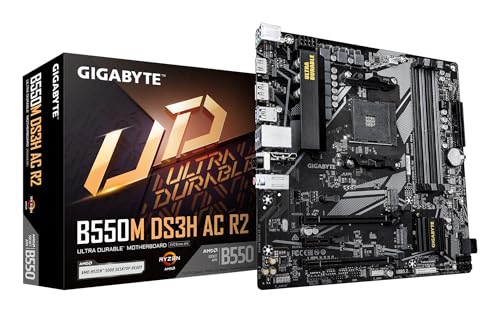
The Gigabyte B550M DS3H AC R2 Motherboard is aimed squarely at people building a sensible mid-range Ryzen system without spending a fortune on the foundation. It's a Micro-ATX board, which means it'll fit in most cases, and the AC suffix means Wi-Fi 5 is already on board rather than being something you have to bolt on later.
With some owner reviews and a positive overall rating at the time of writing, it's clearly not a disaster. But a 4.4 average on some reviews is a small sample, and budget boards tend to attract either very happy casual builders or very unhappy people who pushed the board harder than it was designed for. So let's work through what this board actually is, what it does well, where it cuts corners, and whether it makes sense for your build.
Core Specifications
The B550M DS3H AC R2 is a Micro-ATX board built around AMD's B550 chipset, using the AM4 socket. It supports AMD Ryzen 5000 series processors along with 3rd Gen Ryzen and 3rd Gen Ryzen with Radeon Graphics (the APU lineup). Memory support runs to four DIMM slots in a dual-channel configuration, accepting DDR4 up to 4733MHz with overclocking enabled. That's a decent ceiling for a budget board, though hitting those speeds in practice depends heavily on your memory kit and CPU's memory controller.
For storage, you get two M.2 slots. The first runs at PCIe 4.0 x4 speeds when paired with a Ryzen 5000 CPU, which is genuinely useful. The second is PCIe 3.0 x4. Both support NVMe drives. On the expansion side, there's a primary PCIe x16 slot for your GPU. Connectivity includes Wi-Fi 5 (the AC part of the name), 1GbE LAN, and USB 3.2 Gen 1 on the front panel header. The VRM is rated at 5+3 phases.
Here's a quick reference table covering the key specs:
| Specification | Detail |
|---|---|
| Form Factor | Micro-ATX |
| Socket | AM4 |
| Chipset | AMD B550 |
| CPU Support | AMD Ryzen 5000 Series, 3rd Gen Ryzen, 3rd Gen Ryzen with Radeon Graphics |
| Memory Slots | 4x DDR4 DIMM (Dual Channel) |
| Max Memory Speed | Up to 4733MHz (O.C.) |
| M.2 Slots | 2 (1x PCIe 4.0 x4, 1x PCIe 3.0 x4) |
| VRM Phases | 5+3 |
| LAN | 1GbE |
| Wi-Fi | Wi-Fi 5 (802.11ac) |
| Front Panel USB | USB 3.2 Gen 1 Type-A header |
| Audio | Not specified |
Socket and CPU Compatibility
The AM4 socket is one of the best things AMD has done for PC builders over the last several years. The same physical socket has supported processors from Ryzen 1000 all the way through to Ryzen 5000, which is a remarkable run. The B550M DS3H AC R2 officially supports Ryzen 5000 series chips (Zen 3) along with 3rd Gen Ryzen (Zen 2) and the 3rd Gen Ryzen with Radeon Graphics APUs. That covers a solid range of hardware that's still very much in use and available at reasonable prices.
If you're planning to drop in a Ryzen 5 5600, a Ryzen 7 5700X, or even a Ryzen 9 5900X, this board will handle the first two without much fuss. The 5900X is where the VRM situation becomes more relevant, and we'll get into that properly in the power delivery section. But from a socket and compatibility standpoint, you're well covered for the mainstream Ryzen 5000 lineup. The AM4 socket uses a standard mounting pattern that's compatible with the vast majority of coolers on the market, so your existing cooler or any modern AM4-compatible cooler will bolt straight on.
One thing worth knowing: if you're buying this board new and pairing it with a Ryzen 5000 chip, it should come with a BIOS version that already supports those CPUs out of the box. Gigabyte has been shipping B550 boards with Ryzen 5000-ready firmware for some time now. But if you somehow end up with old stock and a Ryzen 5000 CPU, you'd need a Zen 2 chip to do the initial BIOS update first, or you'd need a shop to flash it for you. That's an edge case in 2026, but worth knowing. The AMD Ryzen product page has the full compatibility breakdown if you want to double-check your specific chip.
Chipset Features
The AMD B550 chipset sits in the middle of AMD's consumer chipset lineup, below X570 but above A520. The key advantage B550 has over A520 is native PCIe 4.0 support from the CPU, which is what gives this board its PCIe 4.0 M.2 slot and PCIe 4.0 x16 capability for the GPU slot. A520 is stuck at PCIe 3.0 throughout, so if you care about getting the most out of a fast NVMe drive, B550 is the minimum you want.
In terms of what the chipset itself provides, B550 offers a reasonable set of USB and SATA lanes for a mid-range board. You're looking at SATA 6Gb/s ports for traditional drives, USB connectivity managed through a combination of the chipset and CPU lanes, and PCIe 3.0 lanes from the chipset for additional expansion. The B550 chipset doesn't support CPU overclocking directly, but it does support memory overclocking via EXPO/XMP profiles, which is how you'd push that DDR4 beyond the base 3200MHz or so.
Compared to X570, you lose some features. X570 has more PCIe 4.0 lanes from the chipset itself and generally better I/O provisioning. But X570 boards also cost significantly more and the chipset fan on early X570 boards was a genuine annoyance. For most people building a Ryzen 5000 system for gaming or everyday productivity, B550 is the sweet spot. You get the PCIe 4.0 that actually matters (the primary GPU and M.2 slots) without paying the X570 premium. For this board's target audience, that's the right call.
VRM and Power Delivery
Right, this is where budget boards either earn their place or get found out. The B550M DS3H AC R2 uses a 5+3 phase VRM design. To put that in plain terms: five phases handle the CPU core voltage, three phases handle the SoC/other components. This is a modest setup by any measure. It's not the worst thing in the world for a budget board, but it does set a ceiling on what you should reasonably ask this board to do.
For a Ryzen 5 5600 or a Ryzen 5 5600X, this VRM is perfectly adequate. Those chips have relatively modest power requirements and the 5+3 phase design will handle them without breaking a sweat under normal gaming or productivity loads. Push up to a Ryzen 7 5700X and you're still probably fine for most use cases, though sustained heavy workloads like video rendering for hours at a time might cause the VRM to run warm. A Ryzen 9 5900X or 5950X on this board is a different conversation entirely. Technically the board will boot and run those chips, but a 12-core or 16-core Zen 3 processor under full load is asking a lot from a 5+3 phase budget VRM. You'd want decent airflow in your case pointed at the VRM area, and you probably shouldn't be doing extended all-core rendering sessions and expecting the board to stay cool and stable indefinitely.
The heatsink situation on budget boards like this is typically minimal, and the DS3H line has historically used fairly small heatsinks rather than the chunky finned designs you see on mid-range and premium boards. That's not a disaster for light-to-moderate CPU loads, but it's something to factor in if you're planning on pushing the system hard. The honest verdict here is: pair this board with a Ryzen 5 or modest Ryzen 7 chip, keep your case reasonably ventilated, and the VRM won't be your problem. Try to run a 5950X at full tilt and you're using the wrong board for the job.
Memory Support
Four DIMM slots in a dual-channel configuration is genuinely useful on a Micro-ATX board. A lot of budget boards at this size only give you two slots, which limits your upgrade path. With four slots here, you can start with 16GB (two 8GB sticks) and add another pair later without pulling out your existing RAM. The dual-channel setup means you should always populate in pairs for the best performance, using the slots your manual specifies (typically slots 2 and 4 for a two-stick config).
The headline memory speed is 4733MHz with overclocking, which sounds impressive for a budget board. In practice, hitting those speeds depends on your CPU's memory controller quality (silicon lottery applies here) and the quality of your RAM kit. Ryzen 5000 processors have notably better memory controllers than their Zen 2 predecessors, so 3600MHz to 3800MHz at tight timings is very achievable with a decent kit. The JEDEC standard for DDR4 tops out at 3200MHz, so anything above that is technically overclocking, even if it's just enabling an XMP profile.
For most gaming builds, 3600MHz CL18 or 3200MHz CL16 is the sweet spot where you're getting real-world benefit without chasing diminishing returns. The board supports XMP profiles, so if you buy a kit rated at 3600MHz, you just enable XMP in the BIOS and you're done. No manual tuning required. That's the sensible approach for the majority of people buying a board at this price point, and it works well. The four-slot design also means you can go up to 128GB total capacity if you're ever in the unlikely situation of needing that on a budget B550 board.
Storage Options
Two M.2 slots is a solid offering for a budget Micro-ATX board, and the fact that one of them runs at PCIe 4.0 x4 is genuinely good news. If you pair this board with a Ryzen 5000 CPU, that primary M.2 slot gets its bandwidth directly from the CPU's PCIe 4.0 lanes, meaning a fast NVMe like a Samsung 980 Pro or a WD Black SN850X will run at its rated speeds. That's not something you take for granted on a budget board. PCIe 4.0 roughly doubles the bandwidth ceiling compared to PCIe 3.0, so for sequential reads and writes, it matters.
The second M.2 slot operates at PCIe 3.0 x4. For most NVMe drives, PCIe 3.0 is still plenty fast for gaming and everyday use. You'd only notice the difference if you're doing sustained large file transfers or working with very large video files regularly. Using both M.2 slots simultaneously is fine, though it's worth checking the manual for any lane-sharing notes that might affect other slots when both are populated. Budget boards sometimes share bandwidth between M.2 slots and SATA ports, so one or two SATA ports may become unavailable when the second M.2 is in use.
SATA ports are present for traditional 2.5-inch SSDs and hard drives, which is useful if you're migrating from an older system and want to keep existing drives. The board supports standard SATA 6Gb/s speeds. For a budget build focused on NVMe primary storage with a secondary drive for bulk storage, the storage setup here is genuinely well thought out. Two M.2 slots means you can have a fast boot drive and a secondary NVMe for games without needing to use SATA at all, which keeps cable management tidy in a Micro-ATX build.
Expansion Slots and PCIe
The primary PCIe x16 slot runs at PCIe 4.0 speeds when used with a Ryzen 5000 processor. This is the slot your GPU goes in, and PCIe 4.0 x16 is more bandwidth than any current GPU actually needs, so you're not leaving performance on the table here. The slot itself should have some reinforcement, which helps with heavier graphics cards, though budget boards vary on how substantial that reinforcement actually is compared to the steel-shrouded slots on premium boards.
Beyond the primary x16 slot, the expansion options on a Micro-ATX budget board are limited by the form factor as much as anything else. You're not going to have multiple x16 slots or a full array of x1 slots like you would on an ATX board. For the vast majority of people buying this board, that's completely fine. You need one slot for your GPU, and everything else goes into the M.2 slots or rear I/O. The Wi-Fi being built in rather than requiring a PCIe card is actually a meaningful advantage here since it saves you a slot.
If you're planning a multi-GPU setup, this isn't your board. But multi-GPU is essentially irrelevant for gaming in 2026, so that's not a real-world concern for the target audience. If you need a capture card or a sound card alongside your GPU, check the slot layout carefully to make sure there's clearance and the right slot type available for your specific card. Most capture cards use PCIe x1 or x4 and will work in a x16 slot, but physical spacing in a Micro-ATX case can be tight.
Connectivity and Rear I/O
The rear I/O on a budget board is always a bit of a mixed bag, and the DS3H line has historically been fairly lean here. You get the basics covered: USB ports, audio outputs, video outputs for APU users (DisplayPort and HDMI are listed as features for multiple display support), and the ethernet port. The USB situation tops out at USB 3.2 Gen 1 on the front panel header, which gives you 5Gbps throughput. That's adequate for most peripherals and external drives, though it's not the Gen 2 (10Gbps) that faster mid-range boards offer.
The inclusion of DisplayPort and HDMI on the rear I/O is worth highlighting for anyone planning to use a Ryzen APU (the 3rd Gen Ryzen with Radeon Graphics chips). If you're building a budget system with integrated graphics rather than a discrete GPU, having both display outputs gives you the option to run dual monitors without spending anything extra. That's a genuinely useful feature for budget builders who might start without a GPU and add one later.
Audio connectivity comes via the standard rear audio jacks. The board doesn't specify an onboard audio codec in the verified data we have, so we won't guess at the chip used. For most people, the onboard audio will be perfectly fine for headphones and speakers. If you're a serious audio person, you'd be looking at a DAC or sound card regardless of what motherboard you buy. The front panel USB 3.2 Gen 1 Type-A header means your case's front USB ports will work at proper speeds rather than being limited to USB 2.0, which is a small but appreciated detail.
Wi-Fi and Networking
The AC in the board's name tells you what you're getting: Wi-Fi 5, also known as 802.11ac. The Wi-Fi Alliance's 802.11ac standard offers dual-band operation (2.4GHz and 5GHz) and theoretical speeds up to around 867Mbps on the 5GHz band with a standard two-stream implementation. In practice, real-world speeds depend on your router, your distance from it, and how congested your wireless environment is. But for most home networks, Wi-Fi 5 is more than fast enough for gaming, streaming, and general use.
The fact that Wi-Fi is built into the board at this price point is genuinely useful. A lot of competing budget boards make you add a PCIe Wi-Fi card separately, which costs extra money and uses up an expansion slot. Having it integrated means you can set up your system without running a long ethernet cable across the room, and you're not wasting a slot on a Wi-Fi card. If you do have an ethernet port nearby, the onboard 1GbE LAN will handle wired connectivity. It's not the 2.5GbE that some mid-range boards now offer, but 1 gigabit is still more than enough for most home internet connections and local network transfers.
Wi-Fi 6 (802.11ax) would be nicer, and if you're buying a more expensive board you'd expect to see it. But at this price point, Wi-Fi 5 is a reasonable inclusion rather than an omission. The practical difference between Wi-Fi 5 and Wi-Fi 6 for a desktop PC is minimal unless you're in a very congested wireless environment or you have a genuinely fast internet connection (above 400Mbps or so) that you want to access wirelessly. For the target user of this board, Wi-Fi 5 is fine.

BIOS and Overclocking
Gigabyte's BIOS interface has a mixed reputation, and that's being charitable. The good news is that the company has improved things considerably over the years, and the current Easy Mode interface is actually usable for basic setup. Fan curve controls, XMP enabling, and boot order are all accessible without needing a degree in computer science. The more advanced options are buried in the Advanced Mode, which is where things get more cluttered, but if you're just doing basic setup you'll be fine.
The B550M DS3H AC R2 supports memory overclocking via XMP profiles, which is the main overclock most people will want to do. CPU overclocking on B550 is supported for unlocked Ryzen processors (the X suffix chips), so if you have a Ryzen 5 5600X or a Ryzen 7 5800X, you can push the CPU multiplier in the BIOS. The 5+3 phase VRM does limit how far you'd want to push things, but modest overclocks on a 5600X are within the board's capabilities. Just don't expect to run an extreme overclock at high voltage for extended periods and have the VRM stay happy.
Fan control is present and functional. You can set fan curves for the CPU fan header and chassis fan headers, which is important for keeping noise levels sensible. Gigabyte's fan curve interface isn't the prettiest or most intuitive compared to ASUS's Armoury Crate or MSI's Click BIOS, but it works. One thing that comes up in owner reviews of budget Gigabyte boards is that the BIOS can occasionally be a bit finicky with memory compatibility, particularly at higher XMP speeds. If your RAM doesn't post at XMP speeds initially, dropping to the next speed down and working up from there is the usual fix. This isn't unique to Gigabyte, but it's worth knowing going in.
Build Quality and Aesthetics
The DS3H line has always been Gigabyte's no-frills workhorse range, and the aesthetics reflect that. There's no RGB lighting on this board. If you want a light show, you're in the wrong place. But if you're building in a case where the motherboard isn't visible, or you just don't care about RGB (sensible position, honestly), the clean look is actually fine. The PCB is a standard dark colour, the heatsinks are functional rather than decorative, and the whole thing looks like what it is: a competent budget board that spent its money on features rather than lighting.
Build quality at this price point is always going to involve some compromises. The heatsinks are on the smaller side compared to mid-range boards, which ties back to the VRM thermal discussion earlier. The PCIe slot reinforcement on the primary x16 slot should protect against GPU sag to a reasonable degree, though if you're running a very heavy GPU, a support bracket is always a good idea regardless of board tier. The DIMM slot latches are functional. The M.2 slots have standard screw retention.
Owner reviews generally don't flag build quality issues as a concern on this board. The most common complaints are about the BIOS learning curve and the expected limitations of a budget VRM, rather than physical quality problems like capacitors falling off or connectors feeling flimsy. For a board at this price, that's actually a decent result. Gigabyte's manufacturing quality control is generally solid even on their entry-level products, which is one reason the DS3H line has been popular for budget builds for years.
How It Compares
The two most obvious alternatives to the B550M DS3H AC R2 in the budget Micro-ATX space are the ASRock B550M Pro4 and the MSI MAG B550M Mortar. Both are worth considering depending on what you prioritise.
The ASRock B550M Pro4 is a strong competitor that typically offers a more substantial VRM (often cited as having better power delivery for higher-end Ryzen chips), more SATA ports, and a BIOS that many users find more intuitive than Gigabyte's. The trade-off is that it usually doesn't include Wi-Fi, so if wireless connectivity matters to you, you'd need to add a card or adapter, which eats into any price advantage. It's also often slightly larger in footprint, which can matter in compact cases.
The MSI MAG B550M Mortar is a step up in price and features, with a better VRM design, more USB ports, and generally a more premium feel. It's aimed at people who want a proper Micro-ATX board for a Ryzen 7 or Ryzen 9 build rather than a budget Ryzen 5 system. If your budget can stretch to it, the Mortar is a meaningfully better board for demanding workloads. But it costs more, and if you're pairing it with a Ryzen 5 5600, you're spending money on VRM headroom you'll never use.
| Feature | Gigabyte B550M DS3H AC R2 | ASRock B550M Pro4 | MSI MAG B550M Mortar |
|---|---|---|---|
| Form Factor | Micro-ATX | Micro-ATX | Micro-ATX |
| VRM Phases | 5+3 | 10+2 (approx) | 12+2 (approx) |
| M.2 Slots | 2 (PCIe 4.0 + PCIe 3.0) | 2 (PCIe 4.0 + PCIe 3.0) | 2 (PCIe 4.0 + PCIe 3.0) |
| Wi-Fi | Wi-Fi 5 (built-in) | Not included | Not included (some variants) |
| LAN | 1GbE | 1GbE | 2.5GbE |
| Price Tier | Budget | Budget to mid | Mid-range |
| Best For | Ryzen 5 builds with wireless | Ryzen 5/7 wired builds | Ryzen 7/9 builds |
What Buyers Actually Say
With some reviews averaging ★★★★½ (4.5), the overall picture from owners is positive but the sample size is small enough that you shouldn't read too much into the exact number. The praise that comes up consistently is around ease of setup, good compatibility with Ryzen 5000 chips out of the box, and appreciation for the built-in Wi-Fi saving them the hassle of a separate adapter. Several owners mention using this board in small form factor builds where the Micro-ATX size and wireless capability were exactly what they needed.
The complaints, where they appear, tend to cluster around a few themes. BIOS navigation gets mentioned as less intuitive than some competitors, particularly for first-time builders. A small number of owners report having to spend time getting their RAM to post at XMP speeds, which is a known quirk of budget B550 boards rather than a unique flaw here. Nobody seems to be flagging catastrophic failures or DOA boards, which is reassuring.
One thing that's worth noting from the owner feedback is that people who pair this board with modest CPUs (Ryzen 5 5600, Ryzen 5 5600G) are consistently happy with it. The people who seem less satisfied are often those who expected more from the board than a budget 5+3 phase design can reasonably deliver. That's as much about expectation management as it is about the board itself. Know what you're buying, pair it with an appropriate CPU, and the reviews suggest you'll be in the happy majority.
Value Analysis
In the budget motherboard segment, the DS3H AC R2 makes a specific pitch: it gives you Wi-Fi 5 built in, two M.2 slots including one PCIe 4.0, four DIMM slots, and Ryzen 5000 compatibility, all for a price that keeps the total system build cost manageable. If you compare it to budget boards that don't include Wi-Fi, you're effectively getting the wireless module for free, which is a real saving when you factor in the cost of adding it separately.
The value case is strongest when you're building around a Ryzen 5 5600 or similar mid-range CPU. In that scenario, the board's VRM limitations don't come into play, the PCIe 4.0 M.2 slot gives you fast storage, and the built-in Wi-Fi means one less thing to buy. The total package is genuinely good value for that use case. Where the value argument weakens is if you're pairing it with a more demanding CPU or expecting the board to last through multiple CPU upgrades to increasingly power-hungry chips.
Gigabyte has made sensible choices here for the target audience. They've included Wi-Fi (useful), kept two M.2 slots (useful), and maintained four DIMM slots (useful for future upgrades). What they've trimmed is VRM headroom, RGB, and premium rear I/O. For most people building a sensible budget Ryzen system, that's exactly the right set of trade-offs.
Pros and Cons
- Wi-Fi 5 built in: Saves money and a PCIe slot compared to boards that make you add it separately
- PCIe 4.0 M.2 slot: Fast NVMe performance from a budget board is a genuine plus
- Four DIMM slots: More upgrade flexibility than the two-slot designs common at this price
- Ryzen 5000 ready: No BIOS update faff needed with current stock
- 5+3 phase VRM: Adequate for Ryzen 5 chips, limiting for Ryzen 9
- 1GbE LAN only: Not 2.5GbE, which some competing boards now offer
- BIOS learning curve: Gigabyte's interface takes some getting used to
Final Verdict
The Gigabyte B550M DS3H AC R2 Motherboard is a budget board that knows what it is and mostly delivers on it. It's not trying to be a premium board at a budget price. It's trying to be the right board for someone building a Ryzen 5 5600 or similar system who wants wireless connectivity, fast NVMe storage, and four memory slots without spending a fortune. On those terms, it succeeds.
The 5+3 phase VRM is the honest limitation here, and it's the thing that determines whether this board is right for you. If your CPU is a Ryzen 5 or a modest Ryzen 7 with sensible power requirements, the VRM is fine. If you're planning to run a Ryzen 9 5900X or 5950X at sustained all-core loads, spend more on the board. That's not a criticism of the DS3H AC R2 specifically; it's just the reality of what a budget VRM design is designed to handle.
The built-in Wi-Fi 5 is a genuine differentiator at this price. The two M.2 slots with PCIe 4.0 on the primary slot is better than you'd expect for the money. The four DIMM slots give you a sensible upgrade path. The BIOS is functional if not delightful. Owner feedback is positive for people who use it as intended. For a budget Ryzen 5000 build, particularly one where wireless matters and you don't want to spend more than you have to on the motherboard, this is a solid pick. Editorial score: 7 out of 10.

Not Right For You?
If the 5+3 phase VRM is a concern for your CPU choice, look at the ASRock B550M Pro4 for better power delivery at a similar price point (though you'll lose built-in Wi-Fi). If you want a proper step up in board quality for a Ryzen 7 or Ryzen 9 build, the MSI MAG B550M Mortar is worth the extra spend. And if you've decided AM4 is done and you want to future-proof on AM5 with Ryzen 7000 series, that's a completely different board category and a bigger budget conversation. The Gigabyte product page has the full specification sheet if you want to verify compatibility with your specific components before buying.
What works. What doesn’t.
5 + 3What we liked5 reasons
- Wi-Fi 5 built in at budget price, saves a slot and extra spend
- PCIe 4.0 M.2 slot for genuinely fast NVMe storage
- Four DIMM slots give real upgrade flexibility
- Ryzen 5000 ready out of the box with current stock
- Sensible feature set for the target Ryzen 5 audience
Where it falls3 reasons
- 5+3 phase VRM limits suitability for Ryzen 9 chips under sustained load
- 1GbE LAN rather than 2.5GbE now common on competing boards
- Gigabyte BIOS takes getting used to, especially for first-time builders
Full specifications
12 attributes| Socket | AM4 |
|---|---|
| Chipset | B550 |
| Form factor | Micro-ATX |
| Bios flashback | true |
| M2 slots | 2 |
| MAX RAM | 128GB |
| MAX RAM GB | 128 |
| Network | 1GbE + Wi-Fi 5 |
| Pcie 5 slots | 0 |
| Pcie slots | 1x PCIe 4.0 x16, 1x PCIe 3.0 x16 (x4 mode), 1x PCIe 3.0 x1 |
| RAM slots | 4 |
| RAM type | DDR4 |
Frequently asked
5 questions01Is the Gigabyte B550M DS3H AC R2 Motherboard overkill for just gaming?+
Not really. For a gaming build around a Ryzen 5 5600 or Ryzen 7 5700X, this board hits the right balance. The PCIe 4.0 M.2 slot means your NVMe drive runs at full speed, the Wi-Fi 5 handles wireless gaming without extra hardware, and the VRM is fine for those chips under gaming loads. You're not paying for features you don't need, which is exactly what you want in a gaming-focused budget build.
02Will my existing CPU cooler work with the Gigabyte B550M DS3H AC R2 Motherboard?+
The board uses the AM4 socket, which has a standard mounting pattern that's been consistent across AMD's Ryzen lineup from 1000 series through to 5000 series. Any cooler designed for AM4 will physically mount on this board. If you have an older cooler from an Intel build, you'll need to check whether it includes an AM4 mounting kit, which most modern coolers do include as standard.
03What happens if the Gigabyte B550M DS3H AC R2 Motherboard doesn't work with my components?+
Amazon's standard 30-day return policy applies to most purchases, and you're also covered by Amazon's A-to-Z guarantee if there's a fulfilment issue. For genuine compatibility concerns, check Gigabyte's QVL (qualified vendor list) for memory compatibility before buying your RAM kit. If you're pairing with a Ryzen 5000 CPU, current stock should have a BIOS version that supports those chips without needing a prior CPU to update first.
04Is there a cheaper motherboard I should consider instead?+
The Gigabyte B450M DS3H is the generation below and can be found cheaper, but it doesn't support PCIe 4.0 and its Ryzen 5000 support is limited and sometimes requires a BIOS update with an older CPU. For most people, paying the modest premium to be on B550 with native Ryzen 5000 support and PCIe 4.0 M.2 is worth it. Going cheaper than this board usually means losing the Wi-Fi, dropping to two DIMM slots, or ending up on B450 with its limitations.
05What warranty and returns apply to the Gigabyte B550M DS3H AC R2 Motherboard?+
Amazon offers 30-day returns on most items, and you're covered by Amazon's A-to-Z guarantee. Gigabyte typically provides a 3-year manufacturer warranty on their motherboards, covering manufacturing defects. Keep your proof of purchase and register the product on Gigabyte's website to make any warranty claim straightforward.