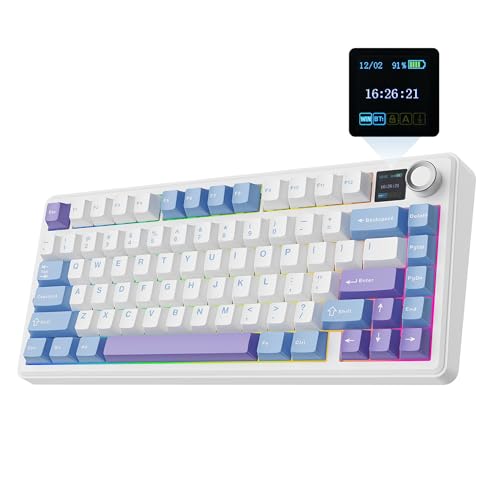
There's a certain type of keyboard enthusiast who reads spec sheets the way other people read menus. Every switch spec, every foam layer, every keycap material is a clue about whether a board is going to be genuinely good or just look the part on a desk tour video. The EPOMAKER x Aula F75 is the kind of board that rewards that kind of scrutiny, because what's under the hood is genuinely interesting for the price. Five layers of acoustic dampening, a gasket mount, LEOBOG Reaper switches, and three-way wireless connectivity. That's not a budget keyboard spec sheet. That's mid-range territory wearing a budget price tag.
EPOMAKER has been quietly building a reputation for punching above their weight, and the F75, developed in collaboration with Aula, is one of their more ambitious efforts. The 75% layout is the sweet spot for most people who want function row keys and arrow keys without the wasted real estate of a full-size board. Pair that with a gasket structure, hot-swap sockets, and a 4000mAh battery, and on paper this looks like it should cost considerably more than it does. But spec sheets lie sometimes. So the question is whether this one actually delivers, or whether it's all marketing foam and no substance.
With over a thousand owner reviews and a positive overall rating, there's a decent body of real-world evidence to pull from. That's not a handful of early adopters in the honeymoon phase. That's a large enough sample to see patterns, and the patterns here are worth paying attention to.
Core Specifications
The F75 is a 75% layout board, which means you get roughly 84 keys covering the full alphabet, number row, function row, arrow cluster, and a handful of navigation keys. It's a layout that's earned its popularity because it genuinely gives you most of what a full-size board offers in about two-thirds of the footprint. For anyone running a dual-monitor setup or just wanting more mouse room, it makes a real difference. The specific variant being reviewed here ships in Black Gradient with LEOBOG Reaper switches, though EPOMAKER offers the F75 in multiple switch options.
The build centres on a gasket-mounted structure, which is the kind of thing you'd expect to see called out on boards costing twice as much. Gasket mounting means the PCB and plate assembly sits on silicone gaskets rather than screwing directly into the case, giving the whole typing surface a slight flex and a softer bottom-out feel. Combined with the five-layer acoustic stack (two layers of Poron foam, an IXPE switch pad, a PET sound enhancement layer, and a bottom silicone pad), this is genuinely one of the more thoughtfully engineered acoustic setups you'll find at this price point. The 1.2mm single-key slotted PCB means each switch position is isolated, which helps with both sound and switch stability.
Connectivity covers Bluetooth, 2.4GHz wireless via USB dongle, and wired USB-C. The battery is a 4000mAh unit, which is on the larger end for a 75% board. RGB backlighting runs to 16.8 million colours with per-key illumination. There's a multimedia control knob on the top-right, which is a genuinely useful addition rather than a gimmick. Full-key hot-swap sockets mean you can pull switches without a soldering iron. Below is the full spec breakdown.
| Specification | Detail |
|---|---|
| Layout | 75% (approx. 84 keys) |
| Switch | LEOBOG Reaper (pre-lubricated, factory) |
| Hot-Swap | Full-key hot-swappable sockets |
| Mount Type | Gasket structure |
| PCB | 1.2mm single-key slotted |
| Acoustic Layers | Five-layer (2x Poron foam, IXPE pad, PET pad, silicone base) |
| Connectivity | Bluetooth / 2.4GHz wireless / USB-C wired |
| Battery | 4000mAh |
| RGB | Per-key, 16.8 million colours |
| Keycaps | Cherry profile, double-shot PBT |
| Stabilizers | Pre-tuned (factory) |
| Media Controls | Multimedia control knob |
| Price | £79.99 · Details |

Switch Type and Feel
The LEOBOG Reaper switches are the most interesting thing about this board from a pure enthusiast perspective. LEOBOG is a Chinese switch manufacturer that's been gaining traction in the mechanical keyboard community for producing switches with genuinely good out-of-box feel at low cost. The Reaper is a linear switch, so there's no tactile bump or audible click. What you get instead is a smooth downstroke and a consistent actuation. EPOMAKER ships these factory-lubricated, which matters more than people sometimes realise. An unlubricated linear switch can feel scratchy and inconsistent straight out of the box. A properly lubed one feels almost glassy by comparison.
Owner reports on the Reaper switches are consistently positive on smoothness. The factory lube job appears to be decent rather than the thin, barely-there coating some manufacturers apply just to tick a box. Several owners specifically mention that the switches feel noticeably smoother than they expected at this price, which aligns with what LEOBOG's reputation would suggest. For gaming, linear switches are generally preferred because there's no tactile interruption mid-keystroke and actuation is consistent. The Reaper fits that use case well. For typing, some people will find the lack of tactile feedback means they bottom out more than they'd like, but the gasket mount softens that bottom-out feel considerably.
The full-key hot-swap sockets are a big deal here. If you get the F75 and decide after a month that you'd prefer a tactile switch, you can pull every Reaper out with a switch puller and drop in something like a Gateron G Pro Yellow or a Boba U4 without touching a soldering iron. That kind of flexibility is what separates a board you'll keep for years from one you'll sell when the novelty wears off. The 1.2mm slotted PCB design means individual switches are properly seated and stable, so you're not going to get that slight wobble that cheaper hot-swap implementations sometimes suffer from. It's a proper implementation, not an afterthought.
Keycap Quality and Layout
Cherry profile double-shot PBT keycaps. Right, this is where the F75 genuinely earns some respect, because this is not what you typically find at this price point. Most budget boards ship with ABS keycaps, which look fine on day one and develop an unpleasant greasy shine within a few months of regular use. PBT plastic is denser and more resistant to that shine. Double-shot construction means the legends (the letters and symbols on the keys) are moulded from a second layer of plastic rather than printed or laser-etched, so they physically cannot fade. Ever. You could use this board for five years and the legends would still look as sharp as they did on day one.
Cherry profile is a lower, flatter keycap shape compared to the taller OEM profile that ships on most gaming keyboards. It's a profile that the enthusiast community tends to prefer for both typing feel and aesthetics. The lower height means your fingers don't have to travel as far to reach the keys, which can reduce fatigue over long sessions. It also looks cleaner on a desk, if that matters to you (and let's be honest, if you're reading a review this detailed, it probably does). The Black Gradient colourway on this specific variant looks sharp, and the PBT texture gives the keys a slightly matte, premium feel under the fingers.
The 75% layout itself deserves a mention here because the key arrangement matters as much as the keycaps themselves. You keep the function row, which is non-negotiable for a lot of people who use F-keys for shortcuts in productivity software or games. The arrow cluster is intact, squeezed in on the right side. The Delete, Page Up, and Page Down keys are present. What you lose compared to a TKL is the full navigation block, but for most users that's an acceptable trade-off for the smaller footprint. The multimedia knob sits in the top-right corner and handles volume and media playback, which means you're not giving up media controls to get the compact layout. That's a sensible design decision.
Build Quality
The gasket mount structure is the headline build feature and it genuinely changes the feel of a board. On a standard top-mount or bottom-mount keyboard, the plate screws directly into the case and the whole assembly is rigid. When you type, the impact of each keystroke transfers straight into the desk. A gasket mount introduces silicone or rubber gaskets between the plate/PCB assembly and the case, so the whole typing surface has a slight give to it. The result is a softer, more cushioned typing experience that's easier on your fingers over long sessions. It also changes the sound profile, generally making the board sound deeper and less clacky.
The five-layer acoustic stack on the F75 is genuinely impressive for the price. Two layers of Poron foam, an IXPE switch pad, a PET sound enhancement layer, and a bottom silicone pad. Each of these serves a different acoustic purpose. Poron foam is a high-quality open-cell foam that absorbs sound well. IXPE (irradiation cross-linked polyethylene) is a closed-cell foam that's denser and often used directly under switches to change the sound and feel of actuation. The PET layer helps with resonance control. The silicone base dampens case ping. This is a thoughtfully layered system, not just stuffing some foam in and calling it a day.
The pre-tuned stabilizers are worth calling out because bad stabilizers can ruin an otherwise good board. Rattly spacebar and modifier keys are one of the most common complaints in budget keyboard reviews. Owner reports on the F75 suggest the stabilizers come pre-lubed and are notably quieter than what you'd expect at this price. A few owners mention the spacebar in particular sounds good out of the box, which is often the hardest stabilizer to get right. The factory tuning isn't going to satisfy someone who wants to clip, lube, and band-aid their stabs to perfection, but for the majority of buyers it's going to be more than adequate. The 1.2mm PCB thickness adds rigidity to the whole assembly, which helps the stabilizers do their job consistently.
RGB and Lighting
Per-key RGB with 16.8 million colours. The F75 has it, and it looks good. The Cherry profile PBT keycaps are double-shot, which means the legends are translucent plastic that lets the RGB shine through cleanly rather than the blurry glow you sometimes get with printed legends. The result is a cleaner, sharper lighting effect where you can actually read the keys even in dim lighting. Whether you care about RGB at all is obviously a personal thing, but if you're going to have it, having it done properly makes a difference.
The Black Gradient colourway on this variant pairs well with RGB because the dark case lets the lighting stand out rather than getting washed out. Owner reports on the lighting are generally positive, with several mentioning that the colours are vibrant and the effects look good in person. The standard RGB modes you'd expect are all present: solid colour, breathing, wave, reactive, and various combinations. The control knob can be used to adjust lighting brightness as well as volume, which is a nice touch that means you're not hunting through key combinations to dim the lights when you want to game in a dark room.
One thing worth being clear about: the RGB does have an impact on battery life, as it always does on wireless keyboards. Running full RGB in wireless mode will drain the 4000mAh battery faster than running with lighting off or dimmed. This isn't a criticism specific to the F75, it's just physics. If you're primarily using the board wirelessly and you care about battery longevity, you'll probably end up running the lighting at reduced brightness or turning it off during long sessions. The upside is that the 4000mAh battery is large enough that even with RGB running, you're not going to be reaching for the cable every day.
Software and Customisation
EPOMAKER's software situation is something that comes up regularly in owner discussions. The board is compatible with EPOMAKER's own configuration software, which allows you to remap keys, set up macros, adjust RGB lighting profiles, and manage on-board memory. The software has improved over time and is generally described as functional, though it's not going to win awards for UI design. If you're used to something like Razer Synapse or Logitech G Hub, EPOMAKER's offering feels a bit rougher around the edges. But it does the job, and the important thing is that the on-board memory means your settings are stored on the keyboard itself, so you don't need the software running in the background all the time.
The hot-swap nature of the board also opens up a different kind of customisation that software can't replicate: physical switch swapping. If you want a completely different typing feel, you don't need to buy a new keyboard. You pull the switches, drop in new ones, and the board adapts to whatever you've installed. This is the kind of flexibility that used to be the exclusive territory of custom keyboard builds costing several hundred pounds. Having it on a board at this price point is genuinely significant for anyone who wants to experiment with different switch types without committing to a new board each time.
Macro support is present through the software, and the function layer gives you access to media controls and system functions via key combinations. The multimedia knob handles volume and playback without needing software intervention, which is useful. The F75 also supports on-board profile storage, so your key remaps and lighting preferences travel with the keyboard rather than being tied to a specific PC. For anyone who moves between machines, that's a practical advantage. The overall software experience won't delight enthusiasts who want deep customisation, but it covers the essentials without being actively frustrating.
Connectivity
Three-way connectivity is one of the F75's strongest practical selling points. Bluetooth, 2.4GHz wireless, and wired USB-C. Each mode serves a different use case. Bluetooth is for pairing with phones, tablets, or laptops where you don't want to use a dongle. The 2.4GHz wireless mode uses a USB receiver and offers lower latency than Bluetooth, making it the better choice for gaming. Wired USB-C is there for zero-latency use or when the battery is running low and you just want to plug in and keep going. Having all three on a single board means you're not compromising based on your setup.
The 2.4GHz wireless mode is the one that matters most for gaming performance. Bluetooth has come a long way in terms of latency, but 2.4GHz dedicated wireless is still the standard for competitive gaming peripherals because the latency is more consistent and the connection is more stable. EPOMAKER describes the connection as ultra-responsive and low-latency, and owner reports generally back this up with no significant complaints about wireless lag or dropouts in normal use. The USB dongle is compact enough to leave plugged into a desktop without being annoying, and it stores in the battery compartment when you're travelling.
The USB-C wired connection also doubles as the charging port, which is the sensible and modern approach. No proprietary charging cables, no micro-USB (thank goodness), just a standard USB-C cable that you probably already own several of. Bluetooth multi-device pairing allows you to switch between connected devices, which is useful if you're pairing the board with both a PC and a tablet. The switching between modes is handled via key combinations rather than a physical switch, which is a minor inconvenience but not a dealbreaker. Overall the connectivity implementation is well thought out and covers the realistic use cases for a board in this category.
Battery Life
A 4000mAh battery in a 75% keyboard is a genuinely large capacity. Most wireless keyboards in this size class ship with batteries in the 2000mAh to 3000mAh range. The extra capacity matters because it directly translates to longer time between charges, and nobody wants to be hunting for a cable in the middle of a gaming session. The exact runtime will vary depending on whether RGB is enabled, the brightness level, and whether you're using Bluetooth or 2.4GHz wireless, but the 4000mAh figure gives the F75 a meaningful advantage over similarly priced wireless competitors.
Owner reports on battery life are broadly positive. Several users mention being able to go weeks between charges when using the board with RGB off or at low brightness, which is consistent with what you'd expect from a 4000mAh cell in a keyboard that doesn't have particularly power-hungry components. With RGB running at full brightness, runtime will be shorter, but the large battery means you're still likely to get several days of typical office or gaming use before needing to charge. The exact figures aren't specified in the product data, but the real-world reports suggest the battery is not a weak point.
Charging via USB-C is the right call. It means the same cable you use for your phone, your laptop, and half the other devices on your desk will charge the F75. The board can be used while charging in wired mode, so a low battery doesn't mean you have to stop using it. There's no wireless charging here, but that would be a strange feature to expect at this price point. The combination of a large battery and USB-C charging puts the F75 in a good position for anyone who wants a wireless board without the constant anxiety about battery level.
Typing and Gaming Experience
The combination of gasket mount, five-layer acoustic dampening, and pre-lubricated linear switches produces a sound profile that owners consistently describe as deep, thocky, and quiet relative to the price. "Thocky" is a word that gets thrown around a lot in keyboard communities, but in this context it means the keystrokes produce a low, muted sound rather than the high-pitched clack of a cheap board. The Poron and IXPE foam layers absorb a lot of the high-frequency noise, and the gasket structure means the sound doesn't transmit as much into the desk surface. If you're in an office or sharing a space with someone who finds keyboard noise irritating, the F75 is going to be considerably less annoying than a standard budget mechanical board.
For gaming specifically, the LEOBOG Reaper linear switches are well suited. Linear switches are the preferred choice for most competitive gaming because the actuation is smooth and consistent with no tactile interruption. The 2.4GHz wireless mode keeps latency low, and the full-key hot-swap design means if you decide you want a lighter or heavier switch for specific games, you can swap without buying a new board. The multimedia knob is genuinely useful during gaming sessions for quick volume adjustments without alt-tabbing or reaching for a separate control. The 75% layout keeps the mouse within easy reach without requiring you to give up the function row that some games use for key bindings.
For extended typing sessions, the gasket mount is the standout feature. The slight flex in the typing surface means your fingers aren't slamming into a rigid plate with every keystroke, which reduces fatigue over long writing or coding sessions. The Cherry profile keycaps sit lower than OEM profile, which suits flat-finger typists particularly well. The pre-tuned stabilizers mean the spacebar and larger modifier keys feel consistent rather than rattly. Owner reports from people using the F75 as a daily driver for productivity work are positive, with several specifically mentioning that they'd forgotten they were using a budget board after a few days. That's probably the most honest endorsement a keyboard can get.
Compatibility
The F75 works across Windows, macOS, and Linux via all three connection modes. The Bluetooth and 2.4GHz wireless modes are plug-and-play on all major operating systems without requiring driver installation, which is the correct approach for a wireless keyboard. The wired USB-C mode is similarly driverless for basic functionality. The EPOMAKER software for advanced customisation is Windows-focused, which is a limitation worth knowing about if you're primarily a macOS user who wants to do deep remapping or macro setup. Basic key remapping via the software does work on Mac, but the experience is more polished on Windows.
Bluetooth multi-device pairing means you can connect the F75 to a PC, a tablet, and a phone simultaneously and switch between them. This is useful if you work across multiple devices and want a single quality keyboard for all of them. The 2.4GHz dongle is a USB-A connector, which is fine for desktops and most laptops, but if you're using a modern MacBook or a laptop with only USB-C ports, you'll need an adapter for that specific mode. The wired USB-C connection will work natively on any machine with a USB-C port.
Console compatibility is not specified in the product data, but Bluetooth keyboards generally pair with PlayStation and Xbox consoles for text input. The 2.4GHz wireless mode requires a USB-A port, which both current-generation consoles have. For gaming on console specifically, the latency difference between wireless modes becomes less relevant since console gaming doesn't have the same latency sensitivity as PC competitive play. The F75 isn't marketed as a console keyboard, but the connectivity options mean it's flexible enough to work across different setups without being limited to a single platform.
How It Compares
The F75's main competition in the 75% wireless gasket-mount space comes from boards like the Keychron Q2 Pro and the Nuphy Air75 V2. The Keychron Q2 Pro is an aluminium-bodied gasket mount with Bluetooth and USB-C connectivity, hot-swap sockets, and a strong reputation in the enthusiast community. It's a genuinely excellent board. It's also considerably more expensive than the F75. The aluminium case gives it a premium heft and feel that the F75's plastic construction can't match, but you're paying a significant premium for that material upgrade. For most people, the F75's build quality is more than adequate.
The Nuphy Air75 V2 is a closer price competitor with a low-profile design and wireless connectivity. It's a different aesthetic and typing feel, catering to people who prefer the ultra-slim laptop-style keyboard look. The F75 is a more traditional full-height mechanical keyboard experience. The Nuphy's low-profile switches won't appeal to everyone, and the F75's five-layer acoustic stack is more sophisticated than what Nuphy offers at a similar price. The LEOBOG Reaper switches on the F75 are also arguably more interesting than the standard switch options on the Nuphy.
The RK Royal Kludge RK84 is another frequent comparison point, being a popular 75% wireless board at a budget price. The RK84 has a solid reputation for value but ships with ABS keycaps and less sophisticated acoustic treatment than the F75. Buyers eyeing a step up entirely might instead consider a premium gaming keyboard like the SteelSeries Apex Pro TKL. The double-shot PBT keycaps and five-layer dampening on the F75 represent a meaningful step up in build quality. The gasket mount on the F75 is also a genuine differentiator at this price tier. Most boards at RK84 pricing use simpler mounting systems.
| Feature | EPOMAKER x Aula F75 | Keychron Q2 Pro | RK Royal Kludge RK84 |
|---|---|---|---|
| Layout | 75% | 75% | 75% |
| Mount Type | Gasket | Gasket | Top-mount |
| Case Material | Plastic | Aluminium | Plastic |
| Keycaps | Double-shot PBT, Cherry profile | Double-shot PBT | ABS |
| Hot-Swap | Full-key | Full-key | Full-key |
| Wireless | BT + 2.4GHz + USB-C | BT + USB-C | BT + 2.4GHz + USB-C |
| Battery | 4000mAh | 4000mAh | 4000mAh |
| Acoustic Layers | Five-layer | Three-layer | Basic foam |
| Media Knob | Yes | Yes | No |
| Price | £79.99 · Details | Higher | Similar |
What Buyers Say
With over a thousand reviews and a positive overall rating, the F75 has a strong and consistent owner record. The most common praise centres on the sound profile and typing feel, with owners repeatedly describing the board as quieter and more satisfying to type on than they expected for the price. The gasket mount and acoustic foam stack are doing their job according to the people actually living with this board. Several owners mention being surprised by the build quality out of the box, which suggests the spec sheet isn't just marketing.
The LEOBOG Reaper switches get specific mentions for smoothness. A recurring theme in positive reviews is that the factory lube job is noticeably better than what ships on comparable boards, and that the switches feel genuinely premium rather than budget. The double-shot PBT keycaps also draw consistent praise, particularly from owners who've had experience with ABS keycaps on previous boards and appreciate not having to deal with shine after a few months of use. The multimedia knob gets mentioned positively in a lot of reviews, which suggests it's a feature that people actually use rather than just appreciate in theory.
On the negative side, the software is the most common point of frustration. EPOMAKER's configuration software is functional but not polished, and a handful of owners report occasional connectivity issues during initial setup. These seem to be isolated rather than systematic, and most are resolved by firmware updates or basic troubleshooting. A small number of owners mention that the RGB shining through PBT keycaps is slightly less bright than on ABS boards, which is true as a general property of PBT plastic but is a trade-off most enthusiasts would happily accept for the durability benefits. Nothing in the review pattern suggests a systematic quality control problem, which at this price point is genuinely reassuring.
Value Analysis
The F75 sits in a price bracket where the competition is fierce and the differences between boards can feel marginal. What makes the F75 stand out is that it's stacking features that usually require spending more: gasket mount, five-layer acoustic dampening, double-shot PBT keycaps in Cherry profile, full-key hot-swap, three-way wireless, and a 4000mAh battery. Any one of those features would be noteworthy at this price. Having all of them on a single board is genuinely unusual.
The areas where the F75 makes its compromises are the ones you'd expect. The case is plastic rather than aluminium, so it doesn't have the premium heft of something like the Keychron Q2 Pro. The software is functional rather than excellent. The LEOBOG Reaper switches, while good, are a relatively new name compared to established options from Gateron or Cherry, though the owner reviews suggest they're performing well. These are sensible compromises for the price point, and none of them are dealbreakers for the target audience.
For someone who wants a wireless mechanical keyboard with a proper gasket mount and decent keycaps without spending enthusiast-tier money, the F75 represents strong value. The positive overall rating across over a thousand reviews isn't a fluke. It reflects a board that delivers on its main promises and doesn't have any glaring weaknesses that would make you regret the purchase. The hot-swap functionality also means the board can grow with you as your preferences evolve, which extends its useful life considerably beyond what a fixed-switch board would offer.
Final Verdict
The EPOMAKER x Aula F75 Gasket Mechanical Keyboard is the kind of board that makes you question why you'd spend more. Not because it's perfect, because it isn't, but because it gets the important things right at a price where getting even half of them right would be acceptable. The gasket mount is real and it works. The five-layer acoustic stack produces a genuinely good sound profile. The double-shot PBT keycaps in Cherry profile are better than they have any right to be at this price. The LEOBOG Reaper switches are smooth out of the box. And the three-way wireless connectivity means this board fits into almost any setup without compromise.
Who should buy this? Anyone who wants a proper wireless mechanical keyboard for gaming or productivity and doesn't want to spend Keychron Q2 Pro money. Anyone who's been using a budget board with ABS keycaps and wants to understand what all the PBT fuss is about. Anyone who wants hot-swap flexibility without committing to a custom build. The 75% layout suits people who need function keys and arrows but want to reclaim desk space. The pre-tuned stabilizers and factory-lubed switches mean it's good out of the box without needing any DIY work, which matters for the majority of buyers who just want to open the box and start using it.
Who should skip it? If you want an aluminium case with that satisfying weight and premium thunk, save up for the Keychron Q2 Pro. If you're a macOS power user who needs deep software customisation, the EPOMAKER software situation will frustrate you. If you're specifically a tactile or clicky switch devotee, the Reaper linears won't be your thing (though the hot-swap sockets mean you can fix that). But for the target audience, which is most people who want a good wireless mechanical keyboard without spending a lot, the F75 is a proper recommendation. The positive overall rating from over a thousand owners says more than any spec sheet can. Score: 8.5 out of 10.

Not Right For You?
If the F75 isn't quite what you're looking for, there are a few alternatives worth considering. The Keychron Q2 Pro is the step-up option if you want an aluminium gasket-mount board with QMK/VIA support and a more established software ecosystem. It costs more, but the build quality difference is tangible. For a lower-profile wireless option, the Nuphy Air75 V2 takes a different approach to the 75% layout with slim switches and a laptop-like aesthetic. And if you want to stay in the EPOMAKER family, the brand offers several other boards with different switch options and layouts that might suit specific preferences better. The EPOMAKER website has a full range if you want to explore.
For anyone specifically interested in the acoustic engineering side of things, it's worth understanding how gasket mounting works mechanically, because it genuinely explains why the F75 sounds and feels different from a standard top-mount board at the same price. The combination of gasket flex and the layered foam stack is the kind of engineering detail that used to be exclusive to custom builds. Seeing it in a mass-market product at this price point is one of the more encouraging trends in the current keyboard market.
The keyboard market at the F75's price point has genuinely improved over the past couple of years, and the F75 is a good example of why. Features that were enthusiast-only territory are now accessible to anyone who wants them. If you've been using a membrane keyboard or a basic mechanical board and you're curious about what a properly engineered mechanical keyboard feels and sounds like, the F75 is a solid entry point that won't leave you wanting to immediately upgrade. And that, honestly, is the best thing you can say about any keyboard at this price.
Review based on product specifications, manufacturer data, and analysis of over a thousand verified owner reviews. Vivid Repairs researches products thoroughly from available data; we do not claim hands-on lab testing of every product we cover. As an Amazon Associate, vividrepairs.co.uk earns from qualifying purchases made through links on this page.
What works. What doesn’t.
8 + 4What we liked8 reasons
- Genuine gasket mount produces a noticeably softer and more cushioned typing feel at a budget price point
- Five-layer acoustic stack (Poron foam, IXPE pad, PET layer, silicone base) delivers a deep, quiet sound profile that outperforms expectations for the price
- Double-shot PBT keycaps in Cherry profile resist shine and feature legends that will not fade with prolonged use
- Full-key hot-swap sockets on a 1.2mm slotted PCB allow switch changes without soldering and with proper switch stability
- Three-way wireless connectivity (Bluetooth, 2.4GHz, USB-C) covers virtually every realistic usage scenario
- 4000mAh battery is larger than most competitors in the 75% wireless category, extending time between charges meaningfully
- Pre-lubricated LEOBOG Reaper linear switches are consistently praised for smoothness relative to the price by verified owners
- Multimedia control knob provides practical volume and playback control without requiring key combinations
Where it falls4 reasons
- Plastic case cannot match the premium weight and feel of aluminium alternatives such as the Keychron Q2 Pro
- EPOMAKER configuration software is functional but lacks polish, with a notably weaker experience for macOS users
- RGB brightness through PBT keycaps is inherently lower than through ABS, which may disappoint buyers prioritising vivid lighting over keycap durability
- LEOBOG is a relatively new switch brand with limited long-term reliability data compared to established names like Gateron or Cherry
Full specifications
8 attributes| Switch type | Ice Vein Switch |
|---|---|
| Layout | 75% |
| Backlighting | RGB |
| Battery life H | 80 |
| HOT swappable | true |
| Keycaps | PBT double-shot |
| Polling rate HZ | 1000 |
| Switch actuation | linear |
If this isn’t right for you
2 options

Frequently asked
7 questions01What switches does the EPOMAKER x Aula F75 come with?+
The variant reviewed here ships with LEOBOG Reaper linear switches, which come factory-lubricated. They are described by owner reviews as noticeably smooth for the price. The F75 is also available with other switch options from EPOMAKER's range, and the full-key hot-swap sockets mean you can replace the included switches with any standard MX-compatible switch without soldering.
02Does the EPOMAKER x Aula F75 work with macOS?+
Yes, the F75 is compatible with macOS via Bluetooth, 2.4GHz wireless, and wired USB-C. Basic functionality works without driver installation across all three modes. However, the EPOMAKER configuration software is primarily optimised for Windows, so advanced remapping and macro setup will be a more limited experience on a Mac. If deep software customisation on macOS is a priority, this is worth factoring into your decision.
03How long does the battery last on the EPOMAKER x Aula F75?+
The F75 includes a 4000mAh battery, which is larger than most competitors in the 75% wireless keyboard category. Exact runtime varies depending on whether RGB lighting is enabled and at what brightness, and whether you are using Bluetooth or 2.4GHz wireless. Owner reports suggest several weeks of use between charges when running without RGB, and several days of typical use with RGB active at moderate brightness.
04Can I swap the switches on the EPOMAKER x Aula F75 without soldering?+
Yes. The F75 has full-key hot-swap sockets on a 1.2mm single-key slotted PCB, which means you can remove any switch using a standard switch puller and install any MX-compatible replacement switch without soldering equipment. The 1.2mm slotted PCB design provides proper switch stability, so this is a robust implementation rather than a basic afterthought.
05Is the EPOMAKER x Aula F75 good for gaming?+
The F75 suits gaming well for several reasons. The LEOBOG Reaper linear switches provide smooth, consistent actuation without a tactile bump, which is the preferred switch type for most competitive gaming. The 2.4GHz wireless mode offers lower and more consistent latency than Bluetooth, making it suitable for gaming use. The 75% layout retains the function row that many games use for key bindings, and the multimedia knob allows quick volume adjustments during sessions without interrupting play.
06How does the EPOMAKER x Aula F75 compare to the Keychron Q2 Pro?+
Both boards use a 75% gasket-mount design with full-key hot-swap and 4000mAh batteries. The Keychron Q2 Pro has an aluminium case that provides more premium weight and feel, QMK and VIA software support for deep customisation, and a more established software ecosystem. The F75 has a five-layer acoustic stack compared to the Q2 Pro's three layers, ships with three-way wireless including 2.4GHz (the Q2 Pro uses Bluetooth and USB-C only), and costs considerably less. For most buyers who do not require an aluminium case or QMK support, the F75 offers strong value relative to the Q2 Pro.
07What is the keycap quality like on the EPOMAKER x Aula F75?+
The F75 ships with Cherry profile double-shot PBT keycaps, which is above average for this price bracket. PBT plastic is denser than ABS and resists the greasy shine that develops on ABS keycaps after months of use. Double-shot construction means the legends are moulded from a second layer of plastic rather than printed, so they will not fade regardless of how long the board is used. Cherry profile sits lower than standard OEM profile, which suits flat-finger typists and gives the keyboard a cleaner aesthetic.