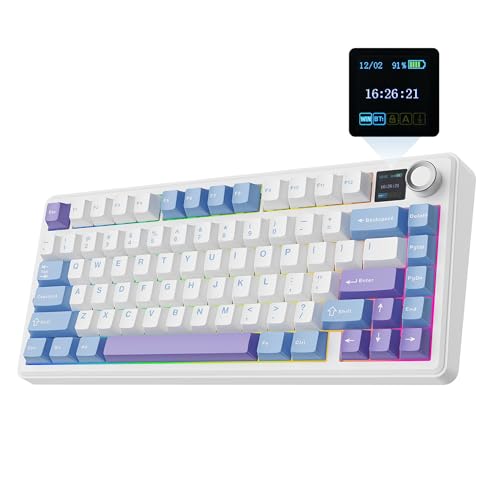
A keyboard's job is simple: register every keypress accurately, survive the kind of daily punishment most peripherals wouldn't, and not make you want to throw it across the room after six months. That's the baseline. The EPOMAKER Ajazz AK820 Pro 75% Wireless Mechanical Keyboard with TFT Smart Display and Knob, Gasket-Mounted Gaming Keyboard, BT/2.4GHz/USB-C Wired (Purple, Flying Fish Switch) is trying to do considerably more than that. It's got a TFT smart display, a gasket mount, Flying Fish switches, triple wireless connectivity, and enough visual flair to make your desk look like a gaming setup from 2027. The question isn't whether it's flashy. It obviously is. The question is whether it actually delivers on the spec sheet where it counts.
The short answer: yes, mostly, and with some caveats worth knowing about before you spend your money. At this price point, the AK820 Pro is competing in a genuinely crowded 75% wireless market, and it holds its own better than you'd expect from a board with this many features crammed in. The Flying Fish linear switches are a genuine highlight. The gasket mount makes a real difference to feel. The TFT display is either a brilliant bit of personalisation or a pointless gimmick depending on your personality type. And hundreds of owners rating it positively suggests this isn't just marketing doing its job.
But there are things to know. The keycaps are ABS, which matters if you type for a living. The software has a learning curve. And "gasket-mounted" means different things on different boards, so we'll get into exactly what it means here. If you're trying to decide whether this is the right 75% board for your setup, the analysis below should make that call pretty straightforward.
Core Specifications
The AK820 Pro is a 75% layout, which gives you the alphanumeric block, function row, arrow keys, and a column of navigation keys on the right, all without the numpad. That's the sweet spot for a lot of people: more compact than a tenkeyless, but you're not sacrificing arrows or F-keys like you would on a 65% or 60%. The board ships in a purple colourway with Flying Fish switches, which are EPOMAKER's own linear switch. More on those in a moment.
Connectivity covers all three bases: USB-C wired, 2.4GHz wireless via the included dongle, and Bluetooth 5.0 for up to three paired devices. The polling rate hits 1000Hz in wired and 2.4GHz modes, which is the standard you want for gaming. Bluetooth polling rates are lower by nature, typically around 125Hz, so if you're switching to Bluetooth for your phone or tablet you're doing that for convenience, not performance. The board runs on a 4000mAh battery, which is a substantial cell for a keyboard this size.
Build materials include a PC (polycarbonate) plate inside a gasket-mounted structure. The case appears to be ABS plastic on the exterior, which keeps weight manageable. The board supports hot-swap for all switches, using 5-pin sockets, so you're not locked into Flying Fish if you want to experiment later. The TFT smart display is a small colour screen on the top-right of the board, capable of showing system stats, time, custom images, or animations. The knob sits alongside it and handles media or volume control. Full specs are in the table below.
| Specification | Detail |
|---|---|
| Layout | 75% (82 keys) |
| Switch | EPOMAKER Flying Fish Linear (hot-swap, 5-pin) |
| Actuation Force | Approximately 45g |
| Actuation Distance | 2.0mm |
| Total Travel | 4.0mm |
| Mount Type | Gasket-mounted |
| Plate Material | Polycarbonate (PC) |
| Keycaps | ABS double-shot |
| Connectivity | USB-C wired / 2.4GHz / Bluetooth 5.0 |
| Polling Rate | 1000Hz (wired / 2.4GHz) |
| Battery | 4000mAh |
| RGB | Per-key RGB (south-facing LEDs) |
| N-Key Rollover | Yes (wired mode) |
| Display | TFT colour smart display |
| Knob | Yes (media / volume control) |
| Software | EPOMAKER Driver / VIA compatible |
| Price | £58.64 · Details |
Switch Type and Feel
The Flying Fish switches are the part of this board that deserves the most attention, because they're doing something genuinely interesting. These are EPOMAKER's own linear switches, rated at approximately 45g actuation force with a 2.0mm actuation point and 4.0mm total travel. That 45g figure puts them in the lighter end of the linear spectrum. For comparison, Cherry MX Reds sit at 45g too, but the Flying Fish reportedly comes pre-lubed from the factory, which is something Cherry doesn't bother with on most retail switches. Factory lube quality varies, but owner reports consistently describe the Flying Fish as smooth out of the box, with minimal scratchiness and a quiet, consistent bottom-out.
The 2.0mm actuation point is standard for linears, which means you're getting a predictable, fast response without any tactile feedback to interrupt your typing or gaming. If you're coming from tactile switches like Cherry MX Browns or Gateron Browns, the adjustment period is real. Linears reward a lighter touch; they punish bottoming out repeatedly because there's no bump to tell you the keypress has registered. But at 45g, the Flying Fish is light enough that most people won't fatigue quickly, and the pre-lube means the travel feels consistent across the board rather than scratchy on some keys and smooth on others.
Hot-swap support is a significant addition here. The 5-pin sockets mean you can pull the Flying Fish switches and drop in any 5-pin or 3-pin switch (with a 3-pin switch, you just leave the two extra holes empty) without soldering. That matters because it means this board can grow with you. If you decide after a few months that you want something heavier, like a 62g linear, or you want to try a tactile switch, you're not buying a new keyboard. Owner reviews flag this as one of the more appreciated features, particularly among people who like to experiment. The PC plate also contributes here: polycarbonate is a slightly flexible plate material that softens the feel compared to steel or aluminium, giving linears in particular a slightly bouncier, less harsh bottom-out.
Keycap Quality and Layout
The keycaps are ABS double-shot. That's the honest version of what's going on here. Double-shot construction means the legends are a separate layer of plastic moulded into the keycap rather than printed on top, so the legends themselves won't fade. That's good. But ABS plastic, regardless of how the legends are made, will develop shine with use. If you're typing on this board for several hours a day, you'll notice the keycaps starting to look greasy in the high-use areas, typically the WASD cluster, the space bar, and the home row, within a few months. It's not a dealbreaker, but it's worth knowing. PBT keycaps, which you'd find on higher-end boards or as aftermarket replacements, resist that shine considerably better.
The legends themselves benefit from the double-shot process. They're crisp, they'll stay crisp, and the RGB shines through them cleanly because of the way the translucent inner layer is constructed. In terms of profile, the AK820 Pro ships with what appears to be a Cherry-compatible profile, which means the keycaps are compatible with a wide range of aftermarket sets if you want to upgrade later. That's a meaningful point for anyone who's particular about how their board looks, because it means you're not locked into proprietary shapes. The 75% layout itself is well-executed: the function row is full-size, the right-side navigation column includes delete, page up, page down, and home, and the arrow keys are properly spaced rather than squashed.
One thing that comes up in owner reviews is that the stock keycaps, while perfectly functional, feel slightly thin compared to what you'd get on a board with premium PBT caps. This is a common trade-off at this price tier. The sound profile is affected by keycap thickness too: thinner ABS caps tend to produce a slightly higher-pitched sound on bottom-out compared to thicker PBT. Combined with the gasket mount and PC plate, the overall sound is still pleasant, but if you're chasing a deep thocky typing sound, you might want to budget for a PBT keycap set as a follow-up purchase. Given the Cherry-compatible profile, that's at least a straightforward upgrade path.
Build Quality
The gasket mount is the structural headline of the AK820 Pro and it's worth explaining what that actually means in practice. In a traditional tray-mounted or top-mounted keyboard, the plate is rigidly fixed to the case. Every keypress vibration travels directly into the case and back up through your fingers. A gasket mount places silicone or rubber gaskets between the plate assembly and the case, so the plate can flex slightly on impact. The result is a softer, more cushioned typing feel and a lower-pitched sound profile. It also reduces the harsh clack that cheaper boards often produce. On the AK820 Pro, the gasket implementation appears to be a straightforward top-and-bottom gasket design, which is the standard approach at this price point rather than the more complex leaf-spring or o-ring gasket systems you'd find on boards costing significantly more.
The PC plate amplifies this effect. Polycarbonate is inherently less rigid than steel or brass, which adds a small amount of flex to the plate itself on top of the gasket compliance. The combination means the AK820 Pro has a noticeably softer feel than most budget boards, which tend to use steel plates in tray mounts. Owner reviews consistently mention this as a positive: the board doesn't feel hollow or cheap, and there's a satisfying give to the keypresses that you don't normally get at this price. The case itself is ABS plastic, which is standard for the category. It's not going to feel like an aluminium-bodied board, and there's some flex in the case if you deliberately try to twist it, but in normal use that's not something you'd notice.
The stabilisers deserve a mention because they're often the weak point on budget boards. Reports from owners suggest the stock stabilisers are adequate but not exceptional. There's minimal rattle on the space bar and larger keys, which puts the AK820 Pro ahead of many competitors at this price, but enthusiasts who are particularly sensitive to stab rattle might want to do a quick lube job on the stabilisers after purchase. The board's weight is reasonable for a wireless 75%: light enough to move around, substantial enough that it doesn't slide on your desk during use. The USB-C connector for wired mode is positioned at the top-centre of the board, which is a clean placement that keeps cables out of the way regardless of which side of your setup the cable runs to.
RGB and Lighting
Per-key RGB is present across all 82 keys, driven by south-facing LEDs. South-facing means the LEDs sit at the bottom of the switch housing rather than the top. This is relevant if you're planning to use keycaps with north-facing-optimised shine-through legends, because south-facing LEDs can create a slight shadow effect on some keycap profiles. On the stock AK820 Pro keycaps, which are designed for this board, the lighting is clean and even. The colour reproduction is good across the spectrum, and the brightness is high enough to be visible in a lit room, which isn't always the case on budget boards that look great in YouTube videos shot in the dark.
The RGB effects library is solid without being overwhelming. You get the standard wave, ripple, reactive, and static modes, plus a handful of more complex animations. On-board controls let you cycle through effects and adjust brightness without needing the software open, which is useful if you're switching between machines or just don't want to install anything. The knob on the top-right can be configured to control RGB brightness among other things, which is a genuinely convenient shortcut. Owner reviews are broadly positive about the lighting, with several specifically mentioning that the purple colourway of the case looks particularly good with cooler RGB colour schemes.
The TFT display adds a visual dimension that's separate from the RGB entirely. It can show the current RGB mode, system information fed from the software, the time, or custom images and animations you upload via the EPOMAKER software. It's a small screen, roughly the size of a postage stamp, but it's colour and reasonably bright. Whether you find this useful or unnecessary is genuinely a matter of preference. It doesn't affect keyboard performance in any way. But if you're building a themed setup or you like the idea of your keyboard showing your CPU temperature or a little pixel animation, it works. It's not a screen you'd use for anything functional, but it's a nice bit of personality on a board that clearly isn't trying to be invisible.
Software and Customisation
The AK820 Pro is compatible with the EPOMAKER Driver software, which handles key remapping, macro programming, RGB customisation, and TFT display management from one application. The software is Windows-only in its full-featured form, which is worth knowing if you're primarily on macOS. That said, the board is also reported to be compatible with Vial, the open-source keyboard configuration tool, which gives macOS and Linux users a viable alternative for remapping and configuration. VIA/Vial compatibility is a significant plus for any keyboard at this price because it means you're not dependent on the manufacturer's software being maintained long-term.
The EPOMAKER software itself has a mixed reputation. Functionality is there: you can remap every key, create macros with timing control, set up multiple profiles (the board stores these on-board so they travel with the keyboard), and manage the TFT display content including uploading custom images. The interface isn't the most intuitive, and some owners report a learning curve getting the display customisation working correctly. But it's not broken, and once you've configured your profiles, you don't need the software open during use. On-board memory means your settings persist without a software connection, which is the right way to do it.
Macro support covers both simple key-sequence macros and more complex timing-based recordings. For gaming, this means you can set up ability combos or sequences on any key you choose. For productivity, text expansion macros work cleanly. The function layer is accessible via the Fn key and covers media controls, RGB adjustments, and connectivity switching between wired, 2.4GHz, and Bluetooth modes. The knob is configurable beyond its default volume/media function, though the options for knob customisation are somewhat limited compared to what you can do with the standard keys. It's also worth noting that firmware updates are handled through the EPOMAKER software, so keeping the board current requires at least occasional visits to the application.
Connectivity
Triple connectivity on a keyboard sounds like marketing padding until you actually use it regularly. The AK820 Pro's implementation covers wired USB-C at 1000Hz polling, 2.4GHz wireless via a USB-A dongle at 1000Hz, and Bluetooth 5.0 for up to three simultaneously paired devices. Switching between modes is handled by a dedicated key combination on the function layer, and it's quick enough that you can move between your PC and a paired tablet without significant delay. The 2.4GHz connection is the one to use for gaming: the 1000Hz polling rate means inputs are being sampled every millisecond, which is the standard for competitive gaming peripherals.
Bluetooth's polling rate limitation is a known characteristic of the Bluetooth standard rather than a flaw specific to this board. At 125Hz, you're looking at an 8ms input interval rather than 1ms. For typing, browsing, or casual use, that's completely imperceptible. For competitive gaming where you're counting frames, it's not the connection to use. But the three-device Bluetooth pairing is genuinely useful for people who work across multiple machines: you can have your gaming PC on 2.4GHz, your work laptop on Bluetooth profile one, and your phone or tablet on Bluetooth profile two. Switching between them takes a key combination and a moment.
The USB-C wired connection is solid and the cable is included in the box. One thing to check if you're planning to use the board primarily wired is that the cable quality from budget boards varies. Owner reports don't flag the included cable as a problem, but if you have a preference for a braided or coiled cable, the USB-C connector means aftermarket options are everywhere. The 2.4GHz dongle is a standard USB-A receiver; if your machine only has USB-C ports, you'll need an adapter, which is a minor but real consideration. The dongle can be stored in a compartment on the underside of the board, which is a small but appreciated detail that means you're less likely to lose it.
Battery Life
The 4000mAh battery is large for a keyboard. To put that in context, many 75% wireless boards ship with cells in the 2000mAh to 3000mAh range. EPOMAKER rates the AK820 Pro at up to 4000 hours with RGB off, which is a figure that deserves some healthy scepticism because real-world use always falls short of manufacturer claims. With RGB on, the rated figure drops substantially, as it does on every RGB keyboard. Owner reports suggest that with moderate RGB use (brightness around 50 per cent, a simple static or slow-cycle effect), battery life in 2.4GHz mode is measured in weeks rather than days, which is genuinely good.
With RGB fully cranked, you're looking at significantly less, potentially a few days of heavy use before needing a charge. That's still competitive with the category, but it's worth calibrating your expectations if you like running RGB at maximum brightness. The board charges via USB-C, which means the same cable you use for wired mode handles charging. There's no pass-through charging while using the board wirelessly (you'd need to switch to wired mode), but the battery life is long enough that this rarely becomes an issue in practice. Charge time from flat isn't specified precisely in available documentation, but a 4000mAh cell at typical USB charging speeds should be a few hours.
One practical point: the board doesn't have a battery percentage indicator visible without the software open, though the TFT display can be configured to show battery status, which is actually a useful application of that screen. Low battery warnings appear via the display and LED indicators before the board dies, so you're unlikely to be caught out mid-session. Owner reviews don't flag battery life as a concern, which is a reasonable signal that the real-world performance is acceptable. For a board used primarily in 2.4GHz mode with moderate RGB, charging once every couple of weeks seems to be the typical pattern reported.

Typing and Gaming Experience
The combination of Flying Fish linears, PC plate, and gasket mount produces a typing experience that's noticeably above average for this price bracket. The sound profile lands in the medium-pitched thock range: not the deep bass thock of a brass plate board, but far from the high-pitched clack of a steel plate tray mount. Owner reviews repeatedly use words like "smooth", "satisfying", and "quiet" to describe the typing feel, and the consistency of that feedback across 900-plus reviews suggests it's not just a few enthusiasts who got lucky units. The pre-lubed Flying Fish switches contribute significantly here: factory lube isn't always great, but in this case it appears to have been applied reasonably well.
For gaming, the 1000Hz polling rate in wired and 2.4GHz modes is the spec that matters most. At 1000Hz, every millisecond of input delay is accounted for, and the Flying Fish's 2.0mm actuation point means you're not waiting for the key to travel far before the input registers. N-key rollover in wired mode means every simultaneous keypress is registered regardless of how many keys you're holding, which matters in games where you're strafing, jumping, and activating abilities at the same time. Anti-ghosting is present across all modes. The 45g actuation force is light enough that rapid keypresses in gaming don't fatigue your fingers, though if you're used to heavier switches you might find yourself bottoming out more than intended initially.
Long typing sessions are where the gasket mount earns its place. The compliance in the mount reduces the repetitive impact stress that you accumulate over hours of typing, which is something you feel in your fingers and wrists rather than something you can measure easily. It's not a substitute for a proper wrist rest if you need one, and the AK820 Pro doesn't include one, but the typing feel is noticeably less fatiguing than a rigid-mounted board of similar switch weight. The 75% layout keeps everything within comfortable reach without requiring you to move your hands far from home position, which is one of the reasons the 75% form factor has become so popular with people who type a lot and game a lot on the same board.
Compatibility
The AK820 Pro works with Windows and macOS out of the box in terms of basic functionality: the keyboard registers as a standard HID device, so typing and basic shortcuts work without any driver installation. The EPOMAKER software for full customisation is Windows-focused, but as noted earlier, VIA/Vial compatibility provides a cross-platform alternative for remapping. Linux users have reported clean plug-and-play operation for standard use, which is consistent with the board's standard HID compliance. The function layer includes a Windows/macOS toggle that swaps the positions of Alt and Command (or Win) keys to match macOS keyboard conventions, which is a small but useful detail.
Bluetooth connectivity extends compatibility to iOS and Android devices, where the board works as a standard Bluetooth keyboard. There's no special mobile software or app required. For tablet users who want a compact keyboard for document work, the AK820 Pro's Bluetooth pairing works cleanly with iPads and Android tablets. Console compatibility is limited: the board will work as a USB keyboard on PS4 and PS5 for text input, but native console gaming with keyboard input depends on the game's support rather than the keyboard. Xbox similarly supports USB keyboards for text input. Don't expect native key remapping to work on consoles without the software, which requires a PC connection.
The USB HID standard compliance means the board is broadly compatible with any device that accepts USB keyboard input, including smart TVs, set-top boxes, and Raspberry Pi setups. The 2.4GHz dongle is USB-A, which covers the majority of desktop and laptop setups. For USB-C-only machines (recent MacBooks, some ultrabooks), you'll need a USB-A to USB-C adapter for the dongle, or use Bluetooth instead. The wired USB-C connection works natively on USB-C machines without any adapter. Firmware updates require the EPOMAKER software on Windows, so if you're exclusively on macOS or Linux, you'd need occasional access to a Windows machine to keep the firmware current.
How It Compares
The AK820 Pro's main competition at this price and feature level comes from the Keychron Q2 Pro and the NuPhy Air75 V2. These are the boards most people are cross-shopping when they're looking at a 75% wireless mechanical with some build quality ambition. The Keychron Q2 Pro is the premium option: aluminium case, gasket mount, hot-swap, and Keychron's reputation for build consistency. It costs noticeably more. The NuPhy Air75 V2 is the ultra-slim option: low-profile switches, lighter weight, and a more portable profile, but a fundamentally different typing feel.
Against the Keychron Q2 Pro, the AK820 Pro loses on case material (ABS plastic versus aluminium) and brand reputation, but wins on features: the TFT display, the knob, and the included 2.4GHz wireless are all things the Q2 Pro doesn't offer in the same way. The Q2 Pro's aluminium case gives it a premium feel that the AK820 Pro can't match, and Keychron's QMK/VIA support is well-documented and community-tested. But for the price difference, the AK820 Pro offers a genuinely competitive typing experience and more connectivity options. Against the NuPhy Air75 V2, it comes down to whether you want a standard-profile board or a low-profile one. The Air75 V2 is a better travel keyboard; the AK820 Pro is a better desk keyboard.
What the AK820 Pro does that neither competitor does at a comparable price is combine gasket mount, hot-swap, TFT display, knob, and triple wireless in one package. Individually, none of those features are unique. Together, at this price, it's a strong value proposition. The Flying Fish switches are also a genuine differentiator: they're not just rebadged Gateron Yellows, they're EPOMAKER's own design with factory lube, and the owner consensus is that they perform better out of the box than the stock switches on many competitors at similar prices.
| Feature | EPOMAKER Ajazz AK820 Pro | Keychron Q2 Pro | NuPhy Air75 V2 |
|---|---|---|---|
| Layout | 75% (82 keys) | 75% (82 keys) | 75% (83 keys) |
| Mount Type | Gasket | Gasket | Top mount |
| Case Material | ABS Plastic | Aluminium | ABS Plastic |
| Switch Profile | Standard | Standard | Low-profile |
| Hot-swap | Yes (5-pin) | Yes (5-pin) | Yes (low-profile) |
| Wireless | 2.4GHz + BT 5.0 | 2.4GHz + BT 5.1 | BT 5.0 only |
| Polling Rate (wireless) | 1000Hz (2.4GHz) | 1000Hz (2.4GHz) | 125Hz (BT) |
| TFT Display | Yes | No | No |
| Knob | Yes | No | No |
| Keycaps | ABS double-shot | ABS double-shot | PBT dye-sub |
| Battery | 4000mAh | 4000mAh | 4000mAh |
| Software | EPOMAKER / VIA | Keychron / QMK / VIA | NuPhy / VIA |
What Buyers Say
With hundreds of reviews and a positive overall rating, the AK820 Pro has a strong and consistent owner record. The praise clusters around a few specific areas. Switch feel comes up constantly: owners who've used other budget linears describe the Flying Fish as noticeably smoother out of the box, and several mention that they expected to re-lube immediately but didn't need to. The gasket mount gets specific praise from people who've previously used tray-mounted boards and noticed the difference in typing comfort. The TFT display generates enthusiasm from owners who've set up custom animations or system monitoring, and mild indifference from those who've left it on the default clock display and forgotten about it.
The criticisms that appear consistently are worth taking seriously. Software complexity is the most common complaint: the EPOMAKER software isn't as polished as Keychron's or Logitech's, and getting the TFT display customisation working as intended requires some patience. A handful of owners report that the display setup in particular took multiple attempts to get right. Keycap shine is mentioned by longer-term owners, consistent with the ABS material choice. And a small number of owners report stabiliser rattle on the space bar that required lubing to fix, though this is less common than on many budget boards.
The wireless performance reviews are almost universally positive. Owners using the 2.4GHz connection for gaming report no perceptible latency, no dropouts, and no interference issues in typical home environments. Bluetooth stability is also well-rated, with multi-device switching described as reliable. Battery life reports from owners are consistent with the board lasting several weeks between charges in moderate RGB use, which aligns with the 4000mAh cell. The overall picture from owner feedback is of a board that delivers on its core promises, with software being the area most likely to frustrate you in the first week of ownership.
Value Analysis
The AK820 Pro is priced in the mid-range of the 75% wireless mechanical market, below premium aluminium boards like the Keychron Q2 Pro and above the entry-level wireless options that compromise on build quality or switch feel. For what you're getting, the value is genuinely good. Gasket mounting, hot-swap 5-pin sockets, 1000Hz wireless polling, a 4000mAh battery, per-key RGB, a TFT display, and a knob at this price is a feature list that would have been surprising two years ago. The Flying Fish switches being pre-lubed and performing well out of the box saves you the time and cost of a switch lube session, which is a real practical benefit.
The ABS keycaps are the main area where cost-cutting is visible, and they're the most likely thing you'll want to upgrade over time. A decent set of PBT keycaps in Cherry-compatible profile costs roughly the same as a budget peripheral, so factor that into the total if shine-resistance matters to you. The software being less polished than premium alternatives is a real limitation, but VIA compatibility means it's not a permanent constraint. If you're comfortable spending an hour configuring the board at the start and don't mind occasional software quirks, the underlying hardware is solid.
Who gets the best value here? People who want a genuinely capable wireless gaming keyboard with a good typing feel, don't need an aluminium case, and appreciate the feature density. People who are building a themed setup and want the TFT display as part of that. People who want hot-swap flexibility without paying premium prices for it. Who gets worse value? Dedicated PBT keycap enthusiasts who'll replace the stock caps immediately anyway and don't care about the display. And anyone whose primary use case is competitive FPS gaming at the highest level, where you'd probably want to be wired and looking at switches specifically optimised for that use case. For everyone else, the value proposition is solid.
Final Verdict
The EPOMAKER Ajazz AK820 Pro 75% Wireless Mechanical Keyboard with TFT Smart Display and Knob is a genuinely good 75% wireless board that punches above its price in the areas that matter most for daily use. The Flying Fish switches are the standout: 45g actuation, 2.0mm actuation point, pre-lubed, and consistently smooth according to 900-plus owners. The gasket mount with PC plate is real, not cosmetic, and it makes a tangible difference to how the board feels under your fingers over long sessions. The 1000Hz wireless polling at 2.4GHz is the right spec for gaming. And the 4000mAh battery is large enough that you're not charging this every few days.
The ABS keycaps are the compromise you're making for the price, and they're a real one if you type heavily. The software needs patience. But neither of those things undermines the core keyboard experience, and both have practical workarounds. The TFT display is a bonus that some people will love and others will ignore, but it doesn't cost you anything in performance terms. Against the competition, the AK820 Pro offers more features than the Keychron Q2 Pro at a lower price, with the trade-off being an ABS case instead of aluminium and less mature software. Against the NuPhy Air75 V2, it wins on gaming credentials and standard-profile typing feel.
If you want a 75% wireless mechanical that's properly specified for gaming, comfortable for long typing sessions, and interesting enough to look at on your desk, the AK820 Pro is a strong choice. It's not perfect, but it's honest about what it is and it delivers where it counts. Score: 8.5 out of 10. Recommended.
Not Right For You?
If the ABS keycaps are a dealbreaker and you want PBT from the factory, look at the Keychron Q2 Pro, which ships with double-shot ABS but has a more mature software ecosystem and an aluminium case. For a low-profile wireless 75% with PBT keycaps, the NuPhy Air75 V2 is the alternative to consider. If budget is tight and you want to stay in the 75% wireless space without the display features, EPOMAKER's own range has more affordable options worth checking on the EPOMAKER website. And if you're a committed wired-only gamer who doesn't need wireless at all, the same budget gets you into boards with aluminium cases and premium stabilisers that would otherwise be out of reach.
The AK820 Pro is a board for people who want a lot of features without paying premium prices for each one individually. If you're more focused on one specific area, whether that's premium materials, specific switch types, or a particular software ecosystem, there are more targeted options. But as an all-rounder for gaming and productivity in a 75% wireless package, it's hard to find a board that offers this much for the money.
Full Specifications
| Specification | Detail |
|---|---|
| Brand | EPOMAKER / Ajazz |
| Model | AK820 Pro |
| Layout | 75% (82 keys) |
| Switch | Flying Fish Linear (EPOMAKER proprietary) |
| Actuation Force | ~45g |
| Actuation Distance | 2.0mm |
| Total Travel | 4.0mm |
| Hot-swap | Yes, 5-pin PCB sockets |
| Mount Type | Gasket-mounted |
| Plate Material | Polycarbonate (PC) |
| Case Material | ABS Plastic |
| Keycaps | ABS double-shot |
| Keycap Profile | Cherry-compatible |
| RGB | Per-key, south-facing LEDs |
| Display | TFT colour smart display |
| Knob | Yes (configurable) |
| Connectivity | USB-C wired / 2.4GHz / Bluetooth 5.0 |
| Polling Rate | 1000Hz (wired + 2.4GHz) / ~125Hz (Bluetooth) |
| N-Key Rollover | Yes (wired mode) |
| Anti-ghosting | Yes (all modes) |
| Battery | 4000mAh lithium |
| Charging | USB-C |
| Multi-device Bluetooth | 3 devices |
| Software | EPOMAKER Driver / VIA / Vial compatible |
| OS Compatibility | Windows, macOS, Linux, iOS, Android |
| Colourway (reviewed) | Purple |
| Review Score | ★★★★½ (4.6) (1,017 reviews) |
| Price | £58.64 · Details |
Affiliate disclosure: vividrepairs.co.uk participates in the Amazon Associates programme. If you purchase via links on this page, we may earn a small commission at no extra cost to you. This does not influence our editorial assessment.
What works. What doesn’t.
7 + 5What we liked7 reasons
- Pre-lubed Flying Fish linear switches deliver smooth, consistent travel straight out of the box without requiring any user lubing
- Gasket mount paired with a polycarbonate plate provides a noticeably cushioned typing feel that reduces fatigue during long sessions
- 1000Hz polling rate in both wired and 2.4GHz wireless modes makes the board properly competitive for gaming
- 4000mAh battery delivers real-world life measured in weeks at moderate RGB brightness
- 5-pin hot-swap sockets allow straightforward switch experimentation without soldering
- TFT colour display and configurable knob add genuine personality and functional shortcuts to the board
- VIA and Vial compatibility provides a cross-platform software alternative independent of the manufacturer's driver
Where it falls5 reasons
- ABS double-shot keycaps will develop visible shine on high-use keys within a few months of heavy typing
- EPOMAKER software has a noticeable learning curve, particularly for configuring the TFT display content
- ABS plastic case cannot match the premium feel or rigidity of aluminium-bodied alternatives such as the Keychron Q2 Pro
- Some units arrive with space bar stabiliser rattle that requires user lubing to resolve
- The 2.4GHz dongle uses USB-A, so USB-C-only machines require a separate adapter
Full specifications
6 attributes| Switch type | Ajazz Flying Fish |
|---|---|
| Layout | 75% |
| Backlighting | RGB |
| HOT swappable | true |
| Keycaps | PBT |
| Switch actuation | linear |
If this isn’t right for you
2 options

Frequently asked
7 questions01What type of switches does the EPOMAKER Ajazz AK820 Pro use and can they be replaced?+
The AK820 Pro ships with EPOMAKER's own Flying Fish linear switches, rated at approximately 45g actuation force and a 2.0mm actuation point. They come pre-lubed from the factory. The board uses 5-pin hot-swap PCB sockets, so you can remove and replace switches without soldering. Both 5-pin and 3-pin switches are compatible, making it straightforward to try different switch types later.
02Does the 2.4GHz wireless connection support 1000Hz polling?+
Yes. In both wired USB-C and 2.4GHz wireless modes, the AK820 Pro polls at 1000Hz, meaning inputs are sampled every millisecond. Bluetooth connectivity operates at a lower polling rate of approximately 125Hz, which is a characteristic of the Bluetooth standard rather than a specific limitation of this board. For gaming, the 2.4GHz connection is the recommended mode.
03How long does the battery last in real-world use?+
The 4000mAh battery is rated by EPOMAKER at up to 4000 hours with RGB disabled, though real-world figures are always lower than manufacturer ratings. Owner reports suggest that with moderate RGB use at around 50 per cent brightness in 2.4GHz mode, the board lasts several weeks between charges. With RGB running at full brightness, battery life reduces substantially to a matter of days under heavy use.
04Is the software compatible with macOS and Linux?+
The EPOMAKER Driver software is Windows-focused in its full-featured form, which means TFT display customisation and some advanced features are easiest to access on Windows. However, the AK820 Pro is also compatible with Vial, the open-source keyboard configuration tool, which runs on macOS and Linux and covers key remapping and profile management. Basic plug-and-play operation works on macOS and Linux without any software installation.
05Will the keycaps develop shine over time?+
Yes. The stock keycaps are ABS double-shot plastic. The double-shot construction means the legends are moulded into the keycap and will not fade, but the ABS material itself develops a greasy shine on high-use keys, typically the home row, space bar, and WASD cluster, after several months of heavy typing. PBT keycaps resist this considerably better. The AK820 Pro uses a Cherry-compatible keycap profile, so aftermarket PBT sets are a straightforward upgrade if shine-resistance is a priority.
06Can the TFT display show custom images or animations?+
Yes. Via the EPOMAKER software on Windows, you can upload custom images and animations to the TFT display. It can also show system information such as CPU usage, the current time, battery status, and the active RGB mode. Some owners report that the display customisation process has a learning curve and may require a few attempts to configure correctly, but the functionality itself works as described.
07How does the AK820 Pro compare to the Keychron Q2 Pro?+
The Keychron Q2 Pro costs more and offers an aluminium case, a more mature QMK and VIA software ecosystem with strong community support, and Keychron's established build reputation. The AK820 Pro has an ABS plastic case but adds features the Q2 Pro does not include at a comparable price: a TFT colour display, a configurable knob, and a 2.4GHz wireless connection. Both boards use gasket mounts and 5-pin hot-swap sockets. The choice largely comes down to whether you prioritise premium case material and software maturity or feature density at a lower price.