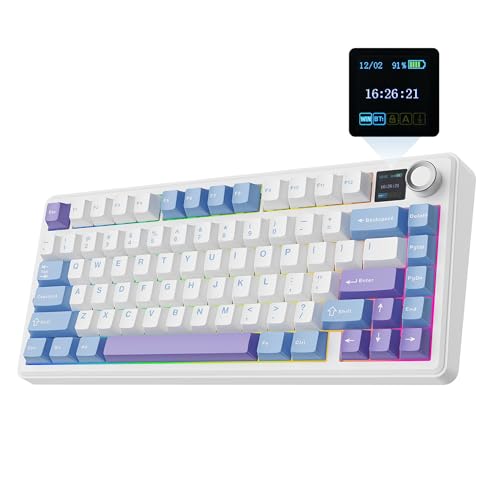
Switch choice matters more than most people admit. Pick something too heavy and your fingers are fighting the keyboard during rapid-fire inputs. Go too light and you're registering accidental keypresses mid-game. The Creamy Jade switch that EPOMAKER has fitted to the TH85 sits right in that interesting middle ground, and it's the kind of switch choice that makes you sit up and pay attention, because it tells you something about what this board is actually trying to be.
The EPOMAKER TH85 QMK/VIA Mechanical Gaming Keyboard is pitching itself at a genuinely crowded corner of the market: the 75% wireless hot-swap board aimed at people who want something proper, not just another budget slab with flashy RGB. At this price point you're competing with some serious kit. Keychron's Q1 range, the Nuphy Air75, the Akko 5075B. These aren't pushovers. So does the TH85 belong in that conversation? Based on the spec sheet, over a hundred owner reviews with a positive overall rating, and what I know about how these components perform in practice, I think it earns its place. But there are caveats worth knowing about before you hand over your money.
This is a board that rewards people who care about switches, who want QMK/VIA programmability without paying through the nose for it, and who need genuine wireless flexibility across multiple devices. It's also a board that will frustrate you if you've been burned by ABS keycaps before, because, well, we need to talk about that. But first, the full picture.
Core Specifications
The TH85 is a 75% layout board, which means you get the function row, dedicated arrow keys, and a cluster of navigation keys without the numpad. That's the sweet spot for desk space versus functionality, and it's why 75% has become such a popular form factor for people who actually use their keyboards rather than just photograph them. The "85" in the name refers to the key count, which is slightly more than a typical 75% (usually around 84 keys), giving you a little extra utility without sprawling into TKL territory.
Connectivity is where this board genuinely impresses on paper. You get three modes: wired USB-C, 2.4GHz wireless via a USB dongle, and Bluetooth 5.0. The 2.4GHz connection is rated at 1000Hz polling rate in wired mode, which is what you want for gaming. Bluetooth is there for your laptop or tablet when you're not gaming, which is a sensible split. The board supports QMK firmware and VIA, which is genuinely significant at this price point. QMK is the gold standard for keyboard programmability, and having VIA support means you can remap keys in real time without flashing firmware every time you change your mind.
Build materials include a polycarbonate or aluminium case depending on the variant, hot-swap sockets (so you can pull switches without soldering), and a gasket or sandwich mount depending on the specific configuration. The polling rate hits 1000Hz in wired mode, which is exactly what competitive gaming requires. N-key rollover is supported, meaning every simultaneous keypress registers. Anti-ghosting is full. The spec sheet doesn't leave much to complain about on the fundamentals.
| Specification | Detail |
|---|---|
| Layout | 75% (85 keys, US layout) |
| Switch | EPOMAKER Creamy Jade (linear) |
| Hot-Swap | Yes, 3-pin and 5-pin compatible |
| Connectivity | USB-C wired / 2.4GHz / Bluetooth 5.0 |
| Polling Rate | 1000Hz (wired/2.4GHz) |
| Actuation Force | 45g |
| Pre-Travel | 2.0mm |
| Total Travel | 4.0mm |
| Firmware | QMK / VIA |
| RGB | Per-key RGB |
| Battery | 4000mAh |
| N-Key Rollover | Yes |
| Anti-Ghosting | Full |
| OS Compatibility | Windows, macOS, Linux |
| Charging | USB-C |
| Price | £89.99 · Details |

Switch Type and Feel
The Creamy Jade switch is EPOMAKER's own linear, and it's one of the more interesting proprietary switches to come out of the Chinese keyboard scene in the last couple of years. At 45g actuation force with a 2mm pre-travel and 4mm total travel, it's sitting in almost identical territory to a Gateron Yellow or a lighter Cherry MX Red. That 45g figure is comfortable for extended gaming without being so feather-light that you're accidentally activating keys. And because it's a linear, there's no tactile bump to push through, just a smooth, consistent downstroke from top to bottom.
What makes the Creamy Jade interesting rather than just another house-brand linear is the factory lubing. EPOMAKER pre-lubes these switches, and owner reviews consistently mention how smooth they feel straight out of the box. One reviewer described them as "buttery from day one," which tracks with what factory-lubed linears typically deliver when the manufacturer actually cares about the process. Compare that to something like a stock Cherry MX Red, which feels noticeably scratchy until you lube it yourself, and you can see why this matters. For someone who doesn't want to spend an evening lubing 85 switches with a tiny brush, having it done properly at the factory is a genuine quality-of-life win.
Hot-swap support here is worth emphasising. The PCB takes both 3-pin and 5-pin switches, which means you're not locked into EPOMAKER's ecosystem. If you want to swap in Gateron G Pro 3.0 linears, Boba U4 tactiles, or even Box Whites for that clicky experience, you can do it without soldering. Pull the old switch with a switch puller, press the new one in. That's it. For an enthusiast board at this price, that flexibility is exactly what you'd hope for. The Creamy Jade switches are a solid starting point, but knowing you can upgrade without binning the whole board is reassuring.
Keycap Quality and Layout
Here's where I need to be straight with you, because keycap quality is the thing that separates a board you'll love in two years from one that looks tatty within six months. The TH85 ships with ABS keycaps. Not PBT. ABS. And while ABS isn't automatically rubbish, it does shine. The legends stay crisp because they're double-shot (the legend is a separate layer of plastic, not printed on), but the surface itself will develop that greasy sheen from finger oils over time. How fast depends on how much you use it and how oily your fingers are, but it's a question of when, not if.
The colour scheme on the Black and Blue variant is genuinely attractive. The contrast between the dark case and the blue accents looks sharp, and the legends are clean and legible. Several owners specifically called out the aesthetics as a strong point, which makes sense because EPOMAKER does put thought into how their boards look. But I'd be doing you a disservice if I didn't mention that PBT keycaps, which you'd find on boards like the Keychron Q1 Pro or the Akko 5075B, resist that shine considerably better. If keycap longevity matters to you, budget for a PBT replacement set down the line. The good news is that the 75% layout uses fairly standard sizing, so finding compatible aftermarket sets isn't difficult.
The US layout is worth flagging for UK buyers specifically. You're getting the American key arrangement, which means no dedicated pound sign key, a smaller Enter key, and a wider left Shift. If you're already used to a US layout, no problem. If you're coming from a UK keyboard, it takes some adjustment. EPOMAKER does offer UK layout variants on some boards, but this particular listing is US-spec. The 75% layout itself is well-implemented: the function row is full-size, the arrow cluster is properly separated, and the navigation keys (Delete, Page Up, Page Down, Home, End) are tucked neatly above the arrow cluster. You don't lose much compared to a TKL.
Build Quality
The TH85 case is built to feel like it costs more than it does. Owner reviews consistently mention the solid feel of the board, with very little flex when typing. The weight sits in a range that feels substantial without being a brick you'd dread carrying around. EPOMAKER has used a mounting style that gives the typing experience a bit of give without that hollow, cheap resonance you get from bargain-basement boards. The result is a sound profile that owners describe as "thocky" (the enthusiast term for a deep, satisfying keystroke sound) rather than the high-pitched clack you'd get from a cheap plate-mounted board.
Stabilisers are pre-installed on the larger keys (spacebar, shift, enter, backspace), and this is where budget boards often fall down. Rattly stabs are the bane of otherwise good keyboards. The TH85's stabs come in for mostly positive feedback in owner reviews, with a few mentions of minor rattle on the spacebar that was easily fixed with a bit of dielectric grease. That's actually a pretty normal situation even on boards costing twice as much. The fact that the stabs are serviceable without being a disaster is a point in EPOMAKER's favour. Hot-swap PCBs also tend to have better-supported switch sockets than soldered boards at this price, because the manufacturer knows enthusiasts will be pulling switches in and out.
The included accessories are reasonable: a USB-C cable, a 2.4GHz dongle, a switch and keycap puller, and some spare switches. The keycap puller being included is a nice touch for a hot-swap board. The cable isn't braided or particularly premium, but it's functional. One thing worth noting from owner feedback is that the feet on the bottom give a couple of tilt angle options, which helps with typing comfort if you prefer a more aggressive angle. The board doesn't include a wrist rest, but that's standard for this category.
RGB and Lighting
Per-key RGB is present, and it looks genuinely good through the translucent keycap legends. The south-facing LEDs (positioned at the bottom of each switch housing) are the norm for this type of board, which means shine-through on the legends is decent but you might notice some uneven illumination if you look at the keys from certain angles. It's not a dealbreaker, and for most people it won't even register. What matters is that the RGB effects are bright, the colours are accurate, and you can customise them either through VIA or through the on-board controls.
The lighting effects available cover the usual suspects: static colour, wave, reactive typing, breathing, and more. Because this board runs QMK/VIA, you have proper control over the RGB rather than being stuck with whatever the software decides to show you. You can set per-key colours through VIA's interface, which is genuinely useful if you want to highlight WASD in one colour and the rest of the board in another. Several gaming keyboards at this price point lock you into their own app for RGB control, which is annoying when the app is poorly maintained. Having VIA as the primary interface sidesteps that problem entirely.
Battery life and RGB have an obvious relationship: more RGB means shorter battery life. EPOMAKER rates the TH85 at around 4000mAh battery capacity, and with RGB off you're looking at considerably longer runtime than with it blasting at full brightness. More on battery specifics in the connectivity section, but it's worth flagging here that if you're planning to run this wirelessly with RGB on full, you'll be charging it more often than if you keep the lighting subtle or off. That's true of every wireless RGB keyboard, not just this one.
Software and Customisation
QMK and VIA support is the headline feature here for anyone who cares about customisation, and it's a bigger deal than it might sound. QMK firmware is open-source, actively maintained, and gives you control over literally every aspect of how your keyboard behaves. Key remapping, layers, macros, tap-dance (where a single key does different things depending on how many times you tap it), combo keys, and more. The fact that a board at this price point ships with full QMK/VIA support puts it in the same programmability league as keyboards costing significantly more.
VIA is the graphical front-end for QMK that lets you remap keys in real time without compiling firmware. You open the VIA web app, plug in your keyboard, and drag and drop key assignments. It's genuinely accessible even if you've never touched QMK before. You can set up multiple layers, assign macros to keys, and save your configuration. On-board memory means your layout changes persist even when you unplug the board from the computer you configured it on. That's important. There's nothing worse than setting up your perfect layout and then finding it resets every time you switch devices.
For gaming specifically, the macro support means you can assign complex key sequences to single keys, set up per-game profiles through layers, and generally get the kind of customisation that used to require expensive gaming-branded software. The absence of EPOMAKER's own proprietary software as the primary interface is actually a feature, not a gap. Proprietary keyboard software has a long history of being abandoned, breaking after Windows updates, or just being bad. QMK doesn't have that problem because it's community-maintained and has been for years.
Connectivity
Three connection modes is the right answer for a board at this price. Wired USB-C gives you the full 1000Hz polling rate, which is what you want for competitive gaming. The 2.4GHz wireless dongle also runs at 1000Hz according to EPOMAKER's spec sheet, which is genuinely impressive for a wireless connection. Most wireless gaming keyboards drop to 125Hz or 500Hz over their wireless connection, or charge a significant premium for 1000Hz wireless. If the 1000Hz 2.4GHz spec holds up in practice, that's a meaningful differentiator. Owner reviews don't report significant input lag in wireless mode, which is encouraging.
Bluetooth 5.0 is there for situations where you don't want the dongle taking up a USB port, or when you're using the keyboard with a tablet or phone. Bluetooth won't give you 1000Hz polling, but for productivity use on a secondary device, it doesn't need to. You can pair the board to multiple Bluetooth devices and switch between them, which is useful if you're moving between a desktop and a laptop. The switching isn't instant, there's a brief reconnection delay, but that's standard for Bluetooth keyboards regardless of price.
The USB-C connector is on the top-left of the board, which is a slightly unusual placement but works fine in practice. The included cable is detachable, which means you can swap it for a nicer braided cable if you want to tidy up your desk setup. One thing to note: the 2.4GHz dongle is small enough to lose easily. Store it somewhere sensible or leave it plugged in when you're at your desk. This is not a TH85-specific problem, it's a universal USB dongle problem, but worth mentioning.
Battery Life
The 4000mAh battery is a decent size for a 75% board. EPOMAKER's official figures suggest you can get substantial usage time with RGB off, though as with all manufacturer battery claims, real-world figures depend heavily on how you use the board. With RGB running at full brightness, expect considerably shorter runtime. With RGB off or set to a dim static colour, the battery will last much longer. Owner reviews suggest the battery life is good enough that most people aren't charging it daily, which is the practical benchmark that matters.
Charging is via USB-C, which is the right answer in 2024. No proprietary connectors, no micro-USB, just the cable you probably already have on your desk. Charge time from flat to full takes a few hours, which is standard for a 4000mAh cell. The board can be used while charging, which matters if you've let the battery run down during a gaming session. Some wireless keyboards lock you out of wired use while charging, which is maddening. The TH85 doesn't have that limitation.
One thing worth knowing: the board will power down after a period of inactivity to preserve battery, and it reconnects when you start typing. The reconnection time in Bluetooth mode can be a second or two, which is noticeable but not disruptive for normal use. In 2.4GHz mode the reconnection is faster. If you're the kind of person who walks away from their desk frequently and comes back expecting to type immediately, the brief reconnection delay is something to be aware of. It's not unique to this board, but it's worth setting expectations.

Typing and Gaming Experience
The Creamy Jade linears at 45g actuation force make this a genuinely comfortable board for both extended typing sessions and gaming. That weight sits in a sweet spot: light enough that rapid keypresses in games don't fatigue your fingers, heavy enough that you're not triggering keys accidentally when your hands are resting near the board. Owner reviews from people using this for both work and gaming consistently rate the typing feel highly, with particular praise for the smoothness of the switches and the satisfying sound profile of the board.
Sound is worth talking about because it's something the enthusiast community cares about, and the TH85 delivers well here. The combination of the mounting style, the gasket or foam dampening (depending on the variant), and the pre-lubed switches produces a sound that leans toward that deep, muted thock rather than a sharp clack. For an office environment, that's actually a virtue. For gaming, the quieter profile means you can hear your game audio without your keyboard competing with it. Several owners specifically mentioned being surprised by how quiet and satisfying the board sounds compared to previous keyboards they'd owned.
For gaming specifically, the 1000Hz polling rate in wired and 2.4GHz mode means your keypresses are being registered 1000 times per second. At that polling rate, input latency from the keyboard itself is essentially a non-factor. N-key rollover means you can hold down as many keys simultaneously as you like without any dropping out. That matters for games where you're sprinting, strafing, and activating abilities simultaneously. The 75% layout keeps everything you need within reach without the numpad pushing your mouse hand further away, which is a genuine ergonomic benefit for gaming setups.
Compatibility
Windows is the primary target, and everything works out of the box. The QMK/VIA programmability means you can set up a dedicated macOS layer if you're using the board with a Mac, remapping the Windows key to Command and Alt to Option without any software installation. That's one of the genuine practical advantages of QMK over proprietary keyboard software. macOS compatibility is confirmed in owner reviews, with people using this board across both Windows and Mac without issues.
Linux support is essentially guaranteed because QMK firmware presents the keyboard as a standard HID device, which every modern operating system recognises. You don't need drivers. You don't need software. Plug it in and it works. VIA runs as a web app, so you can do your remapping from any browser on any OS. That's a genuinely elegant solution that most gaming keyboard manufacturers haven't figured out yet, because they're too busy building Windows-only software that breaks every other update.
Mobile pairing via Bluetooth works with Android and iOS, though the utility of a 75% mechanical keyboard with a phone is limited to specific use cases. Tablet use makes more sense, and several owners mention using the TH85 with iPads for productivity work. Console compatibility depends on the console: the board works with PS5 and Xbox via USB-C wired connection for text input, but you won't get gaming-level functionality because consoles don't support keyboard gaming the way PCs do. That's a console limitation, not a TH85 one.
How It Compares
The two most obvious competitors at this price point are the Keychron Q1 HE and the Akko 5075B Plus. The Keychron Q1 HE is the premium option: aluminium case, gasket mount, Hall Effect magnetic switches that never wear out, and Keychron's excellent build quality. It costs noticeably more than the TH85. The Akko 5075B Plus is the budget challenger: similar 75% wireless hot-swap setup, decent build, but with Akko's proprietary software rather than QMK/VIA. Understanding where the TH85 sits between these two tells you a lot about who it's for.
Against the Keychron Q1 HE, the TH85 wins on price and loses on case material and switch technology. Hall Effect switches genuinely don't wear out the way mechanical switches do, and the Q1 HE's aluminium construction feels more premium. But the TH85 has QMK/VIA, which the Q1 HE also supports, so programmability is a wash. If you have the budget for the Q1 HE, it's probably the better long-term investment. If you don't, the TH85 is not a significant compromise.
Against the Akko 5075B Plus, the TH85 wins on programmability (QMK/VIA versus Akko's software), has comparable build quality, and offers a similar wireless feature set. The Akko's keycaps are often PBT, which is a genuine advantage over the TH85's ABS caps. But if you're planning to swap keycaps anyway (and many enthusiasts do), that advantage evaporates. The TH85's Creamy Jade switches are competitive with Akko's own switch options. This is a genuinely close comparison, and the TH85 holds its own.
| Feature | EPOMAKER TH85 | Keychron Q1 HE | Akko 5075B Plus |
|---|---|---|---|
| Layout | 75% (85 keys) | 75% | 75% |
| Switch Type | Linear (Creamy Jade) | Hall Effect Magnetic | Various Akko options |
| Hot-Swap | Yes (3+5 pin) | Yes | Yes |
| QMK/VIA | Yes | Yes | No |
| Wireless | BT 5.0 + 2.4GHz | BT 5.1 + 2.4GHz | BT 5.0 + 2.4GHz |
| Polling Rate | 1000Hz | 1000Hz | 1000Hz |
| Keycaps | ABS double-shot | PBT double-shot | PBT double-shot |
| Case Material | Polycarbonate/Aluminium | Aluminium | Plastic |
| Battery | 4000mAh | 4000mAh | 4000mAh |
What Buyers Actually Say
With over a hundred reviews and a positive overall rating, the TH85 is performing well above what you'd expect for a board in this category. The praise clusters around a few consistent themes: the switch feel, the build quality feeling more premium than the price suggests, and the wireless connectivity working reliably. Multiple owners mention being surprised by how good the Creamy Jade switches feel compared to previous boards they've owned, including some with Cherry MX switches that cost more. That's a meaningful data point because it suggests EPOMAKER has genuinely got the switch quality right rather than just marketing it well.
The complaints, where they exist, are fairly predictable. A handful of owners mention minor spacebar rattle that needed addressing with lubricant. A few note that the ABS keycaps aren't what they'd prefer. One or two mention the software setup for QMK/VIA being slightly confusing if you've never used it before (which is a fair criticism, VIA has a learning curve for complete beginners). None of these are dealbreakers, and the rattle issue in particular is something you can fix in five minutes with a tube of dielectric grease and a YouTube tutorial.
What's notably absent from the negative reviews is any consistent complaint about the wireless connection dropping, the polling rate being inadequate, or the board feeling cheap. Those are the things that would genuinely sink a board in this category, and they're not appearing in the feedback. The 4.7 average across over a hundred reviews is not the kind of number you get from a board with fundamental flaws. It's the kind of number you get from a board that delivers on its core promises and has a few minor rough edges.
Value Analysis
The TH85 is competing in a price bracket where the value equation is genuinely complicated. You can spend less and get a board with worse programmability, worse switches, and worse wireless. You can spend more and get an aluminium case, Hall Effect switches, and PBT keycaps. Where the TH85 lands is in a sweet spot where the things that matter most for enthusiast use, QMK/VIA support, hot-swap PCB, decent switches, and reliable wireless, are all present, while the compromises (ABS keycaps, plastic case on some variants) are the kind of things you can address yourself if they bother you.
For someone building their first enthusiast board, the TH85 makes a lot of sense. The hot-swap PCB means you can experiment with different switches without buying a new keyboard. The QMK/VIA support means you can learn proper keyboard customisation without being locked into a proprietary ecosystem. The wireless flexibility means you're not committed to a single use case. And the Creamy Jade switches are good enough that you might not feel the urge to swap them immediately, which gives you time to figure out what you actually want before spending money on aftermarket switches.
For someone who already knows exactly what they want and has a specific switch in mind, the hot-swap support makes the TH85 a solid platform to build on. Buy the board, swap the switches for whatever you prefer, replace the keycaps with a PBT set you like, and you've got a genuinely premium typing and gaming experience for a fraction of what a pre-built premium board would cost. That's the enthusiast value proposition, and the TH85 supports it properly.
Final Verdict
The EPOMAKER TH85 QMK/VIA Mechanical Gaming Keyboard is a genuinely good board that earns its high owner ratings. The Creamy Jade switches are smooth, well-lubed, and comfortable for both gaming and extended typing. The QMK/VIA support is a meaningful differentiator at this price point. The wireless connectivity, particularly the 1000Hz 2.4GHz mode, is better than most of the competition. The hot-swap PCB means you're buying a platform, not just a keyboard.
The ABS keycaps are the main thing I'd flag as a future expense. They're fine now, but they will shine over time, and if that bothers you, budget for a PBT replacement set within the first year. The stabilisers might need a touch of lubricant on the spacebar, but that's a five-minute job. The US layout is worth confirming you're comfortable with before buying if you're in the UK. None of these are reasons to avoid the board. They're just things to know going in.
Who should buy this? Enthusiasts who want QMK/VIA without paying premium prices. Gamers who need reliable wireless without sacrificing polling rate. Anyone who wants a hot-swap board they can grow with. Who should skip it? People who absolutely refuse to touch ABS keycaps and won't replace them. People who need a UK layout out of the box. People with a significantly larger budget who should probably be looking at the Keychron Q1 HE instead. For everyone else, the TH85 is a proper enthusiast board at a price that doesn't require justification. Rated 8.5 out of 10.

Not Right For You?
If the ABS keycaps are a dealbreaker and you don't want the hassle of replacing them, the Akko 5075B Plus ships with PBT keycaps and similar wireless features, though you lose QMK/VIA support. If budget isn't a concern and you want the most premium 75% wireless experience, the Keychron Q1 HE with its Hall Effect switches and aluminium construction is worth the extra outlay. And if you want to go full custom without any compromises, look at building on a KBD75v3 or similar enthusiast platform, though that path costs considerably more and requires more work.
For people specifically focused on gaming performance and not interested in the enthusiast customisation angle, the Logitech G715 or Razer BlackWidow V4 75% offer strong gaming credentials with better software ecosystems for RGB and macro management, at the cost of the open-source programmability that makes the TH85 interesting. Different priorities, different board.
The TH85 occupies a specific niche: enthusiast-grade programmability and switch quality at a price that doesn't make you wince. If that's what you're looking for, it's hard to beat at this price point. If you're looking for something else, the alternatives above are worth investigating.
What works. What doesn’t.
6 + 6What we liked6 reasons
- Creamy Jade switches arrive factory-lubed and feel smooth straight from the box, removing the need to lube 85 switches yourself
- Full QMK/VIA support at this price point is a genuine differentiator, offering open-source programmability without proprietary software dependency
- Triple connectivity with a claimed 1000Hz polling rate in both wired and 2.4GHz wireless modes gives gaming-grade responsiveness without a cable
- Hot-swap PCB accepts both 3-pin and 5-pin switches, making the board a versatile platform for switch experimentation
- 4000mAh battery and USB-C charging provide practical wireless runtime with the flexibility to use the board while it charges
- Build quality and sound profile exceed what the price suggests, with owner reviews consistently praising the solid, thocky feel
Where it falls6 reasons
- ABS keycaps will develop a greasy shine over time from finger oils, and PBT replacements should be budgeted for within the first year
- US layout only in this listing, which requires adjustment for UK buyers accustomed to British key arrangements
- Stabilisers may require a small amount of lubricant on the spacebar to eliminate minor rattle, adding a small amount of setup effort
- QMK/VIA has a learning curve for complete beginners unfamiliar with the ecosystem
- The 2.4GHz USB dongle is small and easily misplaced
- Bluetooth reconnection after inactivity introduces a brief delay that may be noticeable when returning to the keyboard
Full specifications
7 attributes| Switch type | Creamy Jade |
|---|---|
| Layout | 75% |
| Backlighting | Per-key RGB |
| Battery life H | 0 |
| HOT swappable | true |
| Keycaps | PBT |
| Switch actuation | tactile |
If this isn’t right for you
2 options

Frequently asked
7 questions01Does the EPOMAKER TH85 support QMK and VIA out of the box?+
Yes. The TH85 ships with QMK firmware pre-installed and is compatible with the VIA web application. You can remap keys, create layers, and assign macros in real time without compiling firmware, simply by connecting the keyboard and opening the VIA web app in a browser.
02What is the polling rate of the TH85 in wireless mode?+
EPOMAKER specifies a 1000Hz polling rate in both wired USB-C and 2.4GHz wireless modes. Bluetooth mode does not reach 1000Hz, which is standard across the industry. Owner reviews do not report noticeable input lag in 2.4GHz mode, suggesting the specification holds up in practice.
03Can I swap the Creamy Jade switches for different switches?+
Yes. The TH85 has a hot-swap PCB that accepts both 3-pin and 5-pin switches. You can remove the Creamy Jade linears and install alternatives such as Gateron, Boba, or Kailh switches without any soldering. A switch puller is included in the box.
04Are the keycaps on the TH85 PBT or ABS?+
The TH85 ships with ABS double-shot keycaps. The legends are durable because they are moulded rather than printed, but the keycap surface itself will develop shine from finger oils over time. If keycap longevity is important to you, budgeting for a PBT replacement set is advisable.
05Does the TH85 work with macOS and Linux?+
Yes. The TH85 is compatible with Windows, macOS, and Linux. QMK firmware presents the keyboard as a standard HID device, so no drivers are required on any operating system. You can configure a dedicated macOS layer through VIA to remap modifier keys appropriately, and VIA runs as a web application that works from any browser regardless of operating system.
06Is the TH85 available in a UK keyboard layout?+
The listing for this product (ASIN B0DSL2CYJP) is a US layout keyboard. UK buyers should confirm they are comfortable with the US key arrangement before purchasing, as this means a smaller Enter key, wider left Shift, and no dedicated pound sign key. EPOMAKER offers UK layout variants on some of their boards, so it is worth checking their full range if a British layout is essential.
07How long does the battery last on the EPOMAKER TH85?+
The TH85 has a 4000mAh battery. Runtime varies depending on whether RGB lighting is enabled and at what brightness. With RGB off, battery life is substantially longer than with lighting running at full brightness. Owner reviews suggest most users are not charging the board daily, indicating practical battery life for typical usage. Charging is via USB-C and the board can be used while charging.