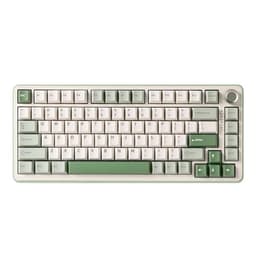
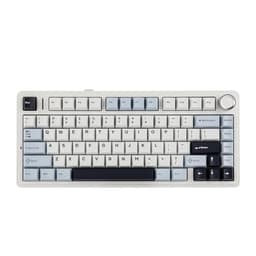
Gaming with repetitive strain injury, or RSI, is a genuine challenge. The wrong keyboard forces your wrists into unnatural angles, encourages ulnar deviation, and turns a two-hour session into a week of discomfort. This roundup is aimed squarely at PC gamers who already feel the early warning signs of RSI, those who have been diagnosed with tendinitis or carpal tunnel syndrome, and anyone who simply wants to protect their hands before problems develop. Since last year, the market has shifted noticeably towards smaller form factors and Hall Effect magnetic switches, both of which reduce the physical footprint of typing and lower actuation force requirements. Wireless connectivity has also improved dramatically, meaning fewer cables pulling your hands into awkward positions. The keyboards below have been researched with RSI specifically in mind, weighing switch weight, layout compactness, wrist travel distance, and overall build quality to give you a shortlist that is genuinely useful rather than just popular.
Quick Verdict
Best Overall: AULA WIN60 HE Mechanical Gaming Keyboard. Its Hall Effect switches offer adjustable actuation, dramatically reducing the force needed per keypress and making it the single most RSI-friendly option in this pool.
Best Value: AULA F75 75% Wireless Mechanical Keyboard. A compact 75% layout, triple wireless connectivity, and gasket mounting for reduced vibration, all at a price that leaves room in the budget for a quality wrist rest.
The AULA WIN60 HE is the most directly RSI-relevant keyboard in this entire roundup, and arguably one of the most RSI-conscious gaming keyboards available at this price point anywhere in the UK market. The headline feature is its Hall Effect magnetic switches, which use magnets rather than physical contact points to register keypresses. This has two immediate benefits for anyone managing hand or wrist pain: first, the actuation force can be adjusted in software, so you can set keys to register with the lightest possible touch rather than having to physically bottom out each key; second, because there is no metal-on-metal contact, the switches do not develop the increased resistance that worn mechanical switches can exhibit over time.
The 60% form factor is equally important from an ergonomic standpoint. By stripping away the numpad, arrow cluster, and function row, the WIN60 HE places your right hand significantly closer to your mouse. This reduction in lateral reach is one of the most frequently recommended adjustments for gamers with RSI, because reaching across a full-size keyboard repeatedly throughout a gaming session adds up to a surprising amount of cumulative shoulder and wrist movement. A 60% board effectively keeps both hands in a more neutral, centred position.
The WIN60 HE is wired via USB, which some RSI sufferers may find slightly limiting since cable tension can subtly restrict hand movement. However, a quality cable management solution or a coiled cable largely mitigates this. The keyboard supports per-key RGB and offers programmable layers to compensate for the missing keys, which is important for gamers who rely on macros or specific key bindings. Build quality feels solid for the price, with a sturdy base that does not flex during heavy use.
This keyboard suits competitive gamers, FPS players, and anyone who spends long sessions at the keyboard and wants the lowest possible actuation force combined with the smallest practical footprint. It is not ideal for productivity users who need a numpad or dedicated arrow keys without remapping, but for gaming specifically, the trade-off is well worth it.
Verdict: The Hall Effect switches and 60% layout make this the most ergonomically purposeful gaming keyboard in this comparison for RSI sufferers.
Pros
- Hall Effect switches allow adjustable actuation force, reducing strain per keypress
- 60% layout shortens the reach to the mouse, reducing shoulder and wrist travel
- No physical contact points means switches do not degrade in resistance over time
Cons
- Wired only, so cable management is needed to avoid restricting hand movement
- 60% layout requires remapping for arrow keys and function row, which takes adjustment
The AULA F75 75% Wireless Mechanical Keyboard strikes an excellent balance between compactness and usability, making it one of the most practical choices for RSI sufferers who still want dedicated arrow keys and a function row without the bulk of a full-size or TKL board. The 75% layout is widely regarded by ergonomics specialists as a sensible middle ground: it removes the numpad, which is the primary cause of lateral mouse reach on full-size boards, while retaining enough keys to avoid heavy reliance on function layers during gameplay.
The triple connectivity options, covering 2.4 GHz wireless, Bluetooth 5.0, and wired USB-C, are particularly valuable for RSI management. Wireless operation means there is no cable exerting tension on your wrist or restricting the positioning of the keyboard. You can place the keyboard at whatever angle and distance feels most natural for your specific condition, whether that means angling it slightly, moving it closer to your body, or pairing it with a negative-tilt stand. This freedom of positioning is genuinely therapeutic and is something wired keyboards simply cannot offer.
The F75 supports hot-swappable switches, which is a meaningful feature for RSI users. If you find the stock switches too heavy or too light after extended use, you can swap them out for lighter linears or tactiles without buying a new keyboard entirely. The keyboard also features a knob for volume or other controls, reducing the need for awkward key combinations that require finger stretching. RGB lighting is present and fully customisable via software.
Battery life on the 2.4 GHz connection is solid for extended gaming sessions, and the USB-C charging port means you are not hunting for a proprietary cable. The gasket-style mounting reduces the harshness of the typing feel, which means less vibration transmitted to your fingertips and wrists over long sessions. This is a subtle but real benefit for anyone with inflammation-related RSI.
This keyboard suits gamers who want the ergonomic benefits of a compact layout without sacrificing arrow keys, and who value the positioning freedom that wireless operation provides.
Verdict: The best value RSI-friendly gaming keyboard in this comparison, combining wireless freedom, compact layout, and hot-swap flexibility at a competitive price.
Pros
- Triple wireless connectivity allows free keyboard positioning without cable tension
- Hot-swappable switches let you change to lighter options as your needs evolve
- 75% layout retains arrow keys while removing numpad reach strain
- Gasket mounting reduces vibration transmitted to wrists during heavy typing
Cons
- Software for remapping and RGB customisation can be unintuitive initially
- Battery life decreases noticeably with RGB enabled at full brightness
The EPOMAKER X AULA F75 MAX is a collaboration between two brands that know the 75% mechanical keyboard market well, and the result is a feature-rich board that addresses several RSI-related concerns simultaneously. Like the AULA F75, it uses a 75% layout with tri-mode wireless connectivity, but the MAX version adds a TFT screen display and a more premium gasket mount construction that meaningfully improves the typing experience for people with sensitive wrists.
The gasket mounting system is worth dwelling on. In a gasket-mounted keyboard, the switch plate is suspended on silicone or rubber gaskets rather than being screwed directly to the case. This creates a slight give or bounce in the typing surface, which absorbs some of the impact energy that would otherwise travel directly into your fingertips and wrists. For RSI sufferers, particularly those with tendinitis or carpal tunnel syndrome, this reduction in transmitted vibration can make a noticeable difference during extended sessions. It is one of the features that separates mid-range ergonomic keyboards from budget options.
The TFT screen is a genuinely useful addition from an RSI standpoint because it allows you to monitor system stats or customise settings without alt-tabbing or reaching for a second device. The knob control is similarly valuable, giving you a physical dial for volume, media playback, or other functions that would otherwise require awkward multi-key combinations involving finger stretching. Hot-swap switch support means you can install lighter switches if the stock options prove too heavy for your condition.
The tri-mode wireless (2.4 GHz, Bluetooth 5.0, USB-C wired) gives you the same positioning freedom as the standard F75. Build quality on the MAX feels a step above the standard F75, with a more substantial case and better sound dampening from the factory. This is a keyboard that will suit gamers who want a premium 75% experience with genuine ergonomic credentials, and who are willing to spend slightly more for the gasket mount and TFT screen.
Verdict: A well-rounded upgrade over the standard F75 with the gasket mount and TFT screen adding real ergonomic and practical value for RSI-conscious gamers.
Pros
- Gasket mount construction absorbs typing impact, reducing vibration to wrists
- TFT screen and knob reduce need for awkward key combinations
- Tri-mode wireless enables free positioning without cable restriction
Cons
- Slightly heavier than the standard F75 due to premium construction
- TFT screen adds complexity that some users may not need or want
- Price premium over the standard F75 may not suit tighter budgets
The YUNZII B75 PRO is a gasket-mounted, hot-swappable 75% wireless keyboard that has built a strong reputation in the UK enthusiast community for its typing feel and build quality relative to its price. For RSI sufferers, the combination of gasket mounting, wireless connectivity, and a compact layout addresses the three most important hardware-side factors in reducing keyboard-related strain: vibration, positioning freedom, and lateral reach.
YUNZII has paid particular attention to the sound and feel profile of the B75 PRO. The keyboard ships with pre-lubed stabilisers and a layer of sound-dampening foam inside the case, both of which contribute to a softer, more cushioned typing experience. While sound dampening is often discussed in terms of acoustics, it also has a direct ergonomic benefit: a quieter, softer keystroke typically means less bottoming-out force is being applied, which is exactly the behaviour you want to encourage when managing RSI. The gasket mount adds to this by providing a slight flex in the typing surface.
The B75 PRO supports tri-mode wireless, covering 2.4 GHz, Bluetooth 5.0, and USB-C wired operation. The 2.4 GHz connection is essentially lag-free for gaming purposes, and the battery life is competitive with other boards in this segment. Hot-swap switch support across a 5-pin socket means compatibility with a wide range of aftermarket switches, giving you the flexibility to experiment with lighter or softer options as your RSI management evolves.
The 75% layout retains dedicated arrow keys and a function row, which reduces the cognitive load of remapping and means you can focus on gameplay rather than remembering which layer your arrow keys live on. The keyboard is available in several colourways and supports per-key RGB, though the lighting is secondary to the ergonomic credentials for the target audience of this article.
This keyboard suits gamers who want a premium typing feel with genuine vibration absorption, and who are willing to invest in a board that will remain comfortable over long sessions.
Verdict: The YUNZII B75 PRO delivers one of the softest, most vibration-absorbent typing experiences in this comparison, making it a strong choice for RSI sufferers who prioritise feel over features.
Pros
- Gasket mount with internal foam dampening provides exceptionally soft, low-vibration typing
- Pre-lubed stabilisers reduce rattle and encourage lighter keystroke habits
- Tri-mode wireless enables flexible, cable-free positioning
Cons
- Software customisation options are less polished than some competitors
- Slightly fewer RGB customisation options than EPOMAKER alternatives
The EPOMAKER AULA F75 (distinct from the MAX variant above) is the standard version of the F75 collaboration, offering a very similar feature set at a comparable price point to the YUNZII B75 PRO. It is a 75% tri-mode wireless keyboard with hot-swappable switches, a knob for analogue control, and per-key RGB. For RSI sufferers, it checks the same fundamental boxes as the other 75% boards in this list: compact layout, wireless positioning freedom, and the ability to swap to lighter switches.
Where the EPOMAKER AULA F75 distinguishes itself is in its software ecosystem. EPOMAKER's companion software is among the more user-friendly in the budget-to-mid-range keyboard segment, making it straightforward to remap keys, adjust lighting, and create macros. For RSI sufferers, the ability to remap keys easily is genuinely important: you may want to move frequently used bindings to positions that require less finger extension, or create macros that replace multi-key combinations with single keypresses. Being able to do this without wrestling with confusing software reduces friction and encourages you to actually optimise your layout.
The knob is a highlight feature for ergonomic use. Rather than pressing Fn plus a function key to adjust volume, you simply turn the knob, which involves a much smaller, more natural wrist movement. This is a small detail but one that adds up over a long gaming session. The keyboard also supports south-facing RGB LEDs, which is primarily an aesthetic consideration but does indicate attention to detail in the overall design.
Build quality is solid for the price, with a case that feels sturdy without being excessively heavy. The typing feel out of the box is pleasant, though the stock switches may benefit from replacement or lubing if you have particularly sensitive wrists. The 2.4 GHz wireless connection is reliable and low-latency, suitable for competitive gaming.
This keyboard suits gamers who want a well-rounded 75% wireless board with good software support and the flexibility to customise their layout for RSI management.
Verdict: A reliable, software-friendly 75% wireless keyboard that gives RSI sufferers the tools to optimise their layout and reduce unnecessary finger strain.
Pros
- User-friendly software makes key remapping straightforward for RSI layout optimisation
- Knob control replaces awkward Fn key combinations with a single wrist movement
- Tri-mode wireless enables free positioning away from cable tension
Cons
- Stock switches may need replacing or lubing for the lightest possible actuation feel
- No gasket mount, so typing feel is slightly firmer than the YUNZII B75 PRO
Buying Guide
Form Factor: Why Smaller Is Better for RSI
The single most impactful hardware change most RSI-affected gamers can make is switching to a smaller keyboard. Full-size keyboards with a numpad force your right hand far to the right of your body's centreline, which means your shoulder must rotate outward every time you reach for the mouse. Over a long gaming session, this repeated movement accumulates into significant strain on the shoulder, elbow, and wrist. A tenkeyless (TKL) board removes the numpad and brings the mouse 8-10 cm closer. A 75% board goes further, removing the numpad and condensing the function row and navigation cluster. A 60% board removes everything except the alphanumeric keys and modifiers. Each step down in size reduces lateral reach, but also removes keys that require remapping, so choose the smallest layout you can comfortably adapt to.
Switch Weight and Actuation Force
Every keypress applies a small amount of force to your finger tendons. Multiply that by tens of thousands of keypresses per session and the cumulative load becomes significant. Lighter switches reduce this load. Linear switches with actuation forces around 35-45g are generally recommended for RSI sufferers, as they offer smooth travel without a tactile bump that might encourage bottoming out. Hall Effect switches, as found in the AULA WIN60 HE, go a step further by allowing you to adjust the actuation point in software, meaning you can set keys to register with the lightest possible touch. Hot-swappable keyboards are valuable here because they allow you to experiment with different switches without buying a new board.
Wireless vs Wired
Wireless keyboards are strongly preferable for RSI management because they remove cable tension from the equation. A cable pulling on a keyboard subtly restricts its positioning and can exert a small but constant tension on your wrist. More importantly, wireless operation means you can position the keyboard at any angle, distance, or height that feels comfortable, including using it on a lap desk or a negative-tilt stand, without worrying about cable length. Modern 2.4 GHz wireless keyboards are effectively lag-free for gaming purposes, so there is no competitive penalty to going wireless.
Gasket Mounting and Vibration Absorption
Gasket-mounted keyboards suspend the switch plate on rubber or silicone gaskets, creating a slight flex in the typing surface that absorbs impact energy. This reduces the vibration transmitted to your fingertips and wrists with each keypress. For RSI sufferers with inflammation-related conditions such as tendinitis, this reduction in vibration can meaningfully reduce discomfort during and after gaming sessions. Internal foam dampening works similarly, softening the sound and feel of each keypress. If you are choosing between two otherwise similar keyboards, the one with gasket mounting is the better choice for RSI management.
Wrist Rests and Keyboard Angle
No keyboard, however well designed, fully compensates for poor desk setup. A quality memory foam wrist rest keeps your wrists in a neutral position during pauses in typing. Keyboard angle matters too: a flat or slightly negative tilt (front of keyboard raised) is generally better for wrist alignment than a steeply positive tilt. Many gaming keyboards come with feet that only tilt upward, which can worsen wrist extension. If your keyboard only tilts positively, consider placing a thin object under the front edge to achieve a neutral or negative angle. Combine this with a monitor at eye level and a chair that supports your forearms horizontally, and you will have addressed the main environmental factors that contribute to keyboard-related RSI.
Software and Key Remapping
The ability to remap keys is underrated as an ergonomic tool. Moving frequently used bindings to keys that require less finger extension, or creating macros that replace multi-key combinations with single keypresses, can meaningfully reduce the range of motion your fingers need to perform during gameplay. Look for keyboards with mature, user-friendly software that makes remapping straightforward. EPOMAKER and Logitech G HUB are both strong in this regard.
For RSI sufferers, the AULA WIN60 HE Mechanical Gaming Keyboard is the overall winner. Its Hall Effect magnetic switches with adjustable actuation force address the root cause of keyboard-related RSI more directly than any other keyboard in this comparison: every keypress can be made lighter, and the switches will not degrade over time. The 60% layout delivers the maximum reduction in lateral mouse reach. If the 60% layout feels too restrictive, the AULA F75 75% Wireless Mechanical Keyboard is the best value alternative, combining a compact layout, wireless positioning freedom, gasket-adjacent construction, and hot-swap flexibility at a price that is hard to argue with. For those who want a premium, proven option with outstanding wireless performance, the Logitech G PRO X TKL LIGHTSPEED remains a trustworthy choice, though the lack of hot-swap support and higher price mean it is not the first recommendation for RSI management specifically.