VIVID·REPAIRS/THE FIELD GUIDE/MONITORUpdated 27 September 2026Prices live from Amazon UK
Best of · UK · Field of 5
Best Monitors for CAD
Best monitors for CAD in the UK 2026: expert picks covering resolution, colour accuracy, screen size and value for AutoCAD, SolidWorks and more.
By the Vivid Repairs deskUpdated 27 September 20265 ranked picks3,802 owner ratings read
As an Amazon Associate we may earn from qualifying purchases. We have not handled these products. Everything below is judged on published specifications, the owner ratings on the UK listings and our own product reviews, and the ranking stays independent of what any of them pay.
As an Amazon Associate, we may earn from qualifying purchases. Our ranking is independent.
Amazon confirms the live price, seller, stock and delivery. Prices here are read from the live listing through the day; a pick Amazon cannot supply is marked as such, and where the list has one in stock it is offered.
vividrepairs.co.uk / best-monitors-for-cadUpdated 27 September 2026 · Prices from the live Amazon UK listing
§ The field
Five picks, on one page
Ranked on fit for the job in the title, not on raw specification. Tap any one to jump to the argument for it. Prices are the live Amazon UK figure, read today; a pick with no figure is out of stock and says so in its entry.
Factory-calibrated IPS panel with Delta-E under 2 for reliable colour accuracy
Exceptional connectivity: HDMI, dual DisplayPort, USB-C with PD, USB hub, and built-in Ethernet
31.5-inch 4K panel delivers 140 PPI sharpness with consistent IPS viewing angles
Where it gives up
IPS contrast (~1200:1) means grey-blacks in dark rooms, not true blacks. Not designed for competitive gaming; response time and refresh rate reflect professional focus.
Rated 4.5 by 125 owners. Our review scores it 8.5.
The rules this ranking ran under, in plain sight: what we read, what we weighed and what no merchant can move.
How we picked
Our editors evaluated 5 Monitor options against the criteria readers actually weigh up: price, real-world performance, build quality, warranty, and UK availability. Picks lean toward what we'd recommend to a friend buying today, not specs-on-paper winners.
Editorial contextEditor notes from individual reviews, not press releases.
Live UK pricingRefreshed from Amazon UK twice daily.
No paid placementsAffiliate commission doesn't change what wins.
The full guideEverything behind the shortlist above: the spec sheet, the write-ups in full, our method and the verdict.
§ Editorial · The full guide · five proofs, nothing hidden
The Doubt Index.
The shortlist told you what we picked; this zone shows the working. Come in through whichever doubt you’re carrying, or read straight down; we’d rather you checked us than trusted us.
Here’s the sheet the desk works from, kept deliberately factual. Every row is written to be checked against the retailer’s current listing, and you should check. The table scrolls sideways inside its own frame; the page underneath stays still.
Scroll sideways →5 rows · 5 columns · Prices swap to the live figure at render
You can, and you should. What follows is the part a sheet can’t do: the working between what these products have and what your desk actually needs, kept word for word.
Best Monitors for CAD
CAD work places very specific demands on a monitor: fine line rendering at fine zoom levels, all day. Zoom into a floor plan and you need every dimension line, every hatch pattern and every small annotation to stay crisp, with toolbars and viewports crowding the screen at the same time. That is the job the Best Monitors for CAD have to do all day, whether you live in AutoCAD, SolidWorks, Revit or Fusion 360. This is our 2026 guide, and it covers five displays: two 27-inch panels (a QHD and a 4K), a 31.5-inch 4K, a 34-inch ultrawide and a 27-inch 5K. Sizes run 27, 31.5 and 34 inches; resolutions run QHD, 4K, UWQHD and 5K. Every one is a productivity or creator monitor, not a gaming one. Below we match each to a specific CAD need, then a buying guide walks through the specs that actually decide it.
Buying Guide: What to Look For
Resolution and Pixel Density
This is the single biggest factor for CAD. Higher pixel density means fine drawing lines, small annotation text and detailed hatch patterns render cleanly instead of looking blocky. The floor is QHD (2560x1440) at 27 inches, about 109 PPI, as on the PA278QV. QHD as a minimum, with 4K preferred for 2D-heavy work with fine linework and small text: the BenQ hits about 163 PPI, the 31.5-inch Dell about 140 PPI, and the 5K PA27JCV about 218 PPI. For clarity on technical diagrams and architectural plans, more PPI is simply more legible detail per square inch.
Colour Accuracy and Calibration
CAD needs layer colours to stay consistent, not photographic perfection. Aim for 99% sRGB or more. BenQ factory-calibrates the PD2705U and includes a report; ASUS lists the PA278QV and PA27JCV as Calman Verified, the PA278QV with a pre-calibration report; Dell factory colour calibrates the U3225QE. The MSI's calibration is not specified. Don't infer accuracy from the panel type alone.
Curved vs Flat
Flat panels keep long horizontal reference lines dead straight, which matters when you check alignment. The MSI is the one curved panel here, at 1500R, and 1500R is more curved than 1800R, so straight lines bend slightly. If you draw a lot of horizontal reference geometry, go flat; if you want a wide canvas for long drawings, the curve is a fair trade.
Connectivity
One USB-C cable can carry both the display signal and power to a laptop, which clears the desk. 65W or more charges most work laptops. By the makers' figures, the BenQ does 65W, the PA27JCV 96W, the MSI 98W, and the Dell's Thunderbolt 4 reaches 140W. A KVM switch lets one keyboard and mouse drive two computers, and PbP/PiP shows two inputs at once. The BenQ, Dell, MSI and PA27JCV all list KVM; the PA278QV does not.
Ergonomics
Eight-hour days need height, tilt, swivel and, ideally, portrait pivot for reading drawing sheets vertically. The BenQ, PA278QV, Dell and PA27JCV all pivot to portrait. The MSI does not: its stand adjusts height, tilt and swivel only.
Budget, 4K, 5K and 6K
The ASUS ProArt PA278QV is the budget pick for CAD and for 3D modelling: QHD, 100% sRGB, Calman Verified and a full stand, without USB-C or 4K. Step up to 4K (BenQ, Dell) for sharper linework, or 5K (PA27JCV) for the densest panel here. No 6K monitor is on this list, and the 5K PA27JCV holds the highest pixel density of the five.
Five write-ups, none folded away. We don’t lab-test, so every line below sticks to what can be defended: the published sheet, the owner ratings on the UK listings and our own reviews.
Start with the pixels, because CAD lives or dies on them. This is a 27-inch panel running 3840x2160, which works out to roughly 163 PPI. That density is what keeps a fine drawing line looking like a line and not a staircase, and it makes small annotation text and dense hatch patterns legible without endless zooming. Against the QHD PA278QV further down this list (about 109 PPI), the extra density shows in a busy architectural plan.
Colour is handled properly for technical work. BenQ lists 99% sRGB and 99% Rec.709, and factory-calibrates each unit with a report in the box. For CAD that matters less for photographic accuracy and more for layer colours staying consistent from one session to the next. The panel is IPS and flat, with a matte anti-glare surface, and BenQ rates it at 1.07 billion colours (the bit-depth method is not stated).
The connectivity is what pushes this to the top. BenQ lists 65W of USB-C power delivery alongside video and data, so a work laptop charges off the one cable that also drives the display. There is a built-in KVM switch, so a single keyboard and mouse can hop between two machines, and BenQ lists PbP and PiP for showing two inputs side by side. Ports run to two HDMI 2.0, one DisplayPort 1.4, the USB-C and three USB-A. BenQ's stand covers what an eight-hour day asks: 110mm height, -5 to 20 degrees tilt, 15 degrees swivel each way, and a 90-degree pivot into portrait for reading long drawing sheets vertically.
BenQ lists a 60Hz refresh rate, which is a non-issue for CAD, and the HDR is DisplayHDR 400 without local dimming, so treat that as cosmetic rather than a reason to buy. If you want a bigger canvas, the Dell U3225QE steps up to 31.5 inches; if you want more pixels still, the PA27JCV goes 5K. But for a colour-steady, well-connected desk monitor that suits AutoCAD and SolidWorks work, this hits the brief squarely. It holds 4.6 stars from 953 ratings on Amazon UK.
Pros
Factory calibrated with a report in the box, useful for consistent layer colours
65W USB-C charges a laptop and drives the display on one cable
KVM switch plus PbP/PiP for dual-machine desks
Full stand with 90-degree portrait pivot for drawing sheets
Cons
DisplayHDR 400 with no local dimming, so HDR is cosmetic only
DCI-P3 coverage not specified, so not the pick for cinema-targeted colour
2. ASUS ProArt Display PA278QV Professional Monitor - 27-inch, IPS, WQHD (2560 x 1440), 100% sRGB, 100% Rec. 709, Color Accuracy E < 2, Calman Verified, ProArt Preset, ProArt Palette, Black
Here is what makes this the budget CAD pick, and it is not a corner cut on the important things. You get a 27-inch IPS panel at 2560x1440, about 109 PPI, which is the floor for CAD clarity rather than the ceiling: lines and dimension text stay sharp, but a 4K panel like the BenQ will render fine linework and small text more crisply. ASUS lists 100% sRGB coverage and ships it Calman Verified with a pre-calibration report in the box. (The Amazon title's "100% Rec. 709" is the seller's wording; ASUS states only a Rec.709 preset, no coverage figure.)
The stand is the standout. ASUS lists 0 to 150mm of height, tilt +35 to -5 degrees, swivel 90 degrees each way, and it pivots 90 degrees into portrait, which is genuinely handy for reading long drawing sheets vertically. The surface is anti-glare, and ASUS rates the panel at 16.7 million colours (8-bit).
Now the trade-offs, because this is what it gives up. There is no USB-C at all: inputs are DisplayPort 1.2, Mini DisplayPort 1.2, HDMI 1.4 and dual-link DVI, plus four USB-A. So no single-cable laptop charging, and KVM and PbP/PiP are not specified. If you run a laptop and want one cable doing power and video, the BenQ above or the Dell below are the answer instead. The 75Hz refresh rate ASUS lists is irrelevant for CAD, and there is no HDR of any kind, which again does not matter for this work.
For an engineer or architect who works off a desktop tower and wants verified colour with a proper stand and does not need USB-C or 4K, this is the budget pick, and it also suits 3D modelling on a budget. It carries 4.7 stars from 1,779 ratings on Amazon UK.
Pros
Calman Verified with a pre-calibration report in the box
Full ergonomic stand including 90-degree portrait pivot
100% sRGB coverage stated by ASUS for steady layer colours
Four USB-A ports for desk peripherals
Cons
No USB-C, so no single-cable laptop charging
KVM and PbP/PiP not specified
QHD (about 109 PPI) is less sharp than the 4K and 5K panels here
If your desk can take a bigger canvas, this is the one to weigh against the BenQ. It is a 31.5-inch 4K panel, so 3840x2160 spread across a larger area gives about 140 PPI: still sharp for technical drawings, with more physical room for toolbars, a model tree and a viewport all open at once. The panel is IPS Black and flat, with an anti-glare, anti-reflective surface, and Dell rates it at 1.07 billion colours.
Colour is broad and factory calibrated: Dell's specification gives 100% sRGB, 99% DCI-P3 and 100% BT.709. For CAD that means consistent layer colours, with the DCI-P3 headroom useful if your work ever crosses into rendered visuals.
Connectivity is the reason to choose it. Dell lists up to 140W from the upstream Thunderbolt 4 port, the most power on this list, enough for a hungry workstation laptop, with Thunderbolt 4 downstream and two 10Gbps USB-C ports besides. There is a built-in KVM, both PbP and PiP, a USB hub, and 2.5GbE Ethernet built in, so it genuinely replaces a separate dock. Ports run to HDMI, two DisplayPort, the Thunderbolt/USB-C set and RJ45. Dell's stand offers 150mm height, -5 to 21 degrees tilt, 30 degrees swivel each way and a 90-degree portrait pivot.
The 120Hz refresh rate Dell lists is a side benefit for CAD, not a reason to buy. This makes sense over the BenQ if you specifically want the extra screen size and the dock-replacement port suite; if 27 inches and 65W USB-C cover you, the BenQ does the core job. Owners give it 4.5 stars from 113 ratings on Amazon UK.
Pros
Thunderbolt 4 up to 140W, plus 2.5GbE Ethernet, replaces a dock
31.5-inch 4K (about 140 PPI) gives room for toolbars and viewports
Factory calibrated with 99% DCI-P3 and 100% sRGB
KVM plus both PbP and PiP
Cons
IPS contrast means grey-blacks in a dark room, not true blacks
The dock features (Thunderbolt 4, Ethernet) only pay off with a laptop that uses them
The reason to pick this over every other display here is the shape. It is a 34-inch 21:9 panel at 3440x1440, about 110 PPI, which is the extra horizontal room a long drawing or a wide assembly wants, with PiP/PbP to keep two inputs side by side. The panel is VA, so contrast is stronger than the IPS options and blacks are genuinely dark. MSI lists a 98W USB-C input (DisplayPort Alt mode) and a built-in KVM for dual-machine desks. MSI's datasheet shows 95% DCI-P3, 92% Adobe RGB and 119% sRGB (CIE1976), an anti-glare surface, and 1.07 billion colours (8-bit + FRC).
Two honest catches for CAD. First, the curve: it is a 1500R panel, and 1500R is more curved than 1800R, so long horizontal reference lines bend slightly. Second, the stand does height (0 to 110mm), tilt (-5 to 20 degrees) and 30-degree swivel, but there is no portrait pivot: the datasheet shows only a small -5 to 5 degree level adjustment, despite the listing's "3-way adjustable" wording. Calibration is not specified, unlike the calibrated BenQ, Dell and ASUS panels. If dead-straight lines and portrait sheets matter more than width, the flat BenQ is the better fit. It holds 4.4 stars from 100 ratings on Amazon UK.
Pros
34-inch 21:9 width for long drawings and wide assemblies
VA panel with strong contrast for dark backgrounds
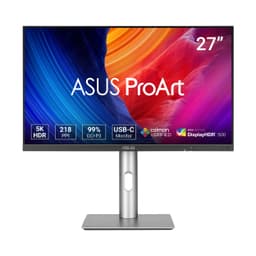
5. ASUS ProArt Display 5K PA27JCV Professional Monitor, 27-inch, IPS, 5K (5120 x 2880), 99% DCI-P3, LuxPixel AGLR, Light Sync, colour Accuracy ΔE < 2, Calman Verified, USB-C PD 96W, VESA DisplayHDR 500
Pixel density is the whole pitch here. A 27-inch panel at 5120x2880 works out to about 218 PPI, the densest on this list, so fine drawing lines, tiny annotation text and detailed hatch patterns look razor-sharp before you even zoom. Against the 4K BenQ (about 163 PPI) the jump is real for detail-heavy 2D work, and it answers the "best 5K monitor for CAD" question directly: no 6K panel is on this list, and this holds the top density.
Colour is Calman Verified, with ASUS listing 100% sRGB and 99% DCI-P3, which also gives DCI-P3 headroom for rendered work. The panel is IPS and flat, with an anti-glare, low-reflection surface, and 1.07 billion colours (10-bit). ASUS lists a 96W USB-C input with DisplayPort Alt mode, a built-in KVM, and both PbP and PiP; ports include HDMI 2.1, DisplayPort 1.4 and three USB-A. ASUS's stand gives 0 to 130mm height, +23 to -5 degrees tilt, 30 degrees swivel each way and a 90-degree portrait pivot.
The 60Hz refresh ASUS lists is a non-issue for CAD. Pick this over the BenQ when clarity is the priority and you want the sharpest linework on a 27-inch panel; pick the BenQ if 4K is already enough and you want the calibration report in the box. It holds 4 stars from 221 ratings on Amazon UK.
Pros
About 218 PPI, the sharpest panel here for fine linework
96W USB-C, KVM, PbP and PiP for dual-machine desks
Calman Verified with 99% DCI-P3
Full stand with 90-degree portrait pivot
Cons
60Hz, though that does not matter for CAD
A calibration report in the box is not specified by ASUS
This page carries affiliate links; they never set the order. We don’t lab-test: rankings come from published specifications, the owner ratings on the UK listings and our own reviews.
How We Compared These
We ranked these five on the specs that decide CAD work: resolution and pixel density, stated colour coverage and calibration status, ergonomics, and productivity connections like USB-C power delivery, KVM and PbP/PiP. Figures come from each maker's published specifications and the Amazon listings, cross-checked against a fact pack where the listing and datasheet disagreed. We also read the verified owner star ratings and counts on Amazon UK. Nobody here has handled these panels: this is research-led comparison of published specs and owner star ratings, not a hands-on bench test, and we quote no lab measurements of our own.
A crown that can’t be argued with isn’t proof of quality; it’s proof nobody checked. So rather than restate the winner’s virtues, we defend the crown against the strongest cases to take it.
BenQ PD2705U 4K 27” Monitor for Designer
Cross-examination · Three challengers, taken seriously
The owners’ argumentASUS ProArt Display PA278QV Professional Monitor
Owners rate it 4.6 from 2,368 ratings. Our review scores it 8.5 against the winner’s 8.0. The crown holds on the ranking rules: the order above was set before any link was attached, and its case is argued in full in the write-up above.
The owners’ argumentDell UltraSharp U3225QE computer monitor 80 cm (31.5") 3840
It’s £699.98 on the live listing today. Owners rate it 4.5 from 125 ratings. Our review scores it 8.5 against the winner’s 8.0. The crown holds on the ranking rules: the order above was set before any link was attached, and its case is argued in full in the write-up above.
The £91 argumentMSI Modern MD342CQPW 34 Inch Uwqhd 1500R Curved Monitor
At £238.97 today against the winner’s £329.99, its strongest case is the £91 it hands back. Owners rate it 4.4 from 104 ratings. Our review scores it 7.5 against the winner’s 8.0. If the cheaper pick covers the job you actually do, take the saving with a clear conscience. The crown stays where it is because rank follows fit for the job in the title, not the receipt, and its full argument is in the write-up above.
Prices checked (this pick) and (the winner) · Details
The original verdict, preserved in full
Final Verdict: Best Monitors for CAD
For most engineers, architects and product designers, the BenQ PD2705U is our Best Overall for CAD: 4K sharpness at 27 inches, factory calibration with a report, 65W USB-C and a KVM switch cover the core CAD job cleanly. If the budget is tight, the ASUS ProArt PA278QV, our Best Budget CAD Monitor, delivers Calman Verified QHD colour and a full portrait stand, accepting no USB-C or KVM. Want a bigger canvas or dock-level connectivity? The 31.5-inch Dell U3225QE is the Best 32-inch 4K for CAD. Want the sharpest linework? The PA27JCV is the Best 5K for CAD. Want width for long drawings and can live with a curve? The MSI MD342CQPW is the Best Ultrawide for CAD. Match the panel to your workflow, and start with the BenQ.
On this list, the BenQ PD2705U is the best all-round CAD monitor. It puts 3840 x 2160 across 27 inches, about 163 pixels per inch, so fine line work and dimension text stay crisp. BenQ lists 99% sRGB and factory-calibrates each unit, with a report in the box. It also has a stand with height adjustment, tilt, swivel and a portrait pivot, 65W USB-C and a built-in KVM switch. If you want a bigger canvas, the Dell UltraSharp U3225QE is 31.5-inch 4K. For wide drawings, the MSI Modern MD342CQPW is a 34-inch ultrawide. For the sharpest detail, the ASUS ProArt PA27JCV is 5K.
1500R is the more curved of the two. The number is the radius of the curve in millimetres, so a smaller number means a tighter curve. On this list, only the MSI Modern MD342CQPW is curved, at 1500R. That tight curve bends long horizontal lines, which matters when you check alignment. The BenQ PD2705U, ASUS ProArt PA278QV, Dell UltraSharp U3225QE and ASUS ProArt PA27JCV are all flat.
No. At a normal desk, 27 inches at QHD (2560 x 1440) or above gives enough room and sharpness for detailed drawings. Three of the five monitors here are 27 inches: the ASUS ProArt PA278QV at QHD, the BenQ PD2705U at 4K and the ASUS ProArt PA27JCV at 5K. If you want more room, the Dell UltraSharp U3225QE is 31.5 inches and the MSI Modern MD342CQPW is a 34-inch ultrawide.
A curve bends straight lines, which matters more for drawings than for text documents. The MSI Modern MD342CQPW is the one curved monitor here, at 1500R. Its 34-inch 3440 x 1440 workspace, picture-by-picture and KVM switch suit side-by-side documents and drawings. If straight lines matter most, choose one of the four flat monitors on this list.
For CAD, 2560 x 1440 at 27 inches (about 109 pixels per inch, as on the ASUS ProArt PA278QV) is the floor. 4K is the sweet spot on the BenQ PD2705U (27 inches) and the Dell UltraSharp U3225QE (31.5 inches). The ASUS ProArt PA27JCV goes further, with 5120 x 2880 across 27 inches, about 218 pixels per inch, the highest density on this list. It also adds 96W USB-C, a KVM switch and Calman Verified colour. No 6K monitor is on this list.
On this list, the budget pick is the ASUS ProArt PA278QV. It covers the essentials: 2560 x 1440 at 27 inches, 100% sRGB, Calman Verified colour, an anti-glare surface, and a stand with height adjustment, tilt, swivel and a full portrait pivot. What it gives up is USB-C, a KVM switch and 4K sharpness. The live price is in the table above. If you want an ultrawide with USB-C charging and a KVM switch instead, look at the MSI Modern MD342CQPW.
That’s the field: five monitors for cad, ranked for the job in the title and nothing else. We read the published specifications, the owner ratings and our own reviews; we haven’t handled these products, and no maker moves the order. Figures checked against the live Amazon UK listings, page updated 27 September 2026.
The Vivid Repairs desk
1Our top pickBenQ PD2705U 4K 27” Monitor for Designer, IPS, AQCOLOR, 99% sRGB, 99% Rec. 709, Delta E ≤ 3, Factory Calibrated, Uniformity, 65W USB-C, HDMI, DP, KVM, Compatible with MacBookScored 8.0/10Compare all →Buy on Amazon →