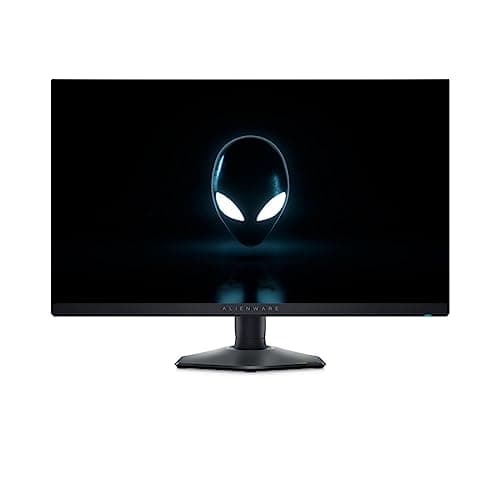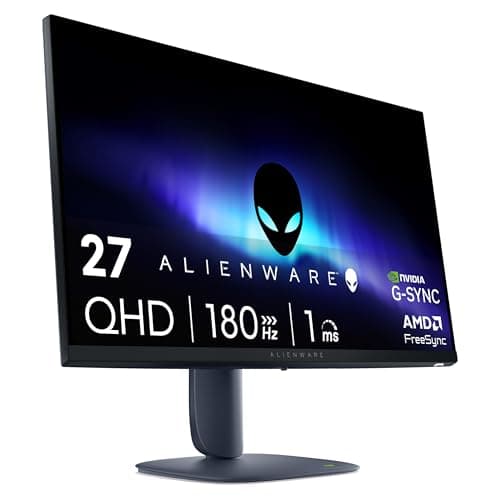
When a 240Hz Fast IPS monitor lands in the budget bracket, the spec sheet deserves serious scrutiny before you hand over your money. Panel type, measured pixel response, colour gamut coverage, and the VRR range all tell a clearer story than any marketing headline. The Dell SE2726HG promises a lot of numbers for not a lot of cash, and that combination either means genuine value or a list of compromises dressed up nicely. Owner feedback across some reviews averaging ★★★★☆ (4.4) suggests most buyers are genuinely happy, but the details matter, and that's what this Dell SE2726HG 240Hz gaming monitor review is here to dig into.
The short version: this is a solid competitive gaming monitor for anyone who can push 240 frames per second in their titles of choice and wants smooth, tear-free gameplay without spending mid-range money. The Fast IPS panel delivers decent colour and wide viewing angles, and the 240Hz ceiling is real. But 1080p on a 27-inch screen is a compromise you need to make peace with upfront, the HDR implementation is checkbox-level at best, and the stand is basic. If those trade-offs suit your use case, there's a lot to like here. If they don't, there are better options.
Core Specifications
The SE2726HG is a 27-inch Fast IPS panel from Dell running at a native 1920x1080 resolution with a 240Hz maximum refresh rate. That combination is common in the esports monitor space, and Dell is pitching this squarely at competitive players who need high frame rates over pixel density. The panel carries a 1ms GtG (grey-to-grey) rating, which is Dell's marketing figure rather than a measured result, but Fast IPS panels in this class typically land between 1ms and 4ms in independent testing depending on the overdrive setting used. Worth keeping that context in mind.
Adaptive sync is handled via AMD FreeSync Premium, which covers a VRR range of 48Hz to 240Hz. That's a wide enough range to keep LFC (Low Framerate Compensation) active when you dip below 48fps, which matters more than people realise for games that aren't perfectly smooth. There's no NVIDIA G-Sync certification, but modern NVIDIA cards work with FreeSync panels over DisplayPort in most cases, so that's less of a concern than it used to be. Peak brightness is rated at 350 nits, and the native contrast ratio sits at the typical IPS figure of 1000:1.
On the connectivity side, you get two HDMI 2.0 ports and one DisplayPort 1.4, which covers the bases for most setups. There's no USB hub, no USB-C, and no built-in speakers. The monitor supports HDR10 and carries a DisplayHDR 400 certification, which we'll address honestly in the HDR section. The panel uses an anti-glare matte coating. Colour coverage is rated at 99% sRGB and 90% DCI-P3 by Dell's own figures, which is genuinely good for this price tier if the numbers hold up in practice.
| Specification | Detail |
|---|---|
| Screen Size | 27 inches |
| Resolution | 1920x1080 (Full HD) |
| Panel Type | Fast IPS |
| Refresh Rate | 240Hz |
| Response Time (rated) | 1ms GtG |
| Adaptive Sync | AMD FreeSync Premium (48 to 240Hz) |
| Peak Brightness | 350 nits |
| Native Contrast | 1000:1 |
| Colour Coverage | 99% sRGB, 90% DCI-P3 (rated) |
| HDR | HDR10, DisplayHDR 400 |
| Ports | 2x HDMI 2.0, 1x DisplayPort 1.4 |
| Stand Adjustments | Tilt only |
| VESA Mount | 100x100mm |
| Dimensions (with stand) | 612 x 452 x 183mm |
| Weight (with stand) | 4.24kg |
| Current Price | £119.00 · Details |

Panel Technology
Fast IPS is a specific variant of the standard IPS (In-Plane Switching) panel technology designed to reduce pixel transition times without the image quality compromises of TN (Twisted Nematic) panels. Traditional IPS panels were known for excellent colour accuracy and wide viewing angles but were historically slow, with GtG times in the 4ms to 8ms range. Fast IPS panels use modified liquid crystal formulations and stronger electric fields to push those transitions down significantly, making them genuinely competitive with TN for motion clarity while retaining the colour and viewing angle advantages IPS is known for.
The viewing angle spec here is 178 degrees horizontal and vertical, which is the standard IPS claim and broadly accurate. In practice, Fast IPS panels maintain colour and contrast well across wide angles, unlike VA panels where contrast shifts noticeably off-axis, and TN panels where colour inversion becomes visible even at moderate angles. For a monitor sitting in a fixed position on a desk, this matters less than it would on a TV, but if you share a screen or work in a bright room with multiple people looking at the display, IPS holds up better than the alternatives at this price point.
The native contrast ratio of 1000:1 is the main area where IPS technology falls short compared to VA panels. A VA panel at the same price could offer 3000:1 or higher, which translates to deeper blacks and better perceived contrast in dark scenes. The SE2726HG's blacks will look greyish in a dark room, and IPS glow (a characteristic brightening in the corners of the screen when displaying dark content) is a known trait of the panel type. Owner reviews don't flag this as a major complaint, which suggests Dell has managed the backlight uniformity reasonably well, but it's what you're getting into. If you play a lot of dark atmospheric games in a pitch-black room, a VA panel might suit you better despite the slower response times.
Display Quality
1080p on a 27-inch screen gives you a pixel density of approximately 82 pixels per inch (PPI). That's the number that matters most for perceived sharpness, and 82 PPI is noticeably lower than the 109 PPI you'd get from the same resolution on a 24-inch screen, or the 163 PPI of a 27-inch 4K display. Text and fine detail will look softer than on smaller or higher-resolution panels. This isn't a dealbreaker for gaming, where you're often moving fast and not scrutinising individual pixels, but if you use your monitor for any significant amount of reading, coding, or detailed work, it will be apparent.
The anti-glare matte coating does its job in managing reflections from ambient light sources. Matte coatings scatter reflections rather than eliminating them, which means a bright window behind you won't produce a mirror image on screen, but it can introduce a slight haze that reduces perceived contrast compared to a glossy panel. For a gaming monitor that's likely to be used in a variety of lighting conditions, matte is the right call. Owner reviews don't raise complaints about glare or coating quality specifically, which is a decent sign. Some owners do note the image looks punchy and vibrant straight out of the box, which aligns with Dell's colour coverage claims.
Brightness uniformity is harder to assess without independent measurements, but the 350-nit peak brightness rating is adequate for most indoor environments. It's not going to compete with high-brightness panels designed for bright office spaces or HDR peak highlights, but for a gaming monitor used in a normally lit room, 350 nits is workable. A few owner reviews mention the display looks bright and clear at typical brightness settings, which suggests the backlight distribution is at least acceptable. Dell's quality control on budget monitors has historically been decent rather than exceptional, so panel lottery risk exists but isn't dramatically higher than competitors in this bracket.
Refresh Rate and Adaptive Sync
240Hz is the headline number and it's a genuine one. This isn't a 144Hz panel overclocked to 165Hz or a marketing refresh rate that requires specific signal conditions. The SE2726HG runs at a native 240Hz, which at 1080p resolution is achievable on a wide range of graphics cards. An NVIDIA RTX 3060 or AMD RX 6700 can push well above 240 frames per second in competitive titles like Valorant, CS2, or Apex Legends at 1080p, so you're not buying a 240Hz monitor only to run it at 144Hz because your GPU can't keep up. That's an important practical consideration.
FreeSync Premium is the adaptive sync implementation here, and it covers 48Hz to 240Hz. The FreeSync Premium tier, as defined by AMD's specification, requires a minimum 120Hz refresh rate at maximum resolution and mandates Low Framerate Compensation (LFC) support. LFC kicks in when your frame rate drops below the minimum VRR threshold (48Hz in this case) and multiplies the frame rate to keep the display in sync, avoiding the judder that would otherwise occur. In practice, this means the monitor behaves well even in demanding scenes where frame rates dip, rather than dropping out of adaptive sync and introducing tearing.
NVIDIA GPU owners should know that G-Sync Compatible certification isn't listed for the SE2726HG, but that doesn't mean it won't work with FreeSync over DisplayPort. Most modern NVIDIA cards from the RTX 20 series onwards will activate adaptive sync on FreeSync panels automatically, and the experience is typically smooth. HDMI VRR is also supported on the HDMI 2.0 ports, which matters for console users on PlayStation 5 or Xbox Series X running at 1080p 120Hz (not 240Hz, since console VRR tops out lower). The 240Hz ceiling itself is a PC-only proposition given current console hardware limitations.
Response Time and Motion
Dell rates the SE2726HG at 1ms GtG, which is the fastest marketing figure in common use. The reality with Fast IPS panels is more nuanced. Published measurements of comparable Fast IPS panels in this class typically show GtG transitions in the 1ms to 4ms range depending on which overdrive (or "response time" preset) is selected. The fastest overdrive settings on many panels produce overshoot, also called inverse ghosting, where a bright halo appears behind moving objects. The middle overdrive setting usually represents the best practical balance between transition speed and overshoot control.
Owner reviews of the SE2726HG don't raise significant ghosting complaints, which is encouraging. A few owners specifically mention the motion looks clean and smooth in competitive shooters, which aligns with what you'd expect from a well-tuned Fast IPS panel at 240Hz. The combination of high refresh rate and reasonably fast pixel transitions means motion clarity is genuinely good here, noticeably better than a 144Hz IPS panel and competitive with 240Hz TN panels while offering better colour. That's the core value proposition of Fast IPS at high refresh rates, and the SE2726HG appears to deliver it.
MPRT (Moving Picture Response Time) is a different metric that measures perceived motion blur based on backlight strobing rather than pixel transitions. Dell doesn't list an MPRT figure, and there's no mention of a backlight strobe mode (sometimes called ULMB or similar). At 240Hz, the per-frame display time is already just 4.17 milliseconds, which limits motion blur significantly even without strobing. For most competitive gaming scenarios, 240Hz without strobing is cleaner than 144Hz with strobing, so the absence of a strobe mode is unlikely to matter to the target audience. If you're a hardcore esports player who specifically wants strobe for maximum motion clarity, there are monitors that offer it, but the SE2726HG's 240Hz baseline already puts it in strong territory.
Color Accuracy and Gamut
Dell claims 99% sRGB and 90% DCI-P3 colour coverage for the SE2726HG. If those figures are accurate, they're genuinely impressive for a budget monitor. Most budget IPS panels in this price bracket cover around 95% sRGB and 72% DCI-P3, so Dell's claimed figures would represent a meaningful step up in colour volume. The DCI-P3 colour space is the standard used for cinema content and increasingly for HDR gaming, so 90% coverage means colours in compatible content look richer and more saturated than on a standard sRGB panel.
Factory calibration on budget monitors is rarely tight. Dell doesn't claim a specific Delta-E figure for the SE2726HG at this price point, and out-of-box colour accuracy on budget panels typically lands at Delta-E values between 2 and 5, where Delta-E below 2 is considered accurate to the human eye and below 1 is excellent. A Delta-E of 3 to 4 is visible to a trained eye on colour-critical work but perfectly acceptable for gaming and general use. Owner reviews don't raise colour accuracy as a concern, and several mention the picture looks vibrant and natural, which is consistent with decent but not studio-grade factory calibration.
For content creation, the picture is mixed. 90% DCI-P3 coverage is useful if you're editing photos or video for digital distribution, and the wide sRGB coverage means web content will look accurate. But without a known Delta-E figure and without the option to load a custom ICC profile easily (Dell's budget monitors don't typically ship with per-unit calibration reports), professional colour work requires a hardware calibrator and some patience. The SE2726HG is not aimed at professional colour work, and it doesn't pretend to be. For gaming and media consumption, the colour performance should be genuinely pleasing. For anything where colour precision matters commercially, you'd want a monitor with verified calibration data.

HDR Performance
The SE2726HG carries a VESA DisplayHDR 400 certification, which is the entry-level tier of the DisplayHDR standard. DisplayHDR 400 requires a peak brightness of at least 400 nits, no local dimming requirement, and an 8-bit panel (or 6-bit with FRC dithering). It's the certification that the display industry uses to tick the HDR box on a spec sheet, and it's worth being direct about what that means in practice: the HDR experience on a DisplayHDR 400 monitor is marginal at best.
Real HDR requires high peak brightness (typically 1000 nits or more for HDR1000, or at least 600 nits for a passable experience), local dimming to control contrast zone by zone, and wide colour gamut coverage. The SE2726HG has the colour gamut, but 350 nits peak brightness (Dell's SDR rating, with the HDR400 cert implying a peak closer to 400 nits in HDR mode) and no local dimming mean HDR content won't look dramatically different from SDR content. You'll get wider colour if the content is encoded correctly, but the lack of brightness headroom and local dimming means the HDR highlights won't pop the way they do on a proper HDR display.
None of this is unusual or surprising for a monitor at this price point. Genuine HDR performance requires hardware that costs significantly more. The honest advice here is to treat the HDR400 certification as a compatibility tick rather than a quality indicator. Enable HDR in Windows and in games that support it, and you might notice slightly richer colours in some content. But don't buy this monitor expecting a transformative HDR experience, because that's not what DisplayHDR 400 delivers on any monitor, from any brand. Owner reviews don't mention HDR as a selling point, which suggests buyers are using it primarily as a high-refresh SDR gaming monitor, which is exactly the right way to use it.
Contrast and Brightness
The native contrast ratio of 1000:1 is standard for IPS technology and it's the figure that most directly affects how the monitor looks in a dark room. At 1000:1, blacks on the SE2726HG will appear as a dark grey rather than true black when the display is showing a mostly dark image. This is an inherent characteristic of IPS panels and not a manufacturing defect. VA panels at the same price can offer 3000:1 to 4000:1 native contrast, which produces noticeably deeper blacks and better shadow detail in dark scenes. The trade-off is that VA panels have slower pixel response times, which causes smearing on fast-moving objects in games.
For competitive gaming, the Fast IPS choice makes sense despite the contrast limitation. Games like CS2, Valorant, and Apex Legends are often played with in-game brightness settings turned up to improve visibility in dark areas, which reduces the practical impact of lower native contrast. The motion clarity advantage of Fast IPS at 240Hz outweighs the contrast disadvantage for this use case. For cinematic single-player games with dark atmospheric scenes, the contrast limitation is more noticeable, and a VA panel might serve you better. It's a genuine trade-off, not a flaw.
The 350-nit peak brightness is sufficient for a normally lit room. Running the monitor at 80% to 100% brightness in typical indoor lighting conditions should produce a comfortable, punchy image. In a very bright room with direct sunlight hitting the screen, 350 nits will feel inadequate, and the matte coating will help with reflections but won't fully compensate for the brightness limitation. Most owner reviews are positive about the brightness and clarity of the image, with several noting it looks great for gaming, which suggests the 350-nit figure is adequate for the environments most buyers are using it in.
Ergonomics and Stand
The stand on the SE2726HG offers tilt adjustment only. No height adjustment, no swivel, no pivot to portrait mode. This is a common cost-cutting measure on budget monitors and it's the right place to cut if something has to give, but it does mean you're relying on the fixed stand height being comfortable for your desk and chair setup. If the default height doesn't work for you, the VESA 100x100mm mount is there, and a decent monitor arm will give you full adjustability for less than the cost of upgrading to a monitor with a better stand. That's genuinely the smarter route if ergonomics matter to you.
The stand itself is described by owners as stable enough for daily use, though a couple of reviews mention it feels a bit plasticky compared to Dell's higher-end monitors. That's fair, and expected at this price. The overall build quality is described as solid rather than premium, which is about right for a budget gaming monitor. The bezels are reasonably slim on three sides, which keeps the footprint looking modern without being ultra-thin. The back panel has a clean design without aggressive gaming aesthetics, no RGB lighting, no angular vents or decorative fins. If you want a monitor that doesn't look like it's trying too hard, this one fits.
The physical footprint with the stand is 612mm wide and 183mm deep, which is a moderate desk footprint for a 27-inch monitor. At 4.24kg with the stand, it's light enough to reposition without effort. The tilt range is the standard minus 5 to plus 21 degrees, which covers most natural head positions. Cable management on the stand is basic, with no routing holes or clips mentioned in the spec sheet or owner reviews. For a clean desk setup, you'll want to manage cables yourself with ties or a cable sleeve. None of this is unusual for the price bracket, but check it before you buy.
Connectivity and Ports
The port selection on the SE2726HG is functional rather than generous. Two HDMI 2.0 ports and one DisplayPort 1.4 cover the most common connection scenarios. For a PC gaming setup, DisplayPort 1.4 is the right cable to use: it supports 1080p at 240Hz without compression, and it's the connection that enables FreeSync over DisplayPort for NVIDIA users. The HDMI 2.0 ports support up to 1080p at 144Hz (HDMI 2.0's bandwidth ceiling for 1080p with full colour depth is around 144Hz depending on colour format), so if you want the full 240Hz, DisplayPort is the only option.
There's no USB hub on this monitor, which means no convenient USB-A ports on the side for peripherals or charging. No USB-C either, so laptop users who want a single-cable connection for video and power are out of luck. No built-in speakers, which is standard for gaming monitors but worth confirming if you were planning to use them. The audio output situation isn't listed as a dedicated 3.5mm jack in the primary spec sheet, so headphone users will need to use their PC's audio output rather than routing through the monitor.
For most dedicated PC gaming setups, this port selection is fine. One DisplayPort cable to the GPU, one HDMI for a secondary device like a console or laptop, and you're sorted. The lack of USB hub and USB-C are real omissions if you need them, but they're also why this monitor costs what it does in the budget bracket. If USB-C passthrough or a built-in hub are important to your workflow, there are monitors that offer them, but they cost more. The SE2726HG is honest about what it is: a gaming-focused display with gaming-focused connectivity, nothing more.
How It Compares
The most natural comparison for the SE2726HG is the AOC 27G2ZU, another 27-inch 240Hz IPS monitor that sits in a similar price bracket. The AOC has a slightly smaller sRGB colour gamut claim but has been independently measured and shown to perform consistently. It also offers a height-adjustable stand, which is a meaningful ergonomic advantage over the Dell's tilt-only setup. The AOC's response time performance in published panel measurements is competitive with other Fast IPS panels in this class, and it's been available long enough to have a substantial body of owner feedback. If the Dell's stand limitations bother you, the AOC is worth a serious look.
The other relevant comparison is the LG 27GR75QB, a 27-inch 165Hz IPS monitor at a lower price point. If you can't consistently push 200-plus frames per second in your games, the 165Hz ceiling is perfectly adequate and you'd save money. The LG offers 1440p resolution at 27 inches (163 PPI versus the Dell's 82 PPI), which is a transformative sharpness improvement for any use beyond pure competitive gaming. For anyone who plays a mix of competitive and single-player games, or uses the monitor for work, the 1440p 165Hz option represents better all-round value than 1080p 240Hz. The Dell's advantage is purely the ceiling refresh rate for dedicated competitive play.
The honest framing is this: the SE2726HG is the right choice if 240Hz at 1080p is specifically what you need and you're playing titles where you can actually hit those frame rates. It's not the right choice if you want a general-purpose monitor, if you play slow-paced or cinematic games where contrast and resolution matter more than refresh rate, or if you're not running a GPU capable of pushing 200-plus fps at 1080p. The competition at slightly higher prices offers better ergonomics or better resolution, and the competition at lower prices offers adequate refresh rates for less money.
| Feature | Dell SE2726HG | AOC 27G2ZU | LG 27GR75QB |
|---|---|---|---|
| Size | 27 inches | 27 inches | 27 inches |
| Resolution | 1920x1080 | 1920x1080 | 2560x1440 |
| Panel Type | Fast IPS | IPS | IPS |
| Refresh Rate | 240Hz | 240Hz | 165Hz |
| Adaptive Sync | FreeSync Premium | FreeSync Premium | FreeSync Premium |
| Colour Coverage | 99% sRGB, 90% DCI-P3 | ~99% sRGB | 99% sRGB, 90% DCI-P3 |
| HDR Cert | DisplayHDR 400 | None | DisplayHDR 400 |
| Stand Adjustability | Tilt only | Height, tilt, swivel | Height, tilt, pivot |
| VESA Mount | 100x100mm | 100x100mm | 100x100mm |
| Price | £119.00 · Details | Similar budget bracket | Similar budget bracket |

Final Verdict
The Dell SE2726HG is a focused product that does what it says. A genuine 240Hz Fast IPS panel with wide colour coverage, FreeSync Premium adaptive sync, and a clean design, all in the budget bracket. For competitive esports players who need the highest possible refresh rate at 1080p and are running a GPU that can actually feed it, this monitor delivers the core experience without unnecessary extras pushing the price up. The 4.4-star average across some owner reviews reflects a buyer base that largely got what they expected and is satisfied with it.
The limitations are real and worth naming clearly. The tilt-only stand is basic, and if you care about ergonomics you should budget for a monitor arm. The 1000:1 native contrast means dark scenes look washed out compared to VA panels. The 1080p resolution at 27 inches is noticeably soft for non-gaming use. And the DisplayHDR 400 certification is a compatibility tick, not a meaningful HDR experience. None of these are surprises given the price, but they matter depending on how you use a monitor.
The score is 7.5 out of 10. It's a well-executed budget 240Hz monitor that hits its target use case accurately. It's not trying to be an all-rounder and it's not pretending to offer premium features. If 240Hz competitive gaming at 1080p is your priority and your GPU is up to it, this is a genuinely good option in the budget bracket. But if you play a broader mix of games, do any work on your monitor, or want better ergonomics, spend a bit more and get a 1440p 165Hz panel instead. The extra resolution and adjustable stand will serve you better across everything except the specific scenario where raw frame rate is all that matters.
If you're not consistently hitting 200-plus fps in your games, the SE2726HG's headline advantage disappears and you'd be better served by a 1440p 165Hz monitor at a similar or slightly higher price. That's the honest recommendation for anyone who isn't a dedicated competitive player with a capable GPU. For everyone else in that specific bracket, the Dell SE2726HG is a solid, no-nonsense choice.
What works. What doesn’t.
5 + 4What we liked5 reasons
- Genuine 240Hz Fast IPS panel with real competitive gaming performance
- Wide colour coverage rated at 99% sRGB and 90% DCI-P3 for the price
- FreeSync Premium with LFC support across a 48 to 240Hz VRR range
- Clean, understated design without aggressive gaming aesthetics
- Competitive pricing in the budget bracket for this refresh rate
Where it falls4 reasons
- Tilt-only stand with no height or swivel adjustment
- 1080p on 27 inches gives a soft 82 PPI, noticeable for non-gaming use
- DisplayHDR 400 is a checkbox certification, not a real HDR experience
- No USB hub, no USB-C, no built-in speakers
Full specifications
11 attributes| Panel type | IPS |
|---|---|
| Aspect ratio | 16:9 |
| Curvature | flat |
| HDR | HDR10 |
| Launch year | 2026 |
| Ports | 2x HDMI 2.1, 1x DisplayPort 1.4, 1x 3.5mm audio out |
| Refresh rate HZ | 240 |
| Resolution | 1920x1080 |
| Response time MS | 0.5 |
| Screen size IN | 27 |
| Vesa compatible | true |
If this isn’t right for you
2 options 8.0 / 10
UPERFECT 15.6" Portable Monitor Touchscreen w/8000mAh Rechargeable Battery
£159.99 · UPERFECT · Details
 7.5 / 10
Z-Edge 24.5 Inch Gaming Monitor 300Hz 240Hz 1ms IPS 1080P 99% sRGB DP HDMI
£119.99 · Z Z-Edge · Details
Frequently asked
5 questions01Is the Dell SE2726HG good for gaming?+
Yes, specifically for competitive gaming. The 240Hz Fast IPS panel delivers smooth, tear-free motion in titles like CS2, Valorant, and Apex Legends when paired with a capable GPU (RTX 3060 or better is recommended to actually push 200-plus fps at 1080p). FreeSync Premium with LFC support keeps gameplay smooth even when frame rates dip. For slow-paced or cinematic games where contrast and resolution matter more than refresh rate, the 1000:1 native contrast and 1080p resolution at 27 inches are meaningful limitations.
02Does the Dell SE2726HG have good HDR?+
No, not in any meaningful sense. The DisplayHDR 400 certification is the entry-level tier of the VESA standard and requires only 400 nits peak brightness with no local dimming. In practice, HDR content on this monitor looks similar to SDR content. You may notice slightly richer colours in HDR-enabled games, but there are no dramatic highlight pop or deep black improvements. Genuine HDR performance requires hardware at significantly higher price points. Treat the HDR400 cert as a compatibility feature, not a quality indicator.
03Is the Dell SE2726HG good for content creation?+
Partially. The rated 99% sRGB and 90% DCI-P3 colour coverage is genuinely good for a budget monitor and means colours in photos and video look rich and broadly accurate. However, Dell does not provide a verified Delta-E figure or per-unit calibration report at this price point, so out-of-box colour accuracy is likely in the Delta-E 2 to 4 range rather than studio-grade. For casual photo editing and video work for digital distribution, it's adequate. For professional colour-critical work, you'd want a monitor with certified calibration data.
04What graphics card do I need for the Dell SE2726HG?+
To use the 240Hz refresh rate meaningfully, you need a GPU that can push at least 200 frames per second at 1080p in your games. For competitive esports titles like CS2, Valorant, or Apex Legends, an RTX 3060 or AMD RX 6600 XT can achieve this. For more demanding games, you'll need something more powerful. If your GPU is in the RTX 2060 or RX 5700 class, you'll likely run games at 144Hz to 165Hz rather than the full 240Hz, in which case a 165Hz monitor would save you money without any real-world disadvantage.
05What warranty and returns apply to the Dell SE2726HG?+
Dell typically provides a 3-year advance exchange warranty on its monitors, which covers manufacturing defects and includes panel uniformity guarantees on eligible products. Check the specific warranty terms on Dell's product page for the SE2726HG to confirm what applies to this model. If purchased through Amazon, the standard 30-day return window and Amazon A-to-Z guarantee also apply regardless of the manufacturer warranty.