There's something almost unfair about what Fast IPS panels have done to the budget monitor market. A couple of years ago, if you wanted a gaming display that didn't make your eyes bleed with terrible colours or ghosting that looked like a watercolour painting, you were spending proper money. Now? You can pick up a 200Hz Fast IPS panel for under £150 and get something genuinely good. The Dell SE2725HG sits right in that sweet spot, and the question isn't really "is it decent?" because it clearly is. The question is whether it's the best thing you can spend your money on at this price, or whether something else beats it.
Short answer: it's one of the strongest budget 1080p gaming monitors available right now. The 200Hz Fast IPS combination is genuinely useful rather than just a spec-sheet flex, the colour coverage is solid for the money, and hundreds of owner reviews with a positive overall rating tells you this isn't a fluke. But it's not perfect, and the HDR story is the usual budget disappointment. If you're buying this for competitive gaming at 1080p and you don't want to spend mid-range money, this is a very sensible choice. If you're hoping for cinematic HDR or you need 1440p for productivity alongside gaming, you need to look elsewhere and spend more.
Here's the full picture.
Core Specifications
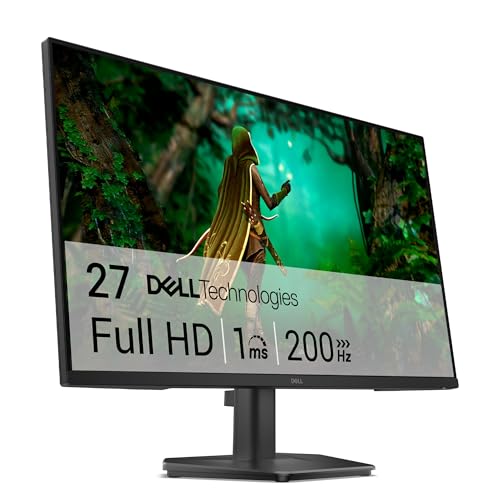
The SE2725HG is a 27-inch Full HD monitor running at 1920x1080 on a Fast IPS panel. That combination gives you a pixel density of around 82 PPI, which is on the lower side for a 27-inch screen. That's early because it's probably the single biggest practical limitation of this monitor. If you're sitting at a normal desktop distance, you'll notice the pixel grid more than you would on a 27-inch 1440p display. For fast-paced gaming where you're focused on movement and reaction, it's fine. For sitting and reading text or doing detailed work, it can feel a bit soft.
The headline specs are a 200Hz refresh rate, a 1ms MPRT response time claim (more on what that actually means in practice later), and AMD FreeSync Premium support covering a range that makes it genuinely useful for tear-free gaming. Dell rates the peak brightness at 350 nits in SDR, which is adequate for most indoor environments though not exceptional. The panel covers 99% sRGB and 83% DCI-P3 according to Dell's published specifications, which is a solid result for a budget display. Connectivity is kept simple: two HDMI 1.4 ports and one DisplayPort 1.2.
The stand offers tilt adjustment only, which is the standard budget compromise. No height adjustment, no pivot, no swivel. If you need ergonomic flexibility you'll want a VESA arm (the mount is 100x100mm standard). The monitor does have a headphone jack and a built-in power supply rather than an external brick, which owners consistently mention as a nice touch at this price. Below is the full spec breakdown.
| Specification | Detail |
|---|---|
| Screen Size | 27 inches |
| Resolution | 1920x1080 (Full HD) |
| Panel Type | Fast IPS |
| Refresh Rate | 200Hz |
| Response Time (MPRT) | 1ms |
| Response Time (GtG) | 1ms (overdrive) |
| Adaptive Sync | AMD FreeSync Premium |
| Peak Brightness | 350 nits (SDR) |
| Contrast Ratio | 1000:1 (native) |
| Colour Coverage | 99% sRGB, 83% DCI-P3 |
| HDR Support | HDR10 (DisplayHDR 400) |
| Ports | 2x HDMI 1.4, 1x DisplayPort 1.2 |
| Audio | 3.5mm headphone jack |
| VESA Mount | 100x100mm |
| Stand Adjustments | Tilt only |
| Dimensions (with stand) | 614.5 x 456.7 x 200mm (approx) |
| Price | £115.99 · Details |

Panel Technology
Fast IPS is basically what happens when panel manufacturers decided that IPS's biggest gaming weakness, its historically sluggish pixel response compared to TN panels, needed fixing without throwing away IPS's advantages. Standard IPS panels typically measure somewhere around 4ms to 6ms GtG in real-world conditions. Fast IPS variants push that down significantly by using a different liquid crystal alignment and stronger overdrive circuitry. The result is an IPS panel that can actually compete with TN on motion clarity while keeping the wide viewing angles and colour accuracy that made IPS popular in the first place.
For a gaming monitor at this price, Fast IPS is genuinely the right choice. VA panels, which are the main alternative in budget displays, offer better native contrast (typically 3000:1 or higher versus IPS's 1000:1) but their response times are notoriously inconsistent. VA panels can look gorgeous in dark cinematic scenes but will smear and ghost on fast lateral movement in a way that's genuinely distracting in competitive games. TN panels are fast but the colour and viewing angle compromise is severe enough that most people find them unpleasant for anything other than pure competitive play. Fast IPS threads the needle: decent speed, good colours, wide angles.
The viewing angles on IPS panels are rated at 178 degrees horizontally and vertically, and in practice this means you can sit off-axis and the image barely shifts. There's the usual IPS glow in the corners when you're displaying dark content in a dim room, which is a characteristic of the panel type rather than a flaw specific to this monitor. Owner reviews don't flag IPS glow as a significant problem here, which suggests Dell's panel selection has been reasonably consistent. Backlight bleed is mentioned occasionally in owner feedback, as it is with virtually every IPS display at this price, but it's not a dominant complaint. The IPS panel technology trade-off between contrast and viewing angle consistency is well understood at this point, and for gaming purposes the angles matter more than the contrast figure for most people.
Display Quality
Right, the pixel density thing. 82 PPI at 27 inches is noticeably lower than the 109 PPI you'd get from a 27-inch 1440p display. That's not a small difference. If you're coming from a 1440p panel or a high-density laptop screen, the SE2725HG will look softer. Text rendering is the area where this shows up most obviously. For gaming, especially at normal monitor distances, it's less of an issue because you're not staring at fine text, you're tracking movement. But if you're planning to use this for work as well as gaming, the lower pixel density is something to factor in honestly.
That said, the colour quality from this panel is genuinely impressive for the price. Dell's 99% sRGB coverage means the gamut is essentially complete for standard content, and the 83% DCI-P3 figure is better than many monitors at twice the price were achieving just a few years ago. The matte anti-glare coating does its job without introducing the kind of heavy grain that some budget monitors use, which can make the image look hazy. Owner reviews consistently praise the out-of-box colour quality, with several noting they didn't feel the need to adjust anything beyond basic brightness. That's a good sign for factory calibration consistency.
Brightness uniformity across a budget IPS panel is always a mild lottery. Dell rates peak brightness at 350 nits, which is enough for a reasonably lit room but won't fight direct sunlight. The matte coating helps with ambient light management. Published specifications from Dell don't include factory Delta-E figures, which is typical for budget monitors. Based on the 99% sRGB coverage claim and the owner feedback pattern, you're likely looking at a display that's usable out of the box for gaming and casual content without needing any calibration work. For serious colour-critical work, you'd want something with a published Delta-E measurement and a proper calibration report, but that's a different category of monitor entirely.
Refresh Rate and Adaptive Sync
200Hz is a genuinely useful refresh rate for competitive gaming. The step from 144Hz to 200Hz is smaller than the step from 60Hz to 144Hz, but it's not nothing. At 144Hz each frame lasts about 6.9ms. At 200Hz that drops to 5ms. In fast-paced games like CS2, Valorant, or Apex Legends where you're playing at high frame rates, the additional smoothness is perceptible. Whether it's worth paying extra for specifically is a different question, but when a monitor ships at 200Hz as standard in the budget bracket, there's no reason to complain.
AMD FreeSync Premium is the adaptive sync implementation here, and it's the more capable tier of FreeSync rather than the basic version. FreeSync Premium requires a minimum 120Hz refresh rate at the native resolution and mandates Low Framerate Compensation (LFC) support. LFC matters because it means when your frame rate drops below the lower end of the VRR range, the monitor doubles (or multiplies) frames to keep adaptive sync working rather than dropping out of VRR mode and letting tearing appear. In practice, this makes the gaming experience significantly smoother in demanding titles where your GPU occasionally dips. Dell hasn't published the full VRR range explicitly in the main spec sheet, but based on the FreeSync Premium certification the lower bound is typically around 48Hz with LFC covering below that.
G-Sync compatibility is for Nvidia users. FreeSync monitors frequently work with Nvidia's G-Sync Compatible mode, which uses the same VESA Adaptive Sync standard that FreeSync is built on. Dell hasn't specifically listed this as G-Sync Compatible, so Nvidia users should be aware that VRR functionality isn't officially guaranteed, though in practice many FreeSync monitors work fine with Nvidia cards in G-Sync Compatible mode. AMD GPU owners are the primary target here and will get the full certified FreeSync Premium experience. The VESA Adaptive Sync standard underpinning all of this is worth understanding if you want to dig into why FreeSync and G-Sync are increasingly interchangeable.
Response Time and Motion
The "1ms" claim needs unpacking because Dell uses it in a way that requires some translation. There are two different response time measurements that manufacturers quote: GtG (grey-to-grey) and MPRT (moving picture response time). These measure completely different things. GtG measures how long it takes a pixel to transition between two grey levels. MPRT is a measure of perceived motion blur, which is affected by both pixel response and sample-and-hold display technology. The 1ms MPRT figure is achieved through backlight strobing, not through the panel's raw pixel speed.
For Fast IPS panels, the real GtG response time at optimal overdrive settings is typically in the 2ms to 4ms range. That's still excellent and well ahead of standard IPS panels. The practical consequence is that at 200Hz with a properly tuned overdrive setting, motion clarity is genuinely good. Fast IPS panels at this speed don't produce the obvious ghosting trails that plagued budget monitors of previous generations. What you can get with overdrive pushed too aggressively is inverse ghosting, where bright halos appear behind moving objects. Owner reviews don't flag this as a significant issue on the SE2725HG, suggesting Dell's overdrive implementation is reasonably well tuned out of the box.
For the games this monitor is clearly aimed at, competitive shooters and fast-paced multiplayer titles, the motion performance is more than adequate. You're not going to see the kind of smearing that makes VA panels frustrating in fast scenes, and the 200Hz refresh rate means each frame is displayed for a short enough time that sample-and-hold blur is reduced compared to 144Hz or 60Hz. If you're coming from a 60Hz display, the difference in motion clarity will feel dramatic. If you're coming from a 144Hz Fast IPS panel, the improvement is real but more subtle. And if you're comparing to a proper OLED display, Fast IPS at any price can't match the near-instant pixel response of OLED, but OLED at this price doesn't exist.
Color Accuracy and Gamut
99% sRGB coverage is the number Dell leads with, and for gaming and general media consumption this is genuinely all you need. The sRGB colour space covers the vast majority of web content, streaming video, and game assets. When a monitor hits 99% coverage it means the colours in games and films are being reproduced accurately rather than appearing washed out (under-coverage) or oversaturated (over-coverage). This is a meaningful spec at this price point.
The 83% DCI-P3 figure is a nice bonus. DCI-P3 is the wider colour space used in cinema production and increasingly in HDR content. 83% isn't going to satisfy anyone doing professional colour work, but it means HDR-tagged content will show more vivid colours than a monitor stuck at 72% NTSC or 100% sRGB. For gaming, some titles are starting to use wider colour gamuts, and having a panel that can display more of that gamut is a genuine benefit even if it's not cinema-grade.
Factory calibration quality is where budget monitors often let themselves down. Dell doesn't publish Delta-E averages for the SE2725HG, which is standard practice at this price tier. Based on owner feedback, the out-of-box colour presentation is consistently described as accurate and pleasant without obvious colour casts or hue shifts. Several owners specifically mention the colours looking "natural" and "vibrant without being overdone," which suggests the factory preset is reasonably well tuned. For content creation work where Delta-E accuracy actually matters, you'd want a monitor with a factory calibration report and individual unit calibration data, which typically starts appearing in the mid-range bracket. For gaming and media, the SE2725HG's colour performance is well above average for its price.

HDR Performance
HDR on budget monitors is a topic that requires honesty, and the SE2725HG is no exception to the general rule. This monitor carries a DisplayHDR 400 certification, which is the lowest tier in the VESA DisplayHDR certification scheme. DisplayHDR 400 requires 400 nits peak brightness and no local dimming. That's it. There's no requirement for local dimming zones, no meaningful black level improvement, and 400 nits isn't enough headroom to produce the specular highlights and shadow detail that make HDR content actually look different from well-mastered SDR.
In practice, HDR10 content on the SE2725HG will be tone-mapped to the monitor's capabilities, which means you'll see slightly brighter highlights than SDR but you won't get the dramatic contrast and colour expansion that HDR delivers on a proper HDR monitor. The IPS panel's native 1000:1 contrast ratio doesn't help here. Without local dimming, dark scenes in HDR mode will look similar to SDR mode because the backlight can't selectively dim to produce deep blacks while simultaneously boosting highlights. This is a hardware limitation, not a settings issue.
None of this is a criticism specific to the SE2725HG. It's the reality of DisplayHDR 400 across the board. If HDR is important to you, you need to be looking at monitors with DisplayHDR 600 or higher, ideally with local dimming or OLED panels. Those monitors cost significantly more. For a budget gaming display, the SE2725HG's HDR implementation is about what you'd expect, and if you're buying this primarily for competitive gaming at high refresh rates, you probably won't miss proper HDR much. Just don't go in expecting anything transformative when you flip the HDR switch.
Contrast and Brightness
The native contrast ratio of 1000:1 is standard for IPS panels and perfectly adequate for gaming in normal room conditions. It means blacks look acceptably dark when there's ambient light in the room, but in a fully darkened environment you'll notice that blacks have a slight grey cast compared to what VA or OLED panels can produce. For most gaming scenarios this isn't a significant issue. Games are typically played with some ambient light, and the wide viewing angles and colour accuracy of IPS more than compensate for the contrast limitation in everyday use.
Peak brightness at 350 nits is enough for a desk setup in a normally lit room. You won't be fighting glare from a window directly behind you at that brightness level, but the matte anti-glare coating helps significantly by scattering reflections rather than producing mirror-like glare. Owners in brighter rooms occasionally mention turning brightness up high, which is expected. The 350 nit figure is a typical SDR peak; the monitor may boost slightly higher for HDR content in HDR mode, but as discussed in the HDR section, the practical impact is limited.
Brightness uniformity across the panel is something that varies unit to unit on budget IPS monitors. The general pattern from owner reviews is that the SE2725HG is consistent enough that most users don't notice uniformity issues in normal use. Some owners report mild IPS glow in the bottom corners during dark content, which is a characteristic of the panel technology. Nobody is reporting severe backlight bleed as a common complaint, which is a good sign. For gaming and general use, the brightness and contrast performance is solid for the price bracket.
Ergonomics and Stand
The stand is the area where Dell has made the most obvious cost savings, and it's worth being straightforward about this. You get tilt adjustment only, somewhere in the range of negative 5 to positive 21 degrees. No height adjustment, no swivel, no pivot. For a 27-inch gaming monitor aimed at people who'll likely be sitting at a fixed desk setup, tilt-only is workable but not ideal. If you're taller or shorter than average, or you want to position the monitor precisely, you'll find the fixed height limiting.
The good news is that the 100x100mm VESA mount is included, so fitting a third-party monitor arm is straightforward. A decent single-arm monitor mount can be had for around £20 to £30, and it transforms the ergonomic situation completely while also freeing up desk space. Several owners mention going straight to a monitor arm, which suggests the stand limitation is well understood. The stand itself is stable enough that owners don't report wobbling or instability during normal use, which is at least the baseline requirement.
Build quality for a budget monitor is generally described as solid in owner reviews. The bezels are reasonably slim on three sides, with a slightly thicker bottom chin that houses the OSD buttons. The OSD itself is operated by physical buttons on the back-right edge of the panel, which is a slightly awkward arrangement that owners mention takes a moment to get used to but isn't a dealbreaker. The monitor has an internal power supply rather than an external power brick, which is a small quality-of-life improvement that owners consistently appreciate. Overall build feels appropriate for the price: not premium, but not flimsy either.
Connectivity and Ports
The port selection on the SE2725HG is minimal but covers the basics for a single-GPU gaming setup. Here's what you get:
- 2x HDMI 1.4
- 1x DisplayPort 1.2
- 1x 3.5mm headphone jack
For a gaming monitor at this price, the absence of USB-C and a USB hub is expected. This is a display-focused device without peripheral connectivity features. The DisplayPort 1.2 connection will handle 1080p at 200Hz without any issues, since DisplayPort 1.2 has more than enough bandwidth for that resolution and refresh rate combination. HDMI 1.4 is the limiting factor for console users: HDMI 1.4 maxes out at 1080p/120Hz, which means if you're connecting a PS5 or Xbox Series X via HDMI and want the full 200Hz, you'll need to use the DisplayPort connection instead. Console users will be capped at 120Hz over HDMI, which is still excellent but.
The dual HDMI inputs are useful if you want to connect two HDMI sources, such as a gaming PC and a console, and switch between them. The headphone jack is a practical addition for anyone who uses headphones rather than speakers. There are no built-in speakers, which is standard for gaming monitors and not a meaningful omission given that built-in monitor speakers are almost universally poor quality. The overall connectivity package is lean but functional for the intended use case.
One thing from the owner reviews: several people mention the input switching and OSD navigation being a bit slow to respond, which is a common minor complaint with budget monitors that use basic OSD controller chips. It's not a daily frustration since you're not usually switching inputs constantly, but if you're frequently swapping between sources it's something to be aware of. The Dell product page covers the full connectivity spec if you want to verify anything before buying.
How It Compares
The budget 1080p gaming monitor market is genuinely competitive right now, and the SE2725HG has real rivals. The two most relevant alternatives are the AOC 27G2SP and the LG 27GN650-B, both of which compete directly in the same price bracket and offer similar Fast IPS panels at high refresh rates.
The AOC 27G2SP is a 27-inch 165Hz Fast IPS monitor that typically sits slightly below the SE2725HG in price. It offers solid colour coverage and good motion performance, but the 165Hz refresh rate is meaningfully lower than 200Hz for competitive gaming. AOC's build quality is generally considered good for the price, and the stand on the 27G2SP offers height adjustment, which is a genuine advantage over Dell's tilt-only stand. If ergonomics matter more to you than raw refresh rate, the AOC is worth a look.
The LG 27GN650-B is another Fast IPS 27-inch 1080p display, running at 144Hz. LG's IPS panels have a strong reputation and the 27GN650-B has been a popular choice for a while. The 144Hz versus 200Hz difference is the main spec gap, and at similar price points the SE2725HG's extra headroom is a meaningful advantage for competitive gaming. LG's OSD and build quality are generally well regarded, and the 27GN650-B has a larger owner review base to draw confidence from.
| Feature | Dell SE2725HG | AOC 27G2SP | LG 27GN650-B |
|---|---|---|---|
| Panel Type | Fast IPS | Fast IPS | IPS |
| Refresh Rate | 200Hz | 165Hz | 144Hz |
| Resolution | 1920x1080 | 1920x1080 | 1920x1080 |
| Response Time | 1ms MPRT | 1ms GtG | 1ms GtG |
| Adaptive Sync | FreeSync Premium | FreeSync Premium | FreeSync Premium |
| sRGB Coverage | 99% | 99% | 99% |
| HDR | DisplayHDR 400 | DisplayHDR 400 | DisplayHDR 400 |
| Stand Adjustments | Tilt only | Height, tilt, swivel | Tilt only |
| VESA Mount | 100x100mm | 100x100mm | 100x100mm |
| Price | £115.99 · Details | Check current price | Check current price |
The SE2725HG wins on refresh rate against both alternatives, which is its primary competitive advantage. Where it loses is on stand adjustability, particularly compared to the AOC. For pure competitive gaming at 1080p with an AMD GPU, the Dell is the strongest spec in this comparison. For someone who values ergonomics or has an Nvidia GPU and wants certified G-Sync compatibility, the picture gets more nuanced. It's also that if your budget stretches to mid-range, a 27-inch 1440p 144Hz IPS monitor would be a more meaningful upgrade than any 1080p 200Hz option, because the resolution jump has a bigger practical impact than the refresh rate difference at this level.

Final Verdict
The Dell SE2725HG is a genuinely good budget gaming monitor that delivers on its core promise. A 200Hz Fast IPS panel with solid colour coverage at this price is a strong package, and the positive overall rating across hundreds of owners isn't the result of people being easily impressed. This is a monitor that works well for competitive gaming, looks good with everyday content, and doesn't require you to immediately fiddle with settings to get a decent image. For 1080p gaming on a budget, it's one of the better choices available right now.
The limitations are real but predictable. The 82 PPI pixel density at 27 inches means text and fine detail look softer than they would on a 1440p panel. The stand is tilt-only, which is annoying but solvable with a cheap monitor arm. The HDR implementation is DisplayHDR 400 checkbox territory and won't produce anything close to proper HDR. And the HDMI 1.4 ports cap console connections at 120Hz rather than the full 200Hz. None of these are surprises at this price, and none of them undermine the core gaming use case.
Who should buy this? Competitive PC gamers on a tight budget with AMD GPUs who want the best refresh rate they can get at 1080p without spending mid-range money. Students who want a capable gaming display that also handles everyday computing. Anyone upgrading from a 60Hz or 75Hz monitor who wants a significant step up in smoothness without spending a lot.
Who should skip it? If you're primarily a console gamer, the 120Hz HDMI ceiling means you won't see the full 200Hz anyway, and you might be better served by a monitor with HDMI 2.1 for future-proofing. If you care about ergonomics and don't want to buy a monitor arm, the AOC 27G2SP's adjustable stand is. And honestly, if your budget can stretch to the mid-range bracket, a 1440p 144Hz IPS monitor is a more impactful upgrade than any 1080p 200Hz option. The resolution jump from 1080p to 1440p on a 27-inch screen is more noticeable in daily use than the jump from 144Hz to 200Hz. If you're not specifically chasing maximum frame rates in competitive titles, spend a bit more and go 1440p.
But if 1080p at 200Hz in the budget bracket is what you need, the SE2725HG is a proper option. Dell's build quality and reliability track record give it an edge over some lesser-known alternatives, and the owner satisfaction numbers back that up. Solid choice.
What works. What doesn’t.
6 + 6What we liked6 reasons
- 200Hz Fast IPS panel delivers genuinely smooth motion for competitive gaming without the colour and viewing angle compromises of TN
- 99% sRGB and 83% DCI-P3 colour coverage is well above average for the budget price bracket
- Out-of-box colour accuracy is consistently praised by owners, requiring little or no manual adjustment
- AMD FreeSync Premium with Low Framerate Compensation ensures tear-free gaming even when frame rates dip
- Internal power supply rather than an external brick is a welcome quality-of-life detail at this price
- Stable, solid build quality with a track record of owner satisfaction reflected in a positive overall rating across hundreds of reviews
Where it falls6 reasons
- 82 PPI pixel density on a 27-inch panel looks noticeably soft compared to a 1440p display, particularly for text and fine detail
- Stand offers tilt adjustment only, with no height, swivel, or pivot, requiring a monitor arm for proper ergonomic setup
- DisplayHDR 400 certification delivers no meaningful HDR experience due to the absence of local dimming and limited peak brightness
- HDMI 1.4 ports cap console connections at 1080p/120Hz, preventing access to the full 200Hz over HDMI
- G-Sync compatibility is not officially certified, making the VRR experience less reliable for Nvidia GPU users
- OSD navigation via rear buttons is slow and slightly awkward to operate
Full specifications
11 attributes| Panel type | IPS |
|---|---|
| Aspect ratio | 16:9 |
| Curvature | flat |
| HDR | none |
| Launch year | 2025 |
| Ports | 2x HDMI, 1x DisplayPort 1.4, 1x 3.5mm audio out |
| Refresh rate HZ | 200 |
| Resolution | 1920x1080 |
| Response time MS | 1 |
| Screen size IN | 27 |
| Vesa compatible | true |
If this isn’t right for you
2 options

Frequently asked
7 questions01Does the Dell SE2725HG work with Nvidia graphics cards?+
Yes, but with a caveat. The SE2725HG uses AMD FreeSync Premium for adaptive sync, which is not officially certified for Nvidia G-Sync Compatible mode. In practice, many FreeSync monitors function with Nvidia GPUs in G-Sync Compatible mode, but Dell has not specifically certified this monitor for that feature. AMD GPU owners will get the full certified FreeSync Premium experience without any uncertainty.
02Can you use the Dell SE2725HG at 200Hz with a games console?+
Not via HDMI. The monitor has two HDMI 1.4 ports, which are limited to 1080p at a maximum of 120Hz. To reach 200Hz you need to use the DisplayPort 1.2 connection, which is only practical from a PC. Console users connecting a PS5 or Xbox Series X via HDMI will be capped at 120Hz, which is still a very smooth experience but not the full 200Hz the panel is capable of.
03Is the HDR on the Dell SE2725HG worth using?+
Honestly, not particularly. The SE2725HG carries a DisplayHDR 400 certification, which is the lowest tier and does not require local dimming. With a native contrast ratio of 1000:1 and no ability to selectively dim parts of the backlight, the monitor cannot produce the deep blacks and bright highlights that make HDR content look genuinely different from SDR. HDR mode will offer slightly brighter highlights, but it is not a transformative experience. For proper HDR, you need a DisplayHDR 600 or higher monitor, ideally with local dimming or an OLED panel.
04Do you need to buy a separate monitor arm for the Dell SE2725HG?+
You do not strictly need one, but the stand offers tilt adjustment only, with no height, swivel, or pivot. If you are taller or shorter than average, or you want precise positioning, the fixed height will be limiting. The monitor has a standard 100x100mm VESA mount, so fitting a third-party arm is straightforward. A single-arm monitor mount typically costs around £20 to £30 and significantly improves the ergonomic situation while freeing up desk space. Many owners go straight to a monitor arm when they set this up.
05How does the Dell SE2725HG compare to a 1440p monitor at a similar price?+
At equivalent price points, a 27-inch 1440p 144Hz IPS monitor will offer noticeably sharper image quality due to the higher pixel density of around 109 PPI versus the SE2725HG's 82 PPI. The difference is most obvious when reading text and viewing fine detail. For competitive gaming at very high frame rates, the SE2725HG's 200Hz advantage is meaningful, but for general use including work and media consumption, the resolution jump from 1080p to 1440p has a larger practical impact. If your budget can stretch to a 1440p option, it is generally the more well-rounded choice for a 27-inch display.
06What are the main differences between the Dell SE2725HG and the AOC 27G2SP?+
Both are 27-inch Fast IPS 1080p gaming monitors with FreeSync Premium, but they differ in two key areas. The SE2725HG runs at 200Hz versus the AOC's 165Hz, giving Dell an advantage in raw refresh rate for competitive gaming. However, the AOC 27G2SP offers height, tilt, and swivel stand adjustments, whereas the SE2725HG is tilt-only. If ergonomic flexibility without buying a monitor arm is important to you, the AOC is. If maximum refresh rate at this price bracket is the priority, the Dell has the edge.
07Is the pixel density noticeable at 27 inches with 1080p resolution?+
Yes, at normal desktop viewing distances the 82 PPI pixel density of a 27-inch 1080p display is lower than ideal, and most people will notice it when reading text or looking at fine UI details. It is less apparent during fast-paced gaming where attention is on movement rather than fine detail. If you are primarily gaming and sitting at a typical arm's-length distance, it is manageable. If you plan to use this monitor heavily for productivity, web browsing, or any work involving text, the lower pixel density compared to a 1440p display is worth factoring into your decision.