Buying a prebuilt PC is basically a trust exercise. You're handing over your money and hoping whoever assembled the thing didn't cheap out on the bits you can't easily see or replace. And with refurbished kit, that anxiety doubles. Is the SSD actually any good? Did they just bung in the cheapest RAM they could find? Is the whole thing going to die six months after the warranty expires? These are fair questions, and they deserve straight answers.
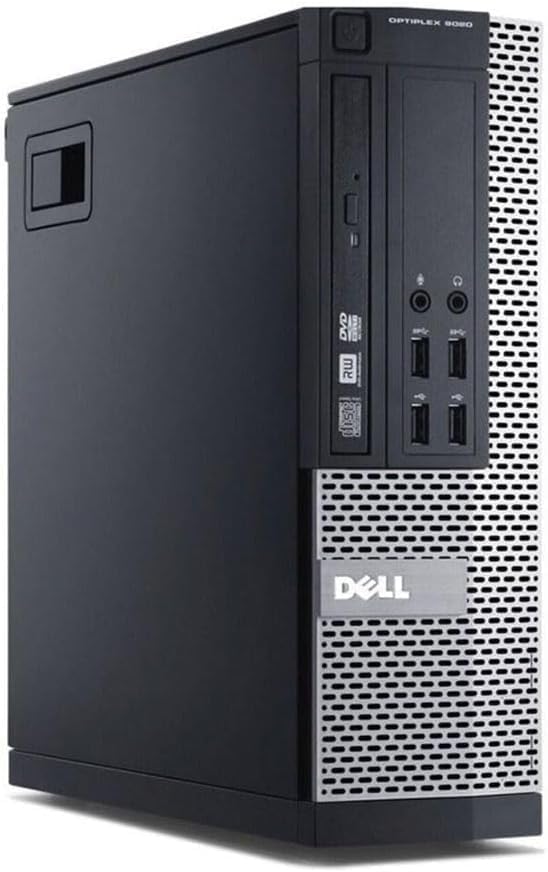
This particular machine is a refurbished Dell OptiPlex, either the 7020 or 9020 SFF (Small Form Factor), running an Intel Core i7-4770, 16GB of DDR3 RAM, a 500GB SATA SSD, and Windows 11 Pro. It's sold by a refurbisher rather than Dell directly, which matters. The OptiPlex line itself has a solid reputation in business IT circles, these things were built to run all day in offices, not to impress anyone at a trade show. That heritage is actually a point in its favour. But the i7-4770 is a 2013 CPU, which means we need to be honest about what this machine is and isn't good for. So let's get into it properly.
There are no owner reviews to draw on yet for this specific listing, so this assessment is grounded in the verified specs, what the OptiPlex platform is known for from years of enterprise deployment, and how it stacks up against what else you can buy at this budget tier. The Dell OptiPlex Desktops UK Review (2026) i7-4770 Tested is a product that rewards clear-eyed thinking. It's not for everyone. But for the right person, it's actually a pretty sensible buy.
Core Specifications
The headline CPU is the Intel Core i7-4770, a quad-core, eight-thread Haswell processor from 2013. It's clocked at 3.4GHz base with a 3.9GHz boost. Paired with 16GB of DDR3-1600 RAM across what can be up to four DIMM slots (though the listing ships with 16GB configured), this is a machine that can genuinely handle multitasking without breaking a sweat on everyday workloads. The storage is a 500GB SATA SSD, which is faster than any spinning hard drive but slower than a modern NVMe drive. For booting Windows and running office apps, you won't notice the difference day to day.
Graphics are handled by Intel HD Graphics 4600, which is the integrated GPU baked into the i7-4770. There's no discrete graphics card here. That's not a surprise given the SFF chassis, which limits what you can physically fit inside, but it's worth being upfront about. The OS is Windows 11 Pro, which is genuinely useful if you need BitLocker, Remote Desktop, or domain joining for work. The machine also includes a 300Mbps USB WiFi adapter dongle for wireless connectivity, and a UK 3-pin power cable is in the box. Display output comes via two DisplayPorts, so you can run a dual-monitor setup without any faffing around with adapters.
The platform supports up to 32GB of DDR3-1600 across four DIMM slots, and storage can go up to 2TB HDD with SSD support and RAID 0/1 capability. The whole unit weighs 6.0kg (13.2lbs), which is light enough to tuck under a desk or sit on a shelf without drama. For a budget-tier machine aimed at office work, browsing, and light productivity, the core spec sheet is actually pretty reasonable. Nothing flashy, nothing unnecessary, just the bits that matter for the use case.
| Specification | Detail |
|---|---|
| CPU | Intel Core i7-4770 (Haswell, quad-core, 8 threads, 3.4GHz base / 3.9GHz boost) |
| GPU | Intel HD Graphics 4600 (integrated) |
| RAM | 16GB DDR3-1600 (up to 32GB, 4 DIMM slots) |
| Storage | 500GB SATA SSD (up to 2TB HDD, RAID 0/1 supported) |
| Operating System | Windows 11 Pro |
| Display Output | 2x DisplayPort |
| WiFi | 300Mbps USB WiFi Adapter Dongle (included) |
| Weight | 6.0kg (13.2lbs) |
| Power Cable | UK 3-Pin included |
| Current Price | £150.00 |
CPU & Performance
The i7-4770 is old. There's no point pretending otherwise. It's a 22nm chip built on Intel's Haswell architecture, and it launched when Windows 8 was still a thing people were complaining about. But "old" doesn't automatically mean "useless", and this is where a lot of people get confused when looking at refurbished hardware. For the workloads this machine is actually designed for, the i7-4770 is still perfectly capable. Web browsing, email, spreadsheets, video calls, light photo editing, document work. It handles all of that without any real complaints. The eight threads help with multitasking in a way that older dual-core budget chips simply can't match.
Where it shows its age is in anything that benefits from modern instruction sets or higher single-core IPC. A current-gen Intel Core i3 from the 12th or 13th generation will outperform it in most benchmarks despite being a lower-tier chip on paper. That's just how much CPU architecture has moved on in a decade. Video encoding, compiling code, running heavier creative applications, these tasks will feel sluggish compared to what a modern mid-range chip can do. If your workload involves any of those things regularly, this isn't the right machine and you should know that before you buy.
That said, the i7-4770 still scores respectably in older benchmark suites and real-world productivity tests for its era. PassMark scores for this chip sit around 6,000 to 6,500, which puts it in the same ballpark as a budget modern chip like a Celeron or Pentium Gold but well below a current Core i3 or Ryzen 3. For the price bracket this machine sits in, that's an acceptable trade-off if your use case is genuinely light. The Windows 11 Pro install does add some overhead compared to Windows 10, so don't expect it to feel snappy on very demanding tasks. But for a secondary PC, a home office workhorse, or something for the kids to do homework on, it's sorted.
GPU & Gaming Performance
Right. This is the section where we have to be very direct. The Intel HD Graphics 4600 is integrated graphics, meaning it shares system memory and has no dedicated VRAM of its own. It is not a gaming GPU. It was never a gaming GPU. Even in 2013 when this chip launched, the HD 4600 was the kind of graphics solution that made PC gamers wince. In 2026, it's firmly in the "absolutely not for gaming" category for anything made in the last decade or so.
What can it actually do? Older titles, absolutely. Minecraft at low settings, older indie games, 2D games, emulation of retro consoles, browser-based games. These will all run fine. But if you're thinking about playing anything from the last five years at a playable frame rate, you're going to be disappointed. Even relatively undemanding modern titles like Fortnite or Rocket League will struggle to hit 30fps at low settings. Anything with modern rendering pipelines, forget it entirely.
The SFF form factor of the OptiPlex also limits your options for adding a discrete GPU later. The chassis is compact by design, which means full-size graphics cards won't fit, and the power supply headroom for a dedicated GPU is constrained. There are low-profile GPU options that technically fit in SFF cases, something like a used GTX 1650 LP or an Arc A310, but you'd want to verify PSU wattage before going down that road. So if gaming is even a minor consideration for you, this machine needs either a careful upgrade plan or a rethink. It's listed under "Gaming PCs" in its category, but that's a stretch. This is an office PC that someone has put Windows 11 Pro on.
Memory & Storage
Sixteen gigabytes of DDR3 RAM is actually a reasonable amount for the kind of work this machine is built for. Chrome tabs, Office apps, video calls on Teams or Zoom, light multitasking. You're not going to hit a memory wall doing any of that. The DDR3-1600 speed is the standard for this platform and there's nothing to complain about there. It does what it needs to do. The fact that the board supports up to 32GB across four DIMM slots is a nice bit of headroom if you ever want to max it out, though for most users the 16GB config will be fine for years.
The 500GB SATA SSD is where things get more interesting. SATA SSDs top out at around 550MB/s sequential read, which is genuinely fast compared to a spinning hard drive but noticeably slower than a modern NVMe drive that can hit 3,500MB/s or more. For booting Windows and launching applications, the difference between SATA and NVMe in day-to-day use is smaller than the numbers suggest. You'll get fast boot times and snappy app launches. Where SATA starts to feel slower is in large file transfers or working with big datasets, but that's not what this machine is for.
Five hundred gigabytes is enough for Windows 11, your applications, and a reasonable amount of documents and media, but it's not generous. If you're planning to store a lot of photos, videos, or games locally, you'll want to add external storage or swap in a larger drive. The platform supports up to 2TB HDD alongside the SSD, so you could add a secondary drive for bulk storage if the chassis has the bay for it. That's a sensible upgrade path for anyone who needs more space without spending a lot of money. SATA drives are cheap right now, so this isn't a painful addition.
Cooling Solution
The OptiPlex SFF chassis uses a compact cooling solution designed for the thermal envelope of the i7-4770, which has a 84W TDP. Dell's business desktops from this era were engineered for sustained all-day operation in office environments, which means the thermal design is actually pretty sensible. These aren't gaming rigs with massive heatsinks and RGB fans, but they're not flimsy either. The stock cooler on OptiPlex units is a direct-contact heatsink with a small fan, sized to fit the SFF case without obstructing airflow.
Under sustained load, the i7-4770 in an SFF chassis will get warm, and the fan will spin up audibly. It's not loud by gaming PC standards, but it's not silent either. In typical office use, browsing and light productivity, you'll barely hear it. Push it with sustained CPU-heavy tasks and the fan noise becomes noticeable. That's just the physics of cooling an 84W processor in a small box. There's no liquid cooling here, no fancy heatsink options, just a sensible Dell-designed solution that does the job it was designed for.
One thing worth knowing about refurbished units is that the thermal paste on the CPU cooler may be years old at this point. Dried-out thermal paste can cause higher temperatures and more fan noise than the original spec. If you buy one of these and notice it running hot or the fan spinning up more than you'd expect, reapplying thermal paste is a cheap and easy fix. It's not a flaw unique to this product, it's just a reality of buying refurbished hardware from 2013 to 2014 era machines. A tube of decent thermal compound costs a few quid and takes ten minutes to sort.
Case & Build Quality
Dell's OptiPlex line has always been built to a higher standard than consumer-grade prebuilts at the same price point. These machines were sold to businesses and government departments that needed reliability over years of daily use, and that philosophy shows in the build quality. The SFF chassis is steel construction, feels solid, and doesn't flex or creak when you pick it up. The internals are well-organised by the standards of the era, with tool-free access to RAM and storage in most configurations. Cable management is functional rather than pretty, but this is a compact business PC, not a showpiece.
The case design is deliberately plain. There's no RGB, no tempered glass panel, no aggressive styling. It's a small black box. If that bothers you aesthetically, you're buying the wrong thing. But if you just want a tidy, compact PC that sits on or under a desk without drawing attention to itself, the OptiPlex SFF is genuinely good at that. It's the kind of design that ages well precisely because it never tried to be fashionable in the first place.
As a refurbished unit, cosmetic condition will vary. The listing doesn't specify grading, so you might get a unit with minor scuffs or scratches. That's normal for refurbished business hardware and doesn't affect functionality. The internal components are the more important consideration, and Dell's build quality means the motherboard, power supply, and chassis components are generally more reliable than equivalent consumer-grade hardware from the same era. These machines were built to last, and many of them have. That's part of why they're still being sold and used in 2026.
Connectivity & Ports
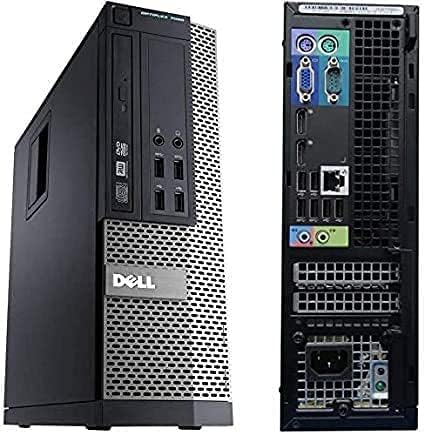
The two DisplayPort outputs are a genuine plus. DisplayPort is the right choice for modern monitors, supporting higher refresh rates and resolutions than VGA or older DVI connections. Running a dual-monitor setup is straightforward, and both ports support crisp digital video. For office work, the ability to spread your workspace across two screens without buying adapters is a practical benefit that's easy to overlook until you don't have it.
Wireless connectivity comes via the included 300Mbps USB WiFi adapter dongle. This is a USB device that plugs into one of the machine's USB ports and gives you 2.4GHz wireless connectivity. It works, and it's better than nothing, but it's worth being realistic about what 300Mbps on 2.4GHz means in practice. You'll get enough bandwidth for browsing, streaming, and video calls without drama. But it's not as fast or as stable as a wired Ethernet connection, and the USB dongle approach means you're using up a USB port permanently. If you're near a router, running an Ethernet cable is always the better option. The OptiPlex will have rear Ethernet ports as part of the standard platform spec, though the exact port configuration for this specific refurbished listing isn't detailed beyond the DisplayPort and WiFi dongle information provided.
The USB port situation is worth paying attention to. The OptiPlex SFF from this generation typically offers a mix of USB 3.0 and USB 2.0 ports on both the front and rear panels. USB 3.0 is fast enough for external drives and peripherals without any issues. The USB 3.0 standard tops out at 5Gbps, which is more than sufficient for anything you'd plug into a machine like this. The front panel ports are useful for quick connections without reaching round the back, which is a small but genuinely appreciated convenience in daily use. Overall the connectivity picture is practical and covers the basics well for an office-oriented machine.
Pre-installed Software & OS
Windows 11 Pro is a proper, legitimate operating system install, and it's one of the better things about this package. The Pro tier matters if you need BitLocker drive encryption, Remote Desktop for accessing the machine remotely, the ability to join a Windows domain for business networks, or Hyper-V for running virtual machines. If you're buying this for a home office or small business setup, Windows 11 Pro is worth having over the Home edition. It's not a token upgrade, it's genuinely useful functionality.
The question of whether Windows 11 runs well on a 2013 CPU is a fair one. Microsoft's official minimum requirements for Windows 11 include an 8th generation Intel processor or newer, which means the i7-4770 technically falls outside the supported hardware list. Refurbishers get around this by bypassing the TPM 2.0 and CPU generation checks during installation, which is a known workaround. The OS will run, and for most tasks it runs fine, but Microsoft has been clear that unsupported hardware may not receive all future updates. That's a real consideration for long-term security, and worth factoring into your thinking if this machine is going to be used for anything sensitive.
On the bloatware front, refurbished business PCs tend to be cleaner than consumer prebuilts from the big manufacturers. There's no shovelware from the original OEM to deal with, and a decent refurbisher will typically install Windows fresh rather than restoring a bloated factory image. You should still go through the installed programs list when you first set it up and remove anything you don't need, but you're unlikely to find the kind of trial software and manufacturer utilities that come pre-loaded on consumer laptops and desktops. That's a small but real quality-of-life win.
Upgrade Potential
The RAM upgrade path is the most straightforward here. The platform supports up to 32GB of DDR3-1600 across four DIMM slots, so if you buy the 16GB config and later decide you want more headroom, you can add another 16GB without any compatibility headaches. DDR3 RAM is actually quite cheap now because it's an older standard, which means this upgrade costs very little compared to buying DDR5 for a modern platform. It's one of the easiest and most cost-effective upgrades you can make to this machine.
Storage upgrades are also accessible. Adding a secondary SATA drive for bulk storage is a sensible move if 500GB feels tight. The platform supports up to 2TB on the HDD side, and SATA SSDs are inexpensive enough that upgrading the primary drive to a larger capacity is a reasonable option if you want more space without sacrificing speed. The RAID 0/1 support is a nice-to-have for anyone who wants either performance striping or redundancy, though for a home or small office use case, a simple single-drive setup is probably fine.
The GPU situation is the limiting factor for upgrades. The SFF chassis physically restricts you to low-profile graphics cards, and the power supply headroom for a discrete GPU is limited. It's not impossible to add a GPU, there are low-profile options that fit and perform better than the HD 4600, but you need to do your homework on PSU wattage before buying anything. The CPU itself is not upgradeable in any meaningful way since you're at the top of what the LGA 1150 socket supports in terms of practical value. So the upgrade ceiling is real. This machine can be improved at the margins, but it's not a platform you're going to grow into over five years. Buy it for what it is now, not for what it might become.
How It Compares
At the budget end of the prebuilt market, the Dell OptiPlex i7-4770 is competing primarily against other refurbished business desktops and very cheap new prebuilts. The two most obvious comparisons are a similarly specced HP EliteDesk refurb and a new budget prebuilt based on a current-gen low-power processor. Each option has a different set of trade-offs, and which one makes sense depends on what you actually need.
An HP EliteDesk 800 G1 SFF with a comparable i7 processor and similar RAM is a direct rival from the same era and the same enterprise market. Build quality is comparable, both HP and Dell built their business desktops to similar standards, and pricing tends to be similar in the refurbished market. The OptiPlex arguably has a slight edge in terms of parts availability and community knowledge, since it was sold in enormous quantities and there's a lot of documentation and community support around it. But honestly, if you found an HP EliteDesk at the same price with the same spec, it's not a wrong choice either.
A new budget prebuilt based on something like an Intel N100 or a Ryzen 3 5300G is a more interesting comparison. These chips are newer, more power-efficient, and in some workloads faster than the i7-4770 despite being positioned as budget processors. They also come with Windows 11 on supported hardware, which removes the TPM and CPU generation concerns. The trade-off is that you're typically getting less RAM and possibly a slower or smaller SSD at the same price point. The i7-4770's eight threads still give it a multitasking advantage over some entry-level modern chips. It's not a clear-cut win either way.
| Feature | Dell OptiPlex i7-4770 SFF | HP EliteDesk 800 G1 SFF (i7-4770) | New Budget Prebuilt (Intel N100) |
|---|---|---|---|
| CPU | Intel Core i7-4770 (4C/8T) | Intel Core i7-4770 (4C/8T) | Intel N100 (4C/4T, efficient) |
| RAM | 16GB DDR3-1600 | Typically 8 to 16GB DDR3 | Typically 8GB DDR4/DDR5 |
| Storage | 500GB SATA SSD | Varies, often 256GB SSD | 256 to 512GB SSD (often eMMC) |
| GPU | Intel HD 4600 (integrated) | Intel HD 4600 (integrated) | Intel UHD (integrated, newer gen) |
| OS | Windows 11 Pro (unsupported HW) | Windows 10/11 (varies) | Windows 11 Home (supported HW) |
| WiFi | USB dongle (300Mbps included) | Usually not included | Often built-in WiFi |
| Display Out | 2x DisplayPort | DisplayPort + VGA typically | HDMI typically |
| RAM Upgrade Ceiling | 32GB DDR3 | 32GB DDR3 | 16 to 32GB (platform dependent) |
| Build Quality | Enterprise grade, solid | Enterprise grade, solid | Consumer grade, lighter |
| Windows 11 Support Status | Unofficial (bypassed) | Unofficial (bypassed) | Official |
Final Verdict
So who is this actually for? The honest answer is: someone who needs a reliable, capable office PC on a tight budget and isn't planning to do anything demanding with it. If that's you, and you're clear-eyed about what this machine can and can't do, it's a genuinely decent buy. The i7-4770 with 16GB of RAM and a 500GB SSD running Windows 11 Pro covers a wide range of everyday computing tasks without drama. The Dell OptiPlex platform is well-built, well-documented, and has a track record of reliability that cheap consumer prebuilts from the same price bracket simply don't have. The dual DisplayPort outputs are a practical bonus. The included WiFi dongle is functional if not elegant.
The people who should probably look elsewhere are anyone who wants to play modern games (the HD 4600 is not up to it), anyone doing regular video editing or heavy creative work (the CPU will feel slow), and anyone who needs the peace of mind of running Windows 11 on officially supported hardware (the TPM bypass is real and has long-term update implications). If any of those apply to you, spending a bit more on a machine with a newer CPU platform is the right call, even if it means a tighter budget elsewhere.
The value question comes down to what you can buy at this price tier. Budget prebuilts at this end of the market are a mixed bag. Some are genuinely good value, some are poorly specced machines dressed up with marketing language. This OptiPlex sits in the former camp. It's a real i7 processor, real DDR3 RAM in a sensible quantity, a proper SATA SSD (not eMMC), and a legitimate Windows 11 Pro licence. The enterprise build quality is a genuine differentiator. For light office and home use, it punches above its weight class.
This Dell OptiPlex Desktops UK Review (2026) i7-4770 Tested lands at a solid 7 out of 10 for its intended use case. It's not trying to be something it isn't, and that honesty is actually refreshing in a market full of overclaimed budget machines. Buy it with realistic expectations and it'll serve you well. Try to make it into a gaming rig or a video editing workstation and you'll be disappointed. Know what you're buying, and this is a proper bit of kit for the money.
What works. What doesn’t.
7 + 7What we liked7 reasons
- Intel Core i7-4770 with eight threads handles everyday multitasking and office workloads capably for its price bracket
- 16GB of DDR3-1600 RAM is a generous allocation at this budget tier and leaves headroom for typical office and home use
- Dual DisplayPort outputs allow a straightforward dual-monitor setup without adapters
- Enterprise-grade Dell OptiPlex build quality is more robust and reliable than consumer prebuilts at comparable prices
- Windows 11 Pro licence includes BitLocker, Remote Desktop, and domain-join functionality that genuinely useful for home office or small business users
- 500GB SATA SSD delivers fast boot times and snappy application launches compared to a spinning hard drive
- DDR3 RAM upgrades to 32GB are inexpensive given the age of the standard, making future memory expansion cheap and simple
Where it falls7 reasons
- Intel Core i7-4770 is a 2013 processor that falls behind current-generation budget chips in IPC and modern instruction set support
- Windows 11 is installed on officially unsupported hardware via a TPM bypass, which carries long-term security update uncertainty
- Intel HD Graphics 4600 integrated GPU is entirely unsuitable for modern gaming and only adequate for basic display tasks
- SFF chassis restricts GPU upgrade options to low-profile cards and limits available PSU headroom for a discrete graphics card
- Wireless connectivity relies on a USB dongle rather than a built-in adapter, occupying a USB port permanently and offering only 2.4GHz 300Mbps performance
- Thermal paste on the CPU cooler may be degraded after years of use, potentially requiring reapplication to maintain correct operating temperatures
- No cosmetic grading is specified in the listing, so refurbished units may carry visible scuffs or scratches
Full specifications
12 attributes| CPU | Intel Core i7-4770 |
|---|---|
| GPU | integrated |
| RAM | Up to 32GB DDR3-1600 (4 DIMM slots) |
| Storage | Up to 2TB HDD, SSD support, RAID 0/1 |
| Case size | micro-ATX |
| Chipset | Intel Q87 Express |
| Dimensions | Height: 11.4in (289mm), Width: 3.7in (94mm), Depth: 12.3in (312mm) |
| Expansion | 1 miniPCIe, low-profile GPU support |
| Form factor | Small Form Factor (SFF) |
| Launch year | 2013 |
| Networking | Intel I217LM Gigabit Ethernet |
| OS | Windows 11 Pro |
If this isn’t right for you
2 options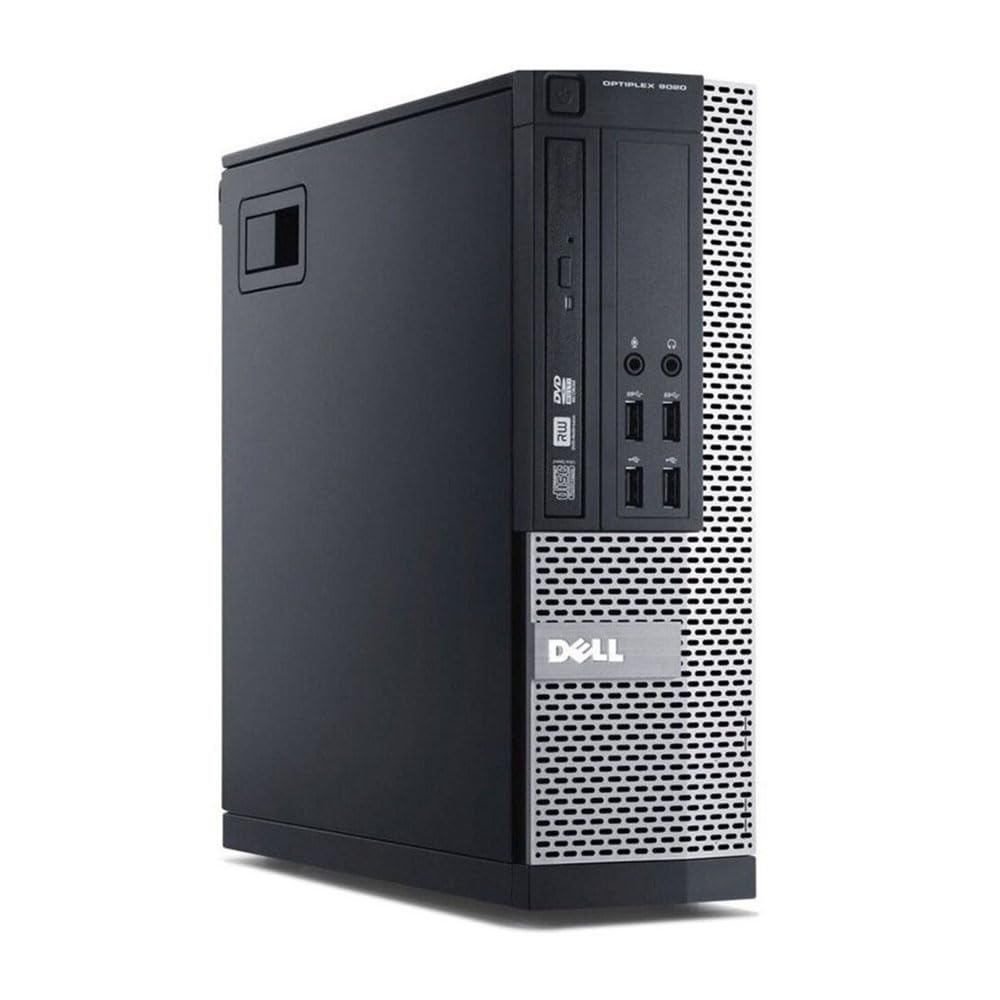 7.0 / 10
Dell FAST Optiplex 7020/9020 SFF Desktop Computer PC - Intel Core i7 4th Gen (4 cores Upto 3.90GHz), 16GB RAM, 500GB SSD Storage, 300Mbps USB WiFi, W11 Pro + 23" Monitor (Renewed)
£200.00 · Dell
 3.5 / 10
OptiPlex 7020 SFF Desktop PC Computer i7 4770 16GB RAM 512GB SSD Windows 11 Pro 300Mbps WIFI (Renewed)
£147.00 · Dell
Frequently asked
7 questions01Does the Dell OptiPlex i7-4770 SFF support Windows 11 officially?+
No. The Intel Core i7-4770 is a 2013 Haswell processor that does not meet Microsoft's official minimum requirements for Windows 11, which specify an 8th-generation Intel processor or newer and TPM 2.0. Refurbishers install Windows 11 by bypassing these checks. The OS runs, but Microsoft has indicated that unsupported hardware may not receive all future updates. If official long-term support matters to you, this is worth factoring into your decision.
02Can I upgrade the RAM in this machine?+
Yes. The OptiPlex SFF platform supports up to 32GB of DDR3-1600 RAM across four DIMM slots. The machine ships with 16GB, so there is room to add another 16GB if you want more headroom. DDR3 is an older standard and is currently quite inexpensive, making this one of the most cost-effective upgrades available for this platform.
03Is the Dell OptiPlex i7-4770 SFF suitable for gaming?+
Not for modern gaming. The Intel HD Graphics 4600 is integrated graphics with no dedicated VRAM, and it is not capable of running games released in the last five to seven years at acceptable frame rates. Older titles, 2D indie games, retro emulation, and browser-based games will run fine. Adding a discrete GPU is technically possible using low-profile cards, but the SFF chassis and limited PSU headroom significantly restrict your options, and you should verify power supply wattage carefully before attempting this.
04What wireless connectivity does this PC include?+
The listing includes a 300Mbps USB WiFi adapter dongle, which plugs into one of the machine's USB ports and provides 2.4GHz wireless connectivity. It is functional for browsing, streaming, and video calls but is not as fast or stable as a wired Ethernet connection. It also permanently occupies a USB port. If you are near your router, a wired Ethernet connection via the built-in rear port is recommended for better reliability.
05What display outputs does the Dell OptiPlex SFF have?+
The machine has two DisplayPort outputs, which support crisp digital video and higher refresh rates than older analogue connections such as VGA. This makes it straightforward to run a dual-monitor setup without needing adapters, which is a practical benefit for office and productivity use.
06How does the build quality compare to consumer prebuilts at a similar price?+
The Dell OptiPlex line was designed and sold for enterprise and government use, where reliability over years of daily operation mattered more than aesthetics or cost-cutting. The SFF chassis is steel construction, feels solid, and the internal components were built to higher durability standards than typical consumer-grade prebuilts at the same price point. As a refurbished unit, cosmetic condition may vary, but the underlying platform quality is a genuine differentiator.
07Should I worry about thermal performance on a refurbished unit from this era?+
It is worth being aware that thermal paste on the CPU cooler may have dried out over the years, which can lead to higher operating temperatures and increased fan noise compared to original specification. This is not unique to this product but is a common consideration with refurbished hardware from the 2013 to 2014 period. Reapplying thermal paste is a straightforward fix that costs only a few pounds and takes roughly ten minutes, and it can noticeably improve cooling performance if temperatures seem higher than expected.