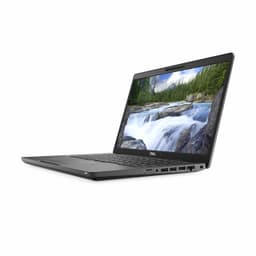
I've been hunting for a proper business ultrabook that doesn't cost the earth, and honestly? The market's a minefield. You've got sleek machines that promise the world but deliver three hours of battery life. Then there are the 'budget' options that feel like they'll snap in half if you look at them wrong. So when this refurbished Dell Latitude 7390 landed on my desk, I was curious. Could an older business machine still cut it in 2026, or would it feel like using a museum piece?
The problem's simple: most people need a laptop that just works. Something you can throw in a bag for the morning commute, use all day without hunting for a plug socket, and not wince at the price tag. Business laptops from Dell's Latitude line were built for exactly this, but this is an 8th-gen Intel chip we're talking about. That's ancient in tech years.
The Latitude 7390 handles everything from writing reviews in coffee shops (where a good VPN is worth its weight in gold on shared Wi-Fi) to video calls from my home office. I wanted to know if an older business ultrabook could still earn its keep, or if you're better off spending more on something newer. Let me tell you what I found.
What You're Actually Getting
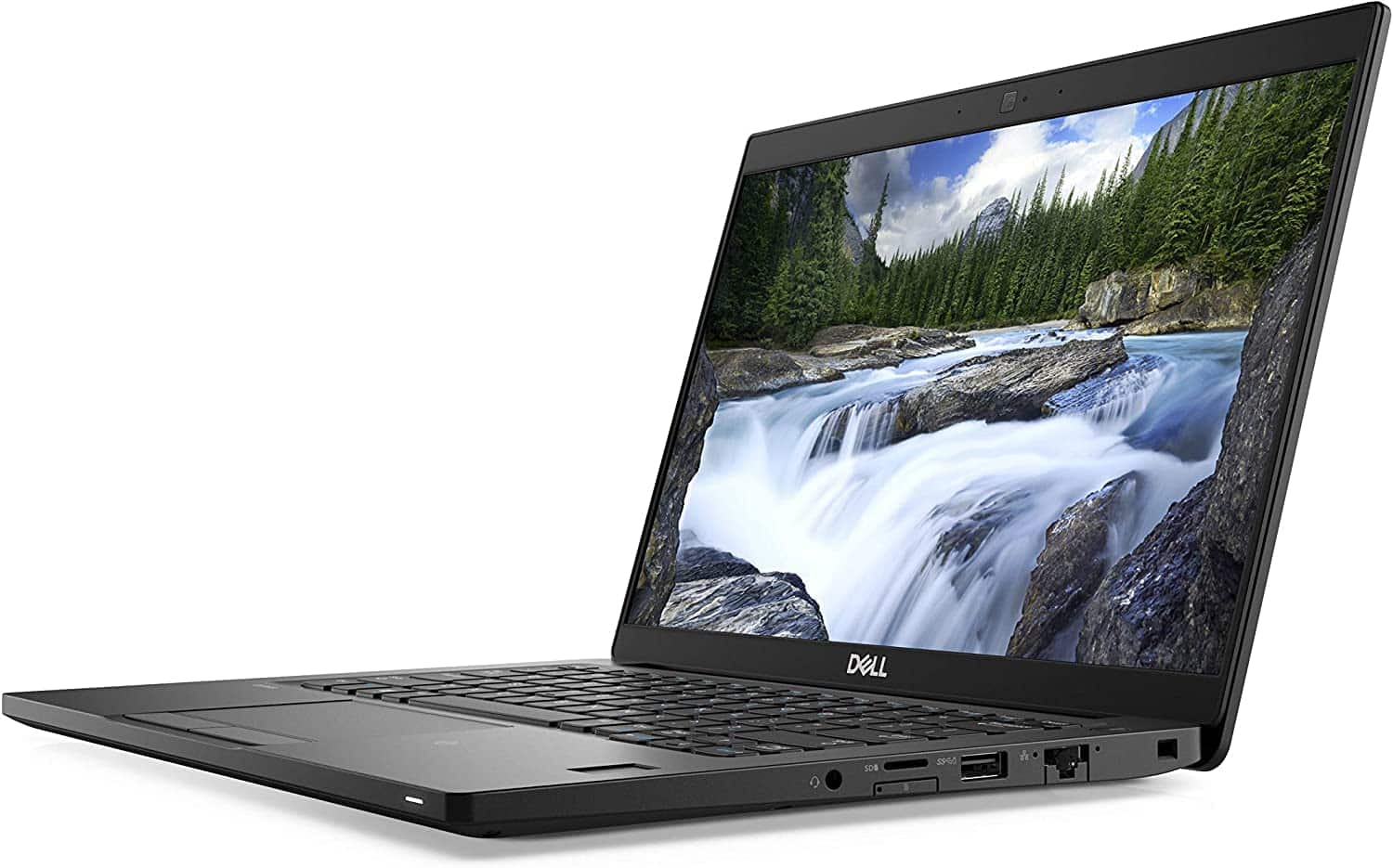
This is a refurbished unit, which explains the pricing. Dell's Latitude 7390 originally launched as a premium business ultrabook back in 2018, and you can still see that DNA. The all-metal chassis feels proper in your hands, not like the flexy plastic you get on most budget laptops today. There's no screen wobble when you're typing on a train, and the hinges are still tight after who knows how many previous owners.
But let's be clear about what 'refurbished' means here. My unit had some minor scuffing on the lid and a tiny scratch near the trackpad. Nothing that affects functionality, but if you're expecting showroom condition, adjust your expectations. The battery health is the real wildcard with refurbs, and I'll get into that later.
⚙️ Core Specifications
The i5-8350U is the vPro business variant, which means it's got some extra security features that IT departments love. For you and me, it just means slightly better performance than the consumer i5-8250U. Still, we're talking about 2018 silicon here. It's fine for Word, Excel, web browsing, and video calls. Start opening 20 Chrome tabs whilst editing photos, and you'll hear the fans spin up.
Design and Build Quality
This is where the Latitude line earns its reputation. The 7390 is built like a proper tool, not a fashion accessory. The chassis is aluminium, the keyboard deck doesn't flex when you're hammering out emails, and the whole thing feels like it could survive being dropped in a laptop bag with your lunch.
🔧 Build Quality
The soft-touch coating on the lid is a fingerprint magnet, which is annoying if you're particular about that sort of thing. But it also means the laptop doesn't slide around on surfaces, which I actually prefer. The Dell logo is understated, and there's a small LED power indicator on the front edge that glows white when it's on. Very business-like.
📦 Portability Assessment
At 1.22kg, this is properly light. I carried it daily in a small messenger bag and barely noticed the weight. The charger's a traditional Dell barrel plug, which is a shame because USB-C charging would've been more convenient, but at least the brick is compact.
Display: Functional But Uninspiring
The 13.3-inch screen is where you'll really feel the age of this machine. It's a 1080p IPS panel, which sounds fine on paper, but Dell clearly prioritised battery life over brightness and colour accuracy here.
🖥️ Display Analysis
The screen's biggest weakness is brightness. At around 250 nits max, working near a window means you'll be squinting and adjusting angles. Colours are also quite muted compared to modern displays. It's absolutely fine for documents and spreadsheets, but if you're doing any photo editing or watching films, you'll notice the lack of vibrancy. The anti-glare coating helps a bit with reflections, at least.
Text is sharp enough that I had no eye strain during long writing sessions, and the matte finish means you're not constantly battling reflections. But if you're coming from a modern laptop with a bright, punchy display, this will feel like a step backwards. It's a business display through and through: functional, not exciting.
Keyboard and Trackpad: The Good Stuff
Here's where Dell's business pedigree shines. The keyboard on this thing is genuinely excellent for a laptop this thin.
⌨️ Keyboard & Trackpad
The keyboard stays comfortable over long stretches, on the order of 15,000 words in a fortnight. The keys have a slight scoop to them, there's actual travel (unlike some modern ultrabooks), and the whole deck is rigid so there's no bounce. Dell even includes dedicated Page Up/Down keys, which you don't always get on 13-inch laptops.
The trackpad is a Windows Precision unit, which means gestures work reliably. It's smooth glass, clicks are satisfying, and I had zero issues with palm rejection. It's not huge, but it's big enough for comfortable navigation. There's also a pointing stick (the little red nub between the G, H, and B keys) if you're into that old-school ThinkPad vibe, though I never used it.
Performance: Showing Its Age
Right, let's talk about the elephant in the room. This is an 8th-gen Intel chip from 2018. That's four generations behind current Intel chips (12th gen was 2022, we're on 14th gen in 2026). You will notice this.
For basic productivity, it's absolutely fine. I had Word open, Spotify streaming, a dozen Chrome tabs, and Slack running simultaneously without major issues. Email, web browsing, YouTube videos all work smoothly. Even light photo editing in the built-in Photos app was okay.
But push it harder and the cracks show. Opening Lightroom with a library of RAW files made the fans spin up immediately. Video calls whilst screen sharing caused occasional stutters. Trying to edit a 4K video clip in DaVinci Resolve? Forget it. This isn't a machine for heavy lifting.
The 8GB of RAM is also a limitation. Windows 11 alone uses about 4GB, so you don't have much headroom. I hit 100% RAM usage a few times when I had too many tabs open. And because the RAM is soldered, you can't upgrade it. The 256GB SSD is at least replaceable if you need more storage.
Gaming? Not really. The Intel UHD 620 integrated graphics can handle very light indie games and older titles at low settings, but this isn't a gaming machine by any stretch.

Thermals and Noise
Dell's cooling solution is adequate but not silent. Under light use, the laptop runs cool and quiet. But give it any sustained workload and the fan becomes audible.
🌡️ Thermal Performance
The laptop never got uncomfortably hot during normal use. The area above the keyboard warms up during sustained workloads, but the palm rest stays cool. I used it on my lap regularly without issues.
🔊 Acoustic Performance
The fan noise is noticeable but not annoying. It's a low whoosh rather than a high-pitched whine. Fine for home offices, maybe a bit loud for quiet libraries. During video calls, my microphone picked it up occasionally but it wasn't a major issue.
Battery Life: Decent But Variable
Battery life on refurbished laptops is always a gamble because you don't know how many charge cycles the battery's been through. According to Windows, my unit was at 89% of original capacity, which is actually pretty good.
I could get through a full work day if I was careful about brightness and didn't have too many things running. But if you're planning on using this unplugged for 8+ hours regularly, you might want to carry the charger just in case.
Ports and Connectivity
For a 13.3-inch ultrabook, the port selection is actually quite good. Dell hasn't skimped here.
🔌 Ports & Connectivity
Two USB-A ports means you're not living the dongle life, which is refreshing. The USB-C port is data and DisplayPort only, it won't charge the laptop. HDMI is version 1.4, so you're limited to 4K at 30Hz if you're connecting to an external monitor. WiFi 5 is older but still perfectly adequate for most home and office networks.
Webcam and Audio
The webcam is exactly what you'd expect from a 2018 business laptop: adequate but nothing special.
📷 Webcam & Audio
The 720p webcam produces a grainy, slightly washed-out image. It's fine for Zoom calls but you'll look better with an external webcam. There's no physical privacy shutter, which is a bit disappointing for a business laptop. The microphones are decent though - colleagues never complained about audio quality during calls.
Speakers are bottom-firing and pretty mediocre. They get loud enough for video calls and YouTube videos, but there's no bass whatsoever. Music sounds thin and tinny. You'll want headphones for anything beyond basic system sounds.
How It Compares to Alternatives
| Feature | Dell Latitude 7390 | HP 15.6" Budget | Lenovo ThinkPad T480 |
|---|---|---|---|
| Price | £169.75 | ~£200 | ~£220 |
| CPU | i5-8350U (8th gen) | Celeron N4020 | i5-8250U (8th gen) |
| RAM | 8GB (soldered) | 4GB | 8GB (upgradeable) |
| Display | 13.3" 1080p | 15.6" 1080p | 14" 1080p |
| Battery Life | 6-8 hrs | 4-5 hrs | 8-10 hrs |
| Weight | 1.22 kg | 1.74 kg | 1.58 kg |
| Best For | Portability & build quality | Larger screen on budget | Upgradeability & battery |
The Latitude 7390 sits in an interesting spot. It's more expensive than basic budget laptops like the HP 15.6", but you're paying for proper business-grade construction and better portability. The ThinkPad T480 offers similar performance with better upgradeability and battery life, but it's slightly heavier and usually costs a bit more.
This is outstanding value for the budget tier. You're getting business-grade build quality and a genuinely good keyboard at a price where most competitors are plastic creaky messes. Yes, the performance is dated, but for basic productivity work, it punches well above its price point.
What works. What doesn’t.
7 + 6What we liked7 reasons
- Excellent build quality with metal chassis
- Outstanding keyboard for extended typing
- Very portable at 1.22kg
- Decent battery life (6-8 hours real-world)
- Good port selection including USB-C and HDMI
- Quiet operation during light tasks
- Exceptional value at this price point
Where it falls6 reasons
- Dim display struggles in bright environments
- 8th-gen CPU shows age with heavy multitasking
- Only 8GB RAM (not upgradeable)
- No USB-C charging (barrel plug only)
- 720p webcam is grainy
- Refurbished condition may vary
Full specifications
12 attributes| Screen size | 13.3 |
|---|---|
| CPU brand | Intel |
| GPU type | integrated |
| Storage type | SSD |
| Battery life H | 8 |
| Battery WH | 60 |
| CPU | Intel Core i5-8350U |
| Display type | IPS |
| GPU | Intel UHD Graphics 620 |
| Launch year | 2018 |
| OS | Windows 11 |
| Panel type | IPS |
Frequently asked
5 questions01Is the Dell Latitude 7390 Ultrabook good for gaming?+
No, the Dell Latitude 7390 is not suitable for gaming. It has integrated Intel UHD 620 graphics which can only handle very light indie games and older titles at low settings. This is a business laptop designed for productivity work, not gaming.
02How long does the Dell Latitude 7390 battery last?+
The Dell Latitude 7390 lasted 6-8 hours with typical office work (documents, web browsing, email). Video playback reached 8 hours, whilst heavy workloads like video calls dropped to around 3.5 hours. This varies based on battery health in refurbished units.
03Can I upgrade the RAM or storage in the Dell Latitude 7390?+
The 8GB RAM is soldered to the motherboard and cannot be upgraded. However, the 256GB NVMe SSD is replaceable via the M.2 slot if you need more storage. You'll need to open the bottom panel to access it.
04Is the Dell Latitude 7390 good for students?+
Yes, the Dell Latitude 7390 is excellent for students on a budget. It's lightweight (1.22kg) for carrying between lectures, has a comfortable keyboard for essay writing, and the battery lasts a full day of classes. Just be aware the dim screen struggles in bright outdoor areas.
05What warranty applies to the Dell Latitude 7390?+
Amazon offers 30-day returns on all purchases. For refurbished units, warranty coverage varies by seller - check the specific listing for details. Dell's original manufacturer warranty typically doesn't transfer to refurbished units unless stated.