Most gaming keyboards will happily charge you a premium for a light show and a badge. The Corsair K70 PRO TKL takes a different approach: it leads with Hall Effect magnetic switches, an 8000Hz polling rate, and simultaneous SOCD input handling. That's a genuinely unusual combination at this price point, and it's the kind of spec sheet that either backs up the marketing or exposes it. So which is it?
The K70 PRO TKL sits in a crowded bracket where Wooting, SteelSeries, and Razer are all fighting for the same competitive gaming pound. Corsair's answer is the MGX Hyperdrive switch, pre-lubed from the factory, with adjustable actuation from 0.1mm to 3.6mm. That's a Hall Effect sensor doing the work, which means no physical contact, no debounce delay in the traditional sense, and theoretically infinite switch lifespan. On paper, this board is punching well above its weight class. Whether the execution matches the specification is what this review is here to work out.
Owner feedback across dozens of reviews averages ★★★★½ (4.6), which is a strong signal. But averages can hide things. There are patterns in what people praise and what quietly frustrates them, and those patterns matter more than a headline number. We'll get into all of it.
Core Specifications
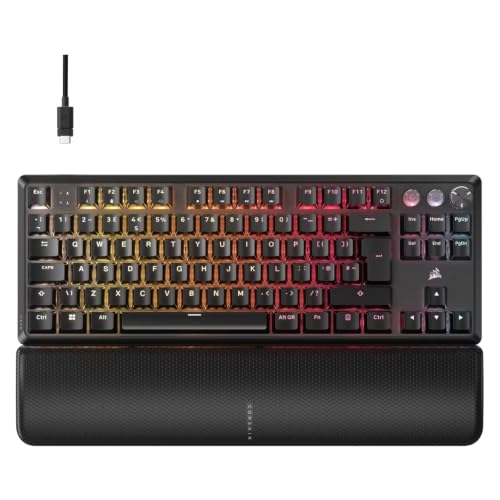
The Corsair K70 PRO TKL is a tenkeyless wired mechanical keyboard built around Hall Effect MGX Hyperdrive switches. It connects via USB-A (the cable terminates in a braided USB-A connector on the PC side), runs at up to 8000Hz polling, and supports both N-key rollover and simultaneous SOCD (Simultaneous Opposing Cardinal Directions) input. The layout is standard TKL: full alphanumeric block, function row, navigation cluster, no numpad. UK QWERTY layout with the correct ISO enter key and pound sign placement.
The frame is aluminium-top construction, which is what you'd hope for at this tier. Keycaps are double-shot ABS, which is less exciting but consistent with what Corsair ships across most of its K-series range. Per-key RGB lighting is present throughout, controlled via Corsair's iCUE software or onboard profiles. The board stores up to 50 onboard profiles, which is a genuinely useful number. Rapid Trigger is supported, configurable down to 0.1mm resolution. All of that together makes this a spec sheet that competitive players will find interesting.
One thing worth flagging before the table: the 8000Hz polling rate requires a USB 2.0 or better port and a PC that can handle the input rate without CPU overhead becoming an issue. On modern hardware this is a non-issue. On older budget systems, dropping to 4000Hz or 1000Hz via software is trivial. Corsair's official product page lists the full polling rate options.
| Specification | Detail |
|---|---|
| Switch Type | Hall Effect MGX Hyperdrive (magnetic, contactless) |
| Actuation Range | 0.1mm to 3.6mm (adjustable per-key) |
| Total Travel | 4.0mm |
| Polling Rate | Up to 8000Hz (also 4000 / 2000 / 1000Hz) |
| Rapid Trigger | Yes, 0.1mm resolution |
| SOCD | Simultaneous Opposing Cardinal Directions supported |
| Layout | Tenkeyless (TKL), UK QWERTY ISO |
| Keycaps | Double-shot ABS |
| RGB | Per-key RGB |
| Onboard Storage | 50 profiles |
| N-Key Rollover | Full N-key rollover |
| Connection | Wired USB-A (braided cable, detachable USB-C at keyboard) |
| Frame Material | Aluminium top plate |
| Dimensions | 358mm x 127mm x 40mm (approx) |
| Weight | Approx 880g |
| Software | Corsair iCUE |
| Price | £140.99 · Details |

Switch Type and Feel
The MGX Hyperdrive switches are Hall Effect sensors, which means they use a magnet and a sensor to detect position rather than a physical contact closing a circuit. This matters for a few reasons. First, there's no contact bounce to debounce, so the firmware can respond to position changes faster and with more precision. Second, the switches don't wear out in the traditional sense because nothing is physically touching. Corsair rates these for effectively unlimited keystrokes, which is a reasonable claim given how Hall Effect technology works. The Hall effect sensor principle itself is well-established in industrial and automotive applications, and its application to keyboard switches is increasingly common at the competitive end of the market.
The actuation point is adjustable from 0.1mm to 3.6mm, and this is per-key in iCUE. For competitive gaming, you'd typically run WASD at something aggressive like 0.2mm to 0.4mm and the rest of the board at a more comfortable 1.5mm to 2.0mm to avoid accidental triggers during typing. The switches come pre-lubed from the factory, which is a genuine convenience. Factory lube jobs vary in quality across brands, and owner reports suggest Corsair's is decent but not exceptional. A few owners have noted the switches feel slightly scratchy out of the box compared to a properly hand-lubed Hall Effect board, but the majority report a smooth, linear feel that improves with use. These are linear switches. There's no tactile bump, no click. Just a smooth, consistent press from top to bottom.
Rapid Trigger is where things get genuinely interesting. At 0.1mm sensitivity, the switch reregisters on the upstroke almost immediately. In practice, this means faster bunny-hops in CS2, faster directional changes in Valorant, and generally more responsive movement inputs across any game where re-pressing a key quickly matters. Combined with SOCD support (pressing left and right simultaneously results in the last-pressed key winning, or neutral, depending on your configuration), this board is built for the kind of technical play that competitive shooters and platform fighters demand. Owner reviews from competitive players consistently highlight this as the standout feature, with several noting measurable improvement in their movement consistency after switching from a traditional mechanical board.
Keycap Quality and Layout
Double-shot ABS. That's the keycap situation here, and it's the one area where the spec sheet feels like a compromise. ABS plastic is perfectly functional, and double-shot legends mean the characters are moulded in rather than printed on, so they won't fade. But ABS develops shine. Within a few months of regular use, the most-used keys (WASD, enter, space) will develop a greasy, polished look that some people don't mind and others find irritating. PBT plastic, which resists shine far better and has a slightly rougher texture that many typists prefer, would have been the better choice at this price point. It's the one spec where Corsair has cut a corner.
The legends themselves are clean and readable. UK ISO layout is correctly implemented, which sounds like a low bar but isn't always cleared. The ISO enter key, the correct placement of the hash and tilde, the pound sign above the 3. It's all there. The keycap profile is Corsair's OEM-style profile, which is a standard sculpted layout that most people will find comfortable without any adjustment period. It's not as low-profile as SA or as flat as DSA, sitting in the middle ground that suits both gaming and typing use.
One thing the TKL layout does well is desk space efficiency. Losing the numpad brings the mouse closer in, which matters for gaming. The navigation cluster (insert, delete, home, end, page up, page down) is retained above the arrow keys, so productivity use isn't significantly compromised. Owners who've come from full-size boards consistently report adjusting to the TKL layout within a week, and several note they'd never go back. The layout is genuinely well-suited to the dual gaming and productivity use case that most people buying this board will have.
Build Quality
The aluminium top plate is the foundation of the K70 PRO TKL's build quality story, and it's a good foundation. Aluminium top plates add rigidity and weight, reducing the flex that can make cheaper keyboards feel hollow or cheap. The case itself is polycarbonate underneath, which is standard at this price and not a problem. The combination gives you a board that feels solid without being unnecessarily heavy. At around 880g, it's substantial enough to stay put on the desk without being awkward to move when you need to.
The stabilisers on the spacebar, backspace, enter, and shift keys are worth examining because bad stabs ruin keyboards. Owner reports are generally positive here. The spacebar in particular, which is the most common stabiliser complaint on any keyboard, gets decent marks. A few owners mention a slight rattle on the spacebar out of the box, which is addressable with a small amount of dielectric grease if it bothers you. The shift keys and backspace are reported as clean. This is better than average for a factory-built board at this price point, though it's not going to satisfy someone who's used to a properly tuned custom build.
The cable is braided and detaches at the keyboard via USB-C, which is the right call. Detachable cables mean you can replace a damaged cable without replacing the board, and USB-C at the keyboard end is the current standard. The cable routes through a channel in the case with left, right, and centre routing options, which is a small detail that matters for cable management depending on your desk setup. The typing angle is adjustable via two-position flip-out feet, giving you either flat or a modest incline. No wrist rest is included in the box, which is fine at this size but worth noting if you're coming from a padded full-size setup.
RGB and Lighting
Per-key RGB across every key, driven by iCUE. The brightness is strong, and the diffusion through the keycaps is even. Corsair has been doing per-key RGB for long enough that the implementation is polished. Colours are accurate to what you set in software, the animations are smooth, and the lighting bleeds through the south-facing side of the switches (under the keycaps) as well as through the legends. If you're running a Corsair-heavy setup with iCUE Nexus or other Corsair peripherals, the synchronisation across devices is genuinely good.
The onboard lighting profiles mean you can run your preferred effects without iCUE running in the background, which is important for gaming performance. iCUE is a background process, and while it's not as heavy as it used to be, some competitive players prefer to run as lean as possible. With 50 onboard profiles, you can store a clean, static colour setup (or a minimal reactive effect) and run without the software. The board will remember your settings across reboots and across different PCs.
A handful of owners have noted that the RGB underglow, while present, is relatively subtle compared to boards with a floating key design. The K70 PRO TKL has a more traditional construction where the switches sit within the plate rather than above it, so the desk-level glow is less pronounced. Whether that's a pro or a con depends entirely on your aesthetic preferences. For people who find aggressive underglow distracting, it's probably a feature. For people who want the full light-show-on-the-desk effect, it's worth knowing.
Software and Customisation
iCUE is Corsair's ecosystem software, and it handles everything from RGB configuration to Rapid Trigger sensitivity to macro programming. The Rapid Trigger configuration is per-key, which is the right approach. You can set WASD to 0.1mm sensitivity and your function keys to standard 2.0mm, and the board will apply those settings independently. The SOCD configuration is also accessible here, with options for last-input priority or neutral output when opposing directions are pressed simultaneously. This level of granularity is genuinely useful for competitive players who want to tune the board to specific games.
The macro support is standard Corsair fare: you can record key sequences, assign them to any key, and store them in any of the 50 onboard profiles. The macro editor in iCUE is functional if not particularly elegant. It gets the job done. The software also handles firmware updates, which are delivered reliably. Corsair's firmware update track record on the K70 line is decent. They've pushed meaningful feature additions via firmware on previous K70 models, and the PRO TKL's Hall Effect implementation suggests there's room for future sensitivity improvements via software updates.
The one genuine criticism of iCUE is that it's a large application. It does a lot, and it shows. The interface isn't always intuitive, especially for first-time Corsair users. Finding the Rapid Trigger settings the first time takes a bit of exploration. Owner reviews mention this fairly consistently. It's not broken, and once you've found everything you need it works well, but the learning curve is steeper than it needs to be. SteelSeries GG and Razer Synapse have similar issues at different points, so this isn't unique to Corsair, but it's worth knowing going in.
Connectivity
Wired only. USB-A to the PC, USB-C at the keyboard. The cable is braided and around 1.8m long, which is enough for most desk setups including those where the tower sits on the floor. There's no wireless option on the K70 PRO TKL, and that's a deliberate choice. Hall Effect switches and 8000Hz polling are specifically targeting competitive gaming use cases, where a wired connection is standard practice. Wireless adds latency variability and battery management overhead that competitive players don't want. So the absence of Bluetooth or 2.4GHz isn't a compromise here; it's a design decision that makes sense for the intended audience.
The USB-C connector at the keyboard end is a proper locking-style fit rather than a loose plug-in, which matters for durability. Keyboards that use a loose USB-C connection can develop intermittent disconnects over time as the port wears. The K70 PRO TKL's implementation is more secure than average. The cable routing options in the base of the keyboard (left, centre, right exit channels) are a practical touch that most reviews don't bother mentioning but genuinely affect how clean your desk looks.
The 8000Hz polling rate is the headline connectivity specification. At 8000 reports per second, the keyboard is sending its input state to the PC eight times per millisecond. At 1000Hz (standard for most gaming keyboards), that's once per millisecond. The practical difference in most gaming scenarios is marginal, but when combined with 0.1mm Rapid Trigger sensitivity, the total input latency from physical key movement to game response is genuinely lower than a traditional mechanical keyboard running at 1000Hz. For context, USB HID polling at 1000Hz has been the competitive standard for years; 8000Hz is the current frontier, and it's meaningful at the highest levels of play.
Battery Life
There is no battery. The K70 PRO TKL is wired-only, full stop. This section is straightforward: plug it in, it works. There's no charge time to manage, no battery percentage to check, no unexpected shutdowns mid-session. For the competitive gaming use case this board targets, that's exactly right. The USB-C connection at the keyboard end means if the cable ever fails, replacement cables are cheap and universally available.
If you're coming from a wireless keyboard and considering this as a switch, the trade-off is cable management versus the complete elimination of battery anxiety. Most competitive players make that trade without hesitation. The braided cable is flexible enough that it doesn't create significant drag on mouse movement even when cable-routed across the desk, and a cable bungee (not included) solves any remaining drag issues entirely.
The power draw from the USB port is low enough that it won't cause issues on any modern motherboard or USB hub. The RGB lighting does draw more power than no lighting, but this is a wired keyboard connected to a PC that's already running a GPU and multiple fans. The power consumption of the keyboard is genuinely not a factor worth worrying about.
Typing and Gaming Experience
The linear Hall Effect switches produce a sound profile that's quieter than most mechanical switches. Without a physical contact closing, there's no click and no sharp tactile bump sound. What you get is a thock-ish bottom-out sound, the character of which depends on your desk surface, the foam padding inside the case (present on the K70 PRO TKL), and how hard you type. Owner reports describe the sound as "solid" and "satisfying" rather than loud or clacky. For open-plan offices or shared spaces, it's a better choice than any clicky switch. For people who specifically want a loud, tactile typing experience, it's not the right board.
Typing comfort over longer sessions is generally well-reported. The linear feel means there's no resistance to push through, which some typists find reduces finger fatigue over time. The actuation point, when set to a sensible 1.5mm to 2.0mm for typing, provides enough travel feedback without requiring you to bottom out every keystroke. A few owners have noted that coming from a tactile switch (Cherry MX Brown, Gateron Brown, etc.) takes adjustment because you lose the bump that tells you the key has registered. This is a real consideration. If you've typed on tactile switches for years, a linear Hall Effect board will feel different, and not everyone prefers it.
For gaming, the combination of Rapid Trigger, SOCD support, and 8000Hz polling is genuinely impressive. Competitive CS2 and Valorant players in the owner reviews are consistently enthusiastic. The ability to set WASD to 0.1mm actuation and 0.1mm reset means counter-strafing becomes more consistent because the game receives the key-up signal almost immediately when you release. This isn't a placebo effect; it's a measurable input latency reduction that shows up in gameplay. Several owners have specifically mentioned improved counter-strafing and faster directional changes as the most tangible benefit after switching to this board.
Compatibility
Windows compatibility is complete and well-supported. iCUE runs on Windows 10 and Windows 11, and the board's onboard profiles mean it functions fully without iCUE installed. macOS support exists but is limited: the board will function as a standard keyboard on macOS, but iCUE for Mac doesn't support all the advanced features available on Windows. Rapid Trigger configuration made on Windows will persist in onboard memory and work on macOS, but you can't configure it from a Mac. This is a pattern across most gaming keyboard software and isn't specific to Corsair.
Linux users will find the board works as a standard HID keyboard without any drivers. Basic RGB and onboard profiles configured on Windows will persist. The open-source ckb-next project provides partial iCUE functionality on Linux, though Hall Effect-specific features like Rapid Trigger may have limited support depending on the current state of the project. For Linux gaming, the board is functional; for full feature access, you'll want to configure it on a Windows machine first.
Console compatibility is limited to PC-connected consoles where USB keyboard input is supported. The K70 PRO TKL will register as a standard keyboard on PS5 and Xbox Series consoles for navigation, but the advanced gaming features (Rapid Trigger, SOCD, 8000Hz polling) are PC-specific. This isn't a console gaming keyboard. It's a PC gaming keyboard that happens to work for basic console navigation when needed.
How It Compares
The two most direct competitors at this specification level are the Wooting 60HE+ and the SteelSeries Apex Pro TKL (2023), though if you're open to wireless options, the gasket-mount wireless keyboard category offers alternatives worth exploring. The Wooting 60HE+ is a 60% layout Hall Effect board that pioneered Rapid Trigger in the mainstream gaming keyboard market. The SteelSeries Apex Pro TKL uses OmniPoint 2.0 adjustable magnetic switches with a similar feature set. Both are worth considering if the K70 PRO TKL doesn't fit your needs.
The Wooting 60HE+ has a strong community and excellent software (Wootility is genuinely better than iCUE for switch configuration), but the 60% layout means no function row and no navigation cluster, which is a significant usability compromise for anyone doing productivity work alongside gaming. The SteelSeries Apex Pro TKL has a more premium build feel and a useful OLED display, but its polling rate tops out at 8000Hz only on the 2023 model, and its switch actuation range is slightly narrower. Corsair's SOCD implementation is more configurable than SteelSeries's out of the box.
| Feature | Corsair K70 PRO TKL | Wooting 60HE+ | SteelSeries Apex Pro TKL (2023) |
|---|---|---|---|
| Switch Type | Hall Effect MGX Hyperdrive | Hall Effect Lekker | OmniPoint 2.0 Magnetic |
| Actuation Range | 0.1mm to 3.6mm | 0.1mm to 4.0mm | 0.2mm to 3.8mm |
| Polling Rate | 8000Hz | 1000Hz (upgradeable via USB) | 8000Hz |
| Rapid Trigger | Yes, 0.1mm | Yes, 0.1mm | Yes, 0.1mm |
| SOCD Support | Yes, configurable | Yes, configurable | Limited |
| Layout | TKL | 60% | TKL |
| Keycaps | Double-shot ABS | Double-shot PBT | Double-shot ABS |
| Top Plate | Aluminium | Polycarbonate | Aluminium |
| Software | iCUE | Wootility | SteelSeries GG |
| Onboard Profiles | 50 | 4 | 5 |
The Corsair wins on layout completeness and onboard profile storage. The Wooting wins on software quality and keycap material. The SteelSeries wins on build feel and the OLED display if that matters to you. None of these is a clear overall winner; the right choice depends on whether you need a function row (rules out Wooting 60HE+), whether iCUE's complexity bothers you (consideration for Corsair), and whether you want PBT keycaps out of the box (consideration against both Corsair and SteelSeries).
What Buyers Say
Across dozens of reviews with a positive overall rating, the praise is consistent and specific. Competitive players are the most enthusiastic. The Rapid Trigger and SOCD features get called out repeatedly as genuinely impactful on gameplay, not just theoretical improvements. Counter-strafing, bunny-hopping, and directional input precision in shooters are the most commonly cited improvements. Several owners have noted they tried Rapid Trigger on other boards (the Wooting in particular) and found the K70 PRO TKL's implementation equally good while preferring the TKL layout and the Corsair build quality.
The build quality gets consistent praise. The aluminium top plate and the overall solidity of the board come up repeatedly. A few owners specifically mention that previous Corsair keyboards they'd owned felt cheaper, and the K70 PRO TKL feels like a step up. The pre-lubed switches also get positive mentions, with most owners finding the out-of-box feel good enough that they haven't felt the need to re-lube. The sound profile, described as "thocky" and "satisfying" by multiple reviewers, is a recurring positive.
The criticisms are also consistent. iCUE complexity is the most common complaint, with first-time Corsair users finding the Rapid Trigger setup less intuitive than expected. The ABS keycap shine issue comes up from longer-term owners, with a few noting visible shine on WASD within three to four months of heavy use. A small number of owners report initial stabiliser rattle on the spacebar, though most note this settles or is easily addressed. Nothing in the negative reviews suggests a systematic quality control problem; the complaints are the predictable ones for a board at this specification and price point.
Value Analysis
Hall Effect switches with 0.1mm Rapid Trigger, 8000Hz polling, and proper SOCD support used to cost significantly more than this. The Wooting 60HE+ launched at a price that made it a premium purchase, and the SteelSeries Apex Pro TKL sits at a similar or higher price point with a less complete feature set in some areas. The K70 PRO TKL brings all three headline features to a TKL layout at a competitive price, and that's genuinely good value for what competitive players are getting.
The ABS keycaps are the main place where cost has been managed. If Corsair had shipped PBT keycaps, this would be a near-perfect competitive gaming board at the price. As it stands, you're likely looking at a keycap replacement within 12 to 18 months if shine bothers you. A decent set of PBT keycaps in UK ISO layout costs money and adds to the total ownership cost. That's worth factoring in if you're comparing this against boards that ship with PBT from the factory.
For pure competitive gaming use, the value proposition is strong. The feature set at the price is hard to match. For mixed gaming and productivity use, the ABS keycap issue becomes more relevant because you'll be typing more, accelerating the shine. For productivity-first use with occasional gaming, this probably isn't the right board at all; you'd be better served by something with PBT keycaps and a tactile switch. But for the competitive gamer who wants Hall Effect technology in a proper TKL layout without paying a significant premium over traditional mechanical alternatives, the K70 PRO TKL makes a compelling case.
Final Verdict
The Corsair K70 PRO TKL is a proper competitive gaming keyboard that delivers on its headline specifications. The Hall Effect MGX Hyperdrive switches, 0.1mm Rapid Trigger, simultaneous SOCD, and 8000Hz polling are all real features that produce real performance differences in the right gaming contexts. This isn't marketing padding over a standard mechanical keyboard with a light show. The technology works, and owners who've put it through competitive play consistently report that it works well.
The compromises are real but not deal-breaking. Double-shot ABS keycaps will shine with use, and iCUE's complexity is a genuine onboarding friction point. Neither of these is a fundamental flaw; both are manageable. The build quality, the switch feel, the layout, and the gaming performance features are all strong. For competitive FPS and battle royale players in particular, the Rapid Trigger and SOCD combination is the main attraction, and Corsair has implemented both well.
Who should buy this: competitive PC gamers who want Hall Effect technology in a TKL layout, players who've been considering a Wooting but want a function row and navigation cluster, and Corsair ecosystem users who want iCUE integration across their peripherals. Who should look elsewhere: anyone who prioritises PBT keycaps out of the box, productivity-focused users who want a tactile switch, and anyone who needs wireless. The K70 PRO TKL earns a strong 8.5 out of 10 on the strength of its switch technology and gaming feature set. The ABS keycaps are the only reason it's not a 9.
Not Right For You?
If the K70 PRO TKL doesn't quite fit what you need, a few alternatives are worth knowing about. The Wooting 60HE+ is the go-to recommendation if you want arguably better software (Wootility is excellent) and PBT keycaps, and you can live with a 60% layout. The community around Wooting is active and the firmware updates are frequent. The trade-off is the missing function row and navigation cluster, which matters more than people expect until they're missing them mid-game.
The SteelSeries Apex Pro TKL (2023) is the closest direct competitor in terms of layout and feature set. The OLED display is a genuine nice-to-have, the build quality is excellent, and SteelSeries GG is arguably easier to navigate than iCUE for new users. The SOCD configuration is less flexible, but for most players that won't matter. It tends to sit at a higher price point, so check current prices before deciding.
If Hall Effect technology isn't a priority and you primarily want a well-built TKL for mixed gaming and typing use, the Ducky One 3 TKL with Gateron switches offers PBT keycaps, better stabilisers out of the box, and a simpler software-free configuration experience. It won't match the Corsair on Rapid Trigger or polling rate, but for someone who types as much as they game, it's a more rounded daily board. Know what you're optimising for and pick accordingly.

Full Specifications
| Specification | Detail |
|---|---|
| Model | Corsair K70 PRO TKL RGB |
| Switch | Hall Effect MGX Hyperdrive (pre-lubed, contactless magnetic) |
| Actuation Point | Adjustable 0.1mm to 3.6mm |
| Total Travel Distance | 4.0mm |
| Rapid Trigger Sensitivity | 0.1mm |
| SOCD | Simultaneous Opposing Cardinal Directions (configurable) |
| Polling Rate | 8000Hz / 4000Hz / 2000Hz / 1000Hz |
| Layout | Tenkeyless (TKL), UK QWERTY ISO |
| Keycaps | Double-shot ABS, OEM profile |
| Backlight | Per-key RGB |
| Onboard Memory | 50 profiles |
| N-Key Rollover | Full N-key rollover |
| Anti-Ghosting | Full keyboard anti-ghosting |
| Connection | Wired USB-A (braided cable, detachable USB-C at keyboard) |
| Cable Length | Approx 1.8m |
| Top Plate | Aluminium |
| Case Material | Polycarbonate |
| Weight | Approx 880g |
| Dimensions | 358mm x 127mm x 40mm (approx) |
| Software | Corsair iCUE (Windows / macOS) |
| OS Compatibility | Windows 10/11, macOS (limited), Linux (HID) |
| Wireless | None (wired only) |
| Price | £140.99 · Details |
| Rating | ★★★★½ (4.6) (64 reviews) |
What works. What doesn’t.
7 + 6What we liked7 reasons
- Hall Effect MGX Hyperdrive switches offer contactless, effectively unlimited lifespan with factory pre-lube that most owners find smooth from the outset
- 0.1mm Rapid Trigger and configurable SOCD support deliver measurable input latency improvements for competitive FPS and movement-heavy games
- 8000Hz polling rate is among the highest available and pairs well with the sub-millimetre Rapid Trigger sensitivity
- Aluminium top plate provides a rigid, solid foundation that owners consistently praise as a noticeable step up from cheaper Corsair models
- TKL layout retains the function row and navigation cluster that 60% boards sacrifice, making it practical for mixed gaming and productivity use
- 50 onboard profile slots is significantly more than competing boards, allowing detailed per-game configurations without iCUE running in the background
- Detachable braided USB-C cable with three routing channels is a practical, durable choice for long-term ownership
Where it falls6 reasons
- Double-shot ABS keycaps will develop shine on heavily used keys within a few months of regular use; PBT would have been preferable at this price point
- iCUE software has a steep initial learning curve and finding Rapid Trigger settings for the first time is less intuitive than it should be
- No wireless option, which is a deliberate design decision but still excludes buyers who want flexibility between wired and wireless use
- Stabiliser rattle on the spacebar is reported by a minority of owners out of the box and requires manual lubing to address
- macOS and Linux users cannot access the full Rapid Trigger and SOCD configuration through software, limiting advanced features to Windows
- RGB underglow at desk level is subtle due to the traditional plate-mounted construction, which will disappoint buyers expecting a pronounced underglow effect
Full specifications
7 attributes| Switch type | Hall Effect MGX Hyperdrive |
|---|---|
| Layout | TKL |
| Backlighting | Per-key RGB |
| HOT swappable | false |
| Keycaps | PBT double-shot |
| Polling rate HZ | 8000 |
| Switch actuation | linear |
If this isn’t right for you
2 options

Frequently asked
7 questions01What makes Hall Effect switches different from traditional mechanical switches?+
Hall Effect switches use a magnet and a sensor to detect key position rather than a physical electrical contact closing a circuit. This means there is no contact bounce to debounce, allowing faster and more precise position detection. The switches also do not wear out in the traditional sense because nothing is physically touching, and Corsair rates the MGX Hyperdrive switches for an effectively unlimited keystroke lifespan.
02What is Rapid Trigger and why does it matter for gaming?+
Rapid Trigger causes the switch to re-register a keypress on the upstroke after a defined reset distance, rather than waiting for the key to return to a fixed reset point. On the K70 PRO TKL this is configurable down to 0.1mm. In practice it means the key is considered released almost immediately when you lift your finger, which allows faster repeated keypresses and more consistent counter-strafing and directional input changes in competitive shooters such as CS2 and Valorant.
03Does the Corsair K70 PRO TKL work on macOS and Linux?+
The keyboard functions as a standard USB HID keyboard on both macOS and Linux without any drivers. Basic typing, onboard profiles configured on Windows, and RGB lighting will all work. However, iCUE for Mac does not support all advanced features, and Rapid Trigger and SOCD configuration cannot be changed from macOS. On Linux, the open-source ckb-next project provides partial support but Hall Effect-specific features may have limited availability. For full feature access, a Windows machine is required for initial configuration.
04What is SOCD and how is it configured on the K70 PRO TKL?+
SOCD stands for Simultaneous Opposing Cardinal Directions. It refers to what happens when you press left and right, or up and down, at the same time. The K70 PRO TKL supports configurable SOCD handling through iCUE, with options for last-input priority (the most recently pressed direction wins) or neutral output (both inputs cancel). This is particularly relevant for competitive platform fighters and shooters where pressing opposing directions simultaneously can be a deliberate technique.
05Are the keycaps replaceable, and what profile do they use?+
Yes, the keycaps are standard and replaceable. The K70 PRO TKL uses an OEM-style sculpted profile, which is one of the most common profiles and has wide third-party keycap set compatibility. However, the layout is UK QWERTY ISO, which has a larger enter key and additional keys compared to US ANSI. ISO-compatible keycap sets are less common than ANSI sets, so you should verify ISO compatibility before purchasing a replacement set. Many owners opt for aftermarket PBT keycap sets to address the shine issue that develops on the stock ABS caps.
06Can the polling rate be changed, and does 8000Hz cause any problems?+
Yes, the polling rate can be set to 8000Hz, 4000Hz, 2000Hz, or 1000Hz through iCUE. On modern hardware 8000Hz is a non-issue. On older or budget systems, the higher polling rate can create a small amount of additional CPU overhead as the system processes more frequent USB reports. Dropping to 4000Hz or 1000Hz via software resolves this immediately. For most current gaming PCs, 8000Hz is the recommended setting.
07How does the K70 PRO TKL compare to the Wooting 60HE+ for competitive gaming?+
Both boards use Hall Effect switches with 0.1mm Rapid Trigger and configurable SOCD, and both are well-regarded by competitive players. The main differences are layout and software. The Wooting 60HE+ uses a 60% layout with no function row or navigation cluster, which is a significant limitation for mixed use. Its Wootility software is widely considered more intuitive than iCUE for switch configuration, and it ships with double-shot PBT keycaps. The K70 PRO TKL offers TKL layout, 50 onboard profiles versus 4 on the Wooting, and 8000Hz polling versus 1000Hz on the standard Wooting 60HE+. The right choice depends on whether you can accept a 60% layout.