Best Overall
Start with the switches, because they decide this keyboard. The OmniPoint 3.0 Hall Effect switches read your keystroke magnetically rather than through a physical contact, and that lets you set the actuation point per key across 40 levels. Down at the 0.1mm Rapid Trigger setting, a key registers almost the instant you touch it and resets the moment you lift, which is the whole point for counter-strafing in an FPS. SteelSeries lists the switches as having 20 times faster actuation and 11 times quicker response than the outgoing design, and while those are the seller's numbers, the underlying tech is genuine and shared with the best boards here.
The frame is aluminium up top, so there's no flex under the fingers, and the magnetic wrist rest comes in the box. That matters more than it sounds. Most rivals sell a comparable rest separately, so factor that in before you balk at the price. Our review scores it 9 out of 10, and Amazon UK owners rate it 4.6 stars from 205 ratings.
SteelSeries builds in the competitive extras that used to need fiddly config: Rapid Tap and SOCD handling for movement keys, Protection Mode to stop the surrounding keys firing when you jab the intended one, and Game-Ready Presets that set sensible actuation per title in a couple of clicks. Our review notes the GG software is cleaner and more reliable than most rival suites, and on-board memory means your profiles travel without it installed.
The catch is the keycaps. They're ABS, and our review flags that they'll go shiny and greasy on the most-used keys within a few months, which stings at this price when the Corsair K100 on this page ships PBT double-shot caps. It's wired only, too, and linear only, with no tactile option for committed typists who want a bump under the finger. For a competitive player who wants the best input system on the page with the wrist rest included, though, nothing else here quite matches it.
Pros
- Per-key actuation across 40 levels via OmniPoint 3.0 magnetic switches
- Magnetic wrist rest included, an accessory most rivals sell separately
- On-board profile memory works without the software running
- 9 out of 10 in our review, and 4.6 stars from 205 owners
Cons
- ABS keycaps will shine within months, a corner cut at this price
- Full Rapid Trigger config needs Windows or macOS; Linux runs on-board profiles only
- The 0.1mm setting can misfire during typing until Protection Mode is dialled in
Buy on Amazon£159.99Read full review
Best for Streamers
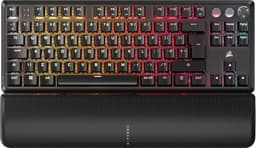
If you stream, this is the one on the page that earns its keep beyond gaming. The iCUE control wheel talks to Elgato Stream Deck software, so six dedicated macro keys can fire scene switches, mutes and clip triggers without a separate deck on the desk. That's a real feature, not a spec-sheet line, and it's what sets the K100 apart from the flagships around it.
The switches are Corsair's OPX optical, linear with a 1.0mm actuation and no debounce delay, which puts them among the fastest linear switches on a production board. The polling rate is 4000Hz, a 0.25ms report interval, which is high for a keyboard even if it's not the 8000Hz you get on the K70 PRO TKL. This is a full-size layout, so the number pad stays, making it the natural pick here for anyone who lives in spreadsheets between matches. The trade is desk space: it's the biggest footprint on this list, and if you sweep the mouse wide, the TKL boards will suit you better.
The keycaps are PBT double-shot, so they resist the shine that plagues the ABS on the pricier SteelSeries, and the aircraft-grade aluminium top plate gives it a rigid feel. Our review scores it 8.5 out of 10, and Amazon UK owners rate it 4.4 stars from 503 ratings, the largest owner base on the page after the GravaStar K1. The magnetic leatherette wrist rest attaches and detaches cleanly.
Two real gripes. The cable uses a proprietary connector rather than USB-C, so a replacement is harder to source than it should be at this price. And iCUE is powerful but heavy, with a history of crashes and pushy update prompts. There's no wireless and no hot-swap either, so a switch swap means a new board. For streamers who want everything in one device, it still makes sense.
Pros
- Stream Deck integration via the control wheel, a genuine streamer differentiator
- PBT double-shot keycaps resist shine far better than the SteelSeries ABS
- Full-size layout keeps the number pad for data entry
- 4.4 stars from 503 owners, a large sample for confidence
Cons
- Proprietary cable connector, not USB-C, so spares are awkward
- iCUE is resource-heavy with a history of crashes and profile loss
- Biggest desk footprint here; no wireless, no hot-swap
Check availabilityRead full review
Best No-Compromise
This is the one that tries to have it both ways: Hall Effect competitive tech and enthusiast feel, wireless included. The magnetic switches give you adjustable actuation from 0.1mm to 4.0mm and Rapid Trigger, and the clever part is that the 1000Hz polling holds over 2.4GHz wireless, so you're not tethered to get the responsiveness. The listing quotes 8000Hz polling; our specs on record list 1000Hz maintained over wireless, so treat the higher figure as a wired-mode ceiling rather than a guarantee everywhere.
The build is where it justifies the premium. A gasket mount and aluminium frame give it the cushioned, solid feel that pricier customs are known for, and unusually for a Hall Effect board, the sockets are hot-swappable. There's a large 4000mAh cell for strong battery life. It's a 75% layout, so it's tighter on the desk than the Corsair K100 while keeping arrows and a function row, and the specs on record list PBT keycaps, though our own review flags ABS, so check the current listing if keycap plastic matters to you.
Our review scores it 8 out of 10, and Amazon UK owners rate it 4.5 stars from 369 ratings. The soft spots are the software, which our review calls functional but less polished than established suites, and GravaStar's support infrastructure, which is still maturing. The Hall Effect switch ecosystem also limits aftermarket swap options even with the hot-swap sockets. Against the wired SteelSeries flagship, the V75 PRO's pitch is simple: you get magnetic switches plus wireless, at the cost of a less mature software story.
Pros
- Hall Effect switches with 0.1mm to 4.0mm adjustable actuation over wireless
- Gasket mount and aluminium frame deliver a genuinely premium feel
- Keycaps listed as PBT on the specs on record, though our review flags ABS: check the listing
- Hot-swap sockets, rare on a magnetic board
Cons
- Listing 8000Hz claim differs from the 1000Hz our specs record over wireless
- Software less polished than Corsair or Logitech ecosystems
- Hall Effect switch choice limits aftermarket swaps despite hot-swap
Buy on Amazon£239.00Read full review
Best Value
Here's the value play. The K70 PRO TKL gives you most of what the SteelSeries flagship offers, magnetic switches, 0.1mm Rapid Trigger, SOCD handling and 8000Hz polling, at a keener bracket. The MGX Hyperdrive switches come factory pre-lubed. It carries 4.6 stars from 64 ratings on Amazon UK and an 8.5 out of 10 in our review.
The TKL layout keeps the function row and navigation cluster that 60% boards drop, so it doubles for productivity, and it hands you 50 onboard profile slots, well ahead of most rivals. Like the SteelSeries, the keycaps are ABS double-shot and will shine over time; PBT would have been the better call at this price. iCUE has a steep learning curve, and finding the Rapid Trigger settings the first time is fiddlier than it should be. Against the Apex Pro TKL Gen 3, you lose the included wrist rest and the cleaner software, but you save money and keep the core competitive feature set.
Pros
- Factory pre-lubed Hall Effect switches with 8000Hz polling and SOCD
- 50 onboard profile slots, more than most competing boards
- 4.6 stars from owners, matching the SteelSeries flagship
Cons
- ABS keycaps will shine; PBT expected at this price
- No wireless option and no hot-swap support
- Spacebar stabiliser rattle reported by a minority out of the box
Buy on Amazon£119.99Read full review
Best Design
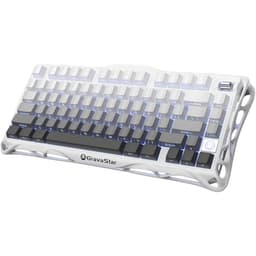
The K1 is the looker, and the value story here is enthusiast features at a mid-range price. The aluminium alloy exoskeleton and gasket mount give it a solid, muted feel that would have cost far more a few years back, and hot-swap sockets take both 3-pin and 5-pin switches for later tinkering. Tri-mode wireless keeps 1000Hz polling in wired and 2.4GHz modes, with Bluetooth on hand for typing across devices, and the 4000mAh battery is rated for several weeks of use.
It carries the biggest owner base on the page, 4.7 stars from 1699 ratings, the highest rating here too, and an 8.5 out of 10 in our review. The proprietary Mercury linear switches are smooth out of the box. The compromises are ABS keycaps that will grease up and software that's functional but short of the polish you get from Corsair or Logitech. It lacks the magnetic actuation of the V75 PRO, so hardcore competitive players should size that up instead, but for a stylish 75% wireless board with hot-swap, this is the pick.
Pros
- Aluminium exoskeleton and gasket mount at a mid-range price
- Highest rating on the page, 4.7 stars from 1699 owners
- Hot-swap sockets take 3-pin and 5-pin switches
Cons
- ABS keycaps; a PBT set is an extra cost
- No battery percentage readout, just an LED indicator
- Standard linear switches, no magnetic actuation like the V75 PRO
Buy on Amazon£129.00Read full review