Compact desktops have never been more capable or more affordable. Whether you are replacing an ageing tower at home, setting up a tidy home-office workstation, or looking for a capable machine that does not dominate a small desk, the small-form-factor (SFF) market in 2024 and 2025 has matured considerably. This roundup is aimed at anyone with a budget of up to £500 who wants a proper Windows PC, not a Raspberry Pi or a Chromebox, but a machine that can handle everyday productivity, light creative work, and the occasional bout of gaming. The biggest change since last year is the sheer number of refurbished and renewed Dell OptiPlex units now shipping with Windows 11 Pro pre-installed and genuine SSDs, making them credible daily drivers rather than stopgap solutions. We have also included the Vibox I-7 for buyers who want a dedicated GPU without spending serious money.
Quick Verdict
Best Overall: Dell FAST OptiPlex i7-6700 SFF (B0FG862S6N), 32 GB RAM and a 1 TB SSD at around £260 makes it the most capable all-rounder in this price bracket.
Best Value: Dell OptiPlex 7020 SFF i7-4770 16 GB (B09XHQ7Y6F), a proven quad-core workhorse with 512 GB SSD for around £148, making it the sharpest deal for tight budgets.
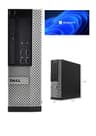
The entry-level slot in this roundup belongs to the Dell OptiPlex running an Intel Core i5-4570. This is a fourth-generation Haswell processor that, while not cutting-edge, remains entirely adequate for word processing, spreadsheets, web browsing, video calls, and light media consumption. At around £81, it is by some distance the cheapest genuine Windows 11 Pro machine you can buy from a reputable seller, and that price includes a 250 GB SATA SSD, which is enough for the operating system, a full Office suite, and a reasonable library of documents and photos.
The 8 GB of RAM is the main limitation here. Windows 11 Pro is comfortable with 8 GB for single-tasking, but if you routinely have a dozen browser tabs open alongside a video call and a spreadsheet, you may notice hesitation. The good news is that DDR3 SO-DIMMs are cheap and plentiful, and the OptiPlex SFF chassis typically supports upgrades to 16 GB or more, so the machine has room to grow. The integrated Intel HD 4600 graphics handle 1080p display output without complaint, and the SFF chassis includes DisplayPort and VGA outputs alongside USB 3.0 ports.
This machine suits students, home users who do not game, small-business owners who need a reliable secondary workstation, or anyone who simply wants a tidy, quiet desktop that does not cost the earth. It is not the machine for video editing or gaming, but as a productivity tool it punches well above its price. The pre-installed Windows 11 Pro licence is a genuine advantage over cheaper Chromebox alternatives, giving you access to the full Windows software ecosystem including legacy applications that Chrome OS cannot run.
One practical consideration: the SFF form factor means the machine is roughly the size of a large hardback book, so it sits neatly on a desk, on a shelf, or even mounted behind a monitor with a VESA bracket. Noise levels are low under everyday loads, though the fan can become audible during sustained CPU-intensive tasks.
Verdict: The most affordable genuine Windows 11 Pro mini desktop in this roundup. Limited RAM holds it back from heavier workloads, but for everyday tasks it is hard to fault at this price.
Pros
- Exceptionally low entry price for a genuine Windows 11 Pro machine
- 250 GB SSD included, faster than HDD-equipped rivals at this price
- Compact SFF chassis fits neatly on or under a desk
Cons
- 8 GB RAM is tight for multitasking-heavy workflows
- i5-4570 is a fourth-generation chip, limiting future-proofing
Step up from the i5 entry point and you arrive at the OptiPlex 7020 SFF, a machine that represents one of the strongest value propositions in the refurbished PC market right now. The Intel Core i7-4770 is a fourth-generation Haswell quad-core processor with Hyper-Threading, giving it eight logical cores and a base clock of 3.4 GHz with a boost to 3.9 GHz. That specification, combined with 16 GB of DDR3 RAM and a 512 GB SSD, creates a machine that handles the vast majority of everyday and professional workloads without breaking a sweat.
At around £148, this is the pick we would recommend to most buyers who want a capable daily driver without spending more than they need to. The i7-4770 remains competitive for productivity tasks: it compiles code, handles large spreadsheets, runs multiple virtual machines, and manages 1080p video playback with ease. The 16 GB RAM figure means you are unlikely to hit memory pressure under normal use, and 512 GB of SSD storage is enough for most users without needing an external drive from day one.
The OptiPlex 7020 SFF chassis is well-built, as you would expect from Dell's business-grade OptiPlex line. It includes USB 3.0 ports, DisplayPort and VGA video outputs, and a standard optical drive bay in most configurations. The machine ships with Windows 11 Pro, which means you get BitLocker encryption, Remote Desktop, and the ability to join a Windows domain, features that matter to small-business users and IT professionals. The integrated Intel HD 4600 GPU handles dual-monitor setups at 1080p without issue.
The weight of 6.29 kg reflects the metal chassis construction, which contributes to build quality and longevity but does mean this is not a machine you will be moving around frequently. Noise levels are acceptable for an office environment, and the machine runs cool under typical loads. For anyone who has been running an older laptop and wants to step up to a proper desktop experience without spending a lot, this is the machine to buy.
It is also worth noting that the OptiPlex 7020 has a large ecosystem of compatible spare parts, meaning repairs and upgrades are straightforward and inexpensive. Replacement fans, power supplies, and RAM modules are all readily available from UK suppliers.
Verdict: Best value pick in this roundup. The combination of i7-4770, 16 GB RAM, and 512 GB SSD at around £148 is genuinely difficult to beat for everyday and professional productivity use.
Pros
- i7-4770 quad-core with Hyper-Threading handles demanding productivity workloads
- 16 GB RAM is generous for the price and avoids memory bottlenecks
- Windows 11 Pro pre-installed with BitLocker and Remote Desktop support
Cons
- 6.29 kg metal chassis is heavier than a true mini PC
- Integrated graphics rule out any meaningful gaming or GPU-accelerated work
The Dell FAST OptiPlex i7-6700 SFF is the standout performer in this roundup and earns the Best Overall designation for a clear reason: it delivers 32 GB of RAM and a 1 TB SSD with a sixth-generation Intel Core i7-6700 processor for around £260. That specification would cost considerably more if you were buying new, and it represents a meaningful step up from the fourth-generation Haswell machines that dominate the rest of this list.
The Intel Core i7-6700 is a Skylake architecture quad-core with Hyper-Threading, running at 3.4 GHz base and 4.0 GHz boost. The Skylake platform brought meaningful improvements over Haswell in instruction-per-clock efficiency, memory controller performance, and platform connectivity. Combined with 32 GB of DDR4 RAM, this machine handles video editing in 1080p, large database queries, software development with multiple concurrent build processes, and heavy browser-based workloads without the memory pressure that limits the 8 GB and 16 GB configurations below it.
The 1 TB SSD is the other headline figure. A terabyte of solid-state storage means you can install a full creative software suite, a large game library (though the integrated GPU limits gaming ambitions), and still have room for a substantial media collection. For content creators who work primarily in 1080p, photographers managing large RAW libraries, or developers who need fast compile times, the combination of 32 GB RAM and 1 TB SSD is transformative compared to the entry-level configurations.
Windows 11 Pro comes pre-installed, and the SFF chassis maintains the same compact footprint as the other OptiPlex machines in this roundup. The integrated Intel HD 530 graphics on the i7-6700 are a generation ahead of the HD 4600 in the Haswell machines, supporting 4K display output and offering slightly better media decode acceleration. This is not a gaming machine, but for everything short of gaming, it is the most capable option under £500 in this catalogue.
At this price, it costs roughly twice the entry-level i5 model and around £112 more than the best-value 7020. Whether that premium is justified depends entirely on your workload. For light productivity, the 7020 is the smarter buy. For anyone who genuinely needs 32 GB RAM or a full terabyte of fast storage, the i7-6700 is worth every penny of the difference.
Verdict: Best Overall. The i7-6700, 32 GB RAM, and 1 TB SSD combination makes this the most capable mini desktop under £500 in this roundup, and the price remains fair for the specification on offer.
Pros
- 32 GB RAM handles demanding multitasking, video editing, and development workloads
- 1 TB SSD provides generous fast storage for creative and professional use
- Sixth-generation Skylake CPU offers a meaningful uplift over Haswell rivals
Cons
- Integrated graphics still limit gaming and GPU-accelerated creative tasks
- Costs roughly twice the entry-level option, which may be unnecessary for light users
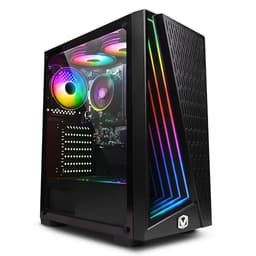
The Vibox I-7 is the only new, non-refurbished machine in this roundup, and it is the only one with a dedicated graphics solution, in this case the AMD Radeon Vega 8 integrated within the Ryzen 3 3200G APU. While Vega 8 is technically an integrated GPU rather than a discrete card, it is a significantly more capable graphics solution than the Intel HD graphics found in all the OptiPlex machines above. This matters for anyone who wants to play casual games, run emulators, use GPU-accelerated creative tools, or simply have smoother video playback and display performance.
The AMD Ryzen 3 3200G runs at 3.6 GHz base with a boost to 4.0 GHz across four cores. This is a Zen+ architecture processor, which is more modern than the Haswell and Skylake Intel chips in the Dell machines, and it brings with it support for faster memory, a more efficient instruction set, and better single-threaded performance in many real-world tasks. The 16 GB of RAM is a solid figure for this price point, and the 1 TB storage gives you plenty of room for games, applications, and media.
At this price, the Vibox I-7 is the most expensive machine in this roundup, and it is important to be clear about what you are paying for. You are paying for a new machine with a warranty, a more modern CPU architecture, and the Vega 8 GPU, which can run games like Fortnite, Minecraft, and older titles at 1080p medium settings. You are not getting the raw productivity muscle of the i7-6700 with 32 GB RAM, and for pure office work, the Dell machines offer better value per pound spent.
The Vibox I-7 suits buyers who want a new machine rather than a refurbished one, who do some casual gaming, or who need the Vega 8 GPU for light GPU-accelerated tasks such as video transcoding or machine learning experimentation. The compact form factor keeps the desk footprint small, and as a new machine it comes without the uncertainty that some buyers associate with refurbished stock, even when that stock is from a reputable seller like Dell.
It is also worth noting that the Ryzen 3 3200G platform supports faster DDR4 memory, which benefits the Vega 8 GPU significantly. If you want to squeeze more gaming performance out of the machine, fitting faster RAM is a relatively inexpensive upgrade that yields noticeable results in GPU-limited scenarios.
Verdict: The pick for buyers who want a new machine with gaming capability. The Vega 8 GPU and modern Ryzen architecture justify the higher price for the right buyer, but pure productivity users will find better value in the Dell OptiPlex range.
Pros
- Radeon Vega 8 GPU enables casual gaming at 1080p, unlike any other pick in this roundup
- Modern Zen+ Ryzen 3 3200G architecture outperforms older Intel chips in many workloads
- New machine with full warranty, avoiding refurbished-stock uncertainty
Cons
- At this price, it is significantly more expensive than the Dell alternatives
- Vega 8 is still integrated graphics and cannot match even a budget discrete GPU for gaming
Buying Guide
What to Look for in a Mini Desktop Under £500
Processor Generation and Architecture
The CPU generation matters more than the model number alone. An Intel Core i7 from the fourth generation (Haswell, 2013) is a capable chip, but it is now over a decade old. It will handle everyday productivity tasks without issue, but it lacks support for newer instruction sets, and its platform is reaching the end of mainstream software support. A sixth-generation Skylake i7 is meaningfully newer and brings DDR4 memory support, better integrated graphics, and improved power efficiency. AMD's Ryzen 3000 series (Zen+) is newer still and offers a strong balance of CPU and GPU performance in a single chip. When comparing machines, check the CPU generation, not just the tier.
RAM: How Much Do You Actually Need?
For light use, 8 GB of RAM is the minimum acceptable figure in 2025. Windows 11 Pro itself consumes around 2 to 3 GB at idle, leaving limited headroom for applications and browser tabs. If you work with multiple applications simultaneously, handle large spreadsheets, or use any creative software, 16 GB is the practical minimum. For video editing, software development, or running virtual machines, 32 GB makes a genuine difference. Always check whether the machine's RAM is upgradeable and how many DIMM slots are available before buying.
Storage: SSD vs HDD
Every machine in this roundup ships with an SSD, which is the correct choice. A solid-state drive makes Windows boot in seconds, applications open instantly, and file transfers feel immediate. Avoid any machine in this price range that ships with a spinning hard drive as its primary storage. The capacity you need depends on your use case: 250 GB is adequate for a secondary machine or a light user, 512 GB suits most people comfortably, and 1 TB is the right choice if you store large media files or a game library locally.
Integrated vs Dedicated Graphics
All but one machine in this roundup uses integrated graphics. Intel HD 4600 and HD 530 graphics handle everyday display tasks, 1080p video playback, and dual-monitor setups without issue. They cannot run modern games at playable frame rates. If gaming is any part of your use case, the Vibox I-7 with Radeon Vega 8 is the only option in this price bracket that offers meaningful GPU capability. If you want discrete graphics, you will need to spend more or look at a larger form-factor machine that accepts a full-length GPU.
Refurbished vs New
Refurbished Dell OptiPlex machines from reputable sellers offer exceptional value, but it is worth understanding what you are buying. A grade-A refurbished machine should arrive checked over, cleaned, and fitted with a new or certified SSD. Check the seller's returns policy and warranty period before buying. New machines like the Vibox I-7 come with a full manufacturer warranty and the peace of mind of unused components, which some buyers value highly enough to justify the price premium.
Can a Mini Desktop Replace a Full Tower?
For the vast majority of home and office users, yes. SFF desktops run the same operating system, the same applications, and connect to the same peripherals as full towers. The trade-offs are limited internal expansion, fewer drive bays, and no space for a full-length discrete GPU. If you need to add a powerful graphics card or multiple internal drives, a full tower is the right choice. For everyone else, a compact SFF desktop is quieter, uses less energy, and takes up far less space.
Lifespan Expectations
A well-maintained mini desktop running a modern SSD and adequate RAM should last five to eight years in everyday use. The limiting factor is usually software support: Microsoft's Windows 11 support lifecycle runs to 2031, which means even a fourth-generation Intel machine bought today has several years of supported use ahead of it. Upgrading RAM and replacing the SSD are the two most cost-effective ways to extend the useful life of any machine in this roundup.
The Dell FAST OptiPlex i7-6700 SFF is the overall winner of this roundup. Its combination of a sixth-generation Intel Core i7-6700, 32 GB of RAM, and a 1 TB SSD at around £260 delivers a level of capability that no other machine in this catalogue can match for everyday and professional productivity use. It is the machine we would recommend to anyone who works with large files, runs multiple applications simultaneously, or simply wants a compact desktop that will not feel underpowered for the next several years.
For buyers on a tighter budget, the Dell OptiPlex 7020 SFF with the i7-4770 and 16 GB RAM at around £148 is the best value pick and the machine we would recommend to the majority of home users and small-business owners. It handles everyday tasks with ease, ships with Windows 11 Pro, and leaves money in your pocket for a monitor, keyboard, or mouse.
The Vibox I-7 earns its place for buyers who want a new machine with genuine gaming capability, and the two mid-range OptiPlex configurations serve users who want more RAM slots or RAID storage support. Whatever your budget within the £500 ceiling, there is a capable compact desktop in this roundup to suit your needs.