Digital signage has moved well beyond a single looping video on a TV screen. Retailers, hospitality venues, corporate offices, and event spaces now routinely run multi-zone content across two, four, or even more displays simultaneously, demanding hardware that can handle 4K video decode, browser-based content management systems, and continuous 24/7 operation without thermal throttling or unexpected shutdowns. The mini desktop category has matured enormously over the past twelve months: AMD's Ryzen 7 8845HS brought genuine multi-display capability to genuinely pocket-sized machines, while Intel's N100 platform has become the go-to for low-power single-screen deployments. This guide is aimed at IT managers, AV integrators, small business owners, and digital marketing teams who need reliable, space-efficient hardware that can be mounted behind a screen or tucked into a media cabinet. We cover true mini PCs, compact tower desktops, and all-in-one options, so whether you are running a single menu board or a four-screen video wall, there is a pick here for your budget and use case.
Quick Verdict
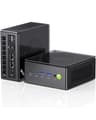
Best Overall: The GMKtec K8 Plus earns the top spot for digital signage thanks to its genuinely compact footprint, AMD Ryzen 7 8845HS processor with AMD Radeon 780M integrated graphics capable of driving multiple 4K displays simultaneously, 32 GB of DDR5 RAM, and a 1 TB PCIe 4.0 NVMe SSD, all in a chassis small enough to VESA-mount behind almost any commercial screen. It runs cool and quiet enough for 24/7 duty and draws a fraction of the power of a discrete-GPU tower.
Best Value: The Lenovo IdeaCentre A100 is the pick for budget-conscious single-screen deployments. Its Intel N100 processor sips power, the 24-inch Full HD display is built in, and Windows 11 Home gives you access to every major CMS platform. For a menu board, reception display, or information kiosk, it is hard to beat at the price.
The GMKtec K8 Plus is the standout recommendation for the majority of digital signage deployments, and the reason is straightforward: it is a genuine mini PC, not a rebranded gaming tower with the word "compact" applied loosely. The chassis is small enough to mount directly behind a commercial display using a standard VESA bracket, which is exactly how most professional signage installations work. Cables run neatly, the unit is invisible to visitors, and you avoid the cable management headaches that come with floor-standing towers.
At the heart of the K8 Plus is AMD's Ryzen 7 8845HS, an eight-core, sixteen-thread processor built on the Zen 4 architecture with a boost clock of up to 5.1 GHz. This is the same chip family used in premium business laptops and thin-and-light workstations, and it brings with it AMD's Radeon 780M integrated graphics, which is one of the most capable integrated GPUs available in 2025. The 780M can drive multiple 4K displays simultaneously, handle hardware-accelerated H.264, H.265, and AV1 video decode, and run browser-based content management systems such as Screenly, Rise Vision, or Yodeck without breaking a sweat. For a two-screen or even a three-screen signage zone, the 780M has more than enough headroom.
The 32 GB of DDR5 RAM is generous for a signage application and means you can run a CMS, a browser with multiple tabs open, a local media player, and a remote management agent simultaneously without any performance degradation. The 1 TB PCIe 4.0 NVMe SSD gives you ample local storage for a large library of video assets, which is important if your installation has unreliable internet connectivity and you need to cache content locally.
Power consumption is a significant advantage over discrete-GPU towers. The 8845HS is a 45-watt TDP processor, and in a typical signage workload the K8 Plus draws well under 30 watts at the wall, compared to 150 watts or more for a system with a dedicated graphics card. Over a year of 24/7 operation, the electricity saving is meaningful, and the lower thermal output means the unit runs quietly and reliably in enclosed media cabinets.
The one area where the K8 Plus asks you to do a little homework is display connectivity. You will need to confirm that the specific display outputs on your unit match your screen's inputs, and you may need active adapters for some configurations. For most modern commercial displays with HDMI 2.0 or DisplayPort inputs, this is a non-issue. Windows 11 comes pre-installed, and the machine is ready to enrol in a device management platform from the moment it boots.
Verdict: The GMKtec K8 Plus is the best all-round mini desktop for digital signage in 2025. It combines a genuinely compact form factor with powerful integrated graphics, generous RAM, fast storage, and low power draw, making it the ideal choice for single-screen and dual-screen deployments across retail, hospitality, and corporate environments.
Pros
- Genuinely mini form factor supports VESA mounting directly behind commercial displays
- AMD Radeon 780M drives multiple 4K outputs with hardware video decode for H.265 and AV1
- 32 GB DDR5 RAM and 1 TB PCIe 4.0 NVMe SSD handle large local media libraries with ease
- Sub-30W typical power draw reduces electricity costs significantly over 24/7 operation
Cons
- No discrete GPU limits output to integrated graphics, which may not suit high-frame-rate video wall applications
- Display output configuration requires verification against your specific screen inputs before purchase
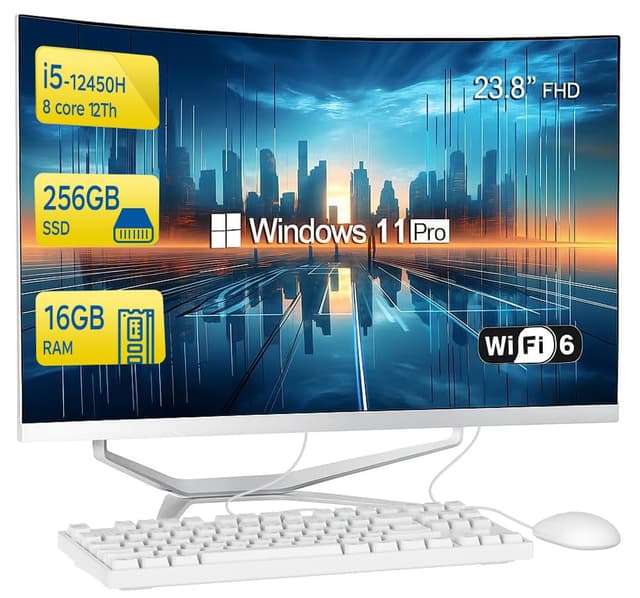
The Lenovo IdeaCentre A100 occupies a very specific and very useful niche in the digital signage landscape: the self-contained, single-screen solution that requires minimal installation effort. Because the 24-inch Full HD display, the computing hardware, and the speakers are all integrated into one unit, you simply mount it on a wall or stand, connect power, and you are operational. There are no separate media player boxes to hide, no display cables to route, and no compatibility questions to answer. For a reception desk information screen, a staff notice board, a queue management display, or a small retail menu board, this simplicity is genuinely valuable.
The Intel N100 processor is a four-core, four-thread chip from Intel's Alder Lake-N family, designed specifically for low-power, always-on applications. It is not a chip that will impress in a benchmark, but digital signage does not need benchmark performance. It needs reliable, consistent operation at low temperatures, and the N100 delivers exactly that. The processor draws as little as 6 watts under typical signage loads, which means the IdeaCentre A100 runs cool and silent even in a sealed enclosure. Thermal throttling, which can cause dropped frames and stuttering on more powerful machines running in poorly ventilated spaces, is simply not a concern here.
With 16 GB of RAM, the A100 can comfortably run a CMS agent, a browser-based player, and a remote management tool simultaneously. The 512 GB SSD is adequate for most signage use cases, though if you plan to cache large volumes of 4K video locally you may find it limiting. The built-in display outputs 1920x1080 resolution, which is the standard for the vast majority of commercial signage content. Windows 11 Home is pre-installed and fully compatible with all major signage software platforms.
The integrated nature of the A100 does mean it is less flexible than a separate mini PC paired with a commercial display. You cannot independently upgrade the display to a higher-brightness commercial panel, and you cannot easily redeploy the computing hardware to a different screen if your requirements change. For permanent, single-location installations where the display size and resolution are fixed, this is not a problem. For deployments where flexibility is important, the GMKtec K8 Plus paired with a commercial display is a better choice.
The A100 also lacks the multi-display capability of the GMKtec and the discrete GPU options lower in this list. It is a one-screen solution, and it should be evaluated as such. Within that constraint, it is an exceptionally well-suited product for digital signage: quiet, efficient, easy to deploy, and backed by Lenovo's business support infrastructure.
Verdict: The Lenovo IdeaCentre A100 is the best value pick for single-screen digital signage. Its all-in-one design eliminates installation complexity, the N100 processor runs cool and silent around the clock, and the price makes it accessible for small businesses deploying their first signage screen.
Pros
- All-in-one design with built-in 24-inch FHD display eliminates cabling and compatibility concerns
- Intel N100 draws as little as 6W under signage loads, enabling silent 24/7 operation in enclosed spaces
- Lenovo business support and warranty infrastructure provides confidence for commercial deployments
Cons
- Single-display only with no option to drive additional external screens for multi-zone signage
- 512 GB SSD storage is limiting if you plan to cache large libraries of 4K video content locally
- Display cannot be independently upgraded to a higher-brightness commercial-grade panel
The Apple iMac with M4 chip is not the obvious choice for a digital signage buyer, but it is a genuinely compelling option for specific deployment scenarios, particularly in premium retail environments, creative agencies, high-end hospitality, and corporate reception areas where the aesthetic of the hardware is as important as its function. The iMac's slim aluminium chassis and integrated 24-inch Retina display make a strong visual statement, and for a brand that wants its signage hardware to reflect its own design values, that matters.
From a pure performance standpoint, the Apple M4 chip is exceptional. The ten-core CPU and ten-core integrated GPU deliver performance that rivals discrete mid-range graphics cards in creative workloads, and the M4's media engine provides hardware-accelerated decode for H.264, H.265, ProRes, and AV1 video formats. For signage content that involves high-quality video, motion graphics, or live data feeds rendered in a browser, the iMac handles everything without thermal throttling or fan noise. Apple Silicon's efficiency architecture means the iMac draws significantly less power than a comparable Windows machine with a discrete GPU, and it runs near-silently in normal operation.
The 16 GB of unified memory is shared between the CPU and GPU, which is a different architecture to conventional RAM but is highly efficient. The 512 GB SSD is fast and adequate for most signage libraries, though large-scale video deployments may require external storage. macOS is fully supported by major signage platforms including Screenly, BrightSign's software player, and most browser-based CMS solutions. Apple's remote management tools, including MDM support via platforms such as Jamf or Mosyle, make fleet management straightforward for organisations already in the Apple ecosystem.
The iMac's Thunderbolt 4 and HDMI ports allow it to drive additional external displays beyond its built-in screen, which opens up multi-zone signage possibilities. However, the maximum external display count is more limited than a Windows machine with a dedicated multi-output GPU, so for video wall applications the iMac is not the right tool. Its strength is as a premium single-screen or dual-screen solution where quality, reliability, and aesthetics are the primary criteria.
The price is the main barrier. The iMac costs significantly more than the GMKtec K8 Plus or the Lenovo A100, and for most commercial signage deployments the additional cost is hard to justify on performance grounds alone. Where it earns its price is in brand-aligned deployments, Apple-ecosystem organisations, and installations where the hardware itself is visible and its appearance matters to the client.
Verdict: The Apple iMac M4 is the premium pick for signage deployments where aesthetics, macOS ecosystem integration, and exceptional build quality justify the higher investment. It is not the most cost-efficient choice, but it is the most refined all-in-one option in this list.
Pros
- Apple M4 chip delivers class-leading performance-per-watt with hardware decode for H.265, ProRes, and AV1 signage content
- Premium aluminium chassis and integrated Retina display suit high-end retail and corporate reception deployments
- Full MDM support via Jamf, Mosyle, and Apple Business Manager for enterprise fleet management
Cons
- Significantly higher price than Windows alternatives offering comparable or greater display output capability
- 512 GB internal SSD is restrictive for large local video libraries without adding external storage
- macOS limits compatibility with some Windows-only signage hardware peripherals and legacy CMS platforms
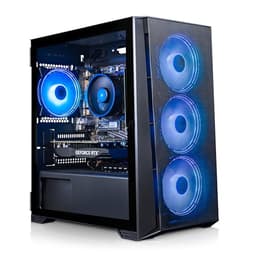
The ADMI Gaming PC with AMD Ryzen 5 5500 and NVIDIA GeForce RTX 3050 represents the entry point into discrete GPU signage territory, and it is a well-priced option for deployments that need more display output flexibility than an integrated graphics solution can provide, without stretching to the higher-end RTX 4060 or RTX 5060 systems further up the range.
The RTX 3050 with 6 GB of GDDR6 memory is a capable signage GPU. NVIDIA's display engine supports multiple simultaneous outputs, and the card handles 4K H.265 and H.264 decode in hardware, meaning the CPU is largely free to run your CMS, browser-based player, and management agent without competition from video decode tasks. For a three-screen or four-screen signage zone running 1080p or 4K content, the RTX 3050 has sufficient headroom, and the NVIDIA driver ecosystem is mature and stable, which is important for 24/7 commercial operation.
The AMD Ryzen 5 5500 is a six-core, twelve-thread processor based on AMD's Zen 3 architecture. It is not the newest chip available, but it is a proven, reliable platform that has been in production long enough to have well-established driver and firmware stability. For signage, where you want a system that has been in the field long enough to have its quirks ironed out, this is actually an advantage over newer, less battle-tested platforms. The 16 GB of DDR4 RAM at 3200 MHz is adequate for most signage workloads, and the 1 TB NVMe SSD provides generous local storage for video libraries.
The compact tower form factor is larger than the GMKtec K8 Plus but smaller than a full ATX gaming tower. It will not mount behind a screen on a VESA bracket, but it can be placed in a media cabinet, under a counter, or in a back-of-house equipment rack with relative ease. Windows 11 is pre-installed and ready for CMS enrolment.
The main consideration with the ADMI system is that the RTX 3050 6 GB is an older GPU generation, and while it is perfectly capable for current signage content, the newer RTX 4060 and RTX 5060 systems offer better performance headroom for future 8K content and more complex interactive signage applications. If your deployment is likely to run for three to five years without a hardware refresh, investing in a newer GPU generation may be worthwhile.
Verdict: The ADMI Gaming PC is a solid mid-range choice for multi-screen signage deployments that need discrete GPU output flexibility without the cost of newer GPU generations. It suits AV integrators building reliable, cost-effective installations on a defined budget.
Pros
- RTX 3050 6 GB GDDR6 supports multiple simultaneous display outputs with hardware H.265 decode
- Ryzen 5 5500 on Zen 3 is a proven, stable platform with mature driver and firmware support for 24/7 operation
- 1 TB NVMe SSD provides generous local storage for large video asset libraries
Cons
- RTX 3050 is an older GPU generation with less future-proofing than RTX 4060 or RTX 5060 alternatives
- Compact tower form factor cannot be VESA-mounted behind a display like a true mini PC
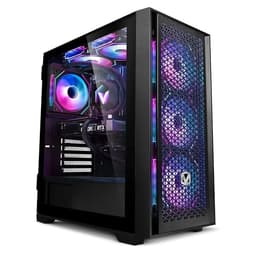
The Vibox V-196 Gaming PC Bundle rounds out this list as a capable, well-specified option for digital signage deployments that need a discrete GPU with a proven track record and a complete bundle that reduces procurement complexity. The inclusion of peripherals in the bundle price makes it particularly attractive for organisations that are setting up a new signage control station or a content creation and management workstation alongside their display hardware.
The NVIDIA GeForce RTX 4060 8 GB is a strong signage GPU. Based on NVIDIA's Ada Lovelace architecture, it offers hardware decode for AV1, H.265, and H.264, supports HDMI 2.1 and DisplayPort 1.4a outputs, and has a mature driver ecosystem with excellent stability on Windows 11. For a three or four-screen signage zone, the RTX 4060 handles 4K content on each output simultaneously without breaking a sweat, and its power efficiency is significantly better than the previous RTX 3060 generation, which translates to lower electricity costs over a long deployment.
The AMD Ryzen 5 5500 processor is the same chip used in the ADMI system, and the same comments apply: it is a proven, stable six-core platform on Zen 3 architecture, well-suited to the always-on demands of commercial signage. The 16 GB of DDR4 RAM at 3200 MHz and the 1 TB NVMe SSD match the ADMI's specification, providing adequate headroom for most signage workloads. Windows 11 is pre-installed and ready for CMS deployment.
Where the Vibox V-196 differentiates itself from the ADMI system is primarily in the GPU. The RTX 4060 is a full generation ahead of the RTX 3050, offering better performance, better efficiency, and better future-proofing for 8K content standards that are beginning to appear in premium commercial signage. If your deployment is expected to run for three to five years without a hardware refresh, the RTX 4060's additional headroom is a worthwhile investment over the RTX 3050.
The bundle nature of the V-196 package means you receive a complete system ready to deploy, which reduces the time and cost of procurement for organisations without dedicated IT staff. Vibox is a UK-based system builder with a track record in the consumer gaming market, and their systems are assembled in the UK, which can simplify warranty returns and support interactions for UK-based signage deployments.
As with all tower systems in this list, the V-196 cannot be VESA-mounted behind a display and requires a separate equipment space. For installations where space is at a premium, the GMKtec K8 Plus remains the better choice. For installations where a full tower with a current-generation discrete GPU is acceptable, the V-196 offers excellent value.
Verdict: The Vibox V-196 is a well-rounded pick for multi-screen signage deployments that need a current-generation discrete GPU at a competitive price. The RTX 4060 provides strong future-proofing, and the bundle format simplifies procurement for smaller organisations.
Pros
- RTX 4060 8 GB on Ada Lovelace architecture supports AV1 hardware decode and HDMI 2.1 output for future-proof 4K signage
- Bundle format includes peripherals, reducing procurement complexity for organisations without dedicated IT purchasing teams
- UK-assembled by Vibox simplifies warranty and support interactions for British signage deployments
Cons
- Ryzen 5 5500 on Zen 3 is an older CPU generation compared to the Ryzen 7 8700F in the CyberPowerPC Wyvern
- Tower form factor requires dedicated equipment space and cannot be concealed behind a display on a VESA mount
Buying Guide
How Many Screens Do You Need to Drive?
The single most important question when specifying a mini desktop for digital signage is how many simultaneous display outputs you need. A single-screen deployment, such as a menu board or reception display, can be handled comfortably by an integrated graphics solution like the GMKtec K8 Plus or the Lenovo IdeaCentre A100. Two screens are within the capability of most modern integrated GPUs. Three or more screens, particularly at 4K resolution, generally require a discrete GPU with multiple HDMI or DisplayPort outputs, which points you towards the ADMI, CyberPowerPC, or Vibox options in this list. Before purchasing, confirm the exact number and type of display outputs on your chosen unit and match them to the inputs on your commercial screens.
Integrated vs Discrete Graphics
For signage, integrated graphics are not a compromise. AMD's Radeon 780M, found in the GMKtec K8 Plus, is a capable integrated GPU that handles 4K video decode in hardware and drives multiple displays simultaneously. It draws far less power than a discrete GPU, runs cooler, and is less likely to cause thermal issues in enclosed installations. Discrete GPUs are the right choice when you need four or more display outputs, very high frame rates for interactive or video wall content, or when you anticipate needing to upgrade your content to 8K resolution in the coming years.
RAM and Storage for Signage Workloads
Most CMS platforms and media players are not RAM-intensive, but running a CMS agent, a browser-based player, a remote management client, and a local caching service simultaneously adds up. 16 GB is the practical minimum for a reliable signage deployment; 32 GB, as found in the GMKtec K8 Plus, gives you headroom for future software updates and more complex content. For storage, 512 GB is adequate if your content is streamed from the cloud, but if you rely on local caching for reliability in locations with poor internet connectivity, 1 TB or more is strongly recommended.
24/7 Operation and Thermal Management
Digital signage hardware runs continuously, often in enclosed spaces with limited airflow. Choose a system with a proven thermal design and, where possible, one with a documented operating temperature range suitable for your installation environment. Mini PCs with low-TDP processors are inherently better suited to enclosed installations than full tower systems with high-wattage discrete GPUs. If you must use a tower system in an enclosed cabinet, ensure the cabinet has adequate ventilation or active cooling.
Software and Remote Management
All systems in this list run Windows 11 or macOS, both of which are supported by the major digital signage CMS platforms. Before committing to a platform, verify that your chosen CMS supports the operating system on your hardware, and check whether the CMS vendor offers a device management portal for remote content updates, scheduling, and monitoring. For multi-location deployments, remote management capability is not optional, it is essential.
Future-Proofing Your Investment
Digital signage hardware is typically deployed for three to five years without a refresh. Choosing a system with a current-generation GPU, a fast NVMe SSD, and at least 16 GB of RAM ensures that your hardware remains capable as content standards evolve. The move from 1080p to 4K is already well underway in commercial signage; 8K content is beginning to appear in premium installations. Investing in a system with HDMI 2.1 or DisplayPort 2.1 outputs now means you will not need to replace your hardware when your display partner upgrades their screen specifications.
For the majority of digital signage deployments in 2025, the GMKtec K8 Plus is the clear overall winner. Its combination of a genuinely mini form factor, AMD Ryzen 7 8845HS processor, AMD Radeon 780M integrated graphics capable of driving multiple 4K displays, 32 GB of DDR5 RAM, 1 TB PCIe 4.0 NVMe SSD, and sub-30W power consumption makes it the most practical, cost-effective, and installation-friendly option in this list. The ability to VESA-mount it directly behind a commercial display is a decisive advantage for professional signage integrators, and its low power draw and quiet operation make it suitable for 24/7 duty in any environment.
For single-screen, budget-conscious deployments, the Lenovo IdeaCentre A100 is the best value pick. Its all-in-one design, Intel N100 efficiency, and built-in display eliminate installation complexity and make it the fastest path from purchase to operational signage screen.
For video wall applications and future-proof multi-screen installations, the CyberPowerPC Wyvern RTX 5060 is the strongest choice, with its Blackwell-architecture GPU and eight-core CPU providing headroom well beyond current signage requirements. The Vibox V-196 offers a similar capability at a slightly different price point with the proven RTX 4060. The ADMI Gaming PC suits budget-constrained multi-screen deployments where the RTX 3050's output flexibility is needed but the cost of newer GPU generations cannot be justified. The Apple iMac M4 remains the premium choice for brand-aligned, aesthetics-driven deployments in the Apple ecosystem.