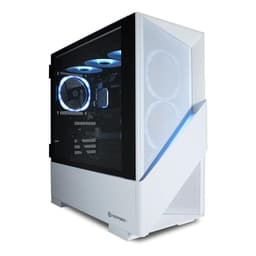
Whether you are heading to university for the first time or returning for another year, choosing the right desktop can make a genuine difference to how you study, create, and unwind. Last year, the conversation centred on mid-range GPUs and AMD Ryzen 5 chips. In 2025, the arrival of Nvidia's RTX 50-series cards and AMD's Ryzen 8000-series processors has shifted the value proposition considerably, meaning students can now get more raw performance per pound than ever before. This guide covers a range of machines, from a compact mini-PC ideal for a cramped halls-of-residence desk, to a polished Apple all-in-one for creative students, through to capable gaming towers that handle demanding coursework and weekend gaming sessions alike. Prices span from under £650 to just under £1,000 for the picks most relevant to student budgets, with one premium option included for postgraduates or those with more flexibility.
Quick Verdict
Best Overall: Vibox V-196 Gaming PC Bundle. It pairs an RTX 4060 with a Ryzen 5 5500, includes a monitor bundle, and sits just under £1,000, making it the most complete package for a student who wants one box that covers coursework, content creation, and gaming without compromise.
Best Value: Lenovo IdeaCentre A100 All-in-One. At under £650, it ships with a 24-inch Full HD display, 16 GB of RAM, and Windows 11 Home in a single tidy unit. It will not run demanding games, but for essays, video calls, spreadsheets, and research it is hard to beat at this price.
The Lenovo IdeaCentre A100 is aimed squarely at students who need a clean, clutter-free setup without spending a fortune. It is an all-in-one design, meaning the computer is built into the back of a 24-inch Full HD display, so there are no towers, no separate monitor cables, and no mess of wires to manage in a small room. For students living in halls or sharing a flat, that tidiness is genuinely valuable.
Under the hood, the Intel Processor N100 is an efficiency-focused chip that handles everyday computing tasks without breaking a sweat. Writing essays in Microsoft Word, running multiple browser tabs for research, joining Zoom or Teams lectures, editing spreadsheets in Excel, and streaming video from Netflix or YouTube are all well within its capabilities. It is not a machine for video editing, 3D rendering, or gaming, and you should go in with those expectations clearly set.
The 16 GB of RAM is a genuine highlight at this price point. Many budget all-in-ones ship with 8 GB, which can feel restrictive when you have a dozen browser tabs open alongside a word processor and a video call. Having 16 GB means multitasking stays smooth throughout a long study session. Storage is 512 GB SSD, which is adequate for most students, though those who store large media files or work with video footage may want to supplement it with an external drive.
The integrated GPU handles the display output and basic tasks, but there is no discrete graphics card here, so gaming is limited to very light titles. Windows 11 Home comes pre-installed, so you are ready to go straight out of the box. The 24-inch Full HD panel saves you the cost of buying a separate monitor, which is a real saving when you factor in the total cost of setting up a study space.
For a student whose primary needs are academic, this is the most sensible starting point in the catalogue. It is tidy, capable enough for coursework, and leaves money in the budget for textbooks, software subscriptions, or a decent keyboard and mouse.
Pros
- All-in-one design eliminates the need to buy a separate monitor, saving significant upfront cost
- 16 GB RAM handles multitasking across browser tabs, word processors, and video calls without slowdown
- Compact, cable-light setup is ideal for small desks in halls of residence or shared flats
Cons
- Intel N100 processor and integrated graphics make it unsuitable for gaming or GPU-intensive creative work
- 512 GB storage fills up quickly for students working with large video or audio files
The ADMI Gaming PC represents the entry point into discrete GPU territory for students, and it does so at a price that sits comfortably within reach for many. Pairing an AMD Ryzen 5 5500 processor with an NVIDIA GeForce RTX 3050 6 GB graphics card, this tower is designed for students who want to game in the evenings without paying over the odds for hardware they do not strictly need for coursework.
The Ryzen 5 5500 is a six-core, twelve-thread processor that handles everyday productivity tasks, coding, content consumption, and moderate creative work without complaint. It is not the newest chip on the market, but it remains entirely competent for student workloads in 2025. Paired with 16 GB of DDR4 RAM running at 3200 MHz, the system feels responsive during normal use, and the 1 TB NVMe SSD ensures fast boot times and quick application launches.
The RTX 3050 with 6 GB of GDDR6 VRAM is where this machine distinguishes itself from the non-gaming options above. It can run most modern games at 1080p with medium to high settings at playable frame rates, and it also unlocks hardware-accelerated video encoding, which is useful for students studying media production, journalism, or any course that involves video editing. NVIDIA's NVENC encoder is significantly faster than software encoding, which saves time when exporting projects.
Windows 11 comes pre-installed, and the system is ready to use out of the box. The tower form factor means it is upgradeable over time: you can add more RAM, swap in a larger SSD, or eventually upgrade the GPU as your budget allows. That upgradeability is a meaningful advantage for a student who expects their needs to grow over a three or four-year degree.
This is the pick for students who want a genuine gaming capability alongside their academic work, but who cannot justify spending close to £1,000 on a desktop right now.
Pros
- RTX 3050 delivers playable 1080p gaming and hardware-accelerated video encoding for media students
- Tower form factor allows future RAM, storage, and GPU upgrades as needs and budget grow
- 1 TB NVMe SSD provides fast load times and ample space for coursework and games
Cons
- RTX 3050 6 GB VRAM is already showing its age in the most demanding 2025 titles at higher settings
- Ryzen 5 5500 is a previous-generation chip, which may limit longevity compared to newer alternatives
The Apple iMac with M4 chip occupies a unique position in this list. It is the only macOS machine, the only all-in-one with a built-in high-quality display, and the only system here built around Apple Silicon. For students studying design, music production, film, photography, or software development targeting Apple platforms, it is in a category of its own.
The M4 chip features a 10-core CPU split between four performance cores and six efficiency cores, alongside a 10-core integrated GPU. What makes this architecture remarkable is the unified memory design: the 16 GB of RAM is shared between CPU and GPU at extremely high bandwidth, which means the integrated GPU performs far beyond what you would expect from a traditional integrated graphics solution. For GPU-accelerated creative applications, including Final Cut Pro, Logic Pro, Adobe Lightroom, and DaVinci Resolve, the M4 iMac is genuinely fast, often outpacing Windows machines with discrete mid-range GPUs in real-world creative workflows.
The 512 GB SSD is the one area where students may feel constrained, particularly those working with large video or audio projects. Apple's SSD is exceptionally fast, but the capacity is modest. External storage via Thunderbolt is the practical solution, and it works well, but it is an additional cost to factor in.
The display built into the iMac is a 24-inch Retina panel with excellent colour accuracy, which is directly relevant for design and photography students who need to trust what they see on screen. The slim, colourful chassis takes up very little desk space, and the cable management is minimal by design. macOS is stable, well-optimised for the M4 hardware, and receives long-term software support, which matters for students who want their machine to remain current for the full length of their degree and beyond.
Battery life is not applicable here since it is a desktop, but the M4's efficiency means the iMac runs quietly and without generating excessive heat, which is welcome in a small study room. This is the pick for creative students who are already invested in the Apple ecosystem or who know their course relies heavily on Apple-native software.
Pros
- M4 chip with unified memory delivers exceptional performance in creative applications like Final Cut Pro, Logic Pro, and DaVinci Resolve
- Built-in 24-inch Retina display with accurate colour reproduction is ideal for design and photography students
- macOS receives long-term software support and is highly optimised for M4 hardware, ensuring longevity
Cons
- 512 GB base storage is restrictive for students working with large video or audio project files
- macOS is incompatible with many Windows-only academic software tools and games, which may be a dealbreaker depending on your course
- Higher price than Windows alternatives offering comparable or greater raw performance for non-creative workloads
Buying Guide
What to look for in a student desktop
Buying a desktop for university is a different exercise from buying one for a home office or a dedicated gaming setup. Students have specific constraints: limited desk space, a tight budget, a need for the machine to cover multiple use cases, and an expectation that it will last for the full length of their degree. Here is what to prioritise.
RAM: start at 16 GB
Eight gigabytes of RAM was acceptable a few years ago, but in 2025 it is the minimum for a comfortable experience. With Windows 11 consuming a portion of available memory in the background, and modern browsers using several gigabytes across multiple tabs, 8 GB leaves very little headroom. Every machine in this guide ships with at least 16 GB, and for students in data science, software development, or video production, 32 GB is worth the extra investment if the budget allows.
Storage: SSD is non-negotiable
A solid-state drive is not a luxury in 2025, it is a baseline requirement. Mechanical hard drives are too slow for a modern operating system and will make your machine feel sluggish from day one. All of the machines in this guide use SSD storage. Aim for at least 512 GB, though 1 TB is preferable if you plan to install games or work with large files. If you end up with 512 GB, an external USB SSD is an affordable way to expand.
GPU: match it to your actual needs
Not every student needs a discrete GPU. If your workload is primarily essays, research, coding, and video calls, an integrated graphics solution is perfectly adequate and saves money. If you want to game in the evenings, an entry-level discrete GPU like the RTX 3050 opens up a wide range of titles. If you are studying media production or want to game at high settings in the latest releases, an RTX 4060 or RTX 5060 is worth the additional cost. Avoid overspending on a GPU if your academic work does not require it.
All-in-one versus tower
All-in-one desktops are tidier and require less desk space, but they are harder to upgrade and typically offer less performance per pound than a tower. If desk space is genuinely at a premium and you do not plan to game or run demanding software, an all-in-one is a sensible choice. If you want the option to upgrade components over time, or if you need a discrete GPU, a tower is the better long-term investment.
Operating system: Windows or macOS
Most academic software, including Microsoft Office, statistical packages, and engineering tools, runs on Windows. macOS is the better choice for students whose course relies on Apple-native creative software or iOS development. Check your university's recommended software list before committing to a platform, as some tools are Windows-only or require a specific version of macOS.
Bundle value
If you do not already own a monitor, keyboard, and mouse, a bundle can save you a meaningful amount of money. The Vibox V-196 bundle is a good example of this done well. Factor the total cost of your setup, not just the tower price, when comparing options.
For the majority of students, the Vibox V-196 Gaming PC Bundle is the overall winner. It delivers a complete, ready-to-use setup with an RTX 4060 GPU, a Ryzen 5 5500 CPU, 16 GB of RAM, and a 1 TB NVMe SSD, all for just under £1,000 including a monitor, keyboard, and mouse. That bundle value is hard to match, and the RTX 4060 ensures the machine handles both demanding coursework and evening gaming sessions comfortably throughout a full degree. Students on a tighter budget should look at the Lenovo IdeaCentre A100 for pure academic use, or the ADMI Gaming PC if they want entry-level gaming capability without exceeding £700. Creative students on macOS should consider the Apple iMac M4, which is in a class of its own for Apple-native creative workflows. And for postgraduates or those with more demanding computational needs, the CyberPowerPC Luxe offers a specification that will not be a bottleneck for years to come.