SolidWorks places heavy demands on a desktop PC. The software leans on a fast multi-core CPU for rebuilds and simulations, a GPU with strong OpenGL and DirectX performance for real-time 3D viewport work, and enough RAM to handle large assemblies without grinding to a halt. Sixteen gigabytes is the bare minimum; 32 GB is far more comfortable once part counts climb. Since last year, the arrival of NVIDIA's RTX 50-series cards has shaken up the mid-to-high end of the market, delivering meaningfully better viewport performance per pound than the RTX 40-series they replace. This roundup is aimed at engineers, product designers, and students who need a ready-to-run Windows desktop that can handle SolidWorks daily, whether that means light part modelling on a budget or full assembly work with Simulation and Visualize add-ins running simultaneously. We have selected machines from the catalogue that represent the most sensible choices across different budgets and workload profiles.
Quick Verdict
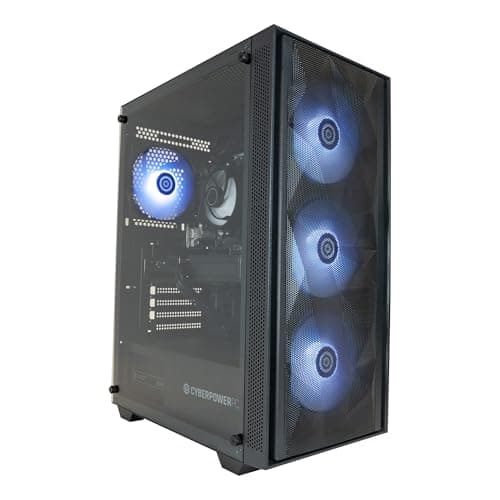
Best Overall: CyberPowerPC Luxe Gaming PC (Intel Core Ultra 7 265KF, RTX 5070 Ti, 32 GB RAM), the strongest combination of CPU throughput, GPU muscle, and storage for serious SolidWorks work at a price that stops short of workstation territory.
Best Value: ADMI Gaming PC (AMD Ryzen 5 5500, RTX 3050, 16 GB RAM), the most affordable route into a discrete-GPU SolidWorks desktop, suitable for students and light professional use.
The CyberPowerPC Luxe is the machine we would recommend to most professional SolidWorks users who need reliable daily performance without paying workstation prices. It pairs Intel's Core Ultra 7 265KF, a 20-thread processor built on Intel's latest architecture, with NVIDIA's RTX 5070 Ti and 32 GB of DDR5 RAM. That combination handles virtually everything SolidWorks throws at it: large assemblies, real-time RealView graphics, PhotoView 360 rendering, and Simulation runs all feel fluid rather than frustrating.
The RTX 5070 Ti is not a certified Quadro or RTX professional card, but NVIDIA's consumer cards have long been usable in SolidWorks with the right driver approach, and the raw shader and memory bandwidth figures are strong enough to make viewport work genuinely comfortable even with complex surface models on screen. The 2 TB NVMe SSD is a practical benefit here too: SolidWorks projects, especially those with large assemblies and associated drawing packs, eat storage quickly, and having 2 TB from the outset avoids early capacity headaches.
The 32 GB of RAM is the sweet spot for professional SolidWorks work. Assemblies with several hundred components, running alongside a browser, email client, and PDM vault, will sit comfortably within that headroom. Users working on very large top-level assemblies with thousands of components may eventually want to upgrade to 64 GB, but the machine's DDR5 platform means that upgrade path is straightforward.
The Core Ultra 7 265KF's high single-thread boost speed matters for SolidWorks rebuild times, which are largely single-threaded operations. Multi-threaded workloads like Simulation and rendering benefit from the full 20-thread count. This is a well-rounded machine for the money.
Verdict: The best all-round SolidWorks desktop in this roundup for professional users who want strong CPU and GPU performance, ample RAM, and generous storage without crossing into five-figure workstation territory.
Pros
- Core Ultra 7 265KF delivers strong single-thread rebuild performance and 20-thread multi-core throughput for Simulation
- 32 GB DDR5 RAM handles large assemblies comfortably without constant page file activity
- 2 TB NVMe SSD provides generous project storage from day one
Cons
- RTX 5070 Ti is not a certified professional GPU, so some SolidWorks RealView features may require driver workarounds
- 16 GB RAM configurations of competing machines at lower prices may tempt budget buyers who later regret the compromise
The Vibox VIII-75 is the most GPU-powerful machine in this roundup, pairing an Intel Core i9 12900KF with NVIDIA's flagship RTX 5090 carrying 32 GB of GDDR7 VRAM. For SolidWorks users who also run heavy rendering workloads, Visualize Professional sessions, or who work with extremely complex surface models where viewport VRAM becomes a genuine constraint, this machine has headroom that nothing else here can match.
The Core i9 12900KF is a 12th-generation Intel processor rather than the latest architecture, which means it sits slightly behind the Core Ultra 7 265KF in raw IPC terms. However, with a 5.2 GHz boost clock and 16 cores across its hybrid architecture, it remains a capable SolidWorks CPU. Rebuild times on complex parametric models will be fast, and Simulation runs benefit from the high core count. The 32 GB of DDR4 RAM is more than adequate for all but the most extreme assembly work.
The RTX 5090's 32 GB of VRAM is genuinely useful for SolidWorks Visualize, which can load very large texture sets and scene data into GPU memory during rendering. For standard SolidWorks CAD viewport work, the performance difference between an RTX 5090 and an RTX 5070 Ti is less pronounced, but for users who render frequently, the faster GPU will cut render times noticeably. The 2 TB NVMe SSD matches the Luxe for storage capacity.
The main consideration here is price relative to the Luxe. The RTX 5090 commands a significant premium, and for pure SolidWorks CAD work, most users will not see a proportional benefit in their daily workflow. Where this machine earns its place is for designers who use SolidWorks as part of a broader pipeline that includes GPU-accelerated rendering or who work with extremely dense mesh geometry imported from scanning or reverse engineering tools.
Verdict: The most GPU-capable option in the roundup, best suited to users who combine heavy SolidWorks work with GPU rendering or who need maximum VRAM for complex visualisation tasks.
Pros
- RTX 5090 with 32 GB VRAM provides class-leading GPU performance for Visualize rendering and complex viewport geometry
- 2 TB NVMe SSD and 32 GB RAM deliver a well-rounded high-end specification
- Intel Core i9 12900KF offers strong single-thread boost for SolidWorks rebuild operations
Cons
- 12th-generation CPU architecture is a generation behind the Core Ultra 7 found in newer competitors at similar price points
- RTX 5090 premium is hard to justify for users who only do standard CAD viewport work without heavy rendering
The ADMI Gaming PC is the most affordable route into a discrete-GPU SolidWorks desktop in this roundup. It pairs the AMD Ryzen 5 5500 with NVIDIA's RTX 3050 carrying 6 GB of GDDR6 VRAM, 16 GB of DDR4 RAM, and a 1 TB NVMe SSD. For students, hobbyists, and professionals working on light SolidWorks tasks, this machine provides a functional starting point at a price that is substantially lower than anything else here.
The Ryzen 5 5500 is a six-core, twelve-thread Zen 3 processor. It is not the fastest CPU in this roundup by any measure, but it is entirely capable of running SolidWorks for part modelling, drawings, and small assemblies. Rebuild times on complex parametric models will be noticeably slower than on the Ryzen 7 8700F or Core Ultra 7 machines, and Simulation runs will take longer, but for users who are not running Simulation intensively, the difference is manageable.
The RTX 3050 with 6 GB VRAM is the specification that most defines this machine's limits. It is sufficient to enable SolidWorks' hardware-accelerated RealView graphics and to handle viewport rendering of parts and small assemblies without stuttering. However, large assemblies with complex surface geometry, high-resolution textures, or multi-monitor setups will push the 6 GB VRAM limit, and render times in PhotoView 360 will be significantly longer than on RTX 5060 or 5070 Ti systems. For students learning SolidWorks or professionals with light workloads, none of this is a dealbreaker.
The 16 GB DDR4 RAM is the same limitation seen on the Wyvern: adequate for light use, potentially constraining for large assemblies. The 1 TB NVMe SSD is a practical storage allocation for getting started. The ADMI machine's real appeal is its price point: it gets a discrete GPU into the hands of SolidWorks users who cannot afford the mid-range options, and for that purpose it does its job.
Verdict: The best-value entry into discrete-GPU SolidWorks computing, suited to students and light professional users who need a functional machine at the lowest possible price, with the understanding that heavy assembly or Simulation work will feel constrained.
Pros
- RTX 3050 enables SolidWorks hardware-accelerated RealView graphics at the lowest price in the roundup
- 1 TB NVMe SSD provides fast project storage for the budget tier
Cons
- RTX 3050's 6 GB VRAM is limiting for large assemblies, high-resolution multi-monitor setups, and PhotoView 360 rendering
- Ryzen 5 5500 Zen 3 architecture shows its age against Zen 4 and Intel Core Ultra alternatives in rebuild and Simulation performance
- 16 GB DDR4 RAM will require an upgrade for any serious large-assembly work
Buying Guide
CPU: Single-Thread Speed Matters Most
SolidWorks' core rebuild engine is largely single-threaded. When you hit Rebuild or roll back a feature tree, the software processes operations sequentially on a single CPU core, which means a processor with a high single-thread boost clock will feel faster in daily use than one with many slower cores. This is why the Intel Core Ultra 7 and Core i9 12900KF machines in this roundup are strong SolidWorks choices: they combine high boost clocks with enough total core count to benefit multi-threaded tasks like Simulation and rendering. AMD's Zen 4 architecture (Ryzen 7 8700F) has closed much of the IPC gap with Intel and is a competitive alternative. Zen 3 (Ryzen 5 5500) is capable but noticeably slower in single-thread benchmarks than the latest generation processors.
GPU: Certified vs Consumer Cards
SolidWorks officially certifies specific professional GPUs, primarily NVIDIA's RTX professional range and AMD's Radeon Pro series, for full RealView graphics support and guaranteed driver stability. Consumer gaming GPUs, including all the RTX 5000-series cards in this roundup, are not on the certified list. In practice, many SolidWorks users run consumer GPUs successfully, and NVIDIA's consumer drivers have improved significantly. However, you may need to use registry edits or third-party tools to unlock RealView on non-certified hardware, and Dassault Systèmes will not provide GPU-specific support if issues arise. For students and many professionals, this is an acceptable trade-off given the price difference. For enterprise environments with strict IT policies, a certified GPU is worth the premium.
RAM: 32 GB is the Professional Standard
SolidWorks recommends 16 GB as a minimum, but 32 GB is the practical standard for professional work. Large assemblies with hundreds or thousands of components, particularly those using in-context references or complex configurations, can consume 12 to 20 GB of RAM on their own. Add a browser, PDM client, email, and perhaps a Simulation study, and 16 GB systems will begin paging to disk, causing noticeable slowdowns. If you are buying a 16 GB machine, check whether the RAM slots are accessible and whether the platform supports expansion, then budget for an upgrade within the first year of heavy use.
Storage: NVMe SSD is Non-Negotiable
SolidWorks loads large assemblies by reading hundreds of individual part and subassembly files from disk. NVMe SSDs, with sequential read speeds of 3,000 to 7,000 MB/s depending on generation, dramatically reduce these load times compared to SATA SSDs or mechanical hard drives. Every machine in this roundup uses an NVMe SSD, which is the correct choice. Capacity matters too: a fresh Windows 11 installation with SolidWorks, its toolbox, and associated PDM software will consume 60 to 100 GB before you have saved a single part file. A 1 TB drive is a workable starting point; 2 TB is more comfortable for users who keep large project archives locally.
All-in-One vs Tower
Tower desktops dominate this roundup for good reason: they are easier to upgrade, better cooled, and generally offer stronger performance per pound than all-in-one designs. For SolidWorks, where you may want to add RAM, swap a GPU, or fit an additional SSD as your workload grows, a tower's upgradeability is a practical long-term advantage. All-in-one machines are tidier on a desk but typically sacrifice thermal headroom and upgrade flexibility, both of which matter for sustained CAD workloads.
The CyberPowerPC Luxe Gaming PC (Intel Core Ultra 7 265KF, RTX 5070 Ti, 32 GB RAM, 2 TB NVMe) is the overall winner for SolidWorks users in 2025. It combines the latest Intel architecture's strong single-thread rebuild performance with a powerful RTX 5070 Ti GPU, 32 GB of DDR5 RAM for comfortable large-assembly work, and 2 TB of fast NVMe storage. The Vibox VIII-75 is the choice for users who need maximum GPU power for rendering pipelines, and the ADMI Gaming PC is the sensible entry point for students and light users who need a discrete GPU without a large budget. For the majority of professional SolidWorks users, the Luxe hits the right balance of capability, value, and future-proofing.