DaVinci Resolve is one of the most demanding applications you can run on a desktop PC. Whether you are colour grading 4K footage, mixing Fairlight audio tracks, or rendering complex Fusion composites, the software pushes CPUs, GPUs, and RAM to their limits simultaneously. Since last year, Blackmagic Design has continued to expand GPU-accelerated features, making a capable discrete graphics card more important than ever, particularly for noise reduction, HDR grading, and the AI-powered Magic Mask tool. The arrival of NVIDIA's RTX 50-series and AMD's latest Ryzen processors has also shifted the value landscape considerably. This guide is aimed at UK buyers who edit video seriously, whether as a freelance colourist, a YouTuber stepping up to professional tools, or a small studio looking for a capable workstation without paying enterprise prices. We have selected five machines from the catalogue that genuinely make sense for Resolve, covering a range of budgets and use cases.
Quick Verdict
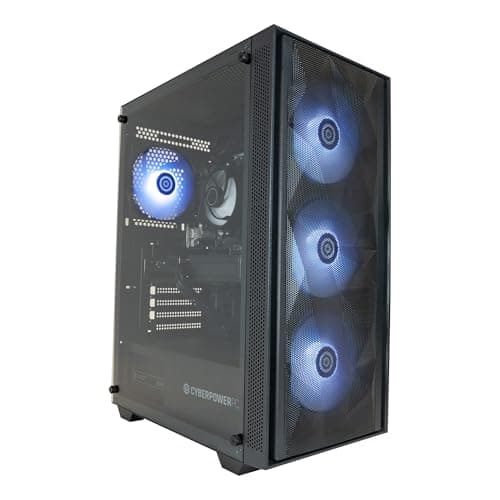
Best Overall: CyberPowerPC Luxe Gaming PC (Intel Core Ultra 7 265KF, RTX 5070 Ti, 32GB), the combination of a modern high-core-count CPU, a powerful RTX 5070 Ti, and 32GB of DDR5 RAM makes it the most rounded DaVinci Resolve workstation in this selection at a price that does not require a business loan.
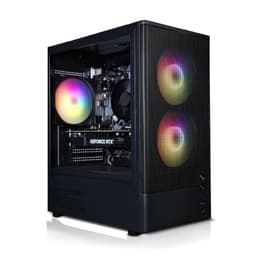
Best Value: CyberPowerPC Wyvern Gaming PC (AMD Ryzen 7 8700F, RTX 5060 8GB), for editors working primarily in 1080p or light 4K timelines, this machine delivers genuine GPU-accelerated Resolve performance at a price that leaves budget for storage upgrades.
The CyberPowerPC Luxe is the machine in this selection that most closely resembles a purpose-built DaVinci Resolve workstation. It is aimed at serious video editors, colourists, and motion graphics artists who need to handle demanding 4K and even 6K timelines without constant dropped frames or render bottlenecks. The Intel Core Ultra 7 265KF is a high-performance desktop chip built on Intel's Arrow Lake architecture. It brings a substantial number of performance cores to the table, making it well-suited to the multi-threaded demands of Resolve's media management, audio processing in Fairlight, and background rendering tasks that run concurrently with your editing session.
The headline feature for Resolve users, however, is the NVIDIA GeForce RTX 5070 Ti. DaVinci Resolve's GPU-accelerated processing engine benefits enormously from a card of this calibre. The RTX 5070 Ti sits in the upper tier of NVIDIA's Blackwell generation, offering substantial CUDA core counts and VRAM bandwidth that directly translates to smoother real-time playback of colour-graded timelines, faster noise reduction rendering, and quicker export times. The 32GB of DDR5 system RAM is the correct amount for professional Resolve work. Running multiple Resolve pages simultaneously, keeping a browser open, and having Blackmagic's Proxy Generator running in the background all consume memory quickly, and 16GB can become a bottleneck during intensive sessions.
Storage comes in the form of a 2TB NVMe SSD, which is genuinely useful for video work. A single 2TB drive gives you enough room for an operating system, the Resolve application, a project cache folder, and a reasonable amount of active project media before you need to reach for an external drive. The machine ships with Windows 11, which is fully supported by the latest versions of DaVinci Resolve. For editors who work primarily on Windows and want a machine that can handle 4K grading, HDR workflows, and Fusion compositing without compromise, the Luxe is the most capable all-rounder in this selection. The price reflects its specification, but compared to building a comparable system from components or buying a branded workstation, it represents fair value for the performance on offer.
Verdict: The best-rounded DaVinci Resolve desktop in this group, combining a modern CPU architecture, a top-tier GPU, and professional-grade RAM in a single pre-built package.
Pros
- RTX 5070 Ti delivers fast GPU-accelerated grading and noise reduction in Resolve
- 32GB DDR5 RAM handles multi-page Resolve sessions without memory pressure
- 2TB NVMe SSD provides enough space for active project media and cache
Cons
- Price is high relative to other picks, making it harder to justify for part-time editors
- Only 1TB of NVMe SSD storage listed for some configurations, so verify before purchase
The Apple iMac with M4 chip occupies a unique position in this selection. It is the only macOS machine, the only all-in-one, and the only system using an integrated GPU rather than a discrete graphics card. For DaVinci Resolve users, this requires some careful consideration. DaVinci Resolve has excellent native support for Apple Silicon, and Blackmagic Design has invested significantly in optimising Resolve for the M-series chip architecture. The M4's unified memory architecture means that the CPU and GPU share the same 16GB of RAM, and this shared pool is accessed with extremely high bandwidth, which partially compensates for the absence of a discrete GPU with dedicated VRAM.
In practical terms, the M4 iMac handles 4K H.264 and H.265 timelines in Resolve with impressive efficiency. The Apple M4's 10-core GPU is capable of GPU-accelerated colour grading, and the chip's media engine handles ProRes and H.264 decode with dedicated hardware acceleration that reduces the load on the GPU cores. For editors who work primarily in 1080p or 4K with standard codecs, the iMac M4 delivers a smooth Resolve experience that many Windows mid-range machines struggle to match, despite those machines having discrete GPUs.
The limitations become apparent with more demanding workflows. The 16GB of unified memory is shared between CPU and GPU tasks, meaning complex Fusion composites, 6K RAW timelines, or sessions with heavy noise reduction applied across many clips can push the system to its limits. The 512GB SSD is the most significant practical limitation for video work. Video files are large, and 512GB will fill quickly. Most iMac M4 buyers working in video will need external storage from day one, which adds cost and desk clutter.
The iMac's built-in 24-inch Retina display is a genuine advantage for colour work. It is P3 wide colour gamut capable and True Tone calibrated, providing a reliable viewing environment for grading without needing to budget for a separate monitor. The all-in-one form factor keeps the desk tidy, and macOS's stability and the iMac's near-silent operation make it a pleasant machine to work on for long sessions. For editors already in the Apple ecosystem, or those who prioritise a clean desk setup and reliable macOS software compatibility, the iMac M4 is a compelling choice for 4K Resolve work.
Verdict: A uniquely efficient and elegant Resolve machine for macOS users working in 4K with standard codecs, though the 512GB SSD and shared 16GB RAM limit its ceiling for demanding workflows.
Pros
- Apple Silicon optimisation in DaVinci Resolve delivers efficient 4K grading performance despite integrated GPU
- Built-in P3 wide gamut Retina display provides a reliable colour reference without a separate monitor purchase
- Near-silent operation and compact all-in-one form factor suit long editing sessions in quiet environments
Cons
- 512GB SSD is insufficient for video work without external storage from day one
- 16GB unified memory shared between CPU and GPU limits performance headroom on complex Fusion and noise reduction tasks
The ADMI Gaming PC with an RTX 3050 6GB is the entry-level option in this selection for editors who want GPU-accelerated DaVinci Resolve on a tight budget. It is a machine that will run DaVinci Resolve with GPU acceleration enabled, which immediately puts it ahead of any integrated-graphics system for colour grading work. The AMD Ryzen 5 5500 is a six-core, twelve-thread processor based on AMD's Zen 3 architecture. It is a capable mid-range chip that handles Resolve's CPU-side tasks, including media management, audio processing, and timeline rendering, without significant bottlenecks for 1080p and light 4K work.
The NVIDIA GeForce RTX 3050 6GB is the GPU that defines this machine's position in the market. For DaVinci Resolve, 6GB of VRAM is a workable minimum for 1080p grading and basic 4K work with standard codecs. You can run colour corrections, apply LUTs, and use most of Resolve's standard colour science tools without hitting VRAM limits on typical 1080p timelines. However, 6GB is tight for 4K RAW workflows, complex Fusion composites, or applying GPU-intensive effects like noise reduction across long timelines. The RTX 3050 is an Ampere-generation card, which means it is two GPU generations behind the RTX 5060 found in the Wyvern above. Its CUDA core count and memory bandwidth are noticeably lower than newer alternatives.
The 16GB of DDR4 RAM at 3200MHz is adequate for straightforward editing sessions. Editors who keep their Resolve session focused, without running numerous background applications simultaneously, will find 16GB sufficient for 1080p and moderate 4K work. The 1TB NVMe SSD provides a reasonable amount of working storage, though video editors will want to supplement this with external drives for media storage relatively quickly.
This machine is best suited to editors who are just starting out with DaVinci Resolve, those who edit primarily in 1080p, or those who need a secondary editing machine for a studio environment. It is not a machine for demanding 4K RAW grading or complex VFX work, but it provides a genuine step up from integrated-graphics systems and will handle the fundamentals of Resolve's colour page, cut page, and edit page without frustration. The price makes it accessible for editors who cannot stretch to the Wyvern or Luxe.
Verdict: A budget-friendly entry point into GPU-accelerated DaVinci Resolve, best suited to 1080p editing and light 4K work, with the RTX 3050 providing enough GPU compute for the fundamentals of colour grading.
Pros
- RTX 3050 enables GPU-accelerated Resolve colour grading at a lower price than any other discrete GPU option in this selection
- Ryzen 5 5500 Zen 3 architecture handles Resolve's CPU tasks efficiently for 1080p and light 4K timelines
Cons
- RTX 3050's 6GB VRAM is tight for 4K RAW workflows and GPU-intensive Resolve effects like noise reduction
- Ampere-generation GPU is two architectures behind current RTX 50-series cards, limiting future-proofing
- 16GB RAM can become a bottleneck when running Resolve alongside other creative applications
Buying Guide
GPU: The Most Important Component for DaVinci Resolve
DaVinci Resolve is built around GPU acceleration. Blackmagic Design's colour science engine, the noise reduction algorithms, the Fusion compositor, and the export pipeline all rely on the GPU to a degree that makes it the single most important component in a Resolve workstation. For Windows machines, NVIDIA GPUs are the preferred choice because Resolve's GPU engine is optimised for CUDA, NVIDIA's proprietary parallel computing platform. AMD GPUs work with Resolve via OpenCL, but NVIDIA CUDA typically delivers better performance and compatibility with Resolve's full feature set.
VRAM capacity matters as much as raw GPU performance. As a practical guide, 6GB of VRAM is a workable minimum for 1080p grading. For 4K work with standard codecs like H.264 and H.265, 8GB is the comfortable minimum. For 4K RAW, 6K, or complex Fusion composites, 12GB or more is advisable. The RTX 5090 in the Vibox VIII-75 with 32GB of VRAM represents the ceiling of what is available in this selection, while the RTX 3050 with 6GB in the ADMI machine represents the practical floor for Resolve work.
CPU: Multi-Core Performance Matters
While the GPU handles most of Resolve's heavy lifting, the CPU is responsible for media decoding, audio processing in Fairlight, timeline management, and tasks that fall outside the GPU pipeline. A six-core processor is the minimum for comfortable Resolve use. Eight cores or more become noticeable when working with complex timelines, running background transcoding, or using Resolve's collaboration features. Modern architectures from both AMD (Zen 4) and Intel (Arrow Lake, Raptor Lake) offer strong single-core performance that keeps the Resolve interface responsive during editing.
RAM: 32GB for Professional Work
DaVinci Resolve recommends 16GB of RAM as a minimum, but 32GB is the practical recommendation for professional use. Resolve uses system RAM for project caches, media management, and tasks that overflow from GPU VRAM. Running Resolve alongside a browser, Slack, or other creative tools on a 16GB system can lead to memory pressure during intensive sessions. If you are buying a machine with 16GB, ensure it has spare RAM slots for future upgrades.
Storage: Speed and Capacity
Video files are large. A single hour of 4K H.264 footage can occupy 20GB or more, and RAW formats multiply that figure several times over. An NVMe SSD for the operating system, application, and project cache is essential for smooth Resolve performance. Resolve's cache files alone can consume tens of gigabytes during a complex project. Most editors will want a secondary drive, either internal or external, for media storage. USB 3.2 or Thunderbolt external drives are suitable for 4K editing, though keeping media on the fastest available drive always improves playback reliability.
macOS vs Windows for Resolve
Both platforms are fully supported by DaVinci Resolve. macOS benefits from Apple Silicon optimisation and hardware media engines that accelerate ProRes and H.264 decode. Windows benefits from a wider range of discrete GPU options and generally lower hardware costs at equivalent performance levels. The choice often comes down to existing ecosystem preferences and whether you need the widest possible GPU performance ceiling, which currently favours Windows with NVIDIA's RTX 50-series cards.
The CyberPowerPC Luxe Gaming PC with the Intel Core Ultra 7 265KF and RTX 5070 Ti is the overall winner for DaVinci Resolve in this selection. It combines a modern CPU architecture, a high-performance Blackwell-generation GPU with sufficient VRAM for demanding 4K and even 6K workflows, and 32GB of DDR5 RAM that provides the headroom professional Resolve sessions require. The 2TB NVMe SSD adds practical value for video editors who need working storage. It is not the cheapest machine here, but for editors who use Resolve seriously, the performance it delivers justifies the investment. If budget is the primary constraint, the CyberPowerPC Wyvern with the RTX 5060 8GB is the best-value pick, offering genuine GPU-accelerated 4K Resolve performance at a mid-range price that leaves room in the budget for external storage and future RAM upgrades.