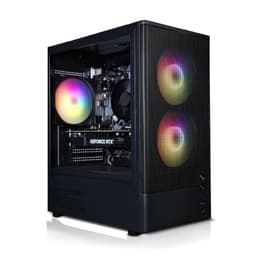
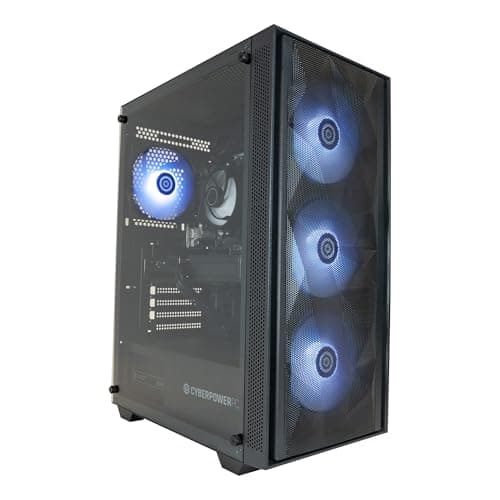
Blender is one of the most demanding creative applications you can run on a desktop PC. Whether you are sculpting high-polygon characters, running Cycles renders overnight, or simulating fluid dynamics in real time, the software punishes weak hardware mercilessly. The good news is that 2025 has brought genuinely exciting options at every price point, largely thanks to NVIDIA's RTX 50-series GPUs landing in pre-built systems and AMD's Ryzen 8000-series CPUs offering strong multi-threaded performance out of the box. Compared to last year, GPU-accelerated rendering via OPTIX and CUDA has become the default workflow for most Blender artists, which means the GPU is now arguably more important than the CPU for typical render workloads. This guide is aimed at 3D artists, motion graphics designers, architects and hobbyists who want a ready-to-run desktop rather than a self-build. We have selected five systems from the catalogue that offer the best balance of rendering power, RAM, storage and value for Blender specifically.
Quick Verdict
Best Overall: CyberPowerPC Luxe Gaming PC (Intel Core Ultra 7 265KF, RTX 5070 Ti). The RTX 5070 Ti is a serious OPTIX rendering card, 32 GB of RAM handles large scenes, and 2 TB of NVMe storage gives you room for asset libraries. It is the most complete Blender workstation in this list without crossing into eye-watering territory.
Best Value: CyberPowerPC Wyvern Gaming PC (Ryzen 7 8700F, RTX 5060 8GB). For under £1,000 you get a next-generation GPU with full OPTIX support, a strong eight-core CPU and a fast NVMe drive. It will handle the vast majority of Blender projects a hobbyist or early-career professional will throw at it.
The CyberPowerPC Luxe is the most well-rounded Blender workstation in this round-up. It pairs Intel's Core Ultra 7 265KF, a 20-thread processor with strong multi-core performance, with NVIDIA's GeForce RTX 5070 Ti. That GPU is a serious piece of hardware for Blender's OPTIX rendering engine: the Blackwell architecture brings improved ray-tracing cores and a substantial leap in memory bandwidth over the previous generation, which translates directly into faster Cycles renders and smoother viewport performance in EEVEE Next.
The 32 GB of DDR5 RAM is the sweet spot for Blender in 2025. Scenes with dense particle systems, high-resolution textures or complex geometry can easily consume 16 GB of system RAM, and having 32 GB means you will rarely hit a bottleneck during sculpting or simulation work. The 2 TB NVMe SSD is equally welcome: Blender project files, texture libraries and rendered image sequences accumulate quickly, and 2 TB gives you room to breathe without immediately reaching for an external drive.
The Intel Core Ultra 7 265KF is an Arrow Lake processor with a hybrid core architecture, delivering strong performance on both lightly threaded tasks (viewport navigation, scripting) and heavily threaded workloads (CPU Cycles rendering, baking). It is not quite as fast as AMD's Threadripper for pure CPU rendering, but for the price it is excellent, and most Blender artists will be offloading the heavy lifting to the GPU anyway.
Windows 11 is pre-installed, so you can install Blender and start rendering within minutes of unboxing. The system comes in a tower chassis, giving you space to add more RAM or a second storage drive later. For professional 3D artists, motion graphics designers and architects who want a machine that can handle real production workloads without a self-build, this is the pick of the catalogue.
Verdict: The best all-round Blender desktop in this list. The RTX 5070 Ti and 32 GB of RAM make it genuinely capable for professional-level 3D work, and the 2 TB drive means you will not run out of space quickly.
Pros
- RTX 5070 Ti delivers fast OPTIX rendering with Blackwell ray-tracing cores
- 32 GB DDR5 RAM handles large, complex Blender scenes without bottlenecks
- 2 TB NVMe SSD provides ample space for textures, projects and render outputs
Cons
- Price is high for hobbyists who will not use the full rendering capability
- Only 1 TB of NVMe storage would feel tight for heavy production pipelines, though 2 TB helps here
The Vibox VIII-75 is the most powerful system in this catalogue for GPU-accelerated Blender rendering, full stop. The NVIDIA RTX 5090 is NVIDIA's flagship Blackwell GPU, and its 32 GB of GDDR7 VRAM is transformative for Blender workflows. Scene complexity in Cycles is directly limited by GPU VRAM: with 32 GB, you can load extremely high-polygon meshes, 8K texture sets and complex volumetric scenes entirely into GPU memory and render them at full speed with OPTIX. That is something no other card in this list can match.
The CPU is an Intel Core i9 12900KF, a 16-core (8 performance, 8 efficiency) Alder Lake processor. It is a generation behind Intel's current Arrow Lake lineup, but it remains a very capable chip for Blender's CPU rendering mode and for the simulation work that runs on the CPU regardless of your render engine choice. Cloth, fluid, rigid body and particle simulations all benefit from strong multi-core performance, and the i9 12900KF delivers that.
The system comes with 32 GB of RAM and a 2 TB NVMe SSD, matching the Luxe on storage and system memory. The combination of the RTX 5090 and 32 GB of system RAM means this machine will not flinch at any scene you throw at it. For VFX artists, architectural visualisation professionals and anyone rendering animations with tight deadlines, the time saved on render times could easily justify the cost.
The price is notably lower than you might expect for an RTX 5090 system, which makes this a compelling proposition for serious Blender users. The trade-off is that the CPU is an older generation, but for GPU-accelerated workflows that matters very little in practice. Windows 11 is included.
Verdict: The RTX 5090 with 32 GB of VRAM is the most powerful GPU rendering setup in this list. If your Blender scenes regularly exceed 8 GB of VRAM or you need the fastest possible render times, this is the machine to buy.
Pros
- RTX 5090 with 32 GB GDDR7 VRAM handles the most VRAM-hungry Blender scenes
- 32 GB system RAM and 2 TB NVMe SSD provide a complete, production-ready setup
- Significantly faster OPTIX render times than any other system in this list
Cons
- Intel Core i9 12900KF CPU is two generations old, limiting CPU-mode rendering performance relative to newer chips
- Highest price in the list, which is hard to justify for hobbyists or students
The ADMI Gaming PC is the entry-level option in this Blender round-up, and it is worth being honest about what that means. The RTX 3050 with 6 GB of GDDR6 VRAM is the weakest GPU in this list, and the 6 GB VRAM limit will constrain GPU rendering on anything other than relatively simple scenes. That said, it does support OPTIX rendering in Blender, which means you get hardware-accelerated ray tracing and NVIDIA's AI denoiser, just at slower speeds than the RTX 5000-series cards above.
The AMD Ryzen 5 5500 is a six-core, twelve-thread Zen 3 processor. It is a competent chip for Blender's CPU rendering mode and handles simulation tasks adequately, though it will be noticeably slower than the eight-core Ryzen 7 8700F in the Wyvern system for heavily threaded workloads. For hobbyists who are just starting out with Blender and working on low-to-medium complexity scenes, it is perfectly usable.
The 16 GB of DDR4 RAM at 3200 MHz is the standard for this price bracket and is enough for most beginner and intermediate Blender projects. The 1 TB NVMe SSD is a reasonable amount of storage for getting started, though as mentioned elsewhere, texture libraries and render outputs accumulate fast.
Where this system makes sense is as a first Blender machine for someone who is learning the software and does not yet know whether 3D is going to become a serious pursuit. It is significantly cheaper than the other systems in this list, it runs Windows 11, and it will run Blender without issue. You will hit its limits eventually, but for introductory sculpting, modelling and animation work, it does the job.
It is also worth noting that the tower form factor means you can upgrade the GPU later when your budget allows. Swapping in an RTX 5060 or 5070 at a future date would transform this machine into a much more capable Blender workstation, making the initial investment less of a dead end than it might appear.
Verdict: The most affordable entry point for Blender in this list. The RTX 3050 is limited by its 6 GB of VRAM, but OPTIX support means GPU rendering works, and the tower chassis allows for a future GPU upgrade when your projects outgrow it.
Pros
- Lowest price in the list, making it accessible for beginners and students
- RTX 3050 supports OPTIX rendering and NVIDIA AI denoising in Blender
- Tower chassis allows a future GPU upgrade as rendering demands grow
Cons
- 6 GB of VRAM on the RTX 3050 limits GPU rendering to simpler, lower-texture-density scenes
- Ryzen 5 5500 is a Zen 3 chip from 2021 and is noticeably behind newer CPUs in multi-threaded performance
Buying Guide
GPU: the most important component for Blender
In 2025, GPU-accelerated rendering via NVIDIA OPTIX or Apple Metal is the standard workflow for most Blender artists. OPTIX uses NVIDIA's dedicated ray-tracing hardware to dramatically accelerate Cycles renders compared to CPU rendering, and the newer the GPU architecture, the faster those ray-tracing cores work. The RTX 50-series (Blackwell) cards in this list are meaningfully faster than the RTX 30-series for OPTIX rendering, not just because of raw shader performance but because of improved ray-tracing and AI denoising hardware.
VRAM is the most important GPU specification for Blender. When you render with OPTIX, Blender loads your entire scene, including all meshes, textures and lighting data, into GPU VRAM. If the scene exceeds your VRAM capacity, Blender either falls back to CPU rendering (much slower) or fails to render at all. For hobbyist projects, 8 GB is workable. For professional work with 4K textures and high-polygon assets, 16 GB or more is strongly recommended. The RTX 5090 in the Vibox VIII-75 offers 32 GB, which is essentially unlimited for current Blender workflows.
RAM: how much do you actually need?
System RAM is separate from GPU VRAM and affects different parts of the Blender workflow. Sculpting with high subdivision levels, running complex particle simulations, and working with large geometry node networks all consume system RAM. 16 GB is the minimum for comfortable Blender use. 32 GB is the recommended amount for professional work. If you are planning to work with film-resolution renders, dense fluid simulations or very large architectural scenes, 64 GB is worth considering, though none of the systems in this catalogue ship with that amount.
CPU: cores matter for simulations and CPU rendering
Even if you render primarily on the GPU, the CPU handles all of Blender's simulation work: cloth, fluid, rigid body, particle systems and hair all run on CPU threads. More cores and higher clock speeds mean faster simulation baking. The CPU also runs Python scripts, Geometry Nodes and the Workbench renderer. For most Blender artists, a six-to-eight-core CPU is sufficient. If you do a lot of CPU Cycles rendering (useful for scenes that exceed GPU VRAM), more cores help significantly.
Storage: do not underestimate how much you need
Blender project files themselves are not enormous, but the supporting assets are. A single HDRI library can consume 20 to 30 GB. A professional texture library from a service like Poliigon or AmbientCG can run to hundreds of gigabytes. Rendered image sequences for animation projects accumulate quickly, especially at 4K resolution. We recommend a minimum of 1 TB for hobbyists and 2 TB for anyone doing professional work.
macOS versus Windows for Blender
Both platforms run Blender well in 2025. Windows gives you access to NVIDIA OPTIX and AMD HIP for GPU rendering, which are currently faster than Apple Metal for equivalent hardware. macOS on Apple Silicon is excellent for CPU performance and has good Metal rendering support, but if raw render speed is your priority, a Windows machine with an NVIDIA GPU will generally be faster for the same budget. Choose macOS if you are already invested in the Apple ecosystem or value the all-in-one form factor of the iMac.
Upgradability
Tower desktops allow you to add RAM, swap the GPU or add storage drives as your needs grow. All-in-one machines like the iMac have soldered components and cannot be upgraded. If you are buying at the lower end of the budget and expect your Blender work to become more demanding over time, a tower chassis is the sensible choice.
The CyberPowerPC Luxe Gaming PC with the Intel Core Ultra 7 265KF and RTX 5070 Ti is our overall winner for Blender. It combines a current-generation 20-thread CPU, a powerful Blackwell GPU with full OPTIX support, 32 GB of DDR5 RAM and a 2 TB NVMe SSD into a single system that can handle professional 3D work across sculpting, animation, simulation and rendering without compromise. The RTX 5090 in the Vibox VIII-75 is faster for pure GPU rendering and offers double the VRAM, but the older CPU generation and higher price make it a more specialised choice. For budget-conscious buyers, the CyberPowerPC Wyvern with the Ryzen 7 8700F and RTX 5060 is the standout value pick, offering next-generation GPU architecture and a capable eight-core CPU for under £1,000. Whatever your budget, prioritise GPU VRAM and architecture above all else, and make sure you have at least 16 GB of system RAM before you start adding to your Blender asset library.