4K video editing demands more from a desktop than almost any other creative workload. You need a powerful GPU for hardware-accelerated encoding and decoding, a fast multi-core CPU to handle timeline scrubbing without dropped frames, at least 16GB of RAM (ideally 32GB for complex projects), and quick NVMe storage so footage loads without bottlenecks. This year the landscape has shifted considerably: Nvidia's RTX 50-series cards have arrived with DLSS 4 and improved AV1 encoding, Apple's M4 iMac delivers remarkable efficiency for Final Cut Pro users, and AMD's Ryzen 8000-series processors bring stronger integrated AI acceleration. Whether you are a freelance video editor, a YouTube content creator, or a small studio professional, the picks below cover a range of budgets and workflows, from compact all-in-ones to full tower workhorses. We have selected machines that genuinely suit 4K editing rather than padding the list with underpowered options.
Quick Verdict
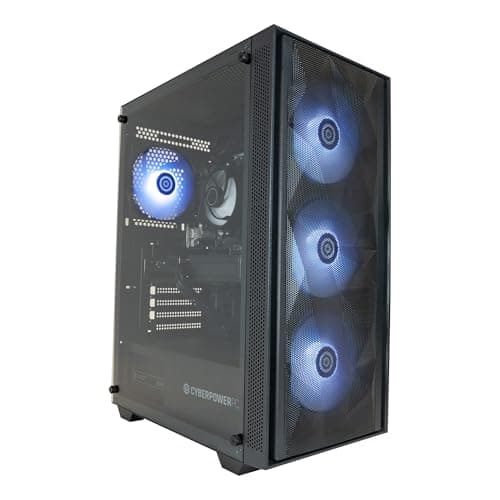
Best Overall: CyberPowerPC Luxe Gaming PC (Intel Core Ultra 7 265KF, RTX 5070 Ti, 32GB RAM). This machine combines a top-tier Blackwell GPU with a modern Arrow Lake CPU and 2TB NVMe storage, making it the most capable all-round 4K editing desktop in the selection at a price that remains competitive against equivalent workstation builds.
Best Value: Apple iMac with M4. For editors working in Final Cut Pro or DaVinci Resolve on macOS, the M4 iMac's unified memory architecture and hardware media engines deliver exceptional real-time 4K performance at a price that undercuts many Windows tower builds of equivalent editing capability.
The CyberPowerPC Luxe is the standout choice for serious 4K video editors who want a Windows desktop capable of handling demanding timelines, heavy colour grading, and multi-stream 4K footage without compromise. It pairs Intel's Arrow Lake Core Ultra 7 265KF processor with Nvidia's RTX 5070 Ti, a Blackwell-generation GPU that brings meaningful improvements to hardware-accelerated AV1 encoding and decoding compared to the previous Ada Lovelace generation. That matters enormously in 4K editing: DaVinci Resolve, Premiere Pro, and Vegas Pro all lean on Nvidia's NVENC encoder, and the RTX 5070 Ti handles dual 4K streams in real time without dropping to proxy workflows.
The 32GB of RAM is the minimum we would recommend for professional 4K work, and it is reassuring to see it included here as standard rather than as an upgrade. The 2TB NVMe SSD is equally welcome: 4K footage is storage-hungry, and having 2TB on the boot drive means you can keep an active project on the system drive without immediately running out of space, though most editors will still want an external RAID or NAS for archiving. The Intel Core Ultra 7 265KF is a 24-thread processor that handles CPU-intensive tasks such as noise reduction, motion tracking, and audio mixing without throttling under sustained load.
This machine ships with Windows 11, which is important for anyone using AI-powered editing tools that rely on DirectML or Windows Studio Effects. The tower form factor also means upgradeability is straightforward: adding more RAM or a second NVMe drive is a simple process. For editors who occasionally game or render 3D assets alongside video work, the RTX 5070 Ti handles those tasks with ease too.
The price is significant, but when you compare it against buying individual components or configuring a similar spec from a boutique builder, the Luxe represents solid value for what you get. It is the machine we would recommend to a freelance editor who needs a reliable, powerful Windows workstation that can grow with their workload over the next several years.
Verdict: The best-balanced 4K editing desktop in this selection, combining a modern Arrow Lake CPU, RTX 5070 Ti GPU, 32GB RAM, and 2TB NVMe storage into a package that handles professional workflows without compromise.
Pros
- RTX 5070 Ti delivers fast hardware AV1 encoding and real-time 4K playback in DaVinci Resolve and Premiere Pro
- 32GB RAM and 2TB NVMe SSD included as standard, covering most professional editing needs out of the box
- Intel Core Ultra 7 265KF offers 24 threads for sustained CPU-intensive rendering without thermal throttling
Cons
- Only 1TB NVMe SSD listed in some configurations, so verify storage before purchasing if 2TB is a requirement
- Premium price point may be difficult to justify for hobbyist or part-time editors
The Apple iMac with M4 is the best desktop for 4K video editing if your workflow centres on Final Cut Pro, or if you use DaVinci Resolve on macOS. Apple's unified memory architecture means the M4's CPU, GPU, and Neural Engine share the same high-bandwidth memory pool, which eliminates the bottleneck that exists between discrete GPU VRAM and system RAM on conventional Windows desktops. In practical terms, this allows the M4 iMac to handle 4K ProRes footage with a fluency that desktop Windows machines costing considerably more struggle to match.
The M4 chip features a 10-core CPU with four performance cores and six efficiency cores, alongside a 10-core integrated GPU. More importantly for video editors, it includes dedicated media engines for hardware-accelerated ProRes, H.264, H.265, and HEVC encode and decode. In Final Cut Pro, this translates to smooth real-time playback of multiple 4K streams, fast export times, and excellent battery-like efficiency: the iMac's power consumption under load is a fraction of what a comparable Windows tower draws.
The 16GB of unified memory is the base configuration available in this listing, and it is sufficient for most single-camera 4K editing projects. Editors working with multi-cam 4K, 8K footage, or heavy effects stacks will want to consider upgrading to 24GB or 32GB at the point of purchase, as RAM is not user-upgradeable. The 512GB SSD is the main limitation here: it fills up quickly with 4K footage, so budget for an external Thunderbolt SSD or NAS from day one.
The iMac's 24-inch 4.5K Retina display is a genuine bonus for video editors: it covers the P3 wide colour gamut and is accurate enough for colour grading work without a separate reference monitor. The slim all-in-one design keeps desk clutter minimal, and the inclusion of Thunderbolt 4 ports means connecting external drives, docks, and displays is straightforward.
For Windows-only software users, the iMac is not the right choice. But for anyone already in the Apple ecosystem or willing to switch, it offers outstanding 4K editing performance per pound spent, particularly for Final Cut Pro workflows.
Verdict: The best-value 4K editing desktop for macOS users, with hardware ProRes acceleration, a P3 display, and unified memory architecture that punches well above its price class in Final Cut Pro and DaVinci Resolve.
Pros
- Dedicated ProRes and HEVC media engines enable smooth real-time 4K playback without proxy workflows in Final Cut Pro
- Built-in 24-inch P3 wide colour gamut display is accurate enough for colour grading, saving the cost of a separate monitor
- Unified memory architecture eliminates CPU-to-GPU data transfer bottlenecks common on Windows desktops
Cons
- 512GB base SSD is insufficient for large 4K projects without an external drive from day one
- RAM is soldered and cannot be upgraded after purchase, making the base 16GB a long-term constraint for heavy workflows
The Vibox VIII-75 is the most GPU-powerful machine in this selection by a considerable margin. Equipped with Nvidia's flagship RTX 5090 with 32GB of GDDR7 VRAM, it is built for editors who work with 8K footage, complex multi-layer 4K compositing, or who use GPU-accelerated AI tools such as Topaz Video AI or DaVinci Resolve's Magic Mask and Super Scale features. The RTX 5090 is the fastest consumer GPU Nvidia has ever produced, and its VRAM capacity means even the most demanding Resolve timelines with heavy noise reduction and AI upscaling will not exhaust GPU memory.
The Intel Core i9 12900KF is a 12th-generation Alder Lake processor with 16 cores and 24 threads, running up to 5.2GHz on boost. It remains a highly capable editing CPU despite being one generation behind the current Arrow Lake platform: for video encoding, colour grading, and timeline rendering it performs excellently, and the performance gap versus a Core Ultra 7 is smaller than the GPU gap between the RTX 5090 and RTX 5070 Ti. The 32GB of RAM and 2TB NVMe SSD are appropriate for professional 4K and 8K work.
The main caveat with the Vibox VIII-75 is value. The RTX 5090 commands an enormous price premium over the RTX 5070 Ti, and for the majority of 4K editing workflows the practical difference in day-to-day editing speed is modest. The RTX 5090 becomes genuinely transformative when you are running AI-accelerated tools at scale, rendering long-form 8K projects, or doing real-time 3D compositing alongside video work. For a standard 4K YouTube or documentary workflow, the RTX 5070 Ti in the Luxe delivers 90% of the performance at a lower price.
That said, if your budget allows and you want the machine that will remain capable for the longest possible time, the VIII-75 is future-proof in a way that few consumer desktops can claim. The RTX 5090's 32GB VRAM will not be a constraint for any foreseeable editing workload, and the tower chassis means adding RAM or storage later is straightforward.
Verdict: The most powerful 4K and 8K editing machine in this selection, best suited to professionals running AI-accelerated tools or working with very high resolution footage, though the price premium over RTX 5070 Ti alternatives is hard to justify for standard 4K workflows.
Pros
- RTX 5090 with 32GB GDDR7 VRAM handles 8K footage, AI upscaling, and complex multi-layer compositing without GPU memory constraints
- 32GB RAM and 2TB NVMe SSD included, appropriate for professional-grade project sizes
- Tower form factor allows straightforward RAM and storage upgrades as project demands grow
Cons
- Intel Core i9 12900KF is a 12th-gen CPU, one generation behind current Arrow Lake processors used in rival builds
- RTX 5090 price premium is difficult to justify over RTX 5070 Ti for standard 4K editing workflows
Buying Guide
GPU: the most important component for 4K editing
The graphics card is the single most important component for 4K video editing on a modern desktop. All major editing applications, including DaVinci Resolve, Premiere Pro, and Vegas Pro, use GPU acceleration for playback, effects rendering, colour grading, and export. Nvidia's NVENC encoder, found on RTX cards, is particularly well-regarded for its quality and speed in H.264, H.265, and AV1 formats. The RTX 50-series Blackwell cards introduced in 2025 offer improved AV1 encode quality and faster throughput compared to the previous Ada Lovelace generation, making them the preferred choice for new builds. For 4K editing, an RTX 5060 is the practical minimum; an RTX 5070 Ti or higher is recommended for professional workflows with heavy effects, AI tools, or multi-stream 4K footage. VRAM capacity matters too: 8GB is workable for standard 4K, but 16GB or more gives headroom for AI-accelerated tools and higher-resolution formats.
CPU: core count and architecture
A multi-core processor is essential for video editing tasks that the GPU cannot accelerate, including audio mixing, certain effects, and software encoding. For 4K editing, a minimum of eight cores is recommended. Intel's Core Ultra 7 Arrow Lake and AMD's Ryzen 7 Zen 4 processors both offer strong performance for editing workloads. Intel's Arrow Lake chips also include a dedicated NPU (Neural Processing Unit) that accelerates AI features in editing software, which is an increasingly relevant consideration as applications add AI-powered tools. Clock speed matters for timeline scrubbing and real-time playback, so look for boost clocks above 4.5GHz where possible.
RAM: 16GB minimum, 32GB preferred
4K video editing is memory-intensive. 16GB of RAM is the practical minimum for single-camera 4K workflows with moderate effects. For multi-cam 4K, 6K or 8K footage, or complex Resolve timelines with noise reduction and AI tools, 32GB is strongly recommended. DDR5 RAM offers higher bandwidth than DDR4, which benefits memory-intensive editing tasks, though DDR4 at 3200MHz or above remains adequate for most 4K work. Ensure the machine you choose has available RAM slots for future upgrades, particularly if buying a 16GB configuration.
Storage: speed and capacity
4K footage is large. A single hour of 4K H.264 footage at 100Mbps occupies approximately 45GB; ProRes 4K is considerably larger. An NVMe SSD on the boot and project drive is essential for smooth playback and fast project loading. Look for PCIe 4.0 NVMe drives where possible for maximum throughput. A 1TB internal SSD is the practical minimum, but 2TB is preferable for keeping active projects on the system drive. Most editors will also need external storage: a USB 3.2 or Thunderbolt external SSD for active projects, and a NAS or external HDD array for archiving completed work.
macOS versus Windows for editing
The choice of operating system matters for video editing. Final Cut Pro is macOS-exclusive and is widely regarded as the most optimised 4K editing application for Apple hardware, particularly when using ProRes footage. DaVinci Resolve and Premiere Pro are available on both platforms and perform excellently on Windows with a capable Nvidia GPU. If your workflow is Final Cut Pro-centric, the Apple iMac M4 is the natural choice. For Resolve or Premiere Pro workflows, a Windows desktop with an RTX 50-series GPU will typically offer faster export times and greater software flexibility.
All-in-one versus tower
All-in-one desktops such as the iMac offer a clean, space-efficient setup with a built-in display, which is convenient and cost-effective if you do not already own a calibrated monitor. Tower desktops offer greater upgradeability, better thermal headroom under sustained load, and typically more powerful discrete GPUs. For long-form professional editing where the machine will run at high load for extended periods, a tower is generally the more reliable choice. For lighter workloads or space-constrained environments, an all-in-one is a practical alternative.
The CyberPowerPC Luxe Gaming PC (Intel Core Ultra 7 265KF, RTX 5070 Ti, 32GB RAM, 2TB NVMe SSD) is the overall winner for 4K video editing. It combines the right GPU for professional Blackwell-generation AV1 encoding, a modern Arrow Lake CPU with NPU acceleration, 32GB of RAM, and 2TB of fast NVMe storage into a package that handles the full range of 4K editing workflows without compromise. The RTX 5070 Ti is the sweet spot in Nvidia's 50-series lineup: fast enough for real-time 4K playback with heavy effects, capable enough for AI-accelerated tools, and not priced into the stratosphere like the RTX 5090. For macOS users or those prioritising value and simplicity, the Apple iMac M4 is the best alternative, delivering exceptional Final Cut Pro performance and a built-in P3 display at a price that is hard to beat in the Apple ecosystem. Editors who need the absolute maximum GPU power for 8K work or intensive AI rendering should look at the Vibox VIII-75 with its RTX 5090, accepting the price premium that comes with it.