Blender and 3D artists have very specific demands from a processor. Unlike gaming, where single-core speed dominates, Blender's CPU renderer (Cycles) scales almost linearly with core count, meaning more threads translate directly into faster render times. Viewport performance in Eevee and sculpting responsiveness, however, still rely on strong single-core clocks. The market shifted considerably in the past twelve months: AMD's Ryzen 9000 series arrived on AM5, bringing improved instructions-per-clock and integrated Radeon graphics, while prices on the mature AM4 platform have dropped to genuinely compelling levels. Whether you are a student rendering overnight on a tight budget, a freelance visualiser who needs quick viewport feedback between client calls, or a studio artist who wants the fastest possible CPU render times without moving to a workstation, there is a processor on this list suited to you. We have focused on chips that offer the best blend of multi-threaded Blender performance, platform longevity, and real-world value at UK prices.
Quick Verdict
Best Overall: AMD Ryzen 7 9700X. It delivers class-leading single-core speed and strong multi-threaded Blender performance on the forward-looking AM5 platform, with a sensible 65 W TDP that keeps thermals manageable in creative workstations.
Best Value: AMD Ryzen 5 5600X. At its current AM4 price it remains one of the most cost-efficient Blender CPUs you can buy, pairing six fast cores with a mature, affordable ecosystem.
The Ryzen 7 9700X is the processor we would recommend to most Blender artists who are building or upgrading a system in 2025. It sits on AMD's AM5 platform, which means DDR5 memory, PCIe 5.0 lanes, and a roadmap that extends well into the coming years, giving your investment considerably more longevity than a late-stage AM4 build. The chip carries eight Zen 5 cores and sixteen threads, boosting to 5.5 GHz, and its instructions-per-clock improvement over Zen 4 translates into noticeably snappier Blender viewport performance, particularly during sculpting sessions where the UI needs to remain responsive even as the scene complexity climbs.
For CPU rendering in Cycles, eight threads will not match a 24-core behemoth, but the 9700X punches well above its core count thanks to Zen 5's wider execution engine. Benchmark results place it ahead of the Ryzen 7 7700X and competitive with the older Ryzen 9 5900X in Blender's official benchmark suite, which is a remarkable achievement for an eight-core chip. The 65 W TDP is a genuine figure here, not a nominal one that the chip ignores under load, making it an excellent choice for compact creative workstations where airflow is limited or noise is a concern. A mid-range 240 mm AIO or a quality tower cooler is all you need to keep it at full boost.
The integrated Radeon graphics mean you do not need a discrete GPU to get a system up and running, which is useful during a staged build where the GPU budget comes later. For Eevee rendering and GPU-accelerated Cycles you will still want a dedicated card, but the iGPU handles display output and basic viewport tasks without complaint. DDR5 memory costs have fallen considerably, and pairing the 9700X with 32 GB of DDR5-6000 CL30 hits the sweet spot for large Blender scenes without breaking the budget. Freelancers and mid-level studio artists who want a fast, quiet, future-proof CPU render node will find this chip hits every mark.
Verdict: The best all-round CPU for Blender in 2025, combining Zen 5 IPC, sensible power consumption, and a platform with genuine longevity.
Pros
- Zen 5 IPC advantage makes viewport sculpting and Eevee noticeably more responsive than Zen 4 equivalents
- 65 W TDP is genuinely respected under sustained Blender renders, keeping noise levels low
- AM5 platform offers DDR5 and PCIe 5.0 for long-term upgradability
Cons
- Only eight cores means overnight CPU renders are slower than higher core-count alternatives at similar prices
- AM5 platform requires a new motherboard and DDR5 RAM, raising total build cost over AM4
The Intel Core i9-14900 is the most powerful multi-threaded CPU on this list, and for artists whose workflow is dominated by long CPU renders in Cycles, that matters enormously. With eight Performance cores and sixteen Efficiency cores delivering 32 threads in total, it can chew through Blender's benchmark scenes at a pace that no six or eight-core chip can match. The non-K variant listed here runs at a nominal 65 W base TDP, though in practice Intel's power limits mean the chip will draw considerably more during sustained all-core workloads, typically settling around 150 to 200 W under a quality cooler. You will need a 280 mm AIO or a high-end tower cooler to keep it stable and quiet.
In Blender's official benchmark, the i9-14900 scores place it among the fastest consumer CPUs available, comfortably ahead of the Ryzen 9 7900X and trading blows with the Ryzen 9 7950X in some scene types. For a studio artist who renders complex architectural visualisations or character animations overnight, shaving 20 to 30 percent off render times is a meaningful productivity gain. The chip also excels in Blender's viewport when GPU rendering is not available, and its high boost clocks on the P-cores keep single-threaded tasks like Python scripting and add-on operations feeling fast.
The LGA1700 platform is mature and well-understood, with a wide range of Z790 and B760 motherboards available at competitive prices. DDR4 and DDR5 support depending on board choice gives you flexibility. However, it is worth noting that Intel's 13th and 14th generation desktop processors attracted attention for instability issues under high power limits, and while the non-K i9-14900 is less affected than the unlocked variants, ensuring your motherboard uses Intel's recommended power limit settings is advisable. The platform is also approaching end of life, so this is a strong performer for the current generation rather than a long-term investment.
This chip suits professional visualisers, VFX artists, and anyone who uses Blender as a primary income tool and needs the fastest CPU render times available at a consumer price point.
Verdict: The highest multi-threaded Blender performance on this list, best suited to professionals who render for a living and need every thread they can get.
Pros
- 24 cores and 32 threads deliver the fastest CPU Cycles render times of any chip on this list
- High P-core boost clocks keep single-threaded Blender tasks and Python scripting snappy
- Mature LGA1700 ecosystem with a wide choice of motherboards at competitive prices
Cons
- Real-world power draw under sustained Blender renders far exceeds the nominal 65 W base TDP, requiring a substantial cooler
- LGA1700 platform is end-of-life, limiting future upgrade paths compared to AM5
- Higher electricity costs over long render sessions compared to lower-TDP alternatives
The Ryzen 5 9600X occupies an interesting position in the 3D artist market. It is a six-core, twelve-thread Zen 5 processor that prioritises single-core performance above all else, boosting to 5.4 GHz with a genuine 65 W TDP. For Blender users who split their time between modelling, sculpting, and UV unwrapping in the viewport, and who rely on a GPU for rendering rather than the CPU, the 9600X makes a compelling case. Its Zen 5 architecture delivers better instructions-per-clock than any previous AMD six-core chip, and the result is a viewport experience that feels genuinely fast during complex scene navigation and Eevee shading previews.
In CPU rendering benchmarks, the 9600X performs roughly in line with the Ryzen 5 7600X and ahead of the Ryzen 9 3900X in Blender's official tests, which is impressive for a six-core chip. However, if overnight CPU renders are a significant part of your workflow, the limited thread count will become a bottleneck compared to eight-core or higher alternatives. Where the 9600X shines is in mixed creative workflows: Blender modelling in the morning, a GPU render kicked off at lunch, and post-production work in DaVinci Resolve or Photoshop in the afternoon. The chip handles all of these tasks with aplomb, and its low power consumption means a modest cooler and a compact case are entirely viable.
The AM5 platform brings DDR5 and PCIe 5.0 support, and the integrated Radeon graphics are a practical bonus for artists who want to run dual monitors from the iGPU while their discrete GPU handles rendering. The 9600X is also a sensible entry point into AM5 if you plan to upgrade to a higher core-count Zen 5 or future Zen 6 chip later, keeping the motherboard and RAM investment intact. At its price point it competes directly with the Ryzen 7 9700X, and the decision between the two largely comes down to whether you prioritise single-core responsiveness or multi-threaded render throughput.
Students, hobbyist 3D artists, and professionals who GPU-render exclusively will find the 9600X an excellent, efficient foundation for a creative workstation.
Verdict: A fast, efficient AM5 entry point for GPU-focused Blender artists who value viewport responsiveness and platform longevity over raw CPU render throughput.
Pros
- Zen 5 IPC makes viewport sculpting and Eevee shading previews feel faster than any previous six-core AMD chip
- True 65 W TDP suits compact, quiet creative workstation builds
- AM5 platform with DDR5 and PCIe 5.0 provides a clear upgrade path to future Zen generations
Cons
- Six cores limit CPU render throughput significantly compared to eight-core or higher alternatives
- AM5 platform requires new motherboard and DDR5 investment, raising total system cost
The Ryzen 5 5600X is one of the most enduring value propositions in the CPU market, and for Blender artists on a tight budget it remains a genuinely excellent choice in 2025. When it launched in late 2020 it was praised as one of the best mainstream processors ever made, and the passage of time has only improved its value proposition as prices have fallen to levels that were unthinkable at launch. Six Zen 3 cores, twelve threads, and a 4.6 GHz boost clock give it strong single-core performance that keeps the Blender viewport feeling responsive, while its multi-threaded score in Blender's benchmark sits comfortably ahead of older Intel eight-core chips like the i7-10700K.
For students and hobbyist 3D artists who are building their first dedicated creative workstation, the AM4 ecosystem around the 5600X is extraordinarily mature and affordable. Motherboards are available from as little as £60 to £70, DDR4 RAM is cheaper than ever, and the platform supports a vast range of coolers. The 65 W TDP means even a budget cooler will keep it stable, and the chip runs cool and quiet under typical Blender workloads. If you plan to spend the majority of your render budget on a capable GPU for Cycles GPU rendering, the 5600X provides more than enough CPU headroom to feed that GPU without becoming a bottleneck.
The limitations are real but predictable. Six cores mean CPU renders take longer than they would on an eight or twelve-core chip, and the Zen 3 architecture, while still competitive, trails Zen 5 in instructions-per-clock. The AM4 platform is also at end of life, so this is a terminal upgrade rather than a stepping stone. That said, for artists who are not planning to upgrade their CPU for several years and who primarily GPU-render, the 5600X delivers everything they need at a price that leaves budget for a better graphics card, more RAM, or faster NVMe storage.
Freelancers on a strict budget, students, and anyone upgrading from an older AM4 system will find the 5600X a smart, proven choice that punches well above its price.
Verdict: The best value CPU for Blender on this list, delivering Zen 3 performance at a price that leaves room for a more capable GPU or other system upgrades.
Pros
- Exceptional price-to-performance ratio for Blender viewport and GPU-accelerated Cycles workflows
- Mature AM4 ecosystem means affordable motherboards, DDR4 RAM, and a huge cooler selection
- 65 W TDP keeps thermals and noise levels low even under sustained Blender renders
Cons
- Six cores mean CPU render times are noticeably slower than eight-core or higher alternatives
- AM4 platform is end-of-life with no upgrade path beyond existing Ryzen 5000 series chips
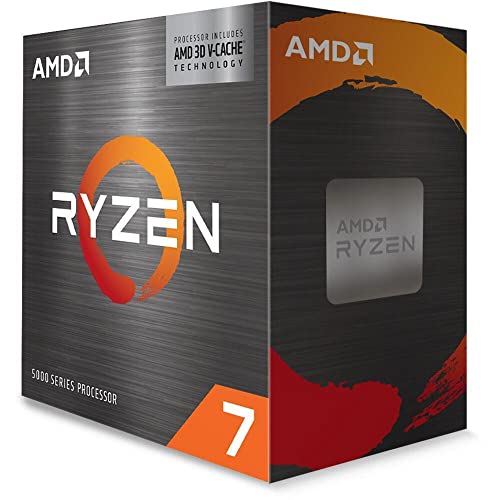
The Ryzen 7 5800X3D is one of the most unusual CPUs on this list, and its inclusion requires some explanation. AMD's 3D V-Cache technology stacks an additional 64 MB of L3 cache on top of the standard 32 MB, bringing the total to 96 MB. This enormous cache was designed primarily to benefit gaming workloads where data locality is critical, and in gaming it delivers remarkable results. For Blender, the picture is more nuanced but still interesting. Certain Blender operations, particularly complex scene traversal during CPU rendering, benefit from having large amounts of data close to the cores, and some users report that the 5800X3D outperforms the standard 5800X in specific Blender benchmark scenes despite having a lower boost clock of 4.5 GHz versus 4.7 GHz.
The practical reality for most Blender artists is that the 5800X3D's performance in Cycles CPU rendering is broadly similar to the standard 5800X, sometimes slightly ahead and sometimes slightly behind depending on the scene. Where it genuinely excels for 3D artists is in mixed-use systems where Blender sits alongside GPU-intensive gaming sessions. If you are a 3D artist who also games seriously, the 5800X3D gives you the best gaming CPU on AM4 alongside perfectly competent Blender performance, making it an excellent dual-purpose chip. The 105 W TDP is higher than the other AMD chips on this list, so a quality cooler is required, but it is not as thermally demanding as the i9-14900 under sustained all-core loads.
At its current price the 5800X3D sits above the 5600X but below the Ryzen 7 9700X, and the decision between it and the 9700X comes down to platform. If you are already on AM4 with a capable B550 or X570 board, the 5800X3D is a drop-in upgrade that avoids the cost of a new motherboard and DDR5 RAM. If you are building from scratch, the 9700X on AM5 is the stronger long-term investment. For existing AM4 owners who want the best possible Blender and gaming performance without a platform change, the 5800X3D is the obvious choice.
Verdict: The best upgrade for existing AM4 owners who want strong Blender performance alongside class-leading gaming capability, without the cost of a platform change.
Pros
- 96 MB of 3D V-Cache benefits certain complex Blender scene types and makes it the best gaming CPU on AM4
- Drop-in upgrade for existing B550 and X570 AM4 systems, avoiding motherboard and RAM replacement costs
- Eight cores and sixteen threads deliver meaningfully faster CPU renders than any six-core chip on this list
Cons
- Lower boost clock than the standard 5800X means some single-threaded Blender tasks are marginally slower
- AM4 platform is end-of-life, so this is a final upgrade rather than a stepping stone to future generations
- 105 W TDP requires a quality cooler to sustain full performance during long Blender render sessions
Buying Guide
Core Count vs Clock Speed for Blender
The most common mistake Blender artists make when choosing a CPU is assuming that the highest core count always wins. In Blender's Cycles CPU renderer, more cores do translate to faster renders, but the relationship is not always linear. A chip with eight fast cores running at 5.5 GHz can outperform a chip with twelve slower cores in certain scene types, particularly those with complex shading calculations that benefit from high single-core throughput. The practical advice is to consider your typical render times. If you regularly wait more than four hours for a single frame, investing in a higher core count chip will have a meaningful impact on your productivity. If your renders complete in under an hour, the difference between six and eight cores is less critical, and spending that budget on more RAM or a faster GPU may deliver greater overall benefit.
CPU Rendering vs GPU Rendering
Blender's Cycles renderer supports both CPU and GPU rendering, and for most artists with a mid-range or better graphics card, GPU rendering is significantly faster than CPU rendering. An RTX 3070 or RX 6800 XT will outperform even the i9-14900 in GPU-accelerated Cycles for typical scene types. If GPU rendering is your primary workflow, the CPU's role shifts to feeding the GPU efficiently, managing the operating system and background tasks, and handling viewport operations in Eevee. In this context, a six or eight-core chip with strong single-core performance is entirely sufficient, and spending extra on a 24-core CPU delivers diminishing returns. Conversely, if you work in a studio environment where GPU rendering is not available, or if you regularly render scenes that exceed your GPU's VRAM, CPU rendering becomes the bottleneck and a higher core count chip justifies its cost.
Platform Choice: AM4, AM5, or Intel LGA1700
Platform longevity matters for creative workstations that are expected to remain productive for five or more years. AM5 is AMD's current platform with a roadmap extending to at least Zen 6, making it the strongest long-term investment for new builds. AM4 is mature and end-of-life but offers exceptional value through cheap motherboards and DDR4 RAM, making it ideal for budget builds or upgrades to existing systems. Intel's LGA1700 platform supports both 12th, 13th, and 14th generation chips and is approaching end of life as Intel transitions to LGA1851, so new LGA1700 builds are best treated as current-generation investments rather than long-term platforms.
RAM Capacity and Speed
Blender scenes can consume substantial amounts of RAM, particularly when working with high-resolution textures, complex particle systems, or large geometry caches. For most artists, 32 GB is the practical minimum for comfortable working, and 64 GB is recommended for professional work with complex scenes. RAM speed matters less for rendering than for viewport responsiveness, but pairing an AM5 chip with DDR5-6000 CL30 hits the sweet spot for both performance and cost. On AM4, DDR4-3600 CL18 is the established optimal configuration.
Thermal and Power Considerations
Blender renders are sustained, all-core workloads that run for hours at a time. A CPU that boosts aggressively for short bursts but throttles under sustained load will deliver worse real-world render performance than its benchmark scores suggest. Always check sustained all-core power draw figures, not just TDP ratings, and ensure your cooler is rated for the chip's actual power consumption. For chips with 65 W genuine TDP like the Ryzen 7 9700X and Ryzen 5 9600X, a quality 120 mm tower cooler is sufficient. For the i9-14900 under full Blender load, a 280 mm AIO or a high-end tower cooler is strongly recommended.
For the majority of Blender and 3D artists in 2025, the AMD Ryzen 7 9700X is the processor we recommend without hesitation. It combines the best single-core performance for viewport work and Eevee rendering with eight Zen 5 cores that deliver competitive CPU render times, all within a genuine 65 W power envelope that keeps your workstation quiet during long sessions. The AM5 platform ensures your investment remains relevant as future Zen generations arrive. If your budget is tighter and you are building or upgrading on AM4, the Ryzen 5 5600X remains one of the most cost-efficient Blender CPUs available, leaving money for the GPU upgrade that will have a far greater impact on GPU-accelerated render times. For professionals who CPU-render for a living and need every thread available, the i9-14900 delivers the highest throughput on this list, albeit at the cost of higher power consumption and a platform approaching end of life.