Developers working on large codebases have a very specific set of demands that differ sharply from general laptop buyers. Running Docker containers alongside an IDE such as IntelliJ IDEA or VS Code, keeping a dozen browser tabs open for documentation, spinning up local databases and occasionally firing up an Android emulator will exhaust 16 GB of RAM surprisingly quickly. Screen resolution matters too: the more vertical pixels you have, the more lines of code fit on screen without scrolling. A comfortable keyboard and a reliable build are non-negotiable for eight-hour coding sessions. This guide focuses on convertible 2-in-1 machines that give you the flexibility to use a touchscreen for diagram sketching or presentations, without sacrificing the raw performance you need at the terminal. Since last year, Qualcomm Snapdragon X-series chips have arrived in force, offering strong multi-threaded performance and excellent battery life, while Intel and AMD continue to push higher core counts into the same thin chassis. Prices have also shifted, making 32 GB configurations more accessible than ever before.
Quick Verdict
Best Overall: ASUS Vivobook S14 M3407HA, with 32 GB of RAM, a 2.5K OLED panel and an AMD Ryzen 9 270 processor, this is the most developer-friendly machine in the pool. Best Value: HP EliteBook x360 1040 G8, a proper enterprise 2-in-1 with Thunderbolt 4, a robust hinge and Windows 11 Pro for well under £500.
The ASUS Vivobook S14 M3407HA is the standout choice for developers who need to run large codebases day in, day out. It is aimed squarely at professionals who want a portable machine that does not compromise on memory or display quality, and it delivers on both counts.
The headline specification is 32 GB of RAM paired with a 1 TB SSD. For a developer, that RAM figure is genuinely transformative. You can run Docker Compose stacks with multiple services, keep IntelliJ IDEA or VS Code open with large project indexes loaded, have a local PostgreSQL or MongoDB instance running in the background, and still have headroom for a browser with twenty-odd tabs without the system grinding to a halt. The AMD Ryzen 9 270 processor brings strong multi-threaded performance for compilation tasks, Gradle builds and running test suites, and it handles parallel workloads well without thermal throttling becoming a persistent problem in a chassis this size.
The 14-inch OLED panel at 2560x1600 resolution is one of the best screens in this price bracket for coding. The 2.5K resolution means you get noticeably more vertical screen real estate than a 1080p display, which translates directly into more lines of code visible at any given moment. OLED brings deep blacks and excellent contrast, which reduces eye strain during long sessions, particularly in dark-mode editors. The 16:10 aspect ratio is a thoughtful choice for developers, adding useful vertical space compared with the 16:9 panels found on many budget machines.
Connectivity is well considered: two USB-C 3.2 Gen 1 ports with DisplayPort 1.2 and Power Delivery 3.0 support, two USB-A 3.2 Gen 1 ports, HDMI 2.1 and a 3.5 mm audio jack. You can drive an external monitor, connect a USB hub and charge the machine simultaneously without needing a dock. The backlit UK keyboard is a practical bonus for developers who frequently work in low-light environments.
The metal chassis keeps the machine feeling premium without adding excessive weight, and the convertible form factor means you can flip it into tablet or tent mode for reviewing pull requests or sketching architecture diagrams on the touchscreen. Running Windows 11, it supports the full range of developer tooling including WSL2, which is now a mature environment for Linux-based workflows.
Verdict: The best all-round developer machine in this pool. Thirty-two gigabytes of RAM, a sharp OLED panel with 16:10 proportions and a capable Ryzen 9 processor make it the clear Best Overall pick for coding large codebases.
Pros
- 32 GB RAM handles Docker, IDEs and browser tabs simultaneously without swapping
- 2560x1600 OLED panel shows more code lines and reduces eye fatigue in dark mode
- HDMI 2.1 and dual USB-C with DisplayPort allow dual-monitor setups without a dock
Cons
- USB-C ports are 3.2 Gen 1 rather than Thunderbolt 4, limiting external GPU or high-bandwidth dock options
- AMD Radeon integrated graphics mean no hardware-accelerated GPU compute for ML workloads
The Samsung Galaxy Book4 Pro 360 is the pick for developers who spend as much time in meetings and on the road as they do at their desk, and who want the largest, most visually impressive screen available in a 2-in-1 form factor. It is aimed at senior engineers, tech leads and developer advocates who need a machine that looks and feels premium in both coding and presentation contexts.
The 16-inch Dynamic AMOLED 2X panel at 2880x1800 resolution is genuinely exceptional. At that pixel density on a 16-inch screen, text rendering in code editors is crisp and clear, and the AMOLED technology delivers the same deep blacks and vibrant colours that make OLED so appealing for long coding sessions. The 16:10 aspect ratio adds useful vertical space, and the touchscreen is responsive enough for S Pen input, which is useful for annotating architecture diagrams or whiteboarding during remote calls.
The Intel Core Ultra 7 155H is a strong processor for development work, with a mix of performance and efficiency cores that handle compilation bursts well while keeping idle power consumption low. Intel Arc integrated graphics offer a step up from basic Intel Iris Xe, with some hardware acceleration capability for certain compute tasks. The 16 GB of RAM is the floor for serious development work: it is workable, but developers running heavier Docker stacks or multiple virtual machines will feel the constraint more than they would on the 32 GB ASUS above.
Storage is 512 GB, which is adequate for most projects but will require an external drive or cloud storage strategy if you work with large repositories, datasets or virtual machine images. The port selection is excellent for a thin machine: two Thunderbolt 4 ports, one HDMI, one USB-A and a microSD slot give you real flexibility for connecting peripherals and external displays without carrying a separate hub.
The 360-degree hinge is well engineered and feels solid through repeated folding. The keyboard is comfortable for extended typing sessions, and the overall build quality is among the best in this price range. Battery life is good for a 16-inch machine, helped by the efficiency cores in the Ultra 7 155H.
Verdict: The best screen in this group and a genuinely premium 2-in-1 experience, but 16 GB of RAM means it falls short of the ASUS for the heaviest development workloads. An excellent choice for developers who prioritise display quality and portability over raw memory headroom.
Pros
- 2880x1800 Dynamic AMOLED 2X panel is among the best displays available in a 2-in-1 laptop
- Two Thunderbolt 4 ports enable high-bandwidth docks, external GPUs and fast storage
- Intel Core Ultra 7 155H balances compilation performance with efficient idle power draw
Cons
- 16 GB RAM is the minimum for large codebase work and will feel limiting with heavy Docker stacks
- 512 GB storage fills quickly when storing multiple large project repositories and VM images
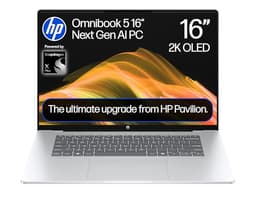
The HP OmniBook 5 is the most affordable machine in this guide that still meets the minimum specification bar for serious development work, and it is aimed at developers who want a large 16-inch screen and OLED display quality without spending over a thousand pounds. It suits junior developers, students on coding bootcamps or developers whose primary workloads are lightweight enough to run comfortably on 16 GB of RAM.
The Qualcomm Snapdragon X1-26-100 is an entry-level chip in the Snapdragon X series, positioned below the X Plus and X Elite. It still delivers ARM-based efficiency and solid battery life, but multi-threaded performance on heavy compilation tasks is more modest than the higher-tier Snapdragon X chips. For web development, scripting, running a local dev server and working with interpreted languages, it is entirely adequate. Developers building large Java or C++ projects with long compilation times will notice the difference compared with the Ryzen 9 270 in the top pick.
The 16-inch OLED panel at 1920x1200 resolution is a genuine highlight. OLED technology at this price point is unusual, and the display quality, with deep blacks, vibrant colours and excellent contrast, makes it a pleasure to use for long coding sessions. The 16:10 aspect ratio adds useful vertical space. At 1920x1200 the pixel density on a 16-inch panel is lower than the 2.5K and 2.8K screens elsewhere in this guide, but text rendering is still clean and comfortable at normal viewing distances.
The 16 GB of RAM and 512 GB SSD are the minimum acceptable specifications for development work. The SSD will fill up quickly if you work with large repositories, multiple virtual environments or Docker image caches, so external storage or a disciplined cleanup routine will be necessary. The port selection is lean: two USB-C 10 Gbps ports, one USB-A 10 Gbps port and a 3.5 mm jack. There is no HDMI port, so connecting an external monitor requires a USB-C to HDMI adapter or a USB-C hub.
As with the ASUS S3407QA, the ARM architecture of the Snapdragon X1-26-100 means developers should verify that their toolchain has ARM-compatible Windows builds before committing to this machine. The Copilot+ PC designation means it includes hardware-accelerated AI features in Windows 11, which may be useful for AI-assisted coding tools.
Verdict: The best entry point in this guide for developers on a tight budget who want OLED display quality and a large screen. Modest CPU performance and limited storage mean it suits lighter workloads rather than the heaviest large-codebase development tasks.
Pros
- 16-inch OLED panel at 1920x1200 delivers exceptional display quality at a competitive price point
- Snapdragon X1-26-100 provides strong battery life for a 16-inch laptop
Cons
- No built-in HDMI port requires an adapter or hub to connect an external monitor
- 512 GB storage and 16 GB RAM leave limited headroom for heavy Docker stacks and large repository collections
- Entry-level Snapdragon X chip is slower than the Ryzen 9 270 on sustained multi-threaded compilation workloads
Buying Guide
RAM: the most important specification for large codebase development
Memory is the single most important hardware specification for developers working on large codebases. Modern IDEs such as IntelliJ IDEA, Android Studio and even VS Code with large extension sets can consume 2 to 4 GB of RAM on their own. Add a Docker Compose stack with a web server, a database and a message broker, and you are already at 8 to 10 GB before opening a browser. Keeping documentation, Stack Overflow and a few GitHub tabs open pushes you past 12 GB. On a 16 GB machine, the operating system will begin swapping to disk at this point, causing noticeable slowdowns. On a 32 GB machine, you have comfortable headroom for all of the above plus a running test suite and a local Kubernetes cluster. If your budget allows, always choose 32 GB over 16 GB for serious development work.
Display resolution and aspect ratio
Vertical screen space is directly useful for coding. A 1920x1080 display at 16:9 gives you 1080 vertical pixels. A 2560x1600 display at 16:10 gives you 1600 vertical pixels, which is roughly 48 per cent more lines of code visible at the same font size. This is not a marginal improvement: it meaningfully reduces the amount of scrolling required when reading through large files or comparing two files side by side. OLED panels add excellent contrast and colour accuracy, which reduces eye strain during long sessions, particularly in dark-mode editors. IPS panels are a solid alternative with good colour accuracy and wide viewing angles.
Processor architecture: x86 versus ARM
Qualcomm Snapdragon X-series chips use ARM architecture, which offers excellent battery life and strong performance per watt. However, developers should verify that their entire toolchain, including any Docker images, native binaries and IDE plugins, has ARM-compatible Windows builds before choosing an ARM machine. Most major tools now support ARM on Windows 11, but niche or legacy tooling may require x86 emulation, which reduces performance for those specific tasks. AMD Ryzen and Intel Core processors use x86 architecture and have universal compatibility with developer tooling on Windows.
Storage: speed and capacity
Large codebases with many dependencies, build artefacts and Docker image caches consume storage quickly. A 1 TB SSD is the practical minimum for comfortable development work. PCIe Gen4 NVMe SSDs offer faster read and write speeds than Gen3, which benefits tasks like indexing large repositories, extracting archives and loading Docker images. If you work with multiple large projects simultaneously, consider a machine with a 2 TB option or plan for external storage from the outset.
Connectivity: ports for a developer setup
Thunderbolt 4 or USB4 ports are highly desirable for developers because they support single-cable docking solutions that can drive two 4K external monitors, charge the laptop and connect all peripherals through a single cable. HDMI is useful for direct monitor connection without a hub. USB-A ports remain important for legacy peripherals, USB drives and hardware security keys. A machine with at least one USB-C with DisplayPort and one USB-A covers the minimum requirements for a productive developer desk setup.
The 2-in-1 form factor for developers
A 360-degree hinge or detachable keyboard adds genuine utility for developers beyond simple novelty. Tablet mode is useful for reviewing pull requests, reading technical documentation and sketching architecture diagrams with a stylus. Tent mode is convenient for video calls and pair programming sessions. The touchscreen adds an input method for navigating large codebases quickly. These benefits come with a small weight and thickness penalty compared with clamshell laptops, but for most developers the flexibility is worth it.
The ASUS Vivobook S14 M3407HA is the clear overall winner for developers working on large codebases. Its 32 GB of RAM is the decisive advantage: it is the only machine in this group that provides genuine headroom for running Docker Compose stacks, a full IDE with a large project index, a local database and a browser simultaneously without the system reaching for swap space. The 2560x1600 OLED panel at 16:10 adds meaningful vertical code space and reduces eye strain during long sessions. The AMD Ryzen 9 270 handles compilation and test suite workloads efficiently, and the port selection, including dual USB-C with DisplayPort and HDMI 2.1, covers the majority of developer connectivity needs without requiring a hub. For developers who need the absolute best display and have a higher budget, the Samsung Galaxy Book4 Pro 360 offers a stunning 2880x1800 AMOLED panel with Thunderbolt 4, though its 16 GB RAM limit is a real constraint for the heaviest workloads. For developers on a tight budget who need enterprise features and Thunderbolt 4, the HP EliteBook x360 1040 G8 remains a strong value choice despite its older processor.