The Samsung Galaxy Book4 Pro 360 is one of the more interesting 2-in-1 laptops you can buy if you're deep into the Samsung ecosystem or just want a proper premium convertible that doesn't compromise on the display. That's my verdict upfront. It's rated ★★★☆☆ (3.3) from 10 Amazon ratings.
The Samsung Galaxy Book4 Pro 360 Laptop (2024) 16" Intel Core Ultra 7 16GB 512GB Moonstone Grey sits in that enthusiast price tier where you expect a lot and Samsung mostly delivers. Dynamic AMOLED 2X touchscreen, Intel's Core Ultra 7 155H, two Thunderbolt 4 ports and an included S Pen. But 16GB of RAM and 512GB of storage at this price point raises eyebrows, and the integrated Arc graphics means you're not gaming seriously on this thing. Know that before you hand over your card.
What follows is built on Samsung's published specifications for this model and the Amazon listing: what it gets right, where it falls short and who it suits.
Core Specifications
The headline act here is the Intel Core Ultra 7 155H, Intel's Meteor Lake chip with 16 cores, 22 threads and a boost clock of up to 4.8GHz. It brings a proper NPU (Neural Processing Unit) into the mix, which is what Samsung means when they talk about "AI performance" in the marketing. In practice it takes on jobs like background blur and noise suppression on video calls (Windows Studio Effects), leaving the CPU and GPU free for everything else.
Paired with 16GB of RAM, though, and you start to feel the ceiling if you're a heavy multitasker. For most creative professionals doing photo editing, document work, video calls, and light video editing, 16GB is fine. But if you're the sort of person who has 30 Chrome tabs open, Lightroom running, Spotify going, and Slack pinging you every five minutes, you'll notice. The memory is LPDDR5X soldered on board, so you can't upgrade it after purchase either, which is the frustrating reality of thin premium laptops. The 512GB SSD is NVMe, but 512GB fills up fast if you're storing raw photo files or video projects. An external drive or cloud storage subscription is basically mandatory.
The GPU situation is Intel Arc Graphics, which is the integrated solution baked into the Core Ultra chip. It's a clear step up from Intel's older Iris Xe graphics, and it'll handle some light gaming (think older titles, indie games, or casual play) and GPU-accelerated creative tasks reasonably well. But don't kid yourself: this is not a machine for serious gaming or 3D rendering. It's a creative productivity machine with a stunning display, and that's exactly what it's designed to be. If you need dedicated GPU grunt, you're looking at the wrong laptop.
| Specification | Detail |
|---|---|
| CPU | Intel Core Ultra 7 155H |
| GPU | Intel Arc Graphics |
| RAM | 16GB LPDDR5X (on board) |
| Storage | 512GB NVMe SSD |
| Display | 16-inch Dynamic AMOLED 2X touchscreen, 2880x1800, up to 120Hz |
| Operating System | Windows 11 Home |
| Ports | 2x Thunderbolt 4, 1x HDMI 2.1, 1x USB-A (USB 3.2), microSD, 3.5mm |
| Battery | 76Wh |
| Weight | 1.66kg |
| Colour | Moonstone Grey |
| Price | £969.99 |

Performance
The Core Ultra 7 155H is built for productivity workloads. What it does well is efficiency. The hybrid architecture (with performance cores, efficiency cores, low-power cores and that NPU) means the chip can be restrained when you're just browsing or writing, which directly benefits battery life.
For creative work, the Arc Graphics integrated GPU handles Intel's XeSS upscaling and AV1 hardware encoding, which is useful for video calls and light video editing. Where it struggles is anything that needs serious sustained GPU compute, which is simply not what this chip was designed for.
The AI side isn't just marketing. The NPU in the Core Ultra architecture handles tasks that would otherwise hit the CPU or GPU, keeping things snappy without hammering battery life. It's not magic, but it's a real architectural advantage over older Intel generations that had no NPU at all.
Display Analysis
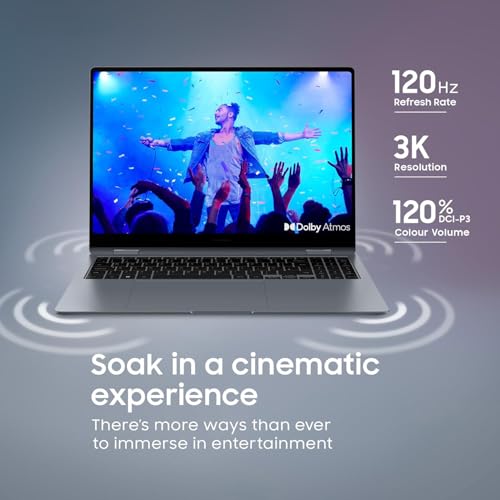
This is where the Galaxy Book4 Pro 360 earns its premium price tag. The 16-inch Dynamic AMOLED 2X panel runs at 2880x1800 with a refresh rate of up to 120Hz. AMOLED means true blacks, very high contrast (Samsung quotes 1,000,000:1) and colours that pop in a way IPS panels simply cannot replicate. At 2880x1800, the pixel density is high enough that text is crisp and images look sharp without needing a 4K panel that would cost you battery life.
Vision Booster is a feature worth calling out specifically. It adjusts contrast and colour based on ambient lighting conditions, which helps when you're working near a sunny window or in a bright coffee shop. The Corning Gorilla Glass with DX cover is anti-reflective, which matters because glare is the usual enemy of glossy OLED panels. Samsung rates the panel at 400 nits, rising to 500 nits peak for HDR content only, so direct sunlight will still be a struggle.
Samsung quotes 120% DCI-P3 colour volume, so this is a wide-gamut panel suited to photography, graphic design and content creation. If you're doing professional colour grading, you'd still want to profile the display with a colorimeter. Viewing angles are a strength of OLED technology generally. And because this is a 360-degree convertible with a touchscreen, you'll be using it in tablet mode and tent mode too, where those wide viewing angles actually matter.
Battery Life
Samsung fits a 76Wh battery (73.9Wh rated minimum) and claims up to 21 hours of video playback. That's a best-case video figure, not a day of heavy work. Battery life on AMOLED laptops always depends heavily on the display: running at full brightness with a white-heavy interface will drain the battery noticeably faster than dark mode with adaptive brightness doing its thing. Heavy creative work or anything that hammers the CPU will cut that down significantly.
The Core Ultra 7 155H's hybrid design helps here. The chip isn't always running its performance cores flat out, and the NPU handling AI tasks off the main cores reduces power draw during those specific workloads.
A 65W charger comes in the box, and Samsung says it gets you to 35% in about 30 minutes. The two Thunderbolt 4 ports support USB-C Power Delivery, which means you can charge from a compatible USB-C charger if your included charger is at home. That's a useful feature for travel. Thunderbolt 4 charging also means you can use a single cable for both charging and connecting to a monitor or dock, which keeps your desk tidy.
One thing to keep in mind: the S Pen is included in the box, which is brilliant, but using the touchscreen and S Pen regularly does add to power consumption compared to pure keyboard and trackpad use. If you're planning to use this heavily in tablet or drawing mode, factor that into your battery expectations. Dark mode is your friend on this machine. The AMOLED panel draws significantly less power on dark backgrounds, so switching your OS and apps to dark mode is one of the easiest wins you can get for battery life.
Portability
A 16-inch convertible laptop is never going to be a featherweight travel companion, and the Galaxy Book4 Pro 360 doesn't pretend otherwise. It weighs 1.66kg and measures 355.4 x 252.2mm, so if you're used to carrying a 13 or 14-inch ultrabook, the footprint difference is real and you'll feel it in your bag. It is slim, though, at 12.8mm. It's not a machine you'd take out every day without thinking about it.
The Moonstone Grey finish looks professional and understated, which matters if you're pulling this out in client meetings or co-working spaces. It doesn't scream "gaming laptop" or "look at me". If you spend a lot of time working from cafés, airports and hotels, it's worth running a good VPN to keep your connection private on shared Wi-Fi. The slim profile means it slides into a laptop sleeve or bag without too much drama, though you'll want a bag with a proper 16-inch laptop compartment rather than trying to squeeze it into something designed for a 15-inch machine.
For commuters and frequent travellers, this is a machine that works best when you have a proper bag for it and you're not carrying it miles between transport connections. It's a premium creative workstation that happens to be portable, rather than a portable machine that happens to have premium specs. Know that going in and you'll be happy. Try to use it like a lightweight ultrabook and you'll be frustrated.
Keyboard & Trackpad
The keyboard is backlit, which is non-negotiable on a premium laptop. A large touchpad is called out specifically in Samsung's own feature highlights, and on a 16-inch chassis there's room for one. For a convertible that also functions as a tablet, having a big trackpad when you're in laptop mode is important.
The 360-degree hinge means the keyboard folds flat when you're in tablet or tent mode. It isn't the most comfortable thing to rest on your lap in full tablet mode, with the keys facing down. That's a design compromise inherent to the convertible form factor rather than a specific failing of this machine.
Ports & Connectivity
The port selection on the Galaxy Book4 Pro 360 is good for a slim premium laptop. Two Thunderbolt 4 ports give you 40 Gbps data transfer speeds, DisplayPort output, and USB-C Power Delivery charging. That means one cable can handle charging, a 4K monitor, and data transfer simultaneously if you're using a Thunderbolt dock. For a clean desk setup, this is exactly what you want. The HDMI 2.1 port means you can plug into a projector or monitor without an adapter, and Samsung says it supports up to 8K at 60Hz or 5K at 120Hz.
The USB-A port (USB 3.2) is there for your legacy devices, which matters more than people admit. USB-A is still everywhere: mice, USB drives, dongles, older peripherals. Having one built in means you're not immediately reaching for an adapter on day one. The microSD slot is useful if you shoot on drones or action cameras that record to microSD. The 3.5mm headphone jack rounds things out. It's a port selection that covers the bases without being excessive.
Samsung's product page doesn't list the Wi-Fi standard or Bluetooth version, so check the listing if that matters to you. There's no Ethernet port.
- 2x Thunderbolt 4 (40 Gbps, USB-C PD charging, DisplayPort)
- 1x HDMI 2.1
- 1x USB-A (USB 3.2)
- 1x microSD card slot
- 1x 3.5mm headphone/microphone jack
Webcam & Audio
The webcam situation on the Galaxy Book4 Pro 360 has a clever trick up its sleeve. Samsung's "Phone as a Connected Camera" feature lets you use your Samsung phone's camera (front or rear) as the webcam for video calls. If you've got a modern Samsung Galaxy phone, this is a proper differentiator: a flagship phone's rear camera has a far bigger sensor than any laptop webcam, and for video calls where presentation matters, that shows.
The built-in webcam is there for convenience when you don't want to set up your phone. Samsung lists it as an FHD wide-angle webcam with Windows Studio Effects, alongside microphones with AI noise cancelling for calls in noisier places.
For sound, Samsung fits four speakers: two 5W woofers and two 2W tweeters. Laptop speakers won't replace a proper speaker, but that's a stronger set-up than the usual pair. The 3.5mm jack means you can plug in proper headphones or a headset for anything where audio quality actually matters, which is the sensible approach on any laptop.
Build Quality
Samsung pitches the Galaxy Book Pro series as premium, and the Book4 Pro 360 in Moonstone Grey has an aluminium chassis. On a convertible, the hinge matters more than people initially think: you'll be tapping the touchscreen in laptop mode, propping it up in tent mode for presentations or media, and folding it back as a tablet.
The Corning Gorilla Glass with DX cover on the display adds a layer of protection that matters on a touchscreen you'll be using with both fingers and the S Pen.
The inclusion of the S Pen in the box is worth a specific mention. On some convertible laptops, the stylus is an optional extra that costs extra. Samsung includes it, and for note-taking, sketching and annotating documents, having a stylus without an additional purchase is a meaningful value-add for the creative audience this machine targets.

Final Verdict
The Samsung Galaxy Book4 Pro 360 Laptop (2024) 16" Intel Core Ultra 7 16GB 512GB Moonstone Grey is an excellent fit for a specific type of buyer. If you're a creative professional who lives in the Samsung ecosystem, values an outstanding display above almost everything else, and wants a premium convertible that includes a proper stylus, it deserves a place on your shortlist. The 16-inch Dynamic AMOLED 2X touchscreen is the headline feature and it earns that billing. The Intel Core Ultra 7 155H is well suited to productivity and light creative work, and the AI features are more than marketing noise.
The limitations are real though, and you should go in clear-eyed. Sixteen gigabytes of RAM is on the lean side for the price, and you cannot upgrade it. Five hundred and twelve gigabytes of storage fills up fast for media-heavy workflows. The Intel Arc integrated graphics means serious GPU work is off the table. And at 1.66kg, the 16-inch form factor isn't a machine you'll forget you're carrying.
For the right buyer, none of those limitations matter much. The display alone justifies serious consideration, and the package of S Pen, Thunderbolt 4 and HDMI 2.1, a 76Wh battery and Samsung ecosystem features makes a compelling case. It's rated ★★★☆☆ (3.3) from 10 Amazon ratings. A solid 8 out of 10 for the enthusiast tier. It's not perfect, but it's proper.
What works. What doesn’t.
6 + 5What we liked6 reasons
- 16-inch Dynamic AMOLED 2X touchscreen at 2880x1800 with up to 120Hz, plus Vision Booster for bright rooms
- S Pen is included in the box, adding creative and annotation value without an extra purchase
- Intel Core Ultra 7 155H (16 cores, 22 threads) with a built-in NPU for AI features
- Two Thunderbolt 4 ports, HDMI 2.1, USB-A and a microSD slot cover most connection needs
- 76Wh battery, which Samsung rates for up to 21 hours of video playback, with a 65W charger in the box
- Phone as a Connected Camera lets Samsung Galaxy phone owners use their phone as a far better webcam
Where it falls5 reasons
- 16GB of LPDDR5X RAM is soldered on board and cannot be upgraded, which is a meaningful ceiling for power users at this price point
- 512GB of storage fills quickly for photographers and videographers working with large media files, making external storage or cloud subscriptions effectively mandatory
- Intel Arc integrated graphics rules out serious gaming and sustained GPU-heavy creative work such as 3D rendering or long video exports
- At 1.66kg, the 16-inch form factor makes it a large, noticeable carry rather than a genuinely portable everyday machine
- AMOLED battery life is sensitive to screen brightness and usage patterns, so heavy creative sessions will fall well short of Samsung's video-playback figure
Full specifications
12 attributes| Storage type | NVMe SSD |
|---|---|
| Battery life H | 21 |
| Battery WH | 76 |
| CPU | Intel Core Ultra 7 155H |
| Display refresh HZ | 120 |
| Display resolution | 2880x1800 |
| Display size IN | 16 |
| GPU | Intel Arc Graphics |
| Keyboard | backlit keyboard with numeric keypad |
| Launch year | 2024 |
| OS | Windows 11 Home |
| Panel type | AMOLED |
If this isn’t right for you
2 options

Frequently asked
6 questions01Can the RAM in the Samsung Galaxy Book4 Pro 360 be upgraded after purchase?+
No. The 16GB of LPDDR5X RAM is soldered on board, which is standard practice for slim premium laptops. The configuration is fixed, so if you anticipate needing more memory for your workflows, factor that into your purchase decision before buying.
02Does the Samsung Galaxy Book4 Pro 360 come with the S Pen included?+
Yes, the S Pen is included in the box. You do not need to purchase it separately, which makes it a real value addition for note-taking, sketching and annotating documents.
03Is the Galaxy Book4 Pro 360 suitable for gaming?+
Only for light gaming. The Intel Arc integrated graphics handles older titles, indie games, and casual play reasonably well, but it is not designed for modern AAA gaming or serious GPU-demanding titles. If gaming is a priority, you should consider a machine with a dedicated Nvidia or AMD GPU.
04How does the Dynamic AMOLED 2X display perform in bright conditions?+
Samsung rates the panel at 400 nits, rising to 500 nits peak for HDR content only. Two things help in bright rooms: Vision Booster adjusts contrast and colour in response to ambient lighting, and the Corning Gorilla Glass with DX cover is anti-reflective. That makes working near windows or in bright indoor spaces more comfortable, but direct sunlight will still be a struggle.
05What is the Phone as a Connected Camera feature and does it require a Samsung phone?+
Phone as a Connected Camera allows you to use your Samsung Galaxy smartphone's front or rear camera as the webcam during video calls, rather than the built-in laptop webcam. It does require a compatible Samsung Galaxy device to work. A modern flagship phone camera has a far larger sensor than a laptop webcam, making this a meaningful differentiator for users who are already in the Samsung ecosystem.
06How does the battery life hold up during a typical working day?+
Samsung fits a 76Wh battery and claims up to 21 hours of video playback, but that's a best-case figure. Heavier creative workloads, high screen brightness and active S Pen use will cut it down noticeably. Using dark mode is one of the most effective ways to extend battery life on an AMOLED panel, as dark backgrounds draw substantially less power than white-heavy interfaces. The 65W charger in the box gets you to 35% in about 30 minutes, according to Samsung.