Lenovo makes laptops for almost every type of user, from students picking up their first machine to professionals who need serious processing power and gamers who demand a dedicated GPU. The range spans ChromeOS devices under £250 all the way to gaming laptops pushing £1,200, which makes choosing the right model genuinely tricky. Since last year, Lenovo has refreshed several IdeaPad lines with 12th and 13th-generation Intel processors and AMD Ryzen 7000-series chips, bringing meaningfully better performance-per-pound at the mid-range. The LOQ gaming series has also matured, offering RTX graphics at more accessible prices than before. Whether you want a lightweight everyday machine, a capable work laptop with a large screen, or a gaming rig that won't break the bank, there is a Lenovo on this list to suit you. The picks below cover the full price spectrum and are ranked by overall value and capability.
Quick Verdict
Best Overall: Lenovo IdeaPad Slim 5 (16-inch, Intel Core i7-13620H). A 13th-gen Core i7, 1TB NVMe SSD, a sharp 1920x1200 IPS panel and a generous port selection make this the most well-rounded Lenovo on the list for everyday and professional use.
Best Value: Lenovo IdeaPad 1 (15-inch, AMD Ryzen 5 7520U). For just over £400 you get a modern Ryzen 5 processor, 16GB of RAM and a 512GB NVMe SSD. That is a genuinely impressive specification for the price.
The IdeaPad Slim 5 in its 16-inch, Core i7-13620H configuration sits at the top of this list because it delivers a genuinely premium experience without crossing into the price territory of a ThinkPad or a gaming laptop. It is aimed squarely at home workers, content creators and students who need a machine that can handle demanding multitasking, video editing in 1080p and long working days without complaint.
The headline specification is the Intel Core i7-13620H, a 13th-generation hybrid processor with 10 cores (6 performance, 4 efficiency) and a maximum turbo frequency of 4.9GHz. Paired with 16GB of LPDDR5 RAM and a 1TB PCIe NVMe SSD, the system handles everything from large browser sessions and Office 365 to Lightroom catalogues and light code compilation with ease. The SSD is notably fast for this price bracket, and 1TB means you are unlikely to run out of space for day-to-day work.
The 16-inch IPS panel runs at 1920x1200, which is a slightly taller 16:10 aspect ratio compared with the standard 16:9 you find on most laptops at this price. That extra vertical space is genuinely useful in productivity applications, showing more of a spreadsheet or a webpage without scrolling. Colour accuracy is solid for an IPS panel at this price, and brightness is adequate for indoor use, though it will struggle in direct sunlight.
Port selection is one of the Slim 5's strongest suits: two USB-C ports, two USB-A ports, a full-size HDMI output, a 3.5mm audio jack and an SD card reader. That is a well-rounded array that means most users will not need a hub. The Intel Iris Xe integrated graphics handle casual photo editing and video playback well, though this is not a machine for 3D gaming.
Build quality is noticeably better than the budget IdeaPad 1 range. The chassis feels rigid, the keyboard has a comfortable travel depth, and the trackpad is large and responsive. Battery life is competitive for a 16-inch machine, and Windows 11 Home comes pre-installed without the S mode restriction found on some cheaper Lenovo models.
Verdict: The best all-round Lenovo laptop on this list. The combination of a 13th-gen Core i7, a 1920x1200 IPS screen, 1TB NVMe storage and a comprehensive port layout makes it exceptional value at this price point.
Pros
- 13th-gen Core i7-13620H delivers strong multi-core performance for creative and productivity workloads
- 1920x1200 IPS panel gives useful extra vertical space compared with 16:9 rivals
- 1TB NVMe SSD and comprehensive dual USB-C plus dual USB-A port layout
Cons
- Intel Iris Xe graphics rule out any meaningful 3D gaming
- 16-inch chassis is bulkier than 14-inch alternatives if portability is a priority
The Lenovo LOQ is the brand's entry-level gaming laptop line, positioned below the Legion series but built specifically for gamers who want dedicated graphics without paying flagship prices. This 15.6-inch model pairs an Intel Core i5-12450HX with an NVIDIA GeForce RTX 3050 6GB, making it the only machine on this list capable of running modern 3D games at playable frame rates.
The Core i5-12450HX is a high-performance mobile chip with 8 cores and a maximum boost clock of 4.4GHz. It is notably more powerful than the standard Core i5-12450H found in the IdeaPad Slim 3, because the HX suffix denotes a higher TDP and better sustained performance under load. Combined with 24GB of RAM, this is a machine that will not bottleneck the GPU in CPU-intensive titles or simulation games.
The RTX 3050 6GB is a modest GPU by 2025 standards, but it is capable of running popular titles such as Fortnite, Minecraft with ray tracing, Valorant and older AAA games at 1080p medium-to-high settings with comfortable frame rates. The 6GB VRAM variant is an improvement over the older 4GB version and gives the card more headroom for texture-heavy games. The 15.6-inch 1080p IPS display has a refresh rate suited to gaming, and the IPS panel means viewing angles are better than the TN screens found on some budget gaming laptops.
Storage is generous at 1TB NVMe SSD, which matters for gamers given that modern titles routinely occupy 50-100GB each. The 24GB of RAM is also a highlight, as most competitors at this price ship with 16GB. Port selection includes USB-C, two USB-A, HDMI, a 3.5mm audio jack and a wired Ethernet port, which is essential for online gaming and a feature absent from many thin-and-light laptops.
The trade-off is weight and battery life. Gaming laptops are heavier and thicker than productivity machines, and the LOQ is no exception. Battery life under gaming load will be significantly shorter than the quoted figures, and the machine runs warm under sustained load. This is expected behaviour for a gaming laptop at this price, not a defect.
Verdict: The only genuine gaming laptop on this list and the right choice if you want to play modern titles. The RTX 3050 6GB, 24GB RAM and 1TB SSD combination is strong for the price, though you are paying a premium for the GPU capability.
Pros
- NVIDIA RTX 3050 6GB enables 1080p gaming at medium-high settings in current titles
- 24GB RAM and 1TB NVMe SSD are generous specifications for the price bracket
- Wired Ethernet port included, which is absent from most thin-and-light laptops
Cons
- Significantly heavier and bulkier than non-gaming alternatives at a similar price
- Battery life under gaming load is considerably shorter than productivity laptops
The IdeaPad 1 with the AMD Ryzen 5 7520U is the best value laptop on this list. For just over £400, you get a modern AMD processor built on a 4nm process node, 16GB of RAM and a 512GB NVMe SSD. That specification would have cost considerably more two years ago, and it makes this machine a compelling option for budget-conscious buyers who do not want to compromise on core performance.
The Ryzen 5 7520U is part of AMD's 7000 series mobile lineup. It is an efficient chip that delivers solid single-core and multi-core performance for everyday tasks including web browsing, document editing, video streaming, video calls and light photo work. The 4nm manufacturing process means it runs cooler and more efficiently than older AMD chips, which translates to better battery endurance during typical use.
The 16GB of RAM is a genuine differentiator at this price point. Many competitors in the sub-£450 bracket ship with 8GB, which is increasingly tight for Windows 11. Having 16GB means the system handles multitasking smoothly and will remain usable for longer as software requirements grow. The 512GB NVMe SSD provides fast load times and ample space for documents, photos and applications.
The 15.6-inch display runs at 1920x1080, but it uses a TN panel rather than IPS. This is the most notable compromise at this price: TN panels have narrower viewing angles and less accurate colours than IPS alternatives. If you view the screen straight-on, it is perfectly usable for everyday tasks, but it is not ideal for creative work or sharing content with others. The port layout is reasonable: one USB-C, two USB-A, HDMI 1.4, a microSD slot and a 3.5mm jack.
The operating system ships in Windows 11 Home S mode, which restricts application installation to the Microsoft Store by default. Switching out of S mode is free and straightforward, but it is a step you will need to take before installing Chrome, Firefox or most third-party software.
Verdict: Outstanding value for money. The Ryzen 5 7520U, 16GB RAM and 512GB NVMe SSD combination at this price is hard to beat, though the TN display and S mode out of the box are worth being aware of.
Pros
- Ryzen 5 7520U on a 4nm process delivers efficient, capable everyday performance
- 16GB RAM and 512GB NVMe SSD are generous specifications for a sub-£450 laptop
- Competitive price makes this the strongest value proposition on the list
Cons
- TN display panel has noticeably narrower viewing angles and less accurate colours than IPS
- Ships in Windows 11 S mode, requiring a manual switch before installing third-party software
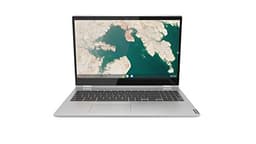
The Lenovo Chromebook C340 is the larger and more capable of the two Chromebook options on this list. Its 15.6-inch touchscreen display and 360-degree hinge make it a versatile machine that can be used as a standard laptop, a tent for media consumption, or a large tablet. It is aimed at users who are comfortable with ChromeOS and whose work revolves around web-based applications, Google Workspace and Android apps.
The Intel Core i3-8130U is an 8th-generation dual-core processor. It is older than the chips in the IdeaPad range, but it is well-matched to ChromeOS, which is a lightweight operating system that places most of the computational burden on cloud services rather than local processing. For Google Docs, Sheets, Gmail, YouTube, Netflix and Android apps from the Play Store, the i3-8130U is perfectly capable.
The 4GB of RAM is adequate for ChromeOS but will feel restrictive if you open many Chrome tabs simultaneously. The 128GB eMMC storage is more generous than the Chromebook S345, giving you meaningful local storage for downloaded files, Android apps and offline documents. The Intel UHD Graphics 620 handles 1080p video playback and light Android gaming without issue.
The 15.6-inch 1080p IPS touchscreen is the standout feature. The touch functionality works well with Android apps and the tent/tablet modes, and the IPS panel delivers good viewing angles and colour accuracy. The 360-degree hinge is robust and opens smoothly. Port selection includes two USB-C, two USB-A and a microSD slot, which covers most connectivity needs.
ChromeOS receives automatic security updates from Google, and the C340 supports Android apps natively. It is worth checking the AUE (Auto Update Expiry) date for this model before purchasing, as older Chromebooks eventually stop receiving ChromeOS updates. This is a key consideration when buying any Chromebook.
Verdict: The best Chromebook on this list for users who want a larger screen and touchscreen versatility. The 360-degree hinge and 1080p IPS touch display are genuine assets, though the 4GB RAM and older processor limit its headroom.
Pros
- 15.6-inch 1080p IPS touchscreen with 360-degree hinge adds versatility for media and Android apps
- 128GB eMMC provides more local storage than the entry-level Chromebook S345
- Two USB-C and two USB-A ports cover most connectivity needs without a hub
Cons
- 4GB RAM limits simultaneous Chrome tab usage and multitasking headroom
- 8th-gen i3-8130U is an older processor and the AUE date warrants checking before purchase
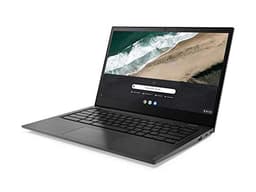
The Lenovo Chromebook S345 is the most affordable option on this list and the right choice for users with very basic computing needs and a tight budget. Running ChromeOS on an AMD A4-9120C processor, it is designed for web browsing, Google Workspace, email and video streaming rather than demanding local applications. It suits primary school children, elderly users who mainly use the internet, or anyone who needs a secondary machine for travel.
The AMD A4-9120C is a low-power dual-core processor that delivers modest performance. It handles ChromeOS's lightweight workloads adequately, but you will notice lag if you open many browser tabs or run multiple Android apps simultaneously. The 4GB of RAM is the minimum for a comfortable ChromeOS experience, and it will feel tight with more than five or six browser tabs open. The 32GB eMMC storage is very limited, meaning you will need to rely heavily on Google Drive and cloud storage for files.
The 14-inch IPS display at 1920x1080 is a genuine highlight for this price bracket. Full HD resolution on a 14-inch IPS panel at under £250 is uncommon, and the screen is pleasant for everyday use, with good viewing angles and adequate brightness for indoor use. The compact 14-inch form factor keeps the machine light and portable.
Port selection is practical for a Chromebook: two USB-C, two USB-A and a microSD slot. The USB-C ports support charging, which means you can use a USB-C power bank or charger if needed. ChromeOS is inherently secure and low-maintenance, requiring no antivirus software and receiving automatic updates. As with the C340, checking the AUE date is advisable before purchasing an older Chromebook model.
This is not a machine for anyone who needs Windows software, local storage for large files or demanding performance. But for its intended use case, it is a capable and affordable option that benefits from ChromeOS's simplicity and security.
Verdict: The most budget-friendly pick on this list. The IPS 1080p screen is a pleasant surprise at this price, but the 32GB storage and 4GB RAM mean it is only suitable for very light, web-centric use.
Pros
- 14-inch 1920x1080 IPS display is impressive quality for a sub-£250 laptop
- ChromeOS is secure, low-maintenance and well-suited to web-based workflows
- Two USB-C ports support flexible charging options including USB-C power banks
Cons
- 32GB eMMC storage is very limited and requires heavy reliance on cloud storage
- AMD A4-9120C and 4GB RAM will struggle with more than light multitasking
- AUE date on this older model should be checked before purchasing
Buying Guide
Processor: The Most Important Decision
The processor determines how fast and responsive your laptop feels, and it has the biggest impact on long-term usability. For general productivity in 2025, aim for at least an Intel Core i5 (10th generation or newer) or an AMD Ryzen 5 (4000 series or newer). The Intel Core i3-N305 and AMD Ryzen 5 7520U represent the lower and upper ends of the acceptable range for everyday use. If you need the laptop for demanding tasks such as video editing, large spreadsheets or software development, look at the Core i5-12450H or Core i7-13620H. For gaming, only the Lenovo LOQ with its Core i5-12450HX and RTX 3050 is suitable from this list.
RAM: Do Not Go Below 8GB
Windows 11 in 2025 requires at least 8GB of RAM to run comfortably, and 16GB is preferable if your budget allows. The 4GB machines on this list run ChromeOS, which is less demanding. For Windows laptops, 8GB is the minimum, and 16GB will keep the machine feeling fast for longer as applications and browser requirements grow. None of the laptops on this list offer upgradeable RAM, so what you buy is what you keep.
Storage: SSD Is Essential
An SSD (solid-state drive) makes a dramatic difference to boot times, application launch speeds and overall responsiveness compared with a traditional hard drive. All the current-generation laptops on this list use SSD storage in some form. NVMe SSD is the fastest type, followed by SATA SSD, then UFS, then eMMC. For Windows laptops, aim for at least 256GB of NVMe SSD storage. A smaller drive will need cloud storage or an external drive for anything beyond basic use.
Display: IPS vs TN
IPS panels offer wider viewing angles and more accurate colours than TN panels. For everyday use, content consumption and creative work, IPS is the better choice. TN panels are cheaper to manufacture and appear in budget models like the IdeaPad 1 Ryzen 5. If you are buying a laptop primarily for document editing or video calls and will always view it straight-on, TN is acceptable. If colour accuracy or sharing the screen with others matters, prioritise IPS.
ChromeOS vs Windows
ChromeOS is a lightweight, secure operating system that works best for users whose computing is primarily web-based. It supports Android apps and has excellent security with minimal maintenance. However, it does not run Windows software, which rules it out for anyone who needs specific Windows applications. Windows 11 is the right choice for most users who need full software compatibility. Be aware of S mode on some budget Windows laptops, which restricts app installation to the Microsoft Store until you switch it off.
Ports and Connectivity
Check the port selection before buying. If you use external monitors, USB-A peripherals or SD cards, make sure the laptop has the ports you need. USB-C is increasingly important, both for data transfer and for charging flexibility. The Slim 5 and Chromebook S345 both offer dual USB-C, which is useful. If you game online or work from home with a wired connection, the LOQ's Ethernet port is a valuable inclusion that most thin-and-light laptops omit.
The Lenovo IdeaPad Slim 5 16" (Core i7-13620H) is the overall winner. It combines a 13th-generation Intel Core i7 processor, 16GB of RAM, a 1TB PCIe NVMe SSD and a 1920x1200 IPS display in a well-built chassis with a comprehensive port layout. At its price point, it offers better specifications and a more premium experience than any other laptop on this list, and it will serve home workers, students and content creators well for years. If budget is the primary concern, the Lenovo IdeaPad 1 15" (Ryzen 5 7520U) is the best value pick, delivering modern AMD performance, 16GB RAM and 512GB NVMe SSD at a price that undercuts many competitors with inferior specifications. For gaming, the Lenovo LOQ is the only viable choice, with its RTX 3050 6GB enabling genuine 1080p gaming capability that no other model here can match.