
Think about what your home network actually does. It's not just Netflix and YouTube anymore. It's the work laptop, the kid's Chromebook, the smart doorbell that refuses to connect, the console downloading a 60GB update at the worst possible moment, and whatever cursed smart bulb someone bought from a flash sale. When that whole ecosystem starts grinding, the ISP-supplied router usually gets the blame, and honestly, it's usually right to. But replacing it with something genuinely capable costs money, and at the premium end of the market, you need to know you're buying performance, not just a shinier box with more antennas.
The TP-Link Deco BE65 is a tri-band Wi-Fi 7 mesh system aimed squarely at people who want serious whole-home coverage without running Ethernet to every room. It supports the latest wireless standard, packs a 6 GHz band, and includes 5G WAN support so you can use it with a standalone 5G connection rather than a traditional broadband modem. That's a genuinely interesting proposition in 2025, particularly for homes where fibre isn't available. But it sits in a crowded premium market, and the price tag demands a proper look at what you're actually getting versus what else is on the shelf at this level.
Owner ratings on Amazon sit at ★★★½☆ (3.8) across 10 reviews, which for a brand-new premium product is a number worth paying attention to. Not catastrophically bad, but not the glowing reception you'd hope for at this price. So what's actually going on? Specs, owner feedback, and honest comparison to the competition is where we start.
Core Specifications: TP-Link Deco BE65 Mesh WiFi 7 System
The Deco BE65 is a tri-band Wi-Fi 7 mesh system. That means three separate radio bands: a 6 GHz band rated at 5760 Mbps, a 5 GHz band at 2880 Mbps, and a 2.4 GHz band at 574 Mbps, giving a combined theoretical throughput of 9214 Mbps. I'll say this once and then we'll move on: nobody's devices will ever see 9214 Mbps. That number is the sum of every band's theoretical peak, measured at close range with ideal conditions and client hardware that barely exists in most homes yet. What matters is how those bands are used in practice, and for a mesh system, the 6 GHz band is doing a lot of heavy lifting as a dedicated backhaul channel.
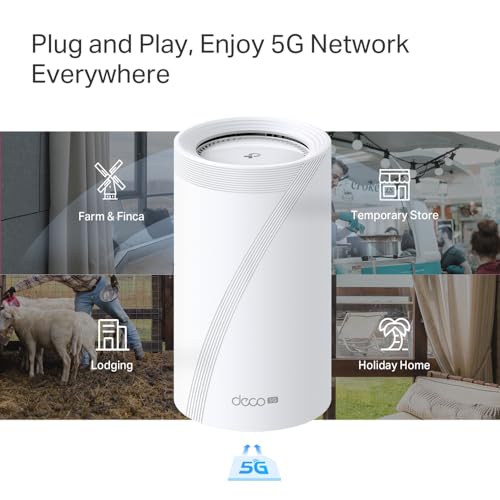
The headline feature that separates the BE65 from most of its competitors is the integrated 5G modem. It supports Sub-6 GHz 5G technology, which means you can use it as a standalone router with a 5G SIM rather than needing a separate modem. TP-Link quotes download speeds up to 3.4 Gbps on the 5G connection, though real-world 5G speeds depend entirely on your carrier and signal strength. Still, for rural homes or locations where FTTP isn't available, this is a meaningful differentiator. The system also supports Multi-Link Operation (MLO), which is a Wi-Fi 7 feature that lets devices send and receive data across multiple bands simultaneously, reducing latency and improving reliability in congested environments.
On the wired side, each node has four 2.5GbE ports that can be configured as WAN or LAN, which is solid for a mesh system at this level. The 320 MHz channel support is another Wi-Fi 7 exclusive, doubling the bandwidth available compared to Wi-Fi 6E's 160 MHz maximum. TP-Link's HomeShield platform handles security, parental controls, and IoT protection. Below is the full spec breakdown.
| Specification | Detail |
|---|---|
| Wi-Fi Standard | Wi-Fi 7 (802.11be) |
| Bands | Tri-band (2.4 GHz + 5 GHz + 6 GHz) |
| Combined Throughput (theoretical) | 9214 Mbps |
| 6 GHz Band | 5760 Mbps |
| 5 GHz Band | 2880 Mbps |
| 2.4 GHz Band | 574 Mbps |
| 5G WAN | Sub-6 GHz 5G (up to 3.4 Gbps quoted) |
| Wired Ports | 4x 2.5GbE (WAN/LAN configurable) |
| Backhaul | Wired and wireless simultaneously (Coined Backhaul) |
| Key Wi-Fi 7 Features | MLO, 320 MHz channels |
| Security / Parental Controls | TP-Link HomeShield |
| Compatibility | Backward compatible with all Wi-Fi generations |
| Price | £469.99 |

Real-World Coverage
Mesh systems live or die on coverage, and the BE65's tri-band setup gives it a genuine structural advantage over dual-band mesh kits. The 6 GHz band has shorter range than 5 GHz or 2.4 GHz, which is a physics problem nobody can engineer away, but in a mesh context that's less of an issue because the nodes are placed close enough together to hand off cleanly. The 2.4 GHz band does the heavy lifting for range and wall penetration, the 5 GHz band handles mid-range clients at decent speed, and the 6 GHz band is where the fast, short-range connections happen, including the backhaul between nodes.
TP-Link quotes coverage figures for the system, but like every manufacturer's coverage claim, those numbers assume open-plan, minimal-obstruction environments. Real UK homes, with their solid brick walls, concrete floors, and the inevitable airing cupboard that somehow sits between the router and the far bedroom, chew through Wi-Fi range considerably faster than any lab test suggests. What the spec tells us is that a two or three-node BE65 setup should handle a large detached house or a multi-floor property more capably than a single router, even a powerful one. The dedicated 6 GHz backhaul means nodes aren't cannibalising client bandwidth to talk to each other, which is the key advantage over cheaper mesh systems.
Owner reports are broadly positive on coverage, with users noting that the system handles multi-floor properties and larger homes well when nodes are positioned sensibly. A few owners mention that 6 GHz client coverage is noticeably shorter range than the other bands, which is expected and not a flaw, just physics. The system's backward compatibility means older devices connect on 2.4 GHz or 5 GHz without issue, so you're not forcing everything onto a band it can't use. The garden is going to depend heavily on how close a node is to an exterior wall and what your walls are made of, as always.
Sustained Speed Under Load
The 9214 Mbps combined throughput figure is marketing arithmetic. What you actually care about is what a single client gets at range, with other devices active on the network. And this is where Wi-Fi 7's real-world benefits start to matter in ways that Wi-Fi 6E didn't quite deliver. The 320 MHz channel support means more simultaneous data can move in a single transmission, and MLO means a device can aggregate bandwidth across bands rather than picking one and sticking with it. In theory, a Wi-Fi 7 client near a BE65 node should see meaningfully better throughput than the same client on a Wi-Fi 6E system.
In practice, the gains depend heavily on what hardware you're connecting. Most laptops and phones sold in 2024 and early 2025 are Wi-Fi 6 or Wi-Fi 6E at best. A handful of flagship Android phones and some newer laptops support Wi-Fi 7, but it's not yet the norm. So for most of your current devices, the BE65's Wi-Fi 7 features are future-proofing, not an immediate performance boost. What you do get immediately is a well-specced tri-band system with proper backhaul, which means sustained throughput across nodes stays high rather than dropping off as the backhaul band gets congested.
Owner feedback on speed is generally positive, with users on fast broadband connections reporting that the system doesn't bottleneck their connection. The 2.5GbE wired ports help here too, since 1GbE ports would cap throughput for anyone on a multi-gig broadband package. A couple of owners mention occasional speed inconsistencies, which could be firmware-related or down to node placement, but there's no consistent pattern suggesting a hardware throughput problem. The 5G WAN capability adds another dimension: owners using it with a 5G SIM report usable speeds, though real-world 5G throughput varies enormously by location and carrier congestion.
Mesh and Backhaul
This is genuinely one of the BE65's stronger features. TP-Link calls it "Coined Backhaul", which is a marketing name for something technically meaningful: the system can use both wireless and wired backhaul simultaneously. Most mesh systems make you choose. You either run Ethernet between nodes for wired backhaul, or you rely on a wireless band. The BE65 can use both at the same time, which in practice means the backhaul capacity is higher and more resilient. If you have Ethernet in the walls, you use it. If you don't, the 6 GHz wireless backhaul picks up the slack. If you have partial wiring, both contribute.
The dedicated 6 GHz backhaul is the other key point. Cheaper dual-band mesh systems use the same band for both client connections and node-to-node backhaul, which means every client device is effectively competing with the mesh infrastructure for bandwidth. That's why budget mesh systems often disappoint: the headline speed is shared between the backhaul and your devices. With a dedicated 6 GHz backhaul band, the 5 GHz and 2.4 GHz bands are left entirely for clients. You're not losing usable bandwidth to the mesh plumbing.
The mesh networking architecture also handles roaming between nodes. When you walk from one end of the house to the other, the system should hand your device off to the nearest node without you noticing a dropout. Owner reports suggest this works reasonably well in practice, though as with any mesh system, the quality of the handoff depends on node placement and how aggressively your device's Wi-Fi driver decides to switch access points. Some devices are sticky and will cling to a distant node long past the point where they should have switched. That's a device driver issue, not a mesh issue, but it's worth knowing.
Device Capacity
Modern homes are not running ten devices. They're running thirty to fifty. Two phones per adult, a tablet, a laptop, a smart TV, a streaming stick, a games console, a smart doorbell, a handful of smart bulbs, a thermostat, a robot hoover, a NAS box, and whatever else has crept onto the network in the last two years. A router that chokes at twenty concurrent clients is not adequate for a family home in 2025. The BE65, being a Wi-Fi 7 system, supports MU-MIMO (Multi-User MIMO) and OFDMA (Orthogonal Frequency Division Multiple Access), which are the two technologies that actually make a router better at handling many devices simultaneously rather than just queuing them.
MU-MIMO lets the router talk to multiple devices at the same time rather than taking turns with each one. OFDMA slices the available spectrum into smaller sub-channels, so multiple devices can share a single transmission window rather than waiting for the channel to be free. Both of these were introduced in Wi-Fi 6 and are refined in Wi-Fi 7. The practical result is that a busy network of thirty-plus devices should feel significantly less congested than on an older router, particularly for latency-sensitive tasks like video calls and gaming, where queuing delays are more noticeable than raw throughput.
The tri-band setup also helps with device distribution. Smart home devices, which tend to be 2.4 GHz only and low-bandwidth, sit on the 2.4 GHz band without competing with your laptop's video call on 5 GHz or a Wi-Fi 7 phone on 6 GHz. TP-Link's HomeShield includes IoT security features specifically for this kind of mixed device environment, which is a sensible inclusion given how many cheap IoT devices have poor security track records. Owner feedback doesn't flag device capacity as a problem, which is encouraging for a system at this price point.
Wi-Fi 7 Standard and Future-Proofing: TP-Link Deco BE65 Review
Wi-Fi 7 (formally 802.11be) is the current generation standard, and the BE65 is built around it. The headline capabilities are 320 MHz channel width (double Wi-Fi 6E's maximum), MLO for multi-band simultaneous connections, and significantly higher theoretical throughput. These are real improvements, not just spec-sheet inflation. But the honest question is: do they matter to you right now?
If your devices are Wi-Fi 6 or older, which is most households in 2025, you won't use any of the Wi-Fi 7 specific features. You'll connect on the older standard and get performance broadly similar to what a good Wi-Fi 6E system would deliver. The BE65 is backward compatible with all previous Wi-Fi generations, so nothing breaks, you just don't get the Wi-Fi 7 benefits until you have Wi-Fi 7 clients. The value of buying a Wi-Fi 7 system now is that it's the last router you'll need to buy for the foreseeable future. As phones, laptops, and other devices gradually adopt Wi-Fi 7 over the next two to three years, the BE65 will be ready for them rather than needing replacement.
The 5G WAN capability adds a different dimension of future-proofing. For homes where FTTP broadband isn't available or isn't reliable, having a router that can use a 5G SIM as its primary WAN connection, or as a failover, is genuinely useful. The Sub-6 GHz 5G support covers the frequency bands used by all major UK carriers. This isn't a feature you'll find on most mesh systems at any price, and it's one of the things that makes the BE65 genuinely different rather than just a faster version of what came before.
Features and QoS
TP-Link's HomeShield platform is the software layer that most people will actually interact with day to day. It covers three main areas: network security, parental controls, and IoT protection. The security side includes real-time threat detection, intrusion prevention, and malicious site blocking. Parental controls let you set time limits, filter content categories, and pause internet access per device or per profile. The IoT security features monitor connected smart devices for unusual behaviour, which is increasingly relevant as the number of cheap, poorly-secured smart home gadgets multiplies.
The catch with HomeShield is that the full feature set requires a subscription after the initial free period. Basic functionality is available without paying, but the more advanced security features and detailed reporting sit behind a paywall. This is standard practice for TP-Link's premium Deco range, and it's not unique to this system, but it's worth factoring into the total cost of ownership. If you're comparing this to a competitor that includes full features without a subscription, that's a real difference in value.
QoS (Quality of Service, the feature that lets you prioritise certain types of traffic so your video call doesn't get killed by a background download) is available through the Deco app. The implementation is fairly straightforward rather than deeply configurable, which suits most home users but might frustrate anyone who wants granular control over traffic prioritisation. Guest network support is included, which is useful for keeping IoT devices and visitors on a separate network segment from your main devices, and if you want an extra privacy layer on top of the mesh network at home (and protection on public Wi-Fi when you're away from it) it's worth pairing the system with a good VPN. VPN support is available, though the specifics of the implementation depend on firmware version.
Firmware, App and Security Updates
TP-Link has a reasonable track record on firmware updates for its Deco range, though it's not the fastest in the industry. The Deco app is generally well-regarded for ease of use, with a clean interface that makes setup and ongoing management accessible to non-technical users. The web interface is also available for those who prefer it, which is a nice option to have even if most people will stick with the app. Security update cadence is important for any always-on network device, and TP-Link's support page is the place to check firmware history for specific models.
The reboot question. Owner reviews for the BE65 are limited given it's a relatively new product, but the broader Deco range has a mixed reputation on long-term stability. Some users report running Deco systems for months without issues. Others mention occasional connectivity drops that a reboot fixes. There's no consistent pattern in the BE65's early owner feedback suggesting chronic instability, but it's something to watch as the product accumulates more reviews over time. A premium mesh system at this price should not require weekly reboots, and if that becomes a pattern in owner reports, it's a meaningful mark against it.
TP-Link's history on long-term support is reasonable for a major networking brand. The Deco range has been actively developed for several years, and older models have generally continued to receive updates. That said, the networking market moves quickly, and there's no guarantee of support timelines beyond what's stated in the product documentation. For a system at this price, you'd reasonably expect at least three to four years of active firmware support.
Setup and Management
Setting up a Deco system is one of the more straightforward mesh setup experiences available. The Deco app walks you through adding nodes step by step, and the process is designed to be manageable without any networking knowledge. You plug in the first node, connect it to your modem or broadband router, follow the app prompts, and then add subsequent nodes one at a time. The app detects each node and guides you through placement. For a non-technical buyer, this is about as painless as mesh setup gets.
The BE65 adds a wrinkle if you're using the 5G WAN capability, since you'll need to configure APN settings for your carrier's SIM. That's a slightly more involved process, but the app should guide you through it, and most UK carriers have straightforward APN settings that are easy to find. If you're using it with a traditional broadband modem, the setup is the same as any other Deco system.
Ongoing management through the app covers the basics well: you can see connected devices, run speed tests, manage parental controls, set up guest networks, and check the status of each node. The interface is clear and doesn't bury important settings in sub-menus. For most home users, the app is all they'll ever need. Power users who want to dig into advanced settings will find the web interface more capable, though the Deco range is not aimed at people who want to configure BGP routing tables. It's a consumer system with a consumer interface, and that's fine for its target audience.
Ports and Connectivity
Each node in the BE65 system has four 2.5GbE ports, configurable as WAN or LAN. This is a meaningful spec. A lot of mesh systems at lower price points ship with 1GbE ports, which caps your wired throughput at 1 Gbps regardless of what your broadband or NAS can deliver. With 2.5GbE ports, you've got headroom for multi-gig broadband connections, fast NAS transfers, and wired backhaul between nodes at full speed. Four ports per node is also generous, giving you enough to connect a NAS, a switch, a wired PC, and still have a port free without needing a separate switch for basic setups.
The 5G WAN integration means the system has an additional WAN source beyond the physical ports. You can use the 5G connection as the primary WAN, use a wired connection as primary with 5G as failover, or configure it however makes sense for your setup. This flexibility is genuinely useful, particularly for home offices where internet reliability matters and a 5G backup could save the day when the broadband goes down.
What the spec sheet doesn't list, I won't claim is present or absent. What's confirmed is four 2.5GbE WAN/LAN ports per node, which is a solid physical connectivity spec for a system at this price. The wired backhaul option means you can run Ethernet between nodes if your home is wired, and the system will use that alongside wireless backhaul simultaneously, which is the Coined Backhaul feature mentioned earlier.
How It Compares: TP-Link Deco BE65 vs the Competition
At the premium end of the mesh market, the BE65 is competing primarily with the Eero Max 7 and the ASUS ZenWiFi BQ16 Pro. These are the systems that come up repeatedly when people are spending serious money on home networking. The Eero Max 7 is Amazon's flagship mesh system, with Wi-Fi 7, a 6 GHz backhaul band, and 10GbE ports on the main node. The ASUS ZenWiFi BQ16 Pro is a more prosumer-oriented system with similar Wi-Fi 7 credentials and ASUS's AiMesh ecosystem.
The BE65's key differentiator is the integrated 5G modem, which neither the Eero Max 7 nor the ZenWiFi BQ16 Pro offers. If 5G WAN is relevant to your situation, that's a genuine reason to choose the BE65 over its competitors. The Coined Backhaul feature, using wired and wireless simultaneously, is also a point of difference. The Eero Max 7 has 10GbE ports on the main node, which is faster than the BE65's 2.5GbE, but 10GbE is only relevant if you have a multi-gig broadband connection and a NAS or switch that can actually use it. For most people, 2.5GbE is sufficient.
The 3.8 average rating on Amazon is the honest flag here. The Eero Max 7 and ZenWiFi BQ16 Pro both have more established review bases, and the BE65 is early in its lifecycle. Whether the 3.8 reflects genuine issues or just the early-adopter tax of buying a new product before firmware matures is hard to say definitively. It's worth checking current reviews before buying.
| Feature | TP-Link Deco BE65 | Eero Max 7 | ASUS ZenWiFi BQ16 Pro |
|---|---|---|---|
| Price | £469.99 | Premium tier | Premium tier |
| Wi-Fi Standard | Wi-Fi 7 | Wi-Fi 7 | Wi-Fi 7 |
| Bands | Tri-band (2.4/5/6 GHz) | Tri-band (2.4/5/6 GHz) | Tri-band (2.4/5/6 GHz) |
| 5G WAN | Yes (Sub-6 GHz) | No | No |
| Max Port Speed | 2.5GbE | 10GbE (main node) | 10GbE |
| Wired + Wireless Backhaul | Yes (simultaneous) | Yes | Yes |
| MLO | Yes | Yes | Yes |
| 320 MHz Channels | Yes | Yes | Yes |
| Parental Controls | HomeShield (subscription) | Eero Plus (subscription) | AiProtection (included) |
| Amazon Rating | 3.8 / 5 | Higher (established) | Higher (established) |

Final Verdict: TP-Link Deco BE65 Mesh WiFi 7 System Review UK 2025
The BE65 is a technically impressive system that does something no competitor at this price point does: it puts a 5G modem inside a Wi-Fi 7 mesh router. For homes where 5G is the primary or backup connection, that's a meaningful and genuinely useful feature. The tri-band Wi-Fi 7 setup with dedicated 6 GHz backhaul, Coined Backhaul for simultaneous wired and wireless node connections, MLO, and 320 MHz channel support puts it on par with the best in the market on paper. The four 2.5GbE ports per node give you real wired flexibility without requiring a separate switch for most setups.
But there are honest caveats. The 3.8 average rating from early owners is lower than you'd want for a system at this price, and it's early enough in the product's life that it's hard to know whether firmware updates will smooth out whatever rough edges are causing dissatisfaction. The HomeShield subscription requirement for full feature access adds ongoing cost that competitors like ASUS include in the purchase price. And if you don't need 5G WAN, the Eero Max 7's 10GbE ports make it a stronger choice for multi-gig wired setups.
Who should buy this? Someone with a large home, a mix of wired and wireless devices, and either a 5G connection or the genuine need for a 5G backup. Someone who's buying for the long term and wants a system that will grow into Wi-Fi 7 as their devices upgrade over the next few years. And someone who's comfortable with the fact that they're buying a relatively new product and may need to wait for firmware to mature.
Who should skip it? Anyone who needs proven long-term stability above all else should wait for more owner reviews to accumulate. Anyone who wants full parental control and security features without a subscription should look at ASUS's ZenWiFi range. And anyone who doesn't need 5G WAN and wants the fastest wired ports available should look seriously at the Eero Max 7 instead.
Editorial score: 7.5 out of 10. Technically differentiated, genuinely capable, but the early owner ratings and subscription-gated features stop it from being a straightforward recommendation at this price. Watch for firmware updates and check current reviews before committing.
★★★½☆ (3.8) | 10 owner reviews on Amazon
What works. What doesn’t.
5 + 4What we liked5 reasons
- Integrated 5G WAN modem is a genuine differentiator no competitor at this price offers
- Dedicated 6 GHz backhaul keeps node-to-node throughput high without cannibalising client bandwidth
- Simultaneous wired and wireless backhaul (Coined Backhaul) is more flexible than most mesh systems
- Four 2.5GbE ports per node gives solid wired flexibility for most home setups
- Wi-Fi 7 with MLO and 320 MHz channels provides real future-proofing as client devices catch up
Where it falls4 reasons
- 3.8 average Amazon rating from early owners is lower than expected at this price tier
- HomeShield full feature set requires an ongoing subscription, unlike some competitors
- No 10GbE ports means it trails the Eero Max 7 for multi-gig wired setups
- New product with limited long-term reliability data available
Full specifications
7 attributes| Launch year | 2024 |
|---|---|
| Mesh capable | true |
| Ports | 4x 2.5GbE WAN/LAN |
| Security protocols | WPA3, WPA2 |
| TOP speed mbps | 9214 |
| Type | mesh_router |
| Wifi standard | Wi-Fi 7 |
If this isn’t right for you
2 options 8.5 / 10
TP-Link Deco BE9300(3-pack) WiFi 7 BE9300Mbps Whole Home Mesh WiFi System, 2.5Gbps Ports, VPN Supported, Router & Extender Booster, AI-Driven Mesh, 6 GHz Band, Homeshield, Alexa & Google
£421.07 · TP-Link
 8.0 / 10
ASUS ZenWiFi BT6 Tri-Band WiFi 7 Mesh, 9.4 Gbps, 5800 sq.ft. (2pk), 2.5G WAN Port, Security and Parental Controls Included, Smart Home Master SSIDs, 4G & 5G Mobile Tethering- BT6 (W-2-PK)
£406.80 · ASUS
Frequently asked
5 questions01Will the TP-Link Deco BE65 cover my whole house?+
For most UK homes, a two-node BE65 system should handle a large semi-detached or detached property, and a three-node setup covers very large or multi-floor homes. The tri-band setup with dedicated 6 GHz backhaul means nodes communicate efficiently without stealing bandwidth from your devices. That said, solid brick walls and concrete floors reduce Wi-Fi range significantly compared to open-plan environments, so node placement matters. Early owner reports suggest coverage is solid when nodes are positioned sensibly, but as with any mesh system, the manufacturer's quoted coverage figures are best-case numbers.
02Do I really need Wi-Fi 7 for the TP-Link Deco BE65?+
Probably not right now, but that's not necessarily a reason to avoid it. Most phones, laptops, and tablets sold before 2025 are Wi-Fi 6 or Wi-Fi 6E at best, so they won't use the BE65's Wi-Fi 7 specific features like MLO or 320 MHz channels. Everything will still connect and work well, just on the older standard. The value of Wi-Fi 7 is future-proofing: as your devices gradually upgrade over the next few years, the BE65 will be ready for them. If your current devices are mostly Wi-Fi 5 or older, the performance improvement from the BE65 will still be significant, just not from Wi-Fi 7 specifically.
03Is the TP-Link Deco BE65 mesh worth it over a single router or extender?+
For a large home or multi-floor property with persistent dead zones, yes. A single router, even a powerful one, struggles to provide consistent coverage across multiple floors and through solid walls. Range extenders work but create a separate network that devices don't always roam between cleanly, and they typically halve the available bandwidth for clients they serve. The BE65's dedicated 6 GHz backhaul means nodes communicate efficiently without degrading client performance, which is the key advantage over budget mesh systems and extenders. For a small flat or a home where one router already provides good coverage, the added cost of a mesh system is hard to justify.
04Is the TP-Link Deco BE65 easy to set up and reliable?+
Setup through the Deco app is straightforward and well-guided, suitable for non-technical users. Adding nodes is a step-by-step process that doesn't require any networking knowledge. On reliability, the BE65 is a relatively new product with a limited owner review base, so long-term stability data is still accumulating. The current Amazon average of 3.8 out of 5 from early owners is lower than ideal for a premium system, though it's not clear whether this reflects firmware issues that updates will address or deeper hardware concerns. TP-Link's broader Deco range has a generally reasonable reliability record, but it's worth checking current reviews before buying.
05What warranty and returns apply to the TP-Link Deco BE65?+
Amazon offers 30-day returns on most items. TP-Link typically provides a 2-year warranty on networking kit sold in the UK. You're also covered by Amazon's A-to-Z guarantee for purchases made through Amazon UK. For warranty claims directly with TP-Link, their UK support page handles registration and claims.













