

You know what actually ruins a high refresh rate monitor? When the pixels can't keep up with the numbers on the box. A monitor that says 165Hz but smears through fast motion is worse than useless, because you've paid for something that actively makes games look worse than your old 60Hz panel did. That's the real test, and it's why the spec sheet alone never tells the whole story.
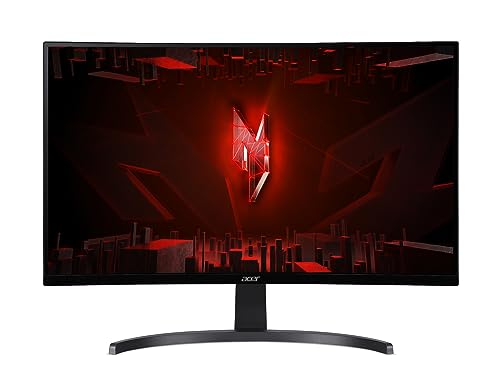
The Acer Nitro ED273 S3 is a 27-inch curved 1080p gaming monitor with a 165Hz native refresh rate (overclockable to 180Hz), AMD FreeSync Premium, and a 1ms VRB response time claim. It sits in the mid-range bracket, which is competitive territory right now. And with hundreds of owner reviews and a positive overall rating, there's clearly something going right here. This Acer Nitro ED273 S3 review digs into whether that enthusiasm is justified or whether buyers are just happy to have a big curved screen at this price point.
Short answer: it's a solid buy for 1080p gaming, with some caveats around the response time marketing and HDR that you should absolutely know about before handing over your money. The longer answer is below.
Core Specifications
The ED273 S3 is built around a 27-inch VA panel with a 1920x1080 resolution and a 1500R curve. The curve is fairly aggressive, which works well at this screen size for single-monitor setups and gives the whole thing a proper gaming look without being ridiculous. The native refresh rate sits at 165Hz, with an overclock option to 180Hz available through the OSD. That's a meaningful bump if your GPU can push the frames to match.
Connectivity is three ports: one HDMI 2.0, one HDMI 1.4, and one DisplayPort 1.2. To hit 165Hz or 180Hz, you'll want to use the DisplayPort connection or the HDMI 2.0 port. The HDMI 1.4 port caps out at lower refresh rates, so plug your PC into the right socket or you'll wonder why you're only getting 60Hz. There's no USB hub, no USB-C, and no built-in speakers. It's a focused gaming panel, not a do-everything workstation display.
The stand offers tilt adjustment only, which is a limitation upfront. No height adjustment, no swivel, no pivot. If you need more flexibility, you'll be looking at a VESA mount (the panel is 100x100mm compatible). The monitor ships with the Acer Nitro ED273 S3 product page listing a 1ms VRB response time and HDR10 support, both of which we'll come back to in detail because they need context.
| Specification | Detail |
|---|---|
| Screen Size | 27 inches (69 cm) |
| Resolution | 1920 x 1080 (Full HD) |
| Panel Type | VA (Vertical Alignment) |
| Refresh Rate | 165Hz native / 180Hz OC |
| Response Time | 1ms VRB |
| Curve | 1500R |
| Adaptive Sync | AMD FreeSync Premium |
| HDR | HDR10 |
| Brightness | 250 cd/m2 (typical) |
| Contrast Ratio | 3000:1 (static) |
| Ports | 1x HDMI 2.0, 1x HDMI 1.4, 1x DisplayPort 1.2 |
| VESA Mount | 100 x 100mm |
| Stand Adjustment | Tilt only |
| Dimensions (with stand) | 614 x 455 x 198 mm |
| Weight (with stand) | Approx. 4.5 kg |

Panel Technology
VA panels are interesting because they sit between IPS and TN in almost every meaningful way, except contrast. On contrast, they absolutely hammer IPS. The ED273 S3's rated 3000:1 static contrast ratio is genuinely high for a non-OLED monitor, and VA panels in this class routinely measure close to their rated figures. That means blacks that actually look black rather than the murky grey you get from IPS panels in a dark room. For gaming at night, watching films, or anything where dark scenes matter, this is a real advantage over most of the competition at this price.
The trade-off is viewing angles. IPS panels are rated at 178 degrees in both directions and largely deliver on that. VA panels are technically rated similarly but in practice colour and contrast shift more noticeably as you move off-axis. For a single-user gaming setup where you're sitting directly in front of the screen, this is basically irrelevant. If you're showing someone else the screen from the side, or you're using it in a setup where you're not centred, you'll see the shift. The 1500R curve actually helps here by angling the edges of the panel slightly toward you, which partially compensates for the viewing angle weakness.
One thing VA panels are known for is black smearing, sometimes called black level rise or the VA ghosting effect. This happens in dark scenes where dark objects moving against dark backgrounds leave a trail. It's a known characteristic of VA technology, not specific to this monitor, and it's about if you play a lot of dark, fast-paced games like horror titles or space shooters. The ED273 S3's overdrive settings can help reduce this, but there's a balance to strike between reducing smear and introducing overshoot. Owner reviews don't flag this as a major complaint, which suggests Acer's tuning is reasonable, but it's not zero. VA ghosting in dark scenes is something you accept as part of the deal with this panel type, and that's the honest version of events.
Display Quality
Right, 1080p on 27 inches. This is where some people get twitchy, and fair enough. The pixel density works out at around 82 pixels per inch, which is noticeably lower than the 109 PPI you'd get from a 27-inch 1440p panel. If you sit close to the screen, you can see individual pixels on text and fine detail. If you sit at a normal gaming distance of 60 to 80 centimetres, it's less of an issue, but it's not as crisp as 1440p. That's just physics.
That said, the majority of owners are happy with the image quality for gaming, and that makes sense. Games don't require the same pixel-level sharpness as reading a spreadsheet. Motion and colour matter more in gaming, and those are areas where the ED273 S3 holds up well. The VA panel's strong contrast makes colours pop in a way that flat IPS panels at this price don't quite match. Several owner reviews specifically mention how good the picture looks for the money, which is consistent with what you'd expect from a decent VA panel with solid contrast.
The anti-glare matte coating does its job. There's no mirror-finish glossy surface here, so reflections from windows or overhead lights are diffused rather than thrown back in your face. Brightness uniformity is typically decent on VA panels, though some backlight bleed at the edges is common and owners occasionally mention it in reviews. It's rarely severe enough to be distracting in normal use, but if you're the type who notices every imperfection in a black screen, it's worth being aware of. The 250 cd/m2 typical brightness is adequate for most indoor environments, though it won't win any awards in a bright room.
Refresh Rate and Adaptive Sync
165Hz native is a good place to be in 2026. It's past the point where you're squinting to see the difference from 144Hz (you'll notice 60 to 144, you'll notice 144 to 165 less, but it's there), and the 180Hz overclock option gives you a bit of headroom if your GPU is powerful enough to push frames that high at 1080p. The overclock is stable according to owner reports, no complaints about crashes or instability at 180Hz, which is reassuring.
AMD FreeSync Premium is the key sync standard here. FreeSync Premium requires a minimum 120Hz at the native resolution and mandates Low Framerate Compensation (LFC), which means FreeSync stays active even when your frame rate drops well below the monitor's minimum VRR range. That's important because without LFC, if your GPU drops below the sync range, you're back to tearing. FreeSync Premium sorts that out. The AMD FreeSync specification is worth a quick read if you want the full technical breakdown of what Premium actually guarantees over basic FreeSync.
If you're on an Nvidia GPU, the situation is a bit more nuanced. The ED273 S3 isn't G-Sync certified, but many FreeSync monitors work with Nvidia's G-Sync Compatible mode. Whether this specific panel works well with G-Sync Compatible is something Nvidia hasn't officially validated, so you'd be relying on community reports rather than a guarantee. If you're on Team Red, you're sorted. If you're on Nvidia, it may well work fine, but it's not a sure thing in the same way a G-Sync Compatible certified monitor would be. AMD GPU owners are the natural audience for this monitor, and the FreeSync Premium implementation appears to work properly based on owner feedback.
Response Time and Motion
The 1ms VRB claim needs unpacking because it's one of the most misleading numbers in monitor marketing. VRB stands for Visual Response Boost, which is a backlight strobing technique. When enabled, it reduces perceived blur by flashing the backlight in sync with the panel refresh, making motion look sharper. The 1ms figure refers to the perceived motion blur under this mode, not the actual pixel transition time from one colour to another. They're different things.
The actual grey-to-grey pixel transition time on a VA panel like this is typically in the 4ms to 8ms range depending on the transition and the overdrive setting. That's not bad, and at 165Hz the frame time is about 6ms anyway, so the panel can keep up. But 1ms GtG it is not. Acer is doing what the whole industry does with VRB numbers, and it's technically not a lie, but it's absolutely designed to look better than it is. The Wikipedia article on display response time gives a clear breakdown of the different ways response time is measured and why the numbers aren't directly comparable.
In practice, the motion performance appears to be genuinely decent for the price. Owner reviews don't report serious ghosting complaints in normal gaming use. The overdrive options in the OSD let you tune the balance between ghosting reduction and overshoot, and the consensus from buyers is that the default or medium overdrive setting works well. Fast-paced shooters and racing games are where this monitor is designed to shine, and the combination of 165Hz plus FreeSync Premium means the experience is smooth when your frame rate is up there. The VA dark-scene ghosting mentioned earlier is the main motion caveat, not general pixel response in bright scenes.
Color Accuracy and Gamut
Acer rates the ED273 S3 at 99% sRGB colour coverage. For gaming, that's the number that matters most, since games are mastered to sRGB and content on streaming platforms is delivered in sRGB. Hitting 99% means colours in games should look accurate and well-saturated without the washed-out look you get from cheaper panels with lower coverage. The sRGB colour space is the standard for web and gaming content, so full coverage here is genuinely useful rather than a marketing checkbox.
DCI-P3 coverage isn't specified by Acer for this panel, which is typical for budget-to-mid-range VA monitors. VA panels in this class often cover somewhere around 85% to 90% of DCI-P3 as a byproduct of their gamut, but without a published figure from Acer or a published independent measurement, it's not something to bank on. If you're doing colour-critical work like photo editing or video grading, this isn't the monitor for that. The factory calibration is consumer-grade rather than professional-grade, and Delta-E figures aren't published, which tells you everything you need to know about who this monitor is aimed at.
For gaming and general media consumption, the colour output is well-regarded by owners. Several reviews mention vibrant, punchy colours straight out of the box, which is consistent with VA's characteristic of producing saturated, high-contrast images. You may find the default colour temperature slightly warm or slightly cool depending on your preference, and the OSD colour settings give you enough adjustment to sort that out without needing to go near any third-party software. It's not a colour-accurate professional display. It's a gaming monitor that looks good, and for that purpose, it delivers.
HDR Performance
HDR10 support is listed, and you should know what that actually means at this price point. HDR10 is the base HDR standard, covering the metadata format and the colour space. But the quality of HDR output depends on the hardware delivering it, specifically peak brightness, black levels, and whether the panel has local dimming. The ED273 S3 has a peak brightness of 250 cd/m2, which is below the VESA DisplayHDR 400 certification minimum of 400 cd/m2. So this monitor doesn't even meet the entry-level HDR certification threshold.
What that means in practice: enabling HDR mode in Windows or in games will give you HDR-flagged output, but the visual improvement over a well-calibrated SDR image is minimal to nonexistent. The panel can't get bright enough to deliver the highlights that make HDR actually look different, and there's no local dimming to deepen blacks independently of bright areas. You're essentially getting the HDR label without the HDR experience. This is checkbox HDR, and it's extremely common at this price. The VESA DisplayHDR specification page lays out exactly what each tier requires if you want to understand the gap between HDR10 support and meaningful HDR performance.
The honest advice: leave HDR off on this monitor. Game in SDR, let the VA panel's native contrast do its thing, and you'll get better-looking dark scenes than HDR mode will deliver. The strong 3000:1 native contrast ratio is more useful than the HDR toggle here. Several owners mention this in reviews, noting that the monitor looks better in SDR than with HDR enabled, which is exactly what you'd expect given the brightness limitations. It's not a flaw unique to this monitor. It's just how budget HDR works, and Acer isn't the only brand doing it.
Contrast and Brightness
The 3000:1 static contrast ratio is the headline number here, and it's a good one. For context, IPS panels typically land around 1000:1, sometimes up to 1200:1 on better units. VA panels routinely measure higher than their rated figures in independent tests, so 3000:1 is a realistic floor rather than an optimistic ceiling. This is where VA genuinely beats IPS for most gaming use cases, because deeper blacks make dark games look more atmospheric and make the overall image feel more three-dimensional.
The 250 cd/m2 typical brightness is on the lower side. It's fine for a dim or normally-lit room, and most people don't game with bright sunlight hitting the screen. But if you're in a bright office or near a window, you might find yourself wishing for more headroom. Some monitors in this class hit 300 to 350 cd/m2, which gives more flexibility. The matte anti-glare coating helps manage reflections, but it doesn't compensate for a dim panel in a bright environment. If your gaming setup is in a well-lit space, factor this in.
Brightness uniformity across the panel is typically good on VA panels, better than FALD (full-array local dimming) edge-lit panels that can have obvious brightness gradients. Some owners mention minor backlight bleed in the corners, particularly visible on solid black screens. This is normal for edge-lit VA panels and rarely visible during actual gaming. If you're the kind of person who tests a new monitor with a pure black screen and a torch, you'll probably find something to complain about. If you just play games on it, you'll likely never notice.
Ergonomics and Stand
The stand is the weakest part of this monitor, and it's worth being straight about that. You get tilt adjustment only, somewhere around -5 to +15 degrees. No height adjustment, no swivel, no pivot. For a monitor at this price point, that's not unusual, but it does mean you need to think about your desk setup before buying. If the monitor's default height doesn't suit you, you're either stacking it on books (yes, people do this) or buying a VESA arm.
The good news is the VESA 100x100mm compatibility means any standard monitor arm will work. VESA arms are cheap and genuinely transform the usability of a monitor with a limited stand. If you're already planning to use an arm, the stand limitation doesn't matter at all. If you want to use the included stand and need height or swivel adjustment, this isn't the right monitor for you, and that's before purchase rather than after.
Build quality is generally described positively in owner reviews. The plastic construction is typical for the price bracket, nothing feels premium, but nothing feels about to fall apart either. The curved panel looks good on a desk, and the relatively slim bezels on three sides keep it looking modern. The base footprint is reasonable, not one of those stands that takes up half your desk. Assembly is straightforward, and owners report it takes about ten minutes to put together. The OSD buttons are on the back-right of the panel, which is standard for this type of monitor and easy enough to navigate once you've found them.
Connectivity and Ports
Three video inputs: one HDMI 2.0, one HDMI 1.4, and one DisplayPort 1.2. That's it. No USB hub, no USB-C, no audio output jack (there are no built-in speakers). For a single-PC gaming setup, three video inputs is actually quite generous. You can have a PC on DisplayPort, a console on HDMI 2.0, and a second device on HDMI 1.4, all without unplugging anything.
- DisplayPort 1.2: supports 1080p at 165Hz and 180Hz OC
- HDMI 2.0: supports 1080p at 165Hz and 180Hz OC
- HDMI 1.4: limited to lower refresh rates (60Hz at 1080p in most cases)
The HDMI 1.4 port is because it can catch people out. HDMI 2.0 has the bandwidth for 1080p at high refresh rates, but HDMI 1.4 is limited to 10.2 Gbps, which caps 1080p at around 144Hz in practice. If you're connecting a current-gen console or a PC and wondering why you're not getting the full refresh rate, check which HDMI port you're using. Use the HDMI 2.0 or DisplayPort for your primary gaming device.
The lack of a USB hub is a genuine omission for anyone who wants to plug peripherals into the monitor. No USB-C means no laptop connectivity via a single cable. These are the trade-offs you make at this price point. The monitor is built to do one thing well, which is display games at high refresh rates, and it doesn't try to be a docking station on the side. If you need USB passthrough or USB-C, you're looking at a different product category and a higher price.
How It Compares
The ED273 S3 sits in a competitive part of the market. The two monitors that come up most often as alternatives are the AOC C27G2ZE (another 27-inch 240Hz curved VA panel at a similar price) and the Samsung Odyssey G5 (27-inch 1440p 165Hz curved VA). These are the meaningful comparisons at this price bracket.
The AOC C27G2ZE pushes 240Hz at 1080p, which is a significant refresh rate advantage if you're a competitive shooter player who can actually push that many frames. The trade-off is that AOC's overdrive implementation at 240Hz has been noted to produce more overshoot than the ED273 S3's 165Hz setup. More Hz isn't always better if the pixel response can't keep up cleanly. The Samsung Odyssey G5 is the more interesting comparison because it offers 1440p resolution at the same refresh rate, which is a meaningful image quality upgrade. But it typically costs more, and you need a more powerful GPU to drive 1440p at 165Hz compared to 1080p at the same rate. If your GPU is mid-range, 1080p at 165Hz is the smarter choice.
| Feature | Acer Nitro ED273 S3 | AOC C27G2ZE | Samsung Odyssey G5 (27") |
|---|---|---|---|
| Resolution | 1080p | 1080p | 1440p |
| Panel Type | VA | IPS | VA |
| Refresh Rate | 165Hz / 180Hz OC | 240Hz | 165Hz |
| Adaptive Sync | FreeSync Premium | FreeSync Premium | FreeSync Premium |
| Contrast | 3000:1 | ~1000:1 | 2500:1 |
| Curve | 1500R | 1500R | 1000R |
| HDR | HDR10 | HDR10 | HDR10 |
| Stand Adjustment | Tilt only | Tilt only | Tilt only |
| VESA | 100x100mm | 100x100mm | 75x75mm |
The honest conclusion from the comparison: if you're on an AMD GPU and want a curved 1080p gaming monitor that looks great in dark games and runs smoothly with FreeSync Premium, the ED273 S3 is a strong pick. If you want the absolute highest refresh rate for competitive play and don't care as much about contrast, the AOC's 240Hz IPS panel is worth a look. And if you can stretch the budget and have a GPU powerful enough for 1440p at 165Hz, the Samsung G5 is the better long-term investment for image quality.
Final Verdict
The Acer Nitro ED273 S3 is a genuinely good monitor for what it is, which is a mid-range curved 1080p gaming display aimed at people who want smooth, tear-free gaming without spending serious money. The positive overall rating from hundreds of owners isn't a fluke. This monitor delivers on its core promise: high refresh rate, FreeSync Premium adaptive sync, decent colour output, and strong contrast from the VA panel. Those are the things that matter day-to-day in a gaming monitor, and the ED273 S3 gets them right.
The caveats are real but manageable. The 1ms VRB claim is marketing, not a GtG pixel response figure. The HDR is checkbox HDR that you should leave switched off. The stand is tilt-only, which is annoying if you need height adjustment. And 1080p on 27 inches is noticeably softer than 1440p if you sit close. None of these are dealbreakers for the target audience, but they're things you should go in knowing rather than discover after setup.
If you're upgrading from a 60Hz or 75Hz monitor and want something curved and fast for gaming, this is a proper step up and the price makes it accessible. The VA contrast will immediately make dark games look better than whatever IPS panel you're replacing at a similar price. The FreeSync Premium range keeps things smooth across a wide frame rate range, and the 180Hz overclock is a nice bonus if your GPU can use it.
One honest note though: if your budget is tighter and you don't need the curved panel or the 180Hz OC, there are flat 1080p 144Hz IPS monitors available for less that will give you better viewing angles and sharper text for general use. The ED273 S3 earns its price for gaming specifically. For a mixed-use setup where gaming is only part of what you do, a flat IPS at a lower price might actually suit you better. Know what you're buying it for.
Editorial score: 8 out of 10. Strong value for 1080p gaming, honest about its limitations, and backed by an unusually positive owner review base. A confident recommendation for the right buyer.
What works. What doesn’t.
5 + 4What we liked5 reasons
- Strong 3000:1 VA contrast ratio makes dark scenes look genuinely good
- FreeSync Premium with LFC keeps gameplay smooth across a wide frame rate range
- 165Hz native with stable 180Hz overclock option
- Competitive mid-range pricing for a curved 1080p gaming panel
- A positive overall rating from hundreds of owners is unusually strong social proof
Where it falls4 reasons
- 1ms VRB is a marketing figure, not a GtG pixel response time
- HDR10 support is checkbox-only, 250 cd/m2 is too dim for real HDR
- Stand is tilt-only, no height or swivel adjustment
- 1080p on 27 inches is noticeably soft compared to 1440p
Full specifications
11 attributes| Panel type | VA |
|---|---|
| Aspect ratio | 16:9 |
| Curvature | 1500R |
| HDR | none |
| Launch year | 2023 |
| Ports | 1x HDMI 2.0, 1x HDMI 1.4, 1x DisplayPort 1.2 |
| Refresh rate HZ | 180 |
| Resolution | 1920x1080 |
| Response time MS | 1 |
| Screen size IN | 27 |
| Vesa compatible | true |
Frequently asked
5 questions01Is the Acer Nitro ED273 S3 Gaming Monitor 27 Inches (69 cm Screen) Full HD, 165 Hz (180 Hz OC), 1 ms (VRB), 1 x HDMI 2.0, 1 x HDMI 1.4, 1 x DP 1.2, AMD FreeSync Premium, Black good for gaming?+
Yes, it's well-suited for gaming. The 165Hz native refresh rate (180Hz with overclock) combined with AMD FreeSync Premium gives you smooth, tear-free gameplay across a wide frame rate range. The VA panel's 3000:1 contrast ratio makes dark games look atmospheric and punchy. Owner reviews consistently praise the gaming experience, and the FreeSync Premium certification guarantees Low Framerate Compensation so sync stays active even when your frame rate dips. It's best paired with an AMD GPU for guaranteed FreeSync compatibility.
02Does the Acer Nitro ED273 S3 Gaming Monitor 27 Inches (69 cm Screen) Full HD, 165 Hz (180 Hz OC), 1 ms (VRB), 1 x HDMI 2.0, 1 x HDMI 1.4, 1 x DP 1.2, AMD FreeSync Premium, Black have good HDR?+
Honestly, no. The monitor supports HDR10, but its 250 cd/m2 peak brightness falls well below the 400 cd/m2 minimum required for VESA DisplayHDR 400 certification. There's no local dimming either. In practice, HDR mode offers little to no visible improvement over a well-configured SDR image. The recommendation is to leave HDR switched off and let the VA panel's strong native contrast do the work instead. This is checkbox HDR, not real HDR.
03Is the Acer Nitro ED273 S3 Gaming Monitor 27 Inches (69 cm Screen) Full HD, 165 Hz (180 Hz OC), 1 ms (VRB), 1 x HDMI 2.0, 1 x HDMI 1.4, 1 x DP 1.2, AMD FreeSync Premium, Black good for content creation?+
Not really. Acer rates it at 99% sRGB coverage, which is fine for general use, but there are no published Delta-E accuracy figures or DCI-P3 coverage data. The factory calibration is consumer-grade rather than professional. For photo editing, video grading, or any colour-critical work, you'd want a professionally calibrated IPS panel with published Delta-E measurements. The ED273 S3 is designed and optimised for gaming, not content creation.
04What graphics card do I need for the Acer Nitro ED273 S3 Gaming Monitor 27 Inches (69 cm Screen) Full HD, 165 Hz (180 Hz OC), 1 ms (VRB), 1 x HDMI 2.0, 1 x HDMI 1.4, 1 x DP 1.2, AMD FreeSync Premium, Black?+
The good news is that 1080p is relatively undemanding compared to 1440p or 4K. A mid-range GPU like an AMD RX 7600 or Nvidia RTX 4060 can push well over 165 frames per second in most modern games at 1080p. Even older cards like the RX 6600 or RTX 3060 are capable of hitting high frame rates at this resolution. For competitive shooters at maximum settings, you'll want something in the mid-range or above. For an AMD GPU, you'll also get the full benefit of FreeSync Premium adaptive sync.
05What warranty and returns apply to the Acer Nitro ED273 S3 Gaming Monitor 27 Inches (69 cm Screen) Full HD, 165 Hz (180 Hz OC), 1 ms (VRB), 1 x HDMI 2.0, 1 x HDMI 1.4, 1 x DP 1.2, AMD FreeSync Premium, Black?+
Specific warranty terms aren't listed in the verified product data for this listing, so check the Acer UK website for the current warranty policy on this model. When buying through Amazon UK, you're covered by Amazon's standard 30-day return window and the A-to-Z Guarantee, which provides a meaningful safety net if the monitor arrives damaged or doesn't match the listing description.