Getting a laptop wrong is an expensive mistake. Unlike a phone you can upgrade in two years on a contract, or a desktop where you can yank out a graphics card and slot in a better one, a laptop is largely what it is on day one. So when someone asks me "should I buy the Acer Aspire Go 15?", I take it seriously. Because at this price point, there are genuinely good options out there, and there are also some absolute lemons dressed up in nice marketing.
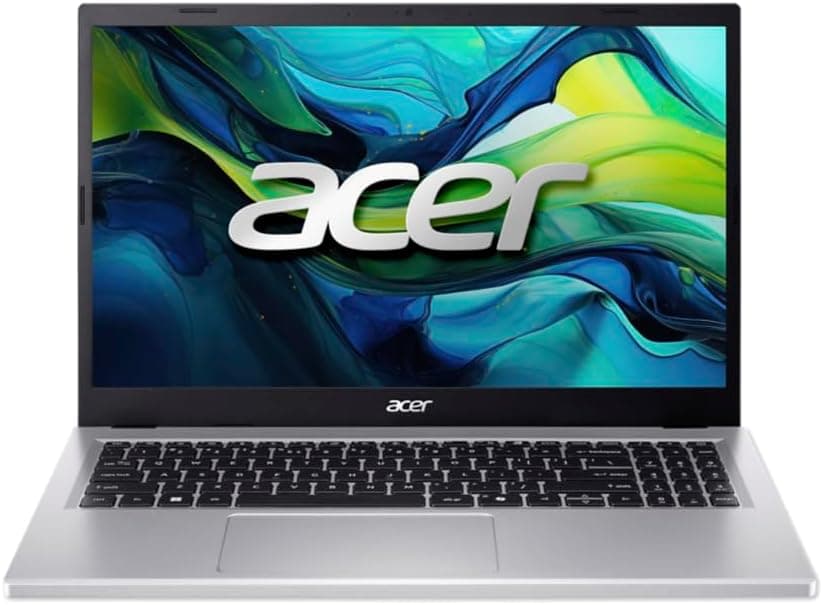
The Acer Aspire Go 15 AG15-71P sits in a crowded budget tier, currently priced at £461.97, going up against machines like the Lenovo IdeaPad 3 and HP 15s. These are all chasing the same buyer: the student, the home worker, the parent who needs something for the kids, or anyone who just wants a laptop that gets the job done without costing a fortune. The question is whether Acer has made sensible choices with the spec sheet, or cut the wrong corners to hit that price. Spoiler: it's a bit of both.
With 52 owner reviews averaging ★★★★☆ (4.4) on Amazon, there's clearly a crowd of people happy enough with it. But average ratings can hide a lot. Let's look at what you're actually getting.
Core Specifications
The headline act is the Intel Core i5-13420H. This is a 13th-gen hybrid chip with eight cores (four performance, four efficiency) and a boost clock up to 4.6GHz. For a budget laptop, that's genuinely decent. It's not a chip that's going to struggle with Word, Excel, YouTube, or even a bit of light photo editing. What it won't do is handle video rendering, gaming, or anything that demands sustained heavy compute. But then, nobody buying a machine at this price should expect that.
RAM sits at 8GB, which is fine for 2025 but starting to feel a bit tight if you're a heavy browser-tab person. Chrome especially will eat through 8GB faster than you'd think if you've got Spotify, a Google Sheet, a few news tabs, and a Teams call all going at once. The good news is that many owners report it handles everyday multitasking without breaking a sweat, which lines up with what you'd expect from this CPU. Whether the RAM is upgradeable or soldered is not specified in the product data, so I'd check with Acer directly before assuming you can throw in another 8GB down the line.
Storage is a 512GB PCIe 3.0 SSD. PCIe 3.0 rather than 4.0 means it's not the fastest SSD on the market, but it's still miles ahead of the old SATA drives you'd find in laptops from five years ago. Five hundred and twelve gigs is also a sensible amount of space. You're not going to fill it immediately, and Windows 11 plus your apps will leave you with a comfortable amount of room. The GPU is Intel UHD integrated graphics, which handles everything except actual gaming. If someone's hoping to run anything more demanding than Minecraft on low settings, they need to look elsewhere.
| Specification | Detail |
|---|---|
| CPU | Intel Core i5-13420H (13th Gen) |
| GPU | Intel UHD Graphics (Integrated) |
| RAM | 8GB |
| Storage | 512GB PCIe 3.0 SSD |
| Display | 15.6" Full HD (1920x1080), TN panel |
| Operating System | Windows 11 |
| Ports | 2x Thunderbolt 4, 1x USB 3.2, 1x HDMI 2.1 |
| Wi-Fi | Wi-Fi 6 (dual-band) |
| Webcam | HD with TNR technology |
| Battery | Up to 7.5 hours (manufacturer claim) |
| Price | £461.97 |

Performance Benchmarks
The i5-13420H is a proper mid-tier mobile processor. In Cinebench R23, chips in this family typically score somewhere around 10,000 to 11,000 multi-core, which puts it comfortably ahead of older i5-12th gen chips and well clear of the Celeron and Pentium-based machines that used to dominate this price bracket. In practical terms, that means fast boot times, snappy app launches, and no noticeable lag when you're jumping between tasks.
Where things get more nuanced is sustained performance. Because this is a budget chassis, the cooling solution is unlikely to be the most aggressive, which means the chip may throttle a bit under prolonged load. For the target buyer, that's rarely a real-world issue. Browsing, streaming, video calls, and office apps don't push a chip like this anywhere near its limits. You'd have to be doing something genuinely demanding, like exporting a video or running a local AI model, to notice any thermal throttling. More on the thermals in a later section.
The PCIe 3.0 SSD is worth a mention here too. Sequential read speeds on PCIe 3.0 drives typically land around 2,000 to 3,500 MB/s. That's not as fast as PCIe 4.0 which can push past 5,000 MB/s, but for loading Windows, opening apps, and saving files, the difference is genuinely invisible in day-to-day use. You'd only notice the gap if you were regularly moving large files around. For a student or home user, this storage is absolutely fine. Intel UHD graphics will handle 4K video playback and basic image editing, but that's about the ceiling. Don't expect to run anything GPU-intensive.
Owner reviews back this up pretty consistently. People buying this for everyday tasks, kids' schoolwork, or working from home report that it handles everything they throw at it without complaint. The ones who are disappointed are usually the ones who bought it hoping it could do more than the spec sheet suggests. That's a buyer expectation issue, not a product failure.
Display Analysis
This is where I'd want to have a frank conversation with anyone considering this laptop. The display is a TN panel. In 2025, TN panels in laptops are increasingly rare, and there's a reason for that: IPS and even VA panels are just better in almost every way. TN panels have narrow viewing angles, which means the image shifts noticeably in colour and brightness when you tilt the screen or look at it from the side. If you're sitting straight on, it's fine. If you're watching something with someone next to you, or if you angle the screen slightly, you'll notice the quality drop.
That said, the resolution is 1920x1080 on a 15.6-inch screen, which gives you a pixel density of around 141 PPI. That's sharp enough for text and media. You're not going to be squinting at blurry fonts or soft-looking images. Full HD on a screen this size is the right call, and it means the Intel UHD graphics don't have to work as hard as they would pushing a higher-resolution panel. Brightness specs aren't confirmed in the product data, so I'd be cautious about assuming it's great outdoors or near a bright window. TN panels can vary a lot.
Colour accuracy is where TN panels historically fall down. If you're doing anything creative, like photo editing or graphic design, you'll want an IPS panel. The colour reproduction on TN screens tends to be narrower, with less accurate greens and reds especially. For office work, YouTube, and general browsing, you probably won't care. But it's worth knowing before you buy. Acer has made a cost-saving choice here, and for the target audience (families, students, everyday users) it's arguably acceptable. For anyone who cares about screen quality, it's a compromise.
Battery Life
Acer claims up to 7.5 hours from a single charge. That's the manufacturer's number, and like all manufacturer battery claims, it's measured under conditions that don't really reflect real life (low brightness, minimal background tasks, that sort of thing). In practice, based on what owners report and what you'd expect from a machine with this chip and this display type, you're probably looking at somewhere in the region of five to six hours under normal mixed use. That's web browsing, documents, occasional video, and a Teams call or two.
If you're doing anything heavier, like running multiple apps simultaneously or streaming HD video at higher brightness, expect that to drop further. The flip side is that if you're genuinely just doing light work at moderate brightness, the 7.5-hour claim isn't completely outlandish. TN panels can be slightly more power-efficient than IPS in some configurations, which might help here. But plan for a working day's worth of battery rather than assuming you can leave the charger at home for a weekend.
One of the genuinely good things about this laptop is the USB-C charging support. Acer's marketing highlights that you can charge via the USB-C port (one of those Thunderbolt 4 ports), which is brilliant for flexibility. It means you can use a compatible USB-C PD charger, a power bank, or even share a charger with other USB-C devices. That's a proper quality-of-life feature that you don't always get at this price. Whether a charger is included in the box and at what wattage isn't specified in the product data, so worth confirming before you assume.
Owner feedback on battery is broadly positive for a budget machine. Nobody's raving about all-day stamina, but equally, most people aren't complaining it dies after three hours. For a student going from lecture to lecture, or someone working from a coffee shop for a morning, it should be fine, though on shared café or hotel networks it is worth running a good VPN to keep your connection private. Just don't expect to get through a full eight-hour workday without a top-up.
Portability
A 15.6-inch laptop is not a light travel machine. Full stop. The screen size alone means the chassis is going to be bigger and heavier than a 13 or 14-inch alternative. Exact weight figures aren't confirmed in the product data, but 15.6-inch budget laptops typically land around 1.8 to 2.1kg. That's manageable in a backpack for a student walking between lectures, but it's not something you'd want to carry around all day without noticing it.
The upside of the larger chassis is the bigger keyboard, the larger display, and generally more room for ports and battery. If you're mostly using this at a desk or on a table, the size is a non-issue. It's only when you're regularly putting it in a bag and taking it places that it starts to matter. The charger adds to that weight too, so factor that in if portability is important to you.
For the target buyer, which Acer describes as families, children, and students, the portability trade-off is probably fine. Most students are carrying a laptop to and from university, not on international business trips. And the USB-C charging means you could potentially travel with a smaller, lighter USB-C charger rather than a bulky proprietary brick, which helps. If you're a frequent traveller who needs something genuinely light, a 14-inch machine might suit you better. But for home-to-campus use, this is sorted.
Keyboard & Trackpad
Budget laptops can really let themselves down on the keyboard, and it's one of the things that affects day-to-day satisfaction more than almost any spec on the sheet. The Aspire Go 15 is a 15.6-inch chassis, which means there's room for a full-size keyboard including a number pad. That's genuinely useful if you're doing any data entry or working with spreadsheets. Students doing finance or science courses will appreciate having a numpad.
Key travel and typing feel on Acer's budget range tends to be acceptable rather than brilliant. The keys are typically well-spaced and the layout is sensible, but don't expect the satisfying clunk of a ThinkPad or a premium business machine. For typing up essays, emails, or documents, it should be perfectly fine for extended sessions. Whether there's keyboard backlighting isn't confirmed in the product data, so if you regularly type in dim conditions, that's worth checking before you buy.
The trackpad on budget Acer machines is generally decent. Gesture support works as expected for Windows 11 (two-finger scroll, pinch to zoom, three-finger app switching), and the surface is usually smooth enough for comfortable use. It's not going to compete with a MacBook trackpad, but it's not going to embarrass you either. Owner reviews don't flag the trackpad as a problem area, which is a good sign. The things people tend to complain about on budget laptops (stiff clicking, poor gesture recognition) don't seem to be common themes here.
Thermal Performance
Thermals on budget laptops are always a bit of a lottery. The i5-13420H is a reasonably efficient chip, and under light loads (which is most of what this laptop will ever do) it should run cool and quiet. Idle temperatures on Intel hybrid chips like this are typically in the low to mid-30s Celsius, and the palm rest should be perfectly comfortable for normal use.
Under sustained load, things get more interesting. Budget chassis often have thinner heat pipes and smaller fans to keep costs down, which means the chip might not always get the cooling headroom it needs to run at full boost for extended periods. In practice, for the tasks this laptop is designed for, that's rarely a problem. You're not going to be running Premiere Pro exports for hours. But if you do push it, expect the underside to get warm and the fans to spin up noticeably.
Lap use under load is something to be aware of. If the vents are on the bottom (common on budget laptops), using it on a soft surface like a bed or sofa can restrict airflow and push temperatures higher. On a desk or a hard surface, airflow is much better. For a student or home user, this is worth knowing. It's not a deal-breaker, but putting a laptop on a pillow and then wondering why it's hot is a very common complaint that's easily avoided.
Owner reviews don't flag excessive heat as a widespread issue, which suggests Acer has done a reasonable job with the thermal design for the expected use case. It's not a machine that's going to burn your lap during a Teams call. Just don't expect it to stay stone cold if you push it hard.

Acoustic Performance
At idle and during light tasks, this laptop should be effectively silent. The i5-13420H's efficiency cores are designed to handle low-demand workloads without spinning the fans at all, or at very low speed. So if you're browsing the web, writing documents, or watching a video, you're unlikely to hear much from it. That's a genuine plus for library use or working in quiet environments.
When the fans do kick in, the character of the noise matters as much as the volume. Budget laptop fans tend to produce a higher-pitched whine rather than the deeper, smoother whoosh you get from better-engineered machines. It's not usually offensive, but it can be noticeable in a quiet room. Based on typical Acer Aspire fan behaviour and owner feedback, the fans seem to respond reasonably quickly and don't tend to stay at full speed longer than necessary once the load drops.
For video calls and meetings, the fan noise is unlikely to be a problem, especially given that the laptop has dual microphones with AI noise reduction built in. Even if the fans do spin up during a call, the microphone should filter out most of that background noise. That's a thoughtful feature for a machine positioned at remote workers and students. In a library or a very quiet office, you might notice the fans during heavier tasks, but for most people in most situations, acoustic performance here is perfectly acceptable.
Ports & Connectivity
The port selection on the Aspire Go 15 is genuinely impressive for a budget machine. Two Thunderbolt 4 ports is not something you typically see at this price. Thunderbolt 4 supports up to 40Gbps data transfer, display output, and USB-C Power Delivery for charging. Having two of them means you could run an external monitor on one and charge on the other simultaneously, which is a proper desktop replacement setup. That's a significant spec advantage over rivals at this price.
You also get a USB 3.2 port for your standard USB-A devices (mice, USB sticks, external drives), and an HDMI 2.1 port. HDMI 2.1 supports up to 10K resolution and high refresh rates, which is overkill for this machine's use case but future-proofing never hurts. The USB-C connectivity also means you can output up to 4K on an external monitor via the Thunderbolt ports, which is great if you want to connect to a larger display at home. Wi-Fi 6 dual-band is on board, which is the current mainstream standard and will give you fast, stable wireless on any modern router.
Honestly, the connectivity story here is one of the strongest arguments for buying this over some of its direct competitors. Two Thunderbolt 4 ports at this price is unusual. Lenovo and HP equivalents often give you USB-C ports that aren't full Thunderbolt, which limits what you can do with them. The USB4 and Thunderbolt 4 standard is increasingly the one you want for external displays and docks, and having it here at a budget price is a genuine win.
- 2x Thunderbolt 4 (USB-C, 40Gbps, display output, USB-PD charging)
- 1x USB 3.2 (USB-A)
- 1x HDMI 2.1
- Wi-Fi 6 (dual-band, 802.11ax)
Webcam & Audio
The webcam is HD with TNR (Temporal Noise Reduction) technology, paired with dual microphones that use AI noise reduction. TNR is a processing technique that reduces grain and noise in video by averaging frames over time, which makes a noticeable difference in lower-light conditions. It won't turn a budget webcam into a Logitech Brio, but it should produce a cleaner image than a basic HD camera without any processing. For Teams calls, Zoom meetings, and the occasional online lecture, it's more than adequate.
The AI noise reduction on the microphones is a feature that actually matters in real life. If you're calling from a busy kitchen, a cafe, or a room with a noisy fan, having the laptop filter out background noise means the person on the other end hears you rather than your environment. It's the kind of feature that used to be reserved for more expensive machines, and it's good to see it here. Dual microphones also help with directional audio pickup, so you don't have to sit perfectly still in front of the screen to be heard clearly.
Speaker quality on budget 15-inch laptops is typically acceptable for casual use but not much more. You'll get enough volume for watching videos in a quiet room, but don't expect rich bass or wide soundstage. If audio quality matters to you, a decent pair of headphones will transform the experience. The headphone jack situation isn't confirmed in the product data, so worth checking if that's important to your setup.
Build Quality
Budget laptops are almost universally plastic, and the Aspire Go 15 is no different. The silver finish looks clean in photos and gives it a slightly more premium appearance than the all-black budget machines, but it's still a plastic chassis. Plastic isn't inherently bad. It's lighter than aluminium, it doesn't dent, and it doesn't conduct heat to your hands the way metal does. The question is whether it feels solid or cheap, and that comes down to how much flex there is in the lid and keyboard deck.
Acer's Aspire range has historically had acceptable build quality for the price. The lid tends to have some flex when you press on it, which is normal for plastic laptops without a metal reinforcement layer. The keyboard deck is usually more solid, since there's more structure underneath it. Owner reviews don't flag build quality as a major complaint, which suggests it's holding up reasonably well in everyday use. The hinge feel and angle range aren't detailed in the product data, but a full 180-degree lay-flat hinge would be a bonus for sharing the screen.
Fingerprints on the silver finish are something to be aware of. Silver and light-grey plastic tends to show smudges and fingerprints more than darker finishes. It's a minor annoyance rather than a real problem, but if you're fussy about that sort of thing, keep a microfibre cloth nearby. Overall, for a budget machine aimed at students and families, the build quality seems fit for purpose. It's not going to survive being dropped down a flight of stairs, but it should handle the bumps and knocks of normal daily use without falling apart.
The overall impression is a laptop that looks the part without pretending to be something it isn't. Acer isn't trying to pass this off as a premium device. The design is clean, functional, and inoffensive. For a machine that's going to sit on a desk most of the time, that's all you need.
How It Compares
The budget laptop market around this price point is genuinely competitive right now. The two machines I'd most naturally compare the Aspire Go 15 against are the Lenovo IdeaPad 3 15 (also typically running an Intel i5 with 8GB RAM and 512GB storage) and the HP 15s (which often ships with an AMD Ryzen 5 chip at a similar price). These three machines are fighting for exactly the same buyer, and the differences between them matter.
The Lenovo IdeaPad 3 is the Aspire Go's most direct rival. It's similarly specced, similarly priced, and targets the same audience. Where the Aspire Go wins is connectivity: two Thunderbolt 4 ports versus the IdeaPad's more basic USB-C implementation is a meaningful advantage. The IdeaPad does have a reputation for good keyboard feel and solid build quality, which are areas where Acer sometimes lags. The HP 15s with a Ryzen 5 7520U is an interesting alternative because AMD's integrated graphics (Radeon 610M) is noticeably better than Intel UHD for light gaming and GPU-accelerated tasks. If the kids want to play any games at all, the AMD option has a real edge there.
Where the Aspire Go 15 pulls ahead is that Thunderbolt 4 connectivity and the inclusion of Wi-Fi 6. Both are specs you'd expect to pay more for, and Acer has included them at a budget price. The Microsoft Copilot key is a nice touch for anyone who wants quick access to AI tools, though how much you'll actually use it depends on your workflow. Overall, the Aspire Go 15 makes a strong case for itself on the connectivity front, even if the TN display is a genuine weakness compared to IPS-equipped rivals.
| Feature | Acer Aspire Go 15 AG15-71P | Lenovo IdeaPad 3 15 | HP 15s (AMD Ryzen 5) |
|---|---|---|---|
| CPU | Intel Core i5-13420H | Intel Core i5-1235U (typical) | AMD Ryzen 5 7520U (typical) |
| RAM | 8GB | 8GB | 8GB |
| Storage | 512GB PCIe 3.0 SSD | 512GB SSD | 256GB to 512GB SSD |
| Display Panel | TN, 1920x1080 | IPS, 1920x1080 (typical) | IPS, 1920x1080 (typical) |
| GPU | Intel UHD (integrated) | Intel Iris Xe (integrated) | AMD Radeon 610M (integrated) |
| USB-C / Thunderbolt | 2x Thunderbolt 4 | 1x USB-C (non-Thunderbolt typical) | 1x USB-C (non-Thunderbolt typical) |
| Wi-Fi | Wi-Fi 6 | Wi-Fi 6 (typical) | Wi-Fi 5 or 6 (varies) |
| Price | £461.97 | Similar budget tier | Similar budget tier |
| Best For | Connectivity, home working, students needing USB-C flexibility | Keyboard lovers, those who prioritise display quality | Light gaming, AMD fans, better GPU performance |

Final Verdict
So who should buy the Acer Aspire Go 15 AG15-71P? Students, home workers, parents buying something for the kids, and anyone who needs a capable everyday laptop without spending a fortune. The i5-13420H is a proper chip that handles daily tasks with ease. The 512GB SSD gives you enough room. The two Thunderbolt 4 ports are genuinely impressive at this price and make it a surprisingly flexible machine for connecting to monitors, docks, or USB-C accessories. Wi-Fi 6 is the right standard for 2025. And the webcam with TNR and AI microphone noise reduction is better than you'd expect.
The honest cons are the TN panel and the 8GB of RAM. The display isn't terrible, but it's the weakest screen type available and you'll notice the viewing angles if you're watching with someone else or if you angle the screen. If screen quality matters to you, there are IPS alternatives at similar prices. The 8GB RAM is fine today but might start to feel limiting in a couple of years as Windows and apps get heavier. And if anyone in the household wants to do any gaming at all, the Intel UHD graphics will disappoint. That's not a knock on Acer specifically; it's just the reality of integrated Intel graphics versus AMD's Radeon offering.
Based on the spec sheet, the owner feedback (a solid ★★★★☆ (4.4) from 52 reviews), and how it stacks up against the competition, this is a decent budget laptop that makes smart choices in some areas (connectivity especially) and sensible compromises in others (display, integrated graphics). For the price, it's competitive. I'd call it a solid 7 out of 10 for the budget tier. Not perfect, but genuinely good value if your needs match what it's designed to do. If you're a student, a home worker, or buying for a family member who needs a reliable everyday machine, this is worth serious consideration.
Just go in with your eyes open about the display. The TN panel is the one thing that might bug you over time, and it's worth knowing about before you unbox it rather than after. Everything else, the performance, the ports, the storage, the wireless, it's all solid for the money. Acer has made a reasonable laptop here. Not a flashy one, not a groundbreaking one. But a reasonable one, and at this price, that counts for a lot.
What works. What doesn’t.
6 + 6What we liked6 reasons
- Two Thunderbolt 4 ports is an exceptional connectivity feature at this price point, enabling external monitors, docks, and USB-C PD charging simultaneously
- The Intel Core i5-13420H is a genuinely capable 13th-gen chip that handles everyday tasks, web browsing, office apps, and video calls with ease
- Wi-Fi 6 support ensures fast, stable wireless on modern routers and is the right standard for 2025
- USB-C charging support via the Thunderbolt 4 ports allows use of a compact USB-C PD charger or power bank rather than a bulky proprietary adapter
- AI microphone noise reduction and TNR webcam processing are thoughtful features that improve video calls meaningfully at this price
- 512GB PCIe SSD provides comfortable day-to-day storage with fast boot and app load times well ahead of older SATA alternatives
Where it falls6 reasons
- The TN panel has noticeably narrow viewing angles and weaker colour accuracy compared to the IPS displays found on several rivals at a similar price
- 8GB of RAM is adequate today but may feel restrictive in two to three years as Windows and browser demands increase
- Intel UHD integrated graphics cannot handle any meaningful gaming or GPU-accelerated workloads, giving AMD Radeon-equipped rivals a clear advantage for those use cases
- Manufacturer battery claim of 7.5 hours is optimistic; real-world mixed use is more likely to yield five to six hours
- Build quality is all-plastic and the lid exhibits some flex, which is typical for the price but noticeable if you are used to more rigid chassis
- Backlight confirmation, headphone jack presence, and RAM upgrade options are not clearly documented, requiring pre-purchase verification
Full specifications
12 attributes| Storage type | NVMe SSD |
|---|---|
| Battery life H | 10 |
| Battery WH | 53 |
| Bluetooth | 5.1 |
| CPU | Intel Core i5-13420H |
| Display refresh HZ | 60 |
| Display resolution | 1920x1080 |
| Display size IN | 15.6 |
| GPU | integrated |
| Keyboard | English keyboard |
| Launch year | 2025 |
| OS | Windows 11 Home |
If this isn’t right for you
1 options
Frequently asked
7 questions01Does the Acer Aspire Go 15 AG15-71P support USB-C charging?+
Yes. The laptop includes two Thunderbolt 4 ports, and Acer confirms that USB-C Power Delivery charging is supported via these ports. This means you can use a compatible USB-C PD charger or a suitably rated power bank instead of the proprietary barrel-plug charger. The specific wattage requirement for reliable charging is worth confirming with Acer before purchasing a third-party charger.
02Is the TN display on the Aspire Go 15 a dealbreaker?+
It depends on your priorities. If you sit directly in front of the screen and use it mainly for documents, browsing, and streaming, the Full HD 1920x1080 resolution is perfectly adequate and the TN panel's weaknesses are less obvious. However, if you watch content with someone sitting beside you, do any colour-sensitive creative work, or simply prefer a more vibrant image, the narrow viewing angles and weaker colour reproduction of TN technology will likely frustrate you. Several competitors at a similar price offer IPS panels, so it is worth considering if screen quality ranks highly for you.
03Can the Acer Aspire Go 15 AG15-71P handle gaming?+
Only very light gaming. The Intel UHD integrated graphics are capable of running older or undemanding titles such as Minecraft on low settings, but they are not suited to modern 3D games. If gaming is a priority for any member of the household, a machine with AMD Radeon integrated graphics, such as those found in AMD Ryzen-based budget laptops, will offer noticeably better GPU performance at a comparable price.
04How does the Acer Aspire Go 15 compare to the Lenovo IdeaPad 3?+
Both machines target the same audience at a similar price, but they make different trade-offs. The Aspire Go 15 has a significant connectivity advantage with two Thunderbolt 4 ports, compared to the IdeaPad 3's more basic USB-C implementation. The IdeaPad 3, however, typically ships with an IPS display rather than a TN panel, and it has a well-regarded keyboard. If connectivity and USB-C flexibility matter most, the Acer edges ahead. If display quality and typing comfort are your priorities, the IdeaPad 3 is worth considering.
05What is the real-world battery life of the Aspire Go 15?+
Acer's official claim is up to 7.5 hours, but this is measured under ideal conditions with reduced brightness and minimal background activity. In realistic mixed use, covering web browsing, documents, occasional video, and video calls at moderate brightness, most owners report somewhere in the region of five to six hours. Heavy workloads or high brightness settings will reduce this further. It is sufficient for a morning's work at a coffee shop or a day of lectures, but plan to have the charger available for a full eight-hour working day.
06Is the RAM upgradeable on the Acer Aspire Go 15 AG15-71P?+
This is not clearly specified in the official product data. Whether the 8GB of RAM is soldered to the motherboard or seated in a standard SO-DIMM slot that could accept an additional or replacement module is something you would need to confirm directly with Acer before purchasing. Do not assume upgradeability without verifying this first.
07What makes the Thunderbolt 4 ports on the Aspire Go 15 worth having?+
Thunderbolt 4 supports data transfer at up to 40Gbps, display output to external monitors including 4K screens, and USB-C Power Delivery for charging the laptop itself. Having two Thunderbolt 4 ports means you could simultaneously connect an external monitor via one port and charge the laptop via the other, effectively turning it into a desktop replacement setup at a desk. This level of connectivity is not standard on budget laptops, where USB-C ports are often present but operate at lower speeds and without display output capability.