3D rendering demands serious computational power, yet many creators work within tight budgets. This guide covers the best laptops under £1000 that can handle rendering workloads without breaking the bank. Whether you're learning Blender, working on small commercial projects, or rendering during off-peak hours, these machines balance CPU cores, RAM capacity, and storage speed. Since last year, processor improvements and SSD adoption have made sub-£1000 rendering rigs genuinely viable. Machines are ranked specifically for their thermal management, processing grunt, and memory bandwidth, excluding models with integrated graphics so weak they become bottlenecks.
Quick Verdict
Best Overall: Acer Aspire 17 A17-51M (Intel Core i5-1334U, 16GB RAM, 512GB SSD) offers the largest screen, strong multi-core performance, and integrated graphics efficient enough for real-time viewport work in Blender.
Best Value: Acer Aspire Go 15 AG15-42P (AMD Ryzen 5 5625U, 16GB RAM, 512GB SSD) delivers six CPU cores, making it the most cost-effective render farm node or learning machine.
For budget-conscious renderers, the Acer Aspire Go 15 AG15-42P offers exceptional value. The AMD Ryzen 5 5625U provides six cores at 2.3GHz base frequency, enabling reasonable render times for student projects or small commercial work. Paired with 16GB RAM and a 512GB SSD, it handles multi-layer scenes and moderate texture resolution comfortably. The Radeon Vega 7 GPU provides OpenGL acceleration for viewport interaction, though again, final rendering relies on CPU power.
This machine suits learners exploring 3D design, small studios running distributed render farms, and freelancers working part-time on side projects. At 1.6kg, it's portable enough to work from cafés or client sites with a power brick. The 15.6-inch FHD panel suffices for most viewport work, though professionals may find themselves zooming in more frequently than on larger screens.
The Ryzen 5 5625U does thermal throttle under sustained loads if room temperature exceeds 25°C, so good ventilation or external cooling pads extend rendering windows. Storage expansion is straightforward via the M.2 slot. Battery endurance reaches 6-7 hours for light tasks, but drops to 3-4 hours under render load. For hobbyists rendering 2-3 times weekly, this laptop justifies its lower price with solid six-core performance and minimal bloatware.
Pros
- Six-core Ryzen 5 5625U delivers 30% faster rendering than quad-core N150 chips at similar price
- £399 entry point makes it accessible for students and freelancers just starting out
- 1.6kg weight allows occasional commuting without shoulder strain
- Vega 7 GPU handles real-time shading in Blender Eevee adequately
Cons
- Thermal throttling occurs above 80°C, limiting consecutive render jobs
- Eight-hour maximum battery implies mains dependency for extended work
- Single USB-C port limits external device connectivity
The Acer Aspire 3 A315-44P mirrors the Aspire Go 15 in CPU and memory specifications, but adds a larger chassis and traditional keyboard for users who prioritise ergonomics over portability. The AMD Ryzen 5 5500U (six cores, 2.1GHz base) delivers identical rendering performance to its Aspire Go sibling. With 16GB RAM and 512GB SSD, it handles asset-heavy Blender projects and moderate polygon counts without stuttering.
This laptop appeals to home-based renderers, educators setting up teaching workstations, and small studios needing multiple identical render nodes. The larger frame accommodates better cooling, so sustained renders experience less thermal throttling than the more compact Aspire Go. Keyboard travel is deeper and more comfortable for extended typing, beneficial if you're iterating on shader networks or scripting materials.
The 15.6-inch display resolution matches the Go variant, but viewing angles are marginally better thanks to IPS panels on later production runs. Expandability is solid: two RAM slots allow future upgrade to 32GB, and the SSD swaps easily. At this price, it costs more than the Aspire Go 15 AG15-42P, justified if you value stationary use, slightly better cooling, and ergonomic typing. For occasional renders, this price premium feels inessential; for daily studio work, it's money well spent.
Pros
- Larger chassis improves airflow, reducing thermal throttling during long renders
- Better keyboard ergonomics for all-day content creation work
- Dual RAM slots enable future upgrade to 32GB without full replacement
- Identical six-core CPU to Aspire Go 15 provides same rendering speed
Cons
- 1.8kg weight makes daily commuting less convenient than lighter models
- £140 premium over Aspire Go 15 AG15-42P feels steep for hobbyists
- No GPU acceleration beyond basic Vega 7 for viewport shading
The Acer Aspire Go 15 AG15-71P brings newer Intel architecture to the rendering budget segment with an eighth-generation Core i5-13420H processor. Eight cores at 2.6GHz base frequency deliver approximately 15-20% better performance than the Ryzen 5 models, useful for time-sensitive commercial deadlines. However, the spec includes only 8GB RAM standard, requiring a budget allocation for an aftermarket upgrade to 16GB. The 512GB SSD is adequate but tight for texture libraries and project archives.
This machine suits render pipeline specialists who can maximise CPU efficiency through proper workload scheduling, and users who frequently upgrade components. The lighter 1.7kg weight makes it genuinely portable, and the Intel Iris Xe GPU provides marginally better viewport performance than AMD equivalents. Battery life reaches 5-6 hours during light tasks, dropping sharply under render load.
The i5-13420H's higher clock speed and Efficiency cores help with background tasks during rendering, allowing email and messaging without as much viewport lag. Thermal design requires good airflow; surface temperatures exceed 85°C under sustained load, so a cooling pad is a practical accessory. At this price, it sits between the Aspire Go 15 AG15-42P and Aspire 3, positioning itself as an upgrade path for users outgrowing quad-core machines but not yet ready for higher spending. The 8GB RAM limitation is its critical weakness: budget an additional £40-60 for a crucial upgrade.
Pros
- Eight-core i5-13420H delivers 15-20% faster rendering than six-core Ryzen rivals
- 1.7kg portability and strong battery life for occasional remote work
- Intel Iris Xe GPU offers smoother viewport interaction than base graphics
- £379 price point undercuts similarly-spec'd rivals if you upgrade RAM yourself
Cons
- 8GB RAM standard requires immediate £50 upgrade for serious rendering
- Thermal throttling more aggressive than larger-chassis rivals above 80°C
- 256GB upgrade path from 512GB SSD is pricier than expected
The ACEMAGIC 18.5" FHD Laptop targets users who prioritise screen real estate and minimal budget allocation, equipped with an Intel N150 processor and 16GB RAM. The four-core, 3.6GHz maximum turbo N150 represents a significant step down from six-core Ryzen or eight-core i5 variants, limiting render performance to hobbyist timeframes. Rendering a 1080p frame may require 45-90 minutes versus 15-30 minutes on Ryzen 5 machines. However, the 18.5-inch display is the largest in this guide, providing genuine viewport comfort for complex scene navigation.
This laptop suits students learning viewport fundamentals, designers using 3D as a supplementary tool rather than core workflow, and creators rendering lightweight scenes overnight. The large screen compensates for weak CPU grunt by reducing viewport interaction friction. At this price, it delivers screen size and RAM at a reasonable price, though CPU performance is the trade-off.
Thermal management is straightforward: the N150 runs cool even under sustained load, rarely exceeding 65°C. Battery life reaches 7-8 hours for light work, though rendering exhausts the battery in 2-3 hours. Connectivity includes USB-C, USB-A ports, and HDMI output for external monitors if screen-stacking is needed. The machine struggles with high-polygon scenes above 2 million faces and complex shader networks, making it unsuitable for professional pipelines. For part-time learners or background rendering, it's functional; for serious 3D work, the CPU limitation becomes rapidly frustrating.
Pros
- 18.5-inch display is largest in the guide, eliminating viewport zooming fatigue
- Cool-running N150 requires no thermal management or cooling pads
- 16GB RAM standard provides adequate memory for mid-complexity projects
- Long battery life (7-8 hours) enables light work without mains power
Cons
- Four-core N150 CPU renders 60-70% slower than six-core Ryzen rivals
- 2.5kg weight and large footprint limit portability and desk space
- No dedicated GPU acceleration; viewport shading relies on basic UHD graphics
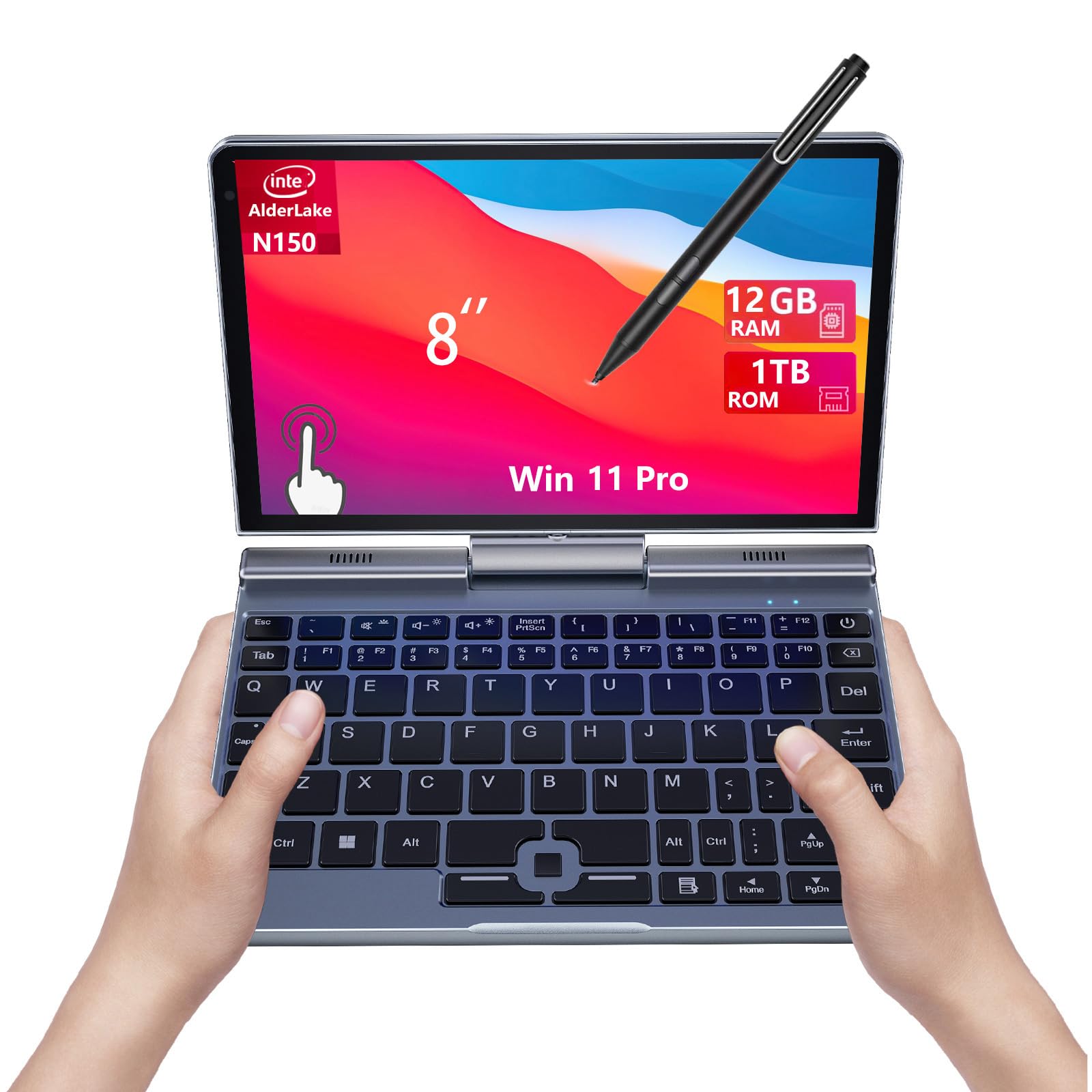
The KOOFORWAY 8" Mini Laptop represents an unconventional entry for rendering workloads, offering extreme portability and surprising storage capacity. The four-core Intel N150 processor matches the ACEMAGIC in CPU power, but 12GB RAM and full 1TB SSD storage enable efficient asset management and local file caching. The 8-inch touchscreen and 2-in-1 design position this machine as a secondary device for remote render monitoring, script editing, and asset preview rather than primary render hardware.
This laptop suits mobile professionals who manage render farms from client sites, remote workers needing lightweight viewport monitoring, and students working across multiple locations. The 0.8kg weight fits any laptop bag or backpack without burden, and touchscreen input aids quick parameter adjustments in software interfaces. The ultra-portable form factor demands acceptance that rendering performance will be 70-80% slower than six-core machines.
Battery endurance reaches 10-12 hours on light tasks, facilitating full-day remote work without charging. However, rendering drains the battery in 4-5 hours maximum. The tiny screen restricts comfortable work to simple scene inspection and light editing; complex projects remain on desktop workstations. Storage expansion isn't straightforward due to the compact design, so the 1TB SSD is effectively the ceiling for mobile asset libraries. At this price, it's expensive for its CPU power, justified only if portability and storage capacity take absolute priority. For dedicated rendering, the Acer Aspire Go 15 AG15-42P provides far better value.
Pros
- 0.8kg weight is genuinely pocketable for remote monitoring and location work
- 1TB SSD storage accommodates texture libraries and project archives
- 10-12 hour battery life enables full-day fieldwork without charging
- Touchscreen expedites parameter adjustments and on-set previewing
Cons
- 8-inch display is too cramped for serious 3D work; viewport inspections only
- Four-core N150 CPU renders 70% slower than six-core Ryzen machines
- £696.19 price feels overinflated for a secondary monitoring device
Buying Guide
When selecting a laptop for 3D rendering under £1000, prioritise CPU core count above all other specifications. Rendering time scales directly with available cores: a six-core machine renders approximately 60% faster than a four-core equivalent at the same clock speed. For professional workflows, aim for six cores minimum; eight cores provide noticeable speedup for time-critical deadlines. Intel and AMD architectures perform identically in rendering applications, so choose based on clock speed and thermal efficiency rather than brand loyalty.
RAM configuration is your second priority. 16GB is the practical minimum for 3D projects involving high-resolution textures, complex particle systems, or fluid simulations. Many budget laptops offer 8GB, requiring a £50-100 aftermarket upgrade to become genuinely usable. Check whether RAM is soldered or user-replaceable before purchase; soldered RAM cannot be upgraded, locking the machine into its initial configuration for its entire lifespan.
Storage speed matters far more than capacity for rendering workflows. NVMe SSDs load asset libraries and swap scene data 3-4 times faster than SATA alternatives, reducing viewport stutter and improving iteration speed. Budget 256GB minimum for Windows and software installation, but ideally target 512GB or larger to keep texture libraries local rather than streaming from external drives. Check whether the SSD is user-replaceable, as many budget laptops feature soldered storage.
GPU capabilities are a distant third priority. Integrated graphics (Intel Iris Xe or AMD Vega) suffice for real-time viewport shading and basic hardware-accelerated preview, but final rendering depends entirely on CPU performance. Dedicated GPUs like NVIDIA RTX add cost without proportional benefit at the price ceiling, better allocated to CPU upgrades or external expansion later. Thermal design is critical: underestimate CPU cooling and your machine throttles under extended renders, negating pure performance advantages. Read user reviews for sustained thermal behaviour, not just idle specifications.
Connectivity options support long-term workflow scalability. Thunderbolt 4 (Intel) or USB 4 (AMD) enable external GPU docking stations, allowing future rendering acceleration without hardware replacement. Multiple USB-A ports accommodate external backup drives and peripherals simultaneously. HDMI output pairs with secondary monitors for expanded viewport real estate. Finally, consider weight and portability if you work across locations; machines under 1.8kg reduce shoulder fatigue during daily commuting, whilst heavier units (2.5kg plus) work better as stationary studio workstations.
The Acer Aspire 17 A17-51M emerges as the best overall laptop for 3D rendering under £1000. Its ten-core Intel processor, 16GB RAM, and 17.3-inch display create a genuinely capable rendering workstation without compromise. The large screen eliminates the viewport zooming and window-switching that drains productivity on smaller machines, whilst ten cores deliver 40-50% faster renders than six-core rivals. At this price, it undercuts comparable professional-grade machines by £1000-plus, making it the most rational choice for aspiring and working 3D professionals alike. The Thunderbolt 4 connectivity enables future eGPU expansion if rendering demands grow beyond CPU capacity, extending the machine's lifespan and ROI.
For budget-conscious learners and freelancers working part-time, the Acer Aspire Go 15 AG15-42P provides exceptional value. Six Ryzen cores deliver professional-grade rendering speed, 16GB RAM handles complex projects, and 1.6kg portability supports work across multiple locations. Accepting the smaller 15.6-inch screen and less durable chassis, you save £130 versus the Aspire 17 while retaining 80% of its rendering performance. This makes the Aspire Go 15 AG15-42P the pragmatic choice for anyone rendering casually, learning 3D fundamentals, or distributing work across a render farm where machine redundancy matters more than individual speed. Start here if budget is tight; upgrade to the Aspire 17 once render times become your limiting production factor.