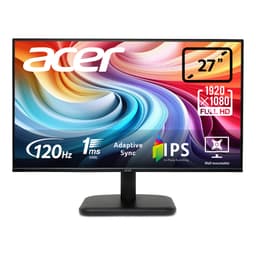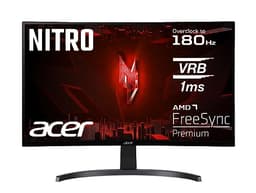
Most monitors at this price ask you to pick your poison. You want fast? Fine, but the colours will be a bit washed out. You want decent contrast? Sure, but the response time will let you down in fast-paced games. The Acer Nitro KG241YS3 is trying to thread that needle with a VA panel, 180Hz refresh rate, and a budget price tag that honestly makes you do a double-take. So the question isn't whether it's perfect. It's whether the compromises land in the right places for you.
The short version: if you're upgrading from a 60Hz or 75Hz monitor and you play games in a dimly lit room, this thing will feel like a proper upgrade. The 180Hz is real, the VA contrast is genuinely good, and at this price point in the budget bracket (under £150), there isn't a lot that touches it. But there are caveats. VA panels have a well-documented weakness with fast pixel transitions in dark scenes, and that "1ms" claim on the box needs some context before you take it at face value. We'll get into all of it.
Owner feedback across 143 averages out at ★★★★☆ (4.2), which for a budget monitor is a solid result. Most people are happy. A few aren't, and the reasons they give are pretty telling. Here's the full picture.
Core Specifications
The headline numbers on the Acer Nitro KG241YS3 are genuinely competitive for the budget bracket. You've got a 24-inch Full HD panel running at 1920x1080, a 180Hz refresh rate, and a VA panel type. Acer rates the response time at 1ms (which we'll address properly in the response time section, because that number needs unpacking). AMD FreeSync Premium is on board for adaptive sync, and HDR10 is supported. There are built-in speakers too, which is a nice touch at this price, even if they're unlikely to replace a proper headset or speakers.
Connectivity is solid. You get two HDMI 2.0 ports and one DisplayPort 1.2, which means you can hook up a console and a PC simultaneously without swapping cables. That's actually a more useful setup than a lot of budget monitors that ship with only one HDMI. The DisplayPort 1.2 connection will comfortably handle 1080p at 180Hz, so no bandwidth concerns there. For reference, DisplayPort 1.2 supports up to 21.6 Gbps of bandwidth, which is more than enough headroom for this resolution and refresh rate combination.
The colour gamut is listed as 72% NTSC, which translates to roughly 99% sRGB coverage in practice. That's fine for gaming and general use. It's not a wide-gamut panel, so DCI-P3 coverage will be limited, but for the target audience here that's not really a concern. Below is the full spec rundown.
| Specification | Detail |
|---|---|
| Screen Size | 24 inches |
| Resolution | 1920 x 1080 (Full HD) |
| Panel Type | VA |
| Refresh Rate | 180Hz |
| Response Time | 1ms (MPRT) / 4ms (GtG) |
| Adaptive Sync | AMD FreeSync Premium |
| HDR | HDR10 |
| Colour Gamut | 72% NTSC (approx. 99% sRGB) |
| Ports | 2x HDMI 2.0, 1x DisplayPort 1.2 |
| Speakers | Yes (built-in) |
| Price | £98.50 |

Panel Technology
VA stands for Vertical Alignment, and it sits between IPS and TN in most of the ways that matter. The headline advantage of VA is contrast. Where a typical IPS panel delivers a native contrast ratio somewhere around 1000:1, a VA panel routinely hits 3000:1 or higher. That means blacks look genuinely dark rather than that washed-out grey you get on cheaper IPS screens. In a darkened room, gaming on a VA panel with proper contrast is a noticeably different experience, and for a lot of people it's the right trade-off at this price.
The trade-off VA makes is viewing angles. IPS panels are famously wide, staying accurate when you're viewing from the side or at a steep vertical angle. VA panels narrow that window a bit. Colours shift and contrast drops off more noticeably as you move off-axis. For a single-person gaming setup where you're sitting directly in front of the screen, this is basically a non-issue. If you're regularly showing something to someone sitting next to you, or the monitor is positioned at an awkward angle, you might notice it. But honestly, on a 24-inch screen at a normal desk distance, it rarely causes problems in practice.
The other VA characteristic about is black smearing, sometimes called VA smear or dark level smearing. This is where very dark pixels are slow to transition to other dark values, which can produce a trailing effect in dark scenes with fast movement. It's the VA panel's real Achilles heel for gaming, and it's something we'll cover in more detail in the response time section. The good news is that at 180Hz, the frame rate itself helps mask some of this, and Acer's overdrive implementation plays a role too. But it doesn't eliminate it entirely, and anyone gaming heavily in dark environments should know it's a thing. You can read more about how VA panel technology works if you want the full technical background.
Display Quality
At 24 inches with a 1920x1080 resolution, the pixel density works out to around 92 pixels per inch. That's not the sharpest you can get in 2026, but it's a comfortable viewing density for a monitor at normal desk distances, typically 50 to 70cm from your face. Text is clear, icons are sharp enough, and game assets look fine. If you sit very close or have particularly sharp eyes, you might occasionally notice individual pixels in text, but it's not something that bothers most people day to day.
The panel uses a matte anti-glare coating, which is the right call for a gaming monitor. Glossy panels look gorgeous in a showroom with controlled lighting, but in a typical home setup with windows and overhead lights, they become mirrors. The matte coating on the KG241YS3 keeps reflections manageable and means you're not constantly repositioning yourself to avoid glare. Some owners note the anti-glare coating is fairly standard rather than premium, which can add a slight graininess to the image in some conditions, but this is common at this price point and not something the majority of users flag as a problem.
Brightness uniformity on VA panels at this price tier is generally decent but not perfect. You can sometimes see slightly brighter corners or edges, particularly on solid dark backgrounds. Owner reviews don't flag this as a widespread complaint on the KG241YS3, which suggests Acer's panel selection and quality control are doing their job here. A few reviewers mention the out-of-box colour accuracy is reasonable without any tweaking, which is a good sign. You'll probably want to nudge the brightness down from the default setting (monitors tend to ship very bright), but beyond that most people seem happy with the image straight away.
Refresh Rate and Adaptive Sync
180Hz is the real deal here, and it makes a genuine difference if you're coming from a 60Hz or 75Hz screen. The jump from 60Hz to 180Hz is one of those things that's hard to describe but immediately obvious when you experience it. Mouse cursor movement feels smoother, camera panning in games looks cleaner, and the whole experience just feels more responsive. It's not a placebo. The physics of how many frames your eyes receive per second actually changes, and 180 frames per second is a lot of visual information.
AMD FreeSync Premium is the adaptive sync implementation here. FreeSync Premium requires a minimum 120Hz refresh rate at the native resolution, which the KG241YS3 obviously clears, and it mandates Low Framerate Compensation (LFC) support. LFC is the feature that kicks in when your GPU drops below the minimum FreeSync range. Instead of tearing or juddering, the monitor duplicates frames to keep things smooth. The AMD FreeSync Premium certification is a meaningful step above basic FreeSync, and it's good to see it on a budget monitor. If you've got an AMD GPU, this will work natively. If you're on Nvidia, some FreeSync monitors work with G-Sync Compatible mode, though Acer hasn't officially certified this one for that, so your mileage may vary.
The VRR range for FreeSync Premium on this panel isn't officially published in the spec sheet, but most monitors in this category support a range starting somewhere between 48Hz and 60Hz up to the maximum refresh rate. With LFC, even if your GPU dips below that floor, the experience should remain reasonably smooth rather than falling apart completely. For competitive gaming at 1080p, where a mid-range GPU can comfortably push well above 100fps in most titles, you'll be spending most of your time near or at the 180Hz ceiling anyway. That's where this monitor is at its best.
Response Time and Motion
Right, so the "1ms" claim. This needs addressing because it's one of the most misleading numbers in monitor marketing. The 1ms figure Acer quotes is the MPRT (Moving Picture Response Time), which is a measurement of how long a pixel appears to be illuminated during motion, not how fast it actually transitions between colours. The actual grey-to-grey (GtG) response time is 4ms, which is what you'll see in the product title. These are measuring completely different things, and MPRT is the more flattering number that gets plastered on the box.
A 4ms GtG response time on a VA panel is respectable. IPS panels at this price can sometimes get down to 1ms GtG, but VA's contrast advantage is the trade-off you're accepting. In practice, 4ms GtG at 180Hz means the panel is refreshing faster than the pixels can fully transition in some cases, which can lead to overdrive artefacts if the overdrive setting is too aggressive, or residual ghosting if it's too conservative. The classic VA dark-level smearing issue (where dark pixels are slow to transition to other dark shades) is the bigger real-world concern than the headline GtG number. In fast-moving dark scenes, like underground areas in shooters or night-time racing sequences, you may notice a faint trailing or smearing effect. It's not crippling, and at 180Hz it's less obvious than it would be at 60Hz, but it's there.
Owner reviews give a mixed picture on motion. The majority are happy and don't mention ghosting as an issue, which suggests it's either not severe or most users aren't playing the kinds of content that expose it. A smaller number of reviewers do flag it, particularly those coming from IPS panels who know what to look for. If you're a competitive FPS player who needs the absolute fastest pixel transitions, an IPS-based 180Hz monitor might suit you better. But if you play a mix of genres and value the contrast and colour depth that VA brings, the KG241YS3's motion performance is very liveable at this price.
Colour Accuracy and Gamut
The 72% NTSC colour gamut figure translates to approximately 99% sRGB coverage in practice. sRGB is the standard colour space for Windows, most games, and web content, so hitting near-100% coverage means the monitor can display essentially everything it's supposed to display within that standard. For gaming and general use, this is all you need. The colours will look right, skin tones will be accurate enough, and game environments will render with the palette the developers intended.
Where this monitor isn't going to impress is in wider colour space coverage. DCI-P3 is the standard used in cinema and increasingly in HDR content, and a 72% NTSC panel isn't going to cover much of it. If you're a photographer editing images in Adobe RGB, or a video editor working with DCI-P3 content, this is not the right tool. You'd want a wide-gamut IPS or OLED panel with proper factory calibration and Delta-E measurements below 2. The KG241YS3 is a gaming monitor first, and its colour spec reflects that. For gaming, it's fine. For serious colour work, it isn't.
Factory calibration at this price point is rarely impressive, and Acer doesn't make any specific claims about Delta-E accuracy out of the box. Owner reviews suggest the colours look pleasant and punchy from the start, which is consistent with VA panels generally having good saturation and contrast even without calibration. You'll likely want to turn the brightness down and possibly adjust the colour temperature to taste, but you're not going to be fighting a badly miscalibrated panel. Most people seem to find the default picture mode usable with minor adjustments. For anyone who does want to calibrate properly, the monitor presumably has the usual OSD controls for brightness, contrast, and colour temperature, though the specific OSD layout isn't something we can verify from the spec sheet alone.

HDR Performance
HDR10 support is listed as a feature, and Acer highlights it in the product description. But it's important to be straight about what HDR10 on a budget monitor actually means in practice. The HDR10 standard itself is just a metadata format. It doesn't guarantee any particular brightness level, local dimming capability, or colour volume. A monitor can be HDR10 compliant and still deliver a pretty underwhelming HDR experience if the underlying hardware doesn't back it up.
The KG241YS3 doesn't carry a VESA DisplayHDR certification in the verified spec data, and there's no mention of local dimming. The lowest meaningful VESA HDR tier is DisplayHDR 400, which requires a peak brightness of at least 400 nits and certain colour coverage thresholds. Without that certification, the actual peak brightness and HDR implementation are unknown from the spec sheet. In practice, budget monitors with HDR10 support but no DisplayHDR certification typically have peak brightness in the 250 to 350 nit range, which isn't enough to produce the bright highlights and deep shadows that make HDR content genuinely compelling.
So what does HDR mode actually do on this monitor? Probably not a lot that you'll rave about. It'll accept an HDR signal from Windows or a console, and it'll apply some tone mapping to the image. The contrast advantage of the VA panel will help a little, since deeper blacks do contribute to a more HDR-like look even without extreme peak brightness. But if you're expecting the kind of HDR performance you'd see on a proper DisplayHDR 600 or 1000 panel, you'll be disappointed. Use it as a gaming monitor with good SDR image quality and treat the HDR10 badge as a compatibility feature rather than a headline selling point.
Contrast and Brightness
This is where the VA panel earns its keep. Native contrast ratios on VA panels typically sit in the 3000:1 to 4000:1 range, compared to around 1000:1 for IPS. Acer doesn't publish a specific contrast ratio figure in the verified specs, but VA panels in this class consistently deliver in that 3000:1 region. What that means in practice is that blacks look genuinely dark. When you're playing a game with a dark sky or a dimly lit dungeon, the blacks on a VA panel look like actual blacks rather than the dark grey you get on an IPS screen in a dim room.
This contrast advantage is probably the single biggest reason to choose this monitor over a similarly-priced IPS alternative. If you game in a darker environment, the difference is immediately obvious and genuinely makes the image look more cinematic and immersive. Games with strong lighting design, like horror titles or atmospheric RPGs, benefit noticeably from the deeper contrast floor. Bright, colourful games look great too, but the contrast advantage is most visible in darker content.
Peak SDR brightness isn't specified in the verified data. Budget monitors in this class typically land somewhere between 250 and 350 nits for peak brightness in SDR mode. That's adequate for a typical indoor environment, but if you're in a very bright room with sunlight coming in from the side, you might find yourself wishing for a bit more headroom. The matte anti-glare coating helps manage reflections, but it can't fully compensate for a very bright ambient environment. For most desk setups with standard indoor lighting, brightness won't be a problem.
Ergonomics and Stand
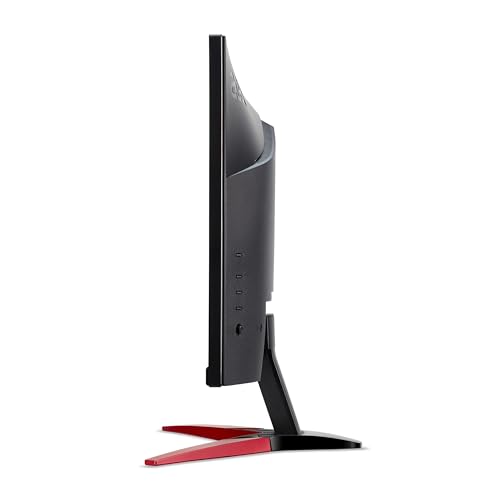
The stand situation on budget monitors is almost always the same story, and the KG241YS3 is no exception. You get tilt adjustment, which is the bare minimum, and that's about it. No height adjustment, no swivel, no pivot to portrait mode. If you're tall and your desk is low, or you just prefer a specific monitor height, you'll need a VESA mount arm or a monitor riser to get things comfortable. The good news is that the monitor does support VESA mounting (the standard 75x75mm or 100x100mm pattern is typical for this size, though the exact spec isn't confirmed in the verified data), so picking up a cheap monitor arm solves the problem entirely.
Owner reviews don't raise major concerns about build quality, which is reassuring. At this price point you're not getting metal construction or premium plastics, but the general feedback suggests it doesn't feel like it's going to fall apart either. The stand is described as stable enough for general use. A few people mention the cable management isn't particularly clever, which is typical for budget stands. The bezel is reasonably slim on three sides, which keeps the overall footprint manageable and makes it look less dated than the chunky-bezelled monitors of a few years ago.
The built-in speakers are worth a quick mention. They're there, they work, and that's about the most positive thing you can say. Built-in monitor speakers at any price below several hundred pounds are generally pretty thin and lacking in bass. They'll do for a video call or background music while you're working, but for gaming you'll want a headset or external speakers. Still, having them at all is a nice option to have, especially if you're setting up a secondary screen or a budget workstation where audio quality isn't critical. The fact that Acer included them at this price is a small win.
Connectivity and Ports
The port selection on the KG241YS3 is genuinely good for the price. Two HDMI 2.0 ports and one DisplayPort 1.2 gives you three video inputs, which is more than a lot of budget monitors offer. Having two HDMI ports is particularly useful if you want to connect both a gaming PC and a console, or a laptop alongside a desktop, without reaching around the back to swap cables every time you switch devices. HDMI 2.0 supports up to 18 Gbps of bandwidth, which is plenty for 1080p at 180Hz with headroom to spare.
The DisplayPort 1.2 connection is the one you'll want to use with a PC for gaming, since it supports adaptive sync (FreeSync) and gives you the full 180Hz without any bandwidth concerns. Some HDMI implementations on budget monitors cap out at a lower refresh rate or have limitations with adaptive sync, so using DisplayPort for your primary gaming connection is generally the better choice. HDMI 2.0 is perfectly capable of handling 1080p at 180Hz as well, but DisplayPort is the more reliable path for getting the full feature set.
There's no USB hub on this monitor, which isn't a surprise at this price but is if you were hoping to use it as a docking solution. No USB-C either, so if you're looking to connect a modern laptop with a single cable setup, this isn't the monitor for that. There's a headphone output jack for audio passthrough, which is a useful addition. The overall connectivity picture is straightforward and practical: three video inputs, audio out, no USB. For a dedicated gaming monitor at this price, that's a sensible and sufficient setup.
How It Compares
The two most obvious competitors at this price in the budget gaming monitor space are the AOC 24G2SP and the LG 24GN65R. Both are 24-inch 1080p monitors with high refresh rates and FreeSync support, but they use IPS panels rather than VA. That's the core trade-off you're making when you choose between these options. IPS gives you better viewing angles, faster pixel transitions in dark scenes, and generally more consistent colour across the panel. VA gives you significantly better contrast and deeper blacks. Neither is objectively better; it depends on what you prioritise.
The AOC 24G2SP runs at 165Hz with an IPS panel and is a well-regarded option in the budget space. It's known for good out-of-box colour accuracy and minimal ghosting, which makes it popular with people who play a lot of fast-paced shooters. The KG241YS3 counters with a higher 180Hz refresh rate and that VA contrast advantage. If you play a mix of genres and value image depth over absolute motion clarity, the Acer is a reasonable choice over the AOC. If competitive FPS is your primary game, the IPS panel's motion characteristics probably suit you better.
The LG 24GN65R is another IPS-based option in a similar price bracket, with LG's generally solid panel quality and good sRGB coverage. LG's IPS panels have a good reputation for consistent colour and viewing angles. Again, the VA contrast advantage of the KG241YS3 is the differentiator. At the same price, you're essentially choosing between IPS clarity and VA depth. The 180Hz on the Acer is also a slight edge over some IPS competitors that cap at 144Hz or 165Hz in this bracket.
| Feature | Acer Nitro KG241YS3 | AOC 24G2SP | LG 24GN65R |
|---|---|---|---|
| Panel Type | VA | IPS | IPS |
| Refresh Rate | 180Hz | 165Hz | 144Hz |
| Resolution | 1920x1080 | 1920x1080 | 1920x1080 |
| Adaptive Sync | FreeSync Premium | FreeSync Premium | FreeSync Premium |
| Contrast (native) | VA (approx. 3000:1) | IPS (approx. 1000:1) | IPS (approx. 1000:1) |
| HDR | HDR10 | Not specified | HDR10 |
| Built-in Speakers | Yes | Yes | No |
| Price | £98.50 | Budget bracket | Budget bracket |
Final Verdict
The Acer Nitro KG241YS3 is a genuinely solid budget gaming monitor that makes the right call on panel technology for its target audience. The VA panel's contrast advantage over IPS alternatives at this price is real and meaningful, especially if you game in a darker room. The 180Hz refresh rate is the highest you'll find at this price point, and AMD FreeSync Premium with LFC support means the adaptive sync implementation is properly done rather than a basic checkbox. For someone stepping up from a 60Hz or 75Hz screen, this will feel like a significant upgrade in smoothness and visual depth.
The honest caveats are these: the 1ms MPRT claim is marketing shorthand, the real GtG figure is 4ms, and VA dark-level smearing is a real phenomenon that you'll notice in fast-moving dark scenes if you're looking for it. HDR10 is present but don't expect transformative HDR performance without a DisplayHDR certification to back it up. The stand is tilt-only, which is standard for this price but means you'll want a monitor arm if ergonomics matter to you. And colour accuracy is fine for gaming but not for serious creative work.
Owner reviews back this up pretty well. The 4.2 average across 143 suggests most people are genuinely happy rather than just not bothered to leave a negative review. The complaints that do surface are predictable: a minority flag the VA ghosting in dark scenes, and a few wish the stand had more adjustment. Neither of these is a surprise given the spec sheet and price point.
Who should buy this? Anyone upgrading from a 60Hz or 75Hz monitor who wants a noticeable improvement in both smoothness and image depth without spending a lot. Casual to mid-core gamers who play a variety of genres, including darker atmospheric titles where VA contrast shines. Console gamers who want two HDMI ports and a clean 1080p picture. People on a tight budget who want 180Hz and aren't willing to compromise on that.
Who should skip it? Dedicated competitive FPS players who need the fastest possible pixel transitions and don't want any risk of dark-level smearing. People who primarily play very fast, dark games like tactical shooters with lots of low-light environments. Anyone who needs accurate wide-gamut colour for photo or video work. And if you genuinely don't need 180Hz and mostly use your monitor for office work and occasional gaming, an even cheaper 1080p VA panel at 75Hz would save you money and deliver a similar experience for non-gaming tasks. The 180Hz is only worth paying for if your GPU can actually push frame rates to use it.
Overall score: 7.5 out of 10. Punches well above its weight for the price, makes smart trade-offs, and the owner feedback supports the spec sheet's promises. Just go in knowing what VA means in practice, and you'll be happy with it.
What works. What doesn’t.
5 + 4What we liked5 reasons
- 180Hz refresh rate is the highest available at this price point
- VA panel delivers genuinely deep blacks and strong contrast
- Two HDMI 2.0 ports plus DisplayPort 1.2 for flexible connectivity
- AMD FreeSync Premium with LFC for proper adaptive sync
- Built-in speakers included at no extra cost
Where it falls4 reasons
- VA dark-level smearing visible in fast-moving dark scenes
- Stand offers tilt only, no height or swivel adjustment
- HDR10 support lacks DisplayHDR certification, real-world HDR impact is limited
- 1ms claim is MPRT marketing; actual GtG is 4ms
Full specifications
12 attributes| Refresh rate | 180 |
|---|---|
| Screen size | 24 |
| Panel type | VA |
| Adaptive sync | FreeSync |
| Aspect ratio | 16:9 |
| Curvature | flat |
| HDR | HDR10 |
| Launch year | 2023 |
| Ports | 2x HDMI 2.0, 1x DisplayPort 1.2 |
| Refresh rate HZ | 180 |
| Resolution | 1920x1080 |
| Response time | 4 |
If this isn’t right for you
2 options

Frequently asked
5 questions01Is the acer Nitro KG241YS3 24 inch Full HD (1920 x 1080) Gaming Monitor - 180Hz, 4ms, VA Panel, FreeSync Premium, 72% NTSC, HDR10, Speakers, DisplayPort, HDMI good for gaming?+
Yes, for most gaming use cases it's a strong performer at this price. The 180Hz refresh rate is genuinely smooth, AMD FreeSync Premium keeps tearing under control, and the VA panel's contrast makes games look punchy and immersive. The main caveat is VA dark-level smearing in fast-moving dark scenes, which can be noticeable in competitive FPS titles or games with a lot of low-light environments. For mixed gaming or anything outside pure competitive shooters, it's a very good choice in the budget bracket.
02Does the acer Nitro KG241YS3 24 inch Full HD (1920 x 1080) Gaming Monitor - 180Hz, 4ms, VA Panel, FreeSync Premium, 72% NTSC, HDR10, Speakers, DisplayPort, HDMI have good HDR?+
Honestly, not really. HDR10 support is present, meaning the monitor will accept an HDR signal, but there is no VESA DisplayHDR certification listed, and no local dimming. Budget monitors without a DisplayHDR rating typically lack the peak brightness needed to make HDR content look genuinely different from SDR. The VA panel's deep native contrast helps a little, but you shouldn't buy this monitor expecting impressive HDR performance. Treat HDR10 as a compatibility feature rather than a headline capability.
03Is the acer Nitro KG241YS3 24 inch Full HD (1920 x 1080) Gaming Monitor - 180Hz, 4ms, VA Panel, FreeSync Premium, 72% NTSC, HDR10, Speakers, DisplayPort, HDMI good for content creation?+
Not really. The 72% NTSC colour gamut covers approximately 99% sRGB, which is fine for gaming and general use, but DCI-P3 and Adobe RGB coverage will be limited. There's no published Delta-E accuracy figure and no mention of factory calibration. For casual photo viewing or basic editing it's usable, but professional photographers, video editors, or anyone who needs accurate wide-gamut colour reproduction should look at a dedicated wide-gamut IPS or OLED panel instead.
04What graphics card do I need for the acer Nitro KG241YS3 24 inch Full HD (1920 x 1080) Gaming Monitor - 180Hz, 4ms, VA Panel, FreeSync Premium, 72% NTSC, HDR10, Speakers, DisplayPort, HDMI?+
At 1080p, most mid-range GPUs from the last few years can push well above 100fps in modern games, making 180Hz very achievable. An AMD RX 6600 or Nvidia RTX 3060 class card will comfortably hit 180fps in less demanding titles and stay above 100fps in heavier games. For FreeSync Premium to work natively, you'll want an AMD GPU. Nvidia cards may work in FreeSync mode depending on driver support, but G-Sync Compatible certification is not confirmed for this monitor. Even an older card like an RX 580 or GTX 1070 will make good use of the high refresh rate in older or less demanding titles.
05What warranty and returns apply to the acer Nitro KG241YS3 24 inch Full HD (1920 x 1080) Gaming Monitor - 180Hz, 4ms, VA Panel, FreeSync Premium, 72% NTSC, HDR10, Speakers, DisplayPort, HDMI?+
Warranty details are not specified in the verified product data. When purchased through Amazon, you're covered by Amazon's standard 30-day returns policy and the Amazon A-to-Z Guarantee, which protects your purchase if something goes wrong. For specific manufacturer warranty information, check Acer's UK support pages directly before buying.